
 Moodtuner997
Agenda Guardian
A day planner for Hermes that does not rely on your discipline.
You write your rules once, estimate each task, and say how long it really took. From the third finished task of a
kind, the planner corrects your estimates by your own median error. It places tasks in the free time around
your meetings, and every block says why it is where it is. A full day tells you what does not fit instead of
quietly overbooking. It can send a morning brief and nudge you when a block starts, with no model call.
It was built for one person's time blindness (ADHD, solo work, no boss to set the day) and it is useful to anyone
who plans more than the day allows.
- Deterministic: no model call anywhere, no API cost, same input gives the same plan.
- Any calendar: the Google Workspace skill, an ICS file or URL (Outlook, Apple, Google), a JSON file, or any
command that prints event JSON. - It reads your calendar and, by default, writes nothing. Writing to a Google calendar is off until you type
/day write onyourself; then it only adds events it marks as its own, only after you say yes to a proposal
that shows its reasons, and it can only remove those events (never one you created). - Works from the
/dayslash command,hermes guardianon the command line (nothermes day: the day-panel plugin already uses that name), fifteen agent tools (so the onboarding and the planning can
happen in a chat, including from a phone) and a Today / Week tab in the dashboard. - You talk to it in plain words, there is no syntax to learn. "Put three sport sessions, two client calls and
two hours of course a day in my week", "the walk took me 1h30"./dayfollowed by anything but one of the
format-free commands (write,undo,plan...) goes to the agent as an ordinary message; typing/dayalone
prints six lines.
Quick start
hermes plugins install Moodtuner997/hermes-agenda-guardian
hermes plugins enable agenda-guardian
Then, in a chat, just say what you want ("my work hours are 9 to 7, lunch between 1 and 3"). If you prefer typing
commands, every one of them can also be said in words:
/day setup                                   what your Hermes profile already has, then the few questions
/day setup auto                              adopt the calendar, language and time zone it found
/day set work_hours=09:00-17:30 focus=09:00-11:30 protected=lunch@12:30-13:30 calendar=google
/day add "Write the quote" 45m cat=writing p=1 due=fri
/day plan                                    today, from now
/day plan tomorrow
/day done 1 70                               it really took 70 minutes
/day cron on 07:30                           morning brief + reminders (script-only jobs)
What a plan looks like
Output of hermes guardian plan tomorrow on an invented profile (tests/make_demo_profile.py), shortened with ...:
Plan for Fri 2026-11-06
3 task(s) planned, 2h35 of 4h10 free
09 #.=#.#.~~#==.~=#. 17
Day bar, 1 char = 30 min:  # task  = meeting  ~ protected  . free

09:00-09:35  [#] Draft the proposal (part 1/3)
       why: 105 min = your estimate 60 x 1.75 (median of 4 finished 'writing' tasks); due 2026-11-07; priority 1; in your focus window
10:00-10:30  [=] Team sync
10:40-11:15  [#] Draft the proposal (part 2/3)
       why: 105 min = your estimate 60 x 1.75 (median of 4 finished 'writing' tasks); due 2026-11-07; priority 1; in your focus window
...
16:40-17:10  [#] Expense report
       why: 30 min = your estimate 20 x 1.33 (median of 3 finished 'admin' tasks); priority 2

Not today:
- #10 Plan next sprint: not among the 3 tasks of the day (rule max_tasks_per_day, default, not set by you yet)

Rules used:
- work hours 09:00-17:30 (you set it on 2026-11-06)
- focus window 09:00-11:30 for priority 1 (you set it on 2026-11-06)
- at most 3 tasks a day (default, not set by you yet)
...
Every constraint is listed once under "Rules used", marked you set it or default, not set by you yet, so
you can see which rules are really yours.
How it plans
- Free time = work hours, minus calendar events (with a buffer around each), minus protected windows (lunch,
a walk, the school run). All-day events are shown but do not block time. - The day's tasks are the first N (default 3) by due date, then priority. The rest are listed under "Not
today" with the rule that left them out. Three things a day is a rule, not a limit of the code. - Calibration. Your estimate is multiplied by the median of (real time / estimate) for that category once
you have three finished tasks in it, bounded to 0.7-3. Under three, your estimate is kept and the plan says
how many are missing. The factor is shown in the block's reason. - Blocks. A task longer than the longest stretch you can hold (default 50 min) is cut into equal blocks with
breaks. Priority 1 goes to your focus window first; other priorities stay out of it unless nothing else fits. - All or nothing. A task is placed in full or not at all, and a day that cannot hold it says by how many
minutes it is short.
Fitting an activity into your week
Things that are not tasks (sport, a long call, an errand) get an activity sheet: what the activity really
takes, the time to get ready before it and to wind down after it, and when it can happen. Then you ask where it
could go; the plugin answers with reasons taken from your own calendar, and writes nothing until you say yes.
/day kind sport real=2h before=15 after=30 window=18:00-22:00 days=mon,tue,wed,thu
/day habit wed 18:00-21:00 family dinner     something you do that is not in the calendar
/day propose sport 2                         where two sessions could go, with the reasons
/day write on                                once, typed by you: allow writing to your Google calendar
/day ok 1                                    write proposal 1 (with an agent: just say yes)
/day undo                                    take back the last session (or: undo <n>, undo all)
/day took 1 150                              it really took 150 minutes: the next proposal learns your pace
With an agent you say it in your own words ("fit two sport sessions in my week"); the plugin adds a short section
to the system prompt that tells the agent to talk in plain words, to assume a sensible figure when one is missing
and say so (your yes or correction settles it), to show the reasons, ask what is planned outside the calendar, and
write only after a clear yes. The same proposal on an invented calendar (eight weeks of history,
a dinner most Tuesdays, a family dinner the plugin was told about on Wednesdays):
Proposal #1: sport, 2 of 2 session(s). Nothing is written to your calendar.

In short: Monday and Thursday, slots your calendar and its history show as free. Left out: Tuesday (Dinner with Sam) and Wednesday (family dinner).

1. Monday 09/11: 18:00-20:45 -> sport 18:15-20:15
     - Your calendar is free on Monday from 18:00 to 22:00.
     - History: Mondays between 18:00 and 22:00 were free 8 weeks out of 8.
     - Mondays are usually a heavy day (about 10h00 of events).
     - Length 120 min as you said (not measured yet: tell me how long it really takes).
     - 15 min before and 30 min after are kept free too.
     - Spread out: 3 day(s) from the nearest other session.
...
Days I left out, and why
  - Tuesday: usually taken, 5 of the last 8 weeks had something between 18:00 and 22:00 (for example 'Dinner with Sam'). It is free this week though: say so if you want this day.
  - Wednesday: you told me 'family dinner' (18:00-21:00).

Before you validate
  - Is anything planned on Monday and Thursday at those times that is not in your calendar?
  - Do you want me to write this to your calendar? (nothing is written until you say yes)
A whole week in one request
You rarely have one activity. "Three sport sessions, two client calls of at least 2h30 in the morning, four hours
of course every day" is one request, and the numbers are in the sentence. The agent passes them to day_week_plan
in one call (nothing has to be saved first; a saved sheet only fills in what the sentence leaves out), and the
plugin places each activity around your events and around the ones placed before it: sport, then calls, then
two blocks of course a day, one after the other with a break. Each activity keeps its reasons; what does not fit
is listed with the cause.
Things the planner cannot express (a fixed appointment, an evening spent somewhere else) are blocks the agent
composes from what you told it and registers with day_stage. They are checked against your calendar and then
follow the same road as any proposal: your yes, the marker, /day undo. That is the only road in: the system
prompt tells the agent never to create, move or delete calendar events with another tool.
What it will and will not do:
- Reasons from your history. It reads the next days and the eight weeks before. History orders the days and
explains them, it never overrules your calendar: a window taken in at least half of the recorded weeks counts as
a habit, so that day comes last and is left out when other days will do (with the title it found as proof and
"it is free this week though"); it is used, with a note asking whether something is planned that is not in the
calendar, when it is needed. A habit that has not happened in the last three weeks is treated as over, the day
is kept, and the reason says so. A short history (under three weeks with events) is said, not hidden. Days are spread out; consecutive
days are used only when nothing better exists, and it says so. - What the calendar cannot show.
/day habitrecords what you do outside the calendar; every proposal asks
about the evenings it picked. - Your events are never touched. It only places events in free time, with the buffer you set around
meetings and the lunch and other protected hours kept. It never edits an event and can only delete the events
it wrote: each write is recorded (event id, link) and each event carries a marker; before a deletion it
checks the id is in that record and the marker is still on the event. An event you rewrote or deleted is
left alone. - You say yes first, and writing is your switch. A proposal expires after a day. Before writing, the slot
is read again and skipped if something new has appeared./day write onis a command you type: no agent tool
turns writing on. - It learns the real length. After a written session ends, the reminder job asks how long it really took;
from the third answer, the planned length follows your own median pace, and the reason says so.
Calendar sources
/day set calendar=...
| Value | Reads |
| --- | --- |
| google | the Google Workspace skill's script (calendar list), with your existing Google login; it runs on the Python of the environment that holds the skill's libraries (under a managed Hermes 0.23, the dependency environment's own python, since 0.5.4; if that Python cannot start, the running one is tried once) |
| ics:<path or https URL> | an ICS file or the secret https:// ICS address of a calendar (Outlook, Google, Apple) |
| file:<path> | a JSON file: a list of {summary, start, end} (the shape the Google script prints) |
| cmd:<program and arguments> | any program that prints that JSON; {start} and {end} are replaced by the day's UTC bounds; run without a shell |
| none | nothing; the plan says it ignores your meetings |
If the source cannot be read, the plan carries a visible warning instead of silently assuming an empty day.
Only you set the calendar source. It names a program or an address that is run or read on every plan, so no
agent tool can set it (day_setup refuses a calendar setting in any spelling, google and none included, applies
the other settings of the call and tells the agent to ask you). You set it by typing /day set calendar=... in the
chat (the plugin answers that command itself, it never goes through the agent), or hermes guardian set calendar=...
in a terminal; /day setup auto adopts a working Google calendar the same way.
-
Side roads, guarded since 0.5.2. A
pre_tool_callhook looks at the arguments of four tools,terminal,
execute_code,write_fileandpatch, and sends the call to Hermes' own approval gate when it is:hermes ... guardianfollowed byset ... calendar=...orsetup auto(quotes and line continuations are read the way a
shell reads them, and a one-character escape such ascalendar\=in bash orcalendar^=in cmd.exe is dropped
as the shell drops it, and a separator that is escaped or quoted stays inside its word, since 0.5.3); a call to the package'sapply_setting,set_rulesorsave_profilethat mentions
calendar, or tosetup_autooragenda_guardian; or a mention of the plugin's folders (plugins/,
plugin-data/orscripts/followed byagenda-guardian) or of its databaseguardian.db(a read from the
terminal asks too;read_fileandsearch_filesare not watched). The prompt shows the whole call when it is
short, otherwise its start and every part that matched, and forwrite_fileandpatchthe content that would be
written. The rule key hashes the whole call, content included, so an "always" answer covers that exact call and
nothing else. In a cron run nobody can answer, so the call is refused. This is not a security boundary. A call
that hides what it does is not recognised: base64, a path built in pieces, a shell expansion (calendar$@=cmd:x,${x}), another interpreter, a script written
withwrite_fileand run later (the content is shown, not scanned),plugins/./agenda-guardian, a relative path
after an approvedcd. The agent's terminal already runs under Hermes' own approvals, and underapprovals.mode: offor Hermes' yolo mode (hermes -zsets it) Hermes answers yes without asking, as it does for every call. The
guard closes the obvious roads and puts a person on the one that would leave a program run at every plan. It reads
no config and no file, its patterns are bounded (under 3 s at worst on a call of two 260 KB fields, measured in the tests; Hermes
blocks apre_tool_callthat runs past 30 s), and an error in the matcher lets the call through. It needs Hermes
0.22.7 or later (requires_hermessays so;approveexists in 0.22.7 and 0.23.0). -
ICS over the network:
https://only. The host is resolved and every address it answers with must be public
(loopback, private, link-local including the cloud metadata address, carrier-grade NAT and reserved ranges are
refused); the connection goes to the address that was checked, with the host name kept for the certificate. A
redirect to another host, port or scheme is refused, and every hop is checked again; so is an address or a
redirect whose host part holds a backslash (or, for a redirect, a user-info@), which Python and the HTTP client
would read as two different hosts. An answer larger than 5 MB is refused, with a visible warning (the read stops
at 5 MB + 1 byte; a calendar answers with a few hundred KB). No proxy is used. A localics:<path>file is read
as is. -
Calendar programs (
googleandcmd:) start withPATH,HOME, the locale (LANG,LC_*),TZand
HERMES_HOME(plusSYSTEMROOT,TEMP,TMP,USERPROFILE,PATHEXTandCOMSPECon Windows), and nothing
else: none of the provider keys Hermes holds, no proxy variable. Acmd:program that needs another variable must
read it from its own configuration.
ICS recurrence: DAILY and WEEKLY (with INTERVAL, BYDAY, COUNT, UNTIL, EXDATE) are expanded;
MONTHLY and YEARLY repeats are flagged in the plan, not guessed. Moved single occurrences of a recurring
event (RECURRENCE-ID) are not applied.
Proactive, without a model
/day cron on [HH:MM] [deliver=telegram] creates two script-only cron jobs through Hermes' own cron tool:
- a morning brief on your workdays;
- a reminder check every 5 minutes during work hours. It says nothing unless a block is about to start, or
a task's last block has ended: then it asks how long it really took. That question is what feeds the
calibration, so the loop does not depend on you remembering to log anything.
Both run a small script the plugin writes to HERMES_HOME/scripts/; neither calls a model. /day cron off
removes them. Replanning during the day does not make a block announce itself twice.
Dashboard
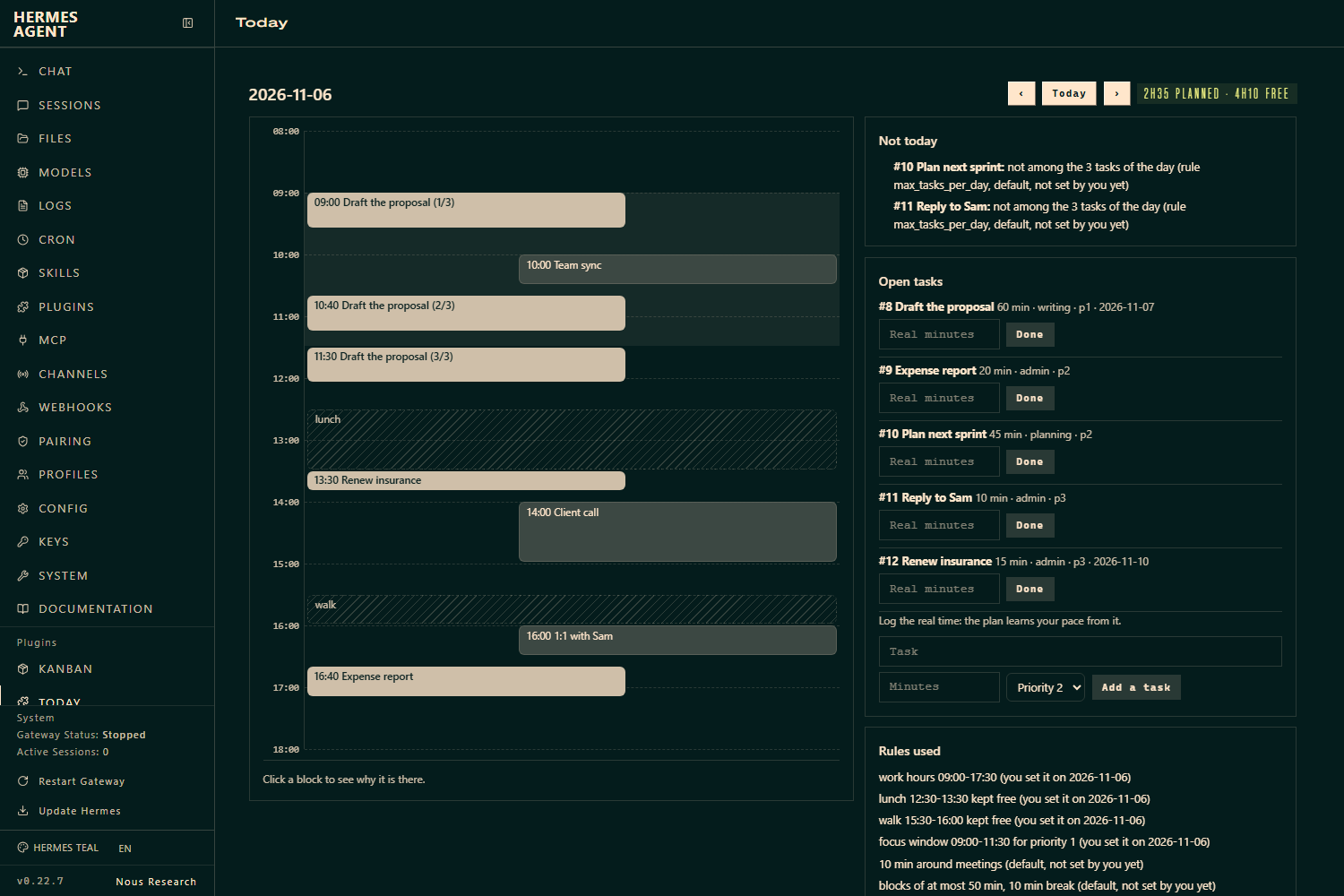
A Today tab: a timeline of the day (meetings, protected time, focus window, planned blocks, a now line),
the reason behind a block when you click it, what does not fit, the rules used, and your open tasks with a
field to log the real time. Reading it changes nothing the reminders follow.
A Week view on the same tab: your calendar events, what the plugin wrote (solid) and what it proposes and is
waiting for you to answer (dashed). Click a proposed block for its reasons; Write it and Not this one
answer a proposal, and a written block has Take it back. Write it stays disabled until you have typed
/day write on.
Agent tools
day_setup, day_add_task, day_plan, day_done, day_tasks, day_schedule, and, for the week:
day_kind (the activity sheet), day_habit, day_propose, day_week_plan and day_stage (all three
read-only: they only propose), day_confirm, day_undo, day_took and day_week (read-only). The setup tool hands the agent
what the profile already shows (time zone, calendar, other reminders) so it proposes your answers from what it
knows of you and asks only to confirm or complete, in your language. It never invents them. day_confirm
refuses unless you turned writing on yourself, and no tool can turn it on; no tool can set the calendar source
either. day_schedule on and off are refused in a cron run unless cron.allow_agent_scheduling is true in the
Hermes config (the rule Hermes applies to its own cronjob tools; an unreadable config counts as refused), and
status always works.
Disclosure
- Network: none by default. With
calendar=ics:https://...it fetches that URL (a secret address: treat it
like a password) under the rules above:httpsonly, public addresses only, same-host redirects only, no proxy.
Withcalendar=googleorcalendar=cmd:it runs the program you chose, which has its own network access. - Reads outside the plugin's own data: the calendar source you configure (event titles, times, status).
For onboarding only: thetimezoneandlanguagelines ofHERMES_HOME/config.yaml, whether the Google
Workspace skill and itsgoogle_token.jsonexist (the token is never opened) and the name and schedule of the
other reminders incron/jobs.json(prompts are not read). The language also falls back to the machine's locale. - Writes: its own data folder (
HERMES_HOME/plugin-data/agenda-guardian/: one SQLite file with your rules,
tasks, activity sheets, habits, proposals and the record of what it wrote). Only after/day cron on: two small
Python scripts inHERMES_HOME/scripts/and two cron jobs namedagenda-guardian-briefand
agenda-guardian-nudge. To your Google calendar, only after you typed/day write onand said yes to a
proposal: new events (up to three per session: get ready, the activity, wind down) whose description carries
[agenda-guardian:<session>:<part>], created and removed through the Google Workspace skill's script
(calendar create/calendar delete) on your primary calendar. It never edits an existing event and deletes
only events it recorded and still recognises./day write offstops it. - Shell commands: only the calendar program you configure (
googleorcmd:), set by you and never by a
tool, run without a shell, with a minimal environment (see Calendar sources) and a 25 second timeout; with
google, also that script'scalendar createandcalendar deletefor the writes above. The generated scripts
run the plugin's own code. - Background processes, stored credentials, telemetry: none. It stores no credential.
- Model calls: none. Reminder and brief jobs are
no_agentjobs. - Dashboard:
GET /plan,GET /week,POST /tasks,POST /tasks/<id>/done,POST /proposals/<id>/ok,
POST /proposals/<id>/refuse,POST /groups/<id>/undounder/api/plugins/agenda-guardian/, behind the
dashboard's own authentication. Writing from the dashboard needs the same/day write onswitch. - System prompt: one short section (rules for the agent, about 1,600 characters in English and 1,800 in French).
- Hooks: two.
pre_gateway_dispatchlooks at the text of each incoming chat message and acts on one
case only: a message that starts with/dayfollowed by anything other than a format-free command (help,
plan,now,list,brief,ok,undo,write,cron), orsetwith acalendar=pair, orsetup auto
(those two are answered by the plugin itself, see Calendar sources). That message is rewritten
into an ordinary request for the agent, prefixed with a pointer to the plugin's tools. It reads nothing else,
stores nothing and never drops a message; on any error it does nothing.pre_tool_callreads the tool name and
the arguments ofterminal,execute_code,write_fileandpatch(matched against fixed patterns, nothing
stored, no config read) and answers with Hermes' approval gate or, in a cron run, a refusal; on any error it
does nothing. - Approvals: apart from the guard above, the plugin touches no tool call.
day_schedule ongoes through the registry'scronjob_manage
tool, so Hermes' own checks apply; the tool descriptions tell the agent to ask you first. The yes before a
calendar write is the agent's to collect in conversation; what the plugin enforces itself is the switch you
type, the recorded-events-only deletion and the stale-proposal and new-clash checks.
Limits
- Tested on Hermes 0.22.7 on Windows 11 and on Linux (arm64, Python 3.12): unit tests,
hermes plugins validate
and an end-to-end run with real tool calls, real cron creation and Hermes' own script runner. On Windows, one
real agent turn (Claude subscription provider) turned the schedule on throughday_scheduleand Hermes listed
the two script-only jobs; the slash command, the CLI and the dashboard tab were exercised there too. By hand on
Windows 11,hermes plugins validateand the end-to-end run also pass on Hermesv0.23.0(not in CI). - Every push and pull request runs the unit tests on Linux, Windows and macOS (GitHub-hosted
ubuntu-latest,
windows-latest,macos-latest), then installs Hermes 0.22.7 from its lockfile, runshermes plugins validate --install-depsand the same end-to-end script on each. The approval prompt a human sees when the guard asks is
not exercised there: the end-to-end run replaces Hermes' gate with a recorder. - Delivery of the brief and reminders to a messaging platform (Telegram, WhatsApp...) rides on Hermes' own cron
deliverand is not tested here: the end-to-end run creates the jobs and runs their scripts with Hermes' script
runner, with the default local target. - The Google source and the writes are tested against the skill script's argv and output format with an
in-memory stand-in (it records every call, so the tests prove which events were and were not touched), not
against a real Google account in this repository's test suite. The skill script has no "update" call: moving a
session means taking it back and proposing again. The choice of the interpreter that runs it is tested with two real
interpreters and a stand-in library, not against a managed Hermes 0.23 in CI (the end-to-end run uses a plain
virtual environment, wheresys.executablealready sees the libraries). - The reasons come from counting (which windows were taken, how heavy a weekday usually is); there is no model
judging your habits, so a habit that does not repeat on the same weekday is not seen. Recurring events are
read as the calendar expands them. - English and French throughout (setup, replies, plans, reasons, reminders). The language follows your Hermes
config or the machine's locale until you set it (/day set language=fr); other languages are not translated. - Time zones: set
timezone=Europe/Parisfor events with other zones; on Windows that needs thetzdata
Python package. Without it, the computer's clock zone is used. - The plugin cannot stop another tool (the Google Workspace skill itself, the terminal) from writing to your
calendar: the guard above covers the roads to the calendar source, not those writes. Its system prompt tells the agent not to, and every plan has a road in (day_week_plan,
day_stage) so the agent has no reason to go around. Events written by another tool carry no marker, so
/day undocannot see them: that was seen once in real use, and is whyday_stageexists. - A
/day ...typed while the agent is still answering is queued by Hermes and reaches the agent as plain text,
not the plugin (seen once: the agent answered that/day writedid not exist and wrote the events itself). Type
/day write onwhen the chat is idle; the system prompt tells the agent it cannot do it for you. - The ICS fetch ignores proxy settings (the connection must go to the address that was checked), and a calendar
program receives no environment variable beyond the list above, so the Google skill's ownHERMES_GWS_BINis not
passed: putgwsonPATH. - One calendar, one person. Not a team scheduler.
Development
python -m pytest tests -q                  # 450 tests, no Hermes needed
hermes plugins validate .
HERMES_HOME=<home> <hermes python> tests/e2e_hermes.py     # real tool calls, real cron, no model
python tests/make_demo_profile.py --home <home>             # an invented day for screenshots
MIT licence.
README from the reviewed commit 2493df2; it updates when the author re-pins.