 kurenn
Agent Galaxy
An interactive 3D galaxy of a Hermes agent: its
tools, skills, memory, projects and channels as glowing stars around the agent's core, with
particles flowing along what the agent actually does — which tool follows which, the tools and
skills each project uses, the channels sessions arrive from.
It runs two ways: as a Galaxy tab in the Hermes web dashboard, or as a static site you
export and host anywhere.
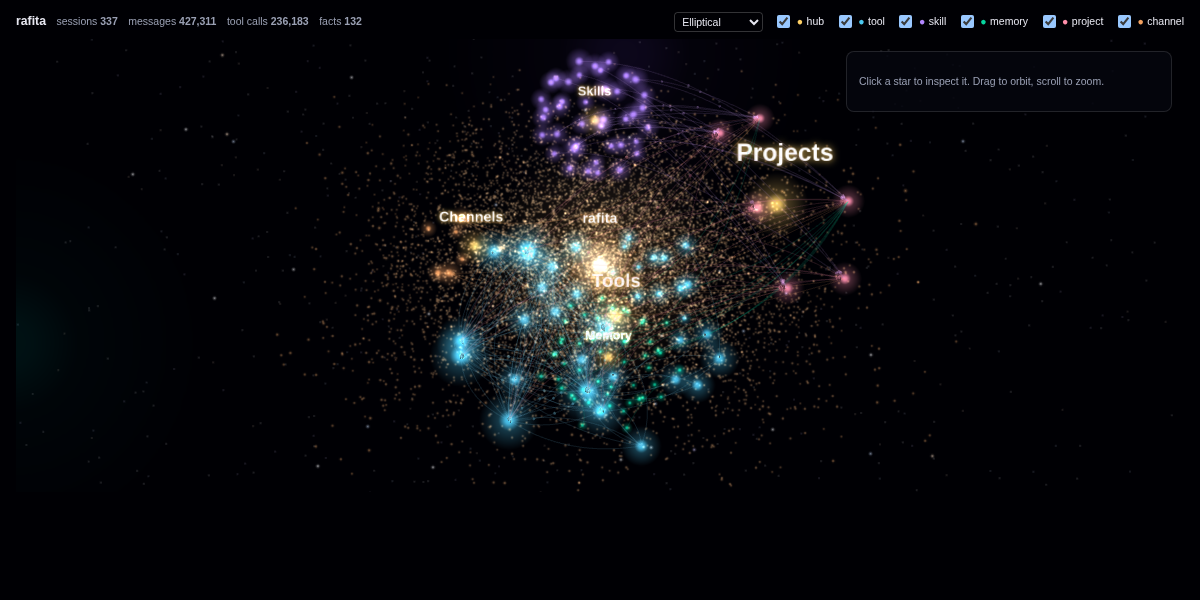
Live example: https://agent.kurenn.dev
Dashboard tab
hermes plugins install agent-galaxy --enable          # from the Hermes plugin catalog
hermes plugins install kurenn/agent-galaxy --enable   # or straight from this repository
Then restart the dashboard (or the gateway that serves it); the plugin's backend route only
loads at startup. The tab appears after Analytics.
Optionally name the core star (it defaults to the profile name, or "Hermes"):
hermes config set agent_galaxy.name my-agent
Hermes notes that agent_galaxy.name is not one of its own keys and saves it anyway; the
plugin reads it.
The data comes from GET /api/plugins/agent-galaxy/graph, which sits behind the dashboard's
login like every plugin route. It includes memory fact text, so treat it as private.
Static site
python3 export.py --hermes-home ~/.hermes --name my-agent --out galaxy-site
python3 -m http.server -d galaxy-site 8000   # preview at http://localhost:8000
Upload galaxy-site/ to any static host. It must be served over HTTP(S) — the page fetches
graph.json, which browsers block from file://. Re-run the export to refresh it.
What a public export contains: tool, skill, project, channel and memory-entity names
(entity names capped at 48 characters), and all counts. It leaves out memory fact text and
full project paths. --private puts both back; only use it for a page behind your own auth.
Read graph.json before publishing it — entity names come from your agent's memory.
What you are looking at
| Star | Size | Source |
|---|---|---|
| core | sessions | the agent |
| tools (cyan) | calls | tool results in state.db |
| skills (violet) | loads | skill_view calls, top 40 |
| memory (green) | facts | entities in the holographic memory_store.db |
| projects (pink) | sessions | session working directories (not /, a bare home, or Hermes's own) |
| channels (orange) | sessions | session sources: cli, cron, subagent, api_server… |
Animated links: tool → next tool (top 150 sequences), project → its top 6 tools and skills,
channel → project. Static links: memory entities that share a fact, and entities whose name
mentions a project. Pick a galaxy type (elliptical, spiral, barred spiral, ring, irregular)
from the top bar; the choice is remembered per browser.
How it works
plugin.yaml+__init__.pymake it an installable Hermes plugin under the name
agent-galaxy, whatever the repository is called. The agent-sideregister()does nothing.dashboard/galaxy_graph.pybuilds the graph. Standard library only; opens every database
read-only (mode=ro) and never writes.dashboard/plugin_api.pyserves it to the dashboard, cached for two minutes.dashboard/dist/index.jsdraws it with 3d-force-graph
1.80.1, loaded from jsDelivr pinned by Subresource Integrity, plus three.js r186's core
(dist/three.core.min.js, vendored, MIT) for the glow, stardust and starfield.export.py+standalone/index.htmlwrap the sameindex.jsin a page that supplies the
two globals the dashboard normally provides.
Large histories make the first graph build after a restart slow (seconds) while SQLite reads
state.db from disk; it is cached afterwards.
Before you install
- Reads outside its own data:
state.db(sessions and messages) and the holographic
memory storememory_store.dbin your Hermes home, read-only; the plugin never writes. - Network: the dashboard tab and the static page load 3d-force-graph 1.80.1 from
cdn.jsdelivr.net, pinned by Subresource Integrity, so the browser refuses any other bytes.
The static page also loads React 18.3.1 from jsDelivr the same way. The Python side makes no
network calls. - No agent tools, hooks or middleware, shell commands, background processes, stored
credentials or telemetry.
License
MIT — see LICENSE. dashboard/dist/three.core.min.js is three.js (MIT, © three.js
authors), redistributed unmodified with its license header.
README from the reviewed commit dde3682; it updates when the author re-pins.