
 PixelAlchemist4
Agent Log — readable agent.log viewer in the status bar
A Hermes desktop plugin that turns the raw agent.log file into a live, colour-coded feed right in the status bar — no more squinting at the terminal or scrolling a wall of text.
English | 简体中文
What it looks like
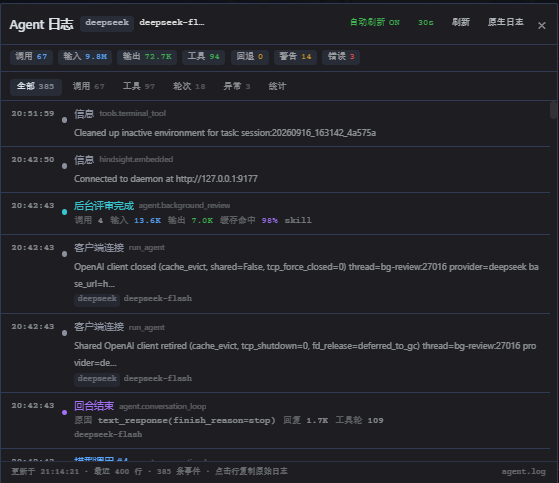
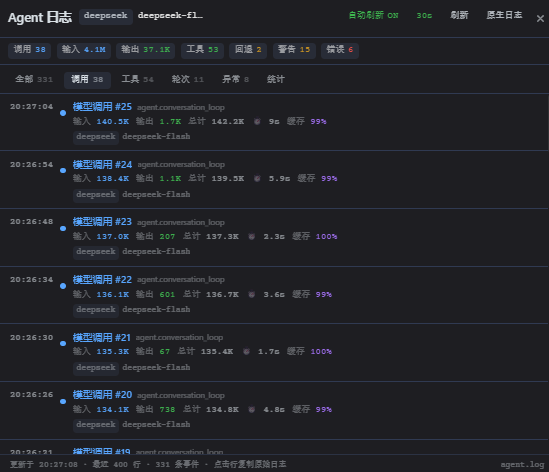
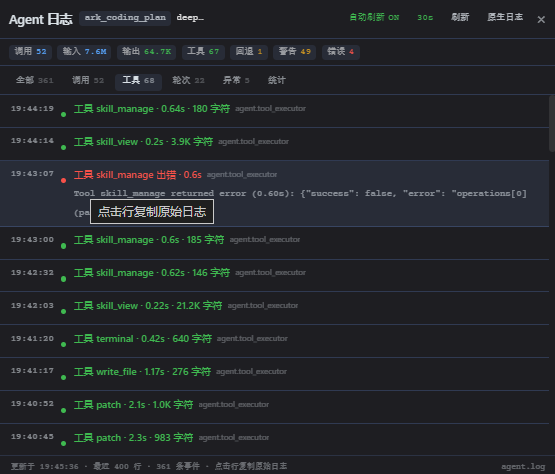
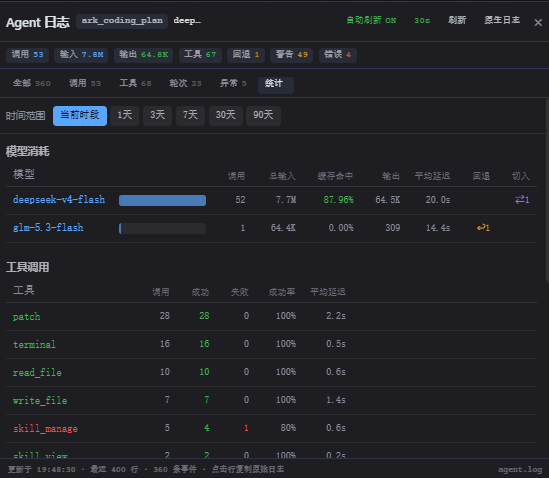
| Main feed | Calls | Tools | Stats |
|---|---|---|---|
|  |
|  |
|  |
|  |
|
(Screenshots show the Chinese UI; the plugin follows the app language — Chinese UI → Chinese, everything else → English.)
Features
- Status-bar chip — one dot for health: green pulse = busy, grey = idle, red pulse = a genuine, non-self-healing fault (credential pool exhausted / model fallback) in the last 30 s. Click to open the panel.
- Live event stream — every API call, tool run, turn boundary, fallback, warning and error parsed from
<hermes home>/logs/agent.logviahost.logs(). Filter tabs: all / calls / tools / turns / issues / stats. Auto-refresh (2–30 s, click the countdown to cycle). - Per-call detail — model, provider, tokens (in / out / cache hit %), latency, finish reason.
- Stats view — per-model token & latency table (with fallback
↩/ manual-switch⇄columns), per-tool success rate, issue cards (errors, warnings, fallbacks, retries, rate limits, credential exhaustion, credential degradation), and per-task auxiliary usage. Time ranges: current window / 1 / 3 / 7 / 30 / 90 days (longer ranges come from the official analytics API). - Follows the app — light/dark theme via the app's own CSS tokens (
.darkclass), and language viadocument.documentElement.lang. Nothing to configure. - Quiet by design — persistent states (e.g. a degraded credential) and self-healing retries are counted and folded, never turned into alerts. The red light is reserved for things a human should look at.
- Click any row to copy the raw log line. "原生日志" jumps to the native log viewer.
Install
One click
CLI
hermes plugins install PixelAlchemist4/hermes-agent-log-plugin
Manual (disk door)
Clone, then copy the desktop half into the Hermes plugin folder:
git clone https://github.com/PixelAlchemist4/hermes-agent-log-plugin.git
mkdir -p "$HERMES_HOME/desktop-plugins/agent-log"
cp hermes-agent-log-plugin/desktop/plugin.js "$HERMES_HOME/desktop-plugins/agent-log/plugin.js"
($HERMES_HOME is ~/.hermes by default; on Windows %LOCALAPPDATA%\hermes.)
Then in Hermes: Ctrl+K → Reload desktop plugins. Toggle the plugin in Capabilities → Plugins if it isn't enabled.
Requirements
- Hermes desktop app (the plugin reads
logs/agent.logfrom the Hermes home directory). - No API key, no extra dependencies — pure frontend, reads only the log file and the app's own analytics endpoints.
Development
The repo is a standard package layout:
plugin.yaml            # package manifest (desktop-only, no agent half)
desktop/plugin.js      # the plugin Hermes loads
screenshots/           # README images
sync.mjs               # repo <-> live install sync + publish helper
desktop/plugin.js is the source of truth; the copy Hermes actually loads lives in $HERMES_HOME/desktop-plugins/agent-log/plugin.js. Use sync.mjs to keep them in lockstep:
node sync.mjs                    # repo -> live (load guard + backup + md5 verify)
node sync.mjs --check            # compare md5 only (exit 1 on drift)
node sync.mjs --pull             # live -> repo (bring a live fix back to commit)
node sync.mjs --push "message"   # repo -> live, then git commit + push (prints the catalog pin SHA)
The sync refuses to ship a file that would fail the desktop runtime loader's import scan (the classic silent "plugin disappears after restart" trap), and backs up the live copy before overwriting it.
Privacy & safety
The plugin reads agent.log and the local analytics API only. It never sends data anywhere, never writes to the log, and contains no credentials, no network calls of its own, no self-updating code.
License
MIT
README from the reviewed commit e58702e; it updates when the author re-pins.