
 AIverflow
Cacheguard
A Hermes plugin that stops you wasting money on an expired cache.
Providers bill a cache hit at a fraction of the input price: about 1/10 at Anthropic and OpenAI, 1/50 or less at Xiaomi.
After a pause, the provider may have dropped your cache. Your next message in a large chat is then billed at the full input price, or more (Anthropic charges extra to write a new cache).
cacheguard can stop it before it is sent (block) or tell you afterwards what was reused or rebilled (warn).
It learns from your own usage over time: the block text and the /cacheguard table show how often your cache was lost after a similar pause.
When a large chat's cache has expired, it is often cheaper to type /new, then ask the new chat to read back the old session by its ID.
How long a cache lives depends on the provider, the model and your Hermes config: from 5 minutes to several hours.
See Get more from your cache.
If you use the DeepSeek provider, its cache lasts 3 days to a week (measured), so this plugin makes less sense.
Scope
- Works in: the terminal (CLI, TUI), the desktop app and Web UI, the gateway (Telegram and other messaging apps).
- Tested: CLI, TUI, desktop app, Web UI and Telegram. Editor (ACP) and other gateway platforms should work but are not tested.
- Left alone: anything that runs without you: cron, kanban, subagents, the curator, API server, webhooks, and one-shot runs (
-Q,--oneshot,-z, so Bot Chat-c NAME -Qtoo). hermes chat -qhas no screen to read the reply, soblockacts aswarnthere.
Install
Needs Hermes 0.22.6 or newer.
hermes plugins install https://github.com/AIverflow/hermes-cacheguard.git --enable
Then restart the gateway and start a new chat.
Another profile: add -p <profile> after hermes in every command here, and use ~/.hermes/profiles/<profile>/ instead of ~/.hermes/.
Older Hermes
Hermes refuses a cacheguard version that is too new for it. Pick the version that matches your Hermes:
| cacheguard | Hermes | Git tag |
|---|---|---|
| 0.6.0 | 0.22.6 or newer | v0.6.0 |
| 0.5.0 | 0.22.6 or newer | v0.5.0 |
| 0.4.0 | 0.22.5 or newer | v0.4.0 |
| 0.3.0 | 0.22.3 or newer | v0.3.0 |
| 0.2.0 | 0.21.6 or newer | v0.2.0 |
Hermes installs an older version by its full commit ID, not by tag:
hermes plugins install https://github.com/AIverflow/hermes-cacheguard.git --ref c5a6380fc2754468f3b362608ddd0423045f1e35 --enable   # 0.3.0
hermes plugins install https://github.com/AIverflow/hermes-cacheguard.git --ref 51de851525bd3d31193154bf8407c67537b6f392 --enable   # 0.2.0
Or with git: git clone --branch v0.3.0 https://github.com/AIverflow/hermes-cacheguard.git ~/.hermes/plugins/cacheguard. The plugin files of 0.2.0 still say 0.3.0 inside.
Or with git
git clone https://github.com/AIverflow/hermes-cacheguard.git ~/.hermes/plugins/cacheguard
hermes plugins enable cacheguard
hermes plugins adopt cacheguard
adopt tells Hermes where your clone came from, so hermes plugins update works later. Then restart the gateway and start a new chat.
Update
hermes plugins update cacheguard
Then restart the gateway and start a new chat.
Restart the gateway
If a Hermes gateway runs, every chat runs its plugins inside it, even in the terminal. It does not reload plugin code by itself: restart it after you install, update, turn on or turn off cacheguard. Use the line that matches how your gateway runs:
hermes gateway restart                   # service set up with `hermes gateway install`
sudo systemctl restart hermes-gateway    # system service (`hermes gateway restart` does not restart it)
Quick setup
Type /cacheguard to check. A new install says (no observations yet). A health: degraded line means something is wrong.
Defaults: cli warn, desktop warn, gateway off. A pause is 10 minutes and a large prompt is 20k tokens.
To block first in every group after a 10-minute pause, for chats of 20k tokens or more:
/cacheguard setup all block 10 20
Format: setup <group|model> <mode> [pause_m] [size_k].
- Groups:
cli(terminal, editor),desktop(desktop app, web UI),gateway(messaging platforms),all. - Modes:
off,warn(report afterwards),block(stop first; you send it with/retry). - pause_m & size_k: they apply to every group, even when
setupnames only one.
To change only the pause, here to 1 minute:
/cacheguard set pause_m 1
One model can have its own values. In a chat that uses it:
/cacheguard set model mode warn
That model is then never blocked, only warned. Pause and size work too: /cacheguard set model pause_m 5. See per-model settings.
Two limits count items, not days. Defaults: journal_rows 10000 (most calls kept in the stats) and chat_files 200 (most chats that keep a tracking file). Change one with /cacheguard set journal_rows 5000.
Using it
block: stops before sending
Example: with pause_m 10 and size_k 20, you come back after 12 minutes to a 48k-token chat. Your message is not sent. cacheguard replies:
[CACHEGUARD] BLOCKED · 13:05 · 12 minutes pause 🕐 · ~48,000 tokens may be rebilled · lost 4 of 10 similar pauses
To send it anyway: /retry, or send it again.
Or start /new and paste it. Session ID: <id>
13:05: when the block happened, on the clock of the machine running Hermes. The text stays in the chat, so you can tell an old block from a new one.lost 4 of 10 similar pauses: 4 of your past calls after a pause of about the same length (the same column of the/cacheguardtable) lost the cache. It shows once there are 10 such calls.- Send it anyway: type
/retry, or send the same text again. It then goes out with no new check, however long you wait, unless Hermes restarts in between. In Telegram and other chats,/retryis a tappable command. In the web UI,/retryshows[Message withheld: …]as your message: the model still gets the text you typed. - Once a message is sent, the pause clock restarts: no new block until the next pause.
- Start over:
/new, then paste the message. The session ID lets the new chat read the old one back. - After a model change the text reads
BLOCKED · 13:05 · model changed a → b · ~48,000 tokens may be rebilled. - Short form:
/cacheguard set tiny_block ongives one line,[CACHEGUARD] BLOCKED · 13:05 · 12m 🕐 · ~48kt · 4/10. Start with the default text. Once you know the plugin, switch tiny on. - Images: a message with an image is only warned, because
/retryrefuses images and the up arrow drops them. Withblock_images onit is blocked too: attach the image again and send it again. If Hermes first turns images into a text description (image_input_mode: text, models without vision), cacheguard sees plain text and treats it as text.
After you send, the result line says what happened:
-
The cache was lost:
CGUARD 13:05 cache lost, 48k rebilled, 12 min -
The cache was kept: no line by default. With
/cacheguard set display_on_success on:CGUARD 13:05 41k reused, 12 min
warn: sends, then tells you
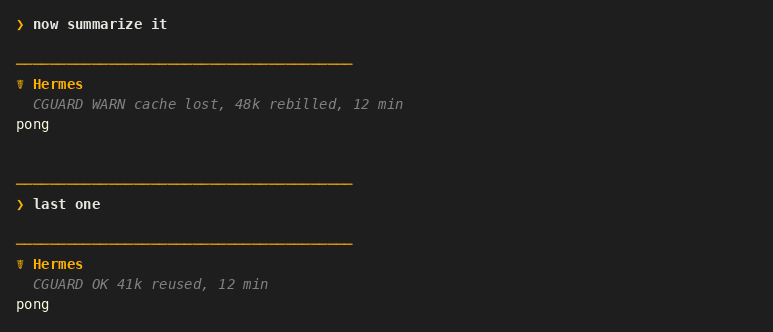
The message goes out at once. The same line has WARN or OK after the time (the OK line, too, only with display_on_success on):
CGUARD 13:05 WARN cache lost, 48k rebilled, 12 min
CGUARD 13:05 OK 41k reused, 12 min
Switching model or provider in a large chat gives the same block (model changed) or line (..., model changed), even without a pause: the new model has no cache yet. A switch of provider alone (same model name) gives only the line. Details.
Small chats and short pauses stay silent. The lines are not sent to the model (details). They appear as short chat notices, not as part of the model reply.
Commands
| Command | What it does |
|---|---|
| /cacheguard | Every setting, and a table: how often the cache was lost, by pause length |
| /cacheguard setup <group\|model> <mode> [pause_m] [size_k] | Set mode, pause and size (pause_m and size_k: both or neither); model = the model of this chat only |
| /cacheguard set <name> <value> | Change one setting |
| /cacheguard set model <pause_m\|size_k\|mode\|reset> [value] | Own setting for the model of this chat |
| /cacheguard help | Every command |
Safe by default
- cacheguard never calls the model itself, and nothing leaves your machine.
- If the plugin fails at any point, your message is still sent.
Disclosure
- No network, no subprocess, no model call in the plugin. cacheguard only reads what Hermes passes to it.
- Reads: your
config.yaml(its own settings). - Reads every message of each request, in memory: to hash the start of the chat (only the hash is kept), and to remove its own
BLOCKEDreplies, with the message before each, from what the model receives (why). - Writes:
<hermes home>/cacheguard/(a journal of calls after a pause of 1 minute or more, with token counts and no session ID, and one small file per chat) and its own settings inconfig.yamlwhen you use/cacheguard setorsetup. - In the repo, not in the plugin:
scripts/and.github/hold the daily compatibility check. It runs on GitHub only, never in your Hermes, and sends a Telegram alert only if its owner sets a token. - No message text is stored or logged. Only counts, times, model names and a hash of the chat. The journal holds no session ID; only the chat's own small file is named after it.
- Private Hermes names: cacheguard uses a few (for example to read cache numbers, and to know a run has no screen).
/cacheguardhealth checks them, andhermes plugins validatelists them.
Turn off or remove
-
Turn off, then back on:
hermes plugins disable cacheguard hermes plugins enable cacheguard -
If a gateway runs, restart it after turning cacheguard off or on, or the old state stays.
-
Avoid turning it off or on in the middle of a long chat: the next call may lose the cache once (why).
-
To hide everything but keep recording:
/cacheguard setup all off.
To remove it:
hermes plugins remove cacheguard
rm -r ~/.hermes/cacheguard
The rm line deletes the history.
More
The guide covers every setting, the estimate, unattended runs and profiles.
Show me the data: how long the cache lasts
One user's calls, October 2026: an example, not a rule for these providers. Each dot is one call, the line is the chance the cache was lost. The same provider can behave very differently: compare DeepSeek pinned to DeepInfra with the same model on any OpenRouter provider.
License
MIT
README from the reviewed commit 4648bc0; it updates when the author re-pins.