All plugins

caduceus

Answers about your own health that cite your DNA, Apple Health trends, medical records and new research, from a vault on your machine. Caduceus imports 23andMe, AncestryDNA, MyHeritage or FamilyTreeDNA raw data, a Promethease report, an Apple Health export and US health records (FHIR) into local SQLite, then gives your agent gene–drug checks (CPIC guidelines plus GLP-1 research), trends before and after a medication start, a rebuilt variant report, a one-page brief for your doctor and a research watch that puts studies on your own gene–drug pairs first. No DNA file yet? /caduceus demo loads an invented person to try it. Privacy levels are yours to choose: open by default, or standard, which hides Alzheimer's risk, hereditary cancer risk, carrier status, mental health and reproductive results until you unlock them. Information with limits, not medical advice. Disclosure — imports, search and reports run locally, and the vault is never uploaded as a whole; tool results (slices of your data) enter the conversation, so the model provider you chose sees them; the research watch (on by default, runs when you or the agent ask for it or on a schedule you create, off with the `research_watch` setting) sends gene and topic terms, the names of medications you recorded, and public marker and article IDs, never genotypes, to Europe PMC and NCBI; scheduled checks run model turns billed like any message; no telemetry. Includes a report-a-problem skill: the agent drafts a bug report, asks you to check it holds no health data, and files it to this repository with `gh` only after you approve the draft.

100yenadminToolsv0.1.1Updated 3 hours ago

About

Answers about your own health that cite your DNA, Apple Health trends, medical records and new research, from a vault on your machine. Caduceus imports 23andMe, AncestryDNA, MyHeritage or FamilyTreeDNA raw data, a Promethease report, an Apple Health export and US health records (FHIR) into local SQLite, then gives your agent gene–drug checks (CPIC guidelines plus GLP-1 research), trends before and after a medication start, a rebuilt variant report, a one-page brief for your doctor and a research watch that puts studies on your own gene–drug pairs first. No DNA file yet? /caduceus demo loads an invented person to try it. Privacy levels are yours to choose: open by default, or standard, which hides Alzheimer's risk, hereditary cancer risk, carrier status, mental health and reproductive results until you unlock them. Information with limits, not medical advice. Disclosure — imports, search and reports run locally, and the vault is never uploaded as a whole; tool results (slices of your data) enter the conversation, so the model provider you chose sees them; the research watch (on by default, runs when you or the agent ask for it or on a schedule you create, off with the `research_watch` setting) sends gene and topic terms, the names of medications you recorded, and public marker and article IDs, never genotypes, to Europe PMC and NCBI; scheduled checks run model turns billed like any message; no telemetry. Includes a report-a-problem skill: the agent drafts a bug report, asks you to check it holds no health data, and files it to this repository with `gh` only after you approve the draft.

Caduceus: Personalized Health & DNA AI

Caduceus: Personalized Health & DNA AI

Your Hermes agent's private health memory. Caduceus brings these into one SQLite vault on your own machine:

  • your 23andMe, AncestryDNA, MyHeritage, FamilyTreeDNA or Living DNA raw data;
  • your Promethease report;
  • your Apple Health export;
  • your US health records.

Your agent can then answer questions like "Why isn't my Ozempic working?" from your genotype, your trends and the
newest research. Answers are cited, with honest limits.

  • One answer from all your data: your genotype, your weight curve, your lab results and published research, each cited.
  • Your vault stays on your machine: search, imports and reports run locally. The agent reads only the slices a question needs.
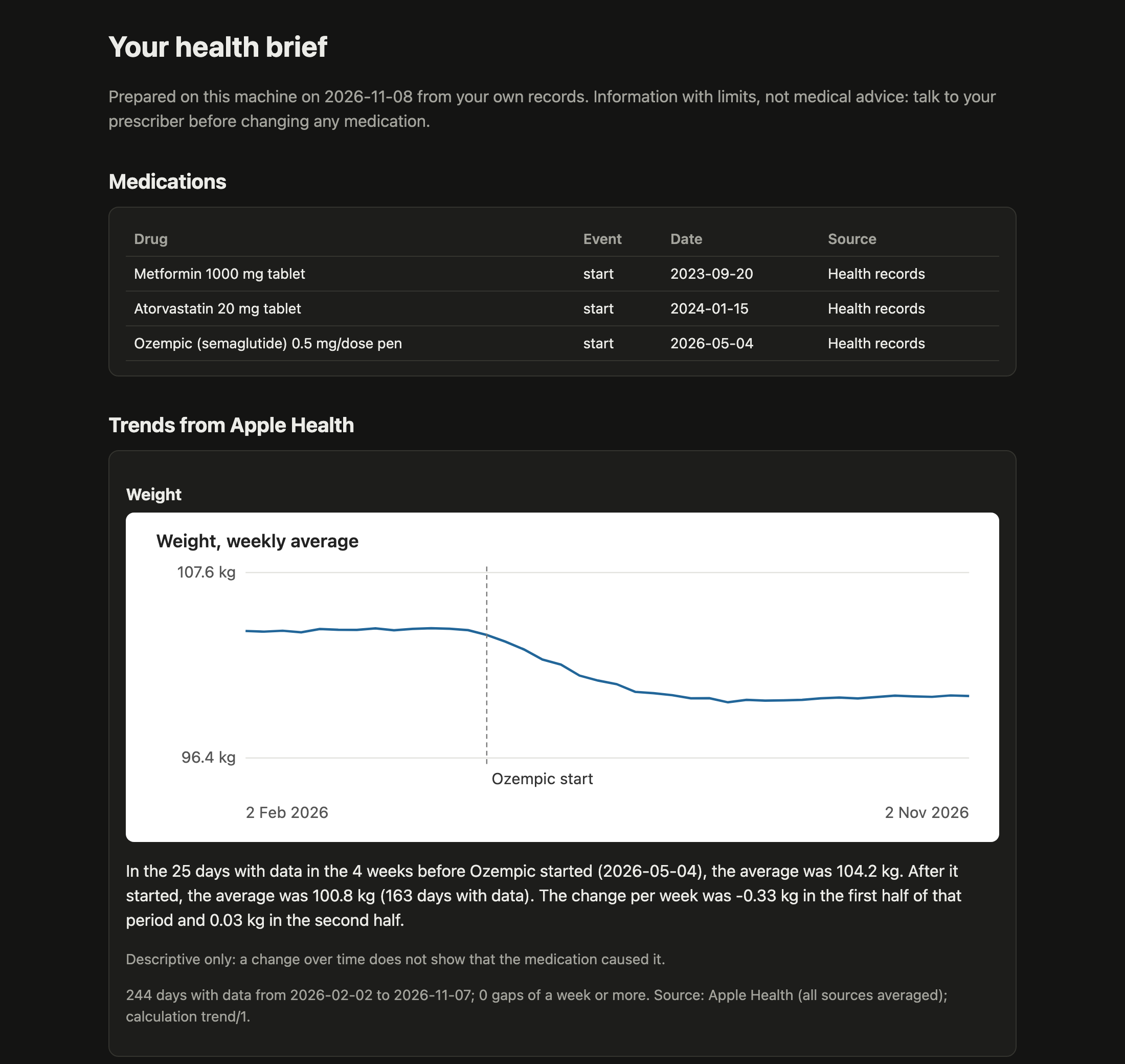
  • Rebuilds your variant report offline: your Promethease report becomes a self-contained page in Caduceus' own design. It also writes a one-page health brief with charts to bring to your doctor.
  • Keeps watching new research about your genes and medications: studies on your own gene–drug pairs come first, and a digest arrives only when something new appears.

Information with limits, not medical advice. Caduceus never tells you to start, stop or change a medication.

| Your variant report, rebuilt offline | A one-page brief for your doctor |
|---|---|
| The rebuilt variant report: record counts, then summaries by magnitude, drug response, good news and what is worth a closer look | The health brief: medications, then the weekly weight average with the Ozempic start marked and the plateau after it |
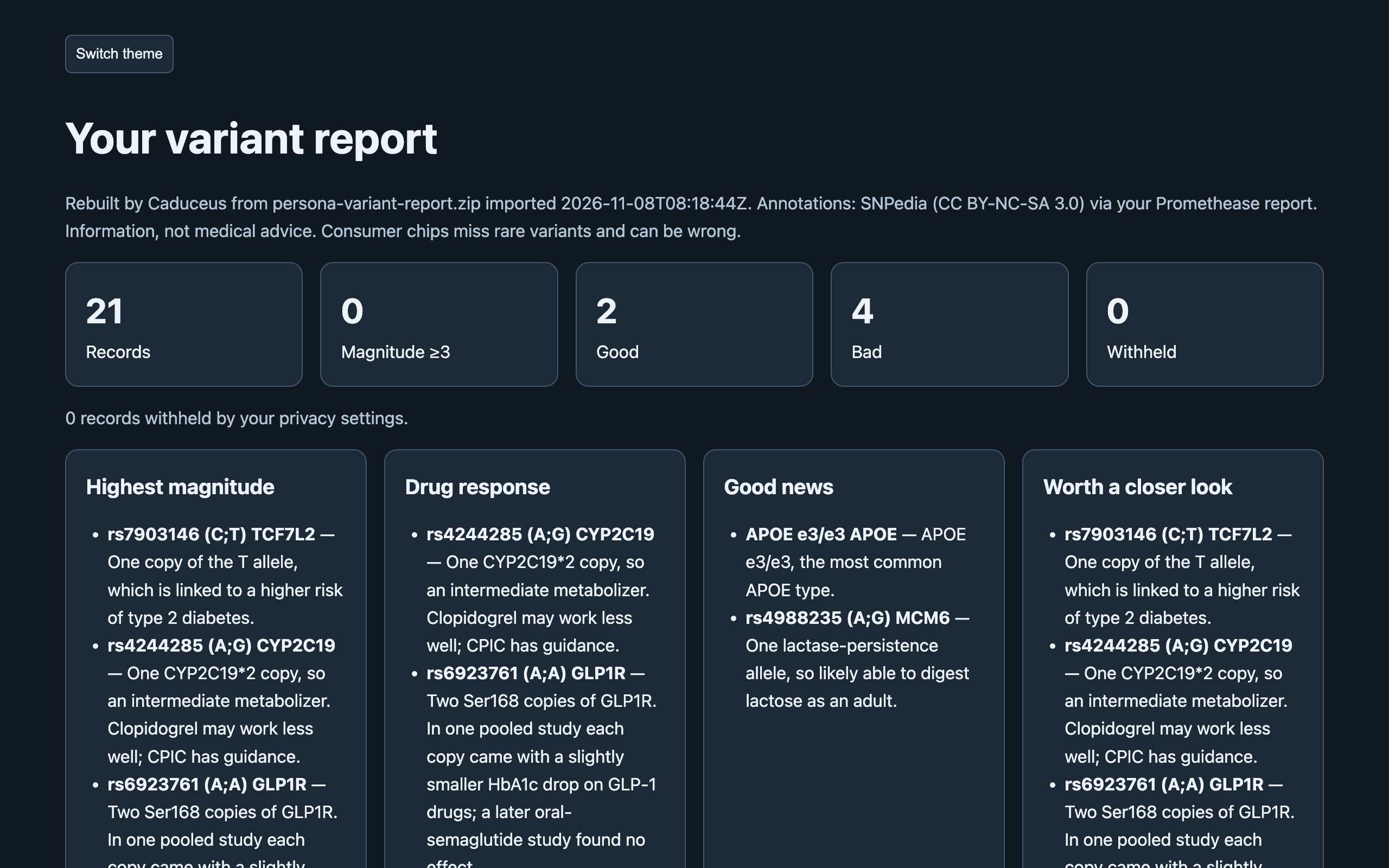
The screenshots use the synthetic demo persona, not a real person's data.

Install

Requires Hermes Agent 0.23.0 or newer. There are no extra dependencies.

hermes plugins install https://github.com/electricsheephq/caduceus

Once it is in the plugin catalog, hermes plugins install caduceus works too. Restart Hermes, then tell your agent
"set up Caduceus". The setup skill takes you through:

  1. importing your files;
  2. recording your medications;
  3. choosing a privacy level;
  4. turning on the research watch.

Try it without your own data

Type /caduceus demo. Caduceus writes three files for an invented person: a DNA raw-data file, a variant report and an
Apple Health export with health records. It imports them in about a minute. Then ask your agent "Why isn't my Ozempic
working?"
or "Would Mounjaro be different for me?". The demo loads only into an empty vault, so it never mixes with
your own data.

What it reads

| File | How to get it |
|---|---|
| 23andMe raw data (v3, v4, v5), .zip or .txt | Request your raw data download in your 23andMe settings |
| AncestryDNA raw data, .zip | Download your DNA data in your AncestryDNA settings |
| MyHeritage raw data, .zip or .csv | Download your raw DNA data in your MyHeritage DNA settings |
| FamilyTreeDNA Family Finder raw data, .csv.gz | Family Finder → download raw data (the build 37 file) |
| Living DNA raw data, .zip or .txt | Download your raw data in your Living DNA settings |
| Promethease report, .zip or .html | The report file you downloaded from Promethease |
| Apple Health export.zip | iPhone Health app → your picture → Export All Health Data. With Health Records connected, it includes your clinical records |
| FHIR R4 JSON (labs, conditions, medications) | A patient portal's FHIR or "download my record" export |

Give your agent the file's path, and Caduceus copies the file into its vault and imports it.

  • The agent is told never to open these files itself.
  • Big imports keep running in the background, and re-importing a file does nothing.
  • An interrupted import resumes where it stopped.

Tools

| Tool | What it does |
|---|---|
| caduceus_search | Full-text search across your annotations, research, labs, conditions, medications and notes, with cited snippets |
| caduceus_genome | Your genotype at any marker, gene views, gene–drug checks (CPIC guidance plus GLP-1 research), derived calls (APOE, CYP2C19, CYP2C9 and others), top findings, and the rebuilt variant report |
| caduceus_trend | Apple Health trends with units, coverage gaps and a calculation version; before and after a medication start; lab results over time; a daily signal check |
| caduceus_capture | Imports and their progress, medications (recorded only after you confirm), notes, the research watch, settings, and the health brief |

A gene–drug result keeps three outcomes apart:

  • flag: you carry the effect allele;
  • no flag: it was tested and is absent;
  • not assessed: not on your chip, or a no-call.

"Not assessed" is never reported as normal.

Privacy

| Level | What shows |
|---|---|
| open (default) | Everything you imported, except categories you hide |
| standard | Alzheimer's risk (APOE), hereditary cancer risk, carrier status, mental health and reproductive results stay hidden until you unlock each one |

You change these yourself, with /caduceus privacy standard, /caduceus hide <category>, /caduceus unlock <category>
and so on (/caduceus help lists them), or in the plugin settings. Your agent can read the settings but cannot change
them. Hidden results are counted, never described.

Disclosure — imports, search and reports run locally, and the vault is never uploaded as a
whole; tool results (slices of your data) enter the conversation, so the model provider you
chose sees them; a research watch you turn on sends gene, drug and topic terms and public
marker and article IDs, never genotypes, to Europe PMC and NCBI; scheduled checks run model turns billed like any message;
no telemetry. Includes a report-a-problem skill: the agent drafts a bug report, asks you to
check it holds no health data, and files it to this repository with gh only after you
approve the draft.

Your data lives in your Hermes profile's plugin-data/caduceus/. In v0.1 it is not encrypted at rest; encrypted and local-model levels are planned for v0.4. See SECURITY.md for the boundaries.

Research watch and daily check

  • /blueprint caduceus:research-watch:
    • What it does: a digest of new studies (Europe PMC, LitVar2) and ClinVar changes about your genes, medications and chosen topics, weekly by default.
    • First run: 3 studies to start with. Studies on your own gene–drug pairs come first (for example GLP1R and semaglutide, from the last five years), then papers that mention your markers, then general results. Each item says why it was picked.
    • After that: only new ones, in the same order, and nothing when there is nothing new.
    • What it sends: gene, drug and topic words, marker IDs from the built-in knowledge pack, and article IDs. Which terms it sends depends only on your medications and topics, never on your genotypes.
  • /blueprint caduceus:daily-check: once a day, checks your Apple Health trends (resting heart rate, sleep, weight, steps) and messages you only when something is outside its threshold. It costs one model call a day.

Accuracy and limits

  • Chips miss things. Consumer DNA chips test common variants. Rare variants can be missed or miscalled: in one large study, most rare pathogenic chip calls did not confirm. Anything important needs a clinical test.
  • Some genes can't be read from chips. CYP2D6, HLA types and copy-number changes are reported as not assessed. An ambiguous APOE pattern stays ambiguous.
  • Small effects, labelled evidence. Genetic effects on drug response are usually small. Every result carries its evidence level (a CPIC guideline, or research association), its sources and its limits.
  • No medical advice. Caduceus never tells you to start, stop or change a medication. Talk to your prescriber.

Data sources and licences

  • CPIC: gene–drug guidance data, CC0.
  • NCBI: ClinVar, dbSNP and LitVar2 (public).
  • Europe PMC: article metadata.
  • SNPedia: its text (CC BY-NC-SA 3.0) appears only from your own Promethease report. Caduceus keeps it on your machine, labels it, and never ships or fetches it.

Development

Python 3.11+, standard library only.

python -m pip install pytest
python -m pytest

Tests use synthetic data generated at test time and never touch the network. Module contracts are in
docs/contracts.md, and agent guidance in AGENTS.md. Report bugs with the issue form,
which your agent can draft (with no health data). Report security problems privately (see SECURITY.md).

Licence

Apache-2.0. Made by Electric Sheep for Hermes Agent.

README from the reviewed commit 8dd0c77; it updates when the author re-pins.
More by 100yenadmin

11 plugins by 100yenadmin in the catalog.

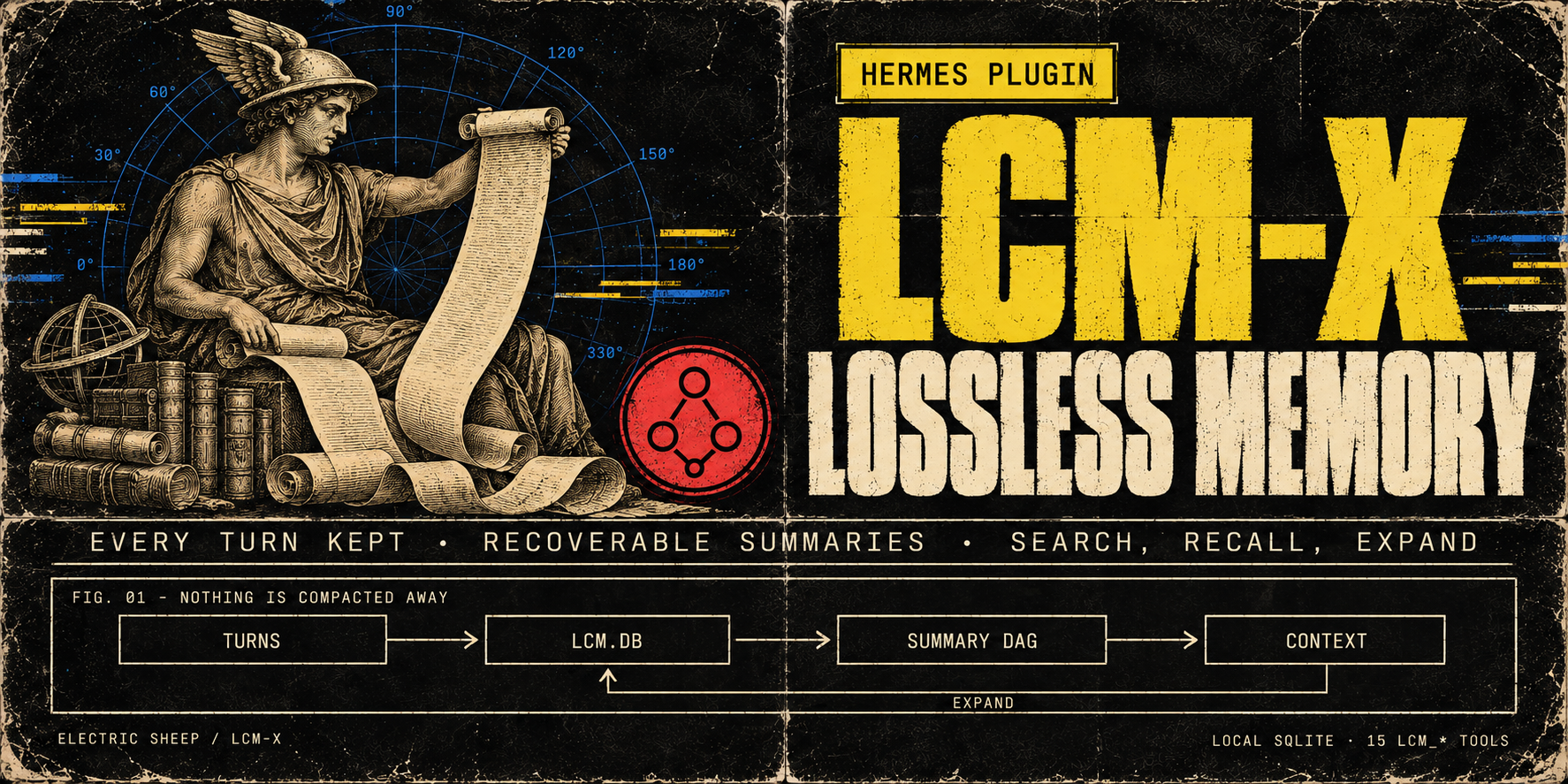
100yenadminhermes-lcm-xLossless memory for long sessions: LCM-X keeps every turn in a local store instead of compacting it away, and the agent can search and expand it. The store is local SQLite (lcm.db) with a recoverable DAG of summaries over it and 16 lcm_* tools for search, recall and expansion (lcm_memory only with LCM_ENTITIES_ENABLED=1). Select it with context.engine: lcm-x. Upgrading from hermes-lcm (breaking in v0.24.0): stop Hermes, then in plugins.enabled replace hermes-lcm with hermes-lcm-x and run exactly one LCM copy (the install script prints the steps; the old engine name lcm still resolves with a deprecation warning); lcm.db and the lcm: config block are unchanged. Summaries use the model Hermes is configured with. Disclosure — local semantic recall is on by default once its dependency companion is installed (hermes plugins install electricsheephq/lcm-x/companions/hermes-lcm-x-local-embeddings --ref <the LCM-X commit>; it carries fastembed): summaries and message chunks are embedded in-process with BAAI/bge-small-en-v1.5 after a one-time model download, in the background, and stay on the machine. Without the companion, recall answers from full text and lcm_doctor prints the install command; on hosts with 2 or fewer effective CPUs the default answers from full text unless LCM_EMBEDDINGS_ENABLED=true; LCM_EMBEDDINGS_ENABLED=false turns semantic recall off. Cloud embedding providers (Voyage via VOYAGE_API_KEY, an OpenAI-compatible endpoint, or a local Ollama) send message text to that provider and run only with LCM_EMBEDDINGS_ENABLED=true and an explicit model. For known cloud providers the provider-bound copy is privacy-transformed by default (LCM_EMBEDDING_PRIVACY_ENABLED=false opts out), while lcm.db keeps the raw text. Every turn (user, assistant and tool output) is stored in plaintext in lcm.db (secret redaction at rest is opt-in); on gateway platforms the sender's platform user ID is recorded with each user message by default (LCM_SENDER_CAPTURE=0 turns it off), and oversized tool outputs are by default written as plaintext files under HERMES_HOME/lcm-large-outputs and replaced in the model's context by recoverable references. The engine also reads Hermes' state.db read-only for session lineage, reads private AIAgent attributes via the call stack on Hermes builds without subagent hooks, and runs git on its own install directory for lcm_status/lcm_doctor; tiktoken may fetch its BPE file on first use.Communitymemory116100yenadminfish-audioYour agent speaks and listens with Fish Audio: expressive voices in 80+ languages, voices you design from a sentence, and live word-by-word dictation. The official Fish Audio plugin: Fish's Drama 3 model with word-level direction, speech-to-text, Fish Audio's community voice library, voice cloning and voice design, with a Voices page in Hermes Desktop. Fish Audio becomes a Hermes speech and transcription provider for voice replies, read-aloud, voice notes and Desktop dictation, with sentence-by-sentence streaming in CLI voice mode and Desktop, and word-by-word live dictation captions on Hermes 0.21.6+ (stt.streaming: true). Adds the fish_speak, fish_voices and fish_transcribe tools, /fish and hermes fish commands, and four skills. Disclosure — sends your Fish API key and the text, audio (with file names) and voice titles, tags, descriptions, cover images and design instructions you ask it to process to api.fish.audio, or to the base_url you configure, and reads your Fish wallet for balances and model choice; with live dictation on, microphone audio streams to Fish's native realtime speech-to-text at api.fish.audio (transcribe-stream-1, Preview) while you speak, billed $0.36 per hour of open session, per second, including silence; a session opens with the first audio and closes once Fish confirms the last words (the plugin stops waiting after 15 seconds), or 30 seconds after the last audio of a cancelled recording; if a live session fails or returns no text, Hermes transcribes the recording as a file instead, a separate billed request; the live_transcription: compat setting uses Fish's older realtime endpoint instead, billed per committed phrase rounded up to a second; synthesis, transcription, cloning and voice design are paid requests billed to your Fish account, except the free s2.1-pro-free model (free through 30 November 2026), whose requests Fish may use to improve its models; when no model is set and your Fish wallet shows no API credit, free credit or past top-up, the plugin uses that free model (allow_free_model: false turns this off). The key comes from the profile's secret scope (Hermes stores it in the profile .env; a single-profile install may also read FISH_API_KEY from the environment). Generated audio and subtitles are written to Hermes's audio cache; clone samples, cover images and recordings it uploads must be regular audio or image files, and Hermes config, secret and credential paths are refused. Cloning and deleting voices from chat or the model tools go through Hermes's approval gate and follow your approval settings. The Desktop Voices page and a Fish Audio settings page add gateway routes under /api/plugins/fish-audio/, behind the Hermes dashboard's existing authentication. On the Voices page, previews, clones and voice designs are billed; cloning a voice or saving a designed one creates a voice in your Fish account; cloning and deleting are confirmed on the page (a speaker-consent box, a typed voice name) instead of through Hermes's approval gate; and Use sets the profile's Fish voice, and its speech provider when none is set. The settings page and the /fish and hermes fish commands can set or reset the profile's Fish model and voice and save up to 50 voice names in the profile's config; /fish use and hermes fish use also make Fish the speech provider when none is set, and given a voice title they search your own Fish voices for it, and hermes fish login sets the speech and transcription providers when they are unset or you confirm. Preview and design audio files are deleted from the gateway once returned; a design's audio is held in gateway memory so you can save it, until it is saved, a later design or save finds it over an hour old, or the gateway stops; clone uploads are deleted after the clone, or by the next upload once idle for 15 minutes. With a key set, Desktop reads your Fish wallet when an agent is selected and about every five minutes, for the status-bar credit; favourites stay in Desktop's plugin storage on that computer, and fetched previews stay in the window's memory until it closes. When you ask for a voice that fits the agent, the voice-studio skill reads the agent's SOUL.md or persona and sends Fish a one- or two-sentence voice description, never the whole persona. Includes a report-a-problem skill: when you report a problem with Fish Audio, the agent runs hermes fish doctor --no-synth, /fish status, hermes --version and hermes plugins list --json, reads recent Hermes log lines that mention Fish, searches this plugin's GitHub issues for a few key words, drafts a bug report and files it to this plugin's repository as a public GitHub issue or comment with your gh login only after you approve the exact text; reports leave out keys, credit amounts and voice ids not confirmed as public library voices, and security problems go to the repository's private advisory form instead. No telemetry.Communityvoice68100yenadminhermes-teammatesGive your agent a team: named subagents with their own instructions, tools and model, which it assigns work to, checks on and steers mid-task. The operator defines the roster; the agent follows up with a digest of earlier results and can work a Kanban teammates lane with a review handoff. Launches subagents only through the public ctx.subagent_lifecycle API. Stock Hermes; no patched core. Disclosure — adds six tools (teammates_roster, teammate_assign, teammate_check, teammate_wait, teammate_message, teammate_stop) and a /teammates command; the model picks only a teammate name, and the operator's config decides what it means. Teammates run as in-process Hermes subagents using credentials selected by Hermes from the parent, delegation settings or an operator-configured teammate route where supported. Toolsets narrow the parent's tools at toolset granularity only (the file toolset includes write_file and patch); Hermes can add inherited MCP toolsets back unless delegation.inherit_mcp_toolsets is false. A teammate with invalid settings refuses to launch. A delegated child cannot start teammates. Steering uses the lifecycle steer where Hermes provides it, otherwise delegate_task's steer action with the turn-bound parent. Under plugins.isolation: host every tool except the roster refuses. Optionally the roster is read from an operator-named YAML file (roster_file, relative to the profile home or absolute, so several profiles can share one); the plugin never writes it. It keeps a per-profile SQLite run ledger in its plugin-data folder (goals, statuses, clipped summaries, role hashes and available token receipts; no full transcripts). It does not read credential stores. Where supported in-process, subagent_start and post_api_request hooks collect token receipts for mapped child sessions. For a card assigned to its non-profile lane, it claims the card through the Kanban DB, heartbeats the claim and its worker, then moves the card to review without a reviewer, or blocks it on failure, a stop or an unavailable result; it never completes a card. On Hermes builds with plugin prompt sections it adds one short paragraph (under 600 characters) about the Kanban lane to new top-level session prompts. The paragraph is rendered from its settings, carries no conversation content, and is left out without a usable teammate, for delegated children and under host isolation. It runs one in-process monitor thread per run to retain finished results and, for lane runs, keep the claim alive; no network calls, child processes or self-updates of its own. Completion-notice code exists but never injects on current Hermes because the host cannot bind notices to the receiving session; use teammate_wait instead. Includes a report-a-problem skill: the agent drafts a bug report and files it to this repository with gh only after the user approves the draft.Communityautomation59100yenadminplan-modeClaude Code-style plan mode for Hermes: the agent explores and writes a plan, and edits nothing else until you approve it. It works on every interactive Hermes surface: /plan or /planmode on blocks mutating Hermes tools dispatched through pre_tool_call (writes outside .hermes/plans, terminal, code execution, delegation, MCP) while the agent explores, asks clarifying questions and writes a plan. The agent shows the complete plan, submits it with plan_mode(submit) and one approval card asks: approve and auto-accept edits, approve and review each file edit (when Hermes approvals are on, every write_file and patch then gets Hermes' approval prompt with its path and a preview), or keep planning; Other sends feedback, and the revised plan says what changed since the last revision. Once approved, it implements in the same turn and tracks todo_list progress. To change the plan yourself, keep planning, run /planmode edit, save, then /planmode show and /planmode approve; the text you were shown is saved as an approved snapshot, so later edits to the file do not change the approval. The classic profile (plan_profile: classic), approval_card: false and surfaces without a card use Hermes' own approval prompt (gateway buttons, the TUI/Desktop card, the CLI panel or /approve). When yolo or approvals.mode: off would auto-approve, it asks through clarify instead, so a person still decides. By default plans are compact and decision-complete, the lean profile asks at most three targeted questions (say "grill me" for more, or set questions: thorough for an interview before every plan, one decision at a time), the reply names any tool call plan mode blocked (Hermes itself shows none), and the agent does not commit unless asked (plan_style, plan_profile, questions, allow_commits and plan_skill settings). Classic CLI enforced on every supported Hermes; gateway, TUI and Desktop from Hermes v2026.9.24 (0.21.5), and refused on older builds; 0.21.6 or newer recommended, tested through 0.23.0. On the interactive classic CLI, Hermes' inline diff shows a new plan file in full, so the agent does not retype it (write_once). A report-a-problem skill drafts a bug report and files it with gh only after you approve the draft. Disclosure — plan-mode does not enforce Codex app-server exec/applyPatch or TUI /background and btw side agents. A plan is approved only on its approval card (a clarify question only the plugin issues and checks), through Hermes' own approval prompt, or with /planmode approve. It reads nine groups of internal Hermes seams for session identity, workspace, profile, skills.inline_shell and the classic CLI's inline diff, each guarded with a documented fallback. It creates .hermes/plans under the session working directory, reads plan files there, saves the approved text of an edited plan as a new file under .hermes/plans/approved, and keeps per-session state in plugin state. It adds a turn note while planning or executing, a ≤200-char system-prompt hint, and a one-line footer to short replies on chat platforms. When a turn ends while a submitted plan still awaits approval and no approval card was answered, it adds one line to that reply on any surface, whatever its length, saying how to approve (unless footer is off). When you pick "Always" on a plan approval or a per-edit review, Hermes core writes a plugin_rule:plan-mode entry to command_allowlist in config.yaml; each entry is keyed to one plan revision, so it cannot approve another plan. With allow_gateway_injection: true it queues one message to start work after a typed /planmode approve. On TUI, Desktop and hermes serve sessions (lean profile, plan_once) it reads the visible reply text from post_api_request while planning and saves its <proposed_plan> block as the plan file; if another plugin holds the stream to withhold commentary, that text can include the commentary it kept off screen (plan_profile: classic turns plan_once off, unless a custom levers list names plan_once or all). On the interactive classic CLI (lean, write_once) it checks that Hermes printed a newly written plan file in full, then tells the agent not to retype it. Its report-a-problem skill has the agent file to the plugin repository with gh only after the user approves the exact saved draft. The plugin itself makes no network calls, launches no subprocesses and has no self-updater.Communitytools48