
 Piyush Pradhan
Flightlog
A flight recorder for Hermes Agent. Flightlog records every step an agent takes and tells you when an unattended run goes wrong.
Hermes cron already catches runs that crash. Flightlog catches the ones that finish green and still did the wrong thing:
- The agent said "fixed, tests pass", but never ran the tests after its last edit, or they failed.
- A tool returned an error, and the agent wrote a confident answer anyway.
- The agent called the same tool 40 times in a loop.
- A job that normally uses 10k tokens used 40k today.
- A job that usually makes 12 tool calls made 1 and answered from memory.
- A subagent failed, and the parent reported success.
Install
hermes plugins install piyushpradhan/flightlog --enable
No API key and no config file. Recording starts the next time the agent runs.
What you get
| Command | Where | Shows |
| --- | --- | --- |
| /flightlog | Any session | Last 5 runs with health marks, new findings since you last looked |
| /flightlog why <run> | Any session | The incident report and timeline for one run |
| hermes flightlog runs [--job ID] | Terminal | Recent runs |
| hermes flightlog show <run or session> | Terminal | Full timeline, one line per event, errors in red |
| hermes flightlog jobs | Terminal | Each cron job's baseline: median tools, tokens, duration |
| hermes flightlog ack <finding> | Terminal | Acknowledge a finding and silence that rule for that job |
| hermes flightlog purge | Terminal | Delete everything |
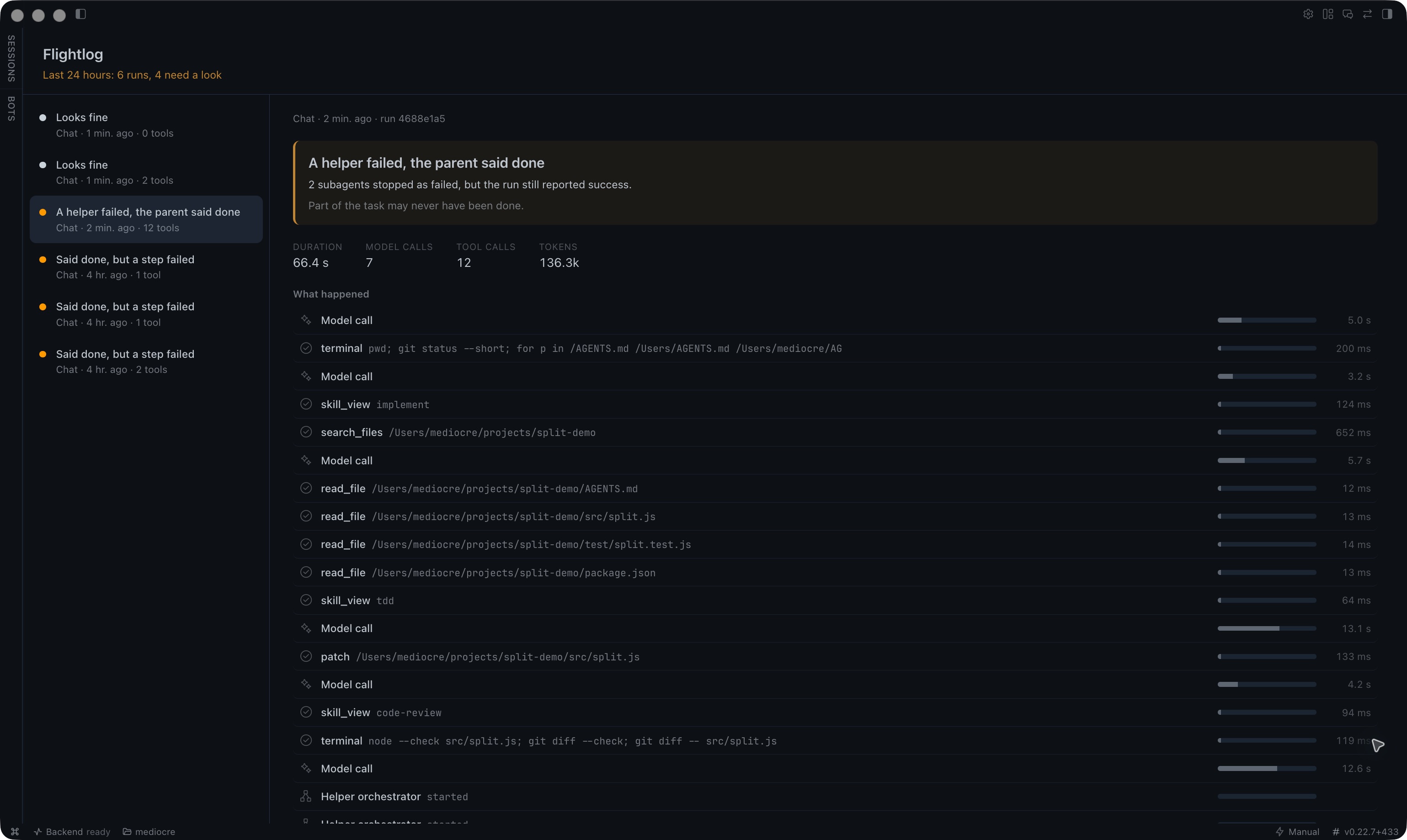
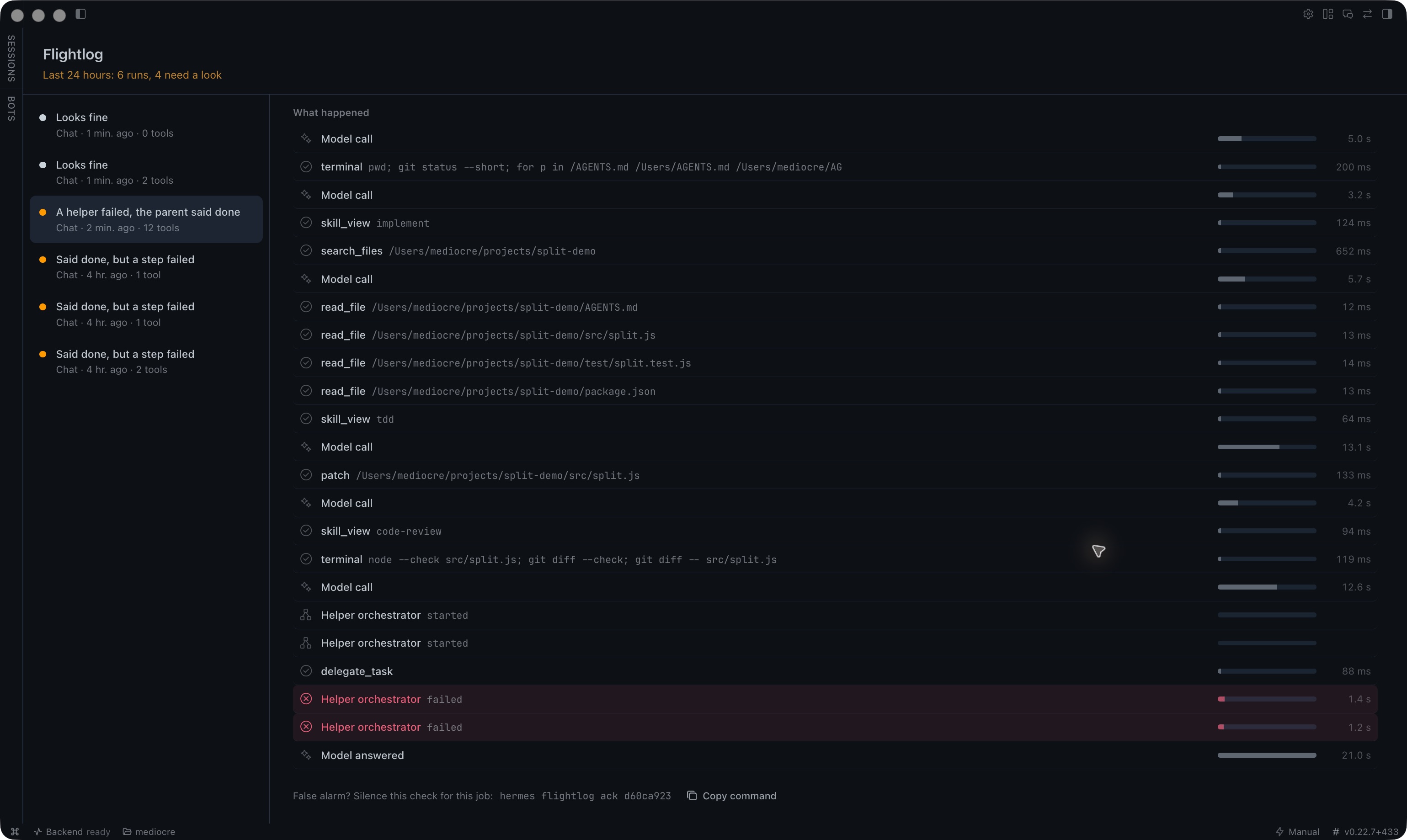
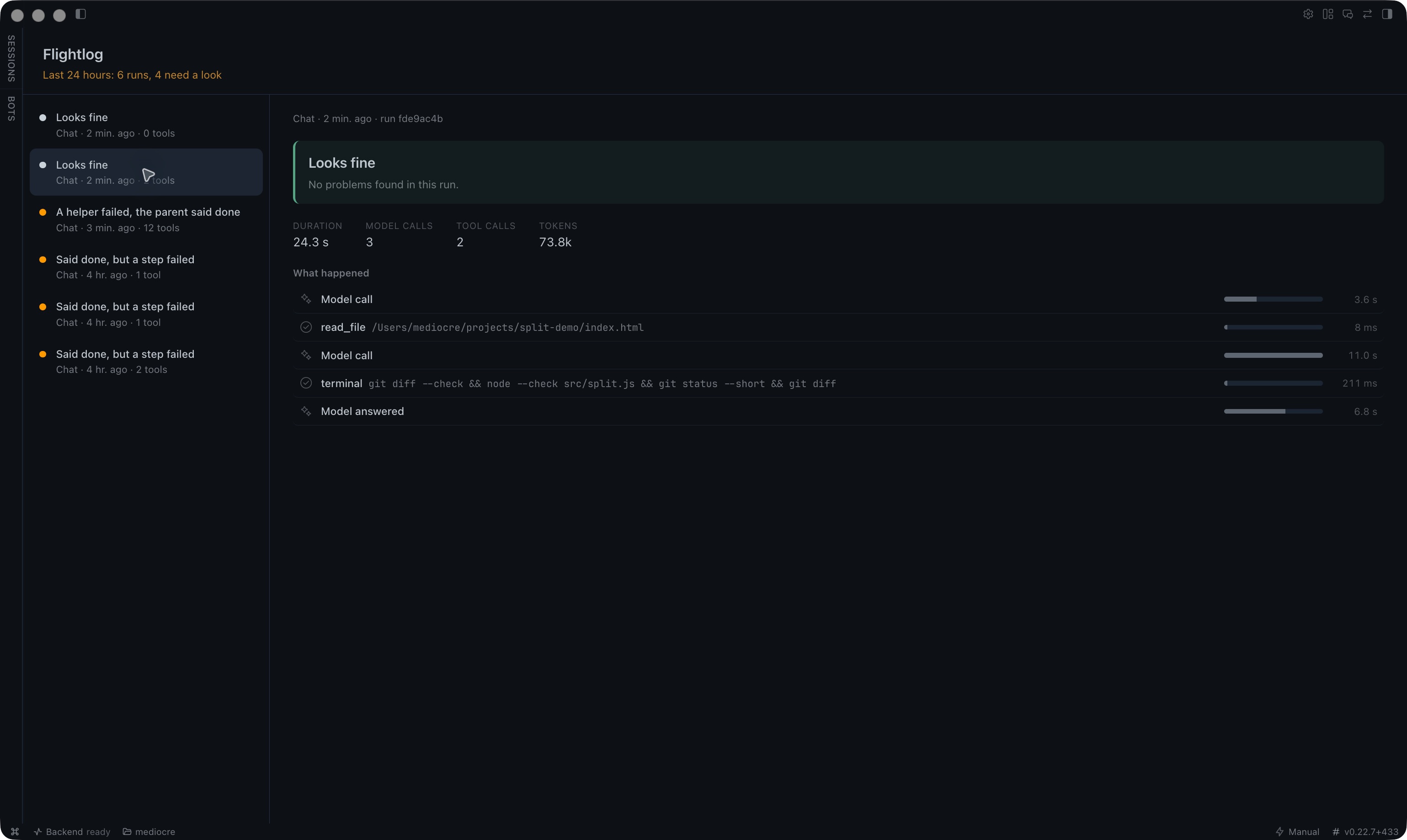
Desktop app: a Flightlog page (sidebar, or ⌘K → "Flightlog: show runs") lists runs with a verdict each, and shows the selected run's verdict, why it matters, and a step-by-step timeline with duration bars and failed steps in red. Turn it on in Settings → Plugins (the desktop half ships off by default).
Web dashboard: the same view as a Flightlog tab, plus a health card on the Cron page.
When a run is flagged, Flightlog appends a short note to the agent's answer. For cron jobs, the job's own deliver: target (Telegram, Discord and so on) carries it:
---
**⚠ Flightlog: said done, but a step failed.** web_search failed 3 times (429 rate limited), and the answer never mentions it. The answer may be built on data the agent never got.
- **Did far less work than usual.** Made 2 tool calls; this job usually makes 11.

Details: `/flightlog why 3f9a01c2`
The first line of the answer is never touched, so [CRON_FAILURE] keeps working. A [SILENT] job that gets flagged posts the note instead of staying silent; set break_silence: false to keep it quiet.
Desktop screenshots
A live repair run where two review helpers failed, followed by a run that disclosed the failures:
Rules
Each finished cron run is compared with its job's last 7 healthy runs.
| Rule | Trips when | Default |
| --- | --- | --- |
| Claimed it works, but never proved it | Files were edited, the answer claims tests pass or the fix works, and no test/build ran after the last edit, or the last one exited non-zero | any |
| Said done, but a step failed | A tool errored and the answer never mentions it | 1 error |
| Stuck in a loop | Same tool, near-identical arguments, in one run | 5 repeats |
| Cost far above normal | Tokens far above the job's median | 3x median |
| Did far less work than usual | Tool calls far below the job's median | under 25% |
| A helper failed, the parent said done | A subagent failed, parent still ok | any |
| Answered without doing any work | Zero tool calls on a job that normally uses tools | baseline over 0 |
Baseline rules stay silent until a job has 3 healthy runs. Interactive sessions get only the first four rules. A shell command that exits non-zero counts as a failed step.
Each flagged run gets a two or three sentence explanation from your own model (ctx.llm.complete), fed only redacted evidence. If that call fails, a fixed template is kept. The finding is never lost.
Settings
All optional, under plugins.entries.flightlog.settings in config.yaml:
plugins:
  entries:
    flightlog:
      settings:
        tripwire: false        # ask a human before a looping tool call continues
        break_silence: true
        rules:
          loop_repeats: 5
          cost_spike_x: 3.0
          effort_collapse_pct: 25
          min_baseline_runs: 3
Tripwire. When on, a pre_tool_call check counts repeats in memory (no I/O) and, at the loop threshold, returns approve, which hands the call to Hermes's own approval gate. Flightlog never blocks a tool on its own. Unattended cron runs have no one to answer, so they fail closed on the approval timeout.
Reliability and privacy
- Hooks only update an in-memory counter and enqueue. One background thread writes to SQLite in WAL mode with batched commits. The test suite checks p95 hook latency stays under 5 ms with 50 KB arguments.
- Every callback is wrapped in try/except and accepts
**kwargs. A Flightlog error never reaches the agent. - The queue is bounded at 10,000 events. When full, the oldest are dropped and counted.
- If the database is unavailable, recording pauses and the agent carries on.
- Local only. Nothing leaves the machine except the incident explanation, which goes to the model you already use.
- Previews are capped at 200 characters and passed through Hermes's secret redaction before storage.
- Data lives in
$HERMES_HOME/flightlog/flightlog.db, per profile, and is pruned after 30 days. - No network calls, no subprocesses, no monkeypatching.
tools.plugin_guardscan verdict: safe.
Development
ln -s "$PWD" ~/.hermes/plugins/flightlog
hermes plugins doctor flightlog
python3 tests/test_flightlog.py   # no Hermes or pytest needed
Licence
MIT
README from the reviewed commit c201d60; it updates when the author re-pins.