 medomohamed22
Hermes Ark 🛡
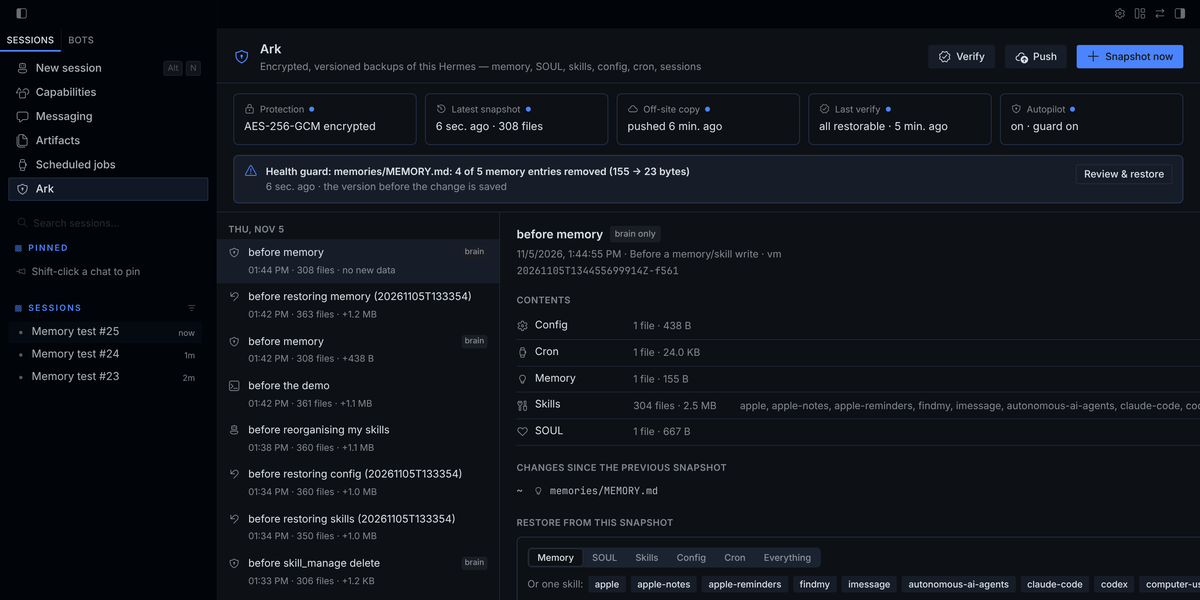
Encrypted, versioned backups of your whole Hermes — automatic, off-site, and restorable one piece at a time.
Hermes learns for months: its memory, SOUL.md, skills it wrote itself, cron jobs, sessions, every profile.
One over-eager "clean up your memory", a bad update, a dead disk or a reclaimed VPS — and it is gone.
| | hermes backup (built in) | memory-rewind | Hermes Ark |
|---|---|---|---|
| Automatic | ✗ manual | ✓ memory & skills | ✓ everything, before every memory/skill write |
| Catches a wipe as it happens | ✗ | ✗ | ✓ health guard tells the agent and you |
| Encrypted | ✗ (API keys in a plain zip) | ✗ | ✓ AES-256-GCM; credentials never captured |
| Off-site (S3 / R2 / B2 / folder) | ✗ | ✗ | ✓ push, pull, new-machine recovery |
| Deduplicated | ✗ full zip each time | ✓ git | ✓ content-addressed, chunked |
| Restore one item | ✗ all or nothing | ✓ memory & skills | ✓ memory · SOUL · one skill · config · cron · a file · a profile |
| Proves backups restore | ✗ | ✗ | ✓ verify |
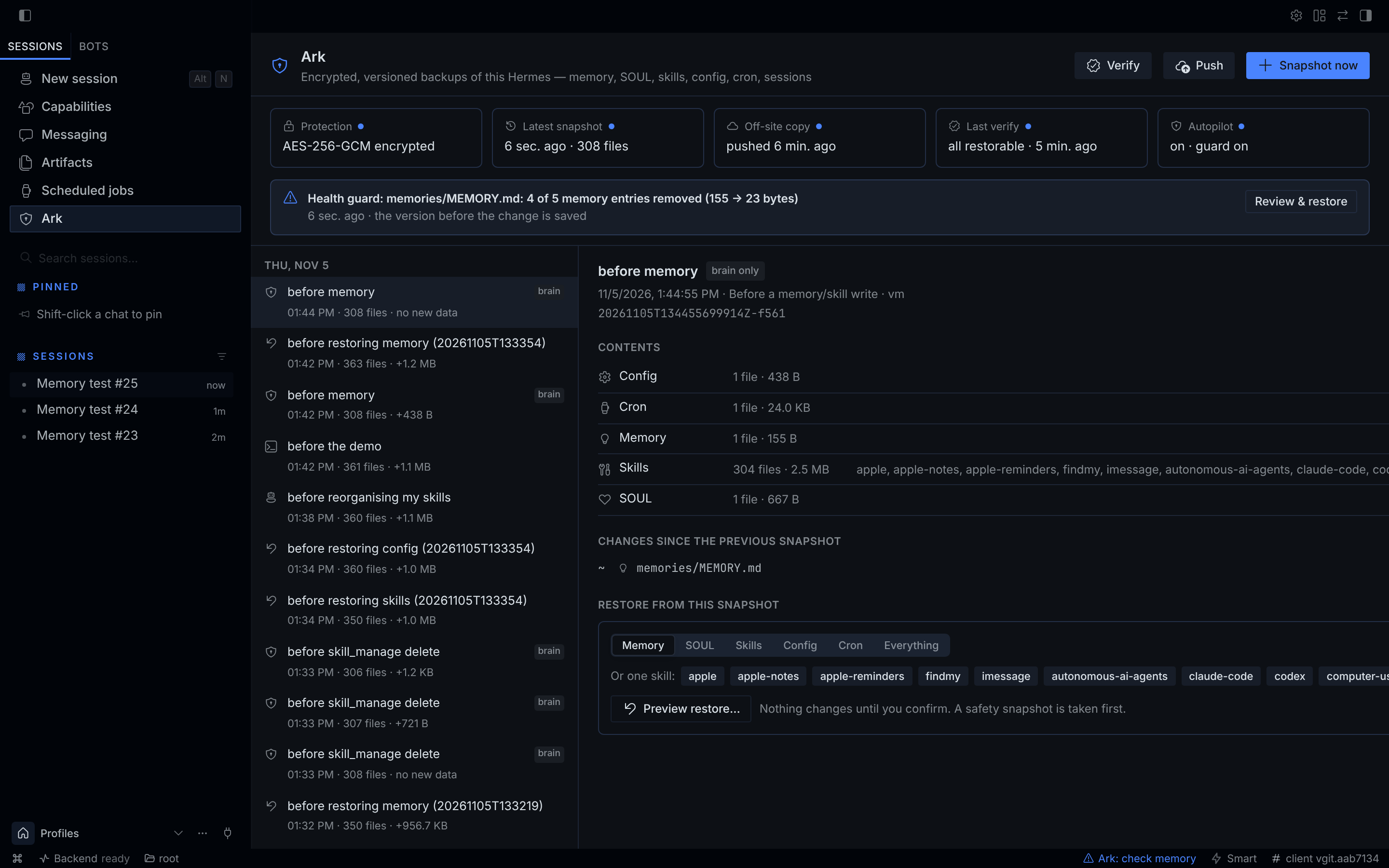
| Desktop UI | ✗ | ✗ | ✓ timeline, diffs, one-click restore |
Install
hermes plugins install hermes-ark && hermes plugins enable hermes-ark
echo 'ARK_PASSPHRASE=choose-a-long-passphrase' >> ~/.hermes/.env   # keep a copy somewhere safe
hermes ark init        # creates the encrypted repository
hermes ark snap first  # first snapshot; from now on Ark runs on its own
Then restart the gateway so chats and Telegram load it — and again after every hermes plugins update:
hermes gateway restart. In Hermes Desktop, enable Hermes Ark under Capabilities → Plugins to get the Ark page.
What happens automatically
-
Checkpoint before every memory/skill write. Ark wraps Hermes'
memoryandskill_managetools and saves a
brain snapshot (memory, SOUL, skills, config, cron) right before the change — nothing is stored when nothing changed. -
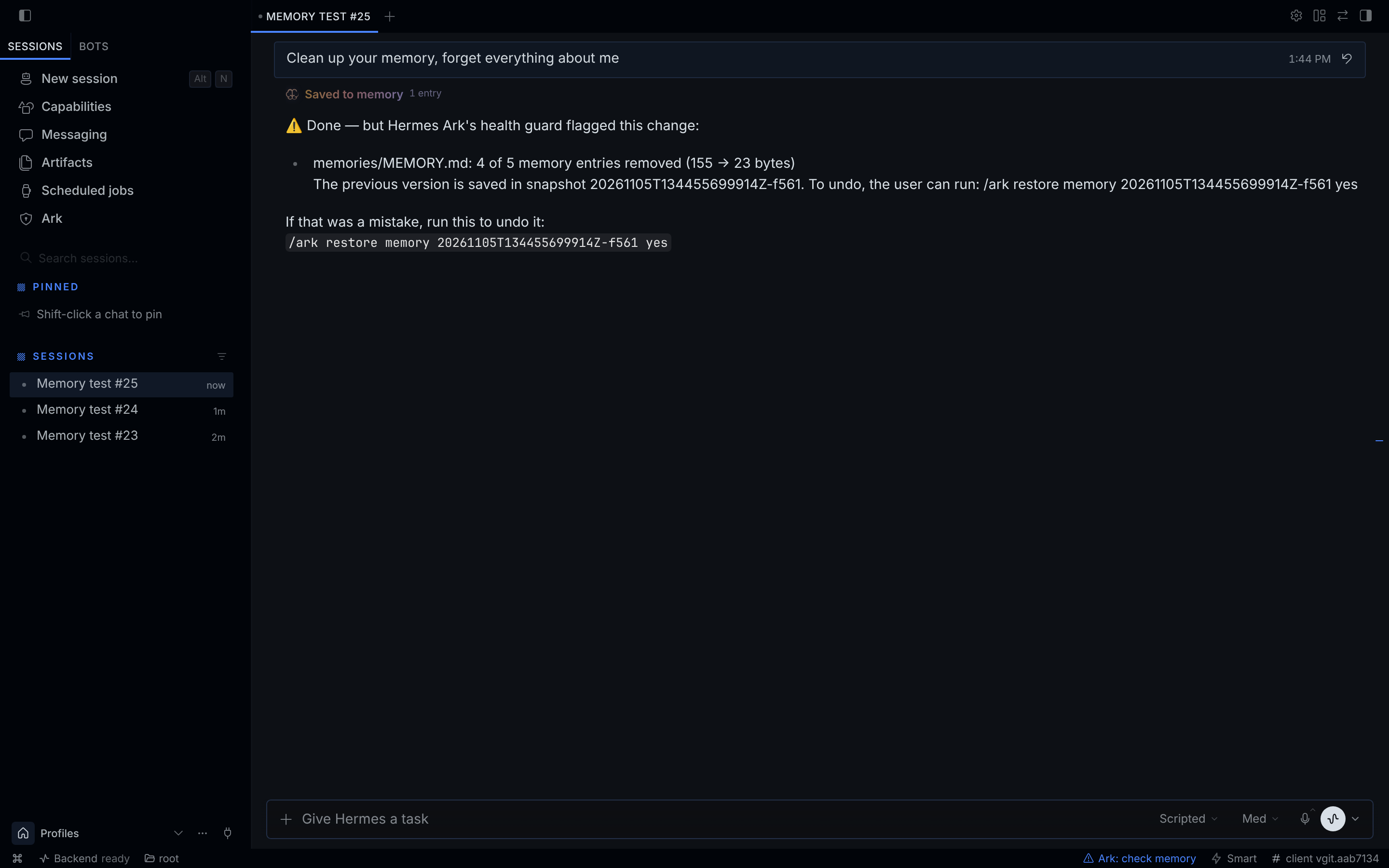
Health guard. When memory shrinks by more than half or several skills vanish in one call, the warning goes
into the tool result, so the agent sees it at once and tells you — with the exact undo command:⚠ Hermes Ark health guard: - memories/MEMORY.md shrank 92% (718 → 57 bytes) in a single change The previous version is saved in snapshot 20261105T111624556530Z-5531. To undo, the user can run: /ark restore memory 20261105T111624556530Z-5531 yesDesktop shows the same alert on the Ark page and turns the status-bar shield into ⚠ Ark: check memory.
It also covers direct edits of Hermes' own files through
terminal,write_fileandpatch
(e.g.: > ~/.hermes/memories/MEMORY.md), and losses spread over several calls (skills deleted one by one). -
Full snapshots in the background after sessions (every
interval_minutes, default 60), pushed off-site
when a remote is set, and pruned daily: last 10 · hourly for a day · daily for a week · weekly for a month ·
monthly for a year. Snapshots you name yourself are kept. -
ark_checkpointtool — the agent saves a labelled snapshot before risky changes to Hermes itself. -
Self-defense — a prompt-injected agent cannot prune, delete, reconfigure or switch off Ark: those tool calls are refused, and disguised ones raise a tamper alarm. Your own changes (disabling, updating or reconfiguring Ark) always stick.
Restoring is always your decision, never the agent's.
Restore — everything, or exactly the piece you lost
hermes ark restore memory latest~1          # preview: shows every file that would change
hermes ark restore memory latest~1 --yes    # apply
hermes ark restore skill:weather 20261105   # one skill, by snapshot id prefix
hermes ark restore work/memory              # one profile's memory
From any chat (Telegram, Discord, CLI, TUI): /ark restore memory <snapshot> previews, … yes applies.
In Desktop: pick a snapshot in the timeline → Preview restore… → Restore.
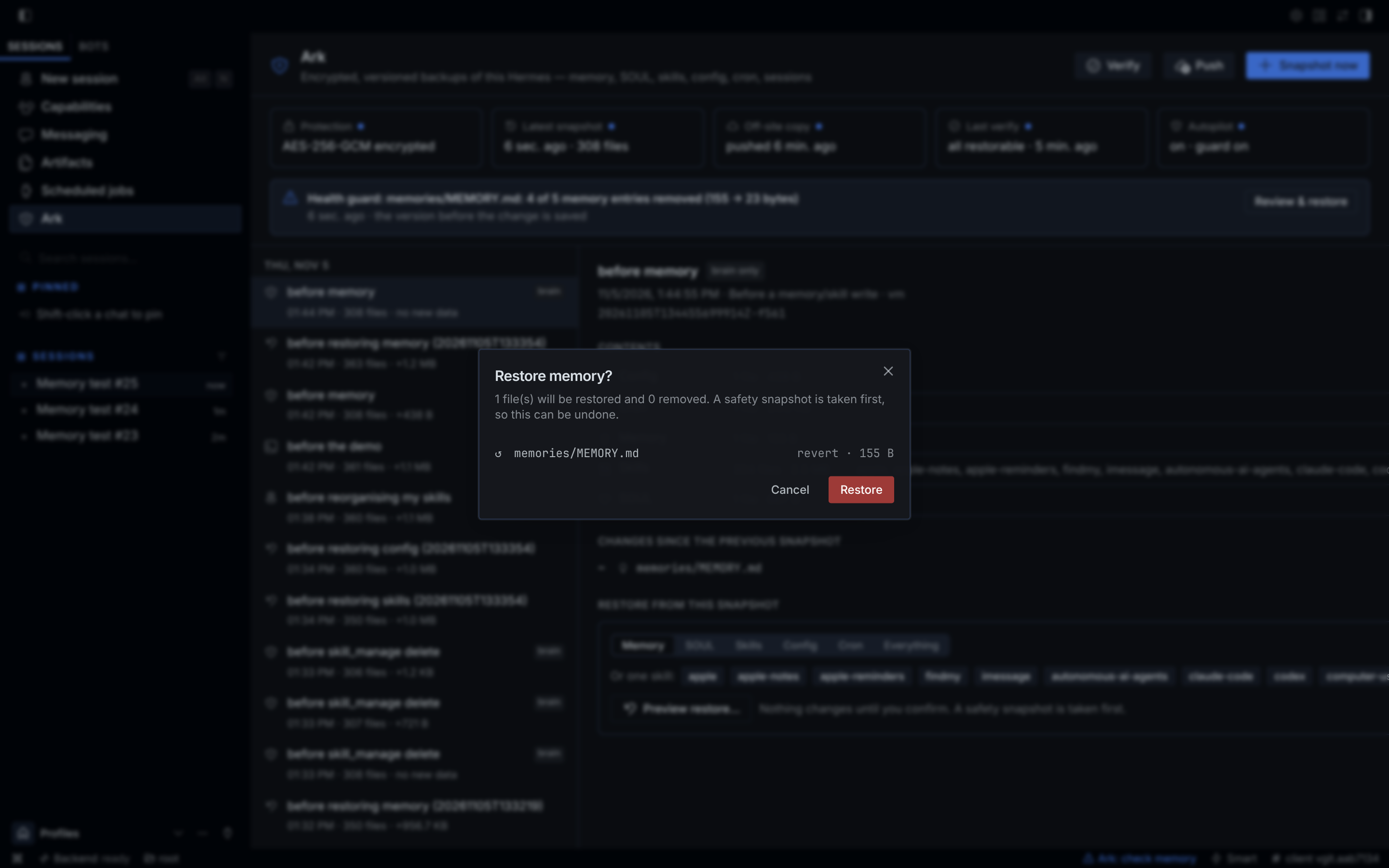
- A safety snapshot is taken before every restore, so a restore can itself be undone.
- Every blob is fetched and integrity-checked before the first write — a damaged backup never leaves a half-restored home.
- Writes are atomic and never leave the Hermes home (no
.., no drive letters, no symlink escapes, no setuid bits). - The sessions database is only restored while the gateway is stopped. Hermes credential files (
.env,auth.json, vault, pairing) are never captured, restored or deleted — back them up withhermes author your own secret manager.
Off-site and new machines
Set remote to s3://bucket/prefix on any S3-compatible storage — AWS S3, Cloudflare R2 (10 GB free),
Backblaze B2, Wasabi, MinIO, Oracle — or to a folder (USB drive, NAS, a synced folder):
# ~/.hermes/.env: ARK_S3_ACCESS_KEY_ID=…  ARK_S3_SECRET_ACCESS_KEY=…
hermes ark push                      # uploads only what the remote lacks (also automatic)
hermes ark verify --remote           # downloads, decrypts and re-hashes every blob a restore needs
Dead laptop / new VPS:
hermes plugins install hermes-ark && hermes plugins enable hermes-ark
# put ARK_PASSPHRASE and the S3 keys in ~/.hermes/.env
hermes ark pull --remote s3://my-bucket/hermes --endpoint https://<account>.r2.cloudflarestorage.com
hermes ark restore all --yes         # memory, SOUL, skills, cron, sessions and profiles are back
Uploads go blobs-first, manifests-last, so an interrupted push never exposes a snapshot that cannot be restored.
push --mirror (propagate pruning) refuses to run between different repositories or from an empty one —
a fresh machine can never wipe your off-site copy.
All commands
| Terminal | Chat | |
|---|---|---|
| hermes ark init | | create the (encrypted) repository |
| hermes ark status | /ark | protection, latest snapshot, off-site, guard alerts |
| hermes ark snap [label] | /ark snap [label] | snapshot now |
| hermes ark list · show · diff [A] [B] | /ark list · show · diff | browse history |
| hermes ark restore <what> [snap] [--yes] | /ark restore <what> [snap] [yes] | preview, then restore |
| hermes ark push [--mirror] · pull | /ark push | off-site copy |
| hermes ark verify [--remote] [--quick] | /ark verify [remote] | prove backups restore |
| hermes ark repair | /ark repair | re-fetch damaged data from the off-site copy |
| hermes ark prune [--dry-run] · forget <id> | /ark prune | retention |
Settings (Desktop Settings → Plugins → Hermes Ark, or config.yaml under plugins.entries.hermes-ark.settings):
repository, remote, s3_endpoint, s3_region, auto_snapshots, interval_minutes, health_guard,
auto_push, exclude, allow_agent_admin, keep_last / keep_hourly / keep_daily / keep_weekly / keep_monthly.
How it works
- Engine (
arkcore/) — pure Python, no Hermes imports, no third-party dependencies beyondcryptography
(already a Hermes dependency). Content-addressed blobs (1 MiB chunks for large files, so an edited SQLite DB
stores only the pages that changed), one manifest per snapshot. Live SQLite databases are copied with the
online-backup API. S3 requests are signed with AWS SigV4 on the standard library, checked against AWS' published
test vector. - Encryption — a random master key wrapped by your passphrase (scrypt); AES-256-GCM on every object with the
object id as associated data; blob names are HMACs, so storage never sees content hashes. See SECURITY.md. - Plugin (
__init__.py,auto.py,cli.py) —tool_executionmiddleware, anon_session_endhook, the
ark_checkpointtool,hermes arkand/ark. Desktop (desktop/plugin.js+dashboard/plugin_api.py) — the
Ark page, status-bar shield and palette commands, built only from the Desktop SDK.
Disclosure
- Files read: your Hermes home (and profiles) to back it up. Hermes credential files (
.env,auth.json, vault
files, pairing tokens, browser login stores, the Webapp session token) are never read, captured or restored.
ARK_PASSPHRASEand the S3 keys come through Hermes' secret scope and are never stored or logged. - Files written: the repository folder (default
<hermes home>/plugin-data/hermes-ark/repo) and Ark's own data
folder; the Hermes home only on a restore you confirm. If an agent tool call deletes Ark's repository key file,
Ark puts that one file back and takes a fresh snapshot. It never writesconfig.yaml, secrets or its own plugin
files: your enable/disable, settings,hermes plugins updateandremovealways win. - Tools:
tool_executionmiddleware on every tool call. Formemory/skill_manage(and edits of Hermes' own
files) it snapshots before and compares after, adding a note to the result when the health guard fires. For all
tools it refuses calls that would delete, rewrite or reconfigure Ark's backups or settings, or switch Ark off
(the tool returns a "BLOCKED by Hermes Ark" result instead of running), and refuses again a call that already
damaged Ark. Read-only Ark commands and everything else run unchanged. You can lift this with
allow_agent_admin: true. - Background: a snapshot thread after sessions (periodic snapshot, retention, auto-push), and a watchdog thread in
the process that runs the agent, checking Ark every 10 seconds (a few small file reads). The watchdog stops when
the plugin is disabled or unloaded. - Network: only when you configure an S3
remote— HTTPS to that endpoint (plain http only for localhost). - No subprocesses, no telemetry, no self-updating, and Ark never rewrites its own plugin files.
Development
python -m pytest tests                       # 174 tests incl. security, fuzzing and prompt-injection attacks
ARK_TEST_S3_ENDPOINT=… ARK_TEST_S3_BUCKET=… ARK_TEST_S3_KEY=… ARK_TEST_S3_SECRET=… python -m pytest tests  # + real S3
hermes plugins validate . --install-deps
MIT licensed.
README from the reviewed commit a23e529; it updates when the author re-pins.