 PietrangeloManco
hermes-colab
Run Python scripts and Jupyter notebooks on Google Colab GPUs from a Hermes chat.
"Fine-tune
examples/lora_t4/train.pyon a Colab T4 and tell me when it's done."
Hermes gets a Colab runtime, uploads your code, keeps the runtime alive, streams
progress, syncs outputs and checkpoints back to your machine while the job runs,
and — when Colab takes the runtime away mid-run — gets a fresh one and resumes from
the last synced checkpoint. When the run ends, the chat that started it hears about it.
No browser tab to babysit, no copy-pasting notebooks, no lost epochs.
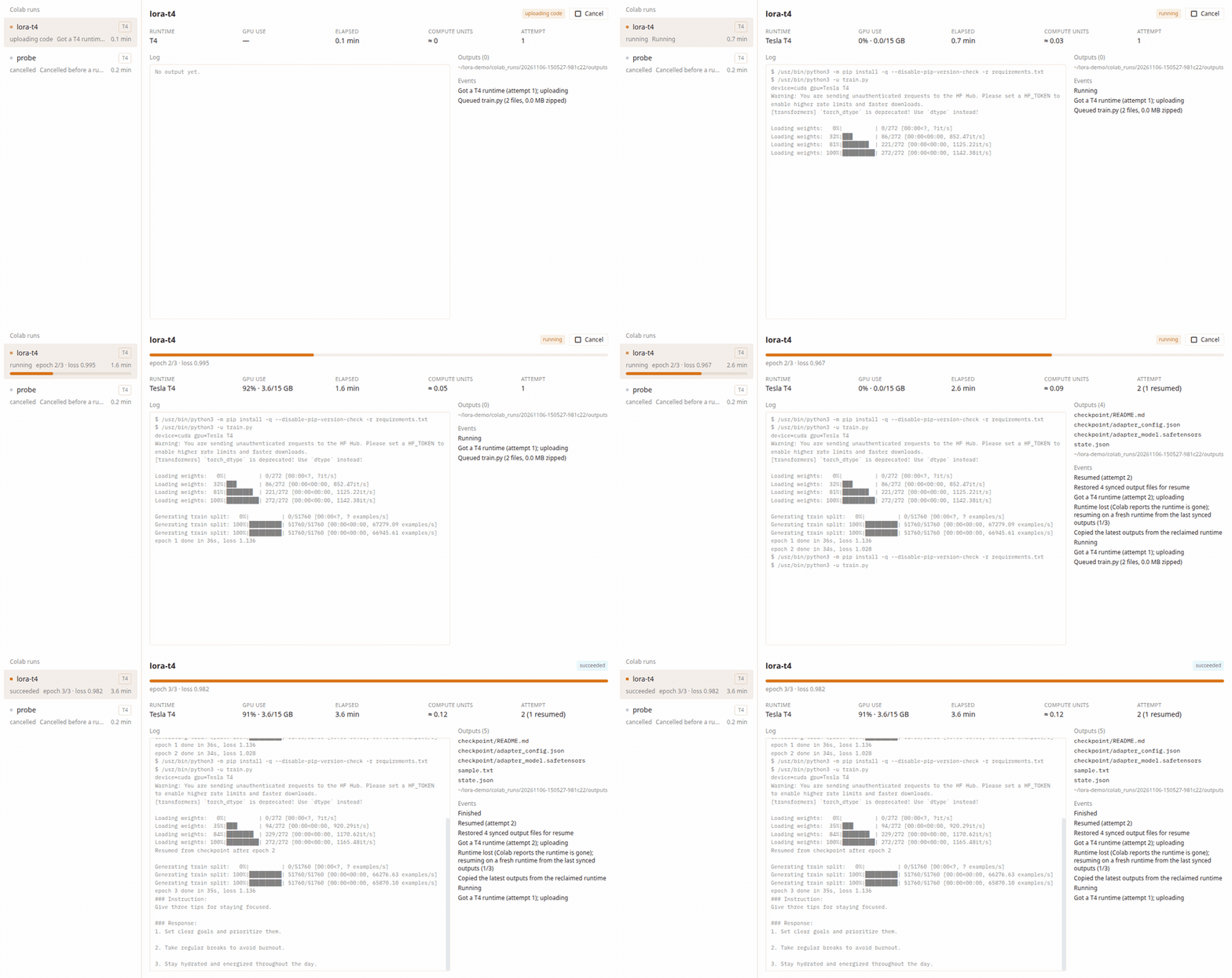
The LoRA example on a free T4 (real run, sped up): Colab takes the runtime away after
epoch 2, the plugin copies the newest checkpoint home, gets a fresh runtime and finishes
epoch 3 there.
What it does
| Tool | What for |
|---|---|
| colab_run | Start a .py or .ipynb (a single file or a project folder) on T4, L4, A100, H100 or a TPU. Returns immediately with a run id. |
| colab_status | State, progress bar data, GPU name/utilisation/memory, elapsed time, compute-unit estimate, synced outputs, recent events. all=true lists recent runs. |
| colab_logs | Tail of the job's stdout/stderr (progress lines left out; they drive colab_status). |
| colab_cancel | Stop the job, sync what it wrote, release the runtime. |
| colab_resume | Restart a failed/cancelled run on a fresh runtime with its outputs restored. |
| colab_runtimes / colab_release_runtime | See and free the runtimes assigned to your account. |
| colab_doctor | Checks setup end to end and names the exact next step. |
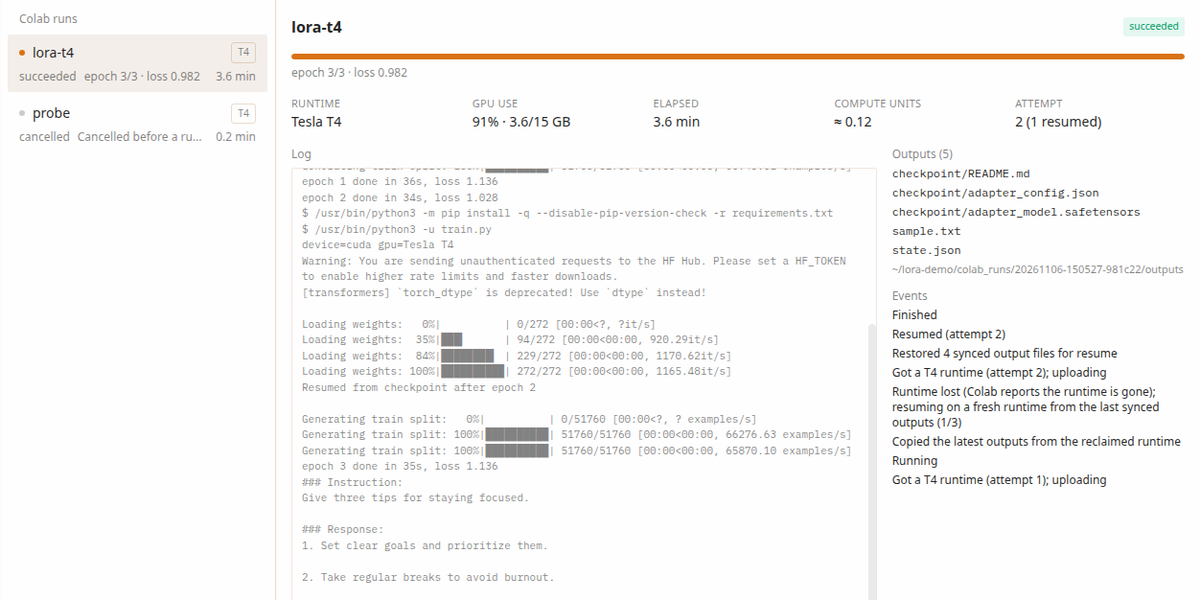
Hermes Desktop: a Colab page in the sidebar lists your runs with live progress,
GPU name/utilisation/memory, elapsed time, compute-unit estimate, the log, synced outputs
and events, with Cancel and Resume on a fresh runtime buttons. It follows the app theme.
How a run behaves:
-
Background supervision. Runs live in a small SQLite store in the profile's
plugin data directory. A supervisor thread (one per profile, lease-protected)
drives them, so a run keeps going after the chat turn ends, is picked up again
after Hermes restarts, and a run started by a cron job or a one-shot CLI is
carried on by the Hermes that keeps running (Desktop backend, gateway). -
Outputs come home as they appear. Anything the job writes to
$HERMES_COLAB_OUTPUT_DIRis copied to<your project>/colab_runs/<run id>/outputs/
once a file stops changing — checkpoints, metrics, plots, the executed notebook. -
Resume on a fresh runtime. If Colab reclaims the VM (idle timeout, preemption,
usage limits), the supervisor assigns a new runtime, re-uploads the code, restores
the synced outputs and restarts the job withHERMES_COLAB_RESUME=1. A training
script that loads its last checkpoint from$HERMES_COLAB_OUTPUT_DIRcontinues where
it stopped (seeexamples/lora_t4). -
Progress. Print
HERMES_PROGRESS {"step": 120, "total": 450, "label": "epoch 1/3"}
from your script; notebooks report cell progress automatically (via papermill). -
Waiting for a GPU. When Colab has no runtime of the requested type, the run waits
and retries with backoff (default up to 30 minutes) instead of failing. -
The chat hears back. When a run ends, its summary (state, time, compute units,
outputs) reaches the chat that started it on that chat's next turn. To have it arrive on
its own, as a new message even while you are away, allow the plugin to queue messages
(Hermes Desktop and TUI chats are reached by their session key, also after a restart;
messaging chats while Hermes keeps running):# config.yaml plugins: entries: hermes-colab: allow_gateway_injection: true
Setup
1. Create your Google OAuth client
Google requires every app that talks to Colab to use an OAuth client. You use your own,
and Hermes owns the sign-in: the plugin never sees your token, refresh token or
client secret (they live in Hermes' auth store; requests are made by Hermes core).
- In the Google Cloud console, create or pick a project.
- APIs & Services → OAuth consent screen: user type External, add your Google
account under Test users. - APIs & Services → Credentials → Create credentials → OAuth client ID,
application type Desktop app. Copy the client ID and secret.
2. Install and configure
hermes plugins install hermes-colab
hermes config set HERMES_COLAB_CLIENT_ID     <client id>
hermes config set HERMES_COLAB_CLIENT_SECRET <client secret>
(or paste both into Settings → Plugins → hermes-colab in Hermes Desktop.)
3. Sign in once
hermes auth add hermes-colab:google
Sign in with the Google account you use on colab.research.google.com. Then ask Hermes
to run colab_doctor — every check should be green.
Requires Hermes Agent 0.22.7 or newer (plugin-declared OAuth clients).
Writing resumable jobs
import os, json
out = os.environ.get("HERMES_COLAB_OUTPUT_DIR", "outputs")
state_file = os.path.join(out, "state.json")
start = 0
if os.environ.get("HERMES_COLAB_RESUME") == "1" and os.path.exists(state_file):
    start = json.load(open(state_file))["epoch"]          # + load your checkpoint
for epoch in range(start, EPOCHS):
    train_one_epoch()
    save_checkpoint(out)                                  # small and atomic is best
    json.dump({"epoch": epoch + 1}, open(state_file, "w"))
Save the weights first and the small progress file last, each with a write-to-temp plus
os.replace: outputs come home in write order once they stop changing, so the progress
file on your machine never describes weights that have not arrived yet.
Large datasets: download them inside the job (Hugging Face, public URLs). Uploads are
capped by max_upload_mb (default 512 MB) and output files above max_sync_mb
(default 1 GB) are listed but not copied home.
Settings
default_accelerator (T4), auto_resume (on), max_resumes (3),
wait_for_gpu_minutes (30), max_upload_mb (512), max_sync_mb (1024),
compute_unit_rates (for the estimate only), notify_on_finish (on).
Security and privacy
- What leaves your machine: the files of the run (a single file plus a sibling
requirements.txt, or the project folder minus hidden files and folders (except
.python-version), virtualenvs, caches, symlinks, hard-linked files and common
credential files such ascredentials.json,token.json), the requirements and the
non-secretenvyou pass.
The home directory,HERMES_HOMEand folders such as~/.ssh,~/.config(or any
folder containing home orHERMES_HOME) are refused. - Where outputs land:
<code folder>/colab_runs/<run id>/, or anoutput_dirinside
the chat's working directory (unless that is the home directory or holds it) or the code
folder;HERMES_HOME, the home directory itself and the credential folders are refused,
also when reached through a symlink, and symlinks inside the run folder are never followed. - Where it goes:
colab.research.google.com(assignment, keep-alive, release; with
your Google sign-in attached by Hermes) and your runtime's Colab proxy (with the
short-lived runtime token Colab returns, kept in memory only). - Cost: runtimes consume your Colab compute units like the web UI does. Runtimes are
released when a run ends unless you passkeep_runtime. The estimate in
colab_statususes the rates in settings; check your plan for current rates. - Code runs on your Colab runtime: the plugin uploads a small runner (
remote/runner.py,
standard library only) next to your code and starts it detached; itpip installs the
run's requirements there (pluspapermillfor notebooks). Nothing runs on your machine
except the plugin itself. - Background work: a daemon thread supervises active runs while Hermes is running
(one per profile, coordinated through a lease in the run store); with no active run it
only reads the run store every 30 s. - Local data: run records live in SQLite under the profile's plugin data directory
(plugin-data/hermes-colab/runs.db); logs and outputs in the run folder you see in
colab_status. No credentials are stored by the plugin. - Chat context: a
pre_llm_callhook adds a one-line summary of a finished run to the
next turn of the chat that started it, once.
Development
uv venv && uv pip install "httpx>=0.27,<1" "websockets>=13,<16" pytest jupyter_server ipykernel fastapi ruff
.venv/bin/python -m pytest tests -q
The test suite uses a real local Jupyter server as a stand-in for the Colab VM, so
the kernel protocol, chunked transfers, the detached runner, output sync and
resume-on-a-fresh-runtime are exercised end to end; only the Colab assignment
endpoints are faked.
License
MIT
README from the reviewed commit f05cf93; it updates when the author re-pins.