
 Synero
Live Voice for Hermes Desktop 🎙️
Native full-duplex voice for Hermes — talk to your
bots from Hermes Desktop with real-time audio, live transcript, voice tool calls and task delegation.
Engine: GPT-Live-1 (gpt-live-1-codex)
through the local Codex app-server, running on a ChatGPT/Codex subscription — no API key needed
for the voice lane.


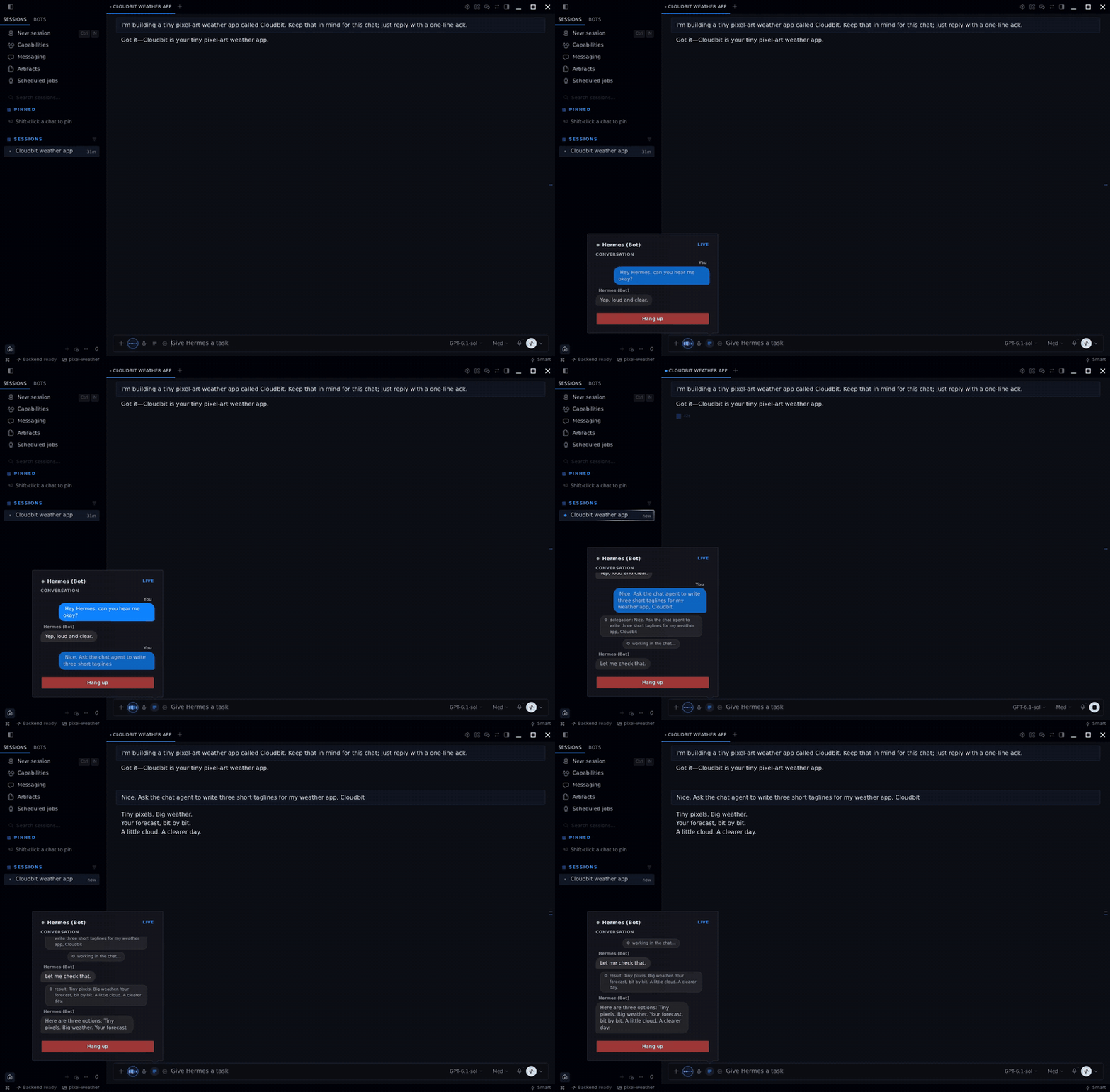
Real call recorded in Hermes Desktop: the bot voice is the live engine, the "user" voice is TTS. Click for the MP4 with sound.
Contents
- Features
- Requirements
- Install
- First run
- Configuration
- Troubleshooting
- How it works
- Status & roadmap
- Changelog
- Tests
- Credits
- License
Features
- 🎧 Full-duplex, interruptible voice over WebRTC — audio goes device ↔ model directly (the server only brokers the session).
- 🤖 Persona-aware — the voice session adopts the active bot's
SOUL.mdidentity and language. - 📝 Live transcript — iMessage-style bubbles (you / bot), streaming deltas, tool activity chips.
- 🛠️ Tools from voice — the model can run tasks: by default they are delegated into your focused Hermes chat, i.e. your own agent with your models and providers. A voice-side delegation policy keeps this clean (only real task requests are delegated, fillers stay conversational) and an internal queue prevents overlapping runs. An opt-in server-agent mode also exists.
- 🎚️ Audio & call controls — device pickers, built-in mic test, one-tap mute and hang-up right in the composer.
- 📊 Usage panels — measured voice minutes (rolling windows) and the Codex plan bucket.
Requirements
- Hermes Agent (backend) and Hermes Desktop (app).
codexCLI ≥ 0.154, logged in with a ChatGPT plan (codex login— device auth).- Python 3.11+ for the backend half.
Install
The plugin ships as a unified package: a backend half (dashboard/plugin_api.py, mounted by the
Hermes dashboard under /api/plugins/talk-desktop/) and a desktop half (desktop/plugin.js, loaded by
the Hermes Desktop app).
From the Hermes plugin catalog
hermes plugins install hermes-live-voice   # curated catalog · tier: community
hermes plugins enable talk-desktop
The catalog entry pins a released revision of this repo (updates: hermes plugins update hermes-live-voice). It lands in $HERMES_HOME/plugins/talk-desktop — the folder name the desktop
app expects — so the desktop half is picked up on the next app start.
Same-machine setup (manual)
# 1) Drop the repo into your Hermes plugins directory:
cp -r hermes-live-voice "$HERMES_HOME/plugins/talk-desktop"     # default: ~/.hermes/plugins/talk-desktop

# 2) Enable the backend plugin (config.yaml → plugins.enabled) and restart the dashboard.
The desktop app discovers the desktop half from the plugin folder
($HERMES_HOME/plugins/talk-desktop/desktop/plugin.js) automatically.
Remote desktop (app on another machine, backend on a server)
- Install the backend half on the server as above.
- Copy only
desktop/plugin.jsto the desktop machine:
$HERMES_HOME/desktop-plugins/talk-desktop/plugin.js— the folder name must equal the plugin id
(talk-desktop), andplugin.jsmust sit at the folder root. - In the app:
Ctrl/Cmd+K→ “Reload desktop plugins”.
First run
- The mic button appears in the composer (next to the
+row). Click to start a call. - Open the gear ⚙ for settings: Bot → Voice engine → Voice → Audio.
- If this is a fresh machine: sign in to Codex first (
codex login) or use the in-panel session flow.
Configuration
settings.json is stored next to the installed backend plugin
($HERMES_HOME/plugins/talk-desktop/settings.json). See settings.example.json:
| key | values | default | meaning |
|---|---|---|---|
| codexAgentModel | a ChatGPT-valid Codex model slug (e.g. gpt-5.6-sol) | (unset) | Model forced for the delegated server agent thread. Needed only when the machine's default Codex model is not ChatGPT-valid (e.g. a custom provider proxy). |
| delegation | client · server | client | Who runs voice-delegated tasks. client = the tasks run in your focused Hermes chat (your config/providers — recommended, nothing is sent to the ChatGPT lane). server = tasks run in a Codex agent thread on the backend (advanced/opt-in). |
Troubleshooting
First-run gotchas:
- No sign-in prompt? The voice session needs a ChatGPT-plan Codex login. Open the mic
config (gear while the plugin is visible) → the auth card shows your sign-in state and a
Sign in button: it opensauth.openai.com/codex/devicewith a code to type.
Nothing to copy by hand from a terminal. codexnot found in the dashboard logs? The backend resolvescodexfrom
~/.local/bin,$PATHand/usr/local/bin. If your service runs with a minimal
PATH, add the codex bin directory to the service environment.- "Method Not Allowed" (or "Not Found") when starting a voice session? The backend half
is not mounted in the dashboard, so the request falls through to its catch-all page. The
dashboard mounts plugin routes only at startup: restart the dashboard (or the service
running it) after installing or enablingtalk-desktop, and make sure it is listed under
plugins.enabledinconfig.yaml. Then look forMounted plugin API routes: /api/plugins/talk-desktop/in the Hermes logs; aFailed to load plugin talk-desktop API routeswarning (not an error) gives the real import failure. Remote setups: the dashboard
on the server is the one to restart, not the desktop app. - Persona too generic? The voice reads the focused bot's
SOUL.md. No bot focused →
it uses your Hermes default identity.
How it works
The desktop renderer negotiates a WebRTC session against the ChatGPT backend; a local broker spawns
codex app-server and drives the realtime conversation (protocol v3, model gpt-live-1-codex).
Voice-delegated tasks surface as delegation items; the client (by default) routes them to your
focused Hermes chat and feeds the result back to the voice model to speak.
┌─ Hermes Desktop ────────────────────────────────────────────────────────────┐
│  mic button in the composer  ·  Live Voice panel: transcript, controls, usage  │
└────────────────────────────────────────────────────────────────────────────┘
                │  WebRTC audio — the device talks to the model directly;
                │  the broker only sets the session up.
                v
┌─ ChatGPT realtime backend ──────────────────────────────────────────────────┐
│  GPT-Live-1 (gpt-live-1-codex)  ·  realtime protocol v3                      │
└────────────────────────────────────────────────────────────────────────────┘
                │  spawn + drive over stdio JSON-RPC
                v
┌─ dashboard half — /api/plugins/talk-desktop/ ───────────────────────────────┐
│  broker: codex app-server on your ChatGPT/Codex subscription                 │
└────────────────────────────────────────────────────────────────────────────┘
                │  delegation item (client mode, default)
                v
┌─ your focused Hermes chat ──────────────────────────────────────────────────┐
│  runs the task with YOUR models and providers, then the result               │
│  is fed back and spoken by the voice model                                   │
└────────────────────────────────────────────────────────────────────────────┘
Full engineering recipe, protocol tables and gotchas:
docs/live-voice-recipe.md.
Status & roadmap
⚠️ Preview (0.2.x). The backend resolves its voice plumbing at import time in this order: the
full hermes-talk plugin when it is installed (richer
— native voice tools, run steering, cascade modes), otherwise the MIT-licensed fallback bundled in
dashboard/talk_vendor/, so a fresh install with no other plugin mounts correctly (covered by a
regression test that runs with an empty HOME and no hermes-talk present). Runtime dependencies
are the Hermes dashboard's own (fastapi, httpx); the desktop half has no build step. The complete
Live Voice implementation and the protocol documentation are included here for reference and
integration work.
Changelog
- 0.2.6 — the plugin no longer holds, refreshes or rewrites a Codex token (#20). On the ChatGPT-subscription lane Hermes signs the Realtime client-secret request itself (
credentialed_provider_request, NousResearch/hermes-agent#136117) with its own locked refresh, the plan usage panel reads Hermes's read-onlyfetch_account_usage, and "Sign out" no longer deletes~/.codex/auth.json(it points athermes auth logout openai-codex). The bundledtalk_authis pinned in-process so an installedhermes-talkcannot add a second refresher.plugin.yamlnow declaresrequires_auth: [openai-codex]and needs Hermes>=0.21.7. API-key lanes and the gpt-live-1 app-server lane are unchanged. Why it matters: Codex refresh tokens are single-use, so two refreshers racing signed users out of Hermes and the Codex CLI. - 0.2.5 — no bot name is hardcoded any more: when no bot profile is chosen the voice identity uses the host
agent.namefrom config, falling back to "Hermes" (#16); the "[voice] reply briefly" note no longer shows up inside the chat bubble on hosts that support the voice-live surface, it only reaches the model (#17); README now has a real demo recording and screenshots (#18). - 0.2.2 — identity and language polish, on top of community fixes by @tillstriegel (#4): the voice identity prompt no longer hardcodes the owner's name, the model-facing voice context follows the session language (es/en), and — fixed here — the delegated-thread recovery path now keeps that language instead of silently recreating the thread in the fallback while the previous run was in the other language. Also: the transcript's user label is localized ("Tú"/"You") rather than a hardcoded name, and the identity docstring no longer lists private bot names. Why it matters: the plugin runs on other people's machines, so no installer should ever see someone else's name in the prompt or in the UI.
- 0.2.1 — audit fixes: the backend now imports its bundled
talk_vendorfallback on fresh installs (previously it neededhermes-talkinstalled); a concurrent/sessionpair no longer deadlocks the event loop; app-server RPC correlation survives reader-buffer pruning;/codexlive/interruptruns off the event loop;CODEX_HOMEis honored consistently across login/backup/logout; when an older app-server dropsclientManagedHandoffsthe response now carriesdroppedFields/handoffDegraded/warningand the desktop shows a notice instead of failing silently; the desktop interrupt call sends a plain object body (no double-encoding) and a muted mic can no longer be un-muted by barge-in. - 0.2.0 — call controls (mute button, hover states) + delegation hardening: voice-side delegation policy, TTS-friendly reply note, filler filter, task queue, and neutralized background thread turns (the Codex plan no longer pays for invisible tool work).
- 0.1.0 — initial public preview.
Tests
python -m pytest -q
Regression tests for the audit findings in issue #1 (no network, no codex binary, no OpenAI
calls — stdlib + pytest only). CI additionally verifies the bundled fallback imports on a
clean environment (empty HOME, no site-packages), compiles the backend, syntax-checks the
desktop half and runs the ESM load harness.
Credits
Voice auth, session minting and identity plumbing are derived from
TheSmokeDev/hermes-talk (MIT) —
bundled in dashboard/talk_vendor/ with attribution in NOTICE.md. The
plugin prefers the full hermes-talk when it's installed (native voice tools,
run steering, cascade modes); the bundled fallback keeps fresh installs
self-contained.
Thanks to @whyyagswhy for the external audit
and the reproduction script behind the 0.2.1 fixes.
License
MIT — see LICENSE. Codex and GPT are OpenAI products; this project is not affiliated
with or endorsed by OpenAI. The Codex CLI it drives is open source and installed by the user.
README from the reviewed commit 0578e0c; it updates when the author re-pins.