
 qwertyuiop97
Loadout for Hermes
Keep a skill library without making every skill available to every agent.
Loadout runs inside Hermes Desktop. It shows the skills you already have, lets
you choose what each application can discover, and saves those choices as named
loadouts. It also manages supported MCP connections. Every capability change is
reviewed before it is applied, with a receipt and a previewed undo.
This is for people who use several coding agents or maintain more skills than
they want active at once. One application with a small skill collection may not
need it. This is a pre-release alpha, not a certification of every client.
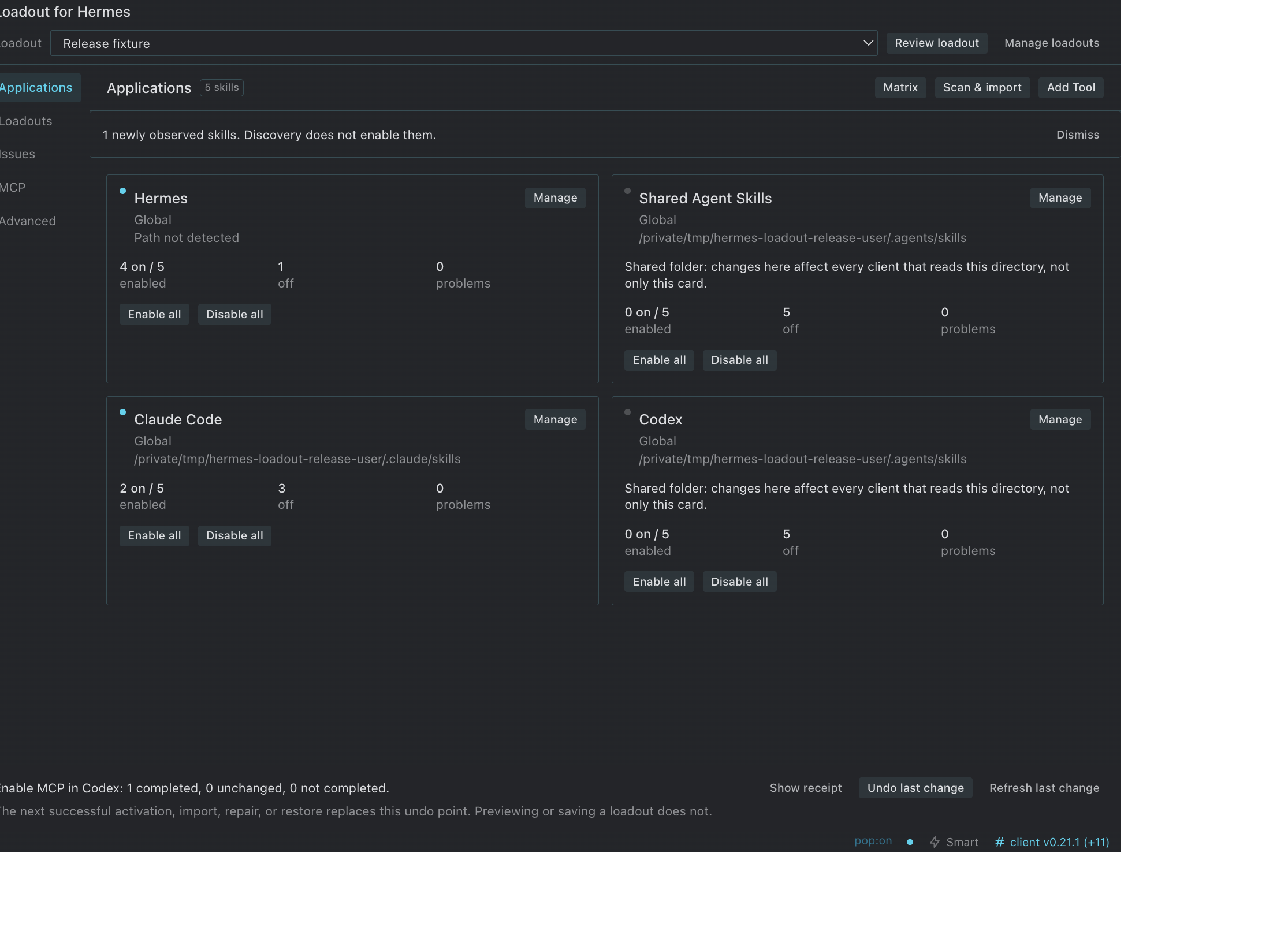
Applications view in Hermes Desktop, captured with a disposable profile and
synthetic skills.
Library, import, and activation
The library lives in <hermes_home>/skills/<category>/<name>/SKILL.md. The default
Hermes home is ~/.hermes. A skill can be stored there and off everywhere.
Scan reads supported locations and folders you select. It does not install
applications, create links, change settings, or activate anything.
Import adds a reviewed copy to the library. A new skill from an ordinary
folder starts off in Hermes and receives no application links. A skill already
active in a source application keeps that application's access; other applications
and existing Hermes selections are unchanged. The original application copy is
preserved outside its discoverable skills folder. Import is not “enable all.”
On / Off controls activation. For Hermes it changes skills.disabled using
Hermes's supported configuration format. For other clients, On creates the
reviewed individual skill link; Off removes that managed link without deleting
the library copy. Refresh the client or start a new session to refresh its catalog.
Loadout does not control a client's cached session or alternate discovery paths.
Applications that read the same folder share its activation state. Loadout shows
that warning and deduplicates the path, rather than pretending two controls can
independently govern the same directory.
Named loadouts
A loadout is a name plus explicit desired skill and MCP On/Off states for one or
more applications. Leave unchanged means the capability is outside the
loadout's scope. New skills and unrelated settings are not implicitly included.
Use Loadouts to create, rename, duplicate, or delete a selection. Choose the
applications, search capabilities, or capture their current safe On/Off states.
Saving or classifying a skill never applies a change. Unavailable or protected
entries are reported rather than guessed. No starter preset enables anything.
The compact selector opens an apply preview showing enables, disables, unchanged
items, unavailable capabilities, conflicts, and protected entries. Confirming
applies only that server-owned plan. A changed or expired plan requires review
again. Partial failure stays visible, not a success toast that hides skipped work.
Loadouts contain identifiers and booleans, not credentials, environment values,
server definitions, or copied skill contents.
Finding your way around
The compact Loadout pane is a status summary and launcher. In the workspace,
Applications shows only detected or configured targets, with Manage, Enable
all, and Disable all. A single-application view keeps one switch per skill.
Issues explains broken links, conflicting copies, protected entries, and
catalog bypasses. MCP handles supported server connections. Advanced holds
setup, imports, notification preferences, and backup recovery.
Search and All / Enabled / Off / Issues are immediately available. One Filters
control contains category, source, and “Designed for.” Classification defaults
to Unclassified. Portable or application-specific labels are informational,
user-reviewed labels, not compatibility certificates or activation rules.
Narrow workspaces use a section selector instead of an overflowing tab row.
The expert matrix is optional and wide-only; its application columns scroll
explicitly. Core controls wrap without needing a wide desktop window.
Clients and scopes
The catalog is the maintained source for candidate
paths, documentation, platform constraints, and separate skill/MCP capabilities.
The following locations are documented candidates, not evidence that every
client has been exercised end to end on each operating system.
| Client | Global path | Project path |
|---|---|---|
| Shared Agent Skills | ~/.agents/skills | .agents/skills |
| Claude Code | ~/.claude/skills | .claude/skills |
| Codex | ~/.agents/skills | .agents/skills |
| OpenCode | ${OPENCODE_CONFIG_DIR:-~/.config/opencode}/skills | .opencode/skills |
| Cursor | ~/.cursor/skills | .cursor/skills |
| Cline | ~/.cline/skills | .cline/skills |
| Gemini CLI | ~/.gemini/skills | .gemini/skills |
| GitHub Copilot | ~/.copilot/skills | .github/skills |
| Kilo Code | ~/.kilo/skills | .kilo/skills |
| Kiro | ~/.kiro/skills | .kiro/skills |
| Amp | ~/.config/agents/skills | .agents/skills |
| Mistral Vibe | ~/.vibe/skills | .vibe/skills |
| Windsurf / Cascade | ~/.codeium/windsurf/skills | .windsurf/skills |
| OpenClaw | ~/.openclaw/skills | Not offered |
Global targets stay within your user home. Project checks the supported
relative directory inside an existing project folder you explicitly select.
Loadout does not search the whole computer for repositories. Saved roots and
resolved targets are checked again before use. Missing or redirected projects
remain read-only. Custom is an explicit reviewed path, not an endorsement of
an unknown client's format.
Open Applications → Add Tool for the searchable Detected / Available / Custom
library. Review the scope and resolved path before Use this path. Adding an
application saves a mapping only; a later explicit enable may create its skills
folder. A folder's presence is not proof the client is installed or loaded it.
Grok, ZCode, Kimi, pi, and Roo Code remain unverified candidates. No guessed path
is automatically promoted to a writable integration. Current Codex targets use
.agents/skills. Explicit custom paths are not silently redirected.
Agent Skills targets require valid frontmatter, a matching supported skill name,
and a description. Trust settings, native extensions, path precedence, and client
refresh requirements still apply. OpenClaw's project path is not offered because
Loadout does not relax its external-link trust settings. Local links into a
Hermes home are not portable team or cloud-agent packages.
Safety, receipts, and undo
A real directory, foreign link, or user-managed file is protected. Conflicting
skill copies have an explicit preview: keep the library version, or use the
application's copy as the library version. Originals are preserved. Loadout does
not automatically merge or rename conflicting content.
A broad link such as skills/shared pointing at the whole library is a Catalog
bypass. Individual Off switches cannot hide skills still reachable through it.
Loadout reports the bypass and blocks misleading mutations. Its previewed repair
removes only the exact verified broad link. Real directories, changed links, and
ambiguous targets are refused; repair is never automatic.
Import previews are bound to the selected entries and their content fingerprints.
Destination containment is checked during preview, apply, and cleanup. A changed
source or a category redirected outside the library is refused before copying.
The most recent successful operation is available in Last change. Review
undo shows what can safely be restored before you confirm. It restores only
managed state that still matches its receipt. External edits and changed backups
are left alone. A new successful operation replaces the previous undo point;
previews, refusals, and no-ops do not create a fake undo point. This is not
unlimited history.
An interrupted operation leaves a recovery record and blocks further mutations.
Refresh to inspect the status; preserve the record and its referenced backups
for manual recovery. Do not delete the journal merely to dismiss the warning.
Windows directory-link replacement uses rename-aside and rollback, not an atomic
multi-file transaction. Creating links may require Developer Mode or privileges.
Configuration backups are exclusive private files named
<filename>.bak.hermes-loadout.<timestamp>. Preserved skill copies live outside
client discovery folders. Advanced lists recognized backups and previews a
whole-file or copy restore, preserving the replaced version for undo. Full
Hermes YAML-backup restore requires the backend's PyYAML parser and refuses
malformed or duplicate-key documents; without that parser this one action is
unavailable, rather than accepting an unvalidated configuration.
Receipts store hashes, identifiers, paths, and references, not secret configuration
snapshots. Original configuration backups can still contain credentials. They
are not encrypted. Paths and server names can also be sensitive. Review any
report before sharing it. These checks protect ordinary desktop operations, not
against an actively hostile process running with your own filesystem privileges.
MCP connections
Hermes config.yaml supplies the server inventory. Hermes has independent enabled
state. Claude Desktop supports validated local stdio projections; Codex supports
validated stdio and HTTP projections. Claude Code skill support does not imply a
Claude Desktop skill directory, and catalog skill support does not imply an MCP
writer for every application.
MCP changes and loadout entries use the same preview and receipt flow. Native
policies, timeouts, unrelated definitions, and client-only servers are preserved.
A conflicting client definition requires separate manual resolution before an
activation change; the UI does not force an overwrite. Unsupported transports,
malformed configurations, and unavailable writers have diagnostics. No credentials
or OAuth setup are invented. Refresh or restart clients as needed.
Install and first use
Use a Hermes Desktop version supporting unified desktop plugins.
Start with the newest reviewed prerelease on the
Releases page. The default
branch may contain changes intended for a later release.
Clone the repository you are reading into the active profile's plugin directory,
using its Code → clone URL. The package directory and plugin ID must be
hermes-loadout.
git clone --branch v0.1.0-alpha.1 --depth 1 \
  https://github.com/qwertyuiop97/hermes-loadout.git \
  ~/.hermes/plugins/hermes-loadout
hermes plugins enable hermes-loadout
Enable Loadout for Hermes in Settings → Plugins, fully quit and reopen
Hermes, then open Loadout. Both plugin halves are opt-in. Backend or manifest
changes require a full restart; a desktop-only file edit can use Reload desktop
plugins. There is no frontend build step.
Start with Scan & import. Review the discovered copies, then explicitly enable
only the capabilities you need. Nothing is activated just because it was found.
For a Git checkout, review updates before git pull --ff-only; do not overwrite
local changes or silently move a pinned revision.
HERMES_HOME takes precedence over HERMES_PROFILE, then ~/.hermes is the default.
All displayed filesystem paths belong to the active backend, which can be a
remote machine. Loadout does not give that backend access to desktop-local files.
The desktop half must also be installed locally for Hermes Desktop to load it.
Settings use <hermes_home>/hermes-loadout.json. This is an accepted clean
pre-release identity reset: earlier development IDs and settings names are not
loaded or migrated. Existing personal development settings require separate
manual review. The plugin never rewrites them automatically.
Limitations and recovery
A switch cannot override a client's trust rules, alternate skill directory, or
old session catalog. A supported path is not an end-to-end client certification.
Filesystem/HTTP tests and SDK-export checks are not native desktop verification.
For a missing backend or version mismatch, enable the matching backend, fully
restart Hermes, and Retry. For a moved project, review a corrected target rather
than stripping its scope metadata. For a refusal, read the item reason instead
of repeatedly applying the same plan. For interrupted recovery, keep the originals
and receipt, and use disposable copies when diagnosing the failure.
Uninstalling does not undo past operations. First review removal of unwanted
links and MCP entries, then disable hermes-loadout in the CLI and desktop
settings. Remove only this plugin's installation folder. The library, settings,
loadouts, backups, and receipts remain until deliberately removed. Never delete
the Hermes skill library just to uninstall Loadout.
Development
See development and validation, contributing,
and security. The Python core runs on 3.9+ without installation of
third-party packages; a pinned TOML reader is bundled with its license.
HTTP tests use pinned test dependencies. Full YAML-backup validation uses the
host's optional PyYAML parser. No telemetry, provider switching, marketplace,
cloud synchronization, or session management is included.
License
MIT. The vendored TOML reader retains its own MIT attribution.
README from the reviewed commit e31ad58; it updates when the author re-pins.