
 Arca Computer (arcabotai)
hermes-ros
Let a Hermes agent drive a ROS / ROS 2 robot — with a safety interlock the model cannot talk its way past.
hermes-ros is a Hermes Agent plugin. It gives the agent nine robot tools
(discover, read odometry, grab a camera frame, drive, call services, e-stop) over a
rosbridge websocket, and puts every one of them behind a
pre_tool_call hook that enforces speed, duration, geofence and write-allowlist limits and a latching e-stop.
It ships with a built-in mock robot (a 2D simulator with a rendered camera and a red cone), so you can try the whole
thing in one command with no ROS, no Docker and no robot — and so CI can test it.
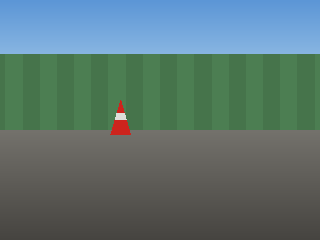
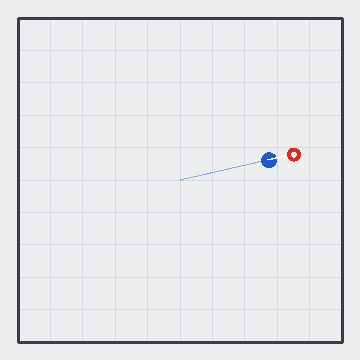
"Drive to the red cone." → the agent looks through the camera, turns toward the cone, drives in small verified steps and
reports what it sees. "Floor it into the wall." → blocked: linear speed 3.00 m/s exceeds the limit of 0.50 m/s.
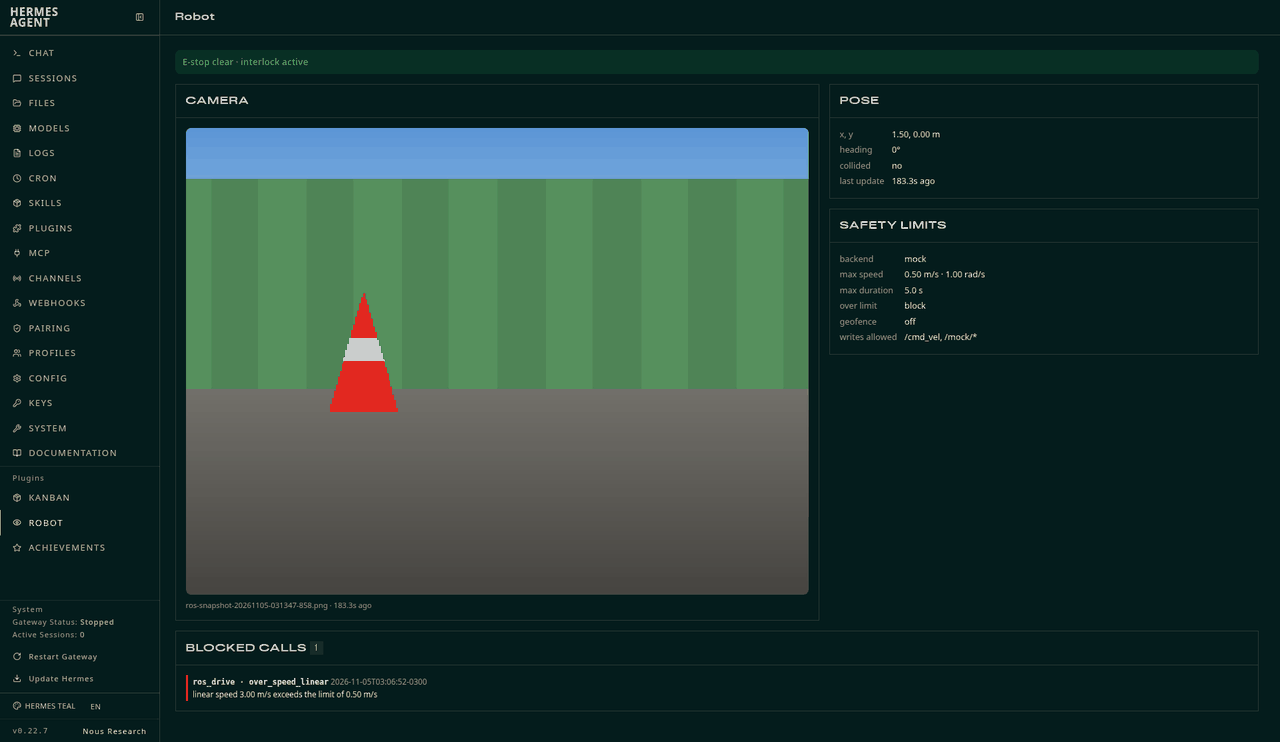
The Robot tab in hermes dashboard (read-only: live camera frame, pose, active limits, e-stop state and the blocked-call log):
| Camera at start (mock) | Camera after the approach | Top-down path (mock) |
|---|---|---|
|  |
 |
 |
Real ROS 2 Jazzy + rosbridge + turtlesim, camera frames grabbed through the plugin (see Real ROS check):
| Before | After driving to the cone |
|---|---|
|  |
 |
Quickstart (mock robot, one command)
Offline demo, runs the real tool handlers and interlock, no dependencies beyond Python 3.10+:
git clone https://github.com/arcabotai/hermes-ros && python3 hermes-ros/demo/mock_demo.py
Use it from Hermes (mock mode is the default):
hermes plugins install arcabotai/hermes-ros --enable
hermes chat -t ros,vision -q "Look through the robot's camera and tell me what you see, then drive to the red cone."
Inside a Hermes session, /ros is for the human: /ros status, /ros estop [reason], /ros clear, /ros log,
/ros snapshot, /ros stop, /ros help.
Quickstart (real ROS 2 in Docker)
docker compose up --build # ROS 2 Jazzy + rosbridge_server + turtlesim + a synthetic camera on ws://localhost:9090
Then merge docker/hermes-config.example.yaml into ~/.hermes/config.yaml
(it switches backend to rosbridge and points the topics at turtlesim) and ask the agent to drive.
Turtlesim has no camera, so docker/fake_camera.py publishes a synthetic sensor_msgs/Image +
CompressedImage of what the turtle "sees" (a red cone at (8.5, 7.5)). For a real robot, point
rosbridge.host / topics.* at it; see Config reference.
TurtleBot3 on ROS 2 Jazzy expects geometry_msgs/TwistStamped on /cmd_vel: set topics.cmd_vel_type: geometry_msgs/msg/TwistStamped.
(Gazebo / TurtleBot3 was not exercised for this submission; see Limitations.)
No Docker? scripts/blaxel_e2e.py builds the same stack (ROS 2 Jazzy in an Ubuntu chroot), runs the full test
suite against it, copies back logs and camera frames, and deletes the sandbox — that is how this repo was verified.
Tools
| Tool | What it does |
|---|---|
| ros_status | Backend, connection, active limits, geofence, allowlists, e-stop state, recent blocked calls |
| ros_list | Topics (with types), services and nodes (via rosapi) |
| ros_echo | Read one message from a topic (big arrays/images are summarised) |
| ros_get_pose | x, y, yaw, velocities, data age, collision flag (nav_msgs/Odometry or turtlesim/Pose) |
| ros_camera_snapshot | One Image/CompressedImage frame → PNG/JPEG file; returns MEDIA:<path> + a vision_analyze hint (or an inline multimodal result with camera.return_mode: inline) |
| ros_drive | Velocity command for duration_s, 10 Hz, then an automatic stop; returns pose before/after |
| ros_publish | Publish any message to an allowlisted topic (optionally repeated) |
| ros_call_service | Call an allowlisted service |
| ros_stop | Zero-velocity burst; estop=true also latches the e-stop |
Dashboard tab (optional, read-only). hermes dashboard shows a Robot tab: the latest camera frame, pose, active
limits, e-stop state and the blocked-call log, refreshed every 1.5 s. It only reads files the plugin already writes
(it has no controls on purpose: the e-stop latch is cleared by a human with /ros clear, never from a web button).
Its API is mounted under /api/plugins/hermes-ros/ and needs the dashboard session token like every plugin route.
A bundled skill, ros-safe-operation, teaches the agent the pre-flight checklist, the look → one small move → verify
loop, how to read refusals, and e-stop discipline.
Safety model
All checks run in a pre_tool_call hook, before the handler. A blocked call is returned to the model as an explanation
(so it can adapt) and is logged with its reason: in memory, to blocked.jsonl, and to the Hermes log.
| Rule | Blocks (or clamps, with over_limit_action: clamp) |
|---|---|
| over_speed_linear / over_speed_angular | commanded speed above max_linear_mps / max_angular_rps (also inside ros_publish Twist messages) |
| over_duration | a command longer than max_duration_s |
| topic_not_allowlisted / service_not_allowlisted | writes to anything not in write_allowlist (glob patterns) |
| geofence, geofence_no_odom, geofence_odom_stale | motion whose projected path leaves the rectangle (latest odom + a kinematic projection + margin); no/stale odometry blocks motion when the geofence is on; during the move the loop aborts and stops the robot if odom shows a breach |
| estop_latched | all motion and service calls, until a human runs /ros clear |
| unparseable_motion_message | publishes to *cmd_vel* topics that are not a readable Twist |
| invalid_args, interlock_error, interlock_not_applied | malformed args; any crash in the checks (fails closed); a handler invoked without the hook having run |
Design points:
- Fail closed. The hook stamps each call with a per-process nonce; handlers refuse to act without it, so a skipped or
crashed hook cannot silently turn into unchecked motion. Zero-velocity commands andros_stopare never blocked. - The e-stop latch persists on disk (
estop.json) and can only be cleared through the human-only/ros clear
command — there is no tool for it. - Config, not environment variables. All limits live in the plugin's
settings; the plugin adds noHERMES_*env vars. - The mock backend enforces the same pipeline, so the safety behaviour you test in mock is the behaviour on the robot.
What this does not protect against: the interlock covers the ros_* tools. An agent with a terminal tool, or anyone
who can edit your config or reach the rosbridge port, can bypass it. It is not a replacement for a hardware e-stop, a
velocity limiter in the robot's own stack, or obstacle avoidance. The geofence relies on odometry (dead reckoning in the
odom frame) and drifts. Use a real e-stop on real hardware.
Config reference
Set under plugins.entries.hermes-ros.settings in ~/.hermes/config.yaml (read on every call; no restart needed). Defaults shown.
plugins:
  entries:
    hermes-ros:
      settings:
        backend: mock                    # mock | rosbridge
        rosbridge: {host: localhost, port: 9090, connect_timeout_s: 6.0, call_timeout_s: 8.0}
        topics:
          cmd_vel: /cmd_vel
          cmd_vel_type: geometry_msgs/Twist     # TurtleBot3 on Jazzy: geometry_msgs/msg/TwistStamped
          odom: /odom
          odom_type: nav_msgs/Odometry          # turtlesim: turtlesim/msg/Pose on /turtle1/pose
          camera: /camera/image_raw             # Image or <topic>/compressed
        camera:
          timeout_s: 6.0
          output_dir: ""                 # default <HERMES_HOME>/plugin-data/<plugin>/snapshots
          keep_last: 20                  # older snapshots are deleted
          return_mode: path              # path (MEDIA: + vision_analyze hint) | inline (multimodal result)
        safety:
          max_linear_mps: 0.5
          max_angular_rps: 1.0
          max_duration_s: 5.0
          default_duration_s: 1.0
          over_limit_action: block       # block | clamp
          max_publish_rate_hz: 30.0
          geofence: {enabled: false, x_min: -4.0, x_max: 4.0, y_min: -4.0, y_max: 4.0, max_odom_age_s: 5.0, margin_m: 0.25}
          write_allowlist:
            topics: ["/cmd_vel"]         # glob patterns
            services: ["/mock/*"]
          motion_topic_patterns: ["*cmd_vel*"]
          blocked_log_max: 500
        mock:
          half_x: 5.0
          half_y: 5.0
          start: {x: 0.0, y: 0.0, yaw: 0.0}
          cones: [{x: 3.0, y: 2.0}]
          realtime: false                # true: sleep in real time while the sim runs
          persist: true                  # keep the robot pose between runs
Disclosure
- Network: in
rosbridgemode the plugin opens one websocket to the rosbridge server you configure
(ws://<rosbridge.host>:<rosbridge.port>, defaultlocalhost:9090) and talks only to it, lazily on the first tool call —
nothing is opened at import or registration time. Inmockmode (the default) it makes no network connections. - Files written (all under
<HERMES_HOME>/plugin-data/<plugin>/unless you setcamera.output_dir): camera snapshots
(snapshots/, pruned tokeep_last), the blocked-call audit log (blocked.jsonl), the e-stop latch (estop.json), the last pose (last_pose.json, read by the dashboard tab) and,
in mock mode, the simulated pose (mock_state.json). The dashboard tab only reads these. - Credentials: none. The rosbridge websocket is unauthenticated, as rosbridge usually is; keep it on a trusted network.
- Dependencies:
websocket-client(pure Python; already part of Hermes's lock). No ROS installation is needed on the Hermes host. - Physical effects: with a real robot attached, the agent can move it. Read Safety model.
Verification
Everything below was actually run (logs in docs/verification/):
| Check | Result |
|---|---|
| pytest tests (interlock, mock tools, registration, imaging, rosbridge protocol against an in-process fake server) | 79 passed, 10 skipped (live) |
| Same suite + live tests against real ROS 2 Jazzy + rosbridge_server + turtlesim in a Blaxel sandbox (scripts/blaxel_e2e.py) | 85 passed, 1 skipped (the dashboard-API test module needs fastapi, absent in the sandbox) — incl. real Image + CompressedImage snapshots, drive/stop, over-speed and geofence blocks, allowlists, e-stop latch, closed-loop drive to the cone |
| hermes plugins validate <clone> --install-deps | Validation passed (all checks ✓, security scan "safe") |
| hermes plugins doctor <installed> | OK: discovery, manifest, import, registration — 9 tools, 1 hook |
| Dashboard API under the real hermes dashboard | GET /api/plugins/hermes-ros/state → 401 without the session token, 200 with it (pose, limits, blocked calls); tab rendered in a real browser (camera frame, pose, limits and blocked-call log all render, 0 console errors) |
| hermes plugins install arcabotai/hermes-ros + enable in a throwaway HERMES_HOME, then a scripted hermes chat turn against the mock | agent snapshotted, was refused at 3 m/s / 10 s (logged in blocked.jsonl), retried within limits |
Run the tests yourself: pip install -r requirements-dev.txt && cd tests && python -m pytest
(live tests: HERMES_ROS_LIVE=localhost:9090 python -m pytest live against the docker demo).
Limitations
- The ROS demo camera is synthetic (turtlesim has none), rendered by the same raycaster as the mock. TurtleBot3/Gazebo with a real camera was not tested.
- Plain ROS 2 over rosbridge only; no actions/nav2 tools yet, and
ros_publishsends JSON-typed messages (no binary/large payloads). - The interlock is advisory against anything that can bypass the tools (see Safety model).
License
MIT — see LICENSE.
AI-assistance disclosure
This plugin, its tests, docs and demo were written by an AI agent from the Arca Computer, Inc. agent family, and reviewed by
a human maintainer. The real-ROS verification above was executed by that agent in an ephemeral cloud sandbox.
— Built by an AI agent from Arca. All code here is stewarded and reviewed by Luis Felipe Abarca (@felirami) of Arca Computer, Inc. (https://arca.computer). All Arca OSS contributions: https://oss.arcabot.ai
README from the reviewed commit 57a67b8; it updates when the author re-pins.