 Adolanium
Session Diff
See what changed. Even after the session ends.
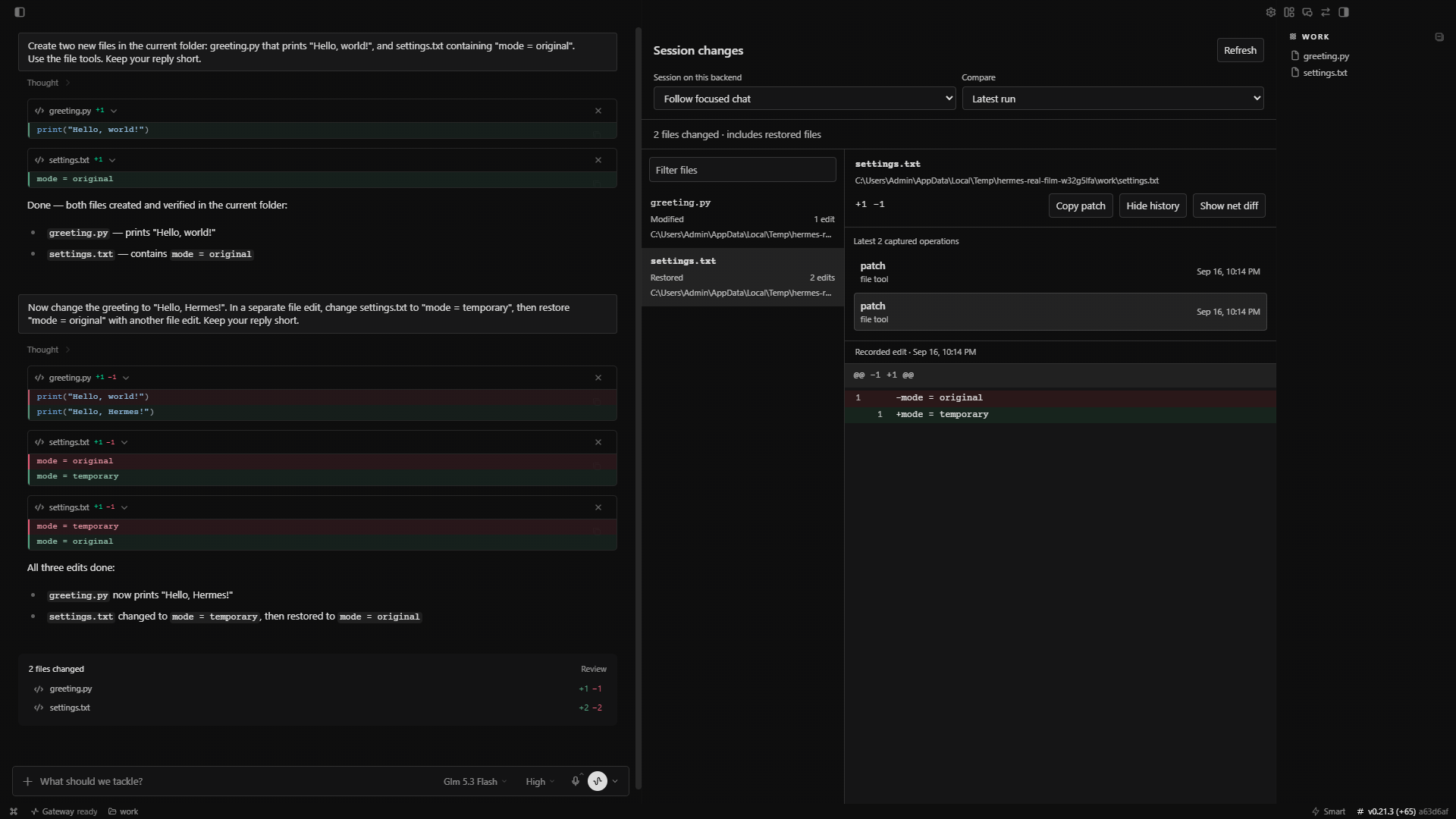
A file-by-file record of your Hermes runs, with quick diffs and individual edit history. Changes stay available after a restart, including edits that were later undone.
POWERED BY HERMES AGENT · COMMUNITY PLUGIN · VERSION 0.1.0
See what it does · Watch the demo · Install · Capture limits
Powered by Hermes
Session Diff uses the existing Hermes Agent hooks, tool middleware, and Desktop plugin SDK. The recorder runs on your gateway; the viewer follows your Desktop theme. No fork, upstream patch, extra server, API key, or model call. The Desktop component is already built.
Every run in one pane
| | |
| --- | --- |
| Find the filesFollow the focused chat, select a recorded session, or filter the file list. Added, modified, deleted, and restored files have distinct labels. | Read the diffSee line numbers, additions, and deletions. Copy the displayed patch when you need it elsewhere. |
| Trace an editOpen individual captured operations. A file changed and restored still has a history, even when its net diff is empty. | Choose the scopeCompare the latest run, an earlier run, or the whole session. The journal survives commits and app restarts. |
The viewer is read-only. It does not stage, commit, revert, or edit your files.
Hermes already includes inline tool diffs, a changed-files card, and Git Review. This plugin adds a persistent journal across runs, intermediate versions, and bounded capture around terminal commands.
Install
Use Hermes Desktop 0.21.3 or newer with combined-package support. Install on the machine running your gateway:
hermes plugins install Adolanium/hermes-session-diff
hermes plugins enable hermes-session-diff
Restart the gateway. In Desktop, rescan or reload plugins, then enable Session changes under Capabilities → Plugins. Open the right pane, or choose Open session changes in the command palette.
Both components matter: the Agent component records changes, and the Desktop component displays them. Recording begins with new tool calls after the recorder is enabled.
Prefer a download? Extract the release ZIP into your profile's $HERMES_HOME/plugins/ directory, then enable the plugin and restart as above. See the reference for profile paths and remote gateways.
Try it
- Start a chat in an empty folder and ask Hermes to create a small text file.
- Run another prompt that edits the file, then restores it in a separate tool call.
- In Session changes, select Latest run. The file is marked Restored.
- Open Edit history to see both edits. Restart Hermes and reopen the session; the history is still there.
The 60-second demo shows this in the real Windows app, including the restart. Cursor animation and zooms are added in the video; waiting time is shortened.
Stored locally
The journal lives at $HERMES_HOME/plugin-data/hermes-session-diff/changes.sqlite3, with 30-day retention by default. The plugin adds no telemetry, external storage service, or model requests. A remote Desktop viewer reads the journal through your gateway's authenticated connection.
Snapshots contain file contents. Common credential filenames, ignored dependency directories, binary files, and oversized text are excluded or recorded as metadata only. These filters cannot detect every secret embedded in an ordinary source file. See storage and limits for exact defaults and configuration.
Capture covers explicit file tools and bounded workspace changes observed around local terminal calls. Concurrent edits may be included; writes outside the captured workspace or after a tool returns may be missed. Docker and SSH terminal execution backends are not supported for content capture. A remote gateway using its own local terminal is supported.
Development
npm ci
npm run build
npm test
python -m unittest discover -s tests -p 'test_*.py'
python scripts/package.py
See integration and browser checks for tests using real Hermes tools and the viewer's history, error recovery, and theme contrast.
Updates use Hermes's plugin update commands. Catalog installs, once admitted, follow reviewed commit pins. This plugin never downloads or replaces its own code.
MIT licensed. Independent community plugin; not affiliated with or endorsed by Nous Research.
README from the reviewed commit 9ed3bf2; it updates when the author re-pins.