hermes-telemetry ☤
Observability + budget guardrails for Hermes Agent
Budget enforcement + observability for Hermes Agent. The only plugin that can stop a run before it overspends.
A comprehensive telemetry plugin that captures real usage data, enforces budget limits, and provides detailed cost analysis for AI agent operations. Built for the Hermes Agent Challenge by Nadia Ujovich.
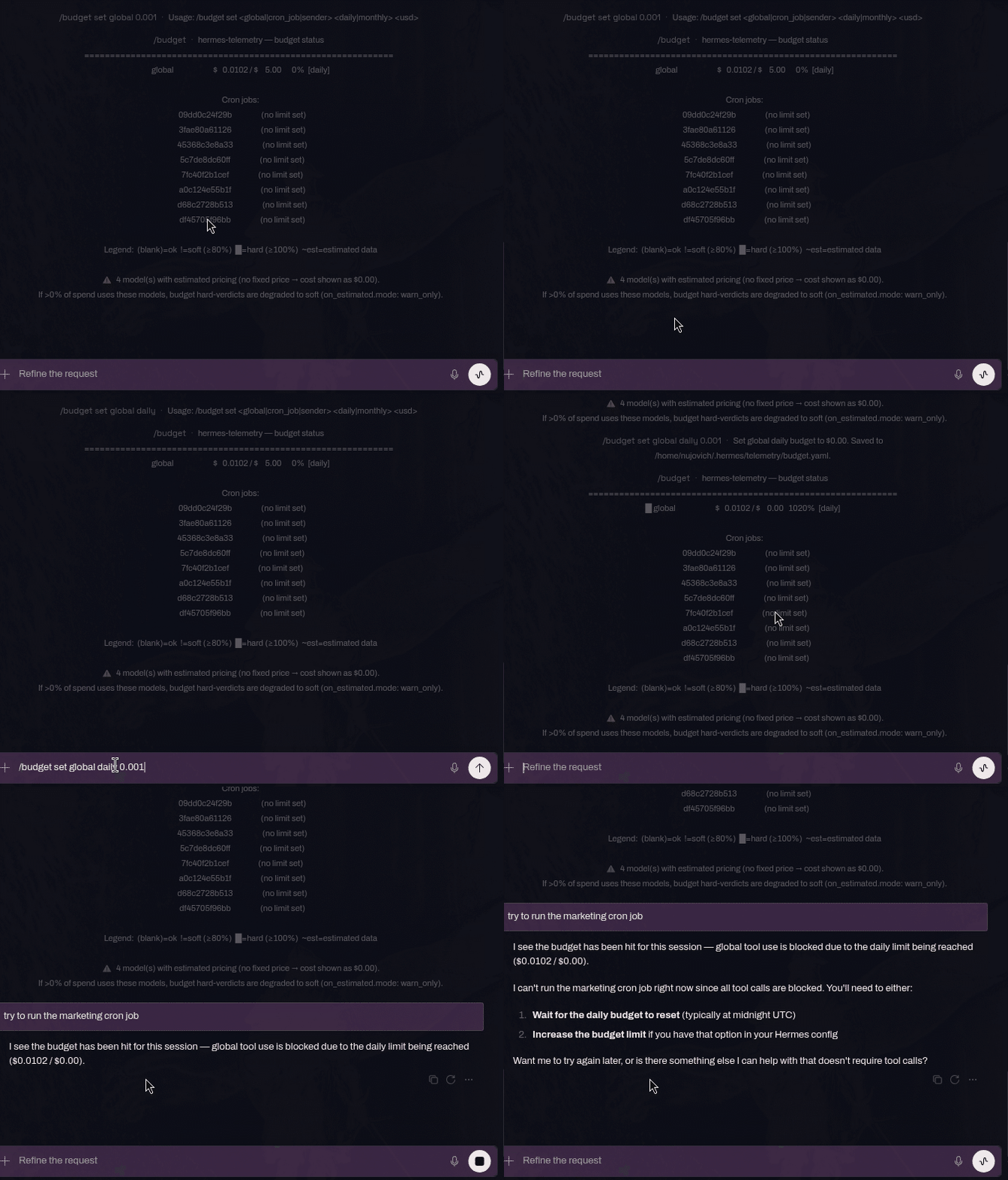
The differentiator: it can stop work that's about to overspend — not just report it after the fact. Set a daily cap below current spend, and the next cron run is blocked by the budget:

/budget set global daily 0.001 writes the cap to budget.yaml; current spend ($0.0102) already exceeds it, so /budget re-renders at 1020% [daily] — a hard breach — and the next marketing cron run is blocked by the budget.

Hermes Agent runs autonomously — across sessions, platforms, and cron jobs — which
means it can keep spending even when you're not watching.
hermes-telemetry lives inside the runtime and enforces hard budget limits before
the next LLM call is made.
This plugin targets a gap raised repeatedly in the Hermes tracker: budget enforcement for unattended runs — capping spend before the next call, not just reporting it after (see #23419 and #26382). It complements — it does not replace — the first-class telemetry work in #51714.
Your Hermes session
↓ every API call
hermes-telemetry (runtime-integrated plugin)
→ tracks tokens + cost in real time
→ enforces budget limits mid-session
→ logs to SQLite with WAL mode
→ syncs OpenRouter pricing automatically
↓ if budget OK
LLM provider
Not a log reader. TokenTelemetry and similar tools read what already happened. hermes-telemetry hooks into the Hermes runtime and can stop what’s about to happen.
Design principle: observability is invisible to the model. Everything goes through hooks. The only user-facing surface is /stats and /budget.
ℹ️ Two models are on a free tier right now
Two models currently bill at $0 on a time-limited free tier:
Model Free until Tencent Hy3 2026-07-15 StepFun Step 3.7 Flash 2026-07-23 What you need to do depends on the id your gateway sends (check
/stats modelsto see the exact id recorded):
- Served with a
:freesuffix (e.g.tencent/hy3-20260706:free) — nothing to do. Any id ending in:freeresolves to$0automatically, is recorded as known-free (no estimated-price warning), shows asfree tierin/stats models, and arms the free→paid alert for when the promo ends and the suffix is dropped.- Served under a bare native id (no
:freesuffix) — the auto-$0 rule does not fire, so declare it with_subscription: trueinpricing.yamlso the$0is recorded as intentional (not a lookup miss) and survives every OpenRouter refresh. Use the exact id the gateway records — a non-dated key will not match a dated id:models: tencent/hy3: # ← the exact bare id from `/stats models` input: 0.0 output: 0.0 _subscription: true # free tier ends 2026-07-15When a promo ends the model starts incurring cost. For a
:freeid the alert fires on its own; for a declared entry, remove it (or set the real price) so hermes-telemetry bills it correctly again.
Table of Contents
- Screenshots
- What It Measures
- Installation
- Quick Start
- Standalone CLI
- Setup Wizard
- Dashboard (Web UI)
- Slash Commands
- Configuration
- Pricing Auto-Refresh
- Architecture
- Budget Enforcement
- Provider Probe: Verifying Your Provider
- Proof of Concept
- Comparison
- Running Tests
- Data Location
- Known Limitations
- Troubleshooting
- License
- Hermes Agent Challenge
Screenshots
Dashboard (Web UI)
A standalone HTML dashboard for users who prefer a visual interface over slash commands. Served locally, reads directly from the telemetry SQLite database.
Current dashboard home view with the tabbed layout (Home / Breakdown / Request / Tool / Error), header auto-refresh controls, budget windows rendered in the viewer's local timezone, and the refreshed recent-session tables.
Slash Commands
/stats — Session analytics
/budget — Current spending vs limits
/stats cron week — Cron job cost breakdown
/stats providers — Real vs estimated usage + estimated-price warning
What It Measures
| Metric | Source | Real or Estimated |
|---|---|---|
| Tokens in / out per API call | post_api_request.usage |
✅ Real (from provider) |
| Cache read / write tokens | post_api_request.usage |
✅ Real (from provider) |
| Reasoning tokens | post_api_request.usage |
✅ Real (from provider) |
| API call latency | post_api_request.api_duration |
✅ Real (ms) |
| Tool call latency & success/failure | post_tool_call |
✅ Real |
| Session / cron job wall time | started_at → ended_at |
✅ Real |
| Model & provider name | post_api_request |
✅ Real |
| Platform (cli / cron / telegram / …) | on_session_start.platform |
✅ Real |
| Cron job ID | Parsed from session_id |
✅ Real |
| Subagent invocation count | subagent_stop hook |
✅ Real (proxy) |
| Free→paid model transition alert | known_free_models table + post_api_request cost check |
✅ Real |
| MoA aggregator call (re-attributed) | Preset resolved to aggregator's real provider/model (moa.py) |
✅ Real |
| Cost (USD) | Local pricing table × tokens | ⚠️ Estimated |
Tokens when provider returns usage=None |
Fallback approximation | ⚠️ Estimated, flagged |
| MoA reference-model tokens | No hook fires (auxiliary call path) | ❌ Not captured (MoA cost is a lower bound) |
Cost is always an estimate computed from a locally-maintained pricing table. No external pricing API is called. When the provider returns no usage data, tokens are estimated from a pre-request approximation + response length and the row is flagged as estimated=1, so /stats and /budget show a ~ prefix and an “estimated data” percentage.
Installation
Hermes plugins are opt-in — you must both install and enable the plugin.
Option A: Install from GitHub
hermes plugins install nujovich/hermes-telemetry
hermes plugins enable hermes-telemetry
To use hermes-telemetry from the command line outside of sessions (one-time setup):
chmod +x ~/.hermes/plugins/hermes-telemetry/hermes-telemetry
ln -s ~/.hermes/plugins/hermes-telemetry/hermes-telemetry ~/.local/bin/hermes-telemetry
Future git pull updates the CLI automatically — no re-linking needed.
Option B: Manual install
git clone https://github.com/nujovich/hermes-telemetry ~/.hermes/plugins/hermes-telemetry
hermes plugins enable hermes-telemetry
To use hermes-telemetry from the command line outside of sessions (one-time setup):
chmod +x ~/.hermes/plugins/hermes-telemetry/hermes-telemetry
ln -s ~/.hermes/plugins/hermes-telemetry/hermes-telemetry ~/.local/bin/hermes-telemetry
Future git pull updates the CLI automatically — no re-linking needed.
Important: restart the Hermes gateway after enabling:
hermes gateway restart
Note: Plugin changes only take effect after a gateway restart. The gateway loads the plugin registry at startup. If you enable a plugin and cron jobs don’t appear in
/stats cron week, this is the most likely cause.
Hermes Dashboard Plugin
hermes-telemetry also ships as a Hermes dashboard plugin. When the Hermes web dashboard is running, it auto-discovers the plugin from this same install path — no extra steps. You get a dedicated Telemetry tab plus widgets injected into the built-in pages.
Screenshots
Dedicated Telemetry tab — Summary
The default sub-tab. Six stat cards summarise the last 24h: cost, total runs (with failed split), API calls, tokens in / out, and average latency. All values come from /api/plugins/hermes-telemetry/summary.
Runs
One row per session in the last 7 days: started_at, session id, platform (cli / cron / telegram), model, provider, status, cost and token counts. Cron sessions surface as cron_<job>_… and any error status row appears with its status column.
Requests
Per-API-call detail (/api/plugins/hermes-telemetry/requests): timestamp, model, provider, tokens, cost, latency, and an Est? column that flags rows recorded with estimated=1 (provider returned no usage info — counts came from the fallback estimator).
Providers
Aggregated by provider: total calls, how many of those were estimated, total cost, and tokens in / out. Useful for spotting a provider whose share of the bill is disproportionate to its share of traffic.
Cron
The Cron sub-tab aggregates runs by cron_job_id: total runs, ok / failed split, cost, and last execution. Built from /api/plugins/hermes-telemetry/cron.
Budgets — soft / hard semáforo
Global daily and monthly budgets read live from budget.yaml. The HARD badge fires when spend exceeds the hard cap ($7.82 / $5.00 = 156.4% here); soft and ok states use distinct badge variants.
Slot: sessions:top (injected into /sessions)
A pinned card at the top of the Sessions page surfaces the most recent run with real activity — cost, tokens in / out, and the model used.
Slot: cron:top (injected into /cron)
Aggregate 7-day cron cost plus a destructive N FAILED badge when any job failed in the window.
Slot: header-right (injected into the dashboard header)
Compact 24h spend + percentage against the global daily cap. Badge turns destructive on hard breach.
Tip: run
tools/seed_demo_data.pyagainst an isolatedHERMES_HOMEto populate the dashboard with realistic demo data before taking your own screenshots.
What you get
- A
/telemetrytab with sub-tabs: Summary, Runs, Requests, Providers, Cron, Budgets. - Slot widgets on the existing dashboard pages:
sessions:top— last run summary (cost · tokens · model).cron:top— 7-day cron cost and failure badge.header-right— 24h spend + global daily budget level (semáforo).analytics:bottom— daily cost chart (Chart.js served from a vendored local asset; CDN fallback only).
- Profile filter — when telemetry is consolidated via
HERMES_TELEMETRY_HOME, a selector in the Telemetry tab filters every view (Summary / Runs / Requests / Providers / Cron) by Hermes profile. Hidden when no profile data is present.
How discovery works
When the Hermes dashboard process starts, it scans for ~/.hermes/plugins/<name>/dashboard/manifest.json (verified against hermes_cli/web_server.py). Because the standalone dashboard at dashboard/serve.py and the plugin manifest at dashboard/manifest.json live in the same directory, a single git pull brings both surfaces up to date.
Install / update (git pull, no PyPI)
If you already installed the plugin via Option B (manual clone) above, you don't need to do anything — git pull updates both the runtime hooks and the dashboard plugin surface in lockstep:
cd ~/.hermes/plugins/hermes-telemetry
git pull
hermes gateway restart
# (no separate restart for the dashboard process, but reload the page)
To force the Hermes dashboard to rescan plugins without restarting it:
curl -sS http://localhost:<dashboard-port>/api/dashboard/plugins/rescan
Backend routes (mounted at /api/plugins/hermes-telemetry/*)
The plugin exposes a read-only FastAPI router. The DB connection opens with PRAGMA query_only=ON; the plugin never writes to telemetry.db.
| Method | Path | Purpose |
|---|---|---|
| GET | /health |
Smoke endpoint. |
| GET | /summary?window_hours=24 |
Run/LLM totals + daily cost series. |
| GET | /token-breakdown?window_hours=24 |
Tokens by component. |
| GET | /runs?limit=50&window_hours=0 |
Recent runs. |
| GET | /requests?limit=100&window_hours=0 |
Recent LLM calls. |
| GET | /providers?window_hours=24 |
Per-provider totals. |
| GET | /cron?window_hours=168 |
Per-cron-job aggregate. |
| GET | /session/{session_id} |
Single-session detail. |
| GET | /budget |
Global daily/monthly budget status. |
| GET | /efficiency?window_hours=24 |
Per-session efficiency scores + average (Efficiency sub-tab). |
| GET | /smells?window_hours=24 |
Detected anti-patterns (top-of-page alert widget). |
| GET | /forecast?window=monthly |
Global burn-rate projection (shown in the Budgets panel). |
Both dashboards surface all three intelligence features. The standalone
dashboard exposes the parallel routes /api/efficiency, /api/smells, and
/api/budget/forecast, rendered as panels in the Breakdown, Error, and Home
tabs respectively.
The two dashboards: when to use each
| Surface | Lives at | Best for |
|---|---|---|
| Standalone | dashboard/serve.py — python serve.py → http://localhost:8765 |
Headless / SSH access, cron-only deployments, environments without the Hermes web dashboard. |
| Hermes plugin | dashboard/manifest.json + dashboard/plugin_api.py |
Interactive use alongside other Hermes features. Theming, header/sidebar slots, native auth. |
They share zero Python code — only the SQLite DB. The isolation is enforced by tests/test_dashboard_plugin_isolation.py.
Quick Start
- Install and enable the plugin (see above)
- Restart the gateway
- Run any session, then type
/statsto see captured data - Optionally configure
pricing.yamlandbudget.yaml(see below)
That’s it. The plugin captures data automatically — no agent action required.
Standalone CLI
Query telemetry data outside of an active Hermes session:
# Session summary
hermes-telemetry stats today
hermes-telemetry stats week
hermes-telemetry stats month
# Per-cron-job breakdown
hermes-telemetry stats cron
hermes-telemetry stats cron-week
# By provider / model
hermes-telemetry stats providers
hermes-telemetry stats models
# Agent intelligence
hermes-telemetry stats efficiency # per-session efficiency scores (0-100)
hermes-telemetry stats smells # anti-pattern detection
# Budget status
hermes-telemetry budget
hermes-telemetry budget cron
hermes-telemetry budget forecast monthly # burn-rate projection (defaults: monthly, global)
# JSON output (for scripting)
hermes-telemetry stats today --json | jq ‘.cost_usd’
hermes-telemetry budget --json | jq ‘.global’
hermes-telemetry budget forecast daily --json | jq ‘.status’
All subcommands read from the same SQLite database as the in-session /stats and
/budget slash commands. The gateway does not need to be running.
Date range filters (--from / --to)
Every stats subcommand also accepts --from and --to (ISO-8601 dates or full
timestamps). --from is inclusive, --to is exclusive, and either can be
omitted — leaving --to off means "up to now".
# Everything since a specific instant (good for "post-deploy" windows)
hermes-telemetry stats models --from 2026-06-16T12:00:00Z
# Bounded range
hermes-telemetry stats providers --from 2026-06-10 --to 2026-06-15
# Date-only is treated as 00:00:00 UTC of that day
hermes-telemetry stats today --from 2026-06-01
# Combine with --json for scripting
hermes-telemetry stats models --from 2026-06-16T12:00:00Z --json \
| jq '.[] | {model, calls: .total_calls, cost: .cost_usd}'
Presets today, week, month, plus last-7-days / last-30-days are also
available as subcommands when you don't need an arbitrary boundary.
Use case: validating a pricing fix without waiting for the 24h window to roll
If you land a fix that changes how a model is priced (e.g. you correct a
provider-resolution bug so a model that was being billed against the wrong
gateway now bills against the right one), the rolling 24-hour window in
/stats models will keep mixing pre-fix and post-fix calls until enough time
passes for the old ones to age out. The cost column is "right" for new calls
but the aggregate is misleading.
--from <fix-deploy-timestamp> lets you see only the post-fix calls
immediately, so you can confirm the new unit cost without dropping to raw SQL
and without waiting 24 h:
# Right after the fix lands at, say, 2026-06-16 12:00 UTC:
hermes-telemetry stats models --from 2026-06-16T12:00:00Z
# Provider Model Calls ... Cost
# nous deepseek/deepseek-v4-pro 17 ... $0.034000 ← new pricing, isolated
The same flags work from inside Hermes Chat via the /stats slash command,
so you don't have to leave the session to run the check:
/stats models --from 2026-06-16T12:00:00Z
/stats providers --from 2026-06-10 --to 2026-06-15
/stats --from 2026-06-16 # date-only → 00:00:00 UTC of that day
The Notes column (subscription/free-tier vs no price entry) and footer
behaviour described in /stats models work the same way under a
date filter — they're computed against whatever rows the filter selected.
Pricing snapshots (pricing backfill / pricing drift)
Every real LLM call captures a pricing snapshot from the core (ground truth). Two subcommands work with that snapshot history:
# Seed snapshots for historical models that never got one (dry-run first)
hermes-telemetry pricing backfill
hermes-telemetry pricing backfill --apply # write the resolvable ones
hermes-telemetry pricing backfill --json # machine-readable output
# Compare pricing.yaml against the core snapshots (dry-run first)
hermes-telemetry pricing drift
hermes-telemetry pricing drift --apply # rewrite drifted entries
hermes-telemetry pricing drift --threshold 5 # flag drift > 5% (default: 1%)
hermes-telemetry pricing drift --model deepseek/deepseek-v4-pro
hermes-telemetry pricing drift --json
pricing backfill seeds a current snapshot for every historical (provider, model)
in llm_calls that has none yet — mainly dated model ids that never matched a live
capture. It's a coverage seed, not historical reconstruction: the tariff written is
whatever the core resolves today. Dry-run by default; --apply writes; idempotent
and safe to re-run.
pricing drift diffs pricing.yaml's input/output rates against the latest core
snapshot per model (input/output only — cache/reasoning rates have no pricing.yaml
analog). It skips _subscription: true entries (a declared $0 is intentional) and
flags anything beyond --threshold percent (default 1.0). If models in llm_calls
still lack a snapshot, the report reminds you to run pricing backfill first so a
clean drift run isn't a false all-clear. Dry-run by default; --apply merges the
core rates back into pricing.yaml (never clobbers) and tags each repaired entry
_source: core-snapshot.
See ONBOARDING.md § Core-sourced pricing snapshots for the full design rationale.
Setup Wizard
hermes-telemetry includes a first-time setup wizard that runs automatically on first
plugin load when pricing.yaml and/or budget.yaml are missing. It can also be
triggered manually at any time with the /setup slash command.
Auto-setup (first load)
On first load, if either config file is missing, the plugin auto-generates defaults:
- Pricing: fetches all models with fixed pricing from the OpenRouter API and merges them with ~30 built-in defaults (Anthropic, OpenAI, DeepSeek, Google, Meta, Nous). New prices take effect immediately — no gateway restart needed.
- Budget: writes a conservative global budget (
$5.00/day,$100.00/month) with an 80% soft warning and 100% hard cap.
/setup slash command
Use /setup to check configuration status or reconfigure individual files.
/setup → show current status (which files exist)
/setup pricing auto → built-in defaults + fetch from OpenRouter API
/setup pricing minimal → built-in defaults only (~30 models, no network)
/setup pricing skip → skip (unrecognized models will record $0.00 cost)
/setup budget default → recommended global budget ($5/day, $100/month)
/setup budget custom → instructions for setting your own limits manually
/setup budget skip → no enforcement (costs still tracked)
Pricing options
| Option | Models | Network |
|---|---|---|
auto |
~30 built-in + all OpenRouter fixed-price models | Yes (OpenRouter API) |
minimal |
~30 built-in only | No |
skip |
None — models will record $0.00 cost |
No |
Budget options
| Option | Behavior |
|---|---|
default |
Global: $5.00/day, $100.00/month. Soft warning at 80%, hard block at 100% |
custom |
Prints the /budget set commands for manual configuration |
skip |
Costs tracked but never enforced |
Re-running setup
Setup skips files that already exist. To reconfigure:
# Reprice from scratch
rm ~/.hermes/telemetry/pricing.yaml
/setup pricing auto
# Reset budget
rm ~/.hermes/telemetry/budget.yaml
/setup budget default
Note: Pricing changes take effect immediately without a gateway restart. Budget changes require a restart.
Slash Commands
/stats
/stats → last 24h summary (sessions, tokens, cost, top tools)
/stats today → same as /stats
/stats week → last 7 days
/stats month → last 30 days
/stats cron → breakdown by cron_job_id (last 7 days)
/stats cron week → cron breakdown, last 7 days
/stats cron month → cron breakdown, last 30 days
/stats cron today → cron breakdown, last 24 hours
/stats providers → per-provider: real vs estimated calls + cost (last 24h)
/stats providers week → provider breakdown, last 7 days
/stats models → per-model breakdown within each provider (last 24h)
/stats models week → per-model breakdown, last 7 days
/stats efficiency → per-session efficiency scores (0-100, last 24h)
/stats efficiency week → efficiency scores, last 7 days
/stats smells → AI smell detection: anti-patterns in sessions (last 24h)
/stats smells week → AI smell detection, last 7 days
/stats raw [N] → last N raw run records (default 20, max 200)
Any subcommand also accepts --from <iso> and --to <iso> (inclusive /
exclusive) to override the preset window with an arbitrary date range — useful
for isolating "post-deploy" or "post-fix" data without waiting 24 h. Examples:
/stats models --from 2026-06-16T12:00:00Z
/stats providers --from 2026-06-10 --to 2026-06-15
See the Standalone CLI · Date range filters section for the full reference (the CLI and the slash command parse the same flags).
Example output (/stats):
hermes-telemetry — last 24 h
============================================
Sessions : 14
Success rate : 92.9% (ok=13, failed=1)
API calls : 47
Tool calls : 183
Tokens in : 1,240,500
Tokens out : 87,300
Cost (est.) : $0.004822
Avg latency : 1.2s
Avg duration : 48.3s
Top tools:
Tool Calls Failures Avg ms
--------------------------------------------------------
read_file 92 0 12ms
terminal 51 3 340ms
write_file 28 0 18ms
Example output (/stats cron week):
hermes-telemetry — cron jobs (last 7 days)
========================================================================
Job ID Runs OK Fail Tok-in Tok-out Cost Avg dur
--------------------------------------------------------------------------
09dd0c24f29b 3 3 0 892,341 12,405 $0.314378 2.1m
d68c2728b513 1 1 0 445,119 8,200 $2.225595 4.7m
Example output (/stats providers):
hermes-telemetry — providers (last 24 h)
========================================================================
Provider Calls Real Est Est% Cost
-------------------------------------------------------------------
openrouter 66 66 0 0% $0.916782
Est% = share of calls where the provider returned no usage data
(tokens estimated locally).
If Est% > 0 for your main provider, budget hard-verdicts may be
degraded to soft under on_estimated.mode: warn_only.
Example output (/stats models):
hermes-telemetry — models (last 24 h)
============================================================================================================
Provider Model Calls Real Est Cost Notes
----------------------------------------------------------------------------------------------------------
nous deepseek/deepseek-v4-pro-20260423 449 448 1 $2.318788
nous tencent/hy3-20260706:free 153 153 0 $0.000000 free tier
nous qwen3.7-plus 80 80 0 $0.000000 subscription/free-tier
openrouter some/unpriced-model 12 12 0 $0.000000 no price entry
Rows are grouped by provider, then by calls (desc).
1 model(s) at $0.00 are subscription/free tier (declared in pricing.yaml via `_subscription: true`).
1 model(s) at $0.00 are free tier (`:free` suffix or built-in $0 price).
1 model(s) at $0.00 have no price entry in pricing.yaml — run /setup pricing auto
to refresh, or add them manually.
Breaks each provider's spend down to individual models. Rows are grouped by provider (ascending), then ordered by call count within each provider; the Model column is kept wide so dated model keys stay readable. Columns: Calls (total), Real (calls with provider-reported usage), Est (calls with locally estimated tokens), Cost, and Notes.
The Notes column disambiguates $0.000000 rows so the user can tell intentional zeros from missing pricing:
subscription/free-tier— the model is declared with_subscription: trueinpricing.yaml. The $0 is intentional (subscription plan or free tier), not a bug. Pricing refresh preserves these entries verbatim.free tier— the model resolves to an explicit $0 on its own, with nopricing.yamlentry needed: a:freesuffix variant (any id ending in:free, including the dated ids a gateway sends, e.g.tencent/hy3-20260706:free) or a built-in $0 seed. Recorded as known-free, so it never triggers the estimated-price warning and arms the free→paid alert for when the suffix is later dropped.no price entry— there is no row for this model inpricing.yamland nothing resolves it to $0. The $0 means Hermes had nothing to multiply by; run/setup pricing autoto refresh, or add a manual entry.
The footer reflects the same split: subscription rows are claimed as declared, free-tier rows are flagged as known-free, no-entry rows keep the original /setup pricing auto hint, and a mixed window emits every applicable line.
Example output (/stats efficiency):
hermes-telemetry -- efficiency score (last 24 h)
========================================================================
Average efficiency: 71.4/100
Sessions scored: 12
Score Status APICalls Tok in Tok out Cost Session
-------------------------------------------------------------------------------------
97.0 ok 2 200 400 $0.002000 9f2c1a7b8e04
68.5 interrupted 1 100 100 $0.001000 1c0d44ab90f2
48.5 error 1 100 100 $0.001000 7a3e55cd21b8
Score ranges: 90+ Excellent, 70-89 Good, 50-69 Fair, <50 Needs attention
Formula: base(40) + output_ratio(0-60) - error_penalty(0-30) - turn_penalty(0-30)
A per-session productivity score (0-100) computed from data already in the
database — no new telemetry. Higher tokens_out / tokens_in, fewer API turns,
and a clean (ok) finish score higher; an error finish costs 30 points and an
interrupted finish costs 10. Scores are computed over the 100 most recent
completed sessions in the window, then ranked best-first. See
ONBOARDING.md § Agent Intelligence
for the exact formula.
Example output (/stats smells):
hermes-telemetry -- AI smell detection (last 24 h)
========================================================================
Smells detected: 3
Context Rotation : 1
High Error Rate : 1
Tool Thrashing : 1
Sev Smell Session Detail
----------------------------------------------------------------------
HIGH Context Rotation 9f2c1a7b8e04 12,400 tokens in vs 480 tokens out ...
HIGH Tool Thrashing 1c0d44ab90f2 9/24 tool calls failed (37.5% failure rate)
WARN High Error Rate 7a3e55cd21b8 Session ended with status 'error' ...
Smell types:
Context Rotation — input tokens vastly outnumber output
Loop Trap — single tool call dominates the session
Tool Thrashing — many tool calls with high failure rate
High Error Rate — elevated session failure rate
Massive Session — extreme token/API call volumes
Severity: HIGH > MED > WARN
Flags anti-patterns in agent sessions using heuristics over existing telemetry.
Each smell carries a severity (HIGH/MED/WARN) and a human-readable detail.
Detection is best-effort: a broken detector is logged and skipped, never
crashing the command. See
ONBOARDING.md § Agent Intelligence
for every threshold.
/budget
/budget → status of every scope (spent / limit / %)
/budget cron → per-cron-job budgets, with soft/hard flags
/budget set global daily 5.00 → set or raise a limit (persists + hot-reloads)
/budget set cron_job daily 1.00 → set default per-cron-job limit
/budget set sender daily 2.00 → set default per-sender limit
/budget set profile daily 2.00 → set default per-profile limit
/budget set profile faro monthly 50 → set a per-profile override (id after scope; optional)
/budget forecast [daily|monthly] [scope] [id] → project burn rate toward the limit
set takes an optional id after the scope (set <scope> [<id>] <window> <usd>): with
an id it writes a per_<scope>.overrides.<id> entry, without one it writes the scope's
default bucket. global takes no id. On the standalone CLI the id is a flag:
hermes-telemetry budget set profile monthly 50 --id faro.
forecast defaults to the monthly window and the global scope. It learns a
recent daily spend rate (moving average over the last 14 days), projects spend
to the end of the current window at that rate, and flags whether the scope is on
track to breach. It is a read-only projection — it never mutates budget state.
Example output (/budget):
hermes-telemetry — budget status
============================================================
global $ 0.1812 / $ 2.00 9% [daily]
Legend: (blank)=ok !=soft (≥80%) █=hard (≥100%) ~est=estimated data
Status flags:
| Flag | Meaning |
|---|---|
| (blank) | Within budget (< 80%) |
! |
Soft warning (≥ 80%) — notice injected into conversation |
█ |
Hard breach (≥ 100%) — tool calls blocked, cron jobs paused |
~est |
Verdict based partly on estimated (usage=None) data |
Example output (/budget forecast):
hermes-telemetry — burn-rate forecast
============================================================
Scope: global (monthly)
Limit: $100.00
Spent: $42.5000
Avg/day: $3.1000 (last 14d)
Projected $85.30 (85%) by window end
At this rate: breach in ~18.5 days
! Projected status: SOFT
The projected status uses the same thresholds as /budget: ok (< 80%),
soft/! (≥ 80%), hard/X (≥ 100%). A scope with no configured limit for the
requested window is reported as not configured.
Dashboard (Web UI)
A standalone HTML dashboard for users who prefer a visual interface over slash commands. Zero dependencies — uses only Python stdlib.
Auto-Refresh
The dashboard includes a header auto-refresh selector with Off / 5s / 10s / 20s / 1min options. The selected interval is saved in localStorage, and background refreshes keep the current page visible instead of blanking the whole UI.
Features
- Home: summary cards, editable budget bars, daily cost, top tools, cron cost, provider distribution, cron jobs, and recent sessions
- Breakdown: token breakdown, provider cost breakdown, cache efficiency, model efficiency, model usage trends, model share delta, daily token table, and the investigation workspace
- Request: provider health/anomaly signals, request forensics, and request detail drawer
- Tool: tool analytics and tool failure heatmap
- Error: run-status groups, failed tools, recent incidents, and cron failure / waste center
- Investigation workspace: click-through drilldown by provider, model, day, status, platform, cron job, tool, and free-text search
- Drawers: session detail and request detail side drawers with click-back chips into filtered investigation views
- Viewer-local timestamps: rendered dates/times follow the browser's timezone; budget windows are computed for that viewer timezone too
- Soft-hidden deleted sessions: sessions marked deleted in Hermes metadata are hidden from session-facing tables by default, but aggregate historical totals remain intact
- Time range selector:
Last 24h / Last 7 days / Last 30 days / Last 90 days / All time
Usage
cd ~/.hermes/plugins/hermes-telemetry/dashboard
python3 serve.py # http://localhost:8765 (loopback only)
python3 serve.py --port 9090 # custom port, still loopback
python3 serve.py 9090 # positional port (back-compat)
Then open http://localhost:8765 in your browser.
Accessing the dashboard from another host
The dashboard has no authentication — anyone who can reach the port sees
every captured token, cost, and tool-call detail. By default it binds to
127.0.0.1, which is unreachable from other machines.
If your Hermes server is headless (Pi, VPS, NAS) and you browse from a laptop, two options:
Recommended — SSH tunnel (no server-side change, leaves the safe default in place):
# Start the dashboard on the server as usual
ssh server "cd ~/.hermes/plugins/hermes-telemetry/dashboard && python3 serve.py &"
# Tunnel from your client
ssh -L 8765:localhost:8765 -N server &
# Browse on the client
open http://localhost:8765
Trusted-LAN shortcut — --host 0.0.0.0:
python3 serve.py --host 0.0.0.0
The script prints a warning when binding to any non-loopback interface. Only use this on a network where you trust every host. Do not expose to the public internet or to networks that include untrusted hosts — the dashboard ships without an auth layer by design (see CONTRIBUTING.md if you want to add one).
Configuration
Configuration lives in ~/.hermes/telemetry/:
~/.hermes/telemetry/
├── telemetry.db ← SQLite database (WAL mode)
├── telemetry.log ← plugin log (errors / debug)
├── pricing.yaml ← optional pricing overrides
└── budget.yaml ← optional spend budgets
If these files don’t exist, the plugin still works — it just uses defaults (all models at $0.00, budgets disabled).
Shared telemetry home (HERMES_TELEMETRY_HOME)
By default the telemetry/ directory above resolves from your Hermes home (HERMES_HOME; ~/.hermes/ for the default profile), so each Hermes profile keeps its own separate telemetry.
If you run multiple profiles and want a single shared cost center — one telemetry.db, one budget.yaml, and one pricing.yaml that every profile reads and writes — set the opt-in HERMES_TELEMETRY_HOME to a common directory in each profile's environment:
export HERMES_TELEMETRY_HOME=~/.hermes-shared
Telemetry paths resolve with precedence HERMES_TELEMETRY_HOME › HERMES_HOME › ~/.hermes. When unset, nothing changes — each profile keeps its own (profile-tagged) telemetry dir.
This relocates telemetry files only (
telemetry.db,budget.yaml,pricing.yaml). It never moves Hermes's ownstate.dborcron/, which stay onHERMES_HOME.
Consolidating multiple profiles (telemetry sync-profiles)
Setting HERMES_TELEMETRY_HOME by hand in every profile's .env gets tedious and error-prone once you run more than a couple of profiles. The telemetry sync-profiles command automates it — it points every Hermes profile at one shared telemetry home so they all read the same pricing.yaml / budget.yaml and write to the same telemetry.db.
Run it from the default profile (its home, ~/.hermes, is the shared target):
# Dry-run (default) — prints the plan, changes nothing
hermes telemetry sync-profiles
# Apply — writes HERMES_TELEMETRY_HOME into each profile's .env
hermes telemetry sync-profiles --apply
# Limit to specific profiles, or point at a custom shared home:
hermes telemetry sync-profiles coder writer --apply
hermes telemetry sync-profiles --telemetry-home ~/.hermes-shared --apply
# Machine-readable report (for scripting):
hermes telemetry sync-profiles --json
What it does — and what it deliberately doesn't:
- Writes only a single
HERMES_TELEMETRY_HOMEline into each profile's.env(atomic and idempotent; existing lines, comments, and anexportprefix are preserved). Hermes loads<home>/.envbefore it loads plugins, so the setting reaches each profile's process on its own — no manualsourcestep. - Treats
config.yamlas read-only: it warns when a profile hasn't enabled the plugin (hermes plugins enable hermes-telemetry --profile <name>) but never edits it. - Is going-forward only — it does not backfill rows already written to a profile's own pre-consolidation
telemetry.db.
Scope safety: with no profile names,
--applytargets every profile under~/.hermes/profiles/*. Pass explicit names to narrow it, and always read the dry-run first. Run from a named profile and--applyrefuses unless you add--yes.
Multiplexed profiles. Consolidation (one DB / pricing / budget) works no matter how your profiles run. Per-profile attribution — the profile tag that powers the dashboard's profile filter and per_profile budgets — is a separate concern: it is accurate only when each profile runs in its own process (a dedicated per-profile gateway or cron). A single multiplexed gateway serving several profiles from one process may tag some runs with the wrong profile (typically default), because the profile is derived from that process's HERMES_HOME.
pricing.yaml
Override model prices in USD per 1 million tokens. Without overrides, unknown models log a one-time warning and record cost as $0.00.
Full format:
models:
# Free model
"openrouter/owl-alpha":
input: 0.00
output: 0.00
# Paid model with full cache/reasoning split
"openrouter/anthropic/claude-sonnet-4-6":
input: 3.00
output: 15.00
cache_read: 0.30
cache_write: 3.75
reasoning: 15.00
# Minimal override (cache prices derived from multipliers)
"openrouter/anthropic/claude-opus-4-7":
input: 5.00
output: 25.00
defaults:
cache_read_multiplier: 0.10 # cache_read = input * 0.10 if not specified
cache_write_multiplier: 1.25 # cache_write = input * 1.25 if not specified
Matching rules (in order):
- Exact match (case-insensitive) against
models:keys in your YAML - Exact match against the built-in pricing table (~35 models)
- Longest-prefix match (e.g.
claude-sonnetmatchesclaude-sonnet-4-6-future) - Unknown →
$0.00with a one-time warning intelemetry.log
Prices are auto-fetched from the OpenRouter API and cached locally.
Provider-aware lookup. Each candidate is filtered by the call's provider so
an OpenRouter-sourced price is never applied to a call another provider served
(e.g. the OpenRouter Qwen rate must not cost a Nous Portal call, and a NIM call
of nvidia/... must not borrow OpenRouter's rate for the same id). Entries
auto-fetched from OpenRouter carry _source: openrouter and are skipped for
non-OpenRouter calls; built-in and hand-added entries (no _source) are
provider-neutral.
Subscription / flat-rate models. If a provider serves a model on a flat subscription or free tier (incremental per-token cost = $0), declare it under the provider's native model id so it stays distinct from a lookup miss:
models:
qwen3.7-plus: # Nous Portal's native id (not the OpenRouter qwen/ form)
input: 0.0
output: 0.0
_subscription: true # declared $0 — survives every OpenRouter refresh
budget.yaml
Configure spend guardrails. No file → budgets disabled.
budgets:
global:
daily_usd: 2.00
monthly_usd: 50.00
per_cron_job:
default:
daily_usd: 1.00
overrides:
daily_email_report:
daily_usd: 3.00
per_sender:
default:
daily_usd: 2.00
overrides:
premium_user_123:
daily_usd: 5.00
per_profile:
default:
daily_usd: 2.00
overrides:
coder:
daily_usd: 10.00
thresholds:
soft_pct: 0.80 # warn at 80% of limit
hard_pct: 1.00 # enforce at 100%
on_estimated:
mode: enforce # warn_only | enforce
Scope resolution:
| Scope | How spend is calculated |
|---|---|
global |
All sessions + all cron jobs combined |
per_cron_job |
Sessions where cron_job_id matches (excludes subagent cost) |
per_sender |
Sessions from a specific sender (multi-user gateways) |
per_profile |
Sessions tagged with a specific Hermes profile (ctx.profile_name) |
Window math: daily and monthly windows are computed in the user’s local timezone. A cron job that runs at 11:59 PM and another at 12:01 AM count against different daily windows.
Pricing Auto-Refresh
The plugin can automatically fetch model pricing from OpenRouter’s public API, eliminating the need to manually maintain pricing.yaml for hundreds of models.
How It Works
- Source: OpenRouter public API (
https://openrouter.ai/api/v1/models) — no auth required - Frequency: Once per 24 hours (tracked via sentinel file)
- Trigger: Automatically on plugin load (gateway startup), or manually via CLI
- Merge strategy:
- User overrides in
pricing.yamlare always preserved — manual entries take priority over auto-fetched ones - New models from the API are added automatically
- Previously auto-fetched models are updated when prices change
- Models are tagged with
_auto: trueand_source: openrouter— the_sourcetag is load-bearing: it drives the provider-aware guard above
- User overrides in
NVIDIA NIM (
build.nvidia.com) is supported out of the box: the Nemotron lineup ships as built-in seed prices, so NIM-served calls cost correctly even though NIM has no auto-refresh source. The seeds are immune to OpenRouter syncs, and a NIM call never borrows OpenRouter's rate for a colliding model id. Any…:freeid resolves to$0.00via the free-tier suffix rule (so a seeded model's:freevariant is never mis-billed at its paid rate).
Estimated-Price Models
Some OpenRouter models have no fixed pricing (e.g. auto routing, experimental models). These are represented with negative prices in the API.
The plugin handles these safely:
- Prices are normalized to
$0.00(they don’t inflate cost calculations) - Flagged with
_estimated_price: trueinpricing.yaml - The budget engine detects when spend uses these models
Budget degradation logic:
| Condition | Effect |
|---|---|
on_estimated.mode: warn_only (default) |
If >0% of calls use estimated-price models, hard verdicts are degraded to soft — the user gets a warning but tools aren’t blocked |
on_estimated.mode: enforce |
Hard verdicts take effect regardless |
CLI Usage
# Dry run — see what would change
python -m hermes_telemetry.pricing_refresh --check
# Apply changes
python -m hermes_telemetry.pricing_refresh
# Verbose output
python -m hermes_telemetry.pricing_refresh --verbose
Example output:
INFO OpenRouterSource: fetched 320 models
Updated 3 model(s):
~ stepfun/step-3.7-flash (openrouter)
input: 0.9999 → 0.2000
output: 9.9999 → 1.1500
+ anthropic/claude-opus-4.8 (openrouter)
input=5.0000 output=25.0000
⚠ Model(s) with estimated pricing: openrouter/auto, openrouter/bodybuilder, openrouter/pareto-code
Extending with New Sources
Add new pricing providers by subclassing PricingSource:
from hermes_telemetry.pricing_refresh import PricingSource, register_source
class AnthropicSource(PricingSource):
name = "anthropic"
def fetch(self) -> dict[str, dict]:
# Fetch from Anthropic's pricing page or API
...
register_source(AnthropicSource)
Sources are registered in pricing_refresh.py and fetched in parallel on each refresh cycle.
Architecture
Hook Plugin
The plugin registers 10 hooks (out of 16 available in Hermes) plus 2 slash commands:
Hook Purpose
─────────────────────────────────────────────────────────────
on_session_start Create run row, extract cron_job_id
pre_api_request Stash approx_input_tokens for fallback
post_api_request PRIMARY: record tokens, cost, latency
post_tool_call Record tool name, success, duration
post_llm_call Refresh session end timestamp
subagent_stop Record delegate_task proxy on parent
on_session_end Set final status (ok/error/interrupted)
on_session_finalize Safety net: ensure run is closed
pre_llm_call Soft budget alerts, free→paid model transition alerts + capture sender_id
pre_tool_call Hard budget enforcement (tool-gate)
Why post_api_request is the primary hook for tokens: The Hermes conversation loop can make multiple API calls per turn (retries, reasoning models, tool calls). Only post_api_request carries the canonical usage dict with token counts and cost data. pre_llm_call fires once per turn with no token data. post_llm_call fires after the tool loop with no token data.
Cron job identification: There is no cron_job_id in any hook. The plugin extracts it from the session_id, which follows the format cron_{job_id}_{YYYYMMDD_HHMMSS} (confirmed in Hermes source). An anchored regex handles job IDs that contain underscores.
Database Schema
SQLite with WAL mode, per-thread connections, schema v5:
runs — one row per session (CLI session or cron job execution):
| Column | Description |
|---|---|
session_id |
Primary key ({YYYYMMDD_HHMMSS}_{uuid6} for CLI, cron_{job_id}_{ts} for cron) |
platform |
cli, cron, telegram, discord, etc. |
cron_job_id |
Extracted from session_id when platform=cron |
model |
Model name (updated from last API call) |
provider |
Provider name (e.g. openrouter, anthropic) |
started_at / ended_at |
ISO-8601 UTC timestamps |
status |
running, ok, error, interrupted |
tokens_in / tokens_out |
Accumulated across all API calls in the session |
cost_usd |
Accumulated estimated cost |
duration_ms |
Wall time (ms) via julianday() |
api_calls / tool_calls |
Counters |
parent_session_id |
Reserved for future parent-child linking (not populated in v0.2) |
estimated_llm_calls |
Count of calls where provider returned usage=None |
sender_id |
For per-sender budgets (set via pre_llm_call) |
llm_calls — one row per individual API call:
All of runs token/cost columns, plus cache_read_tokens, cache_write_tokens, reasoning_tokens, estimated (boolean).
tool_calls — one row per tool execution:
session_id, ts, tool_name, ok (boolean), latency_ms.
budget_alerts — anti-spam ledger:
scope, scope_id, window, period_key, level, fired_at, spent_usd, limit_usd. Unique constraint prevents duplicate alerts.
known_free_models — free→paid transition tracking (schema v5):
model TEXT, provider TEXT, first_seen_at TEXT. Primary key is (model, provider). Every (model, provider) pair seen at explicit $0 is recorded here. A provider='' wildcard row is inserted at plugin load for all explicitly-$0 models in the pricing table, covering sessions started before a model was first seen live.
Concurrency Model
Cron jobs run in a ThreadPoolExecutor (Hermes cron/scheduler.py). Multiple jobs can write to the DB simultaneously from different threads.
Design: per-thread SQLite connections via threading.local(). Each thread opens its own connection to the same WAL-mode DB file. A serializable _schema_lock protects DDL migrations on first connect (WAL mode switch requires a brief lock that busy_timeout alone doesn’t handle).
busy_timeout=5000 ensures write collisions retry for 5 seconds before raising. synchronous=NORMAL balances durability with write performance (safe for WAL mode).
Budget Enforcement
See the budget enforcement demo at the top of this README for an end-to-end walkthrough.
How It Works
Every time the agent is about to do work, the plugin checks:
pre_llm_call(fires once per turn): evaluates all applicable budget scopes. If any has asoftorhardverdict that hasn’t been alerted yet this window, injects a one-time notice into the conversation context (anti-spam viabudget_alertstable). Also injects a one-shot warning when the current model was previously seen as free but is now incurring cost (free→paid transition). Capturessender_id.pre_tool_call(fires before every tool): re-evaluates budgets. If any scope is inhardbreach, returns{"action":"block","message":...}which aborts the tool call.- For cron jobs with
hardbreach: additionally callscron.jobs.pause_jobto pause future runs.
Enforcement Levels
Hermes does not expose a way to abort an in-flight model call from a plugin. pre_llm_call / pre_api_request returns can’t cancel a call. So enforcement is honest about its reach:
| Level | Trigger | Effect | Repeat? |
|---|---|---|---|
Soft (≥ soft_pct) |
Spend reaches 80% of limit (configurable) | One-time notice injected into conversation | Once per window per scope |
Hard (≥ hard_pct) |
Spend reaches 100% of limit | Every subsequent tool call is blocked | Every tool call until window resets |
| Cron pause | Any hard cron_job verdict |
Job is paused for future runs | Once per window per scope |
The model response already in flight still completes and is billed. What’s prevented is further tool-driven work.
Estimated Data and Budget Degradation
When the provider returns usage=None, the plugin estimates tokens and flags the row as estimated=1. Since these estimates may be inaccurate, the budget engine offers a safety valve:
on_estimated.mode: warn_only (default): If a hard verdict rests partly on estimated rows, it is degraded to soft — the user gets a warning but tools aren’t blocked. Rationale: a budget built on estimates shouldn’t hard-stop work.
on_estimated.mode: enforce: Hard verdicts take effect regardless of estimate quality. Use this when you trust your provider’s usage data (Est% = 0) or when estimates are acceptable.
The /stats providers command shows the Est% column so you can see at a glance whether your provider returns real usage data.
Estimated-price models: Some models (e.g. OpenRouter auto routing) have no fixed pricing. These are flagged with _estimated_price: true in pricing.yaml and normalized to $0.00. If >0% of calls use these models, budget hard-verdicts are also degraded to soft under warn_only mode. See Pricing Auto-Refresh for details.
Provider Probe: Verifying Your Provider Returns Real Usage
Run this once after enabling the plugin:
- Run one short session (any minimal task works)
- Execute
/stats providers - Look at the
Est%column for your provider:
0%→ provider returns real usage data. Budget verdicts are based on real numbers. Seton_estimated.mode: enforcefor strict enforcement. ✅> 0%→ provider omits usage in some responses. Those calls are estimated and flagged. Budget hard-verdicts will be degraded to soft underwarn_only. Thetelemetry.logwill have a one-time WARNING per provider. ⚠️
Proof of Concept
The following PoC was executed live to validate the plugin end-to-end.
Setup
- Hermes gateway running on Linux (WSL), model
openrouter/owl-alpha(free tier) - Plugin: hermes-telemetry v0.2.0, loaded in gateway process
- DB:
/home/nujovich/.hermes/telemetry/telemetry.db(schema v3, WAL mode) - 6 cron jobs configured, 2 used for this PoC
Pricing Capture
Added models to ~/.hermes/telemetry/pricing.yaml:
models:
"openrouter/owl-alpha":
input: 0.00
output: 0.00
"openrouter/anthropic/claude-sonnet-4-6":
input: 3.00
output: 15.00
cache_read: 0.30
cache_write: 3.75
"openrouter/anthropic/claude-opus-4-7":
input: 5.00
output: 25.00
cache_read: 0.50
cache_write: 6.25
Set on_estimated.mode: enforce for deterministic enforcement.
Budget Enforcement Test
Step 1 — Trigger a hard breach:
- Budget:
global.daily_usd: 0.001($0.001/day) - Ran MCP Lead Gen job (model:
claude-sonnet-4-6, ~$3/$15 per 1M) - Result: job spent $0.1812 on first run → 18,120% of daily limit → █ hard breach → job auto-paused
█ global $0.1812 / $0.00 18120% [daily]
↑ (0.001 rounded to 0.00 in display)
Step 2 — Raise budget and resume:
/budget set global daily 2.00
Result after /budget set:
global $0.1812 / $2.00 9% [daily]
Step 3 — Verify job runs normally:
- MCP Lead Gen re-ran successfully under the $2.00 daily budget
- Second run confirmed:
state: scheduled,paused_at: null
Cron Job Cost Comparison
| Job | Model | Price (input/output) |
|---|---|---|
| MCP Lead Gen | claude-sonnet-4-6 |
$3.00 / $15.00 per 1M |
| Marketing Highlights | claude-opus-4-7 |
$5.00 / $25.00 per 1M |
| Base sessions (CLI) | owl-alpha |
$0.00 / $0.00 (free) |
Results from SQLite (/stats after all runs):
- CLI sessions (owl-alpha, free): ~1M tokens in → $0.00
- MCP Lead Gen (claude-sonnet-4-6): ~892K tokens in → $0.314
- Marketing Highlights (claude-opus-4-7): ~445K tokens in → $2.23 (opus is ~5-8x more expensive per token)
Results Summary
| Component | Status |
|---|---|
| Token capture from provider | ✅ Real usage (estimated=0) |
| Cost estimation with pricing table | ✅ Accurate to pricing YAML |
| Cron job session tracking | ✅ Captured via session_id regex |
| Budget soft alerts | ✅ One-time context injection |
| Budget hard enforcement | ✅ Paused job at $0.001/day |
Budget hot-reload via /budget set |
✅ Cache cleared, new limit active |
| Multi-model cost comparison | ✅ Sonnet vs Opus vs Free |
| Pricing auto-refresh (OpenRouter API) | ✅ 320 models fetched, manual overrides preserved |
| Estimated-price model handling | ✅ Negative prices → $0.00, budget degradation |
| Dashboard (HTML, auto-refresh 30s) | ✅ Charts, tables, budget bar, provider distribution |
| 623 tests pass | ✅ |
Comparison
| hermes-telemetry | TokenTelemetry | Martin Loop | |
|---|---|---|---|
| Hermes-native | ✅ Native plugin | ❌ Reads external logs | ❌ No Hermes support |
| Budget enforcement | ✅ Stops the run | ❌ Observe only | ✅ But not for Hermes |
| Real-time | ✅ Pre-call | ❌ Post-hoc | ✅ Pre-attempt |
| Requires Hermes | ✅ Hermes only | Any agent | Claude Code / Codex |
| Local dashboard | ✅ | ✅ (more complete) | ❌ |
| Open source | ✅ MIT | ✅ MIT | ✅ MIT |
When to use TokenTelemetry instead: if you need a multi-agent dashboard (Claude Code + Codex + Hermes in one place), TokenTelemetry is the right choice. hermes-telemetry is purpose-built for Hermes operators who need budget enforcement, not just visibility.
Running Tests
cd hermes-telemetry
pip install pytest pyyaml
pytest tests/ -v
Test suite (629 tests, 623 passing + 6 skipped):
| File | Tests | Coverage |
|---|---|---|
test_db.py |
114 | Schema migrations (v1→v16), CRUD, aggregations, concurrent WAL writes, known_free_models, pricing snapshots, subagent edges, cache layer |
test_pricing.py |
84 | Cache/reasoning split, no double-counting of prompt_tokens, YAML overrides, prefix matching, provider-aware source guard, NIM seeds (incl. nemotron-3-ultra paid + :free suffix → $0 rule), subscription tag, unknown model handling, is_explicitly_priced, get_known_free_models, snapshot_to_price/core_price priority (core-pricing-primary) |
test_dashboard.py |
47 | HTML dashboard rendering, auto-refresh, chart data endpoints, viewer-timezone budget windows, cache layer (TTL / serve-stale) |
test_telemetry_cli.py |
37 | CLI subcommands (stats/budget/pricing/sync-profiles), all window variants, text + --json output, entry point smoke test, tracked exec bit on the standalone binary and the pre-commit hook |
test_budget.py |
34 | ok/soft/hard verdicts, estimated-to-soft degradation, anti-spam ledger, cron pause, per-scope routing, /budget set (default + per-profile/id override) hot-reload |
test_dashboard_plugin_api.py |
33 | Plugin dashboard API: per-profile scoping clauses, efficiency/smells/budget endpoints |
test_pricing_drift.py |
32 | Drift vs core snapshots: threshold, subscription skip, canonical collapse, provider-assumed routing, --apply write-back, multi-provider recency, malformed-YAML safety, CLI |
test_sync_profiles.py |
29 | Profile consolidation via HERMES_TELEMETRY_HOME: .env upsert, name scoping, template preservation |
test_stats_smells.py |
22 | Anti-pattern (smell) detection and scoring |
test_setup.py |
21 | First-time setup wizard, pricing/budget file generation, interactive + non-interactive paths |
test_pricing_snapshots.py |
24 | Core-sourced pricing snapshots: append-per-change, resolved_model canonicalization, capture throttle, incomplete-snapshot fallback |
test_init.py |
19 | Cron session ID regex, tool success/failure parsing, free→paid transition alert (detection, queueing, injection, backfill) |
test_stats_models.py |
18 | Per-model breakdown, /stats models output format |
test_subagent_reconciliation.py |
15 | Parent + child hook sequence, token reconciliation, no double-counting |
test_pricing_refresh.py |
15 | Auto-refresh from OpenRouter API, change detection, manual override preservation, subscription-model metadata, HERMES_TELEMETRY_HOME resolution |
test_stats_providers.py |
14 | Real vs estimated per provider, /stats providers output format, Nous warning dedup |
test_stats_efficiency.py |
12 | Per-session efficiency scoring (0–100) |
test_moa.py |
11 | Mixture-of-Agents (MoA) telemetry capture |
test_sync_profiles_cli.py |
7 | sync-profiles CLI wiring, dry-run + --apply |
test_pricing_backfill.py |
7 | Seed pricing snapshots for historical models (coverage seed, fail-open, idempotent) |
test_paths.py |
6 | Telemetry path resolution precedence: HERMES_TELEMETRY_HOME > HERMES_HOME > ~/.hermes |
test_dashboard_plugin_isolation.py |
6 | Enforces zero shared Python code between the two dashboard surfaces |
test_isolation.py |
5 | HERMES_HOME redirect, no writes to real ~/.hermes |
test_pricing_hot_reload.py |
3 | In-process cache invalidation on pricing update |
test_moa_integration.py |
3 | MoA end-to-end integration |
test_budget_per_profile.py |
3 | Per-profile budget scoping |
test_profile_capture.py |
2 | Per-profile attribution capture |
test_logging_isolation.py |
2 | Plugin logger state isolation between tests |
test_ci_config.py |
4 | Lint toolchain pin: .ruff-version is the single source of truth, CI installs from it, the pre-commit hook warns on version skew, *.md excluded from formatting |
No live Hermes is required — all tests are self-contained with in-memory SQLite.
Data Location
~/.hermes/telemetry/
├── telemetry.db ← SQLite (WAL mode, ~70KB base + growth)
├── telemetry.log ← Plugin log (errors, debug, one-time warnings)
├── pricing.yaml ← Your model price overrides
└── budget.yaml ← Your spend guardrails
The DB grows over time. For high-frequency cron jobs, consider periodic cleanup of old rows (not yet automated — see Known Limitations).
Known Limitations
Enforcement gaps:
- No true mid-call abort.
pre_llm_call/pre_api_requestcannot cancel an in-flight model call. The response that’s already generating will complete and be billed. The tool-gate (pre_tool_call) stops subsequent work at the next tool boundary. - Runaway text-only sessions. A session that generates text without calling any tools never hits the tool-gate. If this becomes a problem, a pre-flight check in
on_session_startfor cron jobs could abort before the first LLM call.
Subagent attribution:
- Child agents (
delegate_task) run as their own sessions. Their tokens are captured independently and included in global totals. But there is no parent→child link in any hook — soper_cron_jobbudgets exclude subagent cost. Use theglobalbudget for a cap that captures delegated work.
Mixture-of-Agents (MoA) reference models:
- Selecting a MoA preset as your model (
/model <preset> --provider moa) runs N reference models plus an aggregator per iteration. Only the aggregator fires a hook — the plugin re-attributes it to the aggregator's real provider/model and tags the call with the preset name (moa_calls/moa_preset, shown in/statsand the dashboard). Reference-model tokens are never captured (they run through Hermes' auxiliary call path, which fires no hooks), so a MoA session's recorded cost is a lower bound. - The one-shot
/moa <prompt>command is entirely invisible to telemetry, by Hermes' design: it runs both the references and the aggregator through the auxiliary call path (no hooks) and injects their synthesis into the real main-model call. Only that final main call is recorded — MoA cost (aggregator included) is not captured andmoa_calls/moa_presetare not set. Select the preset as your model instead if you want MoA usage tracked.
Pricing refresh only for OpenRouter models:
pricing.yamlis updated with OpenRouter models via OpenRouter API, preserving those entered manually by the user.
DB retention:
telemetry.dbgrows without bound. No automatic purge of old rows. For >100K rows, consider manual cleanup or a retention policy (not yet implemented).
Gateway restart required:
- Enabling the plugin takes effect only after gateway restart. Cron runs that started before the restart won’t have telemetry.
Troubleshooting
/stats cron week shows “No cron runs in the last 7 days”:
The gateway loaded before the plugin was enabled. Restart the gateway:
hermes gateway restart
Then re-run a cron job.
/budget shows $0.00 as the limit:
The limit is cached in memory at gateway start. If you edited budget.yaml directly, the cache is stale. Use /budget set global daily <amount> to hot-reload, or restart the gateway.
Cost is $0.00 for all sessions:
Your model isn’t in the pricing table. Check telemetry.log for a one-time warning like:
hermes-telemetry: unknown model 'openrouter/some-model' — cost recorded as $0.00
Add it to pricing.yaml.
Provider Est% > 0:
Your provider returns usage=None for some/all calls. Tokens are estimated. Check /stats providers to see which providers are affected. If Est% is 100% for your main provider, all spend is estimated and budget hard-verdicts degrade to soft under warn_only mode.
Plugin not loading at all:
Check telemetry.log for errors. Common causes:
- Missing
pyyamlin the gateway’s venv:pip install pyyaml - Plugin not in
plugins.enabledin config.yaml - Syntax error in
pricing.yamlorbudget.yaml
License
MIT — see LICENSE.
Hermes Agent Challenge
This plugin was built for the Hermes Agent Challenge — a $1,000 competition to build the most useful Hermes Agent plugins and extensions.
🔗 Challenge Entry: hermes-telemetry on dev.to
🛠️ Built by: Nadia Ujovich
💡 Why this plugin: Every AI system needs observability and cost control. This plugin gives Hermes Agent users the visibility to optimize their workflows and the guardrails to prevent bill shock — essential for production deployments and automated cron jobs.
Made with ☕ for the Hermes Agent ecosystem