
 Adolanium
Toolsmith
Everyday developer tools. Right inside Hermes.
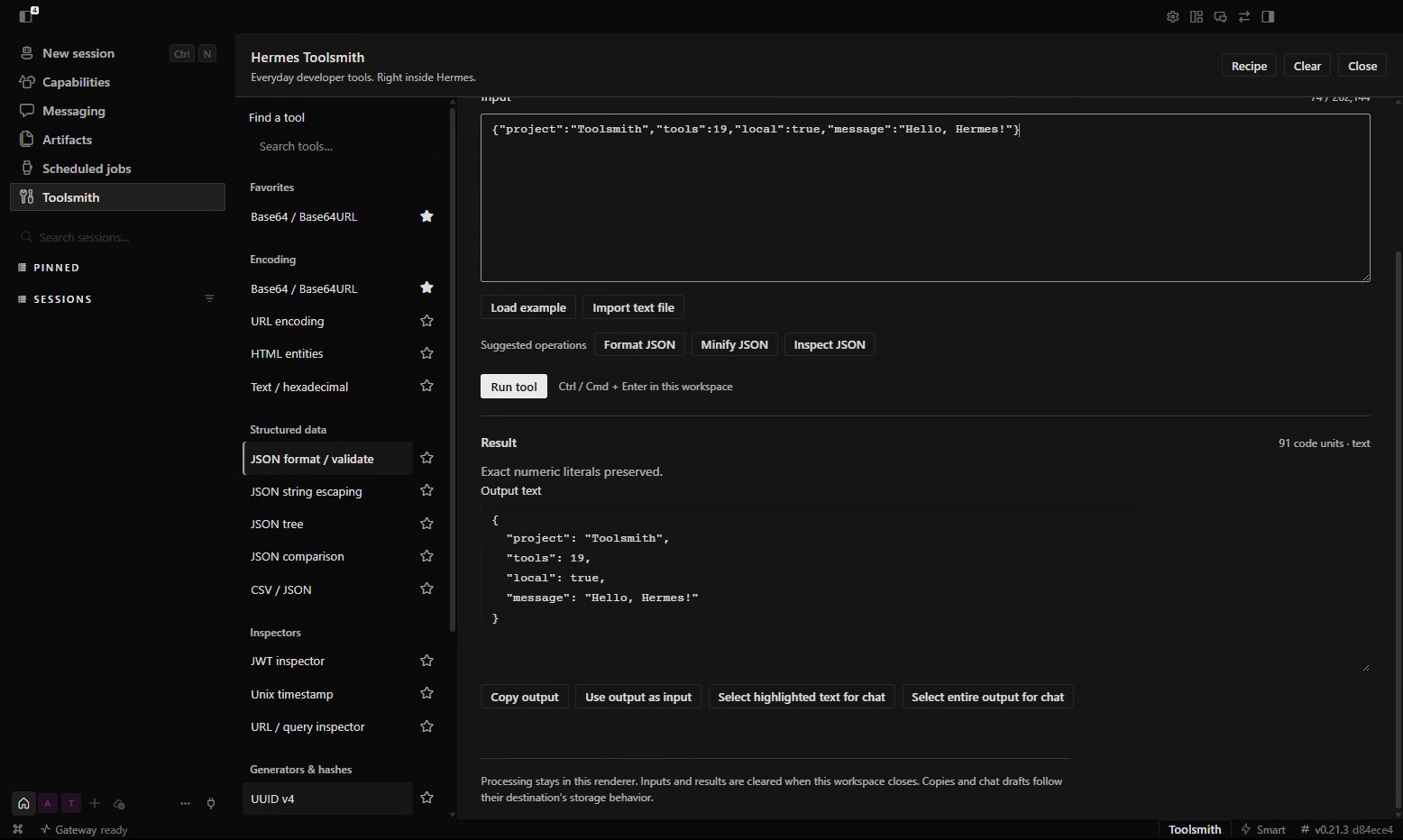
Format JSON, decode a payload, compare text, or chain conversions together. Nineteen tool families in one native Hermes Desktop page. Your input stays local until you choose to copy or share it.
POWERED BY HERMES AGENT · COMMUNITY PLUGIN · VERSION 1.0.1
See what it does · Watch the demo · Install · All tools
Powered by Hermes
Toolsmith opens straight from the Hermes sidebar and follows your Desktop theme. It uses the native plugin SDK for controls, menus, and the chat handoff. One bundled file. No API key, extra server, or model call.
Small jobs without leaving Hermes
| | |
| ------------------------------------------------------------------------------------------------------------------------------------------------------------- | ---------------------------------------------------------------------------------------------------------------------------------------------------------------- |
| Make sense of a payloadFormat JSON without rounding large numbers. Expand a JSON tree, inspect a JWT, or pull apart a URL and its query parameters. | Convert what you haveBase64, hex, URL encoding, HTML entities, CSV, timestamps, number bases, and colors. Load a small UTF-8 file or paste your input. |
| Run the whole sequenceChain up to 12 conversions into a recipe. Reorder steps, inspect intermediate results, and save the definition for next time. | Take only what you need to chatSelect a result, review the exact text, then insert it into a draft. Nothing is sent automatically. |
Search the tool list, star your regulars, and run with Ctrl/Cmd+Enter. Suggestions offer likely operations for your input; you choose what runs. Switching tools keeps the original input, and Use output as input makes replacement explicit.
One recipe, three steps
An encoded response does not have to mean three different websites.
URL decode → Base64 decode → Format JSON
Open Recipe, click Load demo and example input, then Run recipe. You get the decoded JSON and an expandable result for every step. Save the recipe to reuse its settings, or copy its definition to share it. Inputs and results are not included in saved definitions.
Nineteen tool families
| Group | Tools |
| --------------------- | ---------------------------------------------------------------------------------------- |
| Encoding | Base64 / Base64URL · URL encoding · HTML entities · Text / hexadecimal |
| Structured data | JSON format / validate · JSON string escaping · JSON tree · JSON comparison · CSV / JSON |
| Inspectors | JWT inspector · Unix timestamp · URL / query inspector |
| Generators and hashes | UUID v4 · Random strings / passwords · SHA-256 / SHA-512 |
| Text and conversions | Text utilities · Text diff · Number bases · Color conversion |
JWT inspection decodes the token; it does not verify its signature. CSV imports preserve cells as strings. Input and output limits keep larger jobs from overwhelming the page. See the tool reference for exact behavior and limits.
Install
Use a current Hermes Desktop with combined-package support. The native demo was recorded on Windows with Desktop 0.21.3.
From GitHub
Run on the machine where Desktop is installed:
hermes plugins install Adolanium/hermes-toolsmith
hermes plugins enable hermes-toolsmith
Restart Desktop or run Reload desktop plugins, then enable Hermes Toolsmith in Capabilities → Plugins. Click Toolsmith in the sidebar. You can also use Toolsmith: Open in the command palette.
Just the Desktop file
Download plugin.js and place it in:
$HERMES_HOME/desktop-plugins/hermes-toolsmith/plugin.js
With the usual defaults, that is ~/.hermes/desktop-plugins/hermes-toolsmith/ on macOS/Linux, or %LOCALAPPDATA%\hermes\desktop-plugins\hermes-toolsmith\ on Windows. Use your configured Hermes home if it differs. No Node.js or build step is needed.
Choose one installation method. Hermes preserves manually installed plugin folders, so an existing manual copy can take precedence over a package install.
From a result to a draft
- Select the entire output, a highlighted part, a tree value, or a recipe result using its Select … for chat button.
- Switch to a chat and open Add context → Toolsmith: insert reviewed output.
- Review or edit the preview, then click Insert into draft.
The handoff needs Hermes's status bar to be visible. Use Toggle status bar in the command palette if it is hidden. Copy output is always available. Drafts and clipboard contents follow their destination's storage behavior.
Local by default
Conversions run in the Desktop renderer. Toolsmith makes no network requests and does not read your clipboard in the background. It saves favorites, the selected tool, and recipe definitions. Input, output, and intermediate results stay in memory while you work. Switching pages keeps them; Clear, Close, or disabling the plugin releases them.
Updates and development
Toolsmith does not replace its own files. Repository installs update through Hermes; manual installs update by replacing plugin.js with a release file. Catalog installs, once admitted, use reviewed commit pins and hermes plugins update hermes-toolsmith.
To work on the plugin, use Node.js 22 or newer:
npm ci
npx playwright install chromium
npm run check
npm run format:check
The build produces the single committed artifact at desktop/plugin.js. Source lives in src/; tests and build scripts stay in tests/ and scripts/. Browser tests exercise the built artifact with a mock SDK. The demo shows the real Desktop app. The small Python entry point exists for Hermes package discovery and registers no Agent tools or hooks.
License
MIT. Bundled dependency notices are in THIRD_PARTY_NOTICES.md.
Toolsmith
Keep the small jobs inside Hermes.
Community project
Toolsmith is an independent community plugin. It is not affiliated with or endorsed by Nous Research or the Hermes Agent project. Their names and marks belong to their respective owners.
README from the reviewed commit 419669c; it updates when the author re-pins.