 sxuff
sxuffHermes Town native plugin
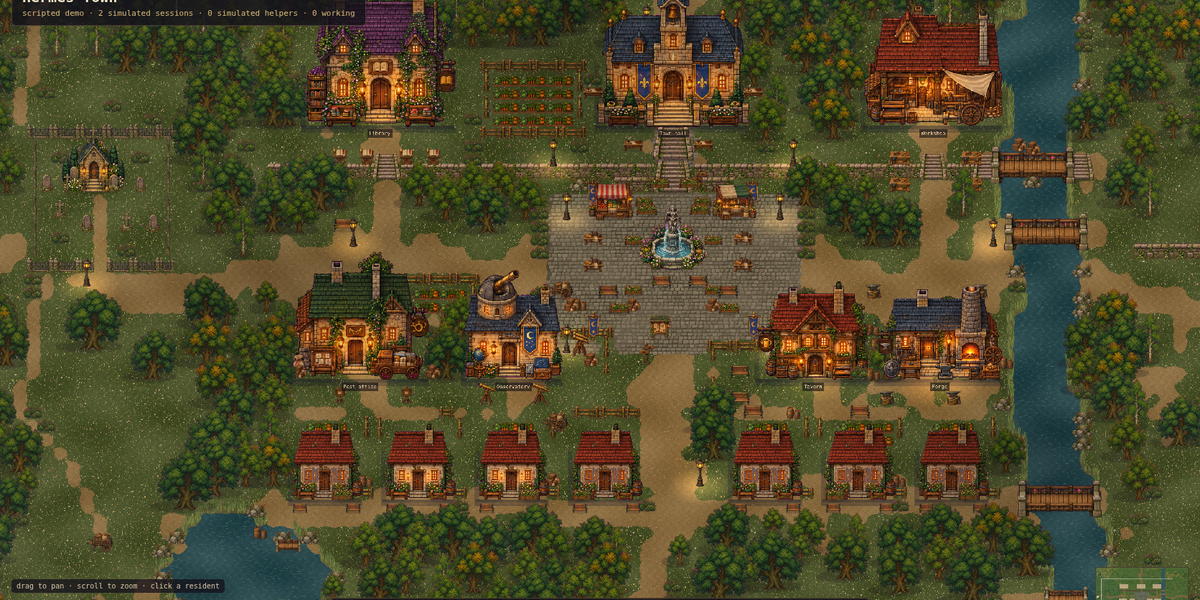
A passive lifecycle observer for Hermes Town. It renders one pseudonymous resident per Hermes execution context without reading what the agent is working on.
This v0.3.0 package includes the passive bridge, a profile-local launcher, the Node server, and a prebuilt frontend. No npm or repository checkout is needed at runtime. Requires Hermes Agent (validated baseline 0.21.2) and Node.js ^20.19.0 or >=22.12.0.
After this version is released and the catalog pin is reviewed:
hermes plugins install hermes-town
hermes plugins enable hermes-town
hermes town start
Open the printed http://127.0.0.1:4187/ URL on the Hermes host. Start a new Hermes CLI session, or restart the observed gateway, then run a turn. Town never enables itself or restarts Hermes. The existing v0.2.0 catalog pin does not contain these commands; it needs a reviewed pin update, then hermes plugins update hermes-town.
Manage your town
hermes town setup          # optional prerequisite/token check, no server start
hermes town start          # idempotent, background, loopback-only
hermes town start --open   # additionally open a browser, opt-in
hermes town status         # local prerequisites, ownership, received events
hermes town status --json
hermes town open
hermes town stop           # authenticated stop, never an arbitrary PID kill
Use hermes -p NAME town ... for a named profile. Runtime state, the token, bounded logs, journal, and private process identity stay under that profile's hermes-town/runtime/, outside the installed code. Windows relies on user-only profile NTFS ACLs; POSIX files use private modes. The server does not automatically start after reboot.
Multiple profiles on one host need distinct ports. Set HERMES_TOWN_BRIDGE_URL=http://127.0.0.1:PORT/api/town/ingest in both the Town CLI and the observed Hermes process; --port PORT must match. An occupied port or mismatched setting is refused. Managed mode uses its profile-local token, not an external token-file override.
A remote-host loopback URL is not your laptop's loopback URL. Use a private SSH forward; do not publish the live API. Browser opening reports when no graphical session exists.
Diagnose connection problems
- Unknown
towncommand: this plugin version is not installed/enabled in the current profile. Install/update through Hermes and explicitly enable it. - Node missing or unsupported: install a supported Node.js version on the Hermes host. No npm packages are installed at runtime.
- Server ready, waiting for events: open a new Hermes session or restart the gateway that should load the bridge. Check that the bridge URL and profile match. A successful browser connection does not prove plugin delivery.
- Events received: a real accepted ingress event reached this server run. Cron keepers and restored journal history are not counted. The age of the last event is not a claim that the plugin is still connected.
- Port occupied / ownership unknown: Town refuses to adopt or stop another process. Stop it through its original supervisor or select a matching unused port.
- Invalid token/permissions: setup fails closed and leaves unsafe existing credential files untouched. Inspect the profile's private runtime directory.
The CLI does not claim to know whether another Hermes process has loaded the plugin. It reports that as unknown.
Packaging and updates
The runtime/ contents belong to the reviewed Git commit. Commands never download replacement code. Maintainers run npm run package:plugin, commit the generated bundle with source, and require npm run check:package after a clean build. The SHA-256 manifest detects drift, not publisher authenticity. Catalog updates still require human review.
The source-checkout fallback npm run install:plugin copies this full package and creates a token, but never edits configuration, enables the plugin, or replaces catalog-managed bytes.
Registered hooks
pre_llm_callpost_llm_callpre_tool_callpost_tool_callon_session_starton_session_endon_session_finalizeon_session_resetsubagent_startsubagent_stop
The plugin registers these ten passive hooks and the hermes town CLI command tree. It registers no tools, slash commands, middleware, or prompt context. Pre-call hooks always return None. Import/registration never starts the server or creates a token.
Published fields
Each event can contain only:
id: random event identifier for de-duplicationkey: HMAC-derivedh/<main|child|cron>/<16 hex>resident keykind: closed lifecycle enumrole: closed role enumtool: sanitized tool name ontool_startedoutcome: closed outcome enum when applicabledetail: a skill name ontool_started, only whenHERMES_TOWN_SKILL_NAMES=1opts in
All other callback fields are ignored. The queue is bounded to 512 events, delivery uses one daemon worker, request bodies are capped at 8 KiB, and the HTTP timeout is 0.5 seconds.
Configuration
| Variable | Default |
|---|---|
| HERMES_TOWN_BRIDGE_URL | http://127.0.0.1:4187/api/town/ingest |
| HERMES_TOWN_SKILL_NAMES | unset. Set to 1 to publish the skill name a skill_view or skill_manage call asks for, so the town gives each skill its own market stall. Nothing else from tool arguments is ever read. |
| HERMES_TOWN_BRIDGE_TOKEN_FILE | ${HERMES_HOME:-~/.hermes}/hermes-town/runtime/bridge-token |
Only loopback HTTP or HTTPS endpoints are accepted. The token must be a regular file with at least 128 estimated bits of entropy. On POSIX systems it must have no group or other permission bits.
Validate
hermes plugins doctor integrations/hermes-town-plugin --ci
python3 tests/verify-plugin-privacy.py
README from the reviewed commit f3b8940; it updates when the author re-pins.