
 iamlukethedev
HUD Teach
Numbered, click-through marks on any live Mac window underneath Hermes —
a chess board, a browser game, Photoshop, a DAW, Settings — instead of
narrating menu paths. It is not Photoshop-only.
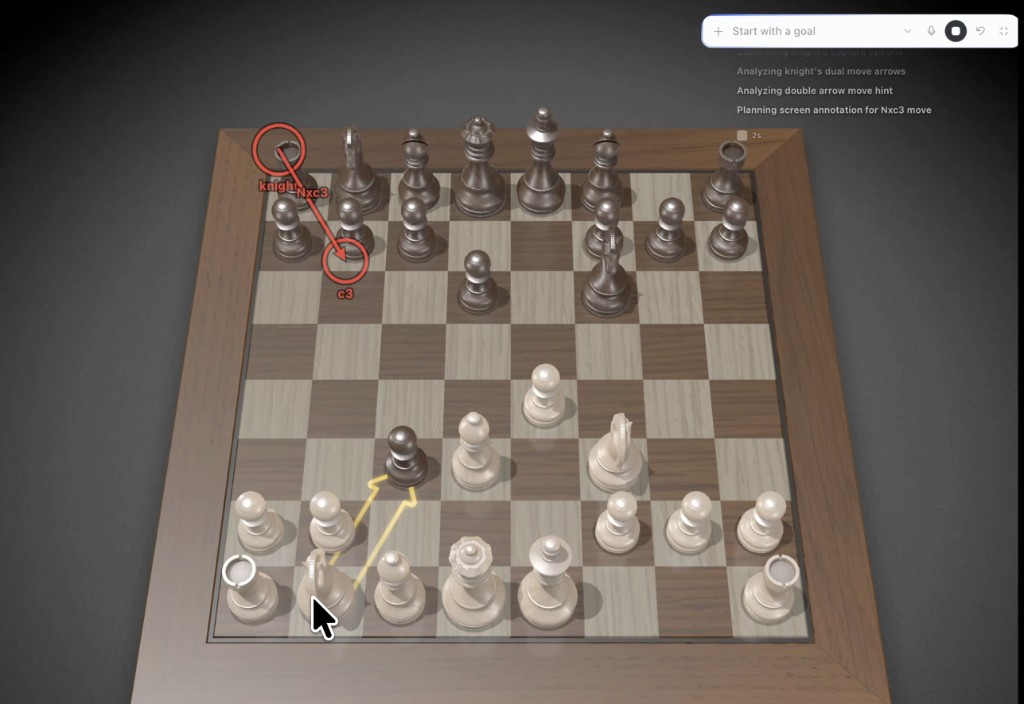
This is a standalone Hermes plugin, not a core patch. The overlay is a small
Tk process the plugin owns. Hermes Desktop does not need to merge any Electron
changes.
Install
hermes plugins install iamlukethedev/hermes-hud-teach
hermes plugins enable hud-teach
Then start a new session so the agent sees teach_screen. Optional: in Desktop,
Capabilities → Plugins → HUD Teach for the status chip and Clear screen marks
palette command.
Permissions
In System Settings → Privacy & Security:
- Screen Recording — Hermes Desktop (or the terminal that launched
hermes) - Accessibility — same app, if you want window titles / a named
target
What the agent does
teach_screen action=capture  target=Chess
teach_screen action=draw     frame_width=… frame_height=… bounds=… shapes=[…]
Shapes support circle, rect, arrow, line, polyline, label, optional
step 1–12, and ttl_seconds (default 180). A new draw replaces the previous
set. Marks are click-through so the user can follow them with their own mouse.
Requirements
- macOS
- Hermes
>= 0.20 - Python with Tk (the macOS/python.org and
uvbuilds include it)
Development
PYTHONPATH=. python -m unittest discover -s tests -v
Smoke the overlay without the agent:
python overlay_daemon.py &
python -c 'from overlay import draw, clear; print(draw(bounds={"x":80,"y":80,"width":480,"height":320}, frame_width=480, frame_height=320, shapes=[{"kind":"circle","x":120,"y":80,"radius":28,"step":1,"color":"red"},{"kind":"arrow","fromX":160,"fromY":80,"toX":300,"toY":180,"step":2,"color":"yellow"}], ttl_seconds=8))'
License
MIT. See LICENSE.
README from the reviewed commit faa7190; it updates when the author re-pins.