e-is
e-isHermes Kanban Gantt



A Gantt timeline view plugin for Hermes Desktop — a full-page /kanban-gantt route that renders any Hermes kanban board as a timeline of real work (created / started / done timestamps), not a forecast planner.
Kanban Gantt ── 20 ────────────────────────────────  [◄ zoom ►] [Refresh]
TÂCHES        │ LUN 7 ── MAR 8 ── MER 9 ── JEU 10 ── VEN 11 ── …
☑ Epic X      │        ▓▓▓▓▓▓▓░░░░░░░▓▓▓▓ (running)
☐ Sub-task A  │              ▓▓▓▓▓ (done)
Features
- Full desktop page (
/kanban-gantt) + sidebar entry + ⌘K palette command. - Board switcher projected into the desktop page-header band (
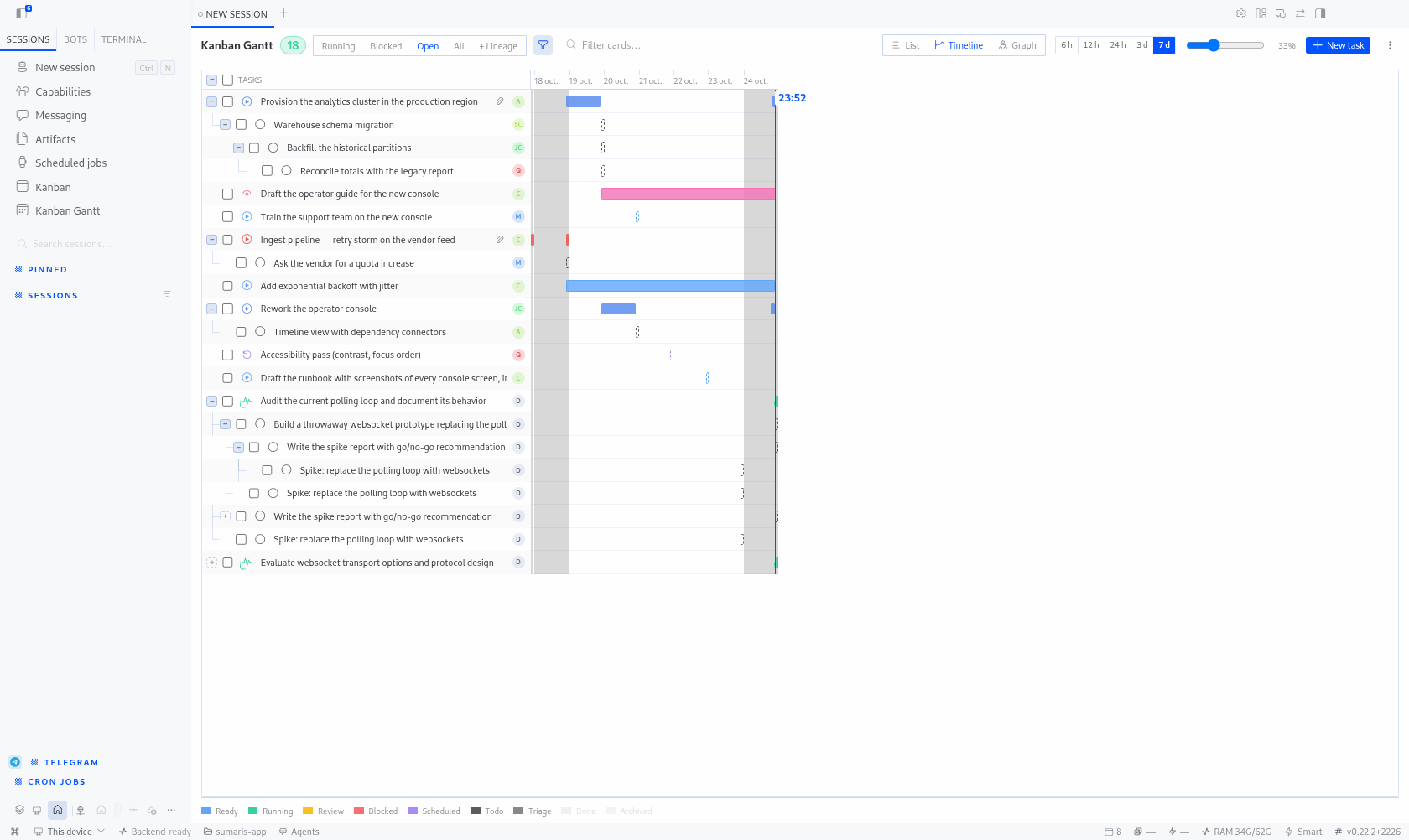
WORKSPACE_PAGE_HEADER_AREA), styled like the official kanban switcher, with an "All boards" aggregate mode; per-board badges on rows in aggregate view. Requires Hermes ≥ 0.21.5. - Real timeline bars — from the kanban tasks' actual timestamps (created / started / review / done), with live-activity arc on running tasks, weekend shading, zoom (7 days at 100%), auto-scroll to "now".
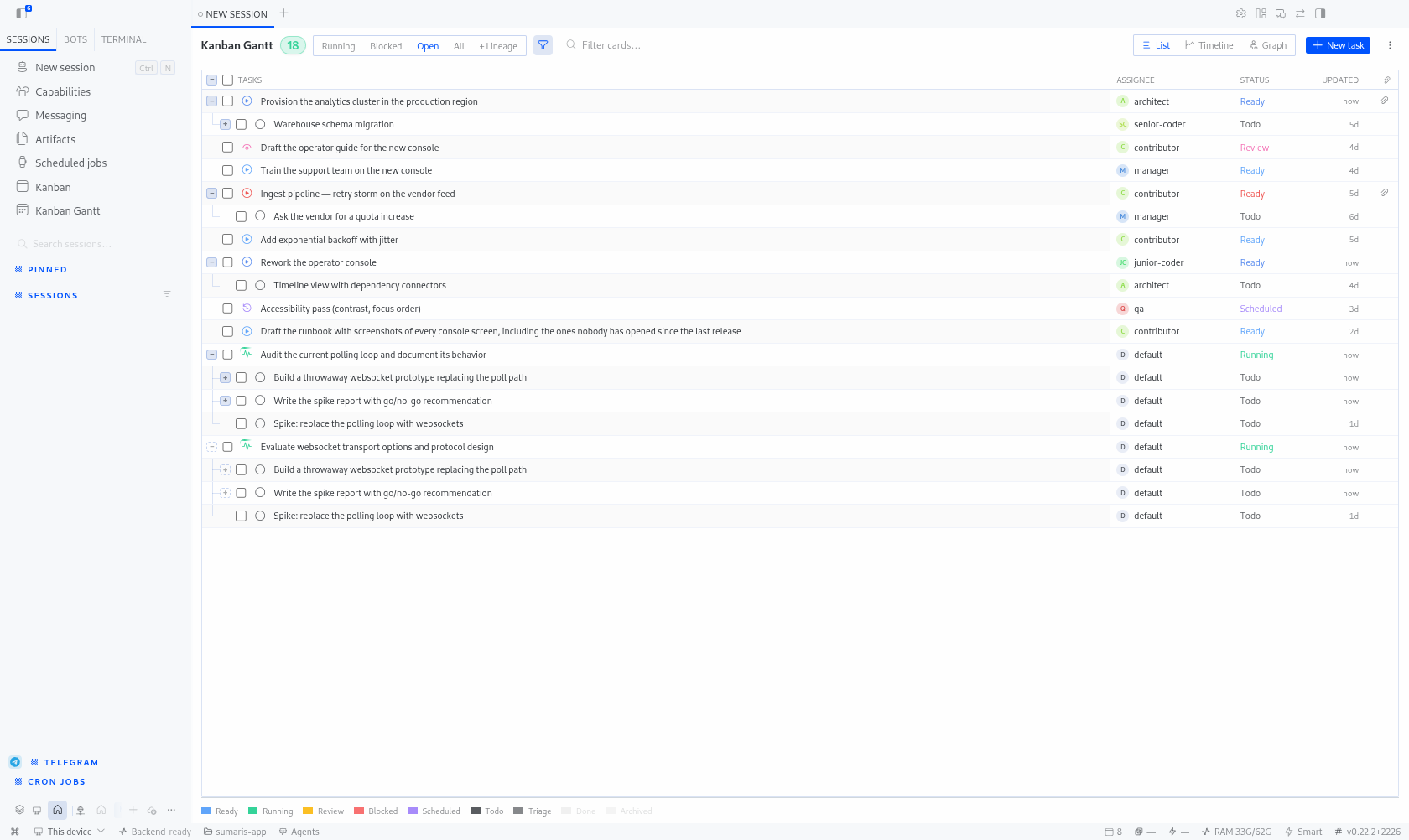
- List view — a List / Timeline toggle in the header swaps the bars for full-width columns (task, assignee, status, last activity). The choice is persisted; the timeline stays the default.
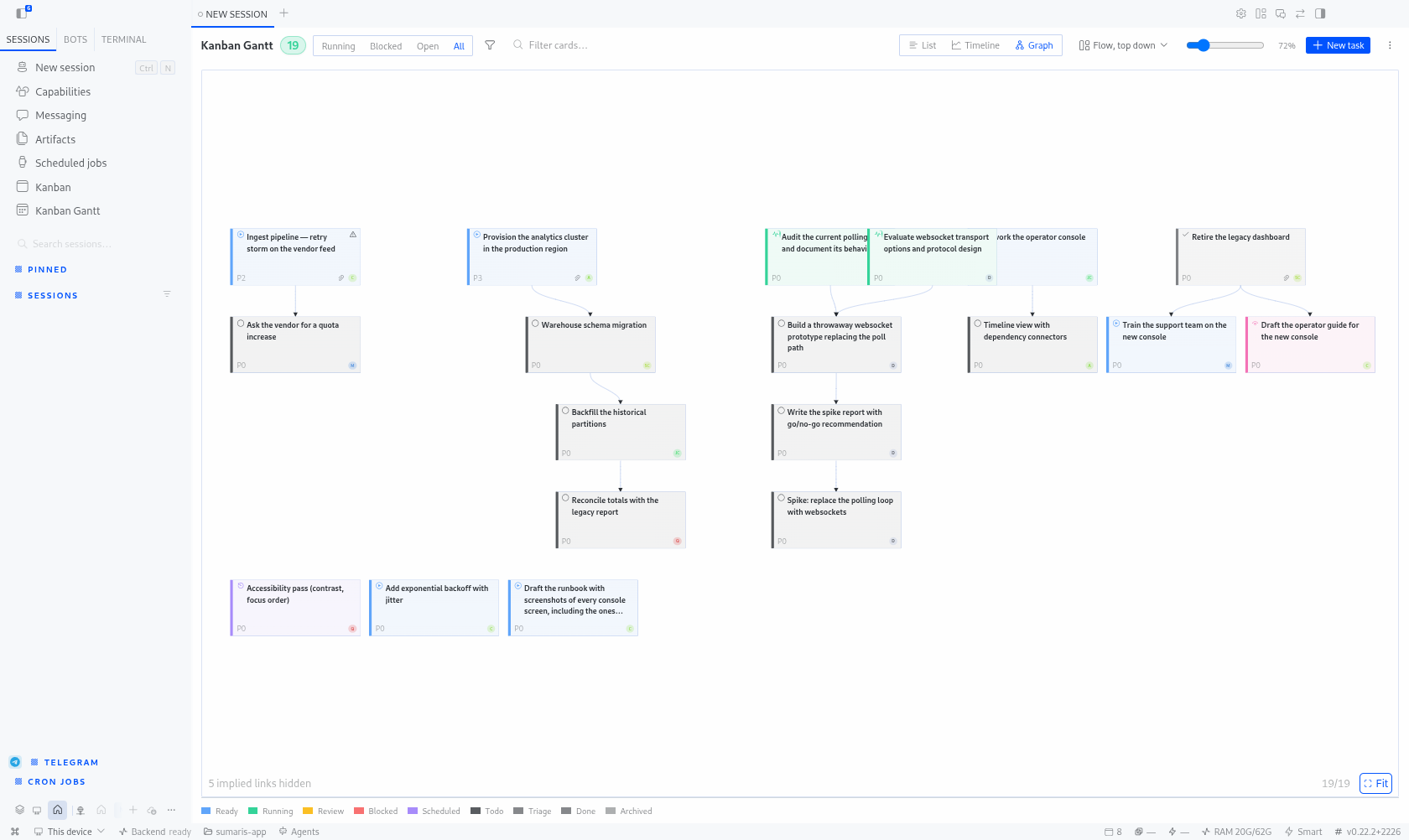
- Graph view — the third mode of that same toggle: the dependency structure, drawn as a card per task with an arrow per parent → child link, laid out by longest path and reduced (a link implied by a longer path is counted in the footer, not drawn). Four arrangements —
Flow, top down,Flow, left to right,Columns by status,Compact grid— remembered per board, with tasks nothing hangs off packed into a trailing row. The camera is the timeline's (Ctrl/⌘ + wheel at the cursor, drag to pan at any zoom,0/+/−), Fit is a mode that keeps reframing as the pane resizes, and selecting a card lights its whole lineage. Links are editable where they are drawn: a slot under each card draws an arrow that adds a parent, a right click deletes a link, and each end carries a grab dot that moves it — all gated by the domain's own rules (no cycles, no finished parents). - Dependencies — parent → child links drawn as tree connectors in the task column and dependency chains in the timeline.
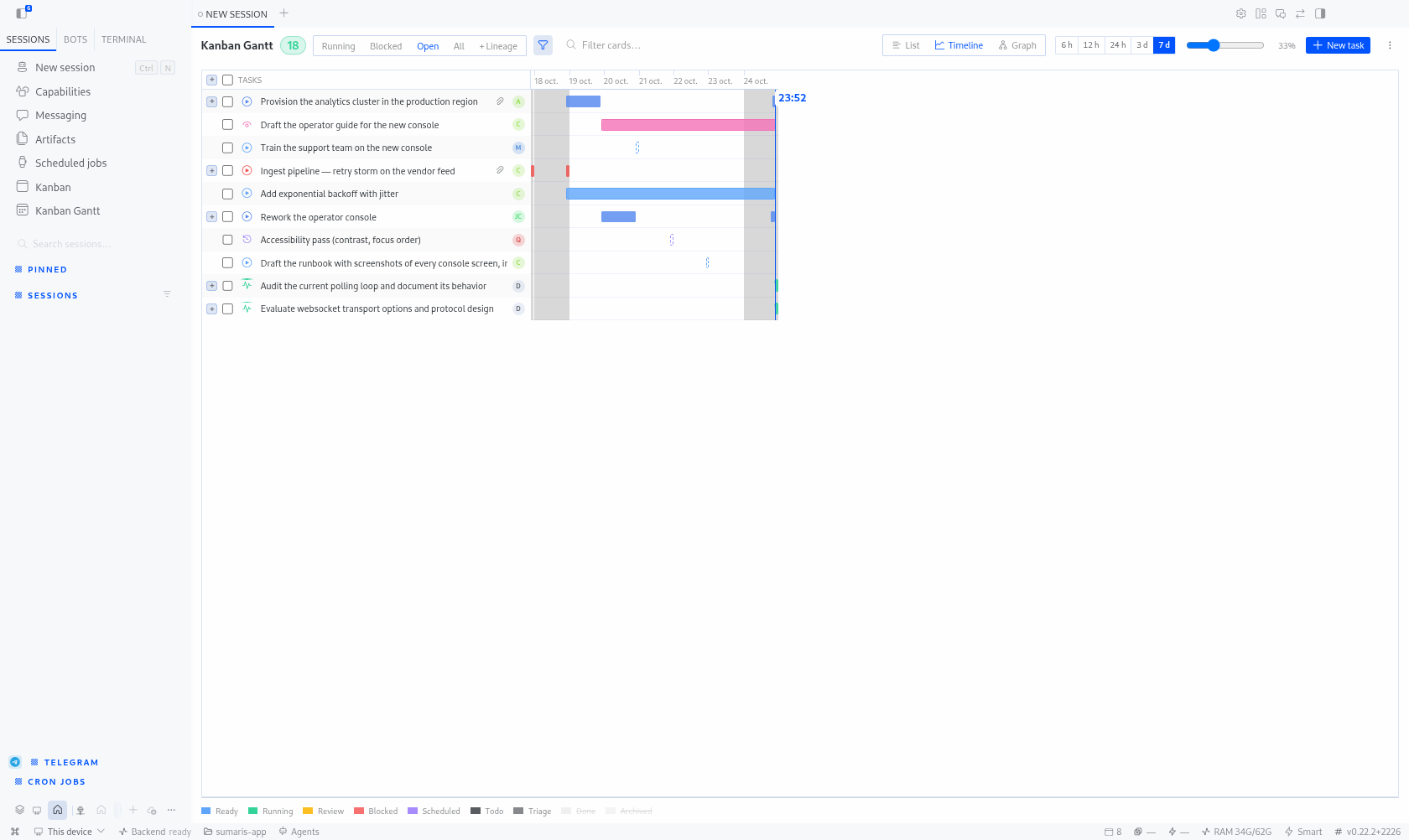
- Collapsible tree column — the task column reads like a file explorer: a boxed
+/−on every task that has children (a leaf keeps the slot, so titles stay aligned), a vertical down every level that still has a sibling below it plus the├/└elbow for the row itself, and a global toggle in the column header, in front of the master checkbox, that collapses or opens everything. The fold state is persisted per board; a search ignores it — everything opens and matches are flagged — without touching what is stored, so clearing the query restores exactly the branches you had. Selecting a task tints its descendants, which is what makes a child not printed directly beneath its parent visible. On a multi-parent board the task is still printed once, under its first parent: a later parent shows a dashed square, closed by default, which reprints the child without repeating its subtree — so the link is always visible and a task never disappears because its first parent happens to be collapsed. - Create tasks — “New task” at the right end of the toolbar (title, description, project, workspace kind + path, assignee, priority, skills, model override, parent, triage, goal mode), and “Create a sub-task” from a task's ⋯ menu (labels come from the locale bundles). The status is derived by the kanban domain —
ready, ortodowhile the chosen parent is unfinished,triagewhen asked. Parent and project pickers are searchable, assignees come from the board and the Hermes profiles, and an idempotency key per submit means a double click cannot duplicate the task. - Re-parent by drag & drop — drag a task's name onto another task to move it under it; refused targets (itself, its own subtree, another board, a done/archived task) light up red before you release. A task that already has parents asks: add a new parent, or replace them with this one — and the parent list can be pruned right there. Full parent/child lists (status icon, click to open that task) live in the detail drawer; the drawer's ⋯ menu also offers a searchable “Move under…” picker for the same operation without the mouse.
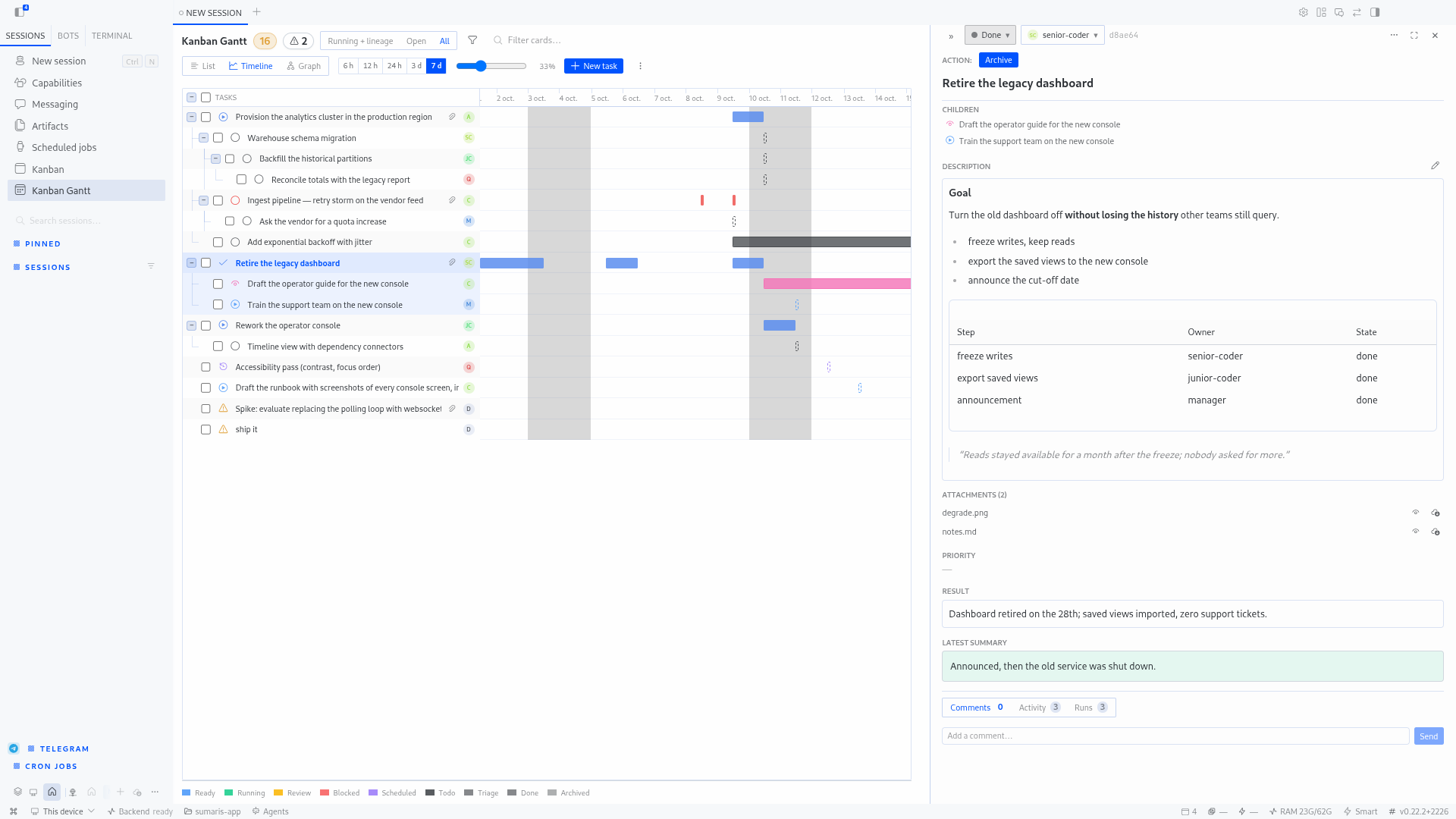
- Task detail drawer — status transitions (action matrix), assignee, comments, runs, attachments; dockable (
«/») beside the gantt instead of overlaying, resizable, position persisted. - Bulk operations — multi-select rows (header checkbox, shift-click) → move status, assign, archive, delete.
- Filters — by assignee, by status, show/hide archived, text search, and the three scopes (
Running + lineage,Open,All) which narrow the graph, the timeline and the list through the same pure function; the legend strikes through what the scope rules out. - Readable by design — sticky opaque label column, opaque dropdown menus, resizable label column, all state persisted per plugin.
Creating and moving tasks
Create — “New task” sits at the right end of the toolbar; “Create a sub-task” is in a task's ⋯ menu (parent prefilled). The form covers the same fields as the official kanban dialog: title, description, project, workspace kind (scratch / worktree / dir) with an optional path, assignee, priority, skills, model override, parent, triage and goal mode. The parent and project pickers are searchable; the assignee list merges the board's own assignees with the Hermes profiles, so it is not empty on a fresh board.
The status is never asked for — the kanban domain derives it (ready, todo while the chosen parent is unfinished, triage when requested) and the new task's detail opens straight away, so you see where it landed instead of a promise. One idempotency key is generated per dialog opening: a double click cannot create two tasks.
Move — drag a task's name cell onto another task to move it under it. Nothing is offered that the domain would refuse: the dragged task itself, its own subtree, a task from another board and finished tasks are greyed out, and the drop target turns red before you release. Dropping on a task that already has parents asks whether to add another parent or replace them with this one (existing parents are listed there, each removable). The same operation is reachable without the mouse from the drawer's ⋯ menu (“Move under…”, searchable). Parents and children are listed in the drawer with their status icon, and clicking one selects and opens that task.
| Route | Purpose |
| --- | --- |
| POST /tasks | create a task (status derived by the domain) |
| GET /projects | projects the profile declares, for the create form |
| GET /profiles | Hermes profiles, offered as assignees |
| POST /tasks/{id}/parent | link a parent — mode: add or replace |
| DELETE /tasks/{id}/parent/{parentId} | drop one parent link |
Every write delegates to hermes_cli.kanban_db and surfaces what the domain decided: a refused move (cycle, running child, cross-board) comes back as a 409 with the domain's own wording, and a re-parented ready child that the domain gated back to todo is reported as such rather than silently flipped.
Install
hermes plugins install e-is/hermes-kanban-gantt
Verify: Mounted plugin API routes: /api/plugins/kanban-gantt/ in ~/.hermes/logs/agent.log, then ⌘K → « Kanban Gantt ».
Layout
plugin.yaml          unified plugin manifest
__init__.py          no-op register() (capability probe only)
dashboard/           backend — FastAPI router → /api/plugins/kanban-gantt/
  manifest.json      name/label/version/api pointer
  plugin_api.py      gantt snapshot, boards, task detail, create/projects/profiles,
                     status/comment/assignee routes, parent links
src/                 AUTHORING SOURCES (TypeScript)
  main.ts            renderer entry — bundled to desktop/plugin.js by esbuild
  state.ts           atoms + the REST door (verb always forwarded)
  core/gantt-core.ts pure timeline logic (no React/SDK)
  ui/                NewTaskDialog, ReparentChooser, TaskRelations, switcher
  sdk.d.ts           ambient types for the SDK subset in use
desktop/             BUILD ARTIFACTS — loaded uncompiled by Hermes Desktop
  plugin.js          bundled renderer (do not edit; run `npm run build`)
  gantt-core.js      bundled pure core (the node tests import it)
install.sh           optional convenience installer (desktop half + backend half)
tests/               node:test suites (pure gantt core, REST door), a stub-render
                     smoke test that mounts the built plugin without a browser
                     (tests/ui/esm-render.mjs), and the pytest backend suite
Build & test:
npm install            # esbuild
npm run build          # src/ → desktop/
npm run check          # syntax-gate the artifacts
npm test               # node suites + stub-render + pytest backend
Architecture
- Backend owns all data access: reads the shared kanban SQLite store
(~/.hermes/kanban/boards/<slug>/kanban.db), serves the Gantt snapshot
(rows, bars, domain, dependencies), and routes status transitions /
comments / bulk writes through the same domain layer as the core kanban.
Mounted at/api/plugins/kanban-gantt/by the desktop'shermes serve. - Renderer owns everything visual: timeline math (pure
GANTT_CORE_SRC
core, testable in isolation), rows, bars, filters, drawer, and the
desktop-page chrome (sidebar entry, palette command, page-header switcher). - Zero API keys, zero model tokens — no network I/O beyond the local
Hermes gateway and the local SQLite store.
Tests
npm test                                                        # everything below

# pure core + REST door (node:test, no deps)
node --test tests/gantt-core.test.mjs tests/rest-method.test.mjs

# the built plugin, imported as ESM against SDK/react stubs: page registers,
# renders and projects its switcher — no browser, no desktop needed.
# The stub fills in any SDK export the artifact imports, so it cannot drift.
node tests/ui/esm-render.mjs

# backend (isolated venv; HERMES_AGENT_HOME points at a hermes-agent checkout)
tests/run_tests.sh
Visual validation
There is no browser harness: the demo page was retired (it rendered its own
simplified DOM, so it proved nothing about the real component tree). Visual
work is validated in the desktop itself, where the plugin actually runs —
install.sh, then Ctrl+K → "Reload desktop plugins", or drive a debug build
over CDP (HERMES_DESKTOP_CDP_PORT=9223 hermes desktop).
Screenshots
npm run shots (Python + CDP) drives the real desktop: it forces the UI to
English, switches the active gateway to « This device », collapses the sidebar's
Pinned/Sessions sections, opens the plugin on the gantt-demo board and walks a
scenario — writing docs/screenshot-en-*.png (what the catalog entry pins) plus
a GIF in docs/animations/ assembled with ffmpeg. The desktop has to expose a
CDP port first:
pkill -f 'release/linux-unpacked/Hermes'
~/.hermes/hermes-agent/apps/desktop/release/linux-unpacked/Hermes \
    --ozone-platform=wayland --remote-debugging-port=9222
Seed the board it captures with .agents/plans/seed-demo-board.py (parents there
are prerequisites — a parent task must be finished before its children run, never
a container).
The scenario leaves nothing to the state it finds: it forces the timeline before
the first capture (the view mode is persisted, so a previous run could have left the
app in list mode), folds a branch for the tree shot, then switches to the list
view for the next captures, and ends on the graph — Flow, top down (the
vertical dependency tree) with the scope on All, because any narrower scope hides
exactly the edges the picture exists to show. It also fixes what the shell would otherwise impose —
the task column's width (400 px), the light appearance (this machine follows the
system, and a switch to dark turned every capture dark) and the sidebar width — and
puts the appearance and the sidebar back the way it found them when the run ends.
Catalogue card
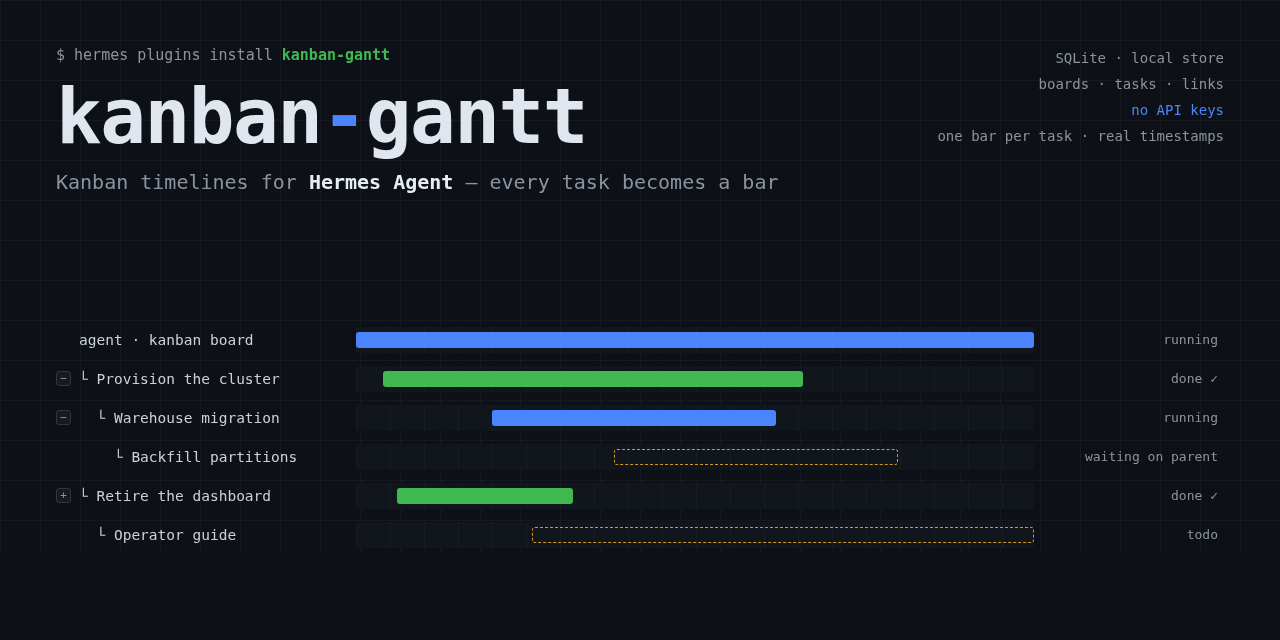
The catalogue entry's image: is a 2:1 banner — measured on four entries:
1600x800, 1280x640, 1200x600, 1280x640 — so this one is 1280x640.
It is drawn, not generated: the other entries are terminal-style cards whose
typography no image model reproduces reliably (FLUX turns "plugins install" into
glyph soup). scripts/card.py composes it in HTML/CSS and rasterises it with the
Chromium Hermes ships, so one place holds the wording, the palette and the bars:
npm run card                       # -> docs/catalog-card.png (1280x640)
python3 scripts/card.py --out /tmp/card.png --scale 1
It needs neither the desktop nor a CDP port, and npm run shots calls it at the
end of a capture run (skip with --no-card), so the stills and the card stay
in sync. The generated docs/catalog-card.html sits next to the PNG on purpose:
that file is the source, and editing it (or the constants at the top of
card.py) then re-running is the whole workflow.
License
GPL-3.0 — see LICENSE.
README from the reviewed commit 94a042d; it updates when the author re-pins.