 diegomarino
kanban-task-threads
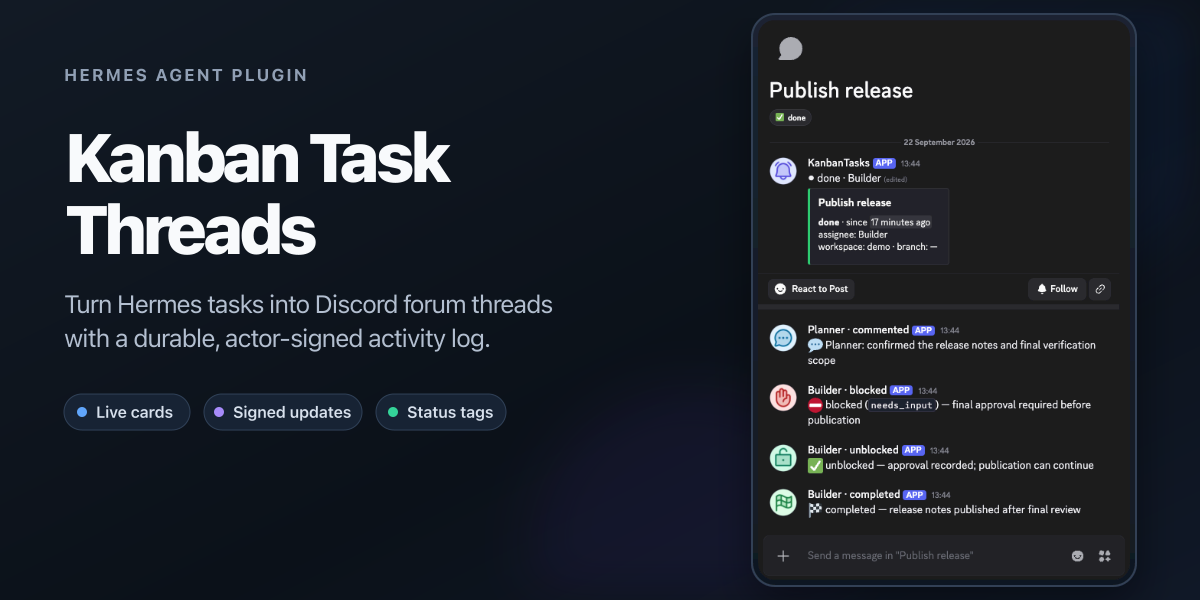
A Hermes plugin that gives every kanban task a Discord forum thread of its
own: the first post is a live status card rewritten in place, and the replies
are the append-only log. The post body answers "what is happening now?"; the
thread answers "how did we get here?".
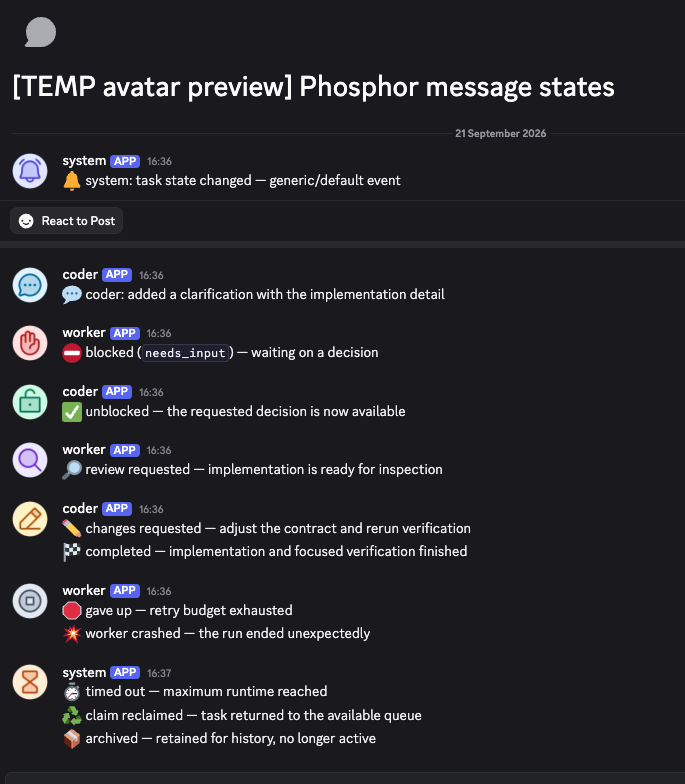
Webhook replies can also carry a Phosphor avatar selected by message type:
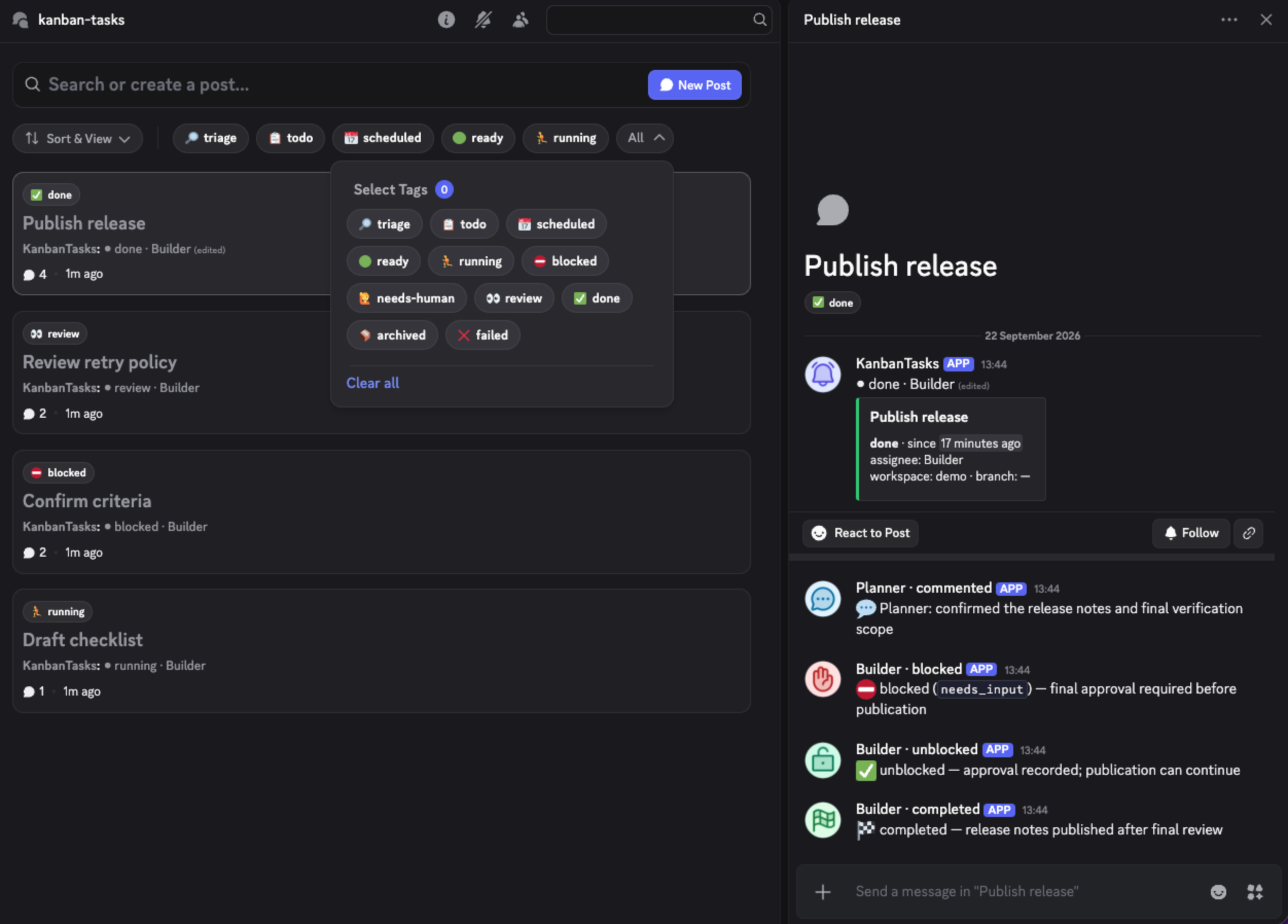
The card re-renders from board state on every change (status, block reason,
assignee, prerequisites, elapsed time via Discord's live <t:…:R> timestamps).
Each reply is signed with the profile that caused it. The card itself is
signed with the webhook's own name — deliberately: a webhook message's
username is fixed at creation, so signing the card with an assignee would
freeze the first one forever (see docs/transport.md).
Requirements
- Hermes 0.20+ with the kanban board in use.
- A Discord forum channel and a webhook bound to it. The webhook is
write-only and bound to one channel: a leak costs only the ability to post
there. - Optionally, the selected publisher profile's existing Discord bot token.
Do not create a dedicated bot for this plugin. Its integration-managed role
needsView Channel,MANAGE_THREADS(shown in Discord as Manage Threads
and Posts),READ_MESSAGE_HISTORYfor archived listing, and
MANAGE_CHANNELS(Manage Channels) to create missing status tags. Scope
both management permissions to this forum, not the whole server. This unlocks
title state, tags, archiving and metadata repair. The plugin works without a
bot token and never requires one.
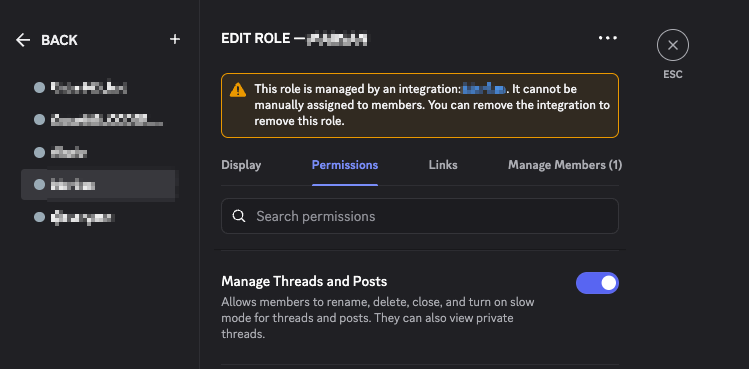
Discord creates and manages this integration role for the bot. Grant the
permission to that role; it is not a role you manually assign to people.
If you do not grant Manage Channels, create all managed tags manually before
the first publishing pass with the documented emojis; the plugin will reuse
them and will not need that permission while the full vocabulary remains
present and unchanged.
Install
The reviewed catalog entry is the normal install path:
hermes plugins install kanban-task-threads
hermes plugins enable kanban-task-threads   # opt-in allow-list
A direct GitHub install remains available for unreleased revisions, but Hermes
treats it as an unreviewed community source and scans the whole repository —
including tests, CI and documentation — before installing it:
hermes plugins install diegomarino/kanban-task-threads
hermes plugins enable kanban-task-threads
If a future revision reports CAUTION, review every finding before repeating
the command with --force; that flag cannot override a DANGEROUS verdict.
Do not disable install-time scanning. Prefer the catalog name and its reviewed,
pinned commit for normal installations.
Set the secret in your profile's environment (through your secret manager —
e.g. a 1Password op:// reference — never a literal in config):
KANBAN_TASK_THREADS_WEBHOOK_URL=https://discord.com/api/webhooks/…/…
KANBAN_TASK_THREADS_BOT_TOKEN=…        # optional
Then restart the gateway — a gateway holds its plugin set from startup.
Confirm with hermes plugins list that the source column reads user.
The forum channel is never configured: the plugin asks the webhook where it
posts (GET on the webhook returns its channel_id). One credential, one
source of truth.
Naming the forum is yours to do — the plugin discovers channels, it never
creates or names them. The binding between a board and a forum is the pair
(board setting, webhook secret), not any name. Suggested convention: name
the forum after the board's slug (#tasks-default, #tasks-web), so a human
reading the channel list can tell which board publishes where. One deployment
serves one board; point each board's deployment at its own forum's webhook.
Managed tags: with a bot token, the first pass holding the board lease
reuses or creates the exact forum tags🔎 triage,📋 todo,📅 scheduled,
🟢 ready,🏃 running,⛔ blocked,🙋 needs-human,👀 review,
✅ done,📦 archived, and❌ failed. It also repairs missing or changed
emojis on those managed names. Existing unrelated tags are preserved.
Discord permits at most 20 forum tags, so the pass fails closed rather than
deleting anything if the combined set will not fit.Forums that require tags: the bot path automatically uses managed
triageas the creation tag when nodiscord_applied_tag_idsoverride is
configured, then applies the task's real state. Webhook-only installations
must still setdiscord_applied_tag_ids, because a webhook cannot discover
or create forum tags.
Configuration
All optional, under plugins.entries.<id>.settings:
| Key | Default | Meaning |
|---|---|---|
| board | current board | Which board this instance serves |
| publisher_profile | empty | Exact ctx.profile_name allowed to publish. Empty preserves the public/single-profile default: every loaded profile is a lease candidate and the board lease elects the active publisher. A value pins publication and gives up cross-profile failover |
| reply_on | sensible set | Event kinds that earn a reply in the thread |
| include_workspace_path | false | Publish the absolute workspace path on the card (see Privacy) |
| discord_applied_tag_ids | [] | Optional creation-tag override. Required only for webhook-only operation in a forum that enforces a tag; bot mode otherwise bootstraps with managed triage |
| avatars_enabled | true | Add message-state avatars; false preserves plain webhook identities |
| avatar_base_url | official catalog | Optional HTTPS directory containing 12 custom PNGs; blank uses the official versioned catalog |
| avatar_theme | duotone | Official-catalog Phosphor weight: duotone, fill, or bold; ignored with a custom directory |
| avatar_palette | colored | Official-catalog palette: colored, black, or white; ignored with a custom directory |
| poll_seconds | 20 | Seconds between passes when no hook kicks arrive |
| stale_after_seconds | 600 | Heartbeat age after which a running task renders as stale |
| dashboard_url | — | Task page URL; may contain {task_id} and {board}. Powers the card link and each reply's trailing [#] (without it, [#] jumps to the card in-app). Links are forever: every URL you publish is frozen in Discord permanently, so use a stable name that resolves from every device you click from — never an IP (the plugin warns on literal IPs), never anything discovered at boot |
| comment_excerpt_chars | 180 | Comment text quoted in replies; 0 = author only |
| card_template, reply_templates | built-ins | Cosmetic templates (docs/configuration.md) |
Templates are rendered through a restricted formatter (flat fields only —
attribute/index traversal is rejected) and fall back to the built-ins on any
error. What is not configurable, by design: which events publish, when the
card re-renders, idempotency, retry policy, truncation, and
allowed_mentions: {"parse": []} on every call.
Message avatars
Avatars are author identity, not message media: the plugin sets Discord's
avatar_url when creating the starter or a reply. It does not add attachment
images, embed thumbnails, or image embeds. The starter always uses default;
replies cover commented, blocked, unblocked, review_requested,
changes_requested, completed, gave_up, crashed, timed_out,
reclaimed, and archived. Unknown future kinds fall back to default.
Discord may visually group consecutive webhook messages that have the same
username even when their avatar_url differs. With avatars enabled, reply
identities therefore include the type: {profile_id} · {message_type} (for
example, profile_wester · blocked). Events without an attributable actor use
system · {message_type}. This keeps every type's avatar visible while
preserving the real profile id whenever it fits. Discord caps webhook names at
80 characters, so an unusually long profile id is marked with … and shortened
just enough to retain the complete message type. When avatars are disabled,
usernames remain unchanged and system observations continue using the webhook's
own identity.
With no avatar settings, the plugin uses the official duotone/colored
catalog. The repository includes 96 px PNGs for all three themes and palettes
under pages/v1/, plus their Phosphor 2.1.1 SVG sources, render manifest, and
license under assets/avatars/. colored is the approved semantic palette;
black uses a black glyph on a white circle and white uses a white glyph on
a black circle. Phosphor's native 20% duotone layer produces the secondary grey
without inventing a second icon color.
The checked-in workflow publishes pages/ with GitHub's official Pages actions
when that directory changes on main. The built-in URL contract is:
https://diegomarino.github.io/kanban-task-threads/
  v1/{theme}/{palette}/96px/{message_type}.png
The bundled manifest selects v1; it is not a user setting. A significant
visual redesign moves the plugin to v2, while v1 remains published for old
installations and messages.
For custom artwork, avatar_base_url is the final directory containing
default.png, commented.png, blocked.png, unblocked.png,
review_requested.png, changes_requested.png, completed.png, gave_up.png,
crashed.png, timed_out.png, reclaimed.png, and archived.png. The plugin
appends only the filename—never its own version, theme, palette, or size:
avatar_base_url: https://assets.example.com/hermes-avatars
https://assets.example.com/hermes-avatars/blocked.png
The custom directory must be public HTTPS without authentication. It needs no
manifest. Theme and palette settings are ignored in custom mode; choose a
different collection by changing the directory URL. Invalid cosmetic settings
fall back or disable only avatars, never task publication. Set
avatars_enabled: false to opt out explicitly. Full operational details are in
Avatar customization and self-hosting.
The renderer for the official catalog requires rsvg-convert and performs no
network access:
python3 scripts/render_avatars.py
The runtime never hotlinks Phosphor, uploads assets, probes an origin, or
creates hidden Discord messages to host files. See
ADR-0015.
Privacy and egress — read before enabling
Everything this plugin publishes leaves your machine permanently and is
visible to everyone who can read the channel:
- Task titles, block reasons, completion summaries and failure
text are arbitrary agent output and may echo secrets or stack traces. They
are published because they are the feature — length-capped, mentions
neutralized — but they are an egress path. Point the webhook at a channel
with an audience you trust. workspace_pathcontains your OS username and project layout. Off by
default; opt in withinclude_workspace_path.- Comment text is excerpted into replies (length-capped, ADR-0011);
setcomment_excerpt_chars: 0if comment bodies must never leave the board. - When a prerequisite thread opens, its dependency announcement includes the
first 140 characters of that task's body. This path currently has no opt-out;
avoid sensitive task bodies when dependency announcements are enabled.
Failure behavior
Discord being down never loses an event: the plugin consumes the board's own
event log past a durable cursor, so it resumes where it left off after any
crash or restart. Unreachable configurations degrade to a no-op with one log
line instead of queuing work that can never be sent. A deleted post is
respected (the plugin stops publishing for that task rather than re-creating
it), and re-pointing the webhook freezes old posts instead of corrupting them.
Details: docs/failure-policy.md.
Diagnostics go through the standard Python logger (kanban-task-threads
namespace): warning for transient retries, error for anything needing an
operator.
Limitations, honestly
- Comment text is excerpted, not full — replies quote up to
comment_excerpt_chars(default 180) with a link to the full text;
set it to0to publish only who commented (ADR-0011). - Latency is seconds to
poll_seconds, not instant: hooks are best-effort
kicks; correctness rides the durable cursor. - The thread name is frozen for webhook-only deployments (it carries the
task id on purpose); a bot token unlocks renames. - The status tag owns the thread's tags when the bot path is active: a
manually applied tag will not survive the next automated retag
(docs/transport.md documents the tradeoff). - Metadata audit is deliberately bounded to all active guild threads plus
the forum's latest 25 public archived threads. Older archived posts are not
scanned until they re-enter that window. - Replies are at-least-once across a crash between send and cursor write;
a rare duplicate reply is possible. Post creation is strictly guarded
instead — ambiguous outcomes wait for an operator (reconcileverbs). - One deployment serves one board and one forum. Multi-forum routing is
deliberately not built (ADR-0010).
This project is not affiliated with or endorsed by Discord Inc. or
Nous Research.
Uninstall
hermes plugins disable kanban-task-threads
hermes plugins remove kanban-task-threads
remove deletes the directory but does not touch plugins.enabled — run
disable too. The task→post mapping is left behind deliberately (it lives
with the board, not the plugin); posts are never deleted.
Development
./scripts/sandbox test      # unit suite (needs uv; pytest runs only through it)
./scripts/sandbox up        # disposable Hermes home — never touches a real one
./scripts/sandbox task      # walk a task through a realistic lifecycle
./scripts/sandbox consume   # run the consumer against it, printing, no network
./scripts/sandbox doctor    # load the plugin through the real runtime, offline
Design rationale lives in the ADRs; the map from design to code
in ARCHITECTURE.md; topic deep-dives in docs/; releases in
CHANGELOG.md (process: RELEASING.md); vulnerability
reports: SECURITY.md.
A second transport?
Discord is the first transport, not the only conceivable one. The transport
seam is five operations plus a capability declaration, and a Telegram mapping
exists on paper — along with what it would lose (live timestamps, per-message
identity, the webhook credential model). Read
docs/transport.md before proposing one.
README from the reviewed commit 4672846; it updates when the author re-pins.