
 alfredbirkelund
Learning Workbench for Hermes
Study with Hermes the way a good tutor works: find out what you already know, agree a short route,
learn one step at a time and answer each exercise in your own words. Learning Workbench adds a pane
to Hermes Desktop, a /study command and six tools for the agent. The plugin keeps the record
honest. Your answers are stored exactly as you wrote them. Hints, revealed solutions, help you asked
for in chat and the tutor's verdicts stay on record. All of it survives restarts, context compaction
and a closed pane.
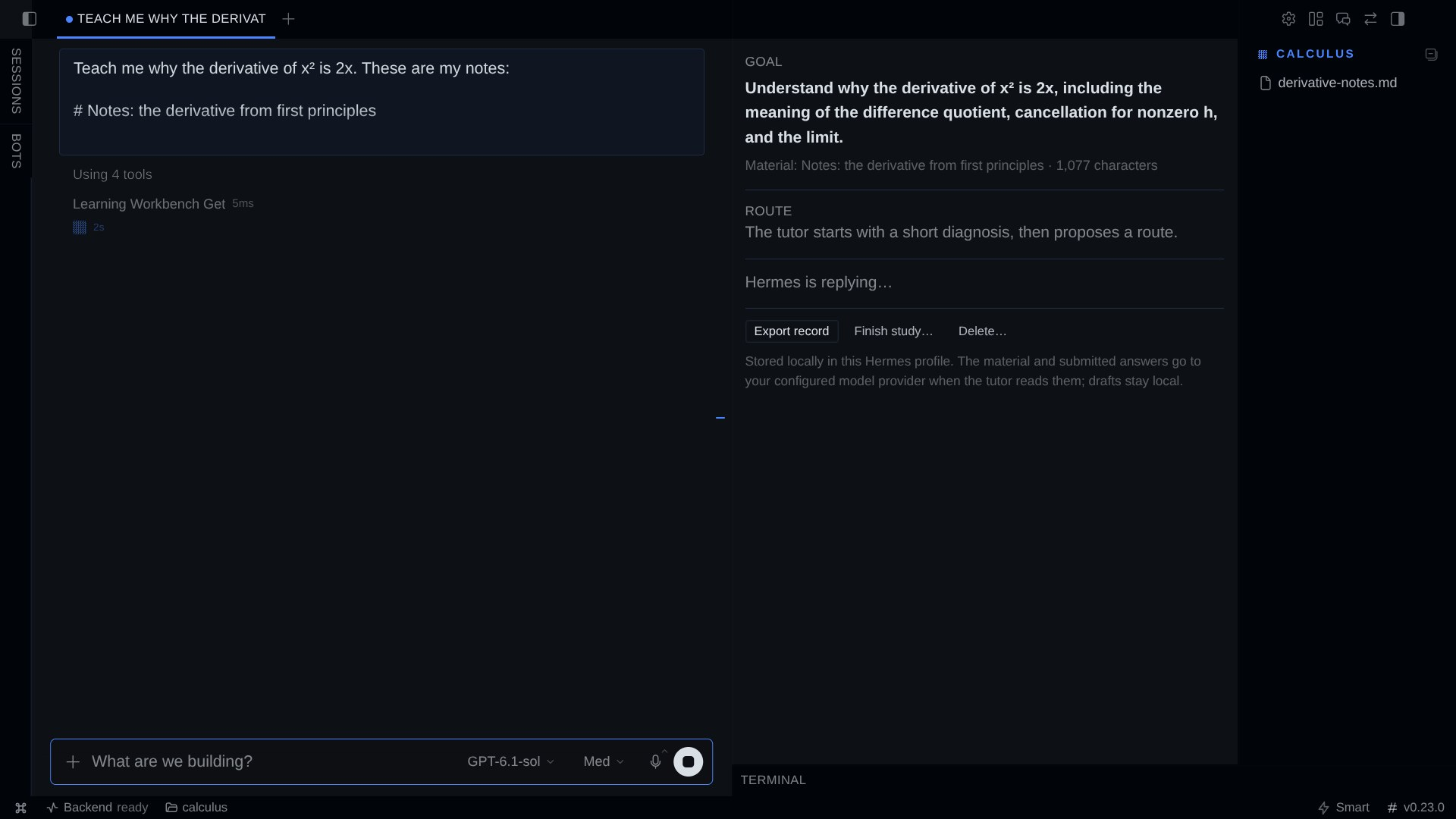
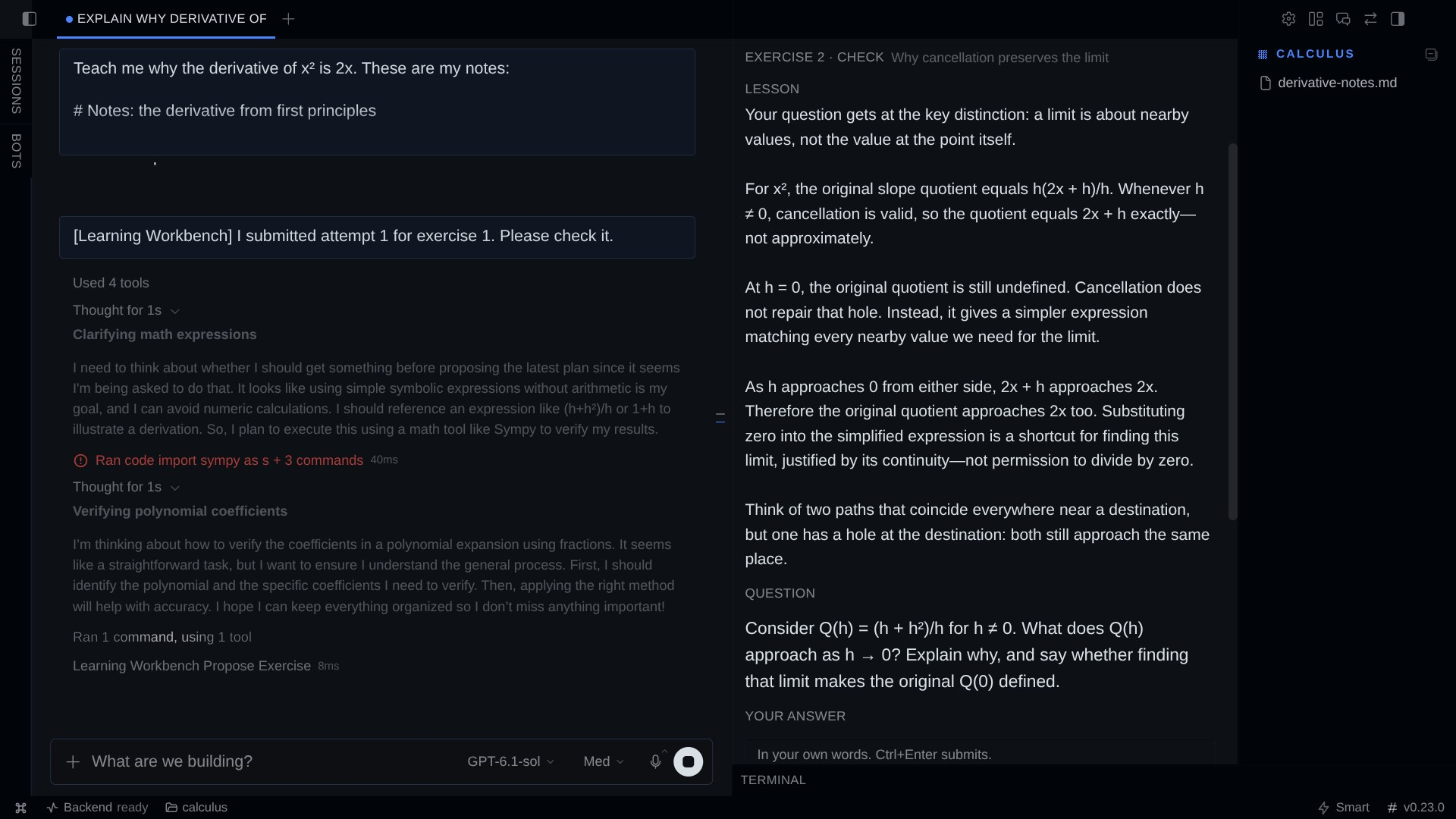
| A lesson sits above the check it introduces | The verdict quotes your words and names the gap |
|---|---|
|  |
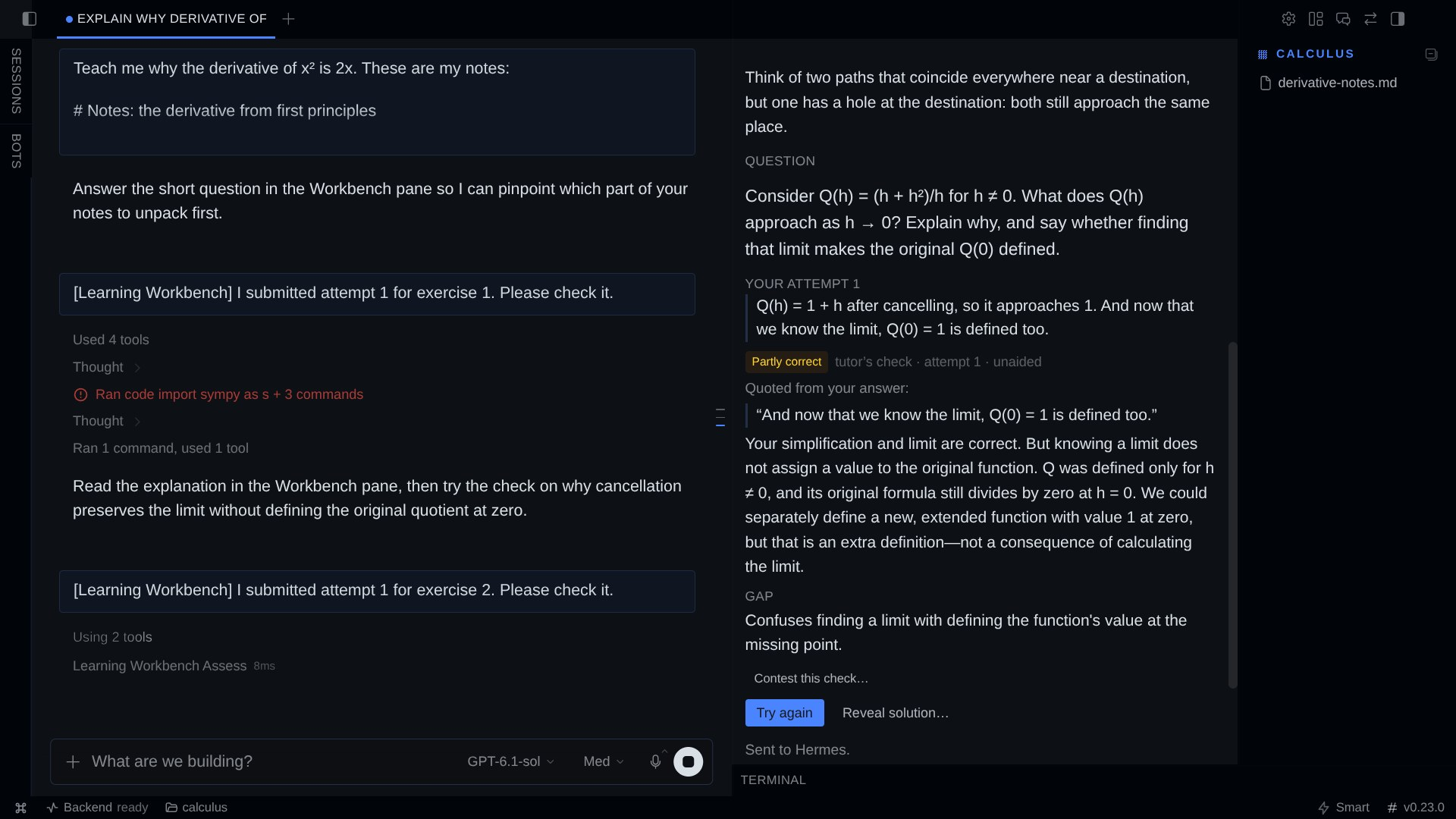 |
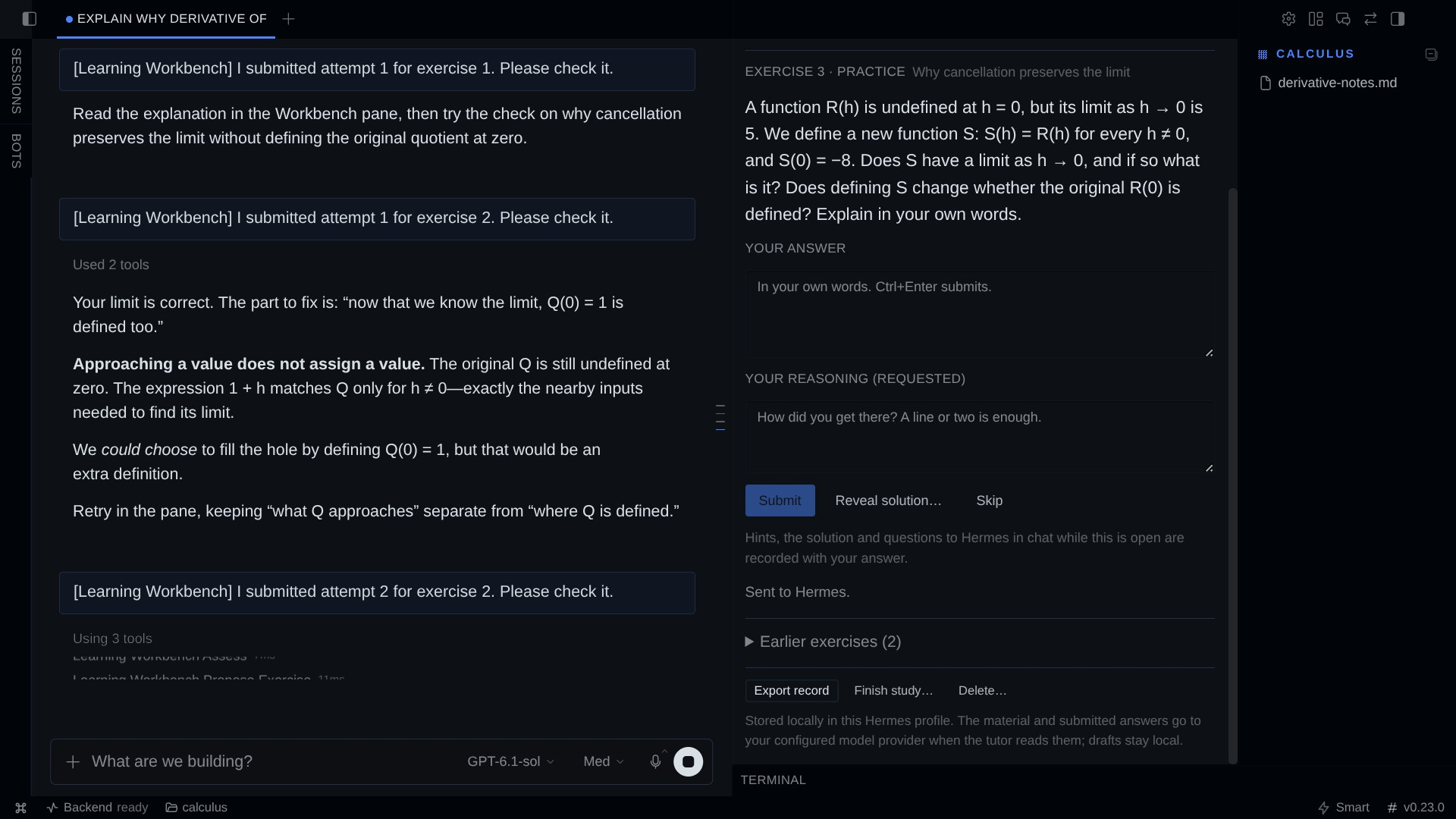
Screenshots show an isolated Desktop study of synthetic notes (tests/fixtures/derivative-notes.md).
goal + material → diagnose (≤ 3 questions) → route (2–7 steps, yours to rename/skip)
                         ↓
       lesson + check in the pane → your answer + reasoning → tutor's check (quotes you)
             ↑                                                         │
             └──────── repair · hint · retry · reveal · contest ───────┘
                         ↓
       fresh practice without help → evidence you can export
Why a plugin and not a prompt
A tutoring skill can tell the model to wait for your answer. It cannot make the record trustworthy.
A skill cannot:
- Freeze the answer key before you answer. The reference answer, rubric and up to three hints
are stored when the exercise is posed. They stay hidden until you take a hint or confirm a reveal.
A changed key becomes a numbered revision with a reason. - Teach before it tests. The first check of a route step must carry a lesson, which you read in
the pane right above the question. A check without one is refused. - Keep your words yours. Only you can submit an attempt: from the pane, or with
/study answer
in a text chat. No agent tool takes answer text, so the model cannot write an answer for you.
Forged fields such asactororhuman_confirmedare refused. - Make verdicts cite you. A check must quote your attempt word for word. The plugin verifies
the quote and rejects a verdict that quotes nothing you wrote. - Label help honestly. Every attempt carries how it was made: unaided, after feedback, after
hints, after help in chat, or after the solution was revealed. The label is fixed when you
submit, so a helped answer never counts as unaided later. - Keep chat help visible. While an exercise waits for your answer, Hermes is reminded on every
chat turn not to solve it there and to point you to a hint or the recorded reveal instead. If you
ask in chat anyway, that is noted, and your next answer to that exercise is labelled after chat
help. The plugin records that a chat turn happened, not what was said. - Keep one exercise open. While an exercise waits for you, the tutor cannot replace it or pose
another one. - Survive the session. Drafts autosave. Closing the pane, restarting Hermes or a context
compaction that rotates the session id brings back the same exercise, draft and attempts. - Let you disagree. Contest a verdict. The tutor answers with a new revision, and the earlier
verdict stays on record.
What it is not: no spaced repetition or flashcards (use Anki), no mastery scores or
certificates, no course marketplace, no extra model calls. Verdicts come from your configured
model. They are proposals, not grades.
Install
hermes plugins install alfredbirkelund/hermes-learning-workbench --enable
Then, in Hermes Desktop, open Capabilities → Plugins, find Learning Workbench and turn it
on; the pane opens in the right sidebar. The Desktop half of a unified plugin is opt-in, and it needs
a Desktop with unified plugin panes (v0.23 or later); /study works everywhere. Requires Hermes
>= 0.23.0. No Python dependencies, no accounts, no network calls of its own.
Quick start
- Open a chat and ask: "Teach me why the derivative of x² is 2x. Use this:" and paste your text,
or point Hermes at a file (it reads files with its own tools).
You can also start in the pane: write a goal, paste material, click Start study. - Hermes asks one to three short diagnostic questions in the pane. Answer there; add your
reasoning if you like (Ctrl+Entersubmits). - Hermes proposes a short route. Rename or skip steps in the pane; it is your plan.
- For each step you get a short lesson and a check in the pane. You answer, and Hermes checks it,
quoting your words. Not there yet? Read the explanation, then Try again, take a Hint, or
Reveal solution…. Questions are welcome in chat; Hermes helps without giving the answer away. - After a correct answer that needed help, Hermes poses a fresh practice problem so you can show
it without help. - Export record writes a Markdown file of everything: route, lessons, prompts, your answers
word for word, help received, every verdict and contest. Finish study… moves a study to
Finished in this chat, where you can still export or delete it, and lets the chat start a new
one.
Without Desktop (CLI, TUI, messaging): /study shows the current lesson and exercise; use /study answer <text> (add a line Reasoning: …), /study hint, /study reveal, /study skip, /study retry, /study contest <why>, /study export, /study finish, /study delete. With no active
study, /study lists this chat's finished studies by number; /study export N and /study delete N act on one. This is a fallback, not a full second interface. (/learn is a Hermes built-in,
hence /study.)
Privacy and data
- Stored locally in the active profile at
<HERMES_HOME>/plugin-data/learning-workbench/data.db
(SQLite). Exports go to…/learning-workbench/exports/. The store is created the first time the
Workbench is used; the hook that runs on every chat turn never creates it. - Sent to your model provider: whatever the tutor reads, through Hermes's normal model access.
That covers the material, when the tutor asks for it, and your submitted answers, reasoning and
contests. While an exercise is open, each chat turn also carries a short reminder that includes
the exercise's question. Drafts never leave your machine.
Local storage does not mean offline processing. - Retention: records stay until you delete them. Updating, disabling or uninstalling the plugin
keeps them; reinstalling shows them again. An update migrates the records in place; an older
version refuses records written by a newer one instead of misreading them. Delete… in the
pane, or/study delete, removes one study and its exports after a confirmation step; other
studies are untouched. - Material and transcripts are treated as untrusted text. They are shown as plain text and never run
as HTML or code.
How it works
 Hermes agent ──tools──▶ ┌──────────── Learning Workbench ────────────┐
  (proposes)             │ core: ids, transitions, versions, checks   │──▶ SQLite (profile)
 Desktop pane ──ctx.rest▶│ learner routes (stamped "learner")         │
  (learner acts)         │ /study command (stamped "learner")         │
 each chat turn ──hook──▶│ open exercise? remind the tutor, note it   │
                         └─────────────────────────────────────────────┘
- Agent tools (
learning_workbench_start,_get,_propose_plan,_propose_exercise,
_assess,_revise_reference) can propose and read. None of them can submit, hint, reveal or
confirm anything for you. - Learner door: the pane calls the plugin's own routes through the Desktop SDK's
ctx.rest(scoped by Hermes to this plugin and the active profile), and/studyis typed by
you. Submitting starts a normal chat turn: through the Desktop composer when it is idle,
otherwise through the sameprompt.submitcall, queued so it never interrupts a running turn. - Hooks:
pre_llm_callruns before each chat turn. Only when that chat has an exercise waiting
for your answer, it adds the reminder to that turn's user message (never the system prompt) and
notes the turn. The pane's own fixed messages, such as "I submitted attempt 2", are not counted.
post_compactionkeeps a study attached to its chat when compaction rotates the session id. - No core patches, no system-prompt changes, no background processes.
Threat model and support boundaries
This is an attribution boundary, not a sandbox. Within Hermes, the model cannot create or change
learner records through the plugin. Any program running as your user can still edit the SQLite
file directly, and that includes Hermes's own terminal tool. Hidden solutions are a learning aid,
not exam security. They are in the local database. Chat help is labelled by when it happened, not
by what was said: a chat turn about something else while an exercise is open still counts.
Tested with Hermes Agent 0.23.0 (source 2bd378ed1b8d) on Linux: the plugin's backend, tools,
hooks and /study in deterministic tests; full study sessions against a real hermes serve with a
real model; the pane's code in React/jsdom against the real backend; install, update from the
previous release, disable, reinstall and uninstall in a fresh Hermes home; and a full study session
by hand in a Hermes Desktop v0.23.0 build (isolated home and app data), including a restart with a
draft, the reveal dialog and the export. Not tested: macOS and Windows, Desktop releases other than
that v0.23.0 build, remote/OAuth gateways (the pane polls, so it should work without the event
socket), messaging platforms beyond /study in the CLI, and models other than gpt-6.1-sol for the
live sessions. See docs/TESTING.md for what was run and what was not.
Development
scripts/verify.sh            # JS syntax check + deterministic tests (real plugin loader, registry, router)
scripts/mutation-check.py    # breaks 22 invariants one at a time; each must be caught
scripts/pane-harness.sh      # real plugin.js in React 19/jsdom against the real backend (host stubbed)
scripts/lifecycle-check.sh   # validate, install the previous release, update, doctor, disable, reinstall, uninstall
tests/e2e/live.py            # drive a real `hermes serve` with a real model (see its docstring)
All test processes run in an isolated Hermes home (scripts/testenv.sh,
scripts/lw-isolation-check).
Credits and license
MIT. Inspired by LearnHarness by Amos Blomqvist
(AGPL-3.0): its diagnose → plan → teach → practice loop with persistent learner reasoning. No
LearnHarness code, prompts or assets are used.
README from the reviewed commit 7724a7c; it updates when the author re-pins.