All plugins

linear-digest

Schedule a model-free morning list of open Linear issues assigned to you, with linear_digest. Disclosure — LINEAR_API_KEY is read from this profile on each request and sent as the Authorization value with no Bearer prefix, as up to ten HTTPS POSTs to host api.linear.app path /graphql; redirects are not followed and proxies are not used; nothing is downloaded at run time and the schema file shipped here is about 1.3 MB; the tool and the script are read-only; archived issues are left out; tools are on for every surface, including gateways, so anyone you allow there can call linear_digest with your key, and hermes tools turns a surface off; schedule writes a no-agent cron at 08:00 delivered to local, empty stdout sends nothing, and there is no daily cap; unschedule removes the saved job, while the script stays only when another job is also named linear-digest; a leftover job is removed with hermes cron remove, and that command leaves the script file; settings stay in <HERMES_HOME>/plugin-data/linear-digest; the skill linear-issues is registered with the tool; bot-chat puts the list into another model turn and that turn is not model-free; an http loopback LINEAR_DIGEST_REHEARSAL URL receives the key in clear text, and any other value fetches nothing.

TakeshiTGALToolsv0.1.0Updated 3 hours ago

About

Schedule a model-free morning list of open Linear issues assigned to you, with linear_digest. Disclosure — LINEAR_API_KEY is read from this profile on each request and sent as the Authorization value with no Bearer prefix, as up to ten HTTPS POSTs to host api.linear.app path /graphql; redirects are not followed and proxies are not used; nothing is downloaded at run time and the schema file shipped here is about 1.3 MB; the tool and the script are read-only; archived issues are left out; tools are on for every surface, including gateways, so anyone you allow there can call linear_digest with your key, and hermes tools turns a surface off; schedule writes a no-agent cron at 08:00 delivered to local, empty stdout sends nothing, and there is no daily cap; unschedule removes the saved job, while the script stays only when another job is also named linear-digest; a leftover job is removed with hermes cron remove, and that command leaves the script file; settings stay in <HERMES_HOME>/plugin-data/linear-digest; the skill linear-issues is registered with the tool; bot-chat puts the list into another model turn and that turn is not model-free; an http loopback LINEAR_DIGEST_REHEARSAL URL receives the key in clear text, and any other value fetches nothing.

linear-digest

Each morning, one message lists the Linear issues still assigned to you.

Linear's hosted connector and MCP are the conversation you talk to. This plugin sends one model-free morning message.

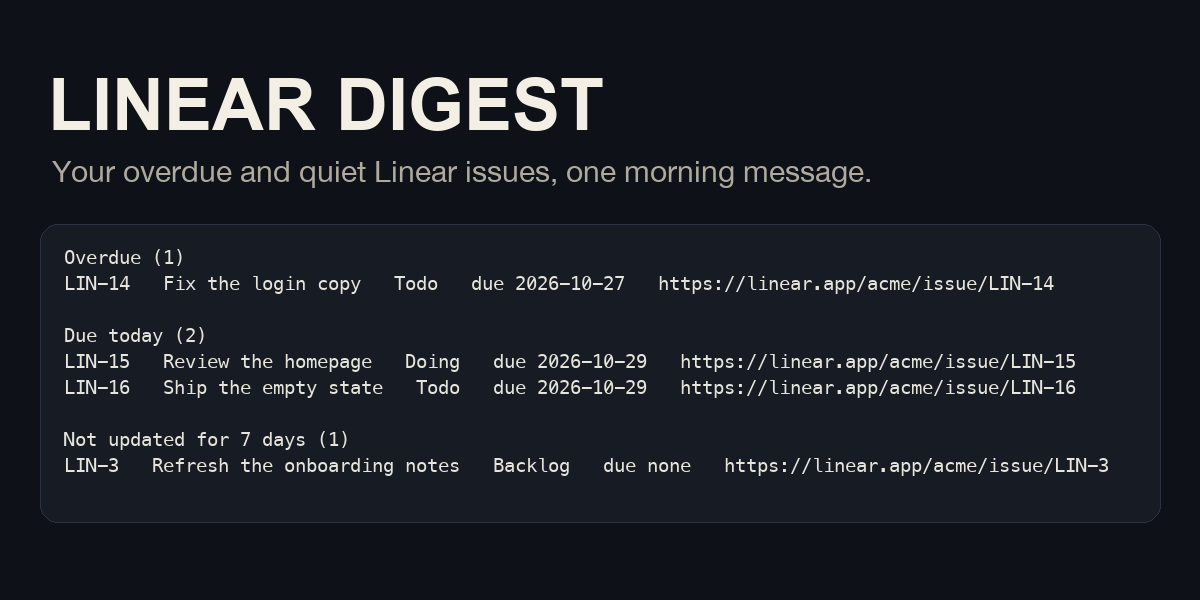
The message is the open issues assigned to the personal API key. Each group has a heading and a count. A group with nothing in it is left out. The groups, in order, are overdue, due today, not updated for N days, and the rest. A blank line separates groups. Each issue line is the identifier, title, state, due date, and URL, separated by tabs. The default quiet window is 7 days (--stale-days, 1 through 90). At most 30 issue lines are listed. Headings are not part of that count. When more were read, the next line is +N more. When a later page was not read, the message says so and does not pretend the list is finished. When no open issue is assigned, the script's stdout is empty, and Hermes sends nothing.

Overdue and due today use the calendar date of the Hermes clock, the same clock cron uses for 08:00. That clock reads HERMES_TIMEZONE, then timezone in this profile's config.yaml, then the machine's local time. The morning script sets TZ from that clock before it builds the list. A due date Linear returns as YYYY-MM-DD is compared to that date. Quiet issues are those whose updatedAt is more than N times 24 hours before that same clock, and that are not already in the overdue or due-today group. A due date that is not YYYY-MM-DD is shown as due unreadable. A missing due date is due none.

Closed workflow types completed, canceled, and duplicate are left out. Archived issues are left out as well (includeArchived is false on the query). The schema names those three plus triage, backlog, unstarted, and started. A type that is not one of the three closed names is still listed.

Key

Put LINEAR_API_KEY in this profile's .env. Do not put it in a config file, a tool argument, or the cron prompt. The plugin reads it on every request with agent.secret_scope.get_secret and does not read os.environ itself. The value is not printed.

On the current Linear GraphQL page, OAuth says Authorization: Bearer <ACCESS_TOKEN>. Personal API keys say Authorization: <API key> with the key itself and no Bearer prefix. This plugin sends only that personal-key form, as HTTPS POSTs to host api.linear.app and path /graphql. One run sends at most 10 of those POSTs, one per page. It does not follow redirects. It does not use HTTP_PROXY, HTTPS_PROXY, ALL_PROXY, or their lowercase names, so the key is not given to a proxy. A response larger than 1,000,000 bytes is a failure. Each POST stops if 15 seconds pass with no data, and is also cut off after 20 seconds. One run reads at most 10 pages of 50 issues and does not retry. HTTP 401 says to set LINEAR_API_KEY in this profile's .env and does not print the key.

LINEAR_DIGEST_REHEARSAL is optional. When it is unset, the only request is HTTPS to host api.linear.app and path /graphql. This plugin only POSTs. When it is set, the scheme must be http, the host must be 127.0.0.1, localhost, or ::1, a port is required, and the path must be empty or /graphql. Any other value fetches nothing. The key is still sent to that loopback process. Leave the variable unset for the real morning job.

A failure is one English line on stderr and a non-zero exit. Hermes delivers that as a failed run. The line does not include the key. HTTP 401, HTTP 429, a 5xx status, a timeout, a redirect, a body that is not the expected JSON, and a 200 response that contains an errors array are all failures, even when data is also present. An empty nodes array and hasNextPage: false is an empty morning, not a failure.

Titles are forced onto one line. Newlines and control characters become spaces. A title longer than 180 characters is cut. An issue URL is kept only when it is https on linear.app or a host ending in .linear.app. Anything else is shown as url refused and is not requested.

Schedule

hermes linear-digest schedule does not call Linear. It writes <HERMES_HOME>/scripts/linear-digest.py and creates one cron job named linear-digest with hermes cron create --no-agent --script. The schedule is 0 8 * * * (08:00 on the clock Hermes cron uses). The default deliver target is local, which does not send to chat. The job record stores one line, The script stdout is the message. An empty script stdout is [SILENT]. A no-agent run does not send that line to a model. Empty stdout is what makes the run silent. Running schedule again sets that same clock and deliver target on the saved job. Omitting --stale-days keeps a saved quiet window. The first schedule uses 7. If more than one cron job is already named linear-digest, schedule changes nothing and does not write the script.

hermes linear-digest schedule
hermes linear-digest schedule --stale-days 14 --deliver local
hermes linear-digest status
hermes cron run <id>
hermes linear-digest unschedule

When HERMES_HOME is unset, the directory is the Hermes default, HOME/.hermes on this platform, from hermes_constants.get_hermes_home(). The child hermes cron is started with that path set. status does not fetch. It prints the schedule and deliver target from hermes cron list for the saved id, and the stale-day number from settings. It does not invent 08:00 when the list shows something else. unschedule removes the saved job. It also removes the script, unless another cron job is named linear-digest, in which case the script stays. Settings stay in <HERMES_HOME>/plugin-data/linear-digest (per profile), including the stale-day number, and the job id is cleared. That folder remains after hermes plugins remove. Run unschedule first. If the plugin is already gone, remove a leftover job with hermes cron remove <id>, and add -p <name> when the profile is not default. That command removes the job only. scripts/linear-digest.py stays until you delete that file, and the settings file can still hold the old job id. The same -p is included on the command lines schedule prints when the profile is not default.

bot-chat puts the list into another model turn. That turn is not model-free. A platform name is a delivery target, not proof that the platform is set up on this machine. cli, cron, and api_server are rejected.

The script is started by Hermes cron, not by the plugin host, so plugins.isolation: host does not stop it. A local no-agent run costs 0 tokens. bot-chat starts another model turn, and the schedule message does not call that turn free. There is no daily cap. interpreter is not passed.

linear_digest takes no arguments and returns the same text. Unknown arguments are rejected before any request. The tool does not write the settings file. It does not create, edit, or comment on issues. Registering the plugin also registers the skill linear-issues, which points at that tool.

The tools are on for every surface, including gateways. Anyone you allow on your gateway can call linear_digest with your key. Turn a surface off with hermes tools. There is no slash command and no approval prompt, because the tool only reads.

Nothing is downloaded when the job runs. schema/schema.graphql ships in this repository (about 1.3 MB) for tests. It is the Linear SDK source schema at commit 8397645bc0a496f68896b18ec6453dddd5e51927, which matches the schema update published with @linear/sdk 100.0.0. The npm tarball does not contain that file. See schema/PROVENANCE.md.

requires_hermes is >=0.21.4. hermes cron create --no-agent is in the v0.21.4 tree (hermes_cli/__init__.py version 0.21.4, tag v2026.9.21). manifest_version is 2. python_dependencies is empty. The license is MIT. schema/schema.graphql is the upstream file unchanged. Its copyright notice is schema/NOTICE, copied from the Linear repository LICENSE (Copyright (c) 2019 Linear).

Offline check

This check does not call Linear. The real API was not used to write this plugin.

  1. Start python3 tests/rehearsal_server.py. It listens on 127.0.0.1 and prints a LINEAR_DIGEST_REHEARSAL line.
  2. Use an empty home. Either leave HERMES_HOME unset and point HOME at a new directory, or set HERMES_HOME to a new directory.
  3. Copy this plugin to <that home>/plugins/linear-digest. Copying alone does not register the command.
  4. Run hermes plugins enable linear-digest. The next hermes process picks it up.
  5. Write <that home>/.env with LINEAR_API_KEY set to any non-empty header-safe value, and LINEAR_DIGEST_REHEARSAL set to the printed URL.
  6. Run hermes linear-digest schedule, then hermes cron list, then hermes cron run <id>.
  7. The command prints that the run succeeded. The morning list is in <that home>/cron/output/<id>/<timestamp>.md under Mode: no_agent (script). It is a script, not an agent turn.
  8. Stop the server and start python3 tests/rehearsal_server.py --empty. Point LINEAR_DIGEST_REHEARSAL at the new URL. Run hermes cron run <id> again. The new output file says silent (empty output), so nothing is delivered.
  9. Run hermes linear-digest unschedule. The job and scripts/linear-digest.py are gone. Removing the job also removes that job's files under cron/output. Copy the morning file first if you want to keep it.

Not verified

The production Linear API was not called. HTTP 401, 429, and 5xx bodies were taken from the published GraphQL and rate-limit pages, not from a live account. No Linear account was created and no key was issued. Paid checkout was not opened. Delivery to a real chat platform was not run. The catalog image is a draft.

README from the reviewed commit cb8cac0; it updates when the author re-pins.

More by TakeshiTGAL

32 plugins by TakeshiTGAL in the catalog.

TakeshiTGALjp-subsidiesJapanese subsidy search and weekly watch, built on the jGrants public API. Disclosure — Searches api.jgrants-portal.go.jp with no API key and no daily request cap; each call waits at most 60 seconds and retries at most twice, and a result is a search match, not proof that every subsidy came back. The plugin has no user list of its own: anyone you allow on your Hermes gateway can call these tools and change this profile's watch, and the agent can set up a watch by itself. In a Chatwork room listed in CHATWORK_ROOMS, everyone can call them while CHATWORK_ALLOWED_USERS is unset. The tools are on for every platform, including gateways; turn them off per platform with hermes tools. While the plugin is enabled, its skill adds one line to the skills index of every session, including surfaces where the tools are turned off. The /subsidies command is outside hermes tools; limit it with allow_admin_from or user_allowed_commands, or disable the plugin. The optional weekly watch is an unattended cron job that runs a script with no model call and is not a sandbox; delivering it to bot-chat instead runs one model turn on the fetched text. If delivery fails after the script runs, those subsidies are already marked seen and the text stays under cron/output/. Uninstall leaves the cron job, scripts/jp-subsidies-weekly-*.py and plugin-data/jp-subsidies/ until you run hermes cron remove and delete the files. The plugin does not store the name or ID of who asked. Not tested against a live gateway, with the Chatwork plugin loaded, or for result sets of several hundred rows.Communitytools1TakeshiTGALwyoming-voice-bridgeWyoming speech-to-text and text-to-speech for a Wyoming server you run (stt/tts provider `wyoming`), plus a wyoming_voice_status tool that lists the server's models and voices. Disclosure — Audio and text to speak go to the WYOMING_* host:port you set over cleartext, unauthenticated TCP (public addresses accepted). Once selected, the providers send speech in every session, including cron and webhooks. This build imports the installed package only when its file tree is the official wyoming 1.5.4 wheel, and a different tree sends nothing. This build lists no ffmpeg digest, so audio that is not already 16 kHz, 16-bit, mono WAV is not converted. wyoming_voice_status asks with one public pre_tool_call line. Choosing always stores one command_allowlist line for that same which and the same host:port list. A later call skips the question only when a person is present. cron, hermes -q, webhook, msgraph_webhook, and api_server do not send a describe, even after always. yolo and approvals off skip the prompt, and this plugin does not add a refusal for those modes. The plugin does not import Hermes approval, config, or write-guard modules. Hermes 0.21.4 does not list the skill. The v0.21.5 canary and Hermes 0.22.2 add one skill line to every session that loads the plugin, including a surface where the tools are turned off. The status tool is on for every surface, including the gateway, and a guest there can call it and approve it when a person can answer. Turn the wyoming_voice toolset off per surface with hermes tools.Communityvoice1TakeshiTGALauthor-feedEach watch run costs 0 tokens, and the unmanned run holds no tools. Read one public profile and watch one account, with profile_get, author_feed and author_watch. It reads public posts and profiles from the Bluesky social media network, which is built on the AT Protocol (atproto), without signing in. Disclosure — HTTPS GET only to public.api.bsky.app, no API key. Hermes starts the watch Python when the cron job fires. The tools are on for every surface, including gateways, and ask for no approval: anyone you allow on your gateway can call them. Turn a surface off with hermes tools. While the plugin is enabled, its skill adds one line to the skills index of every session, including surfaces where the tools are turned off. hermes author-feed schedule writes a script and creates one cron job that does not call a model. Each run costs 0 tokens and has no daily cap. Empty script output sends nothing. Delivered to local unless you pass --deliver, so no chat by default. Run hermes author-feed unschedule before removal. That removes the job and the script. A leftover job after the plugin is gone stops with hermes cron remove <id>. The scheduled script does not run under plugins.isolation: host, so that setting does not stop the watch. The author_watch tool still refuses a run that is not the saved cron job, including under plugins.isolation: host, and posts that notice on every run of the tool. The first run only records what is already there. One run reads at most the latest 3 pages and announces a new post by this account on them. When every row on those pages is new, with no saved post or mark, and the feed still offers another cursor, it also posts a possible-miss notice, at most once in 24 hours while that keeps happening. Replies, including the account's own thread continuations, are not announced. It relies on private Hermes parts, so an update can stop it. State stays in <HERMES_HOME>/plugin-data/author-feed after uninstall. Seen post URIs advance only on the saved cron job after a successful fetch. The script allows that when cron/executions.db shows that job running under the parent pid and cron/jobs.json names author-feed-watch.py. A direct run and another cron job exit 3 with no GET and no write. The author_watch tool allows that only for the saved job id. Delivery accepts origin, local, all, bot-chat, the Hermes 0.21.6 cron platform names, and public registry names that declare a cron delivery env var. A refused name can be set with hermes cron edit <id> --deliver. bot-chat places the watched account's post text in another model turn that has the profile's tools. hermes cron create cannot set a per-job tool list. A job made by 0.1.x keeps its model turn until the next schedule. On Hermes 0.21.4 and 0.21.5 this plugin does not load, and a leftover job keeps its model turn until hermes cron remove <id>. Running schedule again updates the interval and deliver target and switches an existing model job to the script.CommunitytoolsTakeshiTGALcsharp-game-editorGive it one feature for the Unity project open in your editor, and it builds the scripts, objects and scene in one plan, stops that plan when the compile reports an error CS line, and plays the scene when the compile is clean. Disclosure — Needs MCP for Unity pinned to v10.3.0, plus git and uv. Hermes starts mcpforunityserver==10.3.0 through uvx with telemetry and the update check off. Disk reads run at once. apply_plan asks once and puts back a file the plan did not name. A plan that deletes, runs editor code, can lose unsaved work or writes outside the project asks again, and that summary is sent only when every line fits the approval card; otherwise nothing is sent and confirm_risky_plan asks. unity_docs sends the query to docs.unity3d.com after Hermes asks. unity_generate can call paid providers you configured in MCP for Unity; that call was not part of the check. Tools are on by default on every surface, including the gateway. Only users the gateway admits can reach the tools, and this plugin keeps no user list of its own. Cron and a session with nobody to answer decline. Logs stay in <HERMES_HOME>/plugin-data/agent-plugin-csharp-game-editor-<hash>/logs. Stop with hermes plugins disable csharp-game-editor, or hermes tools for one surface. macOS only.Communitytools