
 Munin Labs
Munin for Hermes Agent
Munin meeting notes for Hermes Agent. Ask Hermes what was decided in your last meeting, get follow-ups with action items checked against the transcript and cited by timestamp, and search who said what across meetings. Connects to your Munin account through OAuth (two setup commands, below). Reads your meetings; if you choose an editable connection on Munin's consent page, two write tools appear and Hermes asks before each one. No local code, no telemetry.
Munin records a meeting and writes notes from the transcript: a one-line verdict, a summary, decisions with the clock time they were said, open questions, chapters, quotes and the people who spoke. Every line of the transcript keeps its speaker and time, so anything Hermes tells you about a meeting can point at the exact moment it came from.
A skill alone cannot do this check: it needs Munin's server to return every transcript line with its speaker, line id and second, and every AI-written decision with the second it was said, so Hermes can compare the two and keep only what the words support.
One install ships:
- The hosted Munin MCP server (
munin) athttps://app.muninlabs.ai/mcp, over Streamable HTTP with OAuth 2.1 (PKCE, dynamic client registration). No API key, nothing secret in this repository. skills/munin-followup: turn one meeting into a follow-up. Each decision Munin's AI wrote is checked against the transcript before it is called confirmed; what the transcript does not support goes to a "needs confirmation" list; a draft message closes it.skills/munin-recall: who said what, and when, across meetings, with the exact line cited by meeting id, line id and mm:ss; find a meeting by topic, person or date; compare a recurring meeting across weeks.
What it looks like
Real runs on Hermes Agent 0.23.0 against the live Munin server, with a demo account that holds two fictional meetings (reasoning output hidden; everything else is the terminal as printed).
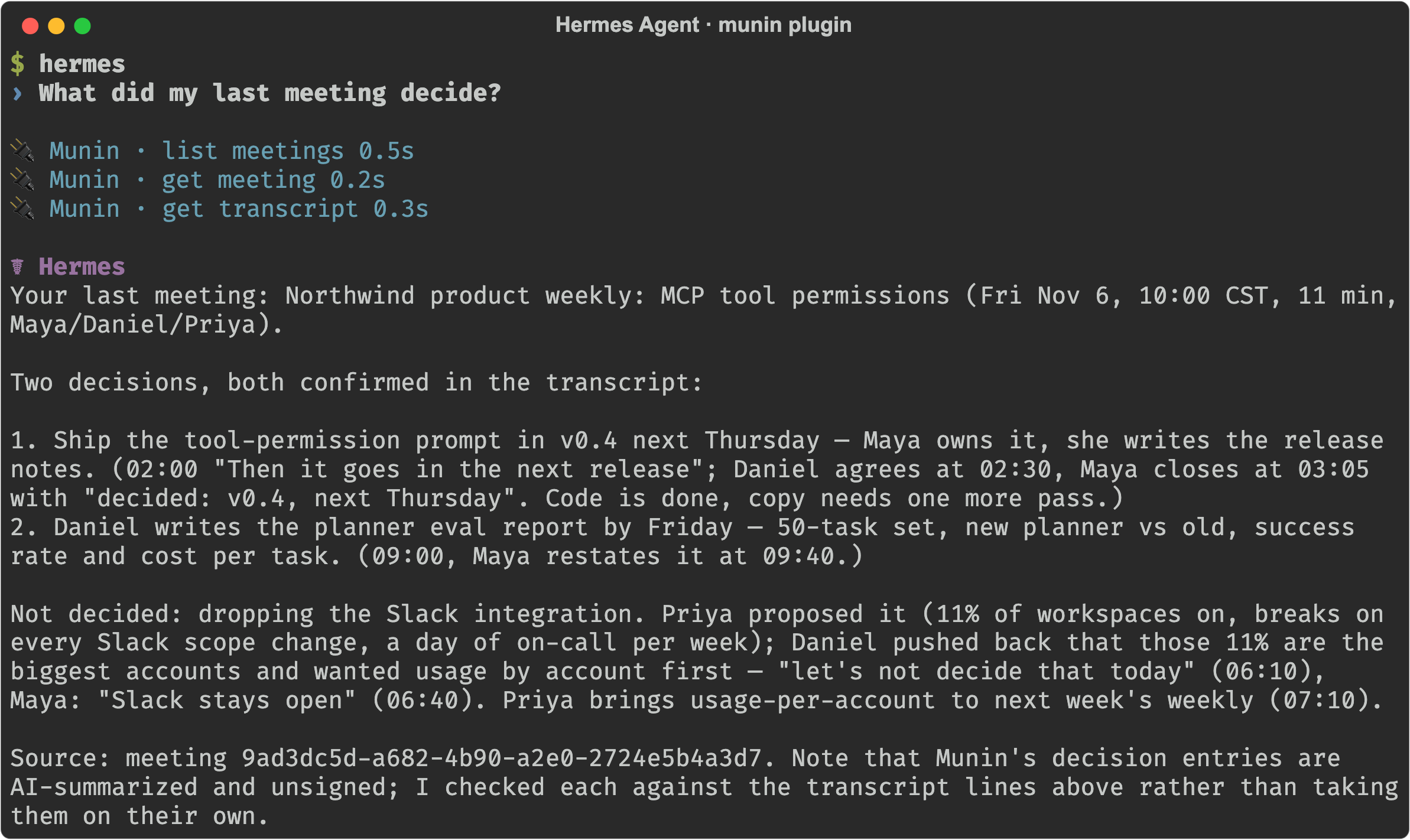
"What did my last meeting decide?" Hermes lists the meeting, reads the notes, pulls the transcript and answers with each decision, who agreed, and the clock time of the line:
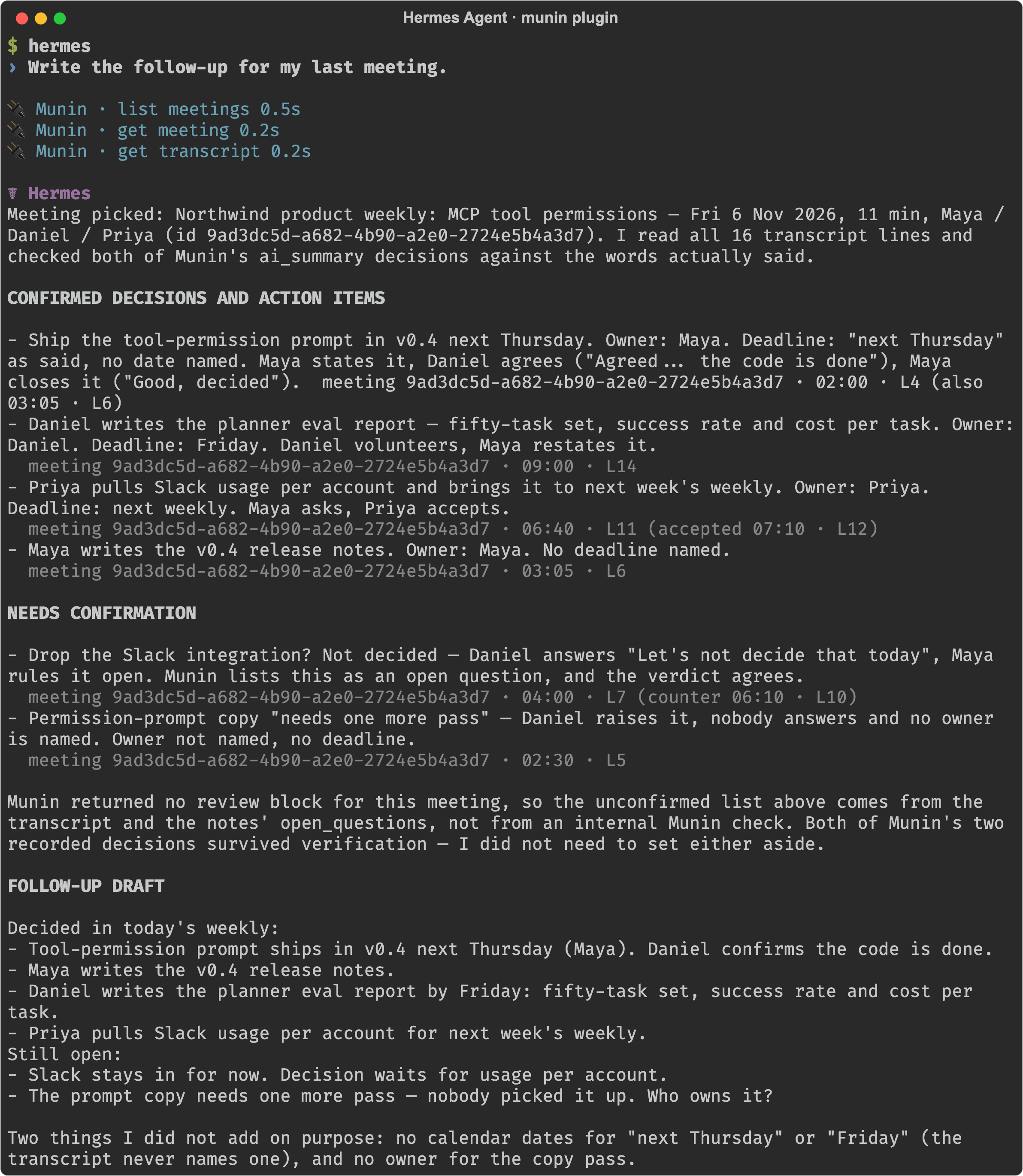
"Write the follow-up for my last meeting." Three sections: confirmed items with meeting <id> · mm:ss · L<n>, items that need confirmation with the line that left them open, and a draft to paste:
The short version as an animation: assets/demo.gif.
Install
hermes plugins install Munin-Labs-AI/munin-hermes-plug-in --no-enable
hermes plugins enable munin
Once the catalog listing is live, hermes plugins install munin does the same.
The Agent Plugins mcp.json format has no field for OAuth, so tell Hermes once that this server signs in with OAuth, then sign in from a fresh terminal (not from inside a running Hermes session):
hermes mcp add munin --url https://app.muninlabs.ai/mcp --auth oauth
hermes mcp login munin
hermes mcp test munin
hermes mcp login opens the Munin page in your browser: sign in and press Allow. Tokens are cached under ~/.hermes/mcp-tokens/ and refresh on their own. hermes mcp test munin should list the Munin tools. Start a new Hermes session afterwards.
Your config.yaml entry and the plugin's mcp.json entry share the name munin; the config entry wins, including its trust setting. The plugin declares the server as untrusted so that any write-capable call asks you first; to keep that behaviour, add trust: untrusted to your entry:
mcp_servers:
  munin:
    url: https://app.muninlabs.ai/mcp
    auth: oauth
    trust: untrusted
On a remote or headless host, see Hermes' OAuth over SSH guide.
Try it
- "What did my last meeting decide?"
- "Write the follow-up for yesterday's product meeting."
- "Who said we would delay the launch, and when?"
- "Compare the decisions of the last three weekly syncs."
A follow-up comes back in three parts: confirmed decisions and action items (owner, deadline when one was said, meeting <id> · mm:ss · L<n>), items that need confirmation (with the line that made them doubtful), and a draft message you can paste.
This is a Portable Agent Plugins v1 package: plugin.json, mcp.json and skills/. There is no Python, no hook, no environment variable and no background process.
Tools
Hermes exposes each tool as mcp__munin__<tool>.
| Tool | What it does | Access |
|---|---|---|
| list_meetings | Your meetings, newest first, filtered by words, person or date | Read |
| get_meeting | One meeting's notes: verdict, summary, decisions with clock times, open questions, chapters, quotes, people, speaker map, review status | Read |
| search_transcripts | Exact words across transcripts, decisions, chapters and your notes, with line id, time and speaker | Read |
| get_transcript | One meeting's transcript lines, by time range and page | Read |
| list_series | Other sessions of the same recurring meeting | Read |
| search | Which meetings can answer a question (ids, titles, links) | Read |
| fetch | One meeting's notes and transcript as one text | Read |
| set_speaker | Replace a speaker label with a name in one meeting | Write |
| import_meeting | Save a meeting from another note-taking app into Munin | Write |
On Munin's consent page you choose what the connection may do. A read-only connection does not list the two write tools at all; an editable connection lists them, and because this plugin declares the server untrusted, Hermes asks you before every write-capable call (and refuses it where nobody can answer, such as a one-shot or cron run). The bundled skills never call them unless you ask for that change in the conversation.
Requirements
- A Munin account with at least one processed meeting. Munin records on the Mac app and in the web app; this plugin reads what is already there and cannot record.
- Hermes Agent 0.23.0 or newer (the catalog entry declares this floor; the package uses the
trustserver declaration, which older releases reject).
What this plugin does and does not do (disclosure)
- Every tool call goes to Munin's own server at
app.muninlabs.ai, over HTTPS, with the OAuth token Hermes holds. No other host is contacted. - Meeting notes, transcript lines, titles and people's names from your Munin account are pulled into the Hermes session, and so reach whichever model you run Hermes with.
- The OAuth request asks for the single scope Munin offers,
meetings:read; what the connection may actually do is set on Munin's consent page, where you pick read-only or editable. With an editable connection the server also listsset_speakerandimport_meeting; the plugin marks the serveruntrustedso Hermes asks before any write-capable call. - No local code runs: no Python, no hooks, no slash commands, no cron, no shell commands, no background process.
- No telemetry or usage reporting. The plugin does not update itself; updates come through the catalog as a reviewed commit pin.
- The plugin never records audio and never reads anything outside Munin's responses.
- Transcript text is treated as data: the skills tell Hermes not to follow instructions found inside a meeting.
- Tokens live where Hermes keeps every MCP token (
~/.hermes/mcp-tokens/); this repository holds none.
Troubleshooting
Tools fail with 401 or "Sign in to Munin". Run hermes mcp login munin from a fresh terminal, then start a new session.
hermes mcp test munin lists no tools. Check that the munin entry in ~/.hermes/config.yaml has auth: oauth, and that the login finished with Allow.
The follow-up says every item needs confirmation. The meeting has notes but no transcript (an import without one), so nothing could be checked. Record the next one in Munin.
Demo script (90 seconds)
0 to 10 s: the meeting just ended; your agent has no idea what was said in it.
10 to 25 s: hermes plugins install, enable, hermes mcp add munin --url https://app.muninlabs.ai/mcp --auth oauth, hermes mcp login munin, press Allow, new session (cut between commands).
25 to 55 s: "What did my last meeting decide?" Hermes answers with each decision and its clock time.
55 to 85 s: "Write the follow-up." Hermes reads the transcript around each decision: the items the words support stay confirmed with their line; the proposal nobody agreed to goes under "needs confirmation" with the line that left it open; the draft carries only the confirmed items.
85 to 90 s: Munin logo, muninlabs.ai.
License
This repository (manifests, skills and docs) is MIT licensed. The hosted Munin service and its MCP server are separate and governed by Munin's own terms.
README from the reviewed commit 5fbcc69; it updates when the author re-pins.