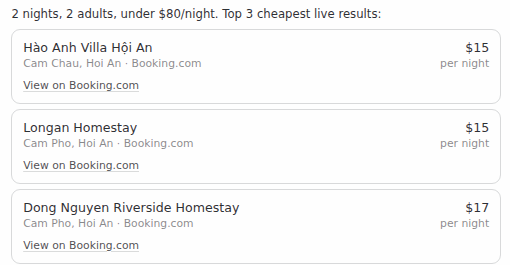
PriceWin plugin for Hermes Desktop
Renders PriceWin hotel and flight results as inline cards in the Hermes Desktop transcript instead of raw JSON.
This package is UI only. It registers no tools, no hooks, no middleware, and
needs no credentials — the search itself comes from the pricewin MCP catalog
entry.
Prerequisites
hermes mcp install pricewin      # the tools (hotel + flight search)
hermes plugins install PriceDotWin/pricewin-hermes-plugin --enable
Without the MCP entry the plugin still loads, it just has nothing to draw. With the plugin disabled the directives below degrade to the plain paragraphs they always were, so nothing breaks either way.
What it renders
The agent writes a directive on its own paragraph and the transcript replaces it with a card:
::pricewin-hotel{name="Liberty Central Riverside" price="58" stars="4"
                 area="District 1, Ho Chi Minh City" ota="agoda"
                 link="agoda.com/liberty-central/hotel/ho-chi-minh-city-vn.html?..."}

::pricewin-flight{route="SGN → HAN" airline="Vietnam Airlines" price="72"
                  depart="06:15" duration="2h10m" stops="0"
                  link="trip.com/flights/..."}
link has no https:// and no www.. Hermes Desktop turns any URL in a
message into a hyperlink before it looks for directives, and a directive with a
hyperlink inside is no longer one — it shows as raw text. The PriceWin MCP
server gives every result a ready-made link in this form, trimmed to the dates
and party so it fits the 1024-character attribute limit. A directive that uses
url="https://…" instead is still read when it survives.
The desktop half is off by default after install: turn it on under Capabilities → Plugins → PriceWin → Desktop.
| Directive | Attributes |
|---|---|
pricewin-hotel |
name (required), price (USD), stars (1–5), area, ota, note, link |
pricewin-flight |
route (required), price (USD), airline, depart, duration, stops, link |
The pricewin-travel-search skill is what teaches the agent to emit these.
Safety
Directive attributes are untrusted model output, so the plugin validates all of them and drops anything it cannot parse:
- The link (
link, or the olderurl) must resolve tohttps:and be on PriceWin or one of the OTAs the search results link to (Agoda, Booking.com, Traveloka, Trip.com), subdomains included. Any other host renders no link at all, so a hallucinated URL never becomes a click target. The button label names the site from the URL itself, never from the model's text. pricemust be a positive number;starsmust be 1–5.- A card with no
name(hotel) orroute(flight) renders nothing.
The plugin makes no network requests, reads no files, and stores no state. Links
open in the system browser through ctx.os.openExternal. Payment and booking
always happen on the linked site, never in the transcript.
Development
desktop/plugin.js is loaded uncompiled — there is no build step, and JSX
syntax will not parse. UI is written with jsx() / jsxs() calls, and
@hermes/plugin-sdk, react and react/jsx-runtime are the only importable
specifiers, which is why the plugin is a single file.
To develop against a live app, symlink the package into the Hermes home and reload desktop plugins (⌘K → Reload desktop plugins):
ln -s "$PWD" ~/.hermes/plugins/pricewin
hermes plugins doctor pricewin
hermes plugins validate pricewin
License
MIT