Provider Usage
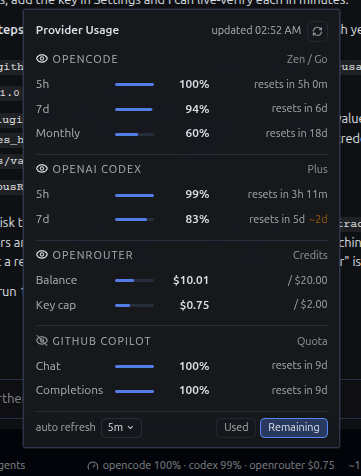
Per-provider quota and balance readout in the Hermes desktop status bar: OpenCode, OpenAI Codex, OpenRouter, plus Anthropic, GitHub Copilot, Nous, Z.AI, Kimi, MiniMax, and DeepSeek when configured.
Providers appear only when their credentials are usable; unconfigured providers are omitted from the panel entirely.
Screenshots
What it shows
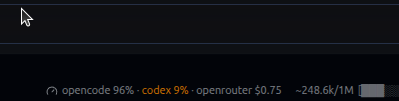
- Status bar: the providers you pick with the eye toggles, e.g.
opencode 6% · codex 2% · openrouter $0.32(5h windows for quota providers, key-cap figure for OpenRouter; flips with Used/Remaining). Until a toggle is touched, only the first provider shows. - Popover: dense rows with every window, reset times, balance and key-cap amounts, and a manual refresh button.
- Near-limit tint: any window or the OpenRouter key cap at 80%+ used renders amber in the bar and in the popover.
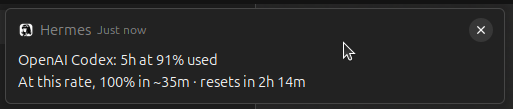
- Native alerts: one desktop notification per threshold crossing, deduped per window cycle (keyed by the reset time) and once a day for the key cap.
- Burn-rate projections:
~2dappears next to a window when it would hit 100% before its own reset at the currently observed rate; caps show the projected exhaustion when inside 14 days. - Footer controls: auto refresh picker (30s / 1m / 5m / 10m) and a Used/Remaining toggle. Both persist across app restarts.
- Provider toggles: an eye button on each provider header shows or hides that provider in the status bar. Persists across app restarts.
Providers and what it reads
| Provider | Credential (read-only) | Endpoint |
|---|---|---|
| OpenCode | OPENCODE_GO_API_KEY via the Hermes secret scope, else ~/.local/share/opencode/auth.json |
https://opencode.ai/zen/go/v1/usage |
| OpenAI Codex | Hermes' Codex sign-in (account-usage helper), else ~/.codex/auth.json |
https://chatgpt.com/backend-api/wham/usage |
| OpenRouter | OPENROUTER_API_KEY via the Hermes secret scope |
https://openrouter.ai/api/v1/key, https://openrouter.ai/api/v1/credits |
| Anthropic | Hermes' Claude Code sign-in (account-usage helper) | https://api.anthropic.com/api/oauth/usage |
| GitHub Copilot | Hermes' Copilot token resolver | https://api.github.com/copilot_internal/user |
| Nous | Hermes' Nous Portal sign-in | Nous Portal account info |
| Z.AI / GLM | ZAI_API_KEY or GLM_API_KEY |
https://api.z.ai/api/monitor/usage/quota/limit |
| Kimi | KIMI_API_KEY |
https://api.kimi.com/coding/v1/usages (falls back to the Moonshot balance) |
| MiniMax | MINIMAX_API_KEY |
https://api.minimax.io/v1/api/openplatform/coding_plan/remains |
| DeepSeek | DEEPSEEK_API_KEY |
https://api.deepseek.com/user/balance |
Privacy
- Read-only credentials. The plugin writes nothing back to any credential
file and never mints or refreshes a token itself. No browser cookies, no
credential CLIs. Providers marked as resolved by Hermes use the app's own
account-usage helpers (the same code path as Hermes'
/usagesurfaces, including Hermes' normal credential upkeep). - No subprocesses. Every provider call is an in-process
httpxrequest; nothing is shelled out, and no helper process ever sees a credential. - Client identity disclosure. The GitHub Copilot check queries GitHub's
internal Copilot usage endpoint presenting the VS Code / Copilot client
identity (
Editor-Version,User-Agent), the same identity the Copilot editor plugin presents. - All provider calls happen on your machine, from the plugin's own backend half. The only network peers are the provider endpoints listed above.
- No telemetry, no analytics, no self-updater.
- The desktop half talks only to your own Hermes backend at
/api/plugins/provider-usage/.
Install
Once listed, install from the plugin catalog:
hermes plugins install provider-usage
Until then, install manually:
- Clone this repository into
$HERMES_HOME/plugins/provider-usage/(~/.hermes/plugins/provider-usage/by default). - Enable it:
hermes plugins enable provider-usage. - Reload the desktop app. The bar item appears in the right cluster and the plugin is listed under Settings, Capabilities, Plugins.
Requires a Hermes build with the desktop plugin SDK (>=0.21.0).
Notes on projections
Projections need at least 30 minutes of observed history inside the last 6
hours. The backend samples history in memory whenever it refreshes; a restart
pauses projections until samples reaccumulate. The payload carries
eta_seconds on windows and depletes_in_seconds on money rows, and the UI
only surfaces them when they are actionable (window hits 100% before its
reset; cap depletes within 14 days).
Layout
plugin.yaml              Agent manifest
__init__.py              Agent entry point (inert by design)
dashboard/manifest.json  Dashboard manifest (mounts the backend router)
dashboard/plugin_api.py  Backend: fetchers, cache, burn-rate history
desktop/plugin.js        Desktop: status-bar item, popover, alerts
Development
hermes plugins validate .runs the same admission checks as the catalog CI.- The backend served payload is a single JSON object:
{ fetched_at, providers: [{ id, name, tag, status, windows | money }] }.
License
MIT