All plugins

quota

Per-provider quota / rate-limit status via /quota command and desktop widget. Reads precomputed quota_cache.json so the widget never does network I/O. Disclosure — refreshes your Gemini OAuth token using the Gemini CLI's public client identity, in memory only; queries Copilot's internal usage endpoint with VS Code client headers and Anthropic's OAuth usage endpoint using the hermes-quota-plugin User-Agent, caching Anthropic usage responses and rate-limit cooldowns in the Hermes root directory keyed by a token hash so profiles sharing one Claude login share them; optional additional Claude accounts read access tokens only from explicitly configured Claude Code credentials files and send them only to Anthropic's fixed OAuth usage endpoint (read-only, no refresh-token exchange or credential write-back; tokens and paths excluded from the quota cache). Linux extra accounts verified; Windows experimental, extra macOS Keychain accounts unsupported. The openai-codex check reads every saved Codex account from Hermes' own auth.json credential pool (read-only, never refreshed; expired accounts show reauth-required) and queries the Codex usage endpoint with the codex-cli User-Agent; when a Codex account is configured, each refresh also fetches public Codex reset announcements from the third-party site codex-resets.com (anonymous request, no credentials sent); the opencode-go check reads the OpenCode CLI's local auth.json, Hermes' auth.json pool and OPENCODE_GO_API_KEY_N variables (read-only). The cursor check reads the Cursor CLI token from the macOS Keychain or Cursor's auth.json (read-only, never refreshed or rewritten; on expiry it asks you to run cursor-agent login) and queries api2.cursor.sh; the opt-in (default off) antigravity check reads Antigravity's OAuth token from Windows Credential Manager, the macOS Keychain or ~/.gemini/antigravity-cli (read-only), refreshes it in memory with Antigravity's public client identity and sends Antigravity's User-Agent to Google's cloudcode endpoint; the opt-in (default off) grok.com check first sends Hermes' own xai-oauth access token (read via Hermes or from auth.json, read-only) to grok.com's billing endpoint with a browser User-Agent, and on an authentication failure falls back to local browser cookies, using secret-tool on Linux, the macOS Keychain or Windows DPAPI for the browser's cookie key and decrypting only grok.com cookies from a temporary copy of the cookie DB; the commandcode check reads ~/.commandcode/auth.json (read-only) or every saved commandcode credential in Hermes' credential store and uses the Command Code CLI's User-Agent; zai, kimi, minimax, deepseek, openrouter, ollama (which may read OLLAMA_API_KEY from ~/.hermes/.env and calls ollama.com/api/usage, /api/balance and /api/me) and experientiallabs send keys from Hermes' credential store or env only to their own vendor's usage or balance endpoints. The opt-in (default off) Agent Monitor reads this profile's Hermes session database and the local process list to show running sessions, spend estimates and model health, locally only.

rarf93Desktopv3.0.0Updated 11 days ago

About

Per-provider quota / rate-limit status via /quota command and desktop widget. Reads precomputed quota_cache.json so the widget never does network I/O. Disclosure — refreshes your Gemini OAuth token using the Gemini CLI's public client identity, in memory only; queries Copilot's internal usage endpoint with VS Code client headers and Anthropic's OAuth usage endpoint using the hermes-quota-plugin User-Agent, caching Anthropic usage responses and rate-limit cooldowns in the Hermes root directory keyed by a token hash so profiles sharing one Claude login share them; optional additional Claude accounts read access tokens only from explicitly configured Claude Code credentials files and send them only to Anthropic's fixed OAuth usage endpoint (read-only, no refresh-token exchange or credential write-back; tokens and paths excluded from the quota cache). Linux extra accounts verified; Windows experimental, extra macOS Keychain accounts unsupported. The openai-codex check reads every saved Codex account from Hermes' own auth.json credential pool (read-only, never refreshed; expired accounts show reauth-required) and queries the Codex usage endpoint with the codex-cli User-Agent; when a Codex account is configured, each refresh also fetches public Codex reset announcements from the third-party site codex-resets.com (anonymous request, no credentials sent); the opencode-go check reads the OpenCode CLI's local auth.json, Hermes' auth.json pool and OPENCODE_GO_API_KEY_N variables (read-only). The cursor check reads the Cursor CLI token from the macOS Keychain or Cursor's auth.json (read-only, never refreshed or rewritten; on expiry it asks you to run cursor-agent login) and queries api2.cursor.sh; the opt-in (default off) antigravity check reads Antigravity's OAuth token from Windows Credential Manager, the macOS Keychain or ~/.gemini/antigravity-cli (read-only), refreshes it in memory with Antigravity's public client identity and sends Antigravity's User-Agent to Google's cloudcode endpoint; the opt-in (default off) grok.com check first sends Hermes' own xai-oauth access token (read via Hermes or from auth.json, read-only) to grok.com's billing endpoint with a browser User-Agent, and on an authentication failure falls back to local browser cookies, using secret-tool on Linux, the macOS Keychain or Windows DPAPI for the browser's cookie key and decrypting only grok.com cookies from a temporary copy of the cookie DB; the commandcode check reads ~/.commandcode/auth.json (read-only) or every saved commandcode credential in Hermes' credential store and uses the Command Code CLI's User-Agent; zai, kimi, minimax, deepseek, openrouter, ollama (which may read OLLAMA_API_KEY from ~/.hermes/.env and calls ollama.com/api/usage, /api/balance and /api/me) and experientiallabs send keys from Hermes' credential store or env only to their own vendor's usage or balance endpoints. The opt-in (default off) Agent Monitor reads this profile's Hermes session database and the local process list to show running sessions, spend estimates and model health, locally only.

Hermes Quota

Quota in Hermes Desktop

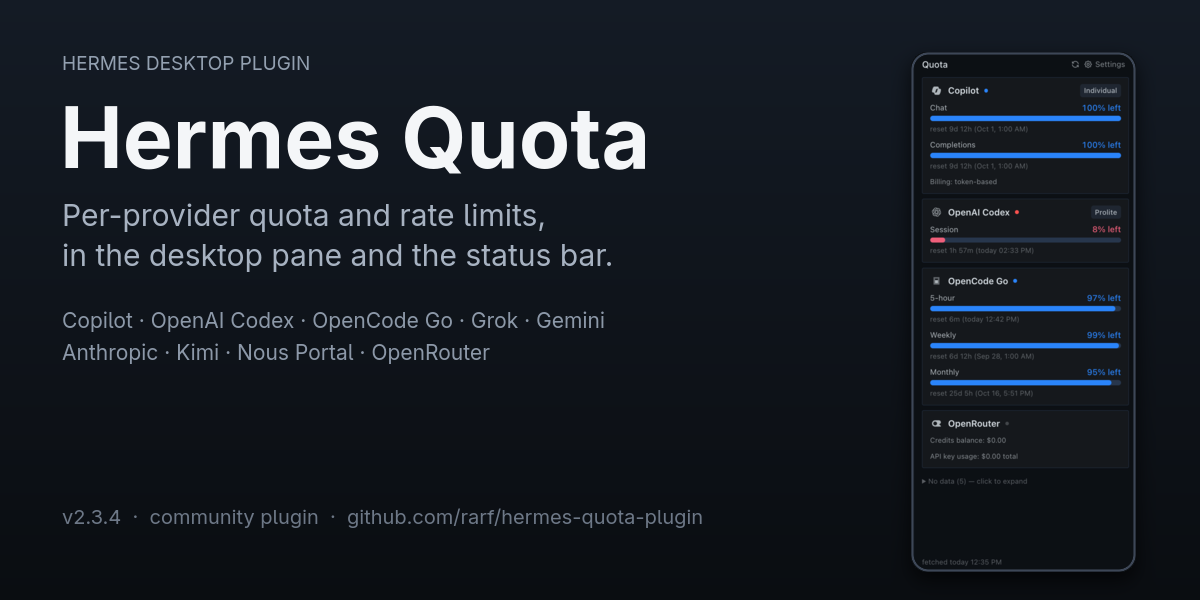
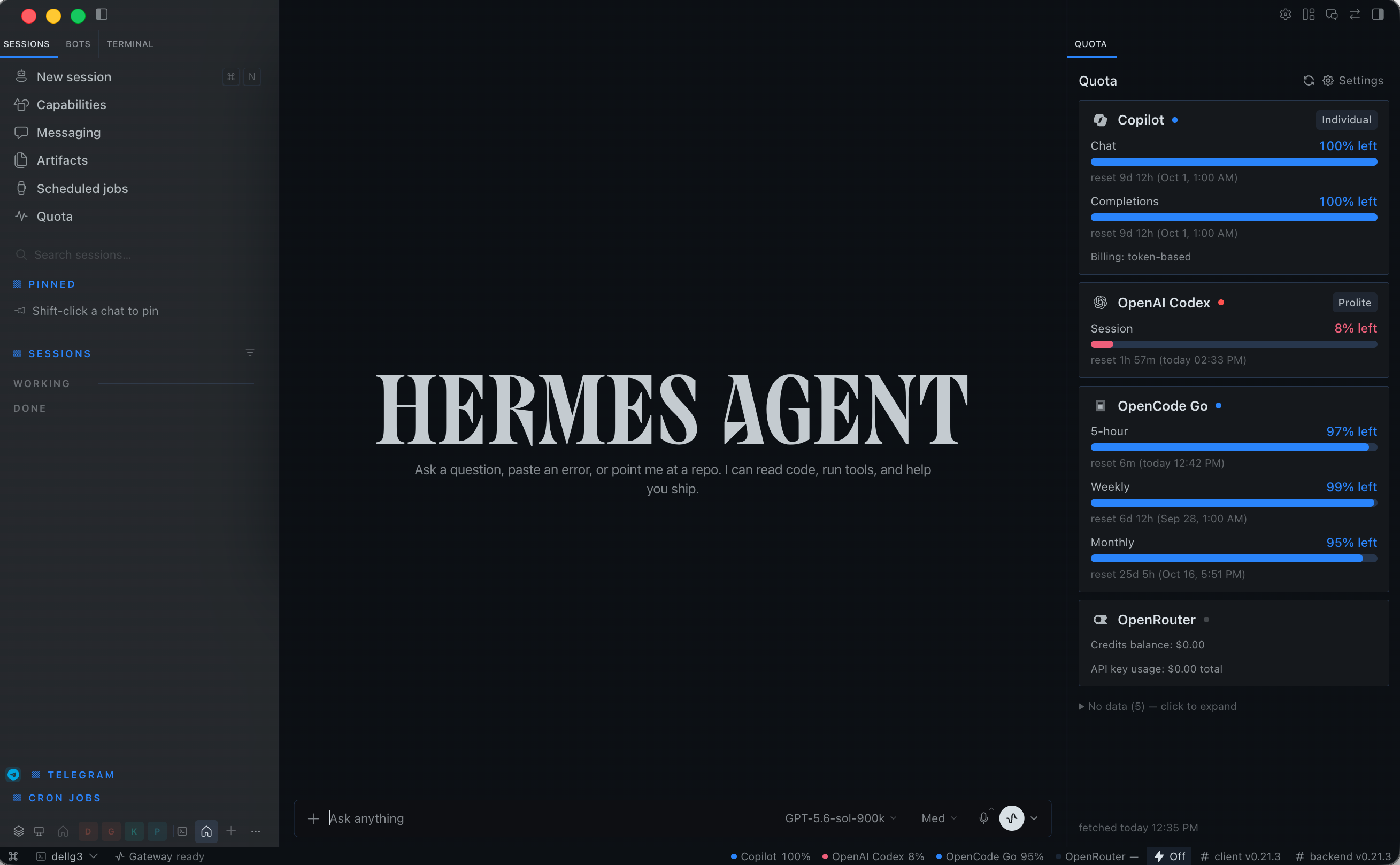
See provider quotas, reset times and account balances in Hermes Desktop and the CLI—without adding network calls to every UI render.

3.0 adds Agent Monitor: an opt-in view of live Hermes sessions, context usage,
model health, usage estimates and quota history inside Desktop. No separate
monitoring server. Existing quota views remain available without enrollment.

New in 3.0

  • Quota history and burn-rate forecasts, when enough readings are available.
  • Live session states and attention indicators for the selected profile.
  • Model health, fallback-chain visibility and recorded usage estimates.
  • Status-bar agent chips, context guard and configurable notifications.
  • Localized monitor UI: English, Turkish, German, Spanish, French, Russian,
    Japanese, Simplified Chinese, Traditional Chinese and Arabic (RTL).

Agent Monitor ships off by default. Enable collection only for the profile
that you want to monitor:

hermes config set plugins.entries.quota.settings.monitorEnabled true

For a named profile, use hermes -p <profile> config set with the same setting.
Disable it by setting the value to false. Disabling stops collection; it does
not erase previously collected history.

This first release deliberately keeps the hardened read-only scope from the
trial: no sibling-profile collection, external CLI transcripts, shared Kanban
boards, new credential-store reads, account/budget mutations or monitor agent
tools. Tabs for unavailable capabilities do not enable them. Usage costs are
estimated API-price equivalents, not invoices; month-end spending projection
is not provided. Monitor behavior, privacy and limitations →

Thank you, @Asimatasert

A huge thank-you to @Asimatasert for proposing
and implementing the Agent Monitor integration, bringing the work from
agent-monitor into Hermes Quota,
and contributing the backend, Desktop views, localization and tests. This is
the contribution behind the 3.0 milestone. The integration retains the existing
quota architecture and adds maintainer-side safety boundaries and fixes.
Original proposal #83.

What you get

  • A docked pane and status-bar indicator with per-provider usage.
  • Model-specific quota windows and reset times when the vendor supplies them.
  • Separate, configurable Claude account cards; no summed or invented allowances.
  • Honest unavailable states and opt-in access to sensitive credential sources.
  • Optional Ink TUI quota chip with an interactive account picker and theme colors.
  • Codex special-reset announcements, separate from account renewals, with data from Codex Resets.
  • A bundled quota-check skill (quota:quota-check) teaching agents to check
    quota before long work and to ask before splitting tasks or switching models.

Install

git clone https://github.com/rarf/hermes-quota-plugin.git
cd hermes-quota-plugin
./install.sh

The source installer enables quota for all existing profiles. Review that scope before running it. For remote Desktop setups, install/update the widget on the computer running the app as well as the backend on the gateway. Installation and updates.

hermes plugins doctor quota --ci
hermes quota refresh
hermes quota status

Optional terminal panel

After installing the backend, copy the optional widget into one profile:

mkdir -p "${HERMES_HOME:-$HOME/.hermes}/tui-widgets"
cp tui/quota-panel.mjs "${HERMES_HOME:-$HOME/.hermes}/tui-widgets/quota-panel.mjs"
hermes --tui

Run /quota-select to choose a provider/account; /quota-panel hides or reopens
the right-aligned, theme-colored quota chip. Requires Hermes' Ink user-widget SDK;
the classic CLI continues to use /quota. The main installer does not enable this
widget automatically. TUI setup, commands and limitations.

Multiple Claude accounts

Additional accounts are explicitly configured by directory and display label. Labels such as Work, Personal or Account 2 are user-configurable—not hardcoded. Linux is verified; additional platform limitations are documented.

Configure Claude accounts →

Privacy and security

Extra Claude accounts are opt-in and read-only: no refresh-token exchange, credential write-back or tokens in the display cache. Requests identify this plugin rather than Claude Code. Primary-account resolution remains Hermes-core behavior. Other providers may use opt-in browser/OS credential-store reads and vendor client identities; see provider disclosures. Python plugins are trusted host code, not sandboxed applications. Third-party login reads require disclosure and maintainer judgment for catalog admission. Security details and limitations.

Grok authentication

Grok is opt-in. When enabled, the provider reuses Hermes' existing xai-oauth
access token as a Bearer token for the Grok billing endpoint. If the token is
unavailable or the endpoint rejects it as an authentication failure, the
provider preserves the browser fallback chain: ~/grok_session.json, Firefox,
then Chromium/Chrome/Brave cookies. On Windows, Chromium cookie values use the
current user's DPAPI-protected Local State key and AES-256-GCM v10/v11
decryption. App-Bound v20 cookies remain unsupported and are reported as
chrome-app-bound; cookie values are never printed or written back.

Documentation

MIT · License

README from the reviewed commit 89a2ca3; it updates when the author re-pins.
More by rarf

2 plugins by rarf in the catalog.