 MindSproutStudios
reachmap
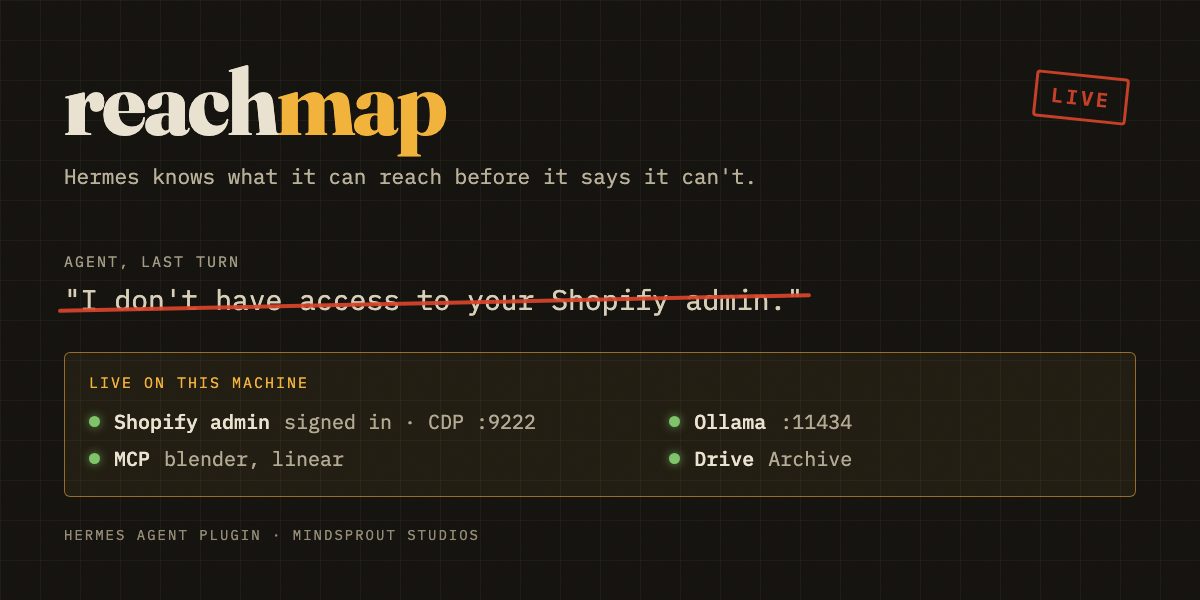
Hermes knows what it can reach before it says it can't.
Agents lose hours to one sentence: "I don't have access to that." Often it's wrong. The access is sitting right there: a Chrome window on a DevTools port, still signed in to Shopify; an MCP server behind tool search; Ollama on :11434; a backup drive someone plugged in last week. None of it shows up in config.yaml, .env or memory, because a live session isn't a file. The opposite mistake costs more: "On it, posting with xurl", when that token died last week.
reachmap scans the machine, keeps a durable record of what it finds, and puts that record where the agent will see it before it answers:
Live capability map for studio-mini (reachmap, scanned 20:23). Before telling the user
something is unreachable, not connected or needs a login, check this map (or call the reachmap
tool). A signed-in browser session counts as access.
- Browser sessions:
  - Chrome on CDP :9222 [cdp_url]: App Store Connect (login page); Gmail (signed in);
    Shopify admin (signed in)
  - Chrome on CDP :9223: GitHub (open); Instagram (open)
- MCP servers: blender, linear
- Local services: Blender :9876, Ollama :11434
- CLI tools: gh, netlify, wrangler, docker, ffmpeg, xcodebuild
- Drives: Drive "Archive"
If the agent says it can't reach something anyway, reachmap catches the claim and corrects it.
What it does
1. A map in every new session, without breaking the prompt cache. The map is registered as a system prompt section. It's rendered once per session, frozen there, and kept under 2,000 characters. If something appears or disappears mid-session, the next turn gets a one-line note through pre_llm_call (+ now live: Ollama :11434, - gone: Chrome on CDP :9223). Nothing is re-sent when nothing has changed.
2. It catches false "I can't" replies, and hedges. A transform_llm_output hook reads each final reply. If one sentence contains both a denial or hedge ("I don't have access to", "isn't connected", "if your session is still signed in, but I haven't checked") and the name of something live on the map, two things happen:
-
The user sees a footer on that reply:
--- reachmap: no need to guess. This is live right now: - Shopify admin: signed in, Chrome on CDP :9222 [cdp_url] Reply "use it" to have me retry with it. -
On the next turn, the agent gets a one-time correction quoting what it said and how to use the live capability.
The check is deterministic: regexes and a keyword match, with no extra model calls and no added tokens on clean replies.
3. A ledger that remembers. Every capability is recorded in SQLite with its first-seen and last-seen times. A signed-in browser that was there yesterday and is gone today shows up as GONE with its last-seen time, which is usually what explains why a 3 AM cron job failed. reachmap note records why a capability exists ("store-ops profile, used by the inbox cron"), so the next session, or the next model, doesn't have to work it out again.
4. Installed isn't the same as signed in (opt-in). A CLI on PATH tells you nothing about its token. That gap is the costlier mistake, because the agent says "on it, posting with xurl" and the task fails halfway through, an hour after the token died. Turn on auth_probes and reachmap runs each listed tool's own read-only status command (gh auth status, xurl whoami, wrangler whoami…) and labels it:
- CLI tools: gh (signed in), xurl (signed in), wrangler (NOT SIGNED IN since 3h ago: token rejected;
  re-auth: wrangler login), hf (NOT SIGNED IN since 3h ago: not logged in; re-auth: hf auth login), ffmpeg, ...
When a login that used to work goes bad, the ledger marks it GONE with the time it was last good. If a reply plans to use a tool whose sign-in failed ("I'll post the thread to X with xurl"), the user gets a heads-up with the re-auth command, and the agent is told to ask for re-auth instead of trying (and never to run the login itself):
---
reachmap: heads up before relying on that:
- X API CLI (xurl) is NOT signed in (token rejected, checked 2m ago). Re-auth needs the user: xurl auth oauth2
Two things the real probes taught it:
- Exit codes lie.
netlify statusexits 1 while you're signed in, whenever the folder isn't linked to a site. Verdicts come from the output text, and anything unrecognised isunknown, never "signed out". - Login is per account. Plain
xurl whoamireturns 401 on the default app even when your real app works.auth_probe_argsadds per-tool flags (xurl: --app my-app -u me).
A verified CLI sign-in never overrules a denial. "Signed in to gh" doesn't mean the token can read everything in the GitHub account. The replay below showed that allowing it added only false alarms.
Precision: tested against real history
Too many false alarms and nobody would keep a check like this turned on. tests/replay_history.py replays your own past assistant replies (read-only, from state.db) against today's live map. On the machine this was built on:
8865 past replies, 8 flagged (0.09%)
- [browser:9222] "Probably, if your Chrome session for the Shopify admin is still signed in, but I haven't checked..."
- [browser:9223] "...nothing I have notes on shows a signed-in session or connector for [TikTok]..."
- [service:9876] "Blender isn't connected right now..."
All 8 are real hedges or denials about something live on today's map, with no false alarms. With six sign-in probes on (two of them finding a dead login), the overclaim check adds no flags. An early version that matched brand names flagged 42 research sentences about "Cloudflare" and "workers", so it now needs a first-person plan ("I'll…", "let me…") plus the tool or a concrete action ("xurl", "post to X", "wrangler deploy"). That history has no case of the agent planning to use a dead CLI, so the replay measures precision only; the positive cases are covered by unit tests. Hedges count too: "probably, if your session is still signed in, but I haven't checked" is the same failure as "I can't", and it's more common. It covers several variants: "haven't checked", "can't confirm without tools", "if one exists".
Things the check deliberately ignores:
-
Login pages. Each site on the map is in one of three states, and the label never claims more than the scan can see:
signed in: an app host that bounces logged-out visitors, such as Gmail or Shopify adminopen: a site that also serves public pages, such as GitHub, X or TikToklogin page: the tab is sitting on a sign-in screen
Tabs on a login page never count. "App Store Connect (login page)" never contradicts "I can't get into App Store Connect."
-
CLIs.
ghbeing installed, or even verified signed in, never overrules a denial. -
Code blocks, and sentences with no access verb. "I can't recommend Shopify for this" is not a denial.
Use it
| Surface | Command |
|---|---|
| Agent tool | reachmap with action: show, find, rescan, note, history |
| Slash command (CLI, Telegram, Discord…) | /reachmap, /reachmap find shopify, /reachmap rescan, /reachmap check <reply>, /reachmap history |
| Terminal | hermes reachmap, hermes reachmap find gmail, hermes reachmap check "I can't log into Shopify", hermes reachmap json |
Install
hermes plugins install reachmap      # once listed in the catalog
# or from source
hermes plugins install MindSproutStudios/hermes-reachmap
hermes plugins enable reachmap
The hooks are live in a running gateway right away. The map and tool appear in the next new session.
Settings
Set these under plugins.entries.reachmap.settings, or in Settings → Plugins in Hermes Desktop.
| Key | Default | |
|---|---|---|
| inject_map | true | Freeze the map into each new session's prompt |
| catch_denials | true | Run the denial check on final replies |
| show_footer | true | Show the user the footer (off = silent correction only) |
| show_identities | true | Include account emails seen in tab titles |
| scanners | all | Any of browser, mcp, service, cli, drive |
| extra_cdp_ports | "" | Extra DevTools ports beyond browser.cdp_url, 9222–9226, 9229, 9230 and 9333 |
| cdp_ports | "" | Probe only these DevTools ports (skips browser.cdp_url and the defaults) |
| rescan_seconds | 90 | How old a scan can get before the next turn refreshes it in the background |
| auth_probes | "" (off) | Tools whose sign-in to verify, or all: aws, flyctl, gh, hf, higgsfield, netlify, railway, vercel, wrangler, xurl |
| auth_probe_args | "" | Extra flags per tool, flags only: "xurl: --app my-app -u me; gh: --hostname github.com" |
| auth_probe_ttl | 900 | Seconds a sign-in verdict is reused before a background re-check |
Disclosure: what it reads and where it goes
- Network: loopback only by default. It sends
GET /json/versionand/json/listto127.0.0.1on DevTools ports. It never navigates, executes or attaches to a page. No telemetry. The only outbound traffic is from opt-in sign-in probes: each listed CLI's own status command contacts that CLI's own service, exactly as if you ran it. - Shell commands:
-
ps -axo args, to find which profile directory backs a DevTools port -
lsof -nP -iTCP -sTCP:LISTEN(orss -ltnpon Linux), to list local listeners -
shutil.which()on a fixed list of CLI names. By default it checks presence only and never runs them. -
Only if you list a tool in
auth_probes, that tool's one fixed status command, with no shell, stdin closed and a 6 s timeout, and a minimal environment:PATH,HOME,USER,LOGNAME,LANG/LC_*,XDG_*,TMPDIR, plus only that tool's own variables (listed below). Hermes provider keys and other tools' tokens never reach the CLI:| Tool | Command | Env passed |
|---|---|---|
|gh|gh auth status|GH_*,GITHUB_TOKEN,GITHUB_ENTERPRISE_TOKEN|
|hf|hf auth whoami|HF_*,HUGGING_FACE_HUB_TOKEN|
|xurl|xurl whoami|XURL_*|
|netlify|netlify status|NETLIFY_*|
|wrangler|wrangler whoami|CLOUDFLARE_*,WRANGLER_*|
|higgsfield|higgsfield account status|HIGGSFIELD_*|
|vercel|vercel whoami|VERCEL_*|
|flyctl|flyctl auth whoami|FLY_*|
|railway|railway whoami|RAILWAY_*|
|aws|aws sts get-caller-identity|AWS_*|The output is classified and discarded. Only the verdict (
signed in/not signed in/unknown) and a short reason (token rejected) are kept. It never runs a login, refresh or logout.
-
- Files read: Hermes config through
load_config_readonly(), forbrowser.cdp_urland the names ofmcp_servers(never headers or env values). It also reads mounted-volume metadata. - No credential stores. It never reads
.env,auth.json, browser profiles, cookies, keychains or token files. Sign-in probes let each CLI use its own credentials the normal way; reachmap never sees them. - What reaches your model provider: the map text, which includes service names, ports, drive names and, if
show_identitiesis on, account emails visible in open tab titles. Turnshow_identitiesoff to keep addresses out of prompts. - Writes: a SQLite ledger at
<HERMES_HOME>/plugin-data/reachmap/data.db, holding capability ids, names, timestamps, notes and the first 200 characters of each flagged sentence. With probes on,auth.jsonnext to it holds each verdict, its reason, the command run, and when it was last good. - Background work: none standing. Each scan is a short-lived thread, bounded by sub-second timeouts per probe (a full scan takes about 0.1–0.4 s). Sign-in probes run in parallel, once per
auth_probe_ttl, in the background except the very first check (about 1–2 s for six tools). - Platforms: macOS and Linux. On Windows the browser and MCP probes work, and the listener and drive probes return nothing.
Develop
python3 -m unittest discover -s tests       # stdlib only, includes a fake DevTools server
python3 tests/replay_history.py             # precision check against your own history
hermes plugins doctor . --ci && hermes plugins validate .
When a gateway is running, hermes chat turns run inside it, so after editing the code, reload with hermes plugins disable reachmap && hermes plugins enable reachmap.
The layout is small on purpose:
scanner.py: probesservices.py: URL, port and CLI tables (add a service here)auth.py: opt-in sign-in probesdenial.py: the checks (false denials, and plans to use a dead CLI)ledger.py: historyrender.py: all text__init__.py: wiring
MIT © MindSprout Studios
README from the reviewed commit f927ac9; it updates when the author re-pins.