
 agentscope-ai
ReMe memory provider for Hermes Agent
This plugin gives Hermes Agent automatic ReMe recall and recording in either of
two modes:
- HTTP (default) connects to an independently managed ReMe service and does
not require the ReMe SDK in Hermes' Python environment. - Embedded creates a ReMe
Applicationinside Hermes on a dedicated asyncio
loop thread. It needsreme-aiinstalled but no service process or port.
Both modes search before a model call and queue each completed user/assistant
turn for automatic memory extraction. ReMe remains local-first: workspace files
are the durable source of truth.
new Hermes turn
  └─ ReMe prefetch → search → protected memory context → model call

completed user/assistant turn
  └─ FIFO writer → auto_memory → workspace daily Markdown
Unlike the DSH adapter, this provider does not add a model-visible search tool.
Hermes calls prefetch() automatically before every relevant model call and
adds the returned evidence to its protected memory context.
| Mode | ReMe process | Hermes dependency | Best for |
| --- | --- | --- | --- |
| HTTP | Separate reme start service | No ReMe SDK required | Process isolation, shared or independently managed services |
| Embedded | Inside Hermes on a dedicated event-loop thread | reme-ai[core] | Simple local setup with no extra service or port |
Requirements
- Python 3.11 or newer.
- Hermes Agent 0.21 or newer.
- A ReMe configuration with
health_check,search, andauto_memoryjobs. - A working ReMe model configuration for
auto_memory; BM25 recall itself does
not require an embedding model.
Install and configure
Hermes can install the plugin directly from this repository subdirectory:
hermes plugins install agentscope-ai/ReMe/integrations/hermes_agent
hermes memory setup
Hermes releases whose plugin catalog includes ReMe also accept the shorter
hermes plugins install reme form.
For development from local ReMe and Hermes checkouts, either copy the integration
into the active profile or link it as a project-local plugin. The link keeps
Hermes on the exact ReMe source being edited:
mkdir -p "$HERMES_HOME/plugins/reme"
cp -R /path/to/ReMe/integrations/hermes_agent/. "$HERMES_HOME/plugins/reme/"
hermes plugins enable reme
hermes config set memory.provider reme
cd /path/to/hermes-agent
mkdir -p .hermes/plugins
ln -s /path/to/ReMe/integrations/hermes_agent .hermes/plugins/reme
export HERMES_ENABLE_PROJECT_PLUGINS=1
hermes config set memory.provider reme
.hermes/ is Hermes runtime state and is ignored by the Hermes repository. Do
not commit the link, profile configuration, conversations, or generated memory.
Verify discovery before starting a conversation:
hermes plugins doctor /path/to/ReMe/integrations/hermes_agent --ci
hermes memory status
The Hermes Dashboard renders the provider's mode-specific fields and advanced
recall, health, write, and shutdown controls. Select Plugins → Runtime provider
plugins → Memory provider → reme. The active mode controls whether the HTTP
endpoint or embedded workspace settings are shown.
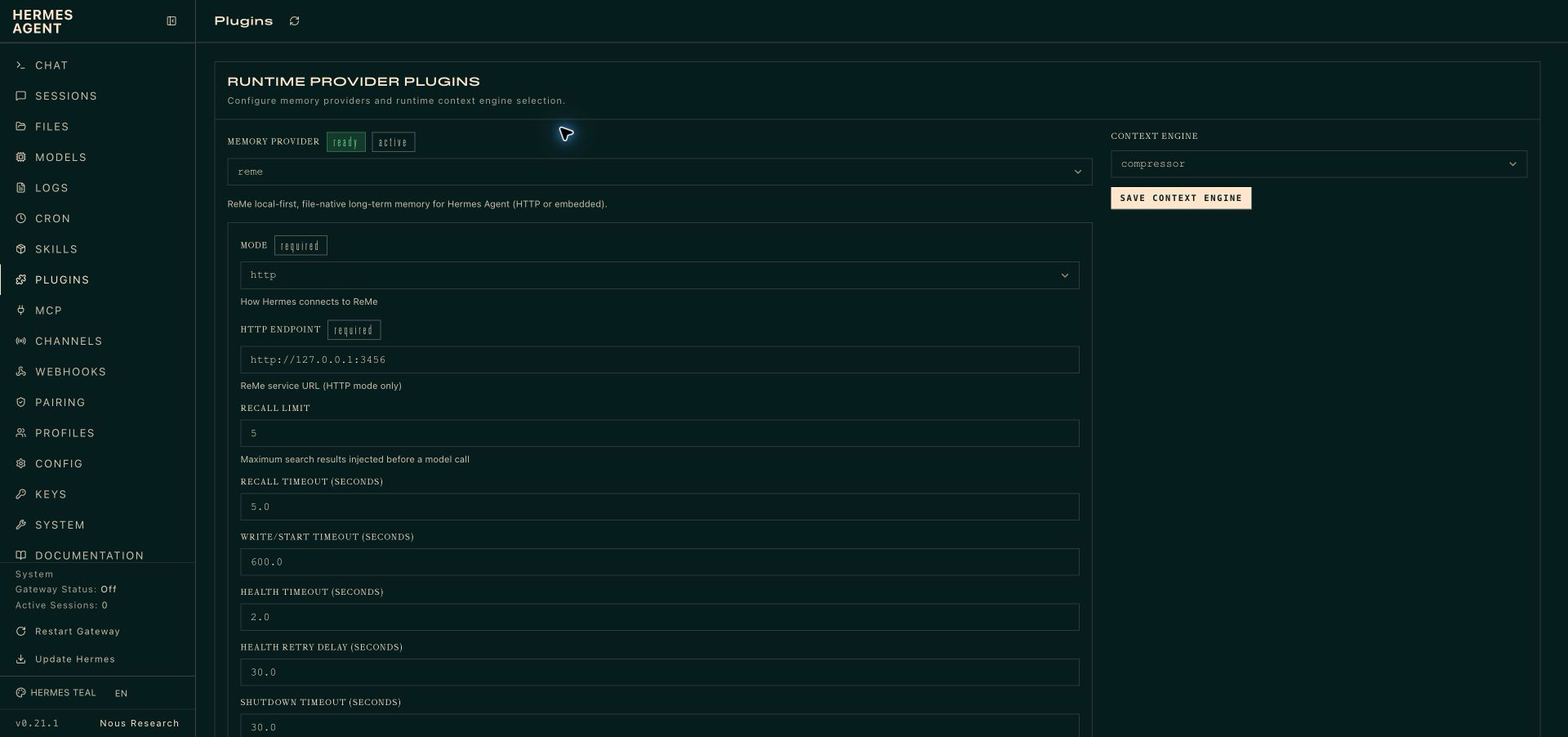
Configuration is profile-local at:
$HERMES_HOME/reme/config.json
The earlier $HERMES_HOME/reme.json location remains a fallback for fields
omitted from the current file. Current values take precedence, and the next CLI
setup save writes a complete current config without deleting the legacy file.
HTTP mode
Install ReMe in the environment that will run its service, then start one
service and workspace for the active Hermes profile:
reme start \
  workspace_dir="$HOME/.reme-hermes-default" \
  service.backend=http \
  service.host=127.0.0.1 \
  service.port=3456
Use this configuration in Hermes:
{
  "mode": "http",
  "endpoint": "http://127.0.0.1:3456"
}
Port 3456 is used in this guide so the verification service does not collide
with another ReMe instance on the default 2333 port. It is not a new default.
The setup wizard checks health_check before replacing a valid configuration.
The generic desktop settings endpoint validates field types and choices; a new
Hermes session validates the URL and performs the live health check. ReMe's action HTTP service has no
integration-specific authentication, so keep it on loopback or place it behind
a trusted tunnel or authenticated proxy.
Embedded mode
Install ReMe into the same Python environment used by Hermes:
pip install "reme-ai[core]"
Then configure a dedicated workspace:
{
  "mode": "embedded",
  "workspace_dir": "~/.reme-hermes-default",
  "reme_config": "default"
}
Embedded mode resolves the named ReMe config, overrides its workspace_dir,
constructs and starts reme.Application on one long-lived event loop, and calls
the health_check, search, and auto_memory jobs directly. Shutdown drains
the Hermes write queue, closes the Application, stops the loop, and joins its
thread within the configured timeout. It never calls Application.run_app() and
therefore never opens a service port.
ReMe needs a working model configuration for automatic memory extraction. The
default search includes BM25, so embedding credentials are optional unless the
selected ReMe config enables vector retrieval that requires them.
Full configuration
{
  "mode": "http",
  "endpoint": "http://127.0.0.1:2333",
  "workspace_dir": "",
  "reme_config": "default",
  "request_timeout": 600.0,
  "recall_timeout": 5.0,
  "health_timeout": 2.0,
  "health_retry_seconds": 30.0,
  "shutdown_timeout": 30.0,
  "recall_limit": 5
}
| Field | Default | Meaning |
| --- | --- | --- |
| mode | http | http or embedded. Missing values preserve legacy HTTP behavior. |
| endpoint | http://127.0.0.1:2333 | Absolute HTTP(S) service URL; credentials, query strings, and fragments are rejected. |
| workspace_dir | empty | Required in embedded mode and normalized to an absolute path. |
| reme_config | default | Built-in ReMe config name or YAML/JSON path for embedded mode. |
| recall_limit | 5 | Maximum number of search results requested before a model call. |
| recall_timeout | 5 | Maximum foreground recall time in seconds. |
| request_timeout | 600 | Embedded startup and auto_memory write timeout in seconds. |
| health_timeout | 2 | Health-probe timeout in seconds. |
| health_retry_seconds | 30 | Cooldown before retrying an unavailable backend. |
| shutdown_timeout | 30 | Total queue-drain and backend-close budget in seconds. |
All numeric values must be finite and positive.
ReMe search covers an entire workspace. Give each Hermes profile a different
workspace unless cross-profile recall is intentional. HTTP profiles normally
use different ports as well.
Lifecycle and failure behavior
prefetchreturns only ReMe's answer; Hermes adds the protected
<memory-context>wrapper.- Successful recall exposes a Hermes recall indicator using ReMe's returned
result count when available. sync_turnsends only the latest completed turn and uses a filename-safe ID
derived from both the Hermes profile and session.- Cron, flush, and subagent contexts do not record conversational memory.
- Health, recall, and write cooldowns are independent. Backend failures log a
warning and do not fail the main Hermes conversation. - The writer is FIFO and in-memory. A process crash can lose queued turns;
persistent spooling is intentionally outside this first dual-mode version.
Run hermes memory status after installation, then start a new Hermes session.
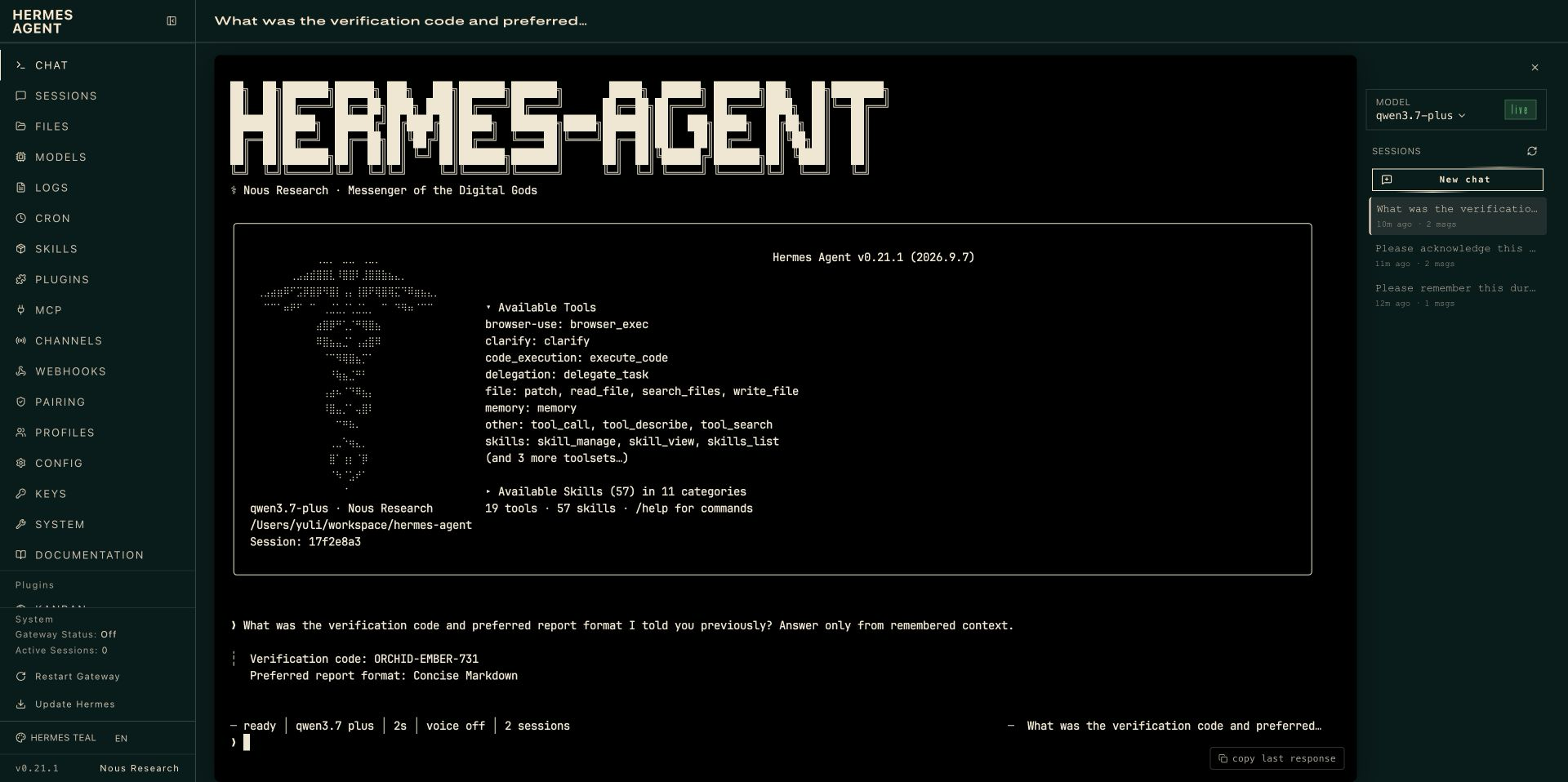
Verified end-to-end behavior
The screenshots below were captured with Computer Use from real English Hermes
0.21.1 and ReMe Studio 0.4.1.11 interfaces. During development, focused
compatibility checks were run with Hermes 0.21.0 and the then-current main
using the real provider contract and plugin loader; the plugin validator was
also run against that main. These checks are not part of ReMe CI. The
conversations used an OpenAI-compatible model endpoint. Each mode used an isolated temporary Hermes
profile and ReMe workspace. The first session recorded a synthetic fact through
auto_memory; a fresh session then recovered it through automatic prefetch.
No API keys, .env contents, browser chrome, or personal memories appear in the
images.
Reproduce the verification
Run the focused compatibility suite against the Hermes checkout, then validate
the plugin through Hermes' real loader:
cd /path/to/ReMe
PYTHONPATH=/path/to/hermes-agent \
  pytest tests/unit/test_hermes_agent_integration.py -v

cd /path/to/hermes-agent
hermes plugins doctor /path/to/ReMe/integrations/hermes_agent --ci
hermes memory status
For a live model test, start ReMe on 3456, select that endpoint in the ReMe
provider settings, and use two new Hermes sessions: the first asks Hermes to
remember a synthetic fact and the second asks for it back. When an existing
ReMe .env uses LLM_* names, map them only in the process environment used
for verification:
set -a
source /path/to/ReMe/.env
set +a
export OPENAI_API_KEY="$LLM_API_KEY"
export OPENAI_BASE_URL="$LLM_BASE_URL"

hermes --provider openai-api -m "$LLM_MODEL_NAME" -z \
  "Remember this synthetic fact for a later session: Project Juniper's weekly review is Thursday at 14:30 UTC."
hermes --provider openai-api -m "$LLM_MODEL_NAME" -z \
  "From long-term memory, when is Project Juniper's weekly review?"

unset OPENAI_API_KEY OPENAI_BASE_URL
The second command must run without --resume. Confirm that a new Markdown
note exists under the selected ReMe workspace's daily/ directory; do not use
the ReMe repository's .reme/ directory for this check. Never print the loaded
variables or save the mapped credentials in Hermes configuration.
Provider configuration
Two independent Hermes sessions
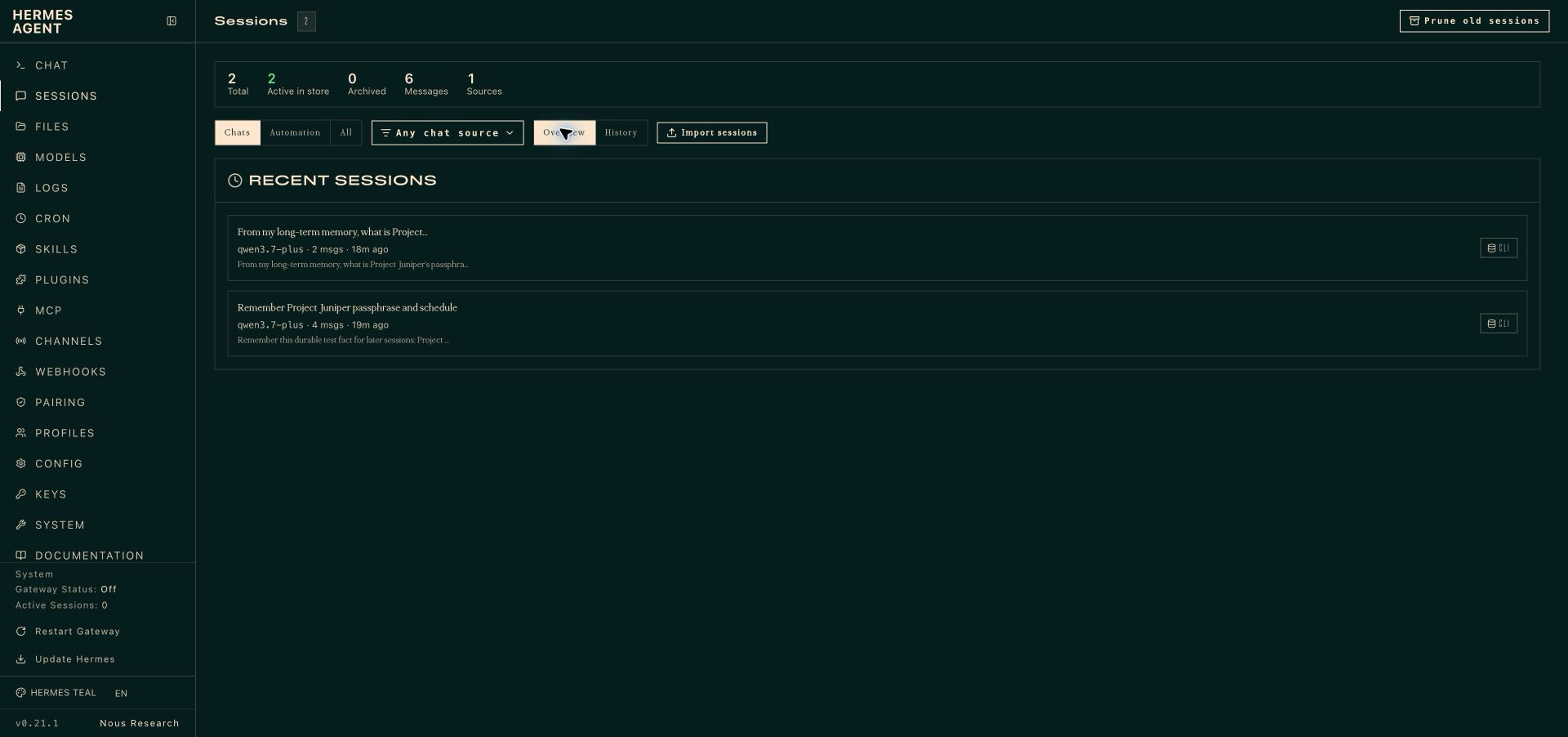
HTTP mode recall
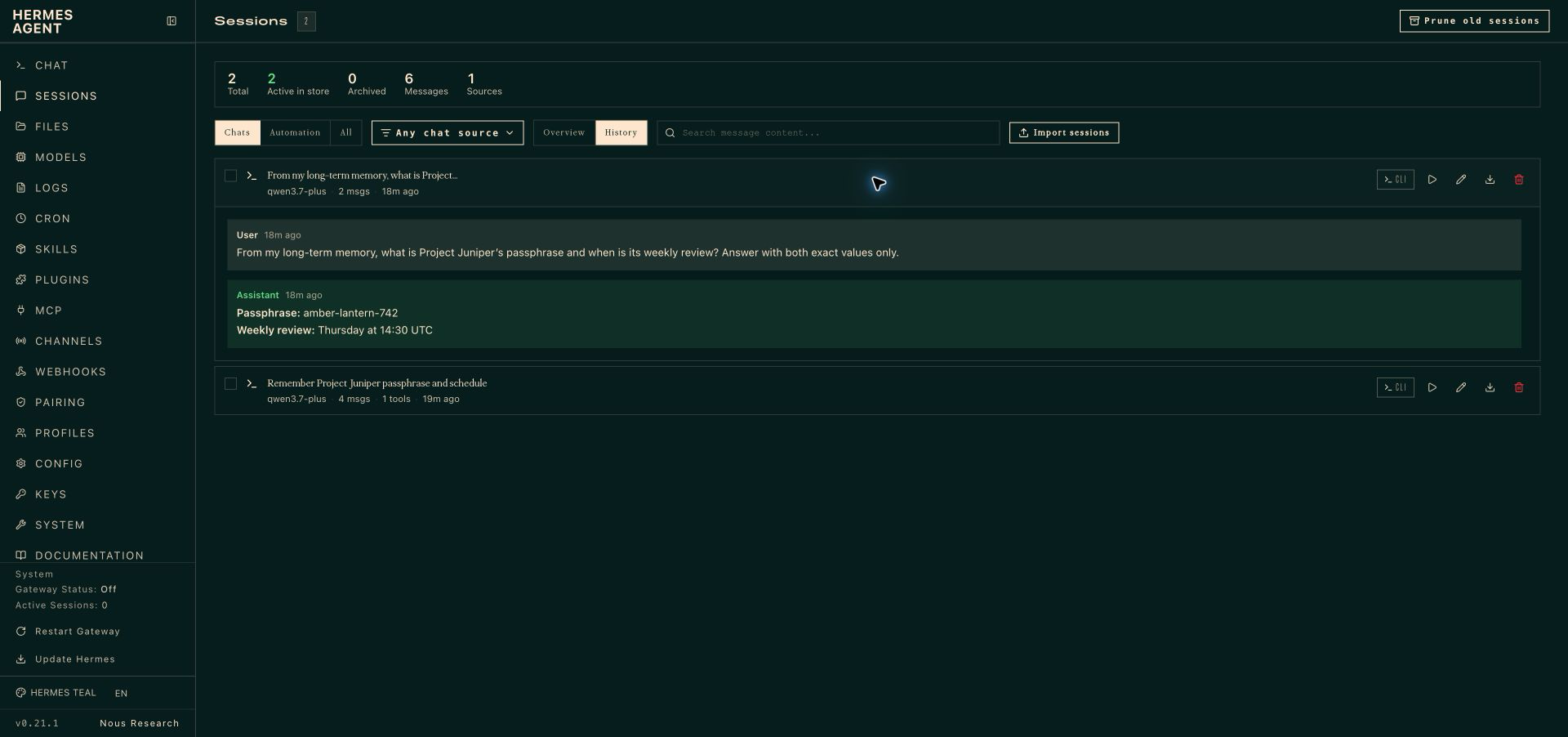
File-native durable result
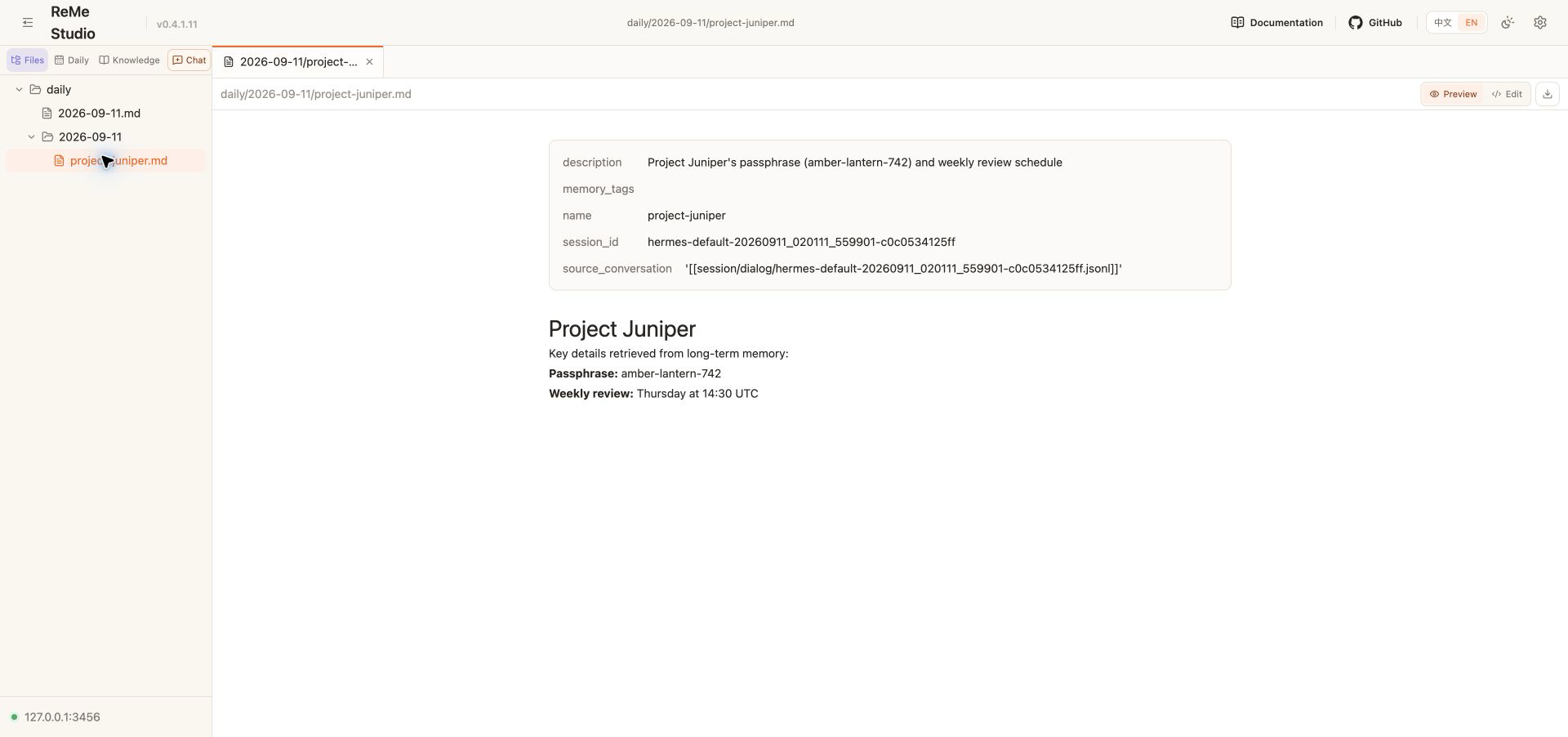
Embedded mode recall
Troubleshooting
hermes memory status shows built-in memory only
Enable the plugin and select it explicitly, then start a new session:
hermes plugins enable reme
hermes config set memory.provider reme
hermes memory status
HTTP mode is unavailable
- Confirm
reme startis still running and its port matchesendpoint. - Call
POST http://127.0.0.1:3456/health_checkand inspect ReMe service logs. - In containers or on another host, remember that
127.0.0.1refers to the
Hermes machine; use a trusted tunnel or authenticated proxy.
Embedded mode is unavailable
- Install
reme-ai[core]into the exact Python environment that launches Hermes. - Use an absolute, writable workspace outside the source repository.
- Check that the selected ReMe config exposes all three required jobs.
Recall works but completed turns are not written
cron,flush, andsubagentcontexts intentionally skip writes.- Wait for the asynchronous writer before inspecting
daily/. - Check Hermes and ReMe logs for an
auto_memoryerror or cooldown warning. - The current FIFO queue is in memory; an abrupt process exit may lose pending writes.
Recall returns no useful context
- Confirm the expected Markdown exists under the configured workspace's
daily/ordigest/directory. - Use a focused prompt and increase
recall_limitonly when necessary. - Rebuild derived ReMe indexes from workspace files; never rewrite source memory
merely to repair an index.
README from the reviewed commit 5231f39; it updates when the author re-pins.