 MrNorkum
RSS Lite
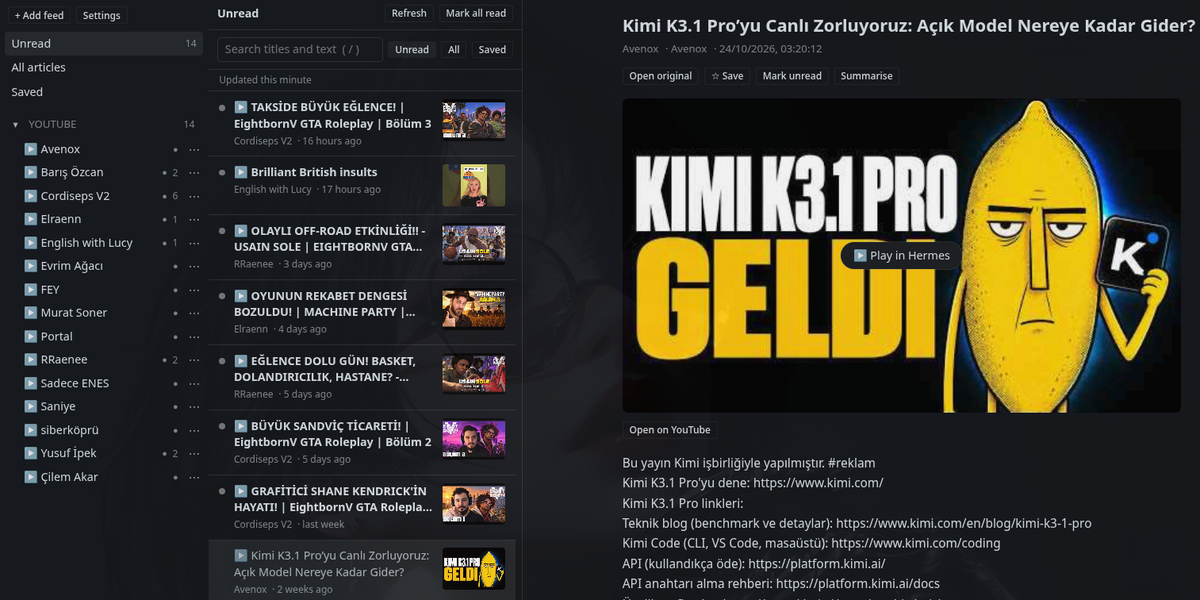
A fast, lightweight feed reader page for Hermes Desktop. It reads RSS, Atom and YouTube
channels, keeps your read and saved state, and can summarise an article with the model you already
use in Hermes. You need no account, no API key and no extra software.
Features
- Every common feed format: RSS 2.0, RSS 0.9x, RSS 1.0 (RDF) and Atom 1.0, with full-content
fields, images, enclosures and relative links. - Paste almost anything: a feed URL, a normal website (its feed is found for you), a YouTube
channel (/channel/UC…,/@handle,/c/…,/user/…) or a YouTube playlist. - Organised reading: folders, Unread / All / Saved views, search, and "Mark all read".
The home page and folders open in Unread. A single feed opens in All. - A safe reader view: article HTML is cleaned twice before it is shown, and links open in
your normal browser. - YouTube built in: a click on the poster plays the video in Desktop's own player, and you
can always use "Open on YouTube" instead. - AI summary on demand: "Summarise" sends the article to the model you set up in Hermes, and
each summary is kept with its article. - Auto-refresh while the page is open (every 5, 15, 30 or 60 minutes, or off). Feeds whose
server supports it are downloaded only when they change. - OPML import and export, to move subscriptions from or to other readers.
- Native look: follows your Hermes theme (light and dark), and adapts to three, two or one
column. - Keyboard:
j/knext and previous article,rrefresh,/search.
Install
Requirements: Hermes Agent and Hermes Desktop 0.22.5 or newer.
From the plugin catalog:
hermes plugins install hermes-rss-lite --enable
hermes gateway restart
Then, in Hermes Desktop:
- Open Capabilities → Plugins. Press Rescan if RSS Lite is not listed.
- Switch on RSS Lite. It starts switched off.
- Open RSS in the sidebar, or press Ctrl+K (⌘K on macOS) and choose Open RSS Lite.
RSS Lite has two switches, and both must be on. --enable lets the gateway load the backend,
and the Desktop switch shows the page. If only the page is on, it tells you what is missing; it
does not crash.
Remote gateway: install the plugin on the machine that runs the gateway. Desktop on your own
computer also needs the Desktop half; use Install from Git with the Desktop target, as for
any plugin.
Using it
- + Add feed: paste a URL and pick an optional folder.
- ⋯ next to a feed: rename it, move it to a folder, or unsubscribe.
- Opening an article marks it read. Refresh reloads the list, so articles you have read
leave the Unread view. - Dots in the sidebar:
- a red ● means the last refresh failed; hover to see why. RSS Lite retries after 15 minutes
and waits longer after each failure, up to 24 hours. - a grey ● means YouTube's feed service is temporarily not answering (see below). RSS Lite
retries every hour, and nothing is lost.
- a red ● means the last refresh failed; hover to see why. RSS Lite retries after 15 minutes
- Settings: refresh interval, remote images on or off, how YouTube videos open, OPML
import, and OPML export (copied to the clipboard).
About YouTube channels
- YouTube's channel feed lists only the 15 newest videos, so a new subscription starts with
up to 15. From then on, every new video is kept. - YouTube's feed service sometimes answers "not found" for every channel for hours, while the
channels are fine. RSS Lite shows this as a grey ● and keeps trying. A channel only turns red
if this lasts more than 3 days, because it may really have been removed.
What RSS Lite does on your computer
Disclosure. RSS Lite runs no shell commands, starts no background processes, stores no
credentials and sends no telemetry. In detail:
- Network, from the Hermes gateway:
- It downloads the feeds you subscribe to, while the RSS page is open (auto-refresh) or when you
press Refresh. - When you paste a web page, it fetches that page once to find its feed. When you paste a YouTube
@handle, it fetches the channel page once to find its channel ID. Requests to YouTube carry
YouTube's anonymous "reject all" consent cookie (SOCS=CAI); no other cookies or
credentials are ever sent.
- It downloads the feeds you subscribe to, while the RSS page is open (auto-refresh) or when you
- Network, from Desktop:
- Thumbnails and article images load straight from the sites that publish them, without a
referrer. You can turn this off in Settings. - A YouTube video loads only when you press Play, through Desktop's own embed, which follows
Desktop's embed privacy setting.
- Thumbnails and article images load straight from the sites that publish them, without a
- Your model: only when you press Summarise, the article's title, feed name and up to
12,000 characters of its text go to the model configured in Hermes. Hermes handles the
credentials, and RSS Lite never sees them. - Storage: one SQLite database per Hermes profile, at
$HERMES_HOME/rss-lite/rss-lite.db.
Desktop keeps display settings (refresh interval, images, video mode) in its plugin storage.
RSS Lite reads and writes nothing else. - Agent: RSS Lite adds no tools, hooks or commands to the agent.
Security
- No access to private networks: feeds on localhost, LAN, Tailscale (100.64.0.0/10), link-local
or cloud-metadata addresses are refused, both on the first request and on every redirect. The
connection goes to the exact address that was checked, so a DNS change cannot slip past. - Credentials: URLs with user names or passwords are refused.
- Limits: a feed may be at most 5 MB (16 MB after decompression), and a download may take at
most 20 seconds. XML that declares entities is refused, which blocks "billion laughs" and XXE. - Article HTML: only an allowlist of tags and attributes is kept, and no scripts, styles,
frames, forms or event handlers. Links open in your browser, never inside Hermes. - AI summaries: the article is passed to the model as untrusted text. The model gets no tools,
and the summary is shown as plain text. - Crash isolation: the page, sidebar, article body and video player are each isolated, so an
error in one never takes down Desktop or other plugins.
Troubleshooting
| What you see | What to do |
|---|---|
| No RSS entry in the sidebar | Capabilities → Plugins → Rescan, then switch on RSS Lite. |
| "RSS Lite backend unavailable" | Run hermes plugins enable rss-lite, then hermes gateway restart, then press Retry. |
| A feed cannot be added: "private address" | The feed is on your own network. This is blocked on purpose. |
| A video stays blank or asks for consent | That is Desktop's embed privacy setting. Use Open on YouTube, or set YouTube videos to "Always open on YouTube" in Settings. |
| Grey dots on all YouTube channels | YouTube's feed service is down for a while. Nothing to do; RSS Lite retries every hour. |
Update and uninstall
hermes plugins update rss-lite
hermes gateway restart
To remove it:
hermes plugins remove rss-lite
hermes gateway restart
Removing the plugin keeps your subscriptions in $HERMES_HOME/rss-lite/. Delete that folder too
if you want them gone.
How it differs from other RSS plugins
RSS Lite is an independent implementation. It is not a fork of hermes-rss or rss-reader, and
it shares no code with them. It downloads feeds in its own backend route, inside the gateway,
instead of running curl through the gateway's shell.exec. As a result, refresh needs no open
chat session, works with any terminal backend, and never cuts a feed short at the 4,000-character
output limit of shell.exec. Its only runtime
dependencies are the Python standard library, plus what Hermes provides for every plugin.
License
MIT
README from the reviewed commit 9af39a5; it updates when the author re-pins.