All plugins

stash

A capture bin for the Desktop sidebar: paste links, YouTube urls, image urls, uploaded images or plain notes and they wait there, out of the chat. One item per line, so a block of links becomes several items; titles and thumbnails are filled in server-side, so capture costs no model calls. Each row carries a Chat button that opens a new session with that item as the opening message. Adds stash_add, stash_list and stash_update, so the agent reads and empties the same store the page writes. Disclosure — saving an item issues one GET to that url from the Hermes host (4 s timeout, 400 KB cap) to read its <title> and og: metadata, refused for loopback, link-local, private and reserved targets and re-checked on every redirect hop; YouTube urls also use www.youtube.com/oembed and i.ytimg.com thumbnails, and the Desktop page loads each item's og:image thumbnail directly from whatever host the page names. No credentials, no telemetry, no shell commands, no Python dependencies beyond the FastAPI Hermes already ships. Items are plain JSON at ~/.hermes/stash/items.json (shared by every profile) and uploads (max 8 MB) in ~/.hermes/stash/media/.

RegeneratusLabsDesktopv0.3.1Updated 3 hours ago

About

A capture bin for the Desktop sidebar: paste links, YouTube urls, image urls, uploaded images or plain notes and they wait there, out of the chat. One item per line, so a block of links becomes several items; titles and thumbnails are filled in server-side, so capture costs no model calls. Each row carries a Chat button that opens a new session with that item as the opening message. Adds stash_add, stash_list and stash_update, so the agent reads and empties the same store the page writes. Disclosure — saving an item issues one GET to that url from the Hermes host (4 s timeout, 400 KB cap) to read its <title> and og: metadata, refused for loopback, link-local, private and reserved targets and re-checked on every redirect hop; YouTube urls also use www.youtube.com/oembed and i.ytimg.com thumbnails, and the Desktop page loads each item's og:image thumbnail directly from whatever host the page names. No credentials, no telemetry, no shell commands, no Python dependencies beyond the FastAPI Hermes already ships. Items are plain JSON at ~/.hermes/stash/items.json (shared by every profile) and uploads (max 8 MB) in ~/.hermes/stash/media/.

Stash

A capture bin for your Hermes sidebar.

You see something — a post, a repo, a video, a screenshot, a half-thought — and you want it
later without it living in your chat history. Paste it into Stash and leave. Come back whenever,
or ask your agent to go through it.

Links, YouTube urls, image urls, uploaded images and plain text all go in the same box. Titles and
thumbnails fill in on their own, fetched server-side, so nothing costs you a model call.
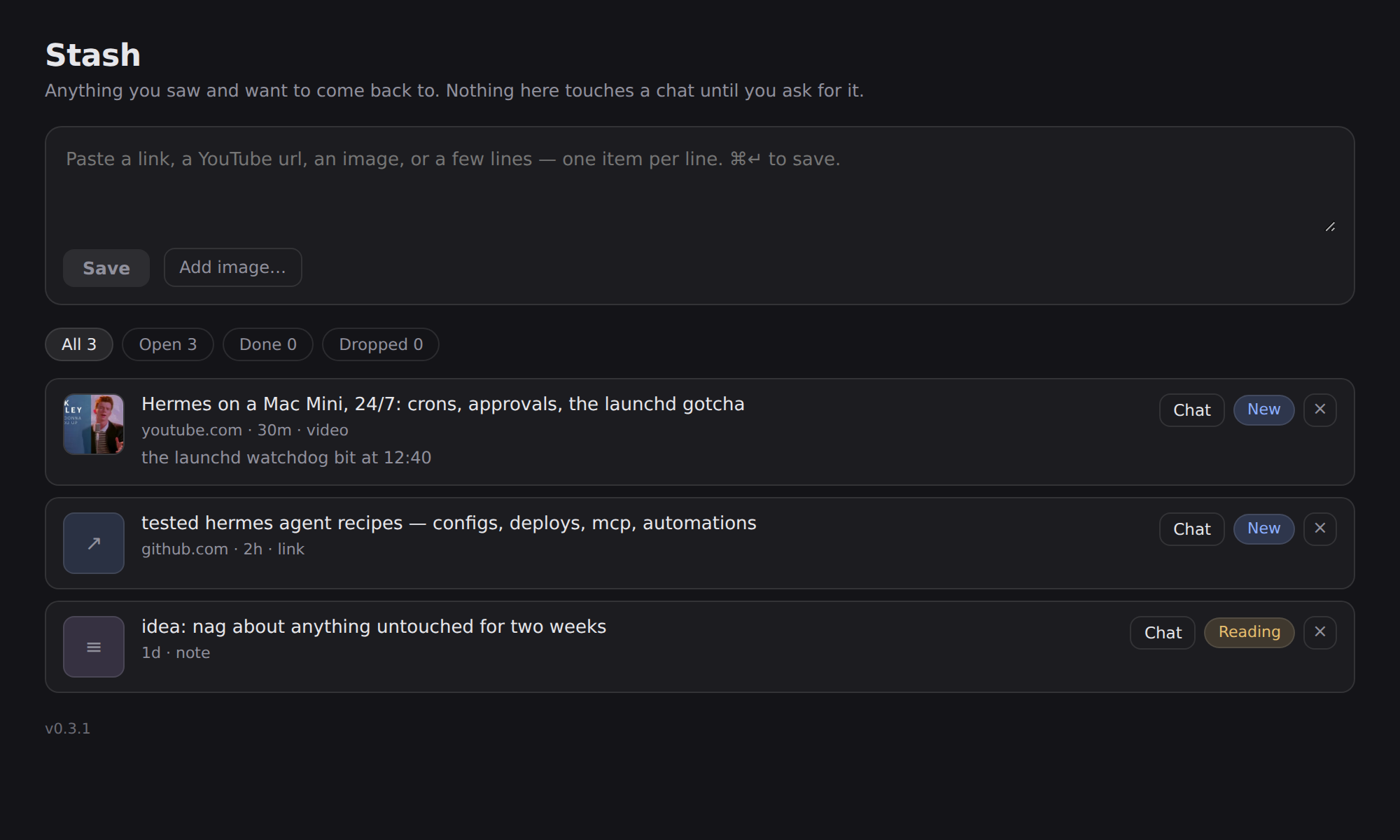
Stash

Install

Install it on the machine that runs the desktop app — the app copies a package's desktop half
out of that machine's ~/.hermes/plugins/, so a copy installed on a remote server never reaches
your sidebar.

hermes plugins install RegeneratusLabs/hermes-stash
hermes plugins enable stash

The desktop half ships off by design (a package's UI half mirrors its agent half's consent).
So there is one click left after the two commands: restart the app, then Capabilities → Plugins →
Stash → enable
. Stash then appears in the left sidebar, under your other plugin pages.

From a clone instead:

git clone https://github.com/RegeneratusLabs/hermes-stash.git
cd hermes-stash
./install.sh

Using it

  • Paste anything into the box at the top. One item per line, so a whole block of links becomes
    several items.
  • Drag an image in, pick one with Add image…, or ⌘V a screenshot straight into the box.
  • Statuses: New → Done → Dropped. Click the pill to move an item along.
  • Filters count what's in each state.
  • Chat on any row opens a new conversation about that item — the title, link and your
    note go in as the opening message, and the item flips to Reading.
  • Click a title to try opening the link; your agent can open anything that refuses.

Letting the agent do the work

Three tools ship with the plugin, so this works from any conversation:

| tool | what it does |
|---|---|
| stash_add | save links or notes to Stash mid-chat |
| stash_list | read what's waiting (open items by default) |
| stash_update | mark something done or dropped once it's handled |

So "stash this for later" and "go through my stash and file what's worth keeping" both work.

Where things live

  • Items: ~/.hermes/stash/items.json — plain JSON, one file, safe to edit by hand.
  • Uploaded images: ~/.hermes/stash/media/.
  • The page talks to the backend at /api/plugins/stash/.

Nothing is summarised, uploaded or sent anywhere. Title lookups are ordinary page fetches against
the url you saved.

Requirements

Hermes Agent with desktop plugin support. Python side uses only the standard library plus what
Hermes already ships (FastAPI). No API keys.

When it installs but never appears

Three traps, in the order they bite:

  1. Install it on the machine the app runs on. The app reads its own
    ~/.hermes/desktop-plugins/, never the backend's (Electron-local, #66899), and a package
    installed only on a remote backend can never materialise a desktop half (#114079). A terminal
    inside the app is the backend's shell, not your laptop's.
  2. The search box in Capabilities → Plugins searches the catalog, not what's installed. Typing
    there will never show a locally installed plugin. Clear it to see the installed list.
  3. .hermes-package.json next to the desktop half means "off". The app writes that marker when
    it copies a package's half, and a marker sets defaultEnabled: false — the UI half mirrors the
    Python half's consent gate. Either flip the Desktop switch on the plugin's row, or drop the
    marker so it loads enabled by default:
    rm -f ~/.hermes/desktop-plugins/stash/.hermes-package.json

Credit

Built by RegeneratusLabs with Hermes Agent. The store is plain JSON on purpose: a capture bin
should outlive the app that made it.

Licence

MIT — see LICENSE.

README from the reviewed commit 97d1667; it updates when the author re-pins.

More by RegeneratusLabs

5 plugins by RegeneratusLabs in the catalog.

RegeneratusLabsethics-filterScore any decision across six ethics modules — environmental, fairness, transparency, leadership, framework, compliance — and get GREEN, AMBER or RED back with the reasoning attached. Ships /ethics and the ethics_evaluate tool. Disclosure — reads the rubrics and constitution templates bundled in the plugin and appends one JSONL record per scored evaluation (decision text, context and reasoning included) to $ETHICS_FILTER_AUDIT, default ~/.ethics-filter/audit.jsonl outside the Hermes profile and shared by every profile; that file is never rewritten or deleted. With auto_score=true it asks the host agent's own model to score through Hermes, holding no separate key; no other network calls.Communitytools4RegeneratusLabshermes-bandCompose and render original music on your own machine — an arrangement is data (tempo, key, chords, parts) rendered to exact-length wav and mp3. No music API, no model download, no per-track cost. Disclosure — renders by running the host's fluidsynth and ffmpeg against a local General MIDI soundfont and writes the wav, mp3 and per-part midi/wav stems into ~/hermes-band-out/<name>/ (configurable via output_dir). Long renders take tens of seconds and run in the foreground of the tool call. No network calls, no credentials.Communitytools4RegeneratusLabssoul-finderBuild or fix your agent's SOUL.md — the personality file behind every reply. A few plain questions draft one from scratch; /soul audits a stale one and ships a diff. Disclosure — reads $HERMES_HOME/SOUL.md and writes it only through the agent's own file tools after you approve the draft (the bundled skill can suggest copying the approved file into other profiles' SOUL.md, again only on approval); on a profile with no real SOUL.md it makes a one-time offer through a system-prompt section and an injected first-run message, and writes two booleans (nudge_sent, flow_complete) to its own plugin-data state so the offer happens once. No network I/O, no credentials.Communitytools1RegeneratusLabslazy-pluginA dashboard page in Hermes Desktop where you describe a plugin and watch it get built. Say what you want — or start from a skill the agent wrote, or a job that runs on a schedule — and your own agent drafts the plan in a chat turn you can read, the code comes from four fixed templates, and the page shows a receipt: plan, files, validator result, and a real try-out of every tool (purrs, needs a key, blocked upstream, held back, half-built, broken — with the exact failing line). The build never runs what it wrote: the try-out is your click, a key only travels to a public https host, and a file tool stays inside its own data dir. Nothing installs itself, and publishing is a SHA-pinned catalog PR you send. Also callable as lazyplugin_create from any conversation. Disclosure — the Desktop "try it" button runs every generated tool for real on your machine (generated `command` tools execute the drafted argv; declared keys are only sent to public https hosts named in the code, never Hermes' own keys), and "publish" uses your `gh` login to create a public GitHub repo for the generated plugin and open a pull request to NousResearch/hermes-agent in one click; builds from `lazyplugin_create` never run generated code.Communitytools