All plugins

stave

Describe a piece of music and Hermes writes it as sheet music in Hermes Desktop: it plans the form, writes every bar in ABC notation, checks bar lengths, instrument ranges, guitar chord shapes and syntax and repairs what fails, then engraves the score. Playback lights each note as it sounds, guitar parts get TAB, and you change any bars you select by asking in words, with undo. Exports PDF, SVG, MIDI, WAV and ABC. Two agent tools (stave_check, stave_open) and the stave:compose skill let any chat compose and open pieces on the page. Disclosure — the page makes one stateless llm.oneshot call per step through its own Stave composer auxiliary task (Settings › Models; reasoning off by default) and creates no sessions; playback downloads FluidR3 GM instrument samples from paulrosen.github.io/midi-js-soundfonts the first time each instrument plays; stave_open writes one JSON file per piece to plugin-data/stave/inbox, which the page reads through the plugin's dashboard route and deletes; pieces and undo history live in Desktop plugin storage; files are written only when the user exports; no shell commands, no processes of its own, no telemetry.

AdolaniumDesktopv0.1.0Updated 2 hours ago

About

Describe a piece of music and Hermes writes it as sheet music in Hermes Desktop: it plans the form, writes every bar in ABC notation, checks bar lengths, instrument ranges, guitar chord shapes and syntax and repairs what fails, then engraves the score. Playback lights each note as it sounds, guitar parts get TAB, and you change any bars you select by asking in words, with undo. Exports PDF, SVG, MIDI, WAV and ABC. Two agent tools (stave_check, stave_open) and the stave:compose skill let any chat compose and open pieces on the page. Disclosure — the page makes one stateless llm.oneshot call per step through its own Stave composer auxiliary task (Settings › Models; reasoning off by default) and creates no sessions; playback downloads FluidR3 GM instrument samples from paulrosen.github.io/midi-js-soundfonts the first time each instrument plays; stave_open writes one JSON file per piece to plugin-data/stave/inbox, which the page reads through the plugin's dashboard route and deletes; pieces and undo history live in Desktop plugin storage; files are written only when the user exports; no shell commands, no processes of its own, no telemetry.

Prelude

Most music generators hand you a sound file. Stave hands you the score.

Hermes writes the piece as notation, so every note is on the page. You can see why the ending feels finished, hear the cello take the tune, and take the whole thing to GarageBand or MuseScore as MIDI, or print it for a real piano. You don't need to read music. The notes light up as they sound, and a line runs along the melody so your eye knows where to look.

The suite

I. Allegro · you ask

Describe what you want in plain words: "a lullaby for a rainy night", "a sea shanty for a very small boat", "something hopeful, like the first warm morning of spring". Name an instrument, a tempo or a length if you care. Hermes fills in the rest.

II. Andante · Hermes plans the form

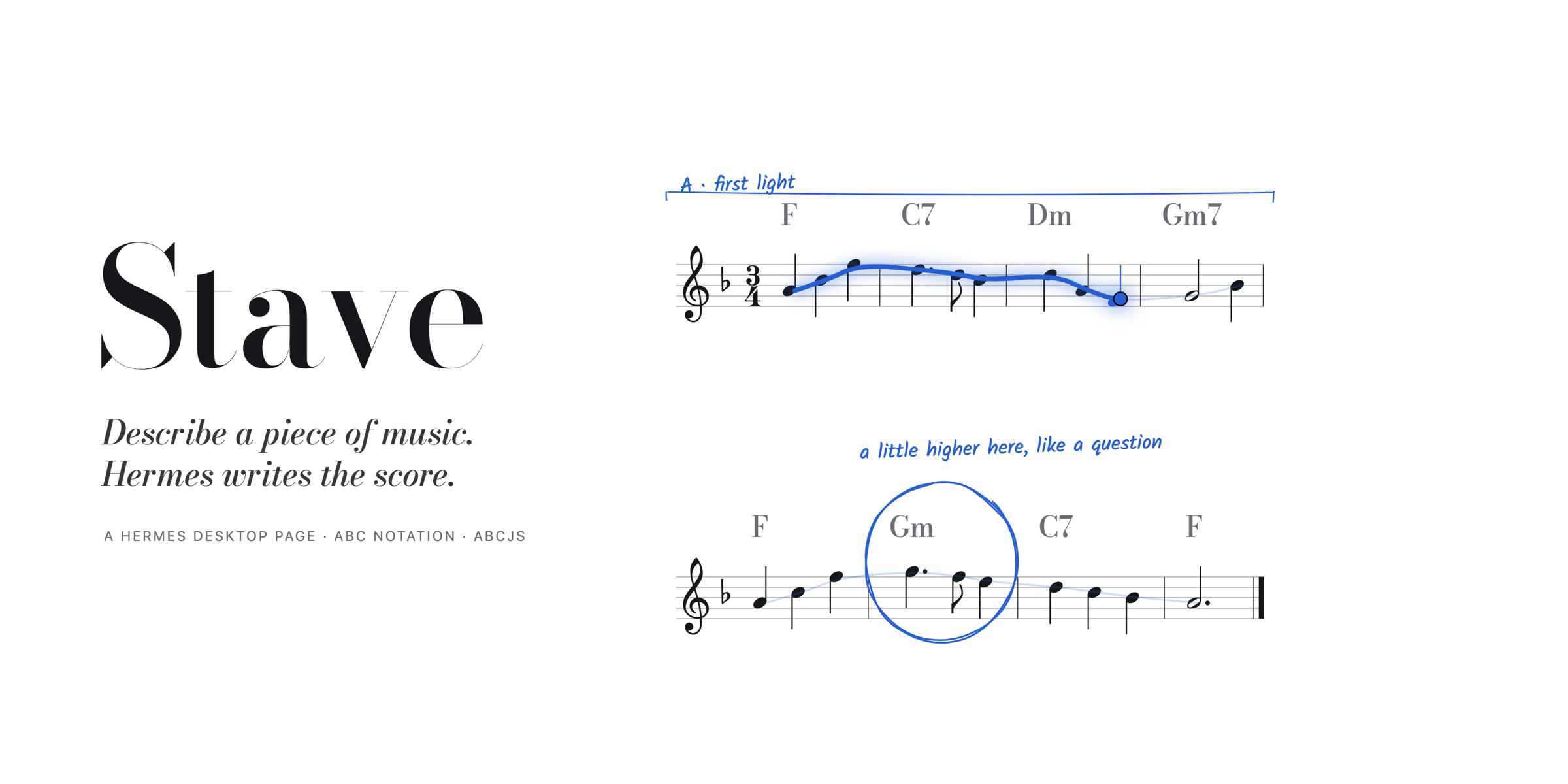
Before any notes, Hermes decides the shape: key, meter, tempo, two or three instruments, and two to four sections with a chord for every bar. The plan appears on the staff in pencil while the notes are still being written: A · rainfall, B · deep clouds, A · rainfall.

III. Moderato · it writes, checks, and corrects itself

Each section is written in ABC notation and checked before you see it:

| Check | What fails it |
|---|---|
| Bar length | any part whose notes do not add up to the meter (6/8 needs six eighths, triplets included) |
| Range | a note a flute or a cello could not play (treble parts G3 to F6, bass parts E1 to G4) |
| Strings | a guitar chord a hand could not hold: two notes on one string, or more notes than strings |
| Syntax | stray bar lines, unclosed chord symbols, anything the engraver cannot parse |

Bars that fail go back to Hermes with the reason, once. The repaired ones are circled in the margin, checked and fixed, so you can see where it corrected itself.

IV. Cantabile · it plays

Press play or Space. Each instrument plays with its own sampled voice: music box, harp, cello, flute, guitar, strings, celesta and a dozen more. The melody lights in full blue, the accompaniment in a softer tint, and the page turns itself when the music moves to the next system. Slow it down, speed it up, or loop just the bars you selected.

V. Rubato · you change it

Click a bar, drag across several, or Shift-click, then say what you want: sadder, end on a long note, simpler bass, more like a question. Hermes rewrites only those bars, boxes them in pencil, and writes what it changed in the margin. With nothing selected, a request applies to the whole piece: slower, on strings, in A minor, make it longer.

Attacca · or ask from any chat

Stave also gives Hermes the craft itself. In any conversation, say "write me a lullaby for my daughter and put it in Stave". The agent loads the stave:compose skill (the notation rules and how to shape a short piece), writes the bars, and checks them with stave_check, the same bar-length, range and syntax checks the page runs. Then stave_open puts the piece on the Stave page. stave_open refuses music with problems and hands back the list, so the agent fixes its own bars before you ever see them. A toast tells you the piece is ready, with a button to open it.

Da capo · nothing is lost

Every change keeps a snapshot. Undo with the arrow or ⌘Z / Ctrl+Z and you are back where you were. Your pieces stay in the Pieces menu.

The score

| | |
|---|---|
| Instruments | piano, music box, celesta, vibraphone, marimba, classical guitar, acoustic guitar, electric guitar, bass guitar, harp, violin, viola, cello, double bass, strings, choir, trumpet, horn, clarinet, oboe, flute, pan flute |
| Guitar | guitar and bass guitar parts get a TAB staff under the notes, with the fret for each string. They are written an octave above how they sound, as guitar music is, and play at their real pitch. Chords use shapes a hand can hold. |
| Meters | 4/4, 3/4, 6/8, 2/4 |
| Keys | C, G, D, A, F, B♭, E♭ major; A, E, B, F♯, D, G, C minor |
| Length | 16 to 32 bars in 2 to 4 sections, longer on request |
| Export | sheet music as a PDF on A4 pages, ready to print · the score as SVG · MIDI · WAV · ABC text |

Rehearsal

Stave is a Hermes Desktop plugin.

hermes plugins install https://github.com/Adolanium/hermes-stave

Enable Stave in Capabilities → Plugins. It appears in the sidebar and as Open Stave in the command palette (⌘K).

Which model writes the music. Stave registers its own task, Stave composer, in Settings → Models. With nothing set there, Hermes uses your main model. A fast model keeps writing and edits quick; a stronger one writes better melodies.

How it stays quick. On a fast model a whole piece arrives in about five seconds and a bar edit in about one. Stave composer runs with reasoning off by default: the page's own checker catches any bar that does not add up and has Hermes repair it, so hidden thinking adds wait without adding safety. Every new section is written at the same time straight after the plan, a returning section (the second A of A B A) reuses the bars already written, and an edit sends only the bars around your selection. If a section fails, Stave asks once more; if it still fails, the bars already written are kept. To let the model think, set auxiliary.stave.reasoning_effort (for example low) in your Hermes config.

Building from source

cd desktop-src
npm ci
npm run build    # writes desktop/plugin.js
npm test

To work on the page live, link only the desktop/ folder into Hermes Desktop instead of installing the plugin (with both, the page loads twice). Every build reloads the page. The agent tools and the stave:compose skill need the full install:

ln -s "$PWD/desktop" ~/.hermes/desktop-plugins/stave

Liner notes

What Stave does on your machine, in full:

  • Model calls. The page makes one stateless llm.oneshot request per step (plan, each new section, each repair, each change) through its Stave composer task. It creates no sessions.
  • Agent tools. stave_check reads the piece it is given and returns problems; it touches nothing. stave_open writes one JSON file per piece to ~/.hermes/plugin-data/stave/inbox/; the page reads it through the plugin's route at /api/plugins/stave/inbox, saves the piece and deletes the file.
  • Network. Playback downloads instrument samples from paulrosen.github.io/midi-js-soundfonts the first time each instrument plays. Nothing else leaves your machine except the model calls you already route through Hermes.
  • Storage. Pieces, their undo history and your model choice live in the plugin's own Desktop storage. Stave writes no files unless you export one.
  • Sound. Audio plays only when you press play. Stave never uses the microphone.

Coda

Stave stands on the work of others:

  • abcjs by Paul Rosen (MIT) engraves the notation and plays it.
  • Rough Notation by Preet Shihn (MIT) draws Hermes's pencil marks.
  • Bodoni Moda and Kalam (SIL Open Font License 1.1) set the titles and the handwriting.
  • The instrument samples are the FluidR3 GM soundfont, converted by midi-js-soundfonts.

Their licenses are in THIRD_PARTY_NOTICES.md. Stave itself is released under the MIT License.

README from the reviewed commit 433bcf9; it updates when the author re-pins.
More by Adolanium

25 plugins by Adolanium in the catalog.

AdolaniumgadgetTalk to your Hermes from small ESP32 devices with a screen, microphone and speaker: hold a button, ask, and hear the answer. Adds a gateway platform where each device is a chat, plus tools to list devices, show a card on a screen and run device actions (LEDs, relays). Disclosure — the gateway listens for devices on a WebSocket port (8765, all interfaces by default; plain ws:// unless tls_cert/tls_key are set). New devices need a Hermes pairing code unless listed in GADGET_ALLOWED_USERS; GADGET_ALLOW_ALL_USERS skips pairing (development only). A paired device answers the agent's command approvals for its own chat (allow once or deny), within Hermes's approval timeout. The first approved device becomes the platform's home channel by default. Session hooks feed a dashboard on paired devices with each agent session's platform, a short id and its state (idle, busy, waiting for approval); a device that can switch profiles also sees the offered profiles' sessions. Optional profile switching (off unless `profiles` is set in the default profile's gadget config) lets a device paired on the default profile talk to the listed profiles; each profile approves the device through its own pairing flow (the device shows the `hermes -p <profile> pairing approve` command), the plugin writes nothing into other profiles, and revoking the device in the default profile sends it back there. A paired gadget that draws faces gets the answering profile's face: its `gadget-face.bin`, or its Hermes avatar (`assets/avatar.*`) converted with Pillow when installed; the plugin only reads these files, and `profile_faces: false` turns this off. `platforms.gadget.extra.stt_language` sets the transcription language of gadget recordings through the `pre_transcription` hook; other platforms' audio is untouched. Spoken replies that are not WAV are converted with the local ffmpeg; Opus reply audio uses the host's libopus when installed (loaded with ctypes, not bundled). `hermes gadget update --latest` downloads firmware from this repository's GitHub releases, checks size and SHA-256 against the release manifest (files carry build provenance attestations) and sends it to the device. A device that advertises `camera.capture` returns stills that are saved as PNGs under `~/.hermes/gadgetpix/` and kept until removed by hand. A Hermes Desktop page (`desktop/plugin.js`, plugin SDK only) runs a gadget in the window that connects to the local gateway as a device of its own: its device key, and the gateway access token when one is required, are kept in the page's plugin storage, it pairs like any device, and it uses the microphone only while its talk button or Space is held. The plugin's dashboard routes, behind the dashboard's login, can approve the pairing code a device is showing and send a card or run an advertised action on a connected, paired device; the requests pass through files under plugin-data/gadget/desk/. Otherwise writes only under plugin-data/gadget/. Uses Hermes's own STT, TTS and image cache; no telemetry. Independent community project, not affiliated with Nous Research.Communityplatform518Adolaniumhermes-resetwatchTrack subscription quotas and reset times in Hermes Desktop. Disclosure — probe.py re-executes itself under the Hermes Python interpreter located via HERMES_PYTHON / VIRTUAL_ENV / the parent process or the Hermes installer's managed venv (HERMES_HOME/installs). Every credential read is read-only and nothing is refreshed or stored: it reads provider API keys from the process environment, the Hermes .env (through Hermes's get_secret helper, else read directly), the Vaultwarden plugin's local secret cache (cache/vaultwarden_cache.json, only when Vaultwarden is the sole enabled secret source, keyed by a hash of BW_SESSION, which is never sent) and Docker s6 container env files; Hermes's saved OAuth logins (the credential pool through Hermes's read_credential_pool helper, else auth.json directly, and HERMES_HOME/.anthropic_oauth.json); and other coding-assistant CLIs' local logins: Claude Code (credentials file, macOS keychain or Windows Credential Manager), Codex, Cursor (macOS keychain and the IDE's state.vscdb, opened read-only), Kimi, Grok, ZCode and Command Code. For GitHub Copilot (on by default) it tries COPILOT_GITHUB_TOKEN / GH_TOKEN / GITHUB_TOKEN (through Hermes get_secret, else the process environment), then the Copilot editor's apps.json / hosts.json, then runs gh auth token (prompts disabled, 3-second limit), trying each token in turn until GitHub accepts one. For Codex, a 401 or 403 is retried once with another saved login for the same account. It sends each key only to its own vendor's usage endpoint, presenting the vendor client's identity headers where a private endpoint expects them (Claude Code and Codex CLI user agents, the Grok CLI client headers, and for Copilot the VS Code / Copilot Chat editor headers on api.github.com/copilot_internal/user, which GitHub does not document); environment variables such as GROK_CLI_CHAT_PROXY_BASE_URL (honored only for https grok.com / x.ai hosts), CLAUDE_CONFIG_DIR, CODEX_HOME and GROK_HOME change which host or file it uses. Usage results are cached under HERMES_HOME/cache/resetwatch, never tokens. It exposes nothing to the model: it is a Desktop page only.CommunityDesktop app83Adolaniumhermes-rssRead RSS and Atom feeds and discuss articles in Hermes Desktop. Disclosure — feeds and full articles are fetched with curl through the gateway's shell.exec on the connected Hermes host (public-IPv4 SSRF guard); opt-in AI grading sends article excerpts to your configured model and creates HERMES_HOME/skills/rss-importance-grading/SKILL.md if missing; opt-in image loading fetches publisher images directly from Desktop.CommunityDesktop app65Adolaniumhermes-tailscaleBrowse Tailscale devices and connect to remote Hermes instances in Hermes Desktop.CommunityDesktop app60