
 rusty4444
Bench Rewind
An undo history for a physical teardown.
A local-first Hermes Agent plugin for the moment every repair hits:
“Where does this screw go, and what has to go back first?”
While you take a device apart, you record each removal step with a photo, mark where each part sat on that photo, note its orientation and the numbered bag or tray it went into, and say which earlier steps had to come out first. Bench Rewind keeps the parts ledger, answers “where does this go?” by highlighting the original spot on the original photo, and walks you back through reassembly in a valid reverse order.
Everything is a human-confirmed record. The plugin never recognises parts, never guesses missing steps and never calls a model, the network or a shell. Hermes can operate the same engine through four native tools; the Desktop page makes it visual.
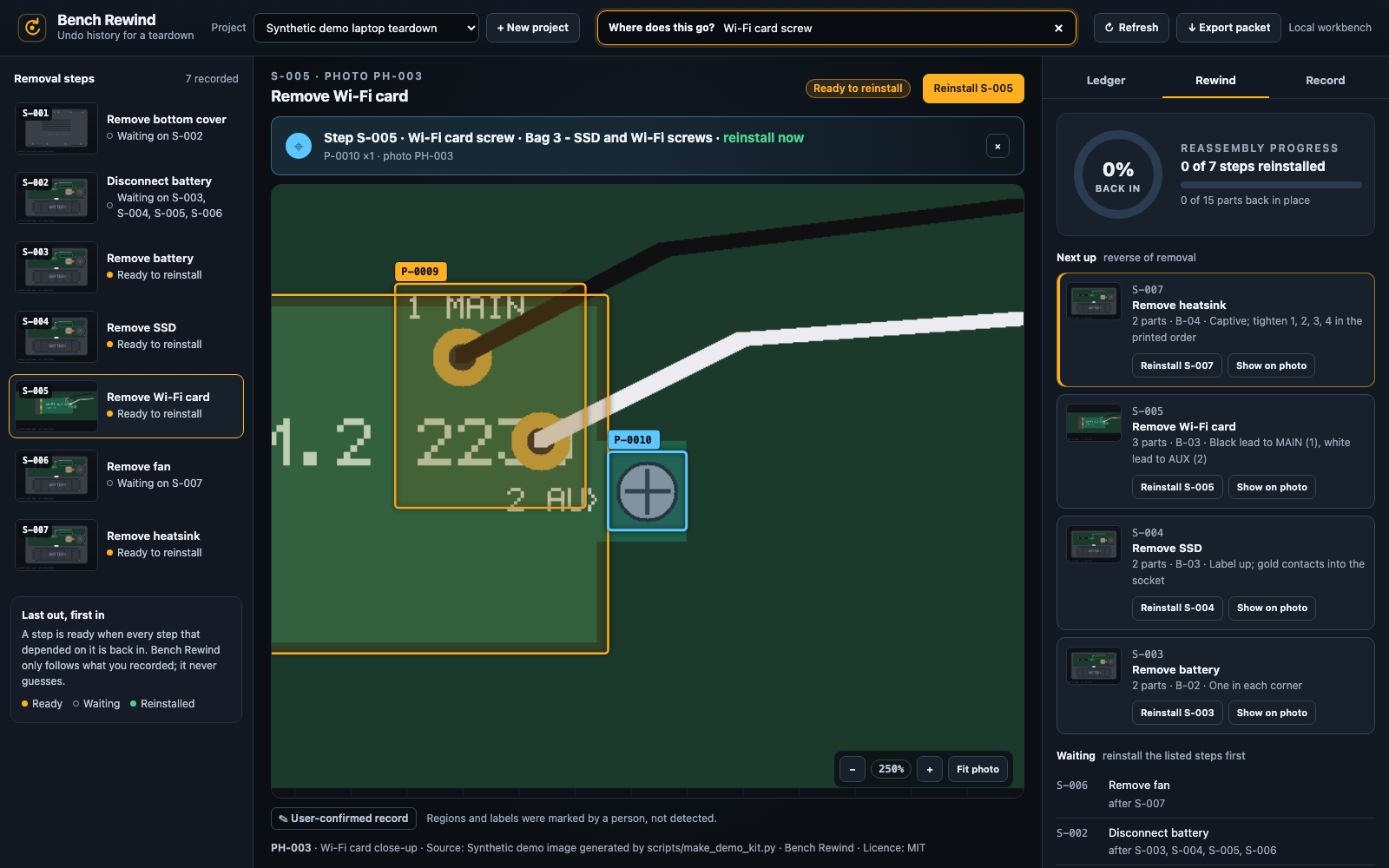
Screenshot of the synthetic demo kit from scripts/make_demo_kit.py (procedural drawings, not a real device).
What you get
- Photo stage: your own photo, large, with crisp outlines and part ids drawn exactly where you marked them. The located part pulses (a static outline if you prefer reduced motion).
- “Where does this go?”: type a part id (
P-0011), a bag id (B-03), part of a bag label or part of a part name. The answer says the step, part, bag and either “reinstall now” or “after S-009, S-010”, and jumps to the region on its photo. - Rewind: progress ring and bar, “Next up” cards in reverse removal order, waiting steps with the steps they wait on, and the full reassembly order. Out-of-order reinstalls are refused with the blocking step ids; an undo is refused while something it depended on is back in.
- Ledger: parts grouped by bag or tray with quantity, orientation and a status chip that uses text as well as colour.
- Record: add a photo (GPS, camera, XMP, text and content-credential metadata are stripped before storage; a JPEG keeps only its orientation, so phone portraits stay upright), add a step with its dependencies, add a bag, and mark a part by dragging a rectangle on the photo or typing the numbers. Nothing is saved until you press a save button.
- Live with Hermes: dock the page beside the chat in Hermes Desktop (“Open in split”) and it follows what the agent tools, the CLI or another window change: while it is visible it checks the project's revision every 2.5 s (and at once when the window gains focus or the page becomes visible again; nothing is asked while the window or the page's Desktop tab is hidden), re-reads only when something changed, keeps your selected step or part, zoom, unsaved region, tab and search, and says what changed (“Updated from Hermes: S-005 reinstalled.”). ↻ Refresh re-reads on demand. It only ever reads; nothing is saved without a button.
- Reassembly packet: a self-contained, script-free HTML file with the checklist in reverse order, highlighted step photos, the ledger by bag, printable bag labels and photo attributions. Each photo is embedded once however many steps show it. It contains your photos, so review it before sharing; a text-only packet (region positions as text) is one click away if the photos are too large.
Install in Hermes
Requires Hermes Agent 0.22.5 or later and Python 3.10 or later on macOS or Linux. The core uses only the Python standard library; the HTTP adapter uses the FastAPI that Hermes supplies. The private store uses POSIX no-follow directory operations, so Windows is not supported.
hermes plugins install rusty4444/hermes-bench-rewind --no-enable
hermes plugins enable bench-rewind
From a local clone, hermes plugins install file:///absolute/path/to/bench-rewind --no-enable installs the committed HEAD instead; Hermes warns that file:// is a local scheme, which is expected for a checkout. Restart the relevant Hermes session or backend if prompted. In Hermes Desktop, enable the plugin's Desktop contribution and open Bench Rewind in the sidebar (route /bench-rewind). The backend plugin must be enabled as well; the Desktop page alone has nothing to talk to.
First teardown
- In Desktop choose + New project, give it a name (for example
Laptop SSD swap) and optionally the device. - In Record, before each part comes out, take a photo and Add photo. Then Add step with a short title, its photo, and under Had to be removed first the earlier steps that physically had to come out before this one.
- Add bag or tray for each container you use, such as
Bag 3 - Wi-Fi screws. - Draw on photo, drag a rectangle around where the part sat, fill in the part name, quantity, bag and orientation, and press Save part. Keyboard users can type Region X, Y, width and height (fractions of the photo, 0 to 1) instead of dragging.
- When putting it back together, search Where does this go? or work down Rewind. Press Reinstall only when that step is physically done.
Or ask Hermes: “Start a Bench Rewind project for my Framework laptop” and let it call the tools, confirming each label and region with you.
Agent tools
| Tool | Actions |
|---|---|
| bench_rewind_projects | list (plus unavailable records), create, get (counts, progress, the newest items, no image data), import_kit (absolute kit_path) |
| bench_rewind_record | add_photo (absolute image_path), add_step, add_bag, add_part, update_part |
| bench_rewind_locate | literal, case-insensitive “where does this go?” for a query |
| bench_rewind_rewind | plan (optional step target_id adds that step's complete entry), reinstall_step, reinstall_part, undo_step (target_id) |
Every result is at most 30,000 characters as returned (measured on the JSON itself, including escaping), so Hermes keeps it inline for any model with a 50K-token window or more. A real teardown is returned in full, and an exact part id always returns that part's full record; at extreme sizes get, plan, locate and list list less, give totals and omitted counts, and say how to ask for the rest (next_eligible_total, blocked_by_total, a hint).
Results are JSON strings, {"ok": true, "result": …} or {"ok": false, "error": …}; refusals add "refused": true and blocked_by. The bundled bench-rewind:workflow skill explains how to record honestly (confirm labels, one photo per step, bags, dependencies) and what a finished plan does not prove. No hooks, middleware, model routing changes or overrides are installed.
CLI
hermes bench-rewind list
hermes bench-rewind create "Darter Pro teardown" --device "System76 Darter Pro 10"
hermes bench-rewind import-kit ./kit/kit.json
hermes bench-rewind show PROJECT_ID
hermes bench-rewind locate PROJECT_ID "wi-fi"
hermes bench-rewind plan PROJECT_ID
hermes bench-rewind reinstall PROJECT_ID S-008     # or a part id, P-0021
hermes bench-rewind undo PROJECT_ID S-008
hermes bench-rewind export PROJECT_ID > packet.html
hermes bench-rewind export PROJECT_ID --no-photos > packet-text.html
list, show, locate and plan accept --json. A refusal exits with status 2 and names the blocking steps.
Rewind rules
- Removal order is the order steps were recorded. “B requires A” means A had to come out before B, and a step can only require earlier steps, so the order is always acyclic.
- A removed step is ready when every step that directly requires it is reinstalled. Reinstalling a step marks its parts reinstalled too.
- A single part can be reinstalled only while its step is ready (or already back); when its last part goes back, the step is complete.
- Undo reverts a reinstalled or partly reinstalled step, unless a step it required is already back in.
- The full reverse of the recorded order is always a valid reassembly order.
See docs/DECISIONS.md for where the implementation interprets or tightens docs/CONTRACT.md.
Kits
A kit is one JSON file plus images in the same directory tree. Keys are local to the kit and become store ids on import. Import is all-or-nothing: every entry and every image is validated before a project is created.
{
  "kind": "bench_rewind.kit", "schema_version": 1,
  "name": "Laptop teardown", "device": "Example 14-inch laptop",
  "photos": [{"key": "bottom", "file": "images/01-bottom.jpg", "caption": "Underside",
              "source": {"label": "My bench", "author": "", "license": "", "url": ""}}],
  "steps": [{"key": "cover", "title": "Remove bottom cover", "photo": "bottom", "requires": [], "notes": ""}],
  "bags": [{"key": "b1", "label": "Bag 1 - bottom cover screws"}],
  "parts": [{"name": "Bottom cover screw", "step": "cover", "photo": "bottom", "quantity": 11,
             "region": {"x": 0.12, "y": 0.08, "w": 0.76, "h": 0.84},
             "orientation": "Short screws at the front", "bag": "b1", "notes": ""}]
}
Image paths are relative POSIX paths inside the kit directory: no .., no absolute paths, no symlinks or hard links, regular files only, 8 MiB each. Photos are JPEG, PNG or WebP, 16 to 12000 px per side, up to 60 per project. Regions are fractions of the photo (w, h at least 0.005; x + w and y + h at most 1). A third-party photo's source takes label, author, license and an https:// url; it is shown under the stage and in the packet.
scripts/make_demo_kit.py OUTPUT_DIR writes a clearly synthetic kit: flat procedural drawings of an imaginary laptop stamped “SYNTHETIC DEMO IMAGE”, not photographs or service documentation for any real device. The tests and the workbench use it.
REST namespace
Served by dashboard/plugin_api.py under /api/plugins/bench-rewind:
| Method and path | Body or result |
|---|---|
| GET /health | {"ok": true, "version"} |
| GET /projects · POST /projects | {projects, unavailable}: readable summaries plus {id, reason} for records that cannot be read · {name, device?} |
| GET /projects/{id} | full project record (no image bytes) |
| GET /projects/{id}/revision | {project_id, revision, updated_at}: a cheap, read-only change signal the page polls |
| POST /projects/{id}/photos | {filename, data_base64, caption?, source?}; the filename is checked, never stored |
| GET /projects/{id}/photos/{photo_id} | {media_type, data_base64} |
| POST /projects/{id}/steps · /bags · /parts | {title, photo_id, requires?, notes?} · {label} · {name, step_id, region, photo_id?, quantity?, orientation?, bag_id?, notes?} |
| PATCH /projects/{id}/parts/{part_id} | any of name, region, orientation, bag_id, notes, quantity |
| GET /projects/{id}/plan | revision, progress, next_eligible, reassembly_order, blocked, sequence (complete) |
| POST /projects/{id}/rewind | {action: reinstall_step\|reinstall_part\|undo_step, target_id} |
| GET /projects/{id}/locate?q= | up to 20 literal matches |
| GET /projects/{id}/export[?photos=omit] | {filename, html}; photos=omit gives the text-only packet |
Mutations return {project, plan, result}. Every route checks Origin and Sec-Fetch-Site (malformed or cross-origin is 403); bodies must be application/json (415), strict JSON without duplicate keys, NaN or Infinity, and at most 256 KiB, or 12 MiB for a photo upload (413). Wrong types, null where a string is required and malformed ids are 400; unknown records are 404; a rewind refusal is 409 with {"detail": {"message", "blocked_by"}}; more than three concurrent photo or export operations wait briefly and then return 429; storage faults (a damaged, unsafe or newer-version record, a missing or tampered photo file) are 503. Bad input never produces a 500.
Host limits. Checked in Hermes source: the in-process dashboard mount adds no body cap of its own for plugin routes (hence the plugin's caps above); plugin-host isolation buffers each request and response and allows 60 s; Desktop ctx.rest has no response-size cap and a 30 s default timeout, which the page raises to 60 s for photos and export. Plugin-host requests that miss the 60 s deadline come back as 504, which the page reports as a timeout; for a write it warns that the change may already have been saved. One 8 MiB photo is about 10.7 MiB as base64 JSON.
Export size. Each photo is embedded once, so a packet is about 4/3 of the photos it shows plus a little text. Packets above 96 MiB of HTML are refused before any photo is encoded; that is roughly 72 MiB of photo files, for example 18 phone photos of 4 MB. The refusal states the packet size and offers the text-only packet (?photos=omit, --no-photos, or Export without photos in the page).
Privacy and disclosure
Network: none. No telemetry, analytics, update checks, model or provider calls, and no shell or subprocess. Installing development dependencies is separate.
Files: the plugin reads only what you explicitly hand it: an image or kit path you name to a tool or the CLI, or a file you pick in Desktop. It does not scan directories. A named image or kit file that is itself a symlink is refused, and a kit's images must be regular files inside the kit directory, reached without symlinks.
Storage: projects and stripped photo copies live under the active profile's plugin-data/bench-rewind/ (0700 directories, 0600 files, atomic writes, one JSON record per project, a SHA-256 for every stored photo checked on each read). The store refuses symlinks anywhere in its path, including the ancestors of the data directory, so keep HERMES_HOME (and any --data directory for the workbench) on a real path rather than behind a symlink. Upload filenames are not stored.
Photos: stripping keeps only what decoding needs, in every format, and only in the exact layout the format specifies, so nothing can ride along inside a kept segment other than a colour profile (see below). JPEG keeps a canonical JFIF header (no thumbnail), one complete ICC profile (chosen the way Chromium chooses it), a canonical Adobe colour-transform header, the EXIF orientation alone (a single-tag APP1), and frame, scan and table segments checked against their layouts; every other APPn (EXIF, GPS, XMP, IPTC, C2PA, MPF…), comments and reserved segments are removed. PNG keeps its critical chunks and the colour/transparency/density chunks (tRNS, gAMA, cHRM, sRGB, iCCP, sBIT, bKGD, pHYs, cICP) once each and only with their exact size for the colour type; iCCP keeps its profile under a fixed name; text, eXIf, tIME, C2PA (caBX), private, unknown and APNG animation chunks are removed. WebP keeps one picture (or its animation frames) and a valid announced ICC profile, with the header flags rebuilt to match. Anything after the end of the image is dropped. A colour profile is kept whenever Chromium would use it, because it changes how colours render: bytes outside its tags are zeroed or cut off and a stale profile id is zeroed, but its tags and header are kept as they are. So any text a profile carries travels with it: its description and copyright (in practice “Display P3” or similar), and whatever an editing tool put in private tags, an ICC v4 metadata dictionary or the header's device and creator fields. The picture itself is not altered: anything visible in a photo (a serial number, your bench, a reflection) stays.
Sharing: the HTML packet embeds every photo it shows and your notes. Review it before you post or send it. It has no scripts and a default-src 'none' policy.
Honesty: a completed plan means every recorded step was marked reinstalled. It is not evidence that the device is safe, correct or complete. Follow the manufacturer's service documentation, disconnect power and batteries first, and stop if anything does not match.
Desktop, browser and mobile
The native Desktop page uses only the public Hermes plugin SDK (ROUTES_AREA, SIDEBAR_NAV_AREA, host.state and ctx.rest). It follows the active connection and profile; switching either resets the page, and late answers from the previous one are discarded. The loopback workbench uses the same UI source and the same backend code, not a mock-up. The Hermes Android app does not render Desktop SDK pages; tool results, the CLI and the exported packet still work there.
Accessible names for driving the page (also used by the browser tests): the Where does this go? search box (a combobox whose results are the Matching parts listbox), the Project select, + New project, Refresh, ↓ Export packet, the polite update line under the stage (role status), the Removal steps navigation, the Photo stage region with its Reinstall S-… and Undo S-… buttons, the Ledger, Rewind and Record tabs, and in Record Draw on photo, Region X/Y/width/height, Part name, Quantity, Bag, Orientation, Save part, Photo file, Add photo, Step title, Add step, Bag label and Add bag.
Development
uv venv --python 3.12
uv pip install --python .venv/bin/python -r requirements-dev.txt
npm ci --ignore-scripts
npm run build && npm run check
node --test tests/ui/*.test.mjs
.venv/bin/python -E scripts/test.py -q
.venv/bin/ruff check .
scripts/test.py gives pytest disposable HOME/HERMES_HOME/TMPDIR directories (resolved, because the store rejects symlinked ancestors such as macOS /var) and does not forward provider credentials. The tests generate every image with the standard library; no binary fixtures are committed.
Run the real workbench with an explicit private data directory and the synthetic kit:
.venv/bin/python scripts/make_demo_kit.py ./artifacts/demo-kit
.venv/bin/python -E scripts/serve.py --data ./artifacts/local-data --port 8766 --import-kit ./artifacts/demo-kit/kit.json
Open http://127.0.0.1:8766. The server binds only to loopback, rejects unrecognised Host headers and cross-origin requests, sends a strict Content-Security-Policy and holds no credentials. It is a development tool, not an internet deployment.
desktop/plugin.js is readable bundled ESM with React and the SDK left to the host; web/app.js bundles React for the standalone workbench (see THIRD_PARTY_NOTICES.md). Both are generated from ui/; CI rebuilds them and fails if the committed files differ.
Plugin checks:
hermes plugins validate . --install-deps
hermes plugins doctor .
Tests
- Core: id allocation, validation tables, region bounds, image parsing and metadata stripping for JPEG, PNG and WebP, store atomicity, no-follow and permission checks, limits and cross-process locking, rewind rules including multi-dependency graphs and randomised property checks, locate, all-or-nothing kits with path safety, and export escaping and CSP.
- Adapters: tool schemas and dispatch, CLI, and the REST boundary including oversize, wrong content type, malformed origin, bad ids and
nullfields. - Browser: a synthetic render contract against a mock API whose native variant rejects exactly as Hermes Desktop does (IPC-wrapped errors for every status but 404, a null local
connectionId), covering every error status, connection failures without a status, live sync (out-of-band changes shown with the context kept, polling paused while hidden, immediate checks on focus and visibility, back-off, the Refresh button, re-reading before any refusal hint, answers dropped after A→B→A), owner changes including A→B→A, explicit saves, keyboard paths, stale results, unsaved regions bound to their photo, unreadable projects, StrictMode and reduced motion; real loopback flows through the router and store: the page following a real tool-handler reinstall and a direct Service write with no user action, a refusal on a deliberately stale page whose hint comes from the re-read plan, writes answered after switching away and back, import a kit, search, check the highlighted region's geometry, centre every located part even at an unchanged zoom, get a refusal, reinstall in order, refused undo, export download, recording a teardown from scratch, and an EXIF-rotated phone JPEG shown upright with regions on the right pixels; and Chromium checks that stripped PNG/JPEG/WebP files decode to the same pixels and that the exported packet renders and prints with every region box on the right pixels. The render contract does not prove native integration.
Known limits
- Matching is literal (ids, part names and bag labels). There is no fuzzy search or recognition, by design.
- There are no deletes in v1 beyond undoing a reinstall; correct a part with
update_part. Photos, steps and bags cannot be edited. - No kit import or export of kits from the Desktop page; use the tool or CLI.
- One rectangle per part; no rotation, polygons or arrows.
- Projects are limited to 60 photos, 500 steps, 99 bags and 2000 parts, and a profile to 50 projects.
- A packet with photos is limited to 96 MiB (about 72 MiB of photo files); a project can hold more (60 photos of up to 8 MiB), so very large projects export without photos.
- Interrupted writes can leave temporary or orphan photo files; they are removed under the store lock once they are 15 minutes old, the next time that project (or, for an interrupted import, any project) is changed or created.
- The page follows outside changes by polling while it is visible (2.5 s, backing off to 30 s while the backend fails); a hidden page (a hidden window, or a Desktop tab that is not shown) asks for nothing and catches up when it is shown again. A photo that fails to load is asked for again at once by its Retry photo button or ↻ Refresh, and otherwise only when that photo's own record changes (after a back-off of 2 s, doubling to 60 s). A record restored by hand from an older copy with the same revision and timestamp is only picked up by ↻ Refresh.
Licence and authorship
MIT. Created by Sam Russell for the Hermes Agent Plugin Hackathon. Development, testing and documentation were AI-assisted using Hermes Agent. Automated review and tests are not a claim of independent human security certification. Bundled React licences are in THIRD_PARTY_NOTICES.md.
README from the reviewed commit 27979cb; it updates when the author re-pins.