Nous
Hermes
Hermes
Marketplace
Community
Portal
Install Hermes
Install Hermes
Nous
Hermes
Community
Portal
Install Hermes
Install Hermes
All plugins
Wijt
GitHub profile
1 plugin in the catalog
1
Plugins by Wijt
1 plugins by Wijt in the catalog, most-starred first.
Wijt
home-3d-workshop
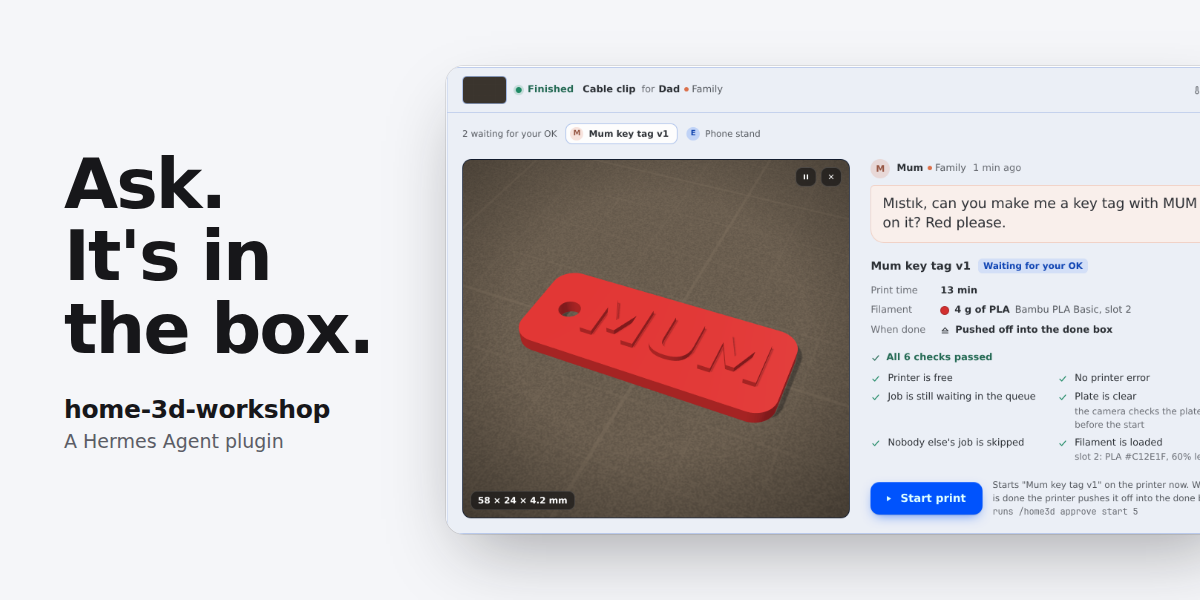
Ask. It's in the box. A 3D printer as a member of the group chat (the persona is Mıstık by default; the name and the en/tr message language are settings, English by default). People in a family or team chat ask in plain words, often by voice note; the agent finds MakerWorld models through Bambuddy, scales one, or designs a part in OpenSCAD (it writes the code, renders it, looks at the preview pictures and keeps every version), slices, and queues with manual start. A print starts only with the owner's typed approval (never from a voice note); when someone else asks, the watcher passes the request to the owner with the exact command. A zero-token cron watcher follows the print; the person who asked gets a one-line start notice and, at the end, a line with a photo in the chat the request came from (groups setting: family or team tone, per-group language), and the owner gets a technical note. Notices go through a saved outbox with retries. Finished parts are tracked in a done box. The owner gets one Workshop screen in Hermes Desktop (approval card with the part in 3D, Start, Pause and Stop, queue, done box, messages, filament, setup check, design versions). Each moment a person had to step in is logged, and repeats become upgrade proposals (for example a printed tilted base for auto-eject). Works with a Bambu Lab printer managed by Bambuddy, or with a built-in simulated printer (hermes home3d demo). Disclosure — Network: only the one Bambuddy URL you set, over HTTP on your LAN. When HOME3D_BAMBUDDY_API_KEY is set, it is sent as X-API-Key, unencrypted over plain http. MakerWorld lookups and downloads go through Bambuddy; the plugin makes no other network calls. The setup check (hermes home3d doctor, the status tool's capabilities, the Workshop screen) makes read-only requests, including GET /api/v1/updates/version, /api/v1/makerworld/status and /api/v1/printers/<id>/camera/status, and never takes a photo. Writes: import, scale, design upload, slice and queue add write to the Bambuddy library and queue without a prompt, for the owner and the people in the household list (unknown senders only with allow_guests); queued items are always manual start. Queue remove only removes the asking person's own waiting items: never a job queued outside the workshop or another household member's job, not even for the owner (who can remove anything by hand in Bambuddy). Bambuddy settings are read (GET /settings/) and never changed. With Bambuddy's require_plate_clear off, Bambuddy may start its own auto-start items on a finished printer before the camera check; hermes home3d doctor warns about this. Chamber light: a tool photo or plate check switches it on for about 12 s and restores its earlier state. The cron watcher also switches it by itself for its plate checks and photos: at most once per pass (twice when a camera request fails), one photo near the end of each workshop print (other prints: one photo and plate check in one light cycle when they end), a check when a print ends, and re-checks that back off 15, 30, 60 and 120 min (at most 6) while a plate or a job waits. Approvals: start, resume and plate-clear confirm follow one rule for the agent path, /home3d and the Workshop screen. They are blocked in cron and in runs with nobody present (kanban workers, chat -q, -z, --source tool; both checks fail closed), when a safety gate fails (printer busy or offline, active HMS error, plate not judged empty, another person's job ahead, plate not confirmed after a failed print, bed hot or of unknown temperature for a plate clear), for unknown or non-owner senders, who are told that the owner approves with /home3d approve, and when the ask came in as a voice note (a typed confirmation is asked for). Voice is detected by the pre_gateway_dispatch hook, which reads only the message type and sender id of each inbound gateway message (never the text), keeps the newest few per sender in memory for 10 minutes and always returns None, and by the transcript shape of the turn text; it does not see local CLI, TUI or Desktop turns. A household member's blocked request is stored, and the watcher tells the owner once (when owner_target is set; otherwise the block tells the person to ask the owner directly). Only an owner session gets the Hermes approve prompt. The owner is any id in owner_ids, plus, while local_is_owner is true (the default), any local CLI, TUI or Desktop session and any slash command typed in the TUI, Desktop or web dashboard or run by the Workshop screen; turn local_is_owner off when others can reach the dashboard. On IRC and ntfy, where people choose their own ids, only an entry written with the platform (irc:<nick>) matches a sender. The tool handler also needs a single-use pass from that hook or from /home3d approve, so a call that skips the hook is refused, and it checks the plate with the camera right before the action. /home3d approve runs the gate and the action at once and stores nothing for later. yolo and approvals off skip the prompt in an owner session (the unattended, identity and voice rules are blocks and are not skipped). Each rule_key is unique, so always does not carry over, and each always answer adds one unused command_allowlist line to config.yaml. Stop and pause need no approval and pass no gate; who may use them is stop_policy (known: the owner and the household list, the default; anyone; owner), and the person who did it is recorded. Hook time: pre_tool_call reads only printer status and queue (at most 5 s per request, 12 s in all, never the camera), so it stays inside Hermes' 30 s hook limit; with a lower plugins.hook_callback_timeout it allows itself 0.4 of it. Workshop screen: three GET routes under /api/plugins/home-3d-workshop/ (health, overview, file), mounted only while the plugin is enabled and callable by anyone who can use that Hermes's dashboard or API; overview returns printer state, queue, requesters' names and words, groups, the done box, filament, moments, upgrades, design versions and the setup check (notice texts and setup details only while local_is_owner is on, chat targets never), reads printer status and queue on each call and runs the setup check (read-only Bambuddy requests, hermes cron list) in the background at most once every 5 minutes; file returns only design STLs, design previews and stored camera photos from the plugin's data folder; no route writes anything. The Desktop half (desktop/plugin.js, built with esbuild, three.js bundled) is off until turned on in Capabilities, calls only its own routes, the gateway's session.create (one hidden session titled Workshop actions (home-3d-workshop)) and slash.exec with /home3d commands only, polls overview every 15 s for its status-bar chip and every 5 s while the page is open, and runs printer actions as the local user through /home3d, so the owner check applies. Hermes internals: besides ctx.current_cron_execution(), the cron, unattended and origin-chat checks read non-public Hermes internals from sys.modules (gateway.session_context.get_session_env, also for HERMES_SESSION_CHAT_ID; cron.execution_identity._CURRENT; gateway.session_finite; and hermes_cli.plugins._resolve_hook_callback_timeout for the hook deadline); they are never imported or patched. A check that raises counts as cron or unattended (fail closed); a renamed one is skipped. Subprocesses: hermes send for notices (with -p send_profile when set, each stopped after send_timeout_s, default 20 s, and all sends of one pass within send_budget_s, default 45 s); hermes cron create, list and remove from hermes home3d setup and teardown, and hermes cron list for the setup check; openscad for the name-tag and label-box templates and for the agent's designs (and openscad --version for the setup check), and xvfb-run for the design preview pictures, when they are installed (one render at a time, a 180 s default time limit, a CPU-time limit, a memory cap and an STL size cap; a design may read files only from its own folder and OpenSCAD's own libraries, checked in the source and in OpenSCAD's list of the files it read). hermes home3d setup writes HERMES_HOME/scripts/home3d_watch.py and creates one hermes cron create --no-agent --script job, every 2 minutes by default (720 runs a day, no daily cap); it runs while the Hermes scheduler (hermes gateway) runs; setup --print-only writes nothing. The job calls no model, and empty output sends nothing. A failed notice is retried on later passes (backoff from 1 min to 4 h, at most 10 attempts within 24 h), then the owner is told once. The script reads HERMES_HOME/config.yaml (the plugin settings) and stays silent while the plugin is disabled or removed. The job and the script stay until hermes home3d teardown (after an uninstall: hermes cron remove and delete the script). Data stays local under HERMES_HOME/plugin-data/home-3d-workshop: a SQLite database (requests with the platform and chat id they came from, jobs, household and group sender ids and names, approval requests, who stopped or paused a print, the outbox with every notice and its delivery state, done-box records with who a part is for and who picked it up, open human-needed moments, audit events), outbox.jsonl with every send attempt, camera photos, model files, designs (OpenSCAD source, STL, preview pictures and facts for every version), a watcher log and a settings snapshot without secrets (the watcher's fallback). pre_llm_call adds up to 900 characters of context (persona, speaker, printer state): for household members and the local owner on the first turn, on printing turns and on printer state changes, else one speaker line; for other senders only on printing turns; inject_context: never turns it off. The tools are on for every surface, and while the plugin is enabled its two skills add one line each to the skills index of every session. Tested on Linux with Hermes 0.22.5; the Workshop screen was run in Hermes 0.23.1 (Webapp) on the simulated printer, not yet in the Desktop app. Verified on a real Bambuddy 1.3.0 with an A1: printer status, queue, Bambuddy settings, lit photo with plate check, MakerWorld import, slice, scale, queue add and remove, and the watcher in dry run on a real print (finish and plate check). The templates, a sample design and the file-access probes are tested with OpenSCAD 2021.01 in CI; a part designed with home3d_design was uploaded and sliced on the real Bambuddy. Planned on the real printer: start, stop, pause and resume, watcher notices and auto-eject with this plugin; nothing new in 0.2.0 was run on it.
Community
automation
1
 GitHub profile