 hey-yx
Dual light/dark palettes that follow your system appearance, with typography,
radii and spacing tuned after the design language of the OpenAI Codex app and
ChatGPT. The settings page is bilingual (English / 中文), and so is everything
the plugin says to you.
Highlights
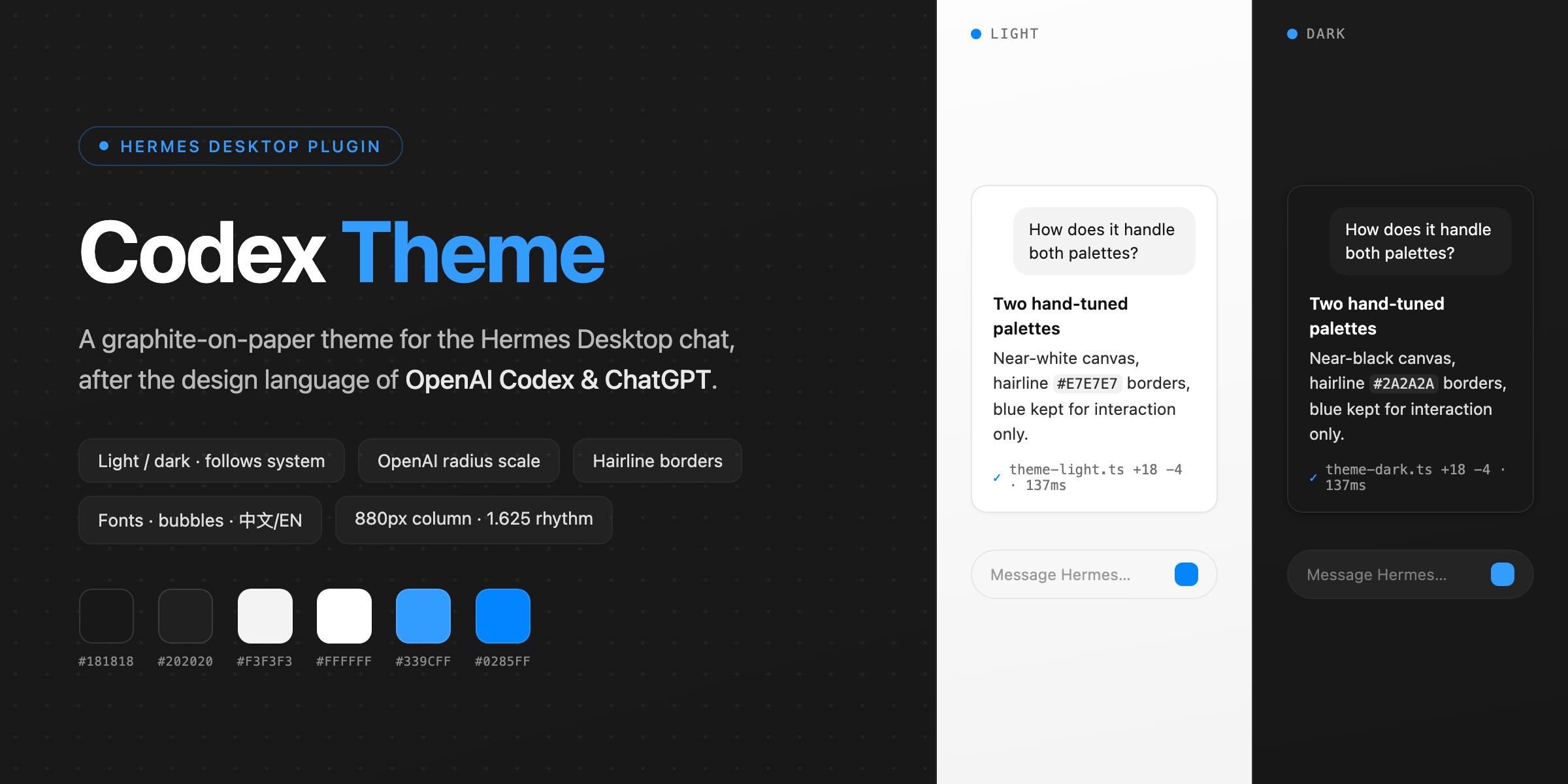
- Light / dark, hands-off — two hand-tuned palettes; the app follows the
system appearance, or you pin one in Settings - Graphite on paper — flat surfaces, hairline borders (
#E7E7E7/#2A2A2A),
hierarchy carried by weight (600/500/400); blue (#0285FFlight /#339CFF
dark) is reserved for interaction, never chrome - OpenAI radius scale — inline code 4px · sidebar rows 8px · controls 10px ·
cards, bubbles, menus and dialogs 12px · composer 20px - Content spacing presets — Compact 1.5 / Comfortable 1.625 (default) /
Roomy 1.75 line height, with paragraph and bubble padding scaled to match - 768 / 880 / 992px reading width — Compact / Comfortable (default) /
Roomy, wider than ChatGPT's 720–768px - Text & code font presets — body text (Default / Serif / Mono) and code
(Default / Fira Code / Courier), each with Chinese fallbacks so mixed
Chinese/English text renders well; Default never overrides your font setup - Chat bubble colors — pick background and text colors for your own bubbles
and for assistant replies; Default keeps the theme's own look - English / 中文 interface — follows the system & app language by default,
or pin one in Settings; every label, hint and popup is localized - Feedback in one click — Settings carries a Open GitHub Issues button
that hands the URL to your browser via the OS - Respects your configuration — text size, interface mode, translucency,
session density and every other Hermes setting stay under Hermes' own
control; the theme only paints theme-level tokens
Screenshots
Design language
| Principle | Practice |
|---|---|
| Graphite on paper | Near-white canvas (#FFFFFF) / near-black canvas (#181818) |
| Weight-carried hierarchy | Headings 600, labels 500, body 400 — no decorative colour |
| Interaction-only blue | #0285FF light / #339CFF dark for links, focus rings, selection |
| Hairline borders | 1px strokes (#E7E7E7 / #2A2A2A) instead of shadows; surfaces stay flat |
| Radius scale | 4px inline · 8px rows · 10px controls · 12px cards/bubbles/dialogs · 20px composer |
| Line height | Root 1.625 — measured from ZCode's chat body (14px × leading-relaxed); spacing presets 1.5 / 1.625 / 1.75 |
| Reading width | 880px default · presets 768 / 880 / 992px (ChatGPT: 720–768px) |
Palettes
| Token | Dark | Light |
|---|---|---|
| Canvas | #181818 | #FFFFFF |
| Sidebar | #171717 | #F9F9F9 |
| Card | #212121 | #F7F7F7 |
| User bubble | #202020 | #F3F3F3 |
| Border | #2A2A2A | #E7E7E7 |
| Accent | #339CFF | #0285FF |
Install
Listed in the official plugin catalog:
hermes plugins install codex-theme
Or install straight from GitHub:
hermes plugins install hey-yx/hermes-codex-theme
Then open Settings → Plugins → Codex Theme and press Reapply (the theme
also applies itself once on first load).
[!TIP]
Manual / development install: copydesktop/plugin.jsto
~/.hermes/desktop-plugins/codex-theme/plugin.jsand run
Reload desktop plugins from ⌘K.
Settings
Everything lives in Settings → Plugins → Codex Theme, grouped into
Appearance, Typography & layout, Chat bubbles and General panels:
| Setting | Options | Notes |
|---|---|---|
| Appearance mode | Follow system / Dark / Light | Follows the system appearance by default |
| Reading width | Compact (768px) / Comfortable (880px, default) / Roomy (992px) | Theme-level knob; Hermes has no built-in width setting |
| Content spacing | Compact (1.5) / Comfortable (1.625, default) / Roomy (1.75) | Line height + paragraph & bubble rhythm |
| Text font | Default / Serif / Mono | Chinese fallbacks in every preset; Default keeps theme/app fonts |
| Code font | Default / Fira Code / Courier | Fira Code / JetBrains Mono must be installed locally — otherwise the system mono kicks in |
| User bubble background | Color picker + Default | Default: theme gray (#F3F3F3 light / #202020 dark) |
| User bubble text | Color picker + Default | Default: theme foreground |
| Assistant bubble background | Color picker + Default | Default: transparent — replies sit straight on the canvas |
| Assistant bubble text | Color picker + Default | Default: theme foreground |
| Language | Follow system / 中文 / English | Plugin UI only; Hermes' own language is untouched |
| Feedback | Open GitHub Issues | Opens the repo's Issues page in your browser |
⌘K also carries two quiet rows: Theme: Use Codex theme and Theme: Codex
theme settings (searchable in both languages).
[!NOTE]
Choosing a non-default font preset overrides--dt-font-sans/
--dt-font-monowholesale — including a custom chat font set in Hermes'
appearance settings. The Default preset overrides nothing.
Bubble colors apply instantly, survive restarts and use the same color in
light and dark; they paint while the Codex theme is active, and Default
restores the theme's own colors.
What this theme deliberately does not touch
Your Hermes configuration is yours. The theme paints theme-level tokens
only (palette, type stack, radii, spacing) and leaves every user-configurable
setting alone — text size (Settings → Appearance), interface mode,
translucency, session-list density, chat background, timestamps, and everything
in config.yaml. Two standing rules:
[!IMPORTANT]
- The theme never writes
--chat-text-scale— that knob belongs to
Settings → Appearance and writing it would create two owners that
overwrite each other.- The theme takes over the palette once on first install. After that, a
theme you pick manually always wins; Reapply is opt-in.
Disclosure
Per catalog rule 13, here is everything this plugin does that a user would want
to know before installing:
- No network calls. The plugin fetches nothing and phones home nothing.
- No telemetry. No usage reporting of any kind.
- No credentials. It reads and writes none.
- No core patching. Themes, palette commands and the settings page are
registered through the Desktop plugin SDK only
(THEMES_AREA,PALETTE_AREA,ctx.registerSettingsPage,ctx.i18n). - External link: the Feedback button asks the OS to open the repo's
GitHub Issues page in your browser (ctx.os.openExternal) — the only
external action in the plugin, and only when you press the button. - Storage: one plugin-scoped store (
ctx.storage) holding your
settings-page choices — appearance mode, reading width, content spacing,
fonts, chat bubble colors and language — plus a first-install flag. - Styling: the theme's
customCSSis injected as a scoped style block by
the app's own theme engine, exactly like user skins; it changes visuals, never
behavior.
Credits
Design language after the OpenAI Codex app and ChatGPT (graphite-on-paper
palette, radius scale, spacing rhythm). This is an independent community
theme — not affiliated with, endorsed by, or a product of OpenAI.
Built on the Hermes Desktop Plugin SDK.
Licensed under the MIT License.
README from the reviewed commit 5d0e94a; it updates when the author re-pins.