
 0xbyt4
Hermes Canvas
Your agent's plan, wired to its real work.
Hermes Canvas is a plugin for Hermes Agent and
Hermes Desktop. The agent draws its plan as hand-drawn boxes on a canvas next to the chat. Each
box is bound to files and a check command. Box status comes from hooks, not from the model: a box
is "doing" when the agent writes one of its files, and "done" or "failed" when its check command
exits. You steer the build by editing the canvas, before and during the build.
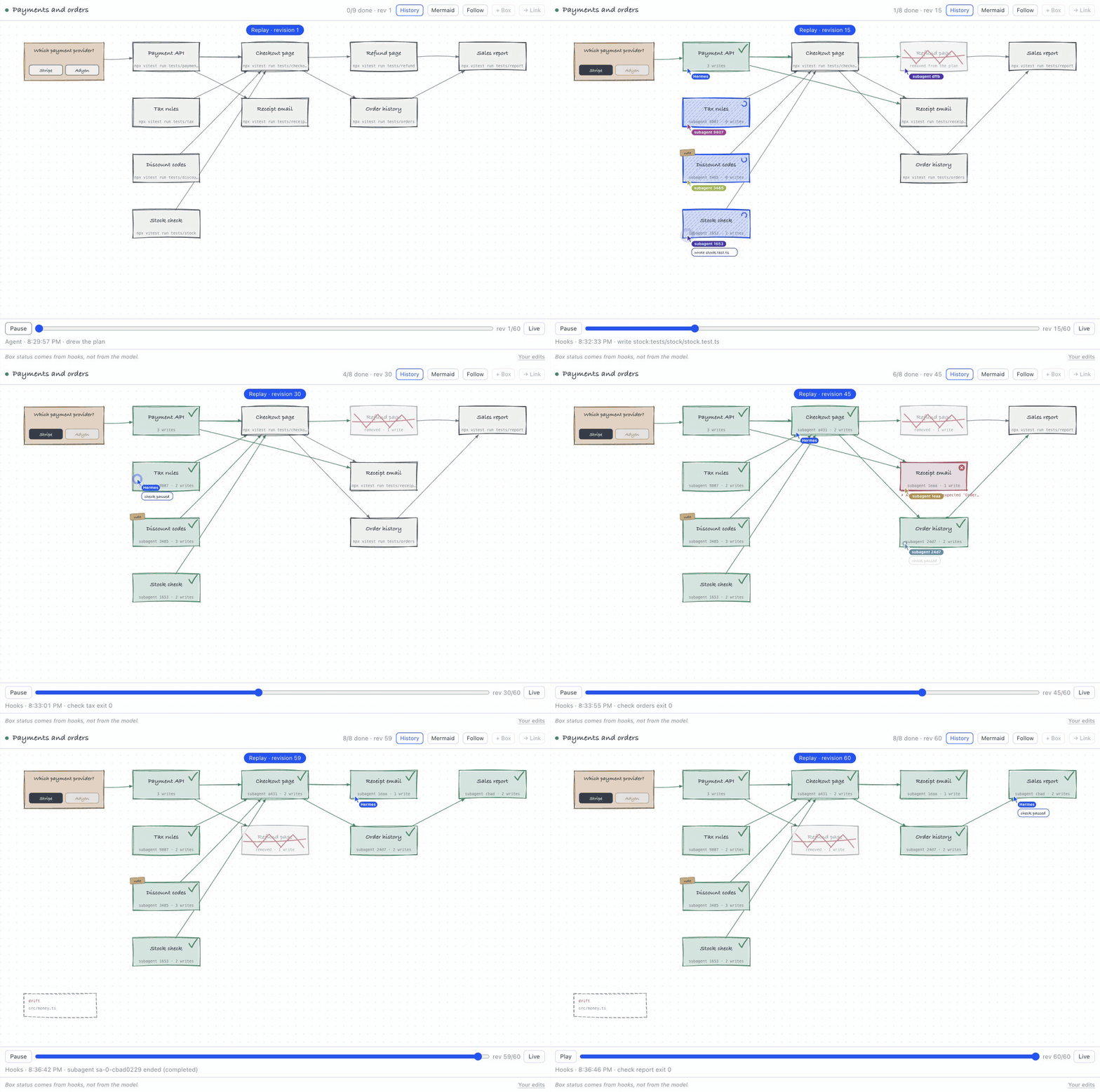
The replay shows one real build with Claude Haiku 5.5. Four subagents build in parallel. The user
removes a box mid-build, and the next write to it is blocked. A failing check holds the finish
while the agent works on it. Hermes caps the holds (agent.max_verify_nudges, 3 by default).
Demo video (88 s): a real build with Claude Opus 5.5 on X.
Sped-up parts are marked in the video.
What you can do
| On the canvas | What happens |
|---|---|
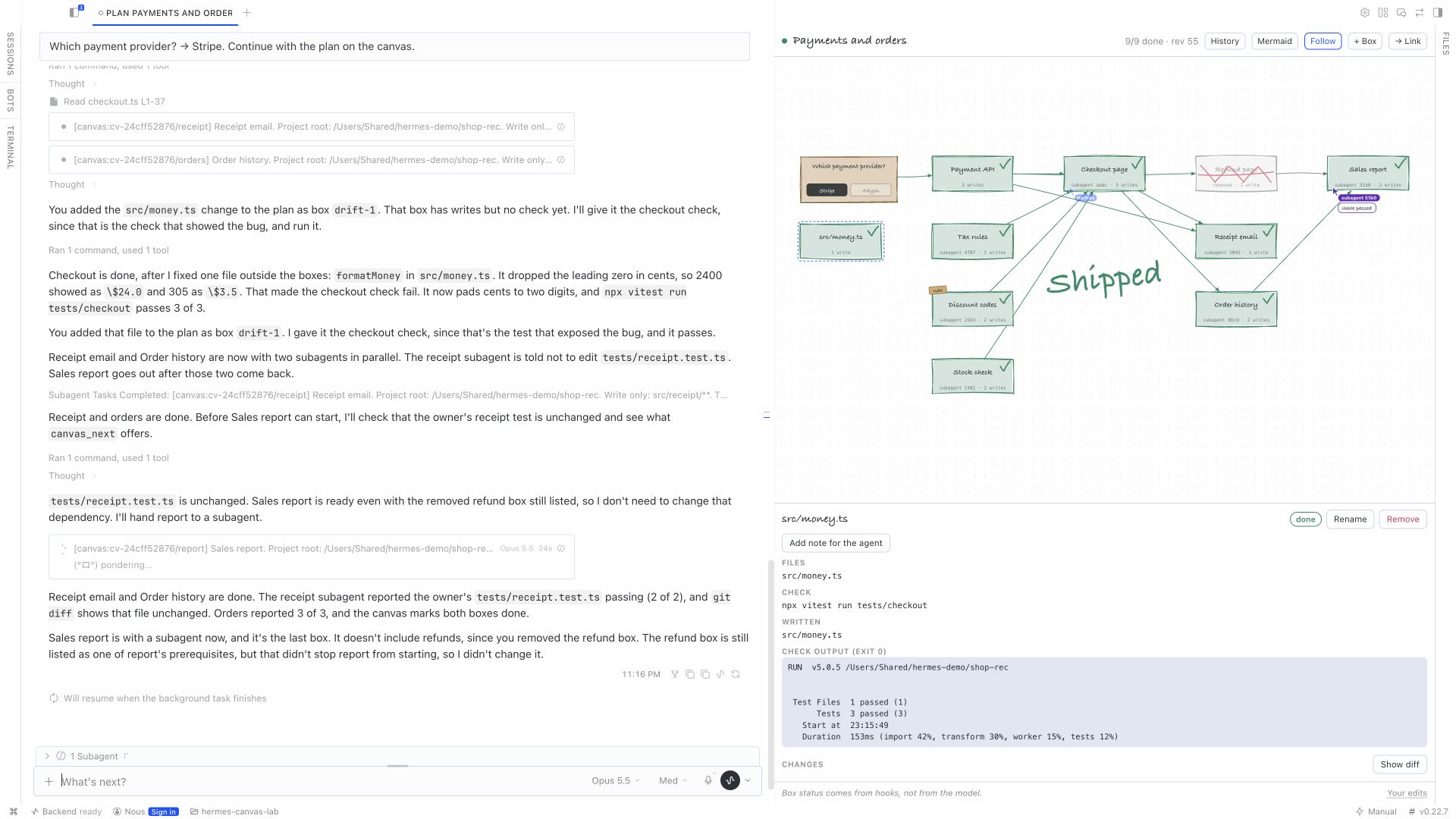
| Watch the plan | Boxes change status from real file writes and check exit codes. New boxes draw themselves. |
| See who works where | Hermes and each subagent show as a named pointer on the box of their latest write, check or veto. A short line on what they did shows for a few seconds. A subagent leaves the canvas when it stops. |
| Answer a question box | Click an option on the canvas or on the chat card. The answer starts the next turn. |
| Remove a box mid-build | The next write to that box's files is blocked, from the write tools and from the terminal. |
| Add a box or leave a note | The agent gets your edit at the start of its next tool result, or of its next turn. A note on a box also reaches the subagent that builds it. |
| Change the order | Click "→ Link" and drag from a box to a box that must wait for it. Remove a dependency in the inspector. The agent gets the change like any other edit. |
| Track your edits | The chat card and the pane list your latest edits, with a tick once the agent got them. Hover an edit to see the text the agent reads. |
| See drift | A write outside every box shows as a drift box. Click "Add to plan" to keep it, or "Revert" to ask the agent to put the file back. |
| Inspect a box | See its files, its check output and the diff of the files it wrote. |
| Replay | Step through every revision of the plan with the History bar. |
| Export | Copy the plan as Mermaid. |
The agent cannot finish its turn while a box it is responsible for is failing. The plugin holds
it with the pre_verify hook (capped by Hermes's agent.max_verify_nudges setting). While the
agent is held, the canvas shows a "Finish held" banner.
Why a plugin and not a prompt
| Feature | Hermes surface | Why a prompt cannot do it |
|---|---|---|
| Box status from real work | post_tool_call | The model cannot fake a file write or an exit code. |
| Veto a box mid-build | pre_tool_call returns block | A prompt cannot stop a running tool loop. |
| Edits reach the agent mid-turn | transform_tool_result | A prompt reaches the agent only between turns. |
| "Done" is held while a box is red | pre_verify | The model cannot skip the gate. |
| Writes outside the plan are flagged | post_tool_call path match | The model cannot hide a write. |
| Subagents shown per box | subagent_start, subagent_stop | Attribution comes from the runtime. |
Install
Hermes Agent 0.22.7 or later is required.
-
Install the plugin:
hermes plugins install 0xbyt4/hermes-canvas --enable -
Restart the gateway, so that the hooks load:
hermes gateway stopHermes Desktop starts the gateway again.
-
In Hermes Desktop, open the Canvas pane.
-
Ask for a plan, for example: "Plan it on the canvas first, then build it." Or start your
message with/hermes-canvas:hermes-canvas: it loads the skill for that message.
The plugin ships a skill (hermes-canvas) that tells the agent how to plan, how to bind files
and checks to boxes, and how to delegate boxes to subagents.
How it works
- The agent calls
canvas_drawwith boxes. Each box hasfilesglobs and acheckcommand. - The pane draws the boxes and follows changes live.
- Hooks bind the agent's work to boxes:
post_tool_callmatches eachwrite_fileandpatchpath, and the files aterminal
command writes (cat > f,tee,cp,sed -i), against the box globs.- A
terminalcall that runs a box's exact check command sets the box to done (exit code 0)
or failed. pre_tool_callblocks writes to the files of a box that you removed.
- Your canvas edits are stored as pending. They reach the agent once: mid-turn through
transform_tool_result, or at turn start throughpre_llm_call. canvas_nextreturns the ready boxes asdelegate_taskgoals tagged[canvas:<doc>/<box>].
Thesubagent_starthook maps each subagent to its box.
Tools
| Tool | Purpose |
|---|---|
| canvas_draw | Create or replace the plan. |
| canvas_update | Add, remove, rename, link or move boxes, set files and checks. |
| canvas_get | Read the plan and the user edits the agent has not seen yet. |
| canvas_next | Get the ready boxes as tagged subagent goals. |
Disclosure
Read this before you install.
- Reads tool calls. Hooks read tool arguments and results (file paths, terminal commands
and their output) to bind work to boxes. - Stores data locally. Canvas documents, revisions and your edits are stored in this
profile's plugin database ($HERMES_HOME/plugin-data/hermes-canvas/). - Blocks some tool calls.
pre_tool_callblockswrite_file,patch,terminaland
execute_codecalls that would write files of a box you removed from the canvas. It blocks
nothing else. - Adds to the model input. Your canvas edits and a short plan summary are added to the
model input (pre_llm_call,transform_tool_result). - Can hold "done".
pre_verifykeeps the agent working while one of its boxes is failing.
Hermes'sagent.max_verify_nudgessetting caps this. - Runs read-only git commands. The diff view runs
git rev-parseandgit cat-filein the
canvas project folder. Git never reads the working tree, so repository filters and hooks do not
run, and lazy fetches are turned off. - Reads project files. The diff view reads the files a box wrote, inside the canvas project
folder only, up to 512 KB each. - Serves an API. The pane uses
/api/plugins/hermes-canvas/on the plugin host. - Never writes project files. "Revert" on a drift box asks the agent to restore the file; the
plugin does not change it. - No network calls, no credentials, no background processes, no self-update.
Development
The plugin uses uv.
uv run pytest -q
uv run ruff check .
hermes plugins validate --install-deps .
License
MIT. See LICENSE.
README from the reviewed commit d6eeff0; it updates when the author re-pins.