
 asimons81
Crux
Find the assumption that changes the answer.
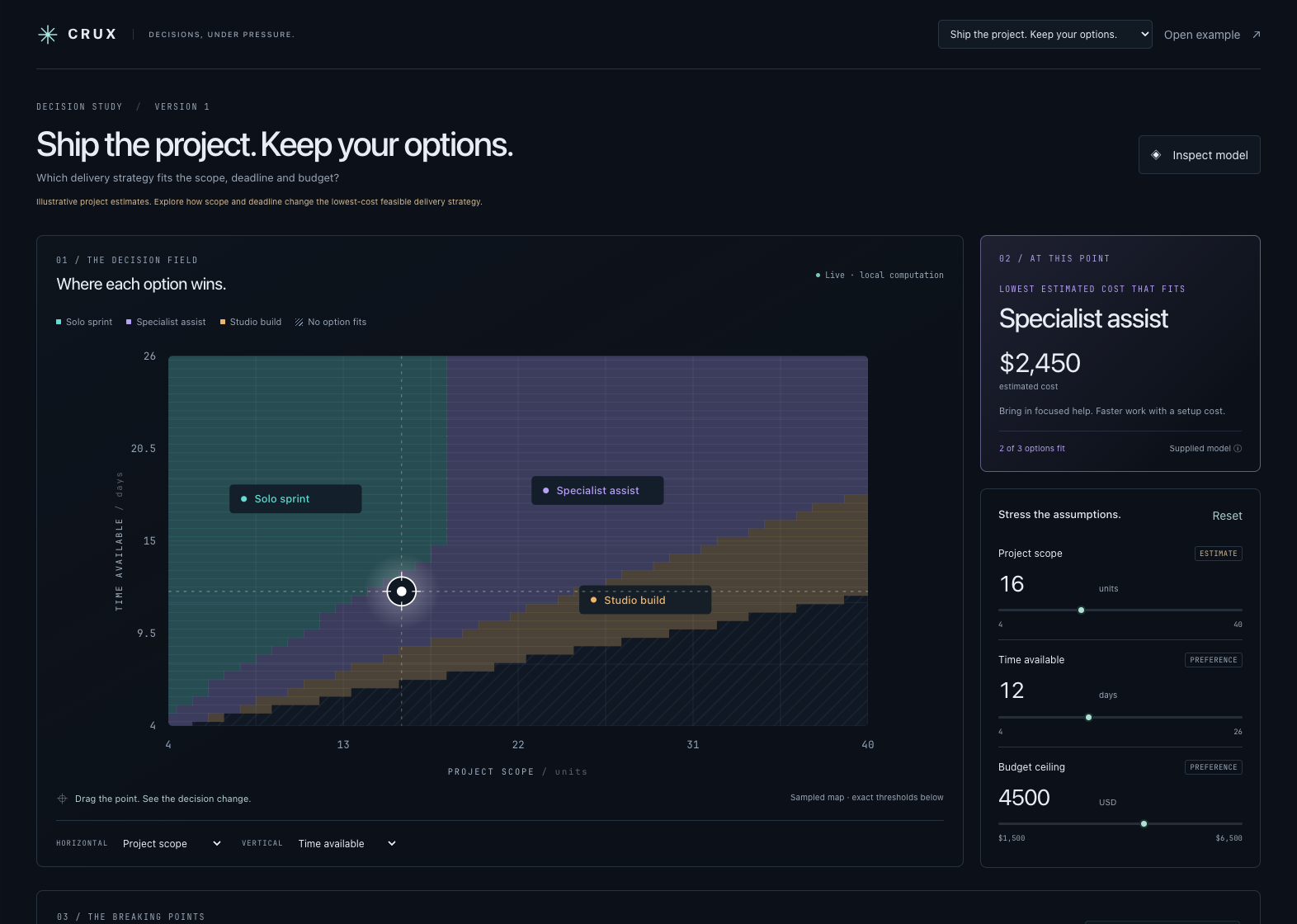
Crux turns a Hermes recommendation into a decision you can inspect and stress-test. Compare concrete options, move the assumptions, and see exactly where the preferred feasible option changes. When no option works, Crux identifies a smallest conflicting set of constraints and shows why.
The included project-delivery example makes the point in seconds. A solo sprint costs less but misses your deadline. Give yourself more time and it becomes viable. Increase the scope and a specialist becomes cheaper. Tighten both time and budget and neither rule is impossible on its own, but together they eliminate every option. Crux computes those distinctions.
What makes it useful
- A decision atlas: explore two assumptions at once, with a movable operating point and regions colored by the best feasible option.
- Analytic switching thresholds: inspect one assumption at a time to find cost crossings and feasibility boundaries, including cases a coarse visualization could miss.
- Explicit tradeoffs: one named objective, visible formulas, hard constraints, and source labels. No hidden scoring weights.
- Explainable failure: identify a minimum-cardinality conflicting constraint set over the supplied options at the current assumption values.
- A durable decision record: keep models and scenario snapshots in the active Hermes profile.
The analysis runs locally. Moving a slider does not call a model or spend API credits.
Install from GitHub
Requires Hermes 0.23.0+. Install the public repository:
hermes plugins install https://github.com/asimons81/hermes-crux
hermes plugins enable hermes-crux
For a reproducible installation, append --ref <full-commit-sha> to the install command using the commit pinned by the catalog submission. Installing by catalog name becomes available after maintainer review and merge.
Install the release archive
Requires Hermes 0.23.0+. Extract the archive so plugin.yaml is at <your Hermes profile home>/plugins/hermes-crux/plugin.yaml. For a new installation in the default profile:
unzip hermes-crux-0.1.0.zip -d "${HERMES_HOME:-$HOME/.hermes}/plugins"
hermes plugins doctor "${HERMES_HOME:-$HOME/.hermes}/plugins/hermes-crux" --ci
hermes plugins enable hermes-crux
Open Hermes Desktop or its Webapp, enable the Crux Desktop half in Capabilities → Plugins if needed, and choose Crux in the sidebar. Select Open example for an immediate working decision model. On a remote setup, install the backend package on the Hermes host and the Desktop half on the computer running Desktop; they are separate enable states.
For your own decision, ask Hermes:
Use the Crux decision-lab skill to compare my options. Show the assumptions and sources, define one explicit objective, and build a decision atlas. Do not invent factual estimates without labeling them.
Four tools are available: crux_create, crux_inspect, crux_evaluate, and crux_snapshot. The bundled skill includes a complete model example. The API contract describes the JSON schema and numerical semantics.
Both Git and local-directory installation work before catalog admission. Catalog listing is subject to maintainer review.
Model boundaries
Crux evaluates affine formulas: a constant plus a sum of coefficient × assumption terms. This deliberately excludes arbitrary code, nonlinear expressions, products of assumptions, and probabilistic forecasts. It makes the mathematical structure inspectable and supports analytic boundaries.
Assumption ranges are exploration bounds, not probability distributions or confidence intervals. Results describe the supplied model and finite candidate set. They do not verify the truth of an agent's estimates, discover every real-world option, or execute the winning plan. The project-delivery example is explicitly illustrative.
Architecture and compatibility
Crux is a standalone Hermes plugin targeting released Hermes 0.23.0 or later. It uses documented agent tool registration, profile-scoped plugin storage, authenticated plugin REST routes, and the Desktop plugin SDK. Its Python analysis engine uses the standard library. The committed Desktop bundle uses Hermes's React and SDK; end users do not need a frontend build.
No core patch, private runtime override, upstream fix, external solver, paid service, or new API key is required. A catalog listing requires the normal catalog review PR; the plugin's functionality does not depend on that PR being merged.
Privacy and disclosure
Crux reads its bundled example and its own profile-scoped model/snapshot data. It stores the model content, assumption/source labels, and saved scenarios locally. It makes no third-party network calls, reads no credential stores or unrelated session history, starts no background service, and executes no shell commands. The Desktop UI calls its own API through the host's authenticated, profile-aware bridge. Asking Hermes to create a model uses your existing Hermes conversation and model provider as usual.
Developer preview and verification scripts are separate from plugin runtime. Preview binds locally; it is for development and demonstrations.
Develop
python3 -m unittest discover -s tests -v
cd desktop
npm ci
npm run build
The source is in desktop/src/; desktop/plugin.js is the readable ESM bundle loaded by Hermes. React and the plugin SDK remain host-provided imports. Run hermes plugins validate /path/to/a/clean/package --install-deps before distributing a change; exclude development node_modules, bytecode and caches from that package.
Research and contest materials
- Validation evidence: 38 passing tests, official plugin checks, and native UI verification.
- Catalog collision audit: 1,063 published entries plus a scoped review of open catalog submissions.
- Hackathon handoff and demo outline.
- License: MIT. Built by Tony Simons.
README from the reviewed commit 9ef205e; it updates when the author re-pins.