 willbohn
Hermes EGM
Design with context. Review with fresh eyes.


Quickstart · How it works · Activation · Security · Development
Hermes EGM is an independent, native Hermes plugin inspired by Google's
Elephant/Goldfish Model.
Your main agent drafts with project context. The egm_review tool sends only an
explicit document snapshot to fresh, tool-free reviewer requests, then checks
every returned citation against the supplied text.
It is not Google's supported EGM distribution, a full upstream port, or an official
Google/Nous product. This implementation and its short workflow prompts are original;
upstream reviewer prompts are not bundled. See NOTICE.
What you get
- A native tool, not just prompts: bounded parallel review, local output validation,
exact source-line/quote checks, a reproducible snapshot fingerprint, exact-duplicate
merging, and explicit incomplete/error states. - Three lenses: comprehension (missing assumptions), design (complexity and risks),
and readiness (contracts, implementation fit and tests). Choose one or all three. - Seven optional skills:
egm-brainstorm,egm-draft,egm-review,egm-resolve,
egm-review-loop,egm-drift-report, andegm-bootstrap, under thehermes-egm:namespace. - Selective activation:
manual,suggest(default), or project-scopedauto.
Automatic calls have durable duplicate suppression and a per-session attempt limit. - No new runtime packages, accounts or API keys. Uses the documented
ctx.llm
interface and follows the active Hermes provider/model. No provider override grants.
Use it for designs with consequential decisions, not every small fix. Three prompts
to the same model are different perspectives, not three independently trained models.
Quickstart
Requires Hermes ≥0.22.7 with the documented plugin LLM API.
1. Install
Run this in your terminal:
hermes plugins install https://github.com/willbohn/hermes-egm --enable
The plugin installs into your active Hermes profile. It uses your existing model
connection; no additional account or API key is needed.
2. Start a new session
Open your project in Hermes and start a new chat so the tool and skills load.
The default mode is suggest: Hermes can recommend a review, then waits for you
to request it. Automatic reviews are opt-in.
3. Review your design
Replace design_draft.md with your design document, then send:
Use hermes-egm:egm-review to review design_draft.md against the relevant source files.
Use all three lenses, report incomplete reviewers, and don't edit anything.
Hermes returns findings with quoted source evidence. Check the advice and choose
what to change; the review tool does not edit files.
How it works
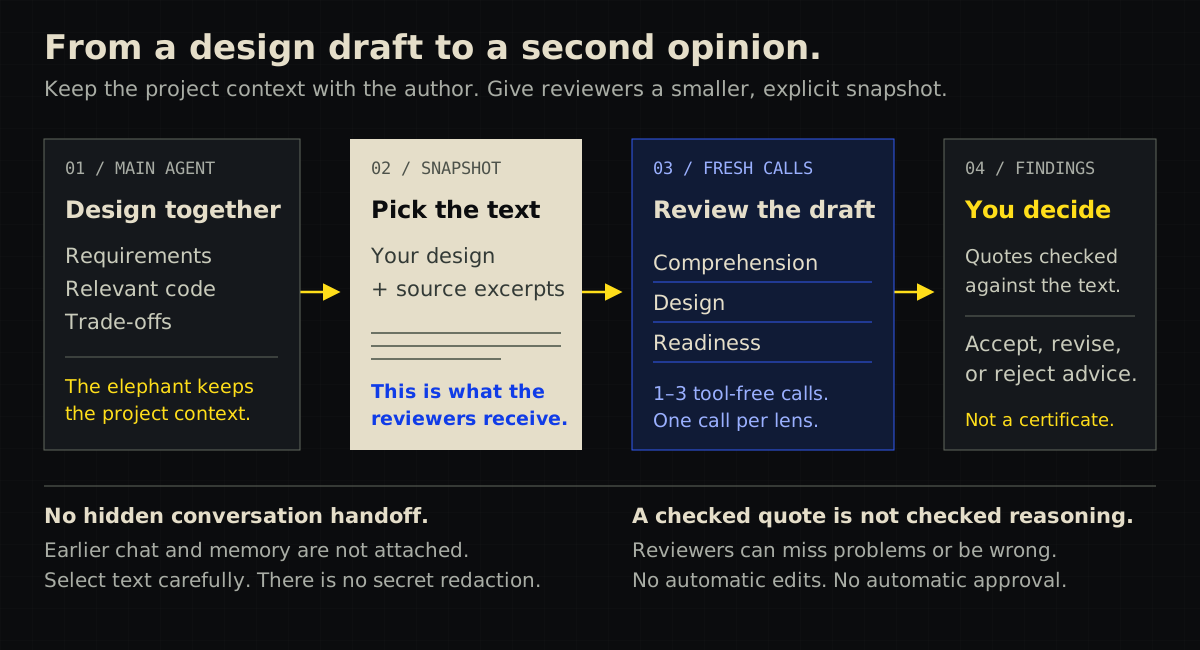
- Draft with context. Your main agent works with you on requirements and trade-offs.
- Choose what crosses the boundary. Supply the exact design and relevant source
excerpts. The review tool does not open files or attach the earlier conversation. - Get fresh perspectives. Each selected lens gets a separate, tool-free model
request: comprehension, design, or readiness. They use the active Hermes route,
not three independently trained models. - Check the findings and decide. The plugin validates output and checks quotes
against the supplied text. You decide which advice to accept. A valid quote does
not prove the reasoning, and an incomplete review is never a pass.
For an example input, see the webhook design snapshot.
It contains an intentionally incomplete design suitable for trying the review workflow.
Other workflows
Ask Hermes to load hermes-egm:egm-brainstorm to explore an idea,
hermes-egm:egm-draft to write a specification, or hermes-egm:egm-resolve to work
through findings. The seven workflow skills guide the main agent;
ordinary Hermes tools do authorized file work. The Goldfish review tool itself
never reads or edits project files.
Selective activation
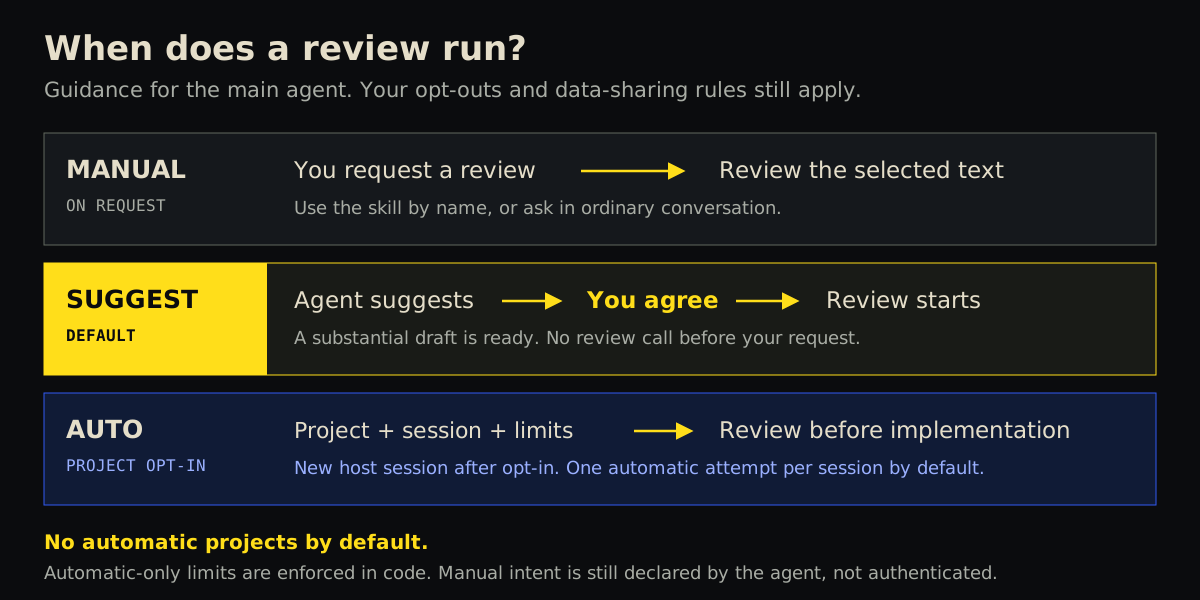
Configure Settings → Plugins → Hermes EGM. No custom Desktop extension is needed.
| Mode | What the main agent is guided to do |
| --- | --- |
| manual | Review only when you request it. |
| suggest (default) | Suggest EGM once when a substantial design is ready, then wait for your review request. |
| auto | In an explicitly allowed starting workspace, review a substantial draft before implementation without another confirmation. |
Automatic review is for architectural, trust-boundary, storage, concurrency, or
failure-recovery decisions, not every edit, trivial fix, or unfinished draft.
An explicit user request uses automatic: false (the tool's backward-compatible
default). A policy-initiated review must use automatic: true.
Settings live under plugins.entries.hermes-egm.settings:
activation:manual,suggest, orauto.auto_projects: JSON list of existing absolute project directories. Default[]
permits no automatic review. Canonical descendants count; a similarly named sibling
or a symlink leading outside the allowed directory does not.auto_max_reviews_per_session: integer 1–3, default 1. Each admitted attempt
may start up to three reviewer requests, plus host retries/fallbacks.
Start a new session after enabling auto or expanding scope/budget. Hermes freezes
plugin routing guidance into a new session's prompt; the plugin never rewrites that
prompt mid-conversation. Auto enrollment uses the host's session ID and starting
workspace. A resumed session with no enrollment fails closed. Start a new session
when changing projects. Revoking the original allowed root, selecting another mode,
or lowering the budget is also checked when each automatic call arrives.
Before starting any automatic reviewer, one SQLite transaction reserves the attempt.
The same target/text snapshot cannot automatically run twice in that session, even
with different lenses. The initial session ceiling cannot be increased by rebuilding
its prompt. Failures and cancellation do not refund an admitted attempt. Missing
context, invalid settings, unavailable storage, duplicates and exhausted limits do
not start reviewers. Explicitly requested manual re-review remains available.
Limits apply to automatic calls. The main agent decides when to request review
and supplies the manual/automatic marker. Calls marked automatic: false are outside
the automatic-attempt limit. Project scope checks the session's starting workspace,
not the origin of pasted text. Existing data-sharing permissions and user opt-outs
still apply. No watcher, automatic repair, edit blocker or merge gate is added.
Result and limits
The exact tool input is illustrated in examples/webhook-review.json.
Document IDs are labels, not paths to open. target names one supplied document.
Omitting lenses runs all three. Send exact authorized text, never chat history,
memory or credentials. Excerpt line numbers are relative to the supplied excerpt.
Reviewer runs return JSON with status, outcome, automatic, snapshot_id,
reviewers, findings and usage. Findings contain severity, explanation, suggested action,
source evidence and contributing lenses. Each reviewer includes host-reported
provider/model and token usage.
| Field | Meaning |
| --- | --- |
| status: complete | Every selected reviewer returned output that passed local validation. |
| status: partial / failed | Some / all reviewers failed. Never treated as a clean review. |
| outcome: no_findings | A complete review returned no accepted findings. Defects may still remain. |
| outcome: incomplete | The requested review did not complete, even if some findings are available. |
| status: invalid_input | Rejected before any reviewer request. |
| status: skipped, outcome: not_run | Automatic policy declined the call; reason explains why. No reviewer started. |
Bounds per invocation: 1–8 documents; 48,000 UTF-8 bytes for the serialized snapshot;
1–3 distinct lenses; at most 8 findings per reviewer; 2,400 requested output tokens
per reviewer. Requests run concurrently, with a 90-second provider timeout and
95-second coroutine deadline. The plugin does not retry or auto-repair. Hermes may
apply its own provider retries/fallbacks; cancellation can stop waiting without
aborting an already-running provider operation. These are not hard monetary caps.
Usage may omit failed calls. Repeated review invocations consume more usage.
Exact duplicate findings are merged; similar but differently worded findings remain.
The SHA-256 fingerprint identifies the supplied target/text snapshot, not its truth,
file freshness, review settings or model version.
Data access and security disclosure
- Supplied text is sent through Hermes to the active model/provider (and any configured
fallback), subject to their data policies and charges. Local models stay local only
when the operator's actual route does. No automatic secret redaction. - The plugin does not read chat history, memory, project document contents, credential
stores or environment secrets. It loads its own source and skills, reads its own
settings, and resolves directory metadata to match an automatic project scope. - Reviewer calls have no shell, browser, filesystem or other tools. They cannot
directly perform an action. The Python plugin is trusted code, not an OS sandbox. - The caller chooses the snapshot. If the main agent explicitly pastes private history
into a document, the plugin cannot know it is history. Inspect sensitive payloads. - Prompts instruct reviewers to treat documents as untrusted. That instruction is not
a prompt-injection proof. Returned prose remains untrusted, even with valid citations;
the main agent must not execute suggestions automatically. - Literal evidence checks prove the quoted text occurs on that line, not that the
conclusion follows. Reviewers can miss defects, hallucinate reasoning or agree wrongly. - No plugin telemetry, credential storage, background daemon, direct HTTP client,
shell subprocess, automatic update or project-file mutation. Automatic admission
persists only session/root/snapshot fingerprints and counters/ceilings in
<HERMES_HOME>/plugin-data/hermes-egm/automatic-reviews.sqlite3through Hermes's
documentedplugin_dbhelper. No source text, model output, raw session IDs or raw
workspace paths are stored there. Hashes are not encryption or anonymity guarantees.
Enrollment is bounded to 10,000 sessions; reaching capacity disables new enrollments
instead of forgetting previous limits. State survives plugin updates/removal; deleting
it loses deduplication/budget history. Hermes/provider logging is outside this plugin.
See SECURITY.md and How Hermes EGM works.
Architecture
Only the explicit snapshot crosses the model-call boundary. No draft conversation,
reviewer discussion or previous findings are automatically appended.
hermes_egm/plugin.py registers the tool, skills and cache-safe routing section.
policy.py validates settings and project scope; auto_store.py owns transactional
admission. review.py handles snapshots, reviewer calls and evidence checks.
The root __init__.py is the loader entrypoint. Only documented Hermes plugin APIs,
including plugins.plugin_storage.plugin_db, are used; no internal core imports or
monkeypatches.
Development and verification
Requires a Hermes build with the documented plugin LLM API. Manifest floor: >=0.22.7.
See VERIFICATION.md for the exact tested host rather than assuming
all development builds bearing that version are identical. Python 3.11+ is required.
From the repository root:
uv venv --python 3.14 .venv
uv pip install --python .venv/bin/python -r requirements-dev.txt --exclude-newer '3 days'
.venv/bin/python -m unittest discover -s tests -v
.venv/bin/ruff check hermes_egm tests __init__.py
.venv/bin/ruff format --check hermes_egm tests __init__.py
.venv/bin/mypy -p hermes_egm
hermes plugins validate "$PWD" --install-deps
The unit suite uses a fake model facade; it tests plugin behavior, not model quality.
A real host/provider run is separate evidence. See VERIFICATION.md.
To install a local development checkout at its current commit:
hermes plugins install "file://$PWD" --ref "$(git rev-parse HEAD)" --enable
Contribution and release instructions are in CONTRIBUTING.md.
Artwork sources, generation notes and export commands are in assets/README.md.
License
Apache-2.0. AI-assisted implementation; see CONTRIBUTING.md.
README from the reviewed commit d37006f; it updates when the author re-pins.