All plugins

hermes-taskbar-badge

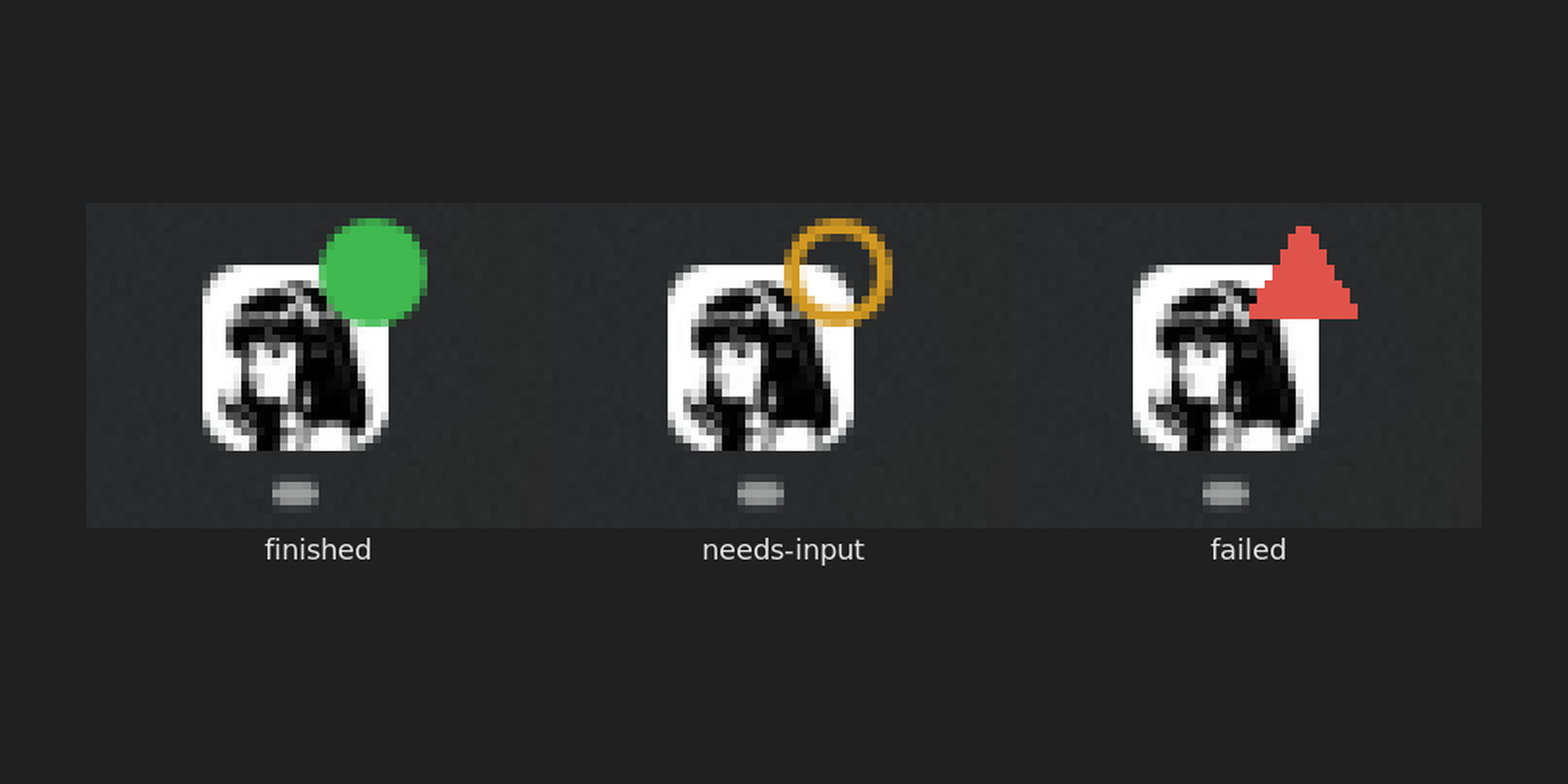
Colour-coded badge on the Hermes taskbar button: a green disc for a turn finished in a session you have not opened, an amber ring while a session waits on an approval, a clarify or a password, a red triangle for a failure. Opening a session clears only that session; failure outranks waiting and waiting outranks finished. The settings page holds the three colours, a test button each, per-event overrides and a switch back to the plain grey count. Disclosure — Disclosure: the desktop half posts the current badge state to 127.0.0.1:8766 on the same machine once per event, and the Python half starts at plugin load in each Hermes process, listens on that loopback port (no token, CORS open to any origin, so any local program or open web page can also set or read the badge colour) and, from a background thread, calls the Windows taskbar overlay API or, on Linux, runs gdbus emit for the Unity launcher badge once a second while a badge is up; it writes badge_bridge.log in its plugin folder; nothing leaves the computer and no other network call is made. Where colour cannot be drawn, Chromium's grey count and the status-bar dot remain.

BrokeSkillDesktopv0.7.0Updated 7 days ago

About

Colour-coded badge on the Hermes taskbar button: a green disc for a turn finished in a session you have not opened, an amber ring while a session waits on an approval, a clarify or a password, a red triangle for a failure. Opening a session clears only that session; failure outranks waiting and waiting outranks finished. The settings page holds the three colours, a test button each, per-event overrides and a switch back to the plain grey count. Disclosure — Disclosure: the desktop half posts the current badge state to 127.0.0.1:8766 on the same machine once per event, and the Python half starts at plugin load in each Hermes process, listens on that loopback port (no token, CORS open to any origin, so any local program or open web page can also set or read the badge colour) and, from a background thread, calls the Windows taskbar overlay API or, on Linux, runs gdbus emit for the Unity launcher badge once a second while a badge is up; it writes badge_bridge.log in its plugin folder; nothing leaves the computer and no other network call is made. Where colour cannot be drawn, Chromium's grey count and the status-bar dot remain.

hermes-taskbar-badge

[!WARNING]
Windows is the only platform where colour is tested end to end. It draws on the app's window with a call Microsoft does not document for other processes, so a Windows or Electron update can break it.

Linux gets the dot and the grey count. Colour there needs a dock that honours LauncherEntry (Ubuntu Dock and Dash-to-Dock do, plain GNOME does not), and I have not run it against a live dock.

The colour half runs on the machine that runs Hermes, which is the app's machine in a normal install. When the two are on different boxes, read Known limits.
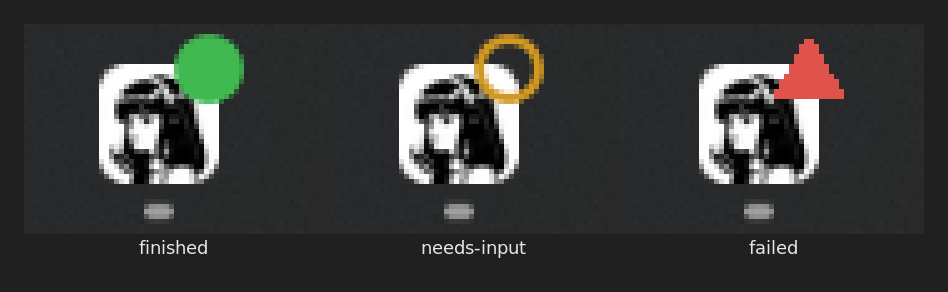
the Hermes taskbar button carrying a green disc, an amber ring and a red triangle

A turn ends while you are in another app and nothing tells you. This puts a small dot on the Hermes taskbar button so you can see it from across the screen.

DotMeans
green disca turn finished
amber ringa session is waiting on you: approval, clarify, password prompt
red trianglea turn failed

The dot clears when you open that session. Other sessions keep theirs. Failure outranks waiting, waiting outranks finished.

When no bridge can draw the coloured dot, the grey count Chromium puts on the button is the fallback, and the status-bar dot still shows the state.

The two halves talk to each other over loopback on the same machine. Nothing leaves it, and there is no other network call.

Install

Capabilities -> Plugins -> Install from Git, then BrokeSkill/hermes-taskbar-badge. Nothing else. The plugin has two halves and they arrive together: the desktop half draws the dot and holds the settings, the Python half colours the Windows button.

Settings

Settings -> Plugins -> Taskbar Badge. Pick the three colours, or press a test button to raise the dot without waiting for a real turn. Advanced folds out under a click and gives one event type its own colour.

Grey icon only puts the plugin back to the legacy look: Chromium's neutral count on the button, no colour. The switch clears a colour that is already up, and turning it off brings the colour back.
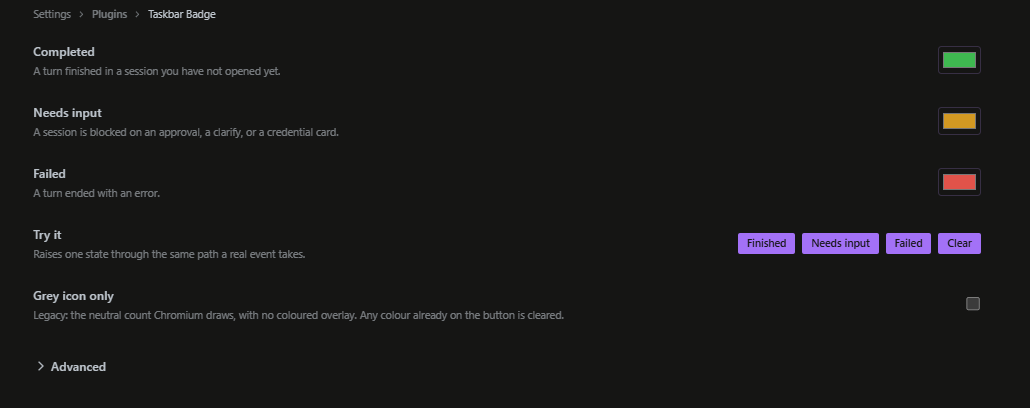
Taskbar Badge settings page: three colour rows, four test buttons, and the Grey icon only switch

Nothing is installed outside the plugin folder and no login item is created. Delete the plugin and the coloured badge is gone.

Known limits

Gateway and app on separate machines. The Python half runs inside Hermes, so it paints the taskbar of whichever box runs the gateway. If your gateway is a Pi and your app is a laptop, the plugin cannot colour the laptop button on its own: a desktop plugin has no way to start a process, and it cannot write a file outside its own storage, so it cannot install or launch the bridge for you. What the laptop shows until you act is the grey count and the status-bar dot.

The fix is one command on the laptop. Copy bridge.py from this repo there and run python bridge.py, once per login, or add it to that machine's startup. The plugin then finds it on 127.0.0.1:8766 and colours the button as usual. Every other install, where Hermes and the app share a machine, needs none of this.

A prompt raised by a session you are not looking at may not light up. Opening that chat does.

License

MIT.

README from the reviewed commit a6fb95b; it updates when the author re-pins.

More by BrokeSkill

5 plugins by BrokeSkill in the catalog.

BrokeSkillhermes-insightSelection-definition lookup for Hermes Desktop. Select any text, get an AI definition with sources in a popup. Renders the definition inline, runnable code aside. Backend is a stateless hermes insight CLI; panel, providers, and one-click model picking are configurable. Disclosure — definitions are generated with your configured provider keys (the selected term, your format template and optional web-search results are sent to that provider) via a short-lived hermes insight CLI run; no background process remains. When web search is on it also queries your configured searxng instance and fetches result thumbnails from their image hosts, inlining them into the panel; nothing is fetched without a searxng URL.CommunityDesktop app3BrokeSkillhermes-vision-inlineAttach an image inline to the session model when it can see one, instead of letting an explicit auxiliary.vision backend describe it. Core already attaches images natively by default; what this plugin changes is an explicit auxiliary.vision setting, which it overrides so the model reads the pixels directly. The image stays in context, so follow-ups do not reprocess it. The model's modality comes from the local models.dev cache; no network calls and nothing to configure. Disclosure — replaces the vision_analyze handler through tool_execution middleware: when the local models.dev cache says the main model takes images and its provider carries images in tool results, it attaches the image itself even if you configured an auxiliary.vision backend (agent.image_input_mode: text still turns this off); the image stays in the conversation and is resent on later turns; relies on Hermes private vision helpers, so after a Hermes update it may silently fall back to the normal path.Communitytools1BrokeSkillhermes-desktop-cameraA camera button for the Hermes Desktop composer. Open the preview, take a photo, and the frame lands in the composer as an image attachment, ready to send.CommunityDesktop appBrokeSkillturn-bellA bell in the Hermes desktop composer that pings the ntfy topic Hermes already uses when a turn finishes. Click to cycle off, current turn, or all turns. Disclosure — when enabled, posts the first line of each finished reply plus model, duration, token and cost figures to the ntfy server/topic Hermes is configured with (default ntfy.sh); reads NTFY_* from the profile .env and falls back to the ntfy CLI's ~/.config/ntfy/client.yml login (read-only).CommunityDesktop app

Developer Mode

Explore built-in Hermes toolsets and actions.

HermesAgent

Developer?

Create a Hermes extension for Desktop or agent workflows.

Developer Section