 winchxyz
hermes-x-bookmarks
A Hermes Agent plugin that reads all your X
bookmarks, including long posts, threads and X Articles, sorts them with your own Hermes model and
exports them: a board on your Desktop, notes in Obsidian, a Notion database or a Google Doc.
/xbm sync       pull your bookmarks from X (the first run reads all of them)
/xbm classify   sort them: category, tags, kind, one-line summary, priority
/xbm export     write them out: desktop, obsidian, notion, gdocs (or all)
/xbm digest     the week in your bookmarks: the best ones numbered, 3 post ideas
/xbm schedule   get that digest every Sunday in this chat; reply "task 3" or "skill 2"
Works in any Hermes chat (/xbm ...) and in the terminal (hermes xbm ...).
Uses the official X API only: no scraping, no browser automation, read-only access.
What it does
-
Sync. Reads every bookmark the X API returns, newest first. The full text of X Articles
(your bookmark is the Article, or quotes one) and long posts comes with it. Later syncs read small
pages and stop as soon as they reach bookmarks already stored. -
Sort. Your Hermes model labels each bookmark: a category from your list, up to 5 tags, a kind
(read, try, task, post-idea, reference, skill-candidate), a one-sentence summary, a priority
(1-3) and why you probably saved it. Ten bookmarks per model call; nothing is sorted twice.
Post text is passed to the model as data, never as instructions. -
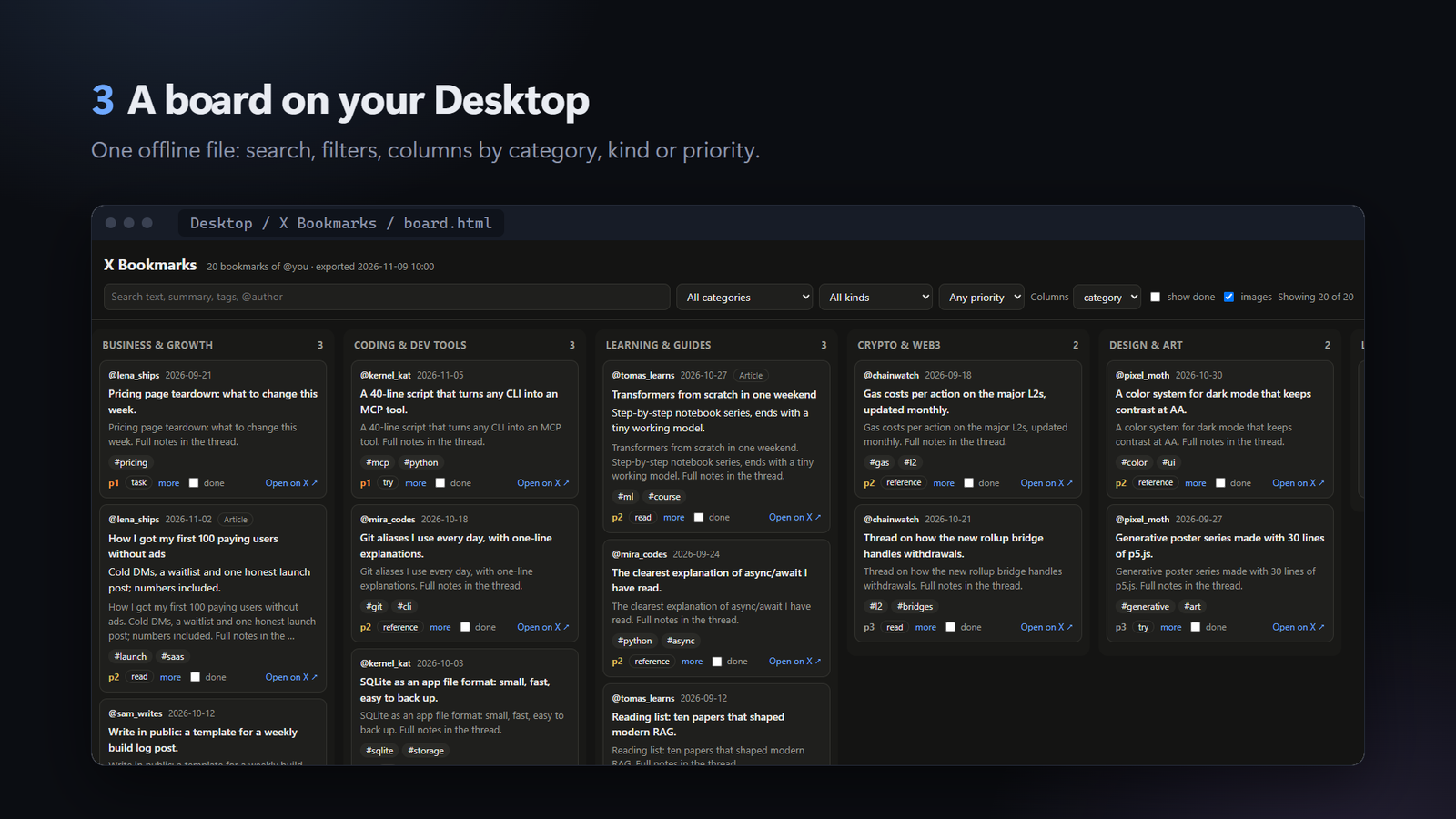
Desktop board.
board.htmlis one self-contained page: search, filters, columns by
category, kind or priority, a "done" mark per card (kept in that browser).bookmarks.mdis the
same list as Markdown, grouped by category. -
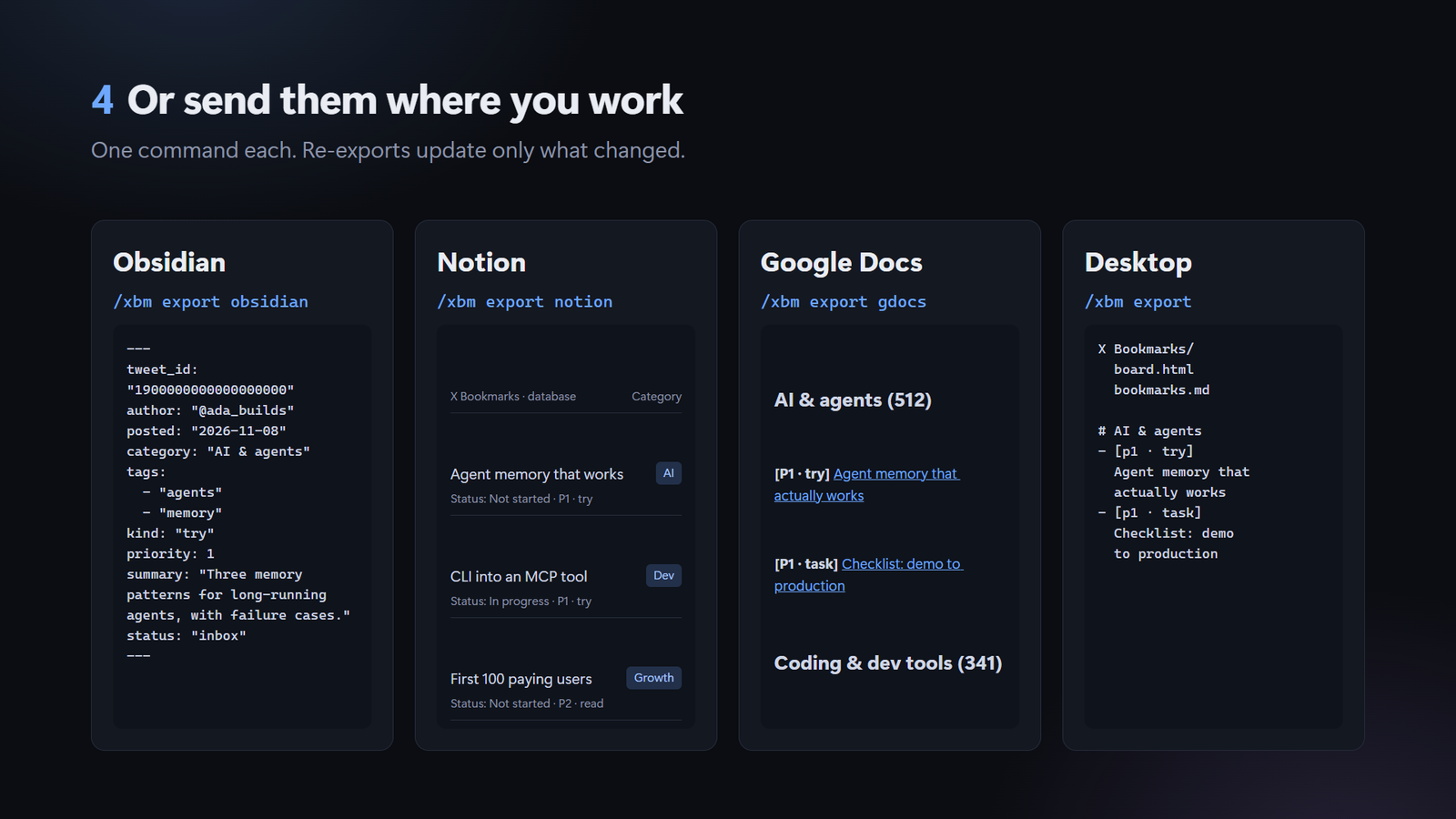
Obsidian. One note per bookmark in your vault's
X Bookmarksfolder, with front matter
(category, tags, kind, priority, summary, status) and the full post or Article text, plus an
X Bookmarks.basetable. Later exports update only the plugin's keys: yourstatus, your own
keys and anything you write in the note stay. -
Notion. A database "X Bookmarks" under a page you choose, with boards by category and by
status. One page per bookmark with the text, quote, image and a link card. Re-exports update
only what changed and never touchStatus(yours to move); pages you delete stay deleted. -
Google Docs. One document "X Bookmarks", grouped by category, highest priority first, with
links. Each export rewrites the same document, so its link and sharing stay. -
Digest.
/xbm digestcovers the bookmarks stored in the last 7 days: counts per category,
a 2-3 sentence overview, the 10 best ones numbered (highest priority first, your own posts left
out) and 3 ideas for your own posts. The overview and ideas come from your model, in your
summary language; without a model you still get the numbered list. -
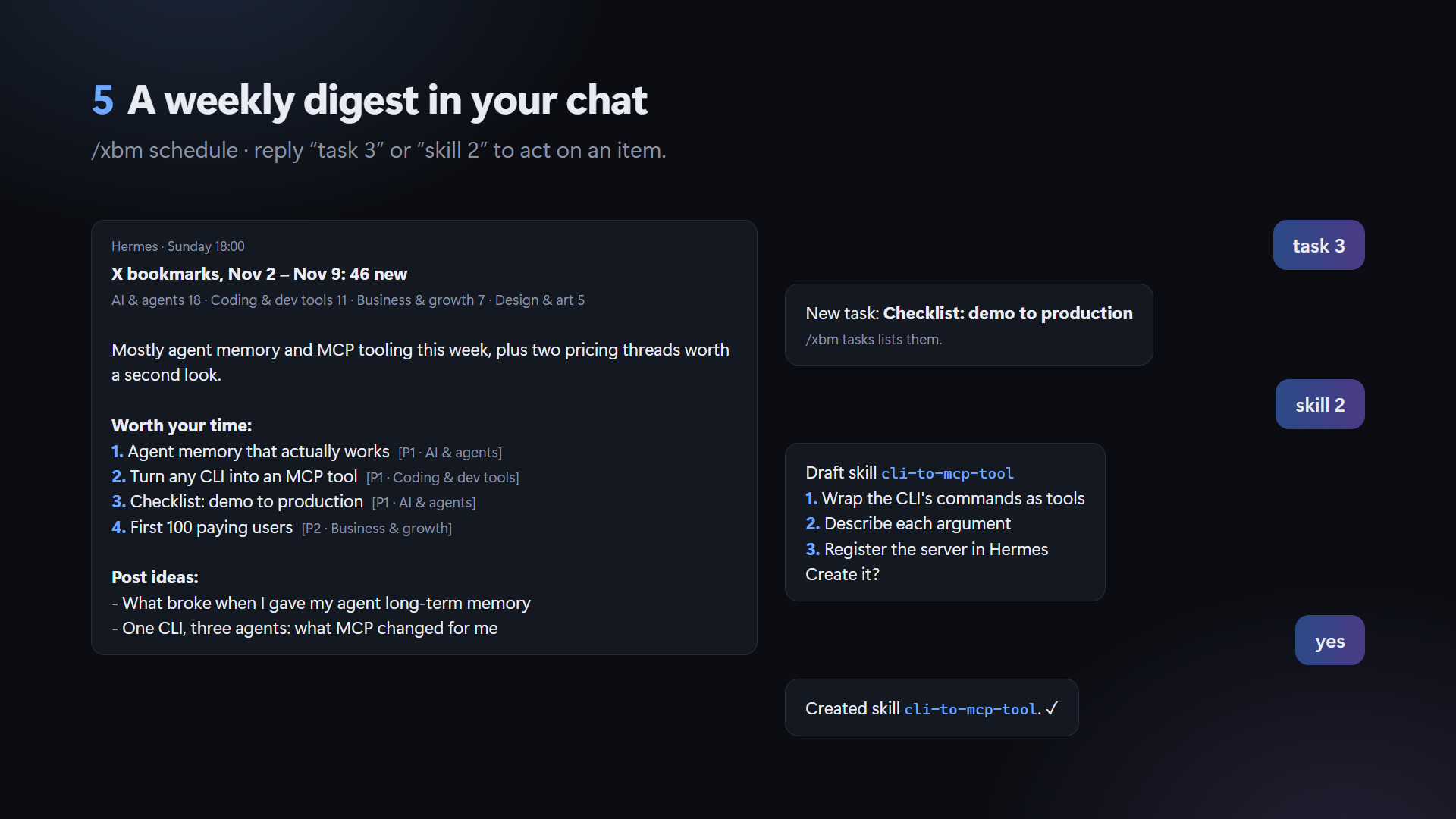
Weekly, in your chat.
/xbm schedulecreates an ordinary Hermes cron job (default: every
Sunday 6pm,/xbm schedule every monday 9amto change it). Each week it syncs, writes the
digest and posts it to the chat you set it up from, or stays quiet when nothing is new. It is
also in Hermes' blueprint gallery as "X bookmarks weekly digest"./xbm unscheduleremoves it. -
Act on an item. Reply to the digest with "task 3", or use
/xbm task 3 [note]: the
bookmark becomes a task (/xbm tasks,/xbm done 1). "skill 2" or/xbm skill 2drafts a
Hermes skill from that post (steps, pitfalls, how to check) and shows it;/xbm skill 2 save
creates it through Hermes' ownskill_manage, where Hermes may ask you to approve it. Posts
with no repeatable procedure get no skill. Your notes stay in the exports above.
Setup
1. Your own X developer app
Every user brings their own X app and pays X for their own reads; nothing goes through a shared
app.
- Sign in at console.x.com with the X account whose bookmarks you want.
That account must own the app (that is what makes the "owned reads" price apply). - Create an app on the Pay-per-use plan, add credit and set a spending limit.
- In the app's user authentication settings, set permissions to Read.
- On Keys and tokens, copy the API Key and API Key Secret, then generate the
Access Token and Access Token Secret (after setting Read, so they carry it).
2. Keys into Hermes
Put the four values in your Hermes profile's .env (~/.hermes/.env; on Windows
%LOCALAPPDATA%\hermes\.env):
XBM_X_API_KEY=...
XBM_X_API_SECRET=...
XBM_X_ACCESS_TOKEN=...
XBM_X_ACCESS_TOKEN_SECRET=...
The plugin reads them through Hermes' secret scope and never writes them anywhere. To revoke,
regenerate the tokens on X.
3. Install
hermes plugins install winchxyz/hermes-x-bookmarks --enable
hermes xbm whoami
whoami should print your handle. Then:
hermes xbm sync
hermes xbm classify --all
hermes xbm export
4. Export destinations (optional)
Obsidian. Nothing to set up if Obsidian has your vault open: the plugin finds it in
Obsidian's own obsidian.json. Otherwise set obsidian_vault to the vault folder. Then
hermes xbm export obsidian.
Notion goes through Hermes' own Notion connector: no token, no Notion app of your own.
-
Connect Hermes to Notion once (opens the browser to sign in):
hermes mcp install notion -
Let this plugin use that connection. In your Hermes
config.yaml(~/.hermes/config.yaml;
on Windows%LOCALAPPDATA%\hermes\config.yaml) add:plugins: entries: hermes-x-bookmarks: mcp_allowlist: ["notion"]Hermes gives a plugin no MCP access unless you list the server here.
-
Make (or pick) a Notion page for the database, then in a Hermes chat:
/xbm export notion <that page's URL>(the URL is remembered asnotion_page).
One export writes everything (25 pages per request; about 1,900 bookmarks take a few
minutes) and shows its progress in the chat. Running it again sends only what changed.
Without the connector (an older Hermes, or a terminal where it is not connected), the plugin can
use a Notion connection token instead: create an internal connection at
notion.so/profile/integrations with Read, Update and
Insert content, put its token in the Hermes .env as XBM_NOTION_TOKEN=..., add the connection
to the page (••• → Connections), and run hermes xbm export notion <page URL>. Both routes
write the same database and know which pages already exist.
Google Docs.
- In the Google Cloud console create a project and enable
the Google Docs API. - Google Auth Platform → Branding: app name and your email. Audience: External, add
yourself as a test user, then Publish app (In production); in Testing, Google ends the
sign-in after 7 days. With only thedrive.filescope no verification is needed; Google shows
an "unverified app" screen once, which you can pass for your own app. - Clients → Create client → Desktop app. Put both values in the Hermes
.env:
XBM_GOOGLE_CLIENT_ID=...andXBM_GOOGLE_CLIENT_SECRET=... hermes auth add hermes-x-bookmarks:google(opens the browser once), then
hermes xbm export gdocs.
drive.file lets the plugin see and change only the document it created, nothing else in your
Drive.
Set export_to (for example desktop, obsidian, notion) to choose what a plain export does.
Settings
Set in the Hermes Plugins settings, or with /xbm about for the last one.
| Setting | Default | What it does |
|---|---|---|
| categories | AI & agents, Coding & dev tools, Crypto & web3, Business & growth, Design & art, Learning & guides, News & opinion, Life & misc | Your category list, comma-separated. "Other" is always added. |
| classify_language | English | Language of summaries and the why-saved note |
| about_me | empty | A sentence on what you build and follow; used only to judge priority (/xbm about <text>) |
| export_to | desktop | What a plain export writes: desktop, obsidian, notion, gdocs |
| export_dir | X Bookmarks on your Desktop | Where export desktop writes |
| obsidian_vault | the vault Obsidian has open | Vault folder; notes go to X Bookmarks/ in it |
| notion_page | empty | The Notion page that holds the database |
| auth_backend | auto | keys (above), hermes (OAuth 2.0 via hermes auth add hermes-x-bookmarks:x) or xurl |
Sorting runs on the plugin's own model slot, X bookmarks: sorting. It uses your main model
until you pick another one in hermes model (auxiliary tasks). A stronger model gives clearly
better priorities and fewer odd categories.
Commands
| Chat | Terminal | |
|---|---|---|
| /xbm sync [full] | hermes xbm sync [--full] | Pull new bookmarks (full re-reads all) |
| /xbm classify [N\|all] | hermes xbm classify [--limit N \| --all] | Sort unsorted bookmarks (chat: 20 by default, max 100) |
| /xbm export [where] | hermes xbm export [where] [--dir PATH] | desktop, obsidian, notion [page URL], gdocs, all; several allowed |
| /xbm status | hermes xbm status | Counts, categories, last runs, X API and model use |
| /xbm list [N] [category] | hermes xbm list [--limit N] [--category C] | Most recent bookmarks with their labels |
| /xbm about [text\|clear] | hermes xbm about [text] | Show or set what you build and follow |
| /xbm digest [days] | hermes xbm digest [days] | Digest of the last 7 (or N) days, items numbered |
| /xbm task N [note] | hermes xbm task N [note] | Make item N of the latest digest a task (also a post id or x.com link) |
| /xbm tasks, /xbm done N | hermes xbm tasks, hermes xbm done N | Open tasks; finish task N |
| /xbm skill N [save] | hermes xbm skill N [save] | Draft a Hermes skill from item N; save creates it |
| /xbm schedule [when] | | Weekly digest as a Hermes cron job in this chat (default every sunday 6pm) |
| /xbm unschedule | hermes xbm unschedule | Remove that cron job |
In a chat you can also just answer a digest: "task 3", "skill 2", "done 1". The agent has
three tools for it: xbm_digest, xbm_task and xbm_skill (toolset x_bookmarks). Hermes
does not show a slash command's output to the agent, so when your whole message is such a reply
and you had a digest in the last 8 days, the plugin's pre_llm_call hook adds one line to that
message naming the item and the tool. Any other message is left alone.
Cost
- X API (paid to X, on your app). Reading your own bookmarks is an "owned read": about
$0.001 per post. The author's first full sync of 1,880 bookmarks took 22 requests and about
$1.89; a sync with nothing new reads 10 posts, about $0.01. From 2026-11-22 X also bills
the expanded objects that come with each page (authors, images, quoted posts): on the same
1,880 bookmarks that is about 3,650 more objects, so a full sync costs roughly 3x.
/xbm statusshows an estimate per run. - Model (your provider). Sorting 1,880 bookmarks took 188 calls, about 500k input and 200k
output tokens. On a free model that was $0. A digest is one model call (up to 60 one-line
summaries in), a skill draft one call; both use thexbm_digestmodel slot. The weekly cron
job itself runs on your main model, which mostly just passes the digest on.
Privacy, network and files
What the plugin touches, so you know before installing:
- Network.
api.x.com(your bookmarks, read-only) and your Hermes model provider (sorting).
Only when you export there: Notion through Hermes' Notion connector (thenotionMCP server,
only if you list it inmcp_allowlist; it creates the database, its two boards and the pages,
and updates those pages) orapi.notion.comwith your token, anddocs.googleapis.comthrough
Hermes' Google sign-in. Nothing else, no telemetry. - Data. Bookmarks, labels, run history, export ids, digests, tasks and skill drafts live in
Hermes plugin data (SQLite) on your machine. No keys or tokens are stored there. - Hermes objects it creates, only when you ask.
/xbm schedulecreates one Hermes cron job
(it keeps running if you disable the plugin;/xbm unscheduleor Hermes' cron tools remove
it)./xbm skill N savecreates one Hermes skill throughskill_manage. Both are ordinary
Hermes objects you can edit or delete. - Credentials. The X keys and the optional Notion token are read from the Hermes
.env
through Hermes' secret scope; the Notion connector, X OAuth 2.0 and Google sign-ins are kept
and refreshed by Hermes.
The plugin never writes a credential. - Files outside plugin data.
export desktopwritesX Bookmarks/on your Desktop (or
export_dir);export obsidianwrites notes into your vault'sX Bookmarks/folder and reads
Obsidian'sobsidian.jsonto find the vault (vault paths only). - Hook.
pre_llm_callreads your message only to check whether it is just "task N",
"skill N" or "done N"; only then it opens plugin data and adds a short note (see Commands). - Commands. None, unless you choose the
xurlsign-in, which runsxurl token. - Post text goes to the model you configured in Hermes and to the destinations you export to.
Limits
- X Article bodies come from the API as plain text (no headings, links or images inside).
- Threads: each bookmarked post is stored on its own; the rest of the thread is not fetched yet.
- Removing a bookmark on X does not yet remove it here.
Development
pip install -e . -r requirements-dev.txt
ruff check .
pytest -q
Design and research notes: docs/ARCHITECTURE.md,
docs/DECISIONS.md, docs/research/.
CI runs ruff, pytest, and hermes plugins validate / doctor against Hermes v0.23.0 and main.
License
MIT
README from the reviewed commit c4c64dc; it updates when the author re-pins.