 DECRUX9812
hermes-office (office-desk)


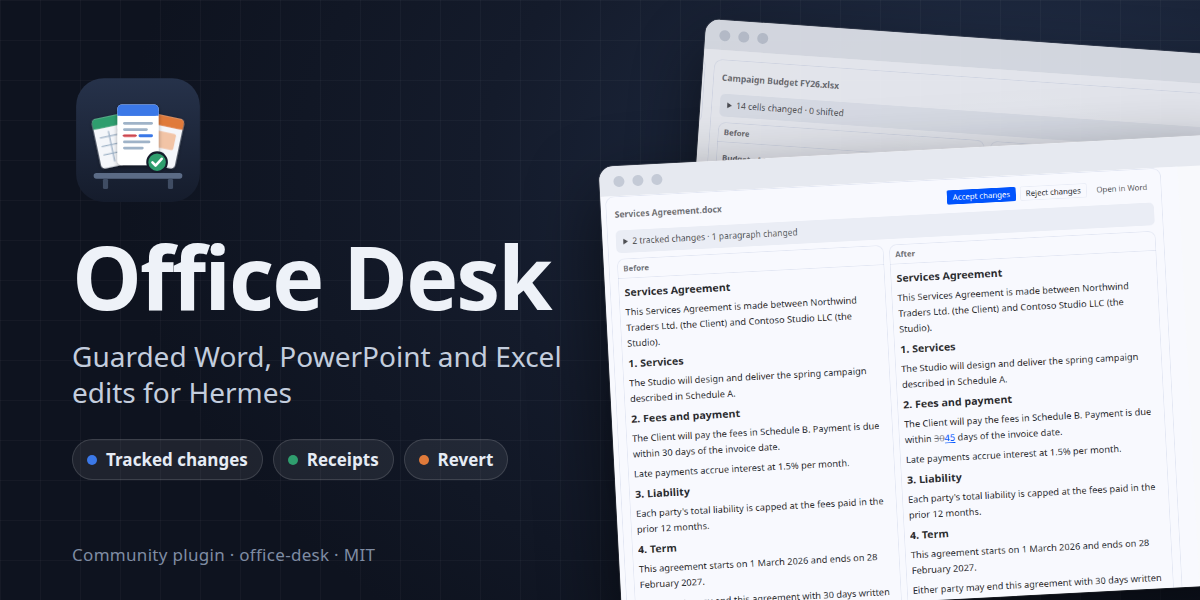
A Hermes plugin for safely editing Word, PowerPoint and
Excel files. It gives the agent 14 guarded tools built on Paper Instruments'
paper-docx,
paper-pptx and
paper-xlsx. Those libraries give you tracked changes,
format-preserving edits and honest refusals, so nothing gets done by raw XML surgery. You also get a Desk page
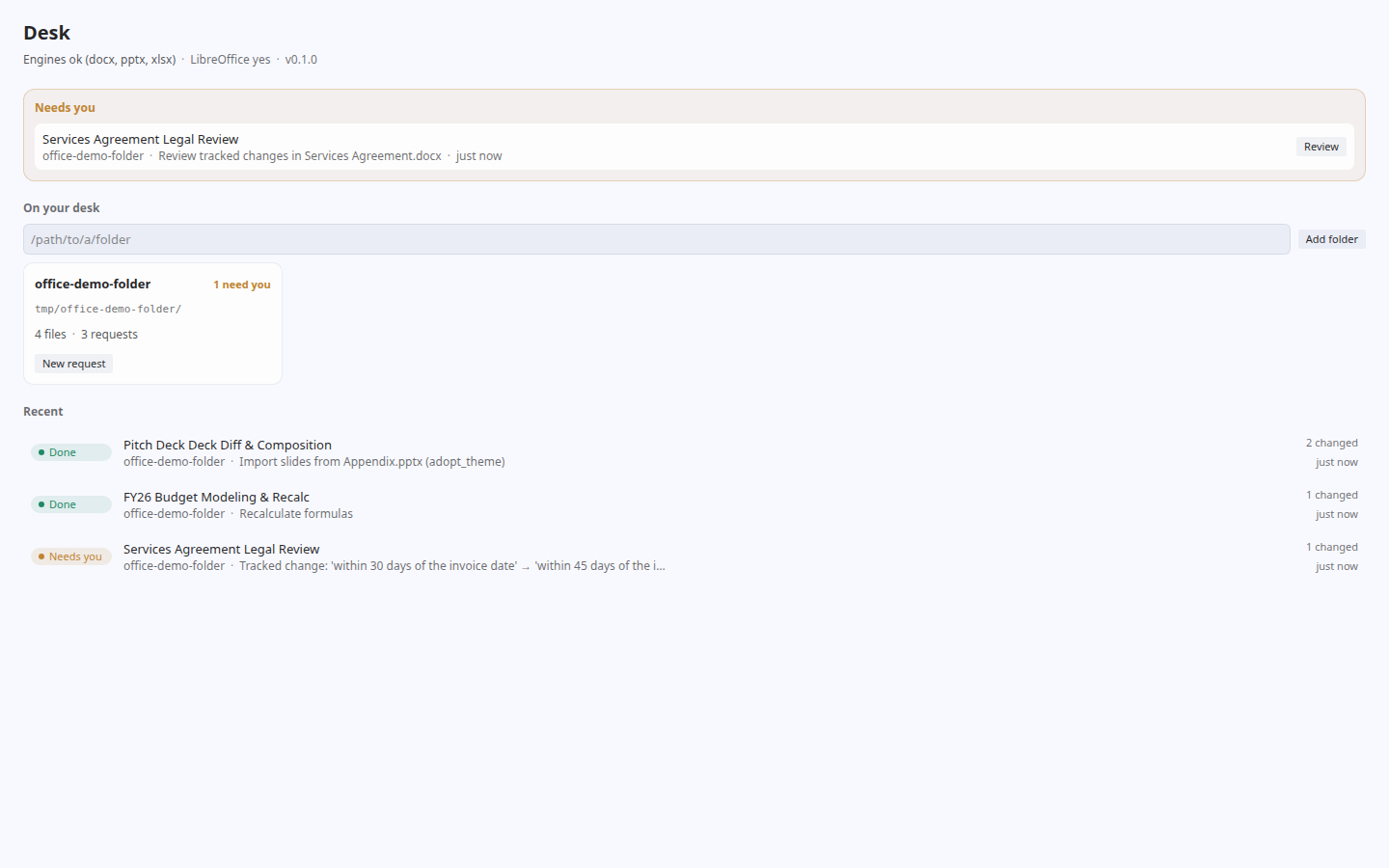
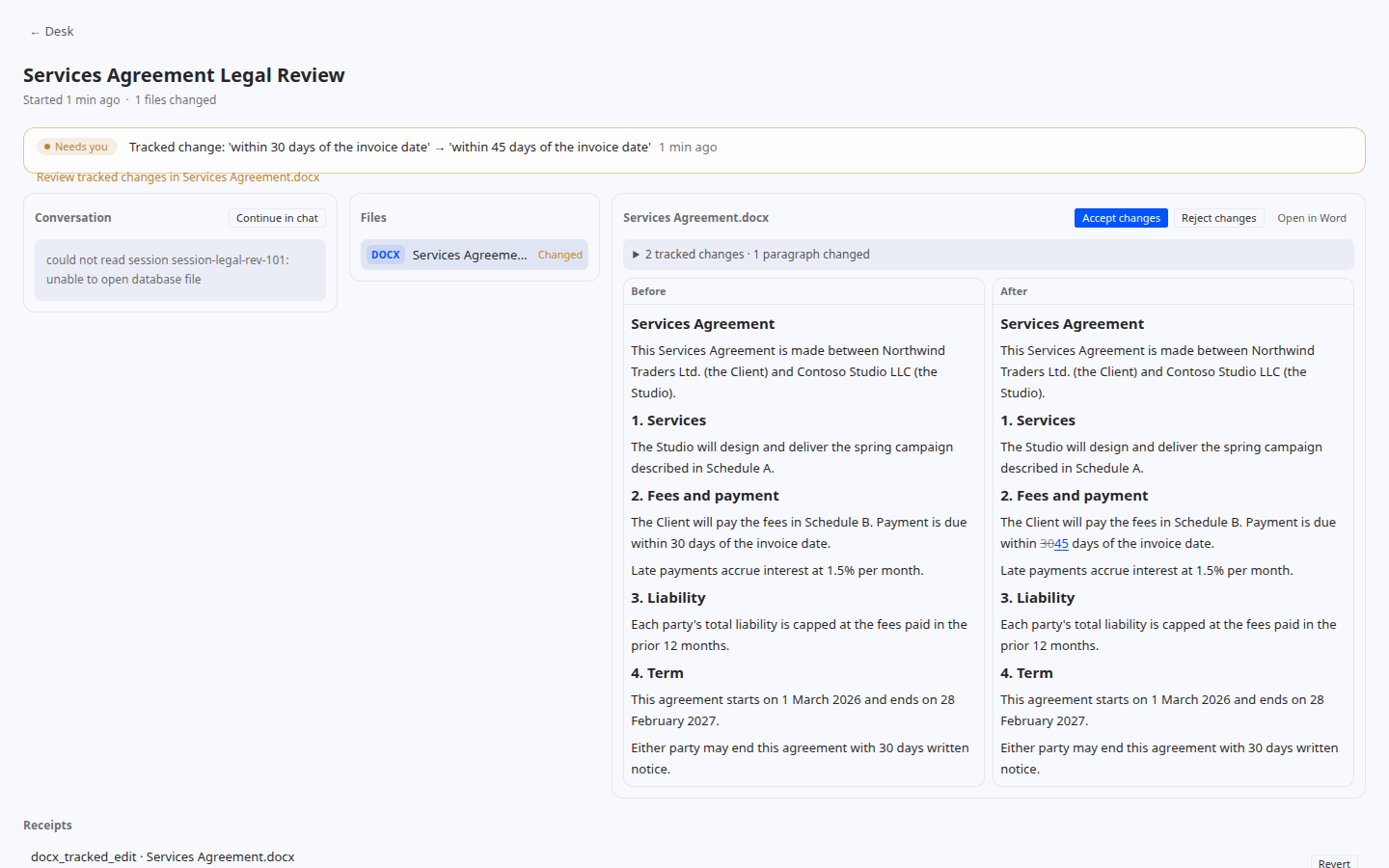
where you watch the work and control it: folders, workstreams, before/after previews, diffs, accept/reject and revert.
The repository is hermes-office; the plugin id Hermes uses is office-desk (hermes plugins enable office-desk).
Why it is safe
- Edits stay inside your Desk folders. The agent can only edit files inside a folder you put on the Desk.
Anything else is refused withoutside_desk. It can still read any readable file. - Every change gets a receipt. A receipt holds the before/after sha256, a byte-exact backup and the library's own
report.office_receipt action=revertrestores the backup. - Writes are atomic and narrow. Each write goes to a temp file and is then renamed into place.
patch_saveand
the preserve-mode saves leave every untouched part byte-identical. - A refusal leaves the file byte-identical. Refusals come back as
{"ok": false, "refused": true, "reason", "message", "hint"}. - Word edits wait for you. Edits are made as tracked changes, which you accept or reject in Word or on the
Desk. Tracked changes and refused edits flag the workstream as Needs you. - LibreOffice is only used for formula caches. It recalculates Excel formula caches into a candidate file,
and that candidate is checked before it replaces the original.
Install
hermes-office needs Python ≥ 3.11 and must be installed in the same Python environment as Hermes.
# 1. The Paper Instruments libraries (they provide the `docx`, `pptx` and `openpyxl` import names)
pip install paper-docx paper-pptx paper-xlsx

# 2. The plugin
pip install git+https://github.com/DECRUX9812/hermes-office.git@v0.1.1
[!WARNING]
Never install the Paper libraries next topython-docx,python-pptxoropenpyxlin the same environment.
The Paper forks replace those packages and use the same import names. If both are installed, one overwrites the
other and you get the wrong engine without any error. If a stock package is already there, uninstall it first
(pip uninstall python-docx python-pptx openpyxl), or use a dedicated venv. If the forks are not the ones being
imported, the tools report themselves as unavailable.
Optional: install LibreOffice (soffice on PATH) to enable xlsx_recalc.
Enable it in Hermes
pip install registers the hermes_agent.plugins entry point (office-desk = hermes_office.plugin:register).
Then enable the plugin in $HERMES_HOME/config.yaml:
plugins:
  enabled:
    - office-desk
Or, as a directory plugin (useful while developing):
git clone https://github.com/DECRUX9812/hermes-office.git "$HERMES_HOME/plugins/office-desk"
Once the plugin is enabled, hermes dashboard and hermes serve serve the Desk backend routes at
/api/plugins/office-desk/. The Desk desktop page is desktop/plugin.js. To install it into Hermes Desktop, see
desktop/README.md and INTEGRATION.md.
Settings
office-desk has no settings screen of its own. Its settings are declared in plugin.yaml (config_schema), and
Hermes builds the form: in Hermes Desktop open Settings > Plugins > office-desk (or click the gear on the
plugin's row in Capabilities > Plugins). Values are stored in config.yaml under
plugins.entries.office-desk.settings, so you can also edit them there:
plugins:
  entries:
    office-desk:
      settings:
        folders: [/path/to/Clients]       # kept on the Desk (default: none)
        default_author: Legal Team        # author of tracked changes and comments (default: Hermes)
        recalc_timeout: 120               # seconds xlsx_recalc waits for LibreOffice (default: 120)
| Setting | Type | Default | What it does |
|---|---|---|---|
| folders | list | [] | Absolute folder paths kept on the Desk. Missing or relative paths are skipped with a warning. Folders added from the Desk page stay too. |
| default_author | text | Hermes | Author on Word tracked changes, comments and redlines when the agent doesn't name one. |
| recalc_timeout | number | 120 | Seconds xlsx_recalc waits for LibreOffice. On timeout the workbook is unchanged. |
The Desk page is a work surface (folders, workstreams, review). It is not a settings page.
What it touches (disclosure)
- Files: reads any Office file the agent points it at; writes only inside Desk folders. Every write keeps a
byte-exact backup and a receipt in the plugin's own data directory ($HERMES_HOME/plugin-data/office-desk/). - Subprocess:
xlsx_recalcruns LibreOffice (soffice, headless) on a temporary copy of the workbook, if
LibreOffice is installed. Nothing else is executed. - Hermes session store: the Desk page reads a workstream's chat messages (read-only) to show the conversation.
- Network: none. No telemetry, no credentials, no background processes, no self-updates.
Usage
Put a folder on the Desk, then ask for changes in plain language:
Put
~/Clients/Northwindon my desk. In Services Agreement.docx, change the payment term from 30 to 45 days
as a tracked change, and add a comment explaining why.
In Campaign Budget FY26.xlsx, insert a row for "Influencers" under Paid Social at 12,000, recalculate,
and show me what changed.
Bring slide 1 of Appendix.pptx into Spring Campaign Review.pptx using the target deck's theme.
The agent works through the tools below. The bundled office-review skill teaches it the workflow: inspect, edit,
check the receipt, and stop when an edit is refused. A chat that edits Desk files is bound to a workstream
automatically. You review each one on the Desk:
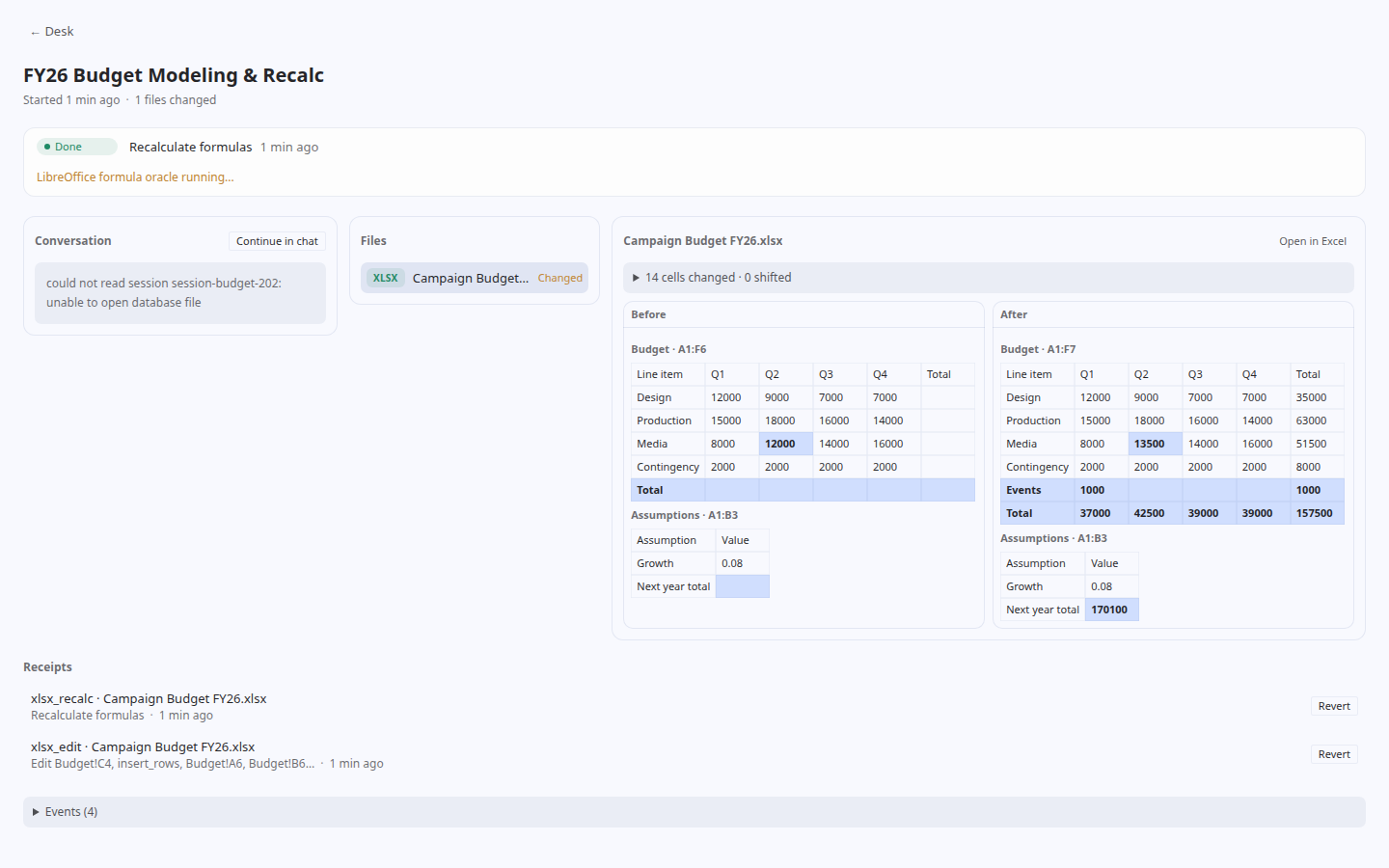
Tools (toolset office)
| Tool | What it does |
|---|---|
| office_desk | list/add/remove folders; workstream status, needs_you, done, attach |
| office_inspect | structure of a docx/pptx/xlsx (paragraphs, slides, shapes, sheets, formulas, comments, revisions) |
| office_search | find text in one file or a folder tree (exact/normalized/regex) |
| docx_tracked_edit | replace text as a tracked change (accept/reject-able in Word) |
| docx_comment | add a comment on exact text, reply to one, resolve one |
| docx_redline_accept_reject | accept/reject tracked changes (all / by author / by index); compare builds a redline between two versions |
| pptx_inspect_formats | effective font/paragraph/shape formatting with provenance |
| pptx_edit_shape | replace text, set geometry, delete shapes; clone/move/delete slides |
| pptx_compose_decks | import slides between decks (adopt_theme / keep_appearance / bake) |
| pptx_diff | deck diff: slides added/removed/moved, text changes |
| xlsx_edit | set values/formulas, insert/delete rows/cols (references rewritten), rename sheets; preserve mode + edit receipt |
| xlsx_recalc | recalculate formula caches with LibreOffice and report values |
| xlsx_diff | cell-level workbook diff |
| office_receipt | list/show/revert receipts |
The model
- Folder: a directory you put on the Desk. Edits are only allowed inside one.
- Workstream: one request. It is created automatically for a chat, or queued from the Desk page and handed to
a session. - Receipt: the record of one change (hashes, backup, library report). It can be reverted.
- Needs you: a workstream that has tracked changes to review or a refused edit.
Upgrading from v0.1.0
v0.1.0 used the plugin id hermes-office, which another catalog plugin already uses. From v0.1.1 the id is
office-desk: enable office-desk instead of hermes-office in config.yaml (and, for a directory install,
rename $HERMES_HOME/plugins/hermes-office to office-desk). An existing Desk in plugin-data/hermes-office keeps
working where it is.
Development
python -m venv .venv && . .venv/bin/activate
pip install paper-docx paper-pptx paper-xlsx
pip install -e '.[dev]'
python -m pytest tests -q
- The tests use real files generated by the libraries (
scripts/make_demo_files.py <dir>). - The xlsx recalc test runs only when LibreOffice is installed.
- The Hermes discovery tests run only when
hermes_clican be imported, or whenHERMES_OFFICE_PYTHONpoints to
a Python that has hermes-agent installed. - To work on the desktop page, see desktop/README.md.
License
MIT. paper-docx, paper-pptx and paper-xlsx are also MIT-licensed. hermes-office depends on them;
it does not vendor them.
README from the reviewed commit b53630c; it updates when the author re-pins.