All plugins

umami-digest

Each morning one letter arrives with yesterday's pageviews, visitors, day-over-day change, the top five pages by pageviews, and a surge flag from the Umami instance you already run, with no model. Umami 3.4.1 returns expanded paths 500 at a time in visitor order. The letter sends limit 500 and walks offset until a short page, or 20 pages, then ranks by pageviews. A day that hits the cap says the five are the top 5 among the first N paths. Disclosure — GET only to the origin in UMAMI_URL with Authorization Bearer UMAMI_API_KEY; plain http only to loopback, otherwise https; the plugin downloads nothing at runtime; umami_digest is read-only and asks for no approval; anyone you allow on a gateway can call it; turn a surface off with hermes tools; hermes umami-digest schedule writes a no-agent cron script that costs 0 tokens with no daily cap; empty stdout sends nothing; run unschedule before removal; a leftover job stops with hermes cron remove <id>; after hermes plugins remove, hermes cron remove <id> leaves scripts/umami-digest.py and you delete that file yourself; state stays in plugin-data/umami-digest; schedule uses hermes_constants.get_hermes_home, so an update can stop it.

TakeshiTGALToolsv0.1.0Updated 2 hours ago

About

Each morning one letter arrives with yesterday's pageviews, visitors, day-over-day change, the top five pages by pageviews, and a surge flag from the Umami instance you already run, with no model. Umami 3.4.1 returns expanded paths 500 at a time in visitor order. The letter sends limit 500 and walks offset until a short page, or 20 pages, then ranks by pageviews. A day that hits the cap says the five are the top 5 among the first N paths. Disclosure — GET only to the origin in UMAMI_URL with Authorization Bearer UMAMI_API_KEY; plain http only to loopback, otherwise https; the plugin downloads nothing at runtime; umami_digest is read-only and asks for no approval; anyone you allow on a gateway can call it; turn a surface off with hermes tools; hermes umami-digest schedule writes a no-agent cron script that costs 0 tokens with no daily cap; empty stdout sends nothing; run unschedule before removal; a leftover job stops with hermes cron remove <id>; after hermes plugins remove, hermes cron remove <id> leaves scripts/umami-digest.py and you delete that file yourself; state stays in plugin-data/umami-digest; schedule uses hermes_constants.get_hermes_home, so an update can stop it.

umami-digest

Each morning one letter arrives with yesterday's pageviews, visitors, the change from the day before, the top five pages by pageviews, and whether traffic surged, from the Umami instance you already run.

Unlike catalog hermes-seo, a native Hermes port of Claude SEO 2.4.2 with SEO skills and a hermes_seo_run tool that can send data to separately configured providers (Matomo is one of them), this plugin only reads yesterday's numbers from an Umami instance you host.

What you get

hermes umami-digest schedule writes a Python script under the Hermes home and creates one cron job with hermes cron create --no-agent --script. Hermes runs that script without a model and delivers stdout as the message. Empty stdout sends nothing. A non-zero exit is a failed run. The default schedule is 0 8 * * * (08:00 every day in the cron daemon's timezone). The conversation tool umami_digest returns the same letter and takes no arguments.

The letter is for yesterday in UMAMI_TIMEZONE (or TZ, or UTC). It includes pageviews, visitors, and day-over-day change from the Umami comparison object (compare=prev). Top pages come from GET /api/websites/{id}/metrics/expanded?type=path&limit=500. On Umami 3.4.1 that route calls getPageviewExpandedMetrics. pageviews is sum(count(*)) grouped by url_path. Rows come back in visitor order, 500 at a time when limit is omitted. The letter sends limit=500 and walks offset until a page is shorter than 500. It then sorts the whole list by pageviews and prints five. It stops after 20 pages (10000 paths). On that day the heading says top 5 among the first N paths. It does not call /metrics, whose y is count(distinct website_event.session_id). Surge is pageviews at least 2.0 times the previous day. That ratio is the constant SURGE_RATIO. When the previous day is 0 and yesterday is above 0, the line is Surge: new traffic (pageviews N vs 0). and does not mention the threshold. There is no model.

A successful read of zero traffic is still a letter. A site that could not be read is reported as unknown, not as zero. If every listed site fails, the script exits 1 with a short English line, and Hermes treats that as a failed watchdog run.

Settings

Put these in the Hermes profile .env that the cron job uses. Do not put keys in a plugin config file.

| Variable | Meaning |
|---|---|
| UMAMI_URL | Origin of your instance, for example https://umami.example.net or http://localhost:3000. No path, query, userinfo, or fragment. |
| UMAMI_API_KEY | Key from Settings → API keys. Sent as Authorization: Bearer. Username and password login are not used. |
| UMAMI_WEBSITE_ID | One website UUID, or several separated by commas. |
| UMAMI_TIMEZONE | Optional IANA name such as Asia/Tokyo. If unset, TZ is used, then UTC. An unknown name fails. It is not treated as UTC. |

Plain http is allowed only to loopback (localhost, 127.0.0.0/8, ::1). Any other host must be https. Umami Cloud hosts (cloud.umami.is, api.umami.is, *.umami.is) are refused. Redirects are not followed. Environment HTTP(S) proxies are not used, so the key is not sent to a proxy. Each GET gives up after 20 seconds with no data and 30 seconds in total. The path list is at most 20 of those GETs. A body larger than 1,000,000 bytes is a failure, not zero traffic.

The plugin never calls POST /api/send and never logs in with a username and password.

Schedule

hermes umami-digest schedule
hermes umami-digest schedule --deliver telegram
hermes umami-digest schedule --every "0 7 * * *"
hermes umami-digest status
hermes umami-digest unschedule

The default deliver target is local, and local does not send to chat. Delivery accepts origin, local, all, bot-chat, the Hermes 0.21.6 cron platform names, and public registry names that declare a cron delivery env var. cli, cron, api_server, and words that look like a schedule are rejected. A refused name can still be stored with hermes cron edit <id> --deliver. bot-chat puts the letter into another model turn.

--every accepts a 5-field cron expression or every 24h. Omitting --every on a later schedule keeps the saved schedule. The first schedule with nothing saved is 0 8 * * *. Faster than daily is rejected.

When HERMES_HOME is unset, schedule, status, and unschedule use hermes_constants.get_hermes_home(), the same default Hermes uses (HOME/.hermes on this platform). The child hermes cron is started with that path set as HERMES_HOME.

Run hermes umami-digest unschedule before hermes plugins remove. That removes the job and scripts/umami-digest.py. After the plugin is removed, that CLI is gone, so remove a leftover job with hermes cron remove <id>, and add -p <name> when the profile is not default. That command leaves scripts/umami-digest.py in the Hermes home, so delete that file too.

30-second check

Use an empty Hermes home. Do not point this at Umami Cloud. From this repository, run:

export HERMES_HOME="$(mktemp -d)"
export HERMES_HOME="$(cd "$HERMES_HOME" && pwd -P)"
hermes plugins install --enable "file://${PWD}"
docker compose -f proof/docker-compose.yml up -d
python3 proof/scene.py | grep '^UMAMI_' >> "$HERMES_HOME/.env"
sched=$(hermes umami-digest schedule --deliver local </dev/null)
printf '%s\n' "$sched"
job=$(printf '%s\n' "$sched" | grep -o 'job [0-9a-f][0-9a-f]*' | awk '{print $2}' | head -n 1)
hermes cron run "$job"
find "$HERMES_HOME/cron/output/$job" -name '*.md' -exec cat {} +

proof/scene.py logs in once as the default Docker admin only to mint an API key and a website, sends a few pageviews, and prints UMAMI_* lines. It does not go through the plugin. The last command prints the cron output file. The morning letter is the script stdout under the --- line. That file records Mode: no_agent. The run costs 0 tokens. pwd -P is there because the script write refuses a symlink anywhere in the directory. On macOS, /tmp and /var are symlinks.

To use HOME/.hermes instead of HERMES_HOME:

home=$(mktemp -d)
home=$(cd "$home" && pwd -P)
env -u HERMES_HOME HOME="$home" hermes plugins install --enable "file://${PWD}"
env -u HERMES_HOME HOME="$home" hermes umami-digest schedule --deliver local </dev/null

If POST /api/send on the pinned image accepts payload.timestamp (Unix seconds, Umami 3.4.1 does), proof/scene.py stamps yesterday so the letter is yesterday's numbers. If a later image rejects that field, send today's hits and keep yesterday's window in the unit tests.

Stop and remove only the two containers this compose file started:

docker compose -f proof/docker-compose.yml down --volumes

What the letter looks like

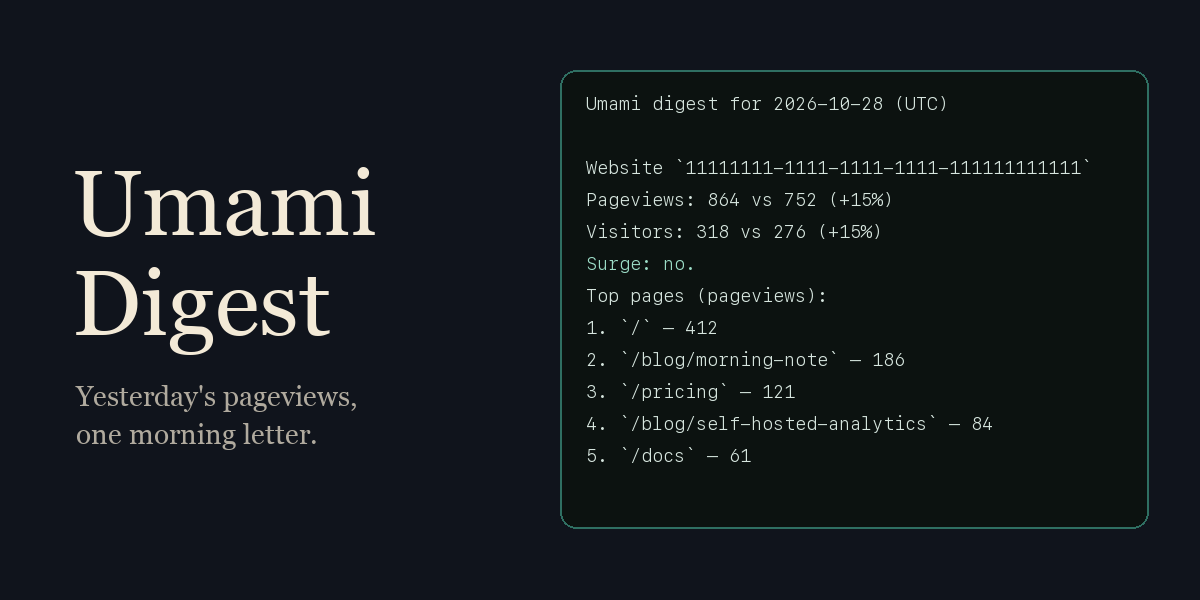
Umami digest for 2026-10-28 (UTC)

Website `f02c2807-9794-4f3b-a409-c9e9665ff2b0`
Pageviews: 4 vs 0 (no previous-day traffic)
Visitors: 1 vs 0 (no previous-day traffic)
Surge: new traffic (pageviews 4 vs 0).
Top pages (pageviews):
1. `/` — 2
2. `/blog` — 1
3. `/pricing'test` — 1

Path text is shown in backticks. Control characters in a path are replaced. A missing comparison object is called unknown, not zero.

Tools

One tool: umami_digest. It is read-only. It writes nothing on disk and sends no Umami event. It asks for no approval. Anyone you allow on a gateway can call it with your API key. Turn a surface off with hermes tools. There is no slash command.

Hermes version

requires_hermes is >=0.21.4. Hermes 0.21.4, dated 2026.9.21, is the earliest tree here that has hermes cron create --no-agent, hermes_constants.get_hermes_home, agent.secret_scope.get_secret, and plugins.plugin_storage.plugin_data_dir.

manifest_version is 2. python_dependencies is empty. The license is MIT. This repository does not include a NOTICE file. User-visible text is English first.

Limits

  • No daily cap. Each scheduled run costs 0 tokens.
  • The scheduled script does not run under plugins.isolation: host as a Hermes plugin process. Hermes starts it as the cron script. That setting does not stop the digest.
  • State stays in <HERMES_HOME>/plugin-data/umami-digest after uninstall (job id, deliver, schedule). It does not store the API key. Delete the folder yourself if you want it gone.
  • Schedule uses the public hermes cron command and hermes_constants.get_hermes_home. Writes go through the Hermes write check when that helper loads. An update can stop schedule.
  • Secrets are read with agent.secret_scope.get_secret on every digest. UnscopedSecretError is not caught.

Proof images

Pinned in proof/docker-compose.yml:

  • ghcr.io/umami-software/umami:3.4.1 (sha256:e69d1a7932e9dab0fc523edc7be1f3a53f3c261f57856fc2167ae74a8fc022e8)
  • postgres:15-alpine (sha256:54e0dd8e8cddcdbb9156c2486eed5a43eccb7214d7c6828097d41ce049fb3984)

Those images are for the 30-second check. The plugin does not pull them at runtime.

README from the reviewed commit b20529c; it updates when the author re-pins.

More by TakeshiTGAL

30 plugins by TakeshiTGAL in the catalog.

TakeshiTGALjp-subsidiesJapanese subsidy search and weekly watch, built on the jGrants public API. Disclosure — Searches api.jgrants-portal.go.jp with no API key and no daily request cap; each call waits at most 60 seconds and retries at most twice, and a result is a search match, not proof that every subsidy came back. The plugin has no user list of its own: anyone you allow on your Hermes gateway can call these tools and change this profile's watch, and the agent can set up a watch by itself. In a Chatwork room listed in CHATWORK_ROOMS, everyone can call them while CHATWORK_ALLOWED_USERS is unset. The tools are on for every platform, including gateways; turn them off per platform with hermes tools. While the plugin is enabled, its skill adds one line to the skills index of every session, including surfaces where the tools are turned off. The /subsidies command is outside hermes tools; limit it with allow_admin_from or user_allowed_commands, or disable the plugin. The optional weekly watch is an unattended cron job that runs a script with no model call and is not a sandbox; delivering it to bot-chat instead runs one model turn on the fetched text. If delivery fails after the script runs, those subsidies are already marked seen and the text stays under cron/output/. Uninstall leaves the cron job, scripts/jp-subsidies-weekly-*.py and plugin-data/jp-subsidies/ until you run hermes cron remove and delete the files. The plugin does not store the name or ID of who asked. Not tested against a live gateway, with the Chatwork plugin loaded, or for result sets of several hundred rows.Communitytools1TakeshiTGALwyoming-voice-bridgeWyoming speech-to-text and text-to-speech for a Wyoming server you run (stt/tts provider `wyoming`), plus a wyoming_voice_status tool that lists the server's models and voices. Disclosure — Audio and text to speak go to the WYOMING_* host:port you set over cleartext, unauthenticated TCP (public addresses accepted). Once selected, the providers send speech in every session, including cron and webhooks. This build imports the installed package only when its file tree is the official wyoming 1.5.4 wheel, and a different tree sends nothing. This build lists no ffmpeg digest, so audio that is not already 16 kHz, 16-bit, mono WAV is not converted. wyoming_voice_status asks with one public pre_tool_call line. Choosing always stores one command_allowlist line for that same which and the same host:port list. A later call skips the question only when a person is present. cron, hermes -q, webhook, msgraph_webhook, and api_server do not send a describe, even after always. yolo and approvals off skip the prompt, and this plugin does not add a refusal for those modes. The plugin does not import Hermes approval, config, or write-guard modules. Hermes 0.21.4 does not list the skill. The v0.21.5 canary and Hermes 0.22.2 add one skill line to every session that loads the plugin, including a surface where the tools are turned off. The status tool is on for every surface, including the gateway, and a guest there can call it and approve it when a person can answer. Turn the wyoming_voice toolset off per surface with hermes tools.Communityvoice1TakeshiTGALauthor-feedEach watch run costs 0 tokens, and the unmanned run holds no tools. Read one public profile and watch one account, with profile_get, author_feed and author_watch. It reads public posts and profiles from the Bluesky social media network, which is built on the AT Protocol (atproto), without signing in. Disclosure — HTTPS GET only to public.api.bsky.app, no API key. Hermes starts the watch Python when the cron job fires. The tools are on for every surface, including gateways, and ask for no approval: anyone you allow on your gateway can call them. Turn a surface off with hermes tools. While the plugin is enabled, its skill adds one line to the skills index of every session, including surfaces where the tools are turned off. hermes author-feed schedule writes a script and creates one cron job that does not call a model. Each run costs 0 tokens and has no daily cap. Empty script output sends nothing. Delivered to local unless you pass --deliver, so no chat by default. Run hermes author-feed unschedule before removal. That removes the job and the script. A leftover job after the plugin is gone stops with hermes cron remove <id>. The scheduled script does not run under plugins.isolation: host, so that setting does not stop the watch. The author_watch tool still refuses a run that is not the saved cron job, including under plugins.isolation: host, and posts that notice on every run of the tool. The first run only records what is already there. One run reads at most the latest 3 pages and announces a new post by this account on them. When every row on those pages is new, with no saved post or mark, and the feed still offers another cursor, it also posts a possible-miss notice, at most once in 24 hours while that keeps happening. Replies, including the account's own thread continuations, are not announced. It relies on private Hermes parts, so an update can stop it. State stays in <HERMES_HOME>/plugin-data/author-feed after uninstall. Seen post URIs advance only on the saved cron job after a successful fetch. The script allows that when cron/executions.db shows that job running under the parent pid and cron/jobs.json names author-feed-watch.py. A direct run and another cron job exit 3 with no GET and no write. The author_watch tool allows that only for the saved job id. Delivery accepts origin, local, all, bot-chat, the Hermes 0.21.6 cron platform names, and public registry names that declare a cron delivery env var. A refused name can be set with hermes cron edit <id> --deliver. bot-chat places the watched account's post text in another model turn that has the profile's tools. hermes cron create cannot set a per-job tool list. A job made by 0.1.x keeps its model turn until the next schedule. On Hermes 0.21.4 and 0.21.5 this plugin does not load, and a leftover job keeps its model turn until hermes cron remove <id>. Running schedule again updates the interval and deliver target and switches an existing model job to the script.CommunitytoolsTakeshiTGALcsharp-game-editorGive it one feature for the Unity project open in your editor, and it builds the scripts, objects and scene in one plan, stops that plan when the compile reports an error CS line, and plays the scene when the compile is clean. Disclosure — Needs MCP for Unity pinned to v10.3.0, plus git and uv. Hermes starts mcpforunityserver==10.3.0 through uvx with telemetry and the update check off. Disk reads run at once. apply_plan asks once and puts back a file the plan did not name. A plan that deletes, runs editor code, can lose unsaved work or writes outside the project asks again, and that summary is sent only when every line fits the approval card; otherwise nothing is sent and confirm_risky_plan asks. unity_docs sends the query to docs.unity3d.com after Hermes asks. unity_generate can call paid providers you configured in MCP for Unity; that call was not part of the check. Tools are on by default on every surface, including the gateway. Only users the gateway admits can reach the tools, and this plugin keeps no user list of its own. Cron and a session with nobody to answer decline. Logs stay in <HERMES_HOME>/plugin-data/agent-plugin-csharp-game-editor-<hash>/logs. Stop with hermes plugins disable csharp-game-editor, or hermes tools for one surface. macOS only.Communitytools