 AndrewMason7
Apple Developer Documentation Studio (apple-doc-plugin)
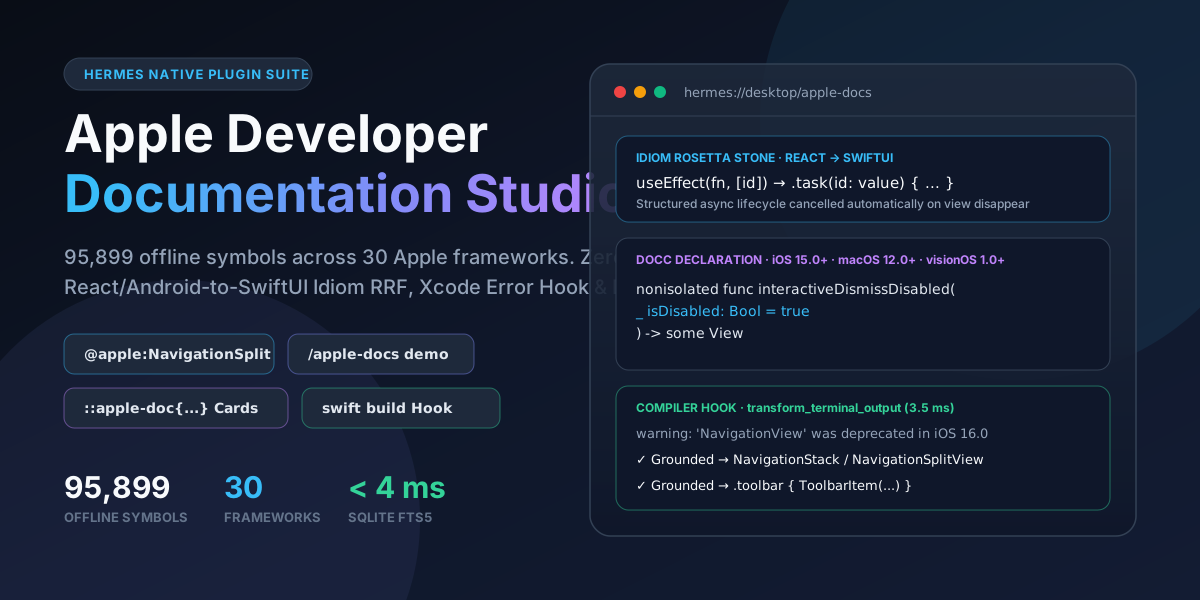
Offline-first Apple Developer Documentation suite for Hermes Agent: 95,899 Apple SDK symbols across 30 frameworks, sub-5ms SQLite FTS5 search, React/Web/Android-to-SwiftUI Idiom RRF, automatic swift build compiler diagnostic grounding hook, @apple: context references, and a native Hermes Desktop Studio.
Built for the Hermes Agent Plugin Hackathon (November 2026) · Requires Hermes Agent >=0.22.5 · macOS, Linux, and Windows · Zero API keys required.
Judges, start here (2 seconds, zero API keys, zero Node setup needed):
- Enable
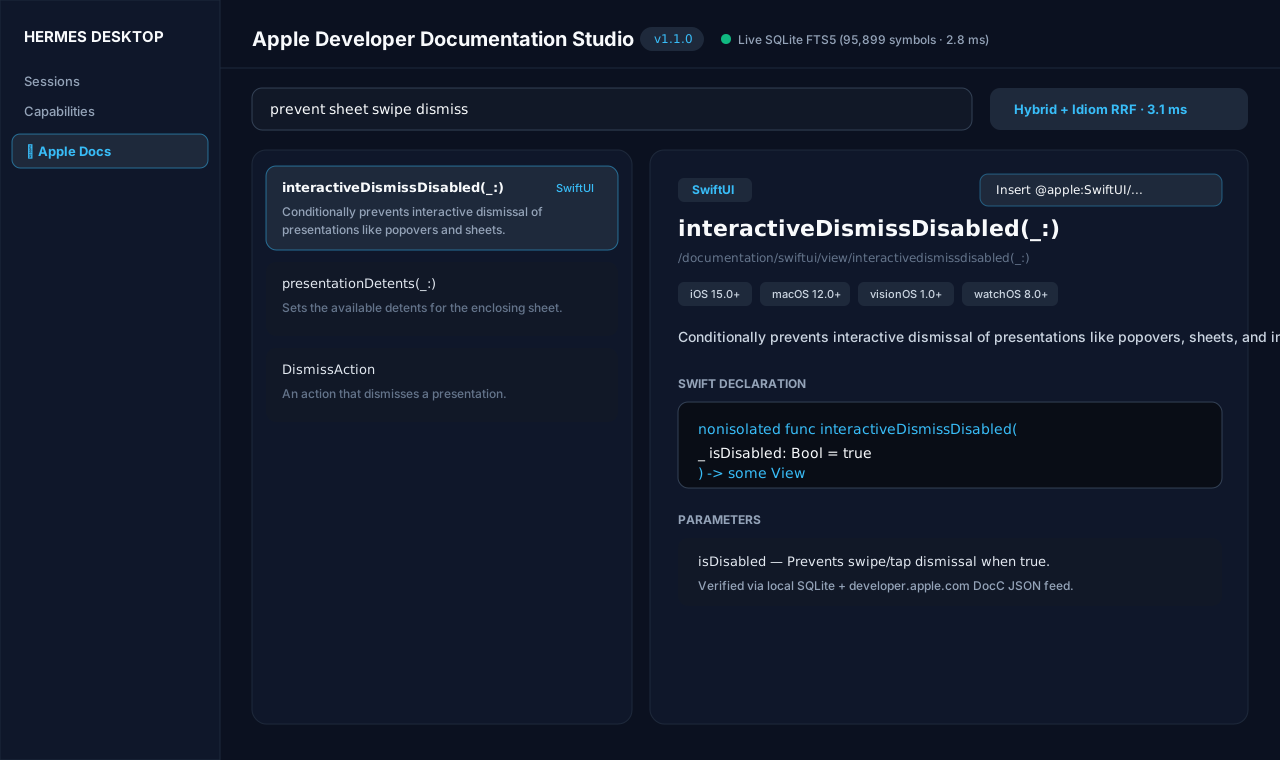
apple-doc-pluginand run/apple-docs demoin any Hermes chat (orhermes apple-docs demoin CLI). It benchmarks wildcard FTS5 globbing (Navigation*View), React-to-SwiftUI idiom RRF (useEffect$\rightarrow$.task(id:_:)), behavioral recall ("prevent sheet swipe dismiss"$\rightarrow$interactiveDismissDisabled(_:)), and live compiler diagnostic grounding in ~85 ms, rendering interactive::apple-doc{...}cards inline in Hermes Desktop.- Open Apple Docs in the Hermes Desktop sidebar (
/apple-docs) or click 95.9k Docsin the bottom statusbar to explore all 95,899 symbols, the Cross-Framework Idiom Rosetta Stone, and the interactive Xcode Compiler Error Lab.- Type
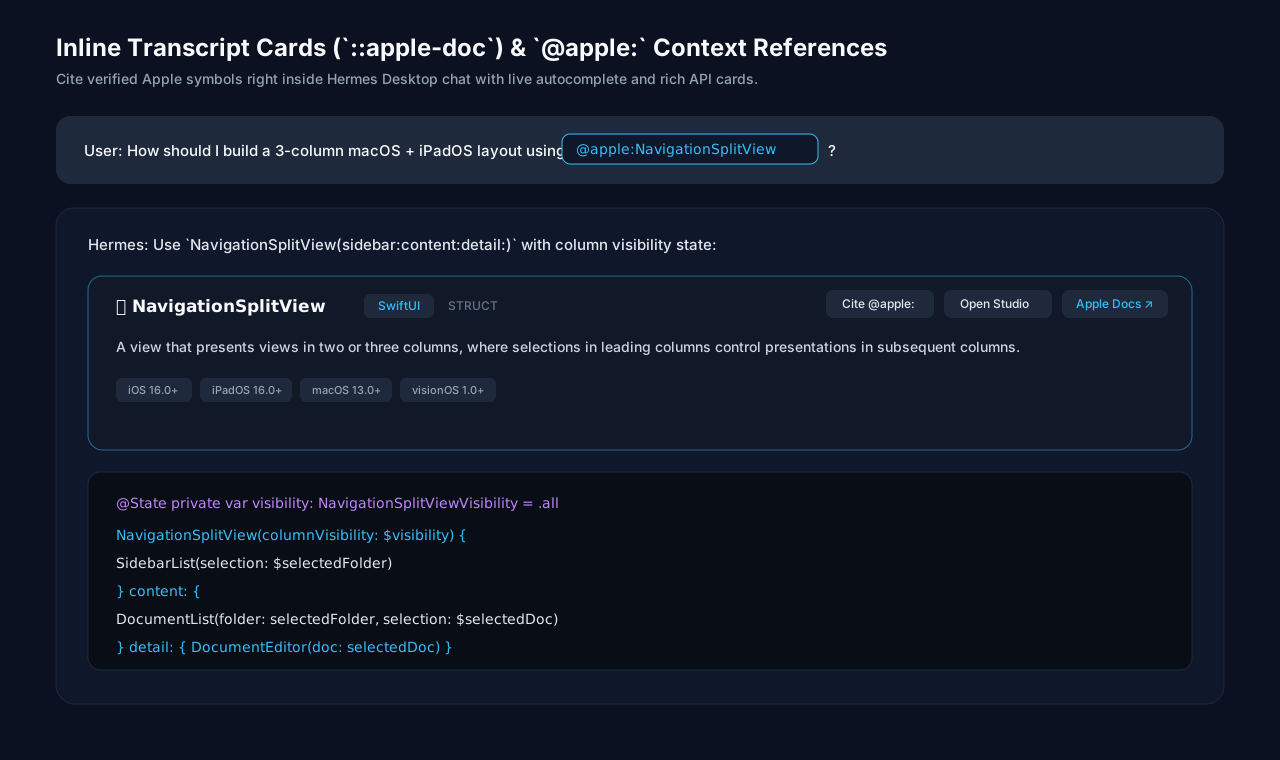
@apple:NavigationSplitViewor@apple:useEffectin any Hermes prompt to expand verified Apple DocC declarations straight into context.
Why a Hermes Plugin (and Not a Prompt or Skill)
| Hermes Surface | Registered Via | What It Does That a Skill Cannot |
| :------------------------------------------------ | :---------------------------------------------------------------- | :------------------------------------------------------------------------------------------------------------------------------------------------------------------------------------------------------------------------------------------------------------------------------------------------------ |
| Desktop Workspace Studio (/apple-docs) | ROUTES_AREA + SIDEBAR_NAV_AREA (desktop/plugin.js) | Full 4-tab master-detail explorer over 95,899 symbols, interactive React/CSS/Android Rosetta Stone, and live Xcode compiler error simulator backed by /api/plugins/apple-doc-plugin/*. |
| Inline Transcript Cards (::apple-doc{...}) | TRANSCRIPT_DIRECTIVE_AREA | Renders native interactive Apple API cards directly inside assistant messages with availability pills, 1-click @apple: citation, and DocC links. |
| Dockable Right Inspector + Statusbar + ⌘K | PANES_AREA, STATUSBAR_AREAS.right, PALETTE_AREA | Persistent side-by-side API lookup drawer next to active coding sessions plus ⌘K palette triggers. |
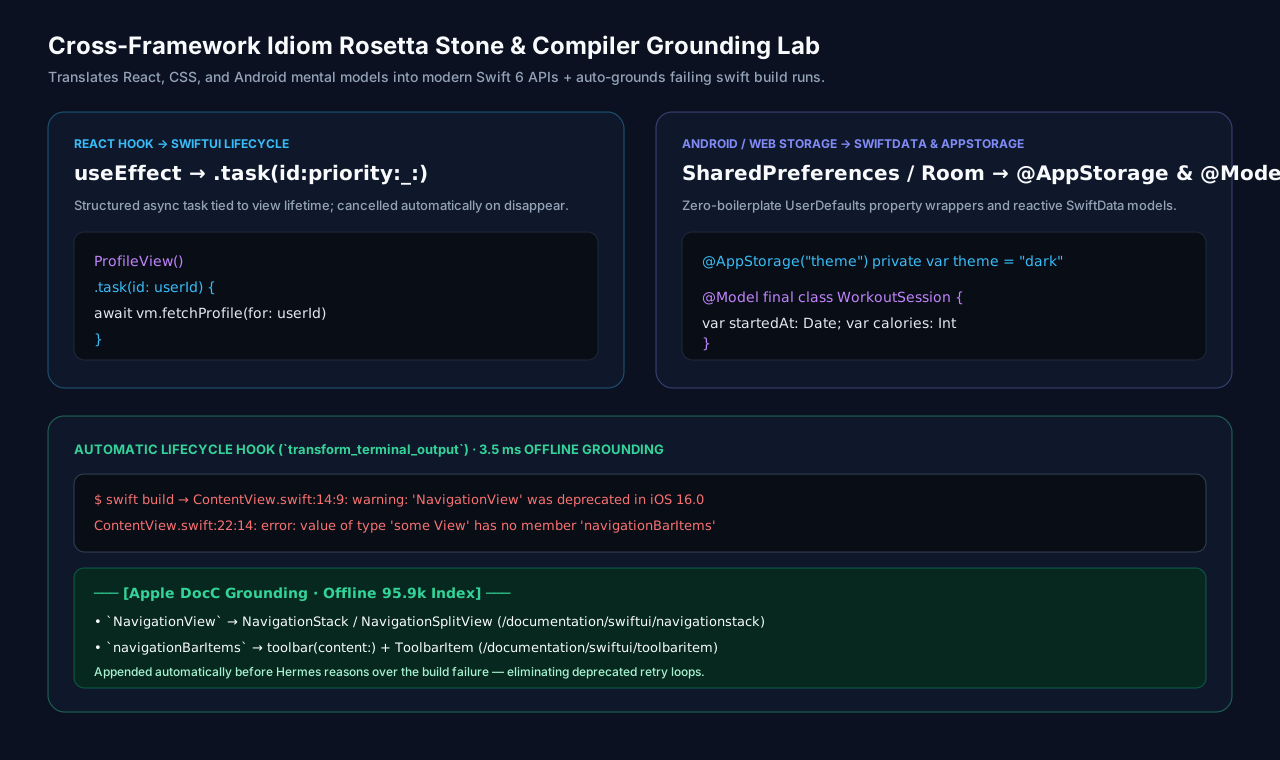
| Automatic Compiler Grounding Hook | ctx.register_hook("transform_terminal_output") | Intercepts failed swift build, swift test, swiftc, and xcodebuild runs (returncode != 0), extracts deprecated/missing Apple symbols (NavigationView, navigationBarItems, foregroundColor, etc.), and appends verified replacements in ~3.5 ms before the LLM wastes turns guessing. |
| @apple: Context Reference Provider | ctx.register_context_reference | Adds @apple:<symbol-or-idiom> with live SQLite FTS5 + Idiom autocomplete across CLI, TUI, Desktop, and gateway chats. |
| /apple-docs Slash & hermes apple-docs CLI | ctx.register_command + ctx.register_cli_command | Zero-LLM-cost instant lookup (/apple-docs demo, /apple-docs idiom SharedPreferences, /apple-docs doc NavigationSplitView). |
| 6 Native Agent Tools + Bundled Skill | ctx.register_tool (apple_docs toolset) + ctx.register_skill | Sub-5ms Python sqlite3 FTS5 fast-path (semantic_search, search_symbols, get_documentation, discover_technologies, get_version, index_info) with optional 768-d dense vector upgrade. |
Desktop Studio Preview
Cross-Framework Idiom & Behavioral Recall
Developers and AI models frequently reason in React, CSS, or Android mental models, or describe desired UI behaviors rather than exact Apple symbol identifiers:
| Query / Mental Model | Naive Keyword Search | What apple-doc-plugin Returns |
| :--------------------------------------- | :------------------- | :---------------------------------------------------------------------- |
| "prevent sheet swipe dismiss" | 0 matches | interactiveDismissDisabled(_:) (SwiftUI) |
| "React useEffect equivalent" | 0 matches | task(id:priority:_:), onAppear(perform:), onChange(of:initial:_:) |
| "SharedPreferences" / "localStorage" | 0 matches | @AppStorage, @SceneStorage, UserDefaults |
| "display: flex" | 0 matches | HStack, VStack, ZStack, Spacer, Layout |
| "Android Room database" | Unrelated matches | @Model, ModelContainer, ModelContext, @Query (SwiftData) |
| "dismiss keyboard on tap outside" | 0 matches | scrollDismissesKeyboardMode(_:), @FocusState |
| Navigation*View (wildcard) | Literal failure | NavigationSplitView, NavigationView |
Install & Usage in Hermes Agent
hermes plugins install apple-doc-plugin
hermes plugins enable apple-doc-plugin
Slash Commands (In Any Hermes Session)
/apple-docs demo— Run the 4-stage live benchmark + render inline::apple-doccards/apple-docs status— Inspect offline symbol count, frameworks, and latency/apple-docs idiom useEffect— Translate React/Web/Android patterns to Swift 6 / SwiftUI/apple-docs doc NavigationSplitView— Fetch Swift declaration, availability, and parameters/apple-docs search Grid*— Wildcard FTS5 symbol search
Inline @apple: Context References
Attach authoritative Apple documentation directly to any prompt:
Build a 3-column macOS document browser using @apple:NavigationSplitViewMigrate this React component's @apple:useEffect and @apple:localStorage hooks to SwiftUIStore credentials securely in the Keychain with @apple:Security/SecItemAdd
Offline Index Coverage (95,899 Symbols)
The shipped read-only SQLite FTS5 index (data/apple-docs.db) covers 95,899 symbols across Swift and Objective-C/C symbol trees with zero network setup required:
| Framework | Symbols | Framework | Symbols |
| :------------------------- | ------: | :---------------------- | ------------------------------------: |
| Swift | 18,442 | CoreData | 1,170 |
| Foundation | 13,013 | Combine | 1,062 |
| AppKit | 12,654 | SwiftData | 552 |
| UIKit | 11,449 | CoreLocation | 474 |
| Security | 7,331 | RegexBuilder | 462 |
| SwiftUI | 7,202 | LocalAuthentication | 246 |
| RealityKit | 6,235 | Synchronization | 196 |
| AVFoundation | 5,614 | Distributed | 93 |
| WebKit | 3,193 | BundleResources | 88 |
| Vision | 1,915 | ObjectiveC | 77 |
| StoreKit | 1,531 | AVFAudio | 45 |
| AuthenticationServices | 1,473 | Observation | 37 |
| MapKit | 1,299 | + cross-ref modules | visionOS, WidgetKit, PassKit, AVKit |
Configuration (config.yaml)
| Setting | Type | Default | Description |
| :------------------- | :----- | :------ | :--------------------------------------------------------------------------------------------------------------------- |
| compiler_grounding | bool | true | Append verified Apple DocC migration hints when swift build, swift test, swiftc, or xcodebuild exits non-zero. |
| prefer_node_bridge | bool | false | Route tool calls through the optional Node.js >= 22 MCP bridge even when dense vectors are not hydrated. |
Optional secret (via Hermes profile .env / agent.secret_scope.get_secret): GEMINI_API_KEY (only used if opting into hosted gemini-embedding-2 dense vector embedding in the Node runtime).
First Node start: when the optional Node.js bridge first launches and node_modules is absent, bin/launcher.cjs runs npm ci (lockfile-exact) from a git clone — or npm install from an npm tarball, which cannot ship a lockfile — and then builds dist/ with tsc. This writes node_modules/ and dist/ into the plugin's own folder and reaches the npm registry (dependency packages, including ones with native install scripts); nothing is installed globally. The npm child environment has plugin credentials (GEMINI_API_KEY, Google ADC variables) stripped before install scripts run.
Security & Behavior Disclosure (Catalog Rule 13)
- Surfaces registered: 6 tools (
search_symbols,semantic_search,get_documentation,discover_technologies,get_version,index_info), 1 hook (transform_terminal_output), 1 slash command (/apple-docs), 1 CLI subcommand (hermes apple-docs), 1 context reference (@apple:), 1 bounded system-prompt guidance snippet (apple-docs-directives), 1 skill (apple-docs), 1 FastAPI router (dashboard/plugin_api.pyunder/api/plugins/apple-doc-plugin/), and 1 Desktop bundle (desktop/plugin.jsusing strictly@hermes/plugin-sdkandreact). - Filesystem access: Reads its own shipped
data/apple-docs.dbin read-only URI mode (?mode=ro). Writes no files during normal Hermes operation — the one exception is the first optional Node-bridge start, which installs dependencies and buildsdist/inside the plugin's own folder (see "First Node start" above). In write-enabled Node hybrid mode, dense vectors hydrate intodata/apple-docs.runtime.db(falling back to$XDG_CACHE_HOME/apple-doc-pluginif the bundle is read-only). - Network calls:
search_symbols,semantic_search,discover_technologies,get_version,index_info,/apple-docs demo, and thetransform_terminal_outputcompiler hook are 100% offline. Onlyget_documentation(and Desktop Studio symbol selection withlive=true) performs an HTTPSGETtohttps://developer.apple.com/tutorials/data/documentation/<symbol>.json(strictly host-checked todeveloper.apple.com, 2.5s timeout, 2 MiB cap) to enrich offline metadata with full Swift declaration tokens, falling back to the local SQLite database if unreachable. The first optional Node-bridge start additionally reaches the npm registry (see "First Node start" above). - Subprocesses & credentials: The default Python SQLite FTS5 engine spawns no subprocesses and requires no credentials. An optional Node.js (
>=22) MCP child process (bridges/hermes/hermes_bridge.py) starts only ifprefer_node_bridge: trueis configured or dense vectors are hydrated inapple-docs.runtime.db; under Hermes,GEMINI_API_KEYis resolved exclusively viaagent.secret_scope.get_secret("GEMINI_API_KEY")(Rule 11) — in standalone npm/MCP use a plugin-root.envmay supply it instead. The bridge child environment setsAPPLE_DOCS_DISABLE_ADC=1, so ambient Google Application Default Credentials (GOOGLE_APPLICATION_CREDENTIALS, the gcloud credential file, or the cloud metadata server) are never used under Hermes — a key is required for hosted embeddings. - Telemetry: None. No analytics, tracking, or third-party endpoints.
- Prior art & pre-existing work: Authored by Andrew Mason (
AndrewMason7). Tool naming conventions originally inspired byMightyDillah/apple-doc-mcp; the 95,899-symbol SQLite FTS5 corpus, cross-framework idiom RRF engine, Python native engine, compiler diagnostic hook,@apple:context reference provider, and Hermes Desktop Studio were built forapple-doc-plugin(with the full Hermes native Desktop/Hook/Directive/Context-Reference suite built for the November 2026 Hackathon).
License
MIT © 2026 Andrew Mason
README from the reviewed commit 97e9816; it updates when the author re-pins.


