
 ParichayMago
AWS Manager for Hermes
Provision and manage AWS resources from the Hermes Desktop sidebar. Review each action in the context of its account and region, then verify supported results in Activity.
Try Demo
Install the plugin from source with Hermes 0.22.7 or later.
hermes plugins install ParichayMago/hermes-aws-manager --yes-deps --enable
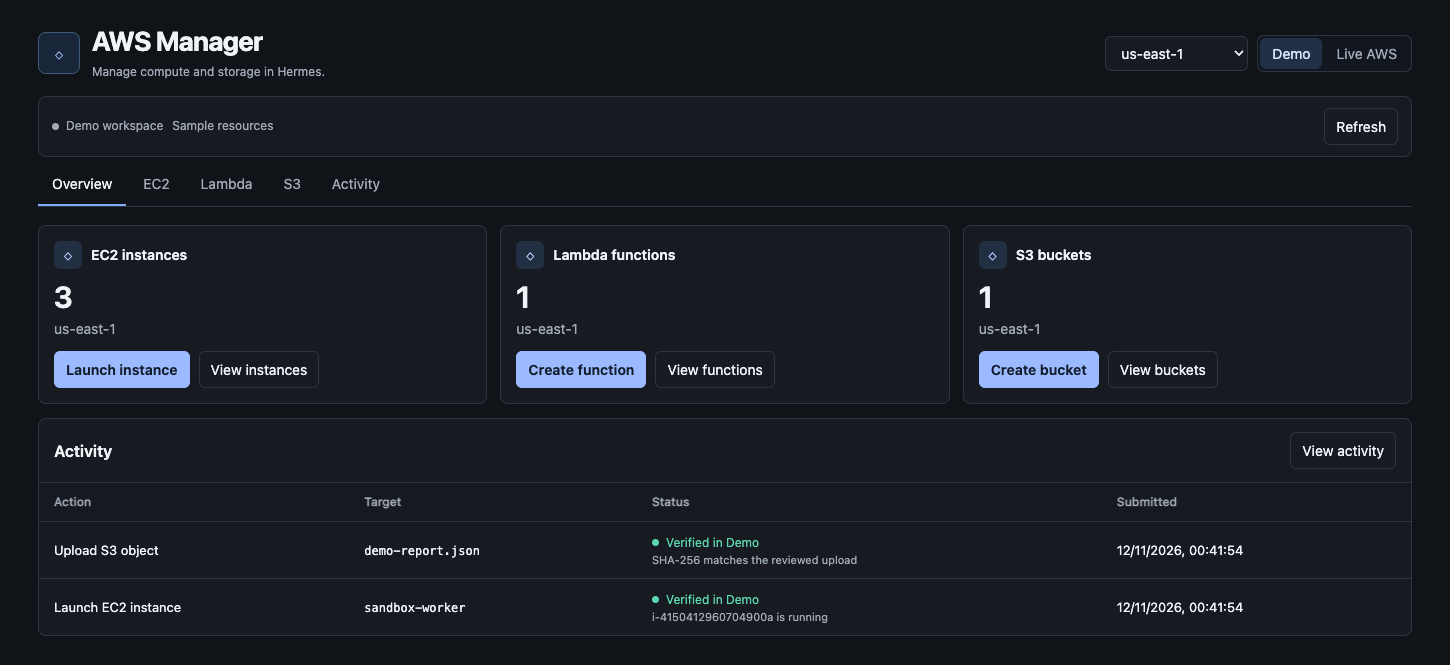
Open AWS Manager in Hermes Desktop. The dashboard opens in Demo, which uses sample resources without AWS credentials.
- Open EC2 → Launch instance. Enter a name, choose
app-private-aandapp-private, then review and launch the instance. - Open Activity → Verify on the launch receipt. The row changes from Submitted to Verified in Demo.
- Try Lambda → process-event → Test invoke, or S3 → hermes-demo-artifacts to upload and download a file. Demo Lambda echoes the event. Live Lambda executes the deployed Python.
What you can do
| Service | Operations |
| --- | --- |
| EC2 | Launch an Amazon Linux 2023 instance, start, stop, reboot, rename, resize a stopped instance, and terminate. Select networking, an encrypted root disk, optional public IPv4, an SSH key pair, or an instance profile. Create a default VPC or security group and import a public key. |
| Lambda | Create a Python function or a dedicated logging role, deploy source, change memory and timeout, invoke with a JSON event, inspect output and CloudWatch Logs, create or remove an IAM-authenticated function URL, and delete the function. |
| S3 | Create a general purpose bucket, connect an existing bucket in the account, filter objects by prefix, upload and download objects up to 4 MiB, delete the current object, and delete an empty bucket. |
| Databases | Create private PostgreSQL or MySQL RDS instances and on-demand DynamoDB tables. Read, write, or delete DynamoDB items on tables with one string partition key. Create a Lambda execution role scoped to one table. |
| APIs | Create an API Gateway HTTP API, connect routes to Lambda, and send signed HTTPS test requests using the current IAM identity. |
| Monitoring | Read EC2 CPU and Lambda invocations, errors, and duration. Browse CloudWatch metric alarms and read recent events from a log group. |
| Networking | Create VPCs and subnets, deploy an application load balancer with an existing EC2 target, and create Route 53 public hosted zones and aliases. |
| Containers | Create private ECR repositories, browse or delete images, create an ECS execution role, and deploy or scale a Fargate service from an existing ECR image. |
| Automation | Schedule Lambda with EventBridge and create encrypted SQS queues. Send messages, create a queue-scoped execution role, and connect a Lambda consumer. |
| CDN | Create a CloudFront distribution with a private S3 origin, with an optional custom domain and ACM certificate. |
| Costs | Read unblended account spend by service from AWS Cost Explorer. |
| Activity | Review the target and region before applying each change. Verify EC2 launches by checking that the instance is running and verify S3 uploads by comparing SHA-256 digests. Live Lambda invocations record the AWS request ID. |
The Demo workspace starts with sample resources and supports the same controls without AWS. Its state is separate from Live AWS and stays in the current Hermes profile. Demo invocations echo the sample event and do not execute the supplied Python.
Live AWS
- Enable the plugin in Hermes and open AWS Manager → Live AWS → AWS credentials. Add credentials for the AWS IAM identity that should operate the workspace. Include the session token for temporary credentials.
- Choose a region and refresh. The account shown comes from AWS STS.
- Choose an operation and review the exact settings before applying. For destructive actions, the dashboard asks you to type the resource identifier.
AWS permissions determine which actions are available. Use permissions scoped to the resources and actions you need. Inventory uses EC2 describe calls, Lambda function reads, and S3 bucket and object reads. EC2 launches resolve the regional Amazon Linux AMI through Systems Manager. AWS also requires iam:PassRole when assigning an instance profile or Lambda role. Creating a Lambda execution role requires IAM role and inline-policy write permissions. CloudWatch Logs access is needed to browse Lambda logs. Current AWS rates apply to live resources and requests.
In Activity, select Verify on an EC2 launch or S3 upload. Verification reads the exact instance or object and records the observation in the receipt. EC2 verification checks for the running state. S3 verification compares the current object with the SHA-256 digest of the reviewed upload. Downloads also show a match when the object has a recorded upload in the workspace.
Deployments
The new provisioning actions use CloudFormation. Open Deployments within the relevant service page to see stack status, errors, and outputs such as the URL, role ARN, or origin bucket. In Activity, use Verify to check completion. Load balancer verification also checks target health, RDS verification checks database availability, and Fargate verification checks running and pending task counts. Use Delete deployment on stacks managed by AWS Manager. Delete dependent routes, records, and triggers before their parent deployments. Empty managed S3 buckets and ECR repositories before deletion. RDS retains a final snapshot, which can incur storage charges.
| Workflow | Setup |
| --- | --- |
| Lambda and DynamoDB API | Create the table and a table access role scoped to your planned function name. Use that role when creating the function. Deploy a handler that reads or writes the table, then create an HTTP API and select the function. Your dashboard identity needs permission to invoke the route. The test displays the response and request ID when available. |
| RDS | Select two subnets in different Availability Zones and a security group in their VPC. Read the endpoint and managed secret ARN from the deployment. Connect from a client with network access to the private instance. |
| Load balancer and DNS | Select two subnets in different Availability Zones, a security group, and a target instance in the same VPC. Configure security groups to allow listener and target health traffic. For a public domain, delegate the hosted zone at the registrar and create an alias to an internet-facing load balancer or a CloudFront distribution configured for that name. |
| Fargate | Push a Linux x86-64 image to private ECR using Docker or an OCI client. The review resolves the selected tag to a digest. Choose a subnet, security group, and execution role. The subnet needs a route to ECR and CloudWatch Logs through NAT, VPC endpoints, or public networking. |
| SQS and Lambda | Create a queue, then create a queue access role for the planned Lambda function. Deploy the function with that role. Connect the Lambda consumer from the queue and send a test message. Check CloudWatch logs for processing results. |
| CloudFront | After the deployment completes, upload index.html through S3 to the origin bucket shown in the deployment outputs. The distribution serves these files publicly. For custom HTTPS domains, provide an issued ACM certificate in us-east-1 and create a DNS alias. |
| Cost Explorer | Enable Cost Explorer in AWS and grant the connected identity billing access. The report is account-wide. Billing data can lag actual usage and AWS charges for API queries. |
Data and permissions
In Live AWS, the plugin uses AWS SDK calls and IAM-signed requests to the selected API Gateway endpoint. AWS credentials come from Hermes' masked plugin settings and stay in Hermes' credential store. The workspace database stores reviewed settings, payload hashes, action receipts, and connected bucket names under Hermes' profile-scoped plugin data. Live object bodies, Lambda source, log events, and query results are transferred as needed and excluded from action history. Demo object bodies and DynamoDB items are stored locally. AWS operations start in response to dashboard interactions.
README from the reviewed commit 60fda4e; it updates when the author re-pins.


