clins1994
Beeper platform for Hermes Agent
A Hermes Agent gateway platform that brings Hermes into your own chats through the local Beeper Desktop API. Type a trigger in a chat that you allowed, and Hermes answers there. It works on every network that Beeper Desktop connects: WhatsApp, Signal, Telegram, LINE, iMessage, Instagram, Messenger, Discord, Slack and more.
Replies are posted from your own account, with a marker (🤖 by default) so that people can tell the agent from you.
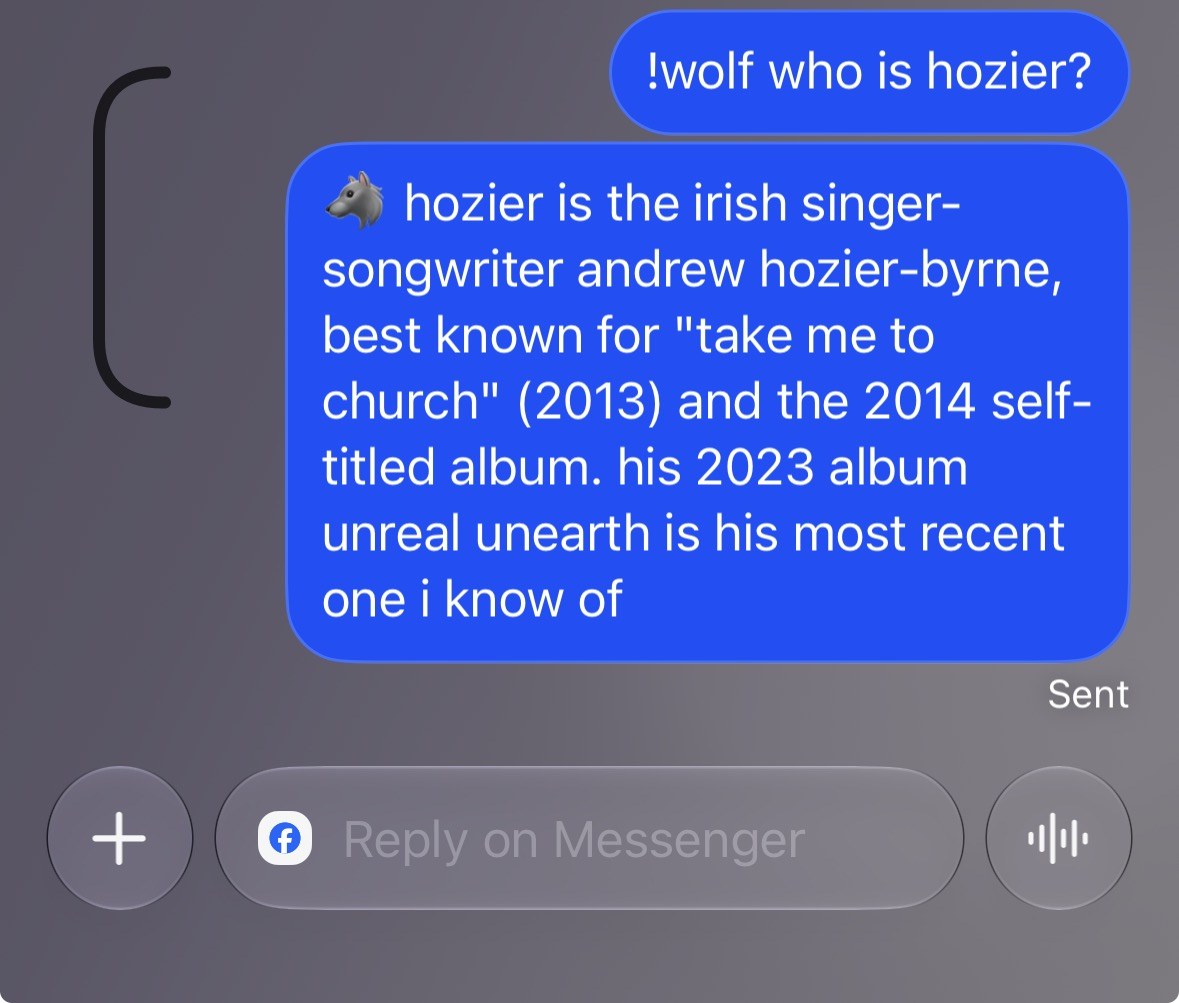
An example setup: a Messenger group with the trigger set to !wolf and the reply marker set to 🐺. The trigger, the marker and the agent's persona are all yours to choose.
Disclosure
Read this before you install:
- The plugin connects to the Beeper Desktop API on your machine (
http://127.0.0.1:23373by default) with your access token. It makes no other network calls. The agent itself uses your configured model provider and tools as usual. - It reads messages only from the chats that you list in
config.yaml. The WebSocket subscription is limited to those chat IDs. - It sends messages, and optionally reactions, as you, only in the chats that you list.
- It writes two files under your Hermes home:
beeper/chat-cursors.json(the last handled message per chat) and, in dry-run mode,beeper/dry-run.jsonl(the replies it would have sent). Both are owner-only (mode 600). - It never marks chats as read and never sends typing indicators. Replying or reacting on some networks can still mark a chat as read on your side. That is the network's behavior.
- No telemetry.
Requirements
- Hermes Agent 0.23.3 or newer.
- Beeper Desktop with the Desktop API enabled, and an access token from Beeper Desktop → Settings → Developers.
Install
hermes plugins install beeper-platform        # from the Hermes plugin catalog
# or straight from GitHub:
hermes plugins install clins1994/hermes-beeper
hermes plugins enable beeper-platform
Put the token in your profile's .env:
BEEPER_ACCESS_TOKEN=...
Configure
Nothing is active until you list a chat. Use a chat ID (!abc...:beeper.local) or the local chat ID that Beeper Desktop shows. GET /v1/chats and GET /v1/chats/search?query=... on the Desktop API list both.
# config.yaml
gateway:
  platforms:
    beeper:
      enabled: true
      dry_run: true              # first run: write replies to beeper/dry-run.jsonl, send nothing
      trigger: "!hermes"         # messages must start with this word
      reply_marker: "🤖 "        # added to every reply, cannot be empty
      processing_reaction: ""    # for example "👀" on the triggering message while the agent works
      chats:
        "101":                   # your notes-to-self chat
          label: notes           # used in logs only
        "!abc123:beeper.local":  # a group with friends
          label: friends
          invokers: ["*"]        # anyone in this chat can use the trigger (default: only you)
          toolsets: [search]     # tools for this chat only
platform_toolsets:
  beeper: [search]               # tools for every Beeper chat
Per-chat settings:
| Key | Default | Meaning |
|---|---|---|
mode | prefix | prefix: only messages that start with the trigger. always: every message from an allowed sender. Use always only for a chat that only you are in. |
trigger | the global trigger | A different trigger word for this chat. |
invokers | [self] | Who can trigger the agent: self, sender IDs such as @whatsapp_123:beeper.local, or *. |
toolsets | the platform toolsets | Toolsets for this chat only. |
processing_reaction | the global value | A different reaction for this chat, or "" to turn it off. |
Global settings: base_url (default http://127.0.0.1:23373), max_backfill_age_seconds (default 600), and rate_limit with per_chat_seconds (2), global_per_minute (20), breaker_replies (10) and breaker_window_seconds (600).
Start the gateway with hermes gateway run. Run it in dry-run first, read beeper/dry-run.jsonl, then set dry_run: false.
How it stays safe in your own account
The agent posts as you, so its own replies come back as new messages. The plugin drops a message in these cases:
- Its ID matches a message that the plugin sent.
- It is your message and it starts with the reply marker.
- The plugin already handled it. One message is upserted several times (pending, sent, seen).
- It is older than the chat cursor. The API also upserts old messages when someone reads or edits them.
- It is a reaction, a notice or an unknown message type.
- The chat reached the reply limit (
breaker_repliesinbreaker_window_seconds). The chat then pauses.
Other protections:
- Allowlist only. The plugin refuses to send to a chat that is not listed.
- No pairing codes. Hermes normally answers unknown senders with a pairing code. On Beeper that code goes out from your account, so the plugin turns it off.
- No gateway notices in chats. Setup and status notices (for example "No home channel is set") go to the log, not into a chat.
- Owner-only slash commands. Only you can run commands such as
/modelor/new. Other people keep/helpand/whoami.
For chats with friends, use a separate Hermes profile with memory off and a small toolset, for example [search], and give the agent a persona (SOUL.md) that tells it not to speak for you.
Reliability
The Desktop API WebSocket is documented as at-most-once, with no replay after a reconnect, and its seq counts per connection. The plugin:
- reconnects with backoff (1 s to 30 s),
- catches up every listed chat over REST from the saved cursor after each connect and after a
seqgap, - skips caught-up triggers older than
max_backfill_age_seconds, so it does not answer stale requests after downtime, - starts from the newest message the first time it sees a chat, so it never answers history.
Limits of v0.1
- Text in and out, and replies. Incoming media shows to the agent as a placeholder such as
[attachment: image]. The agent cannot send files yet. - The Desktop API must run on the same machine as Hermes, or be reachable through
base_url.
Development
The tests need a hermes-agent checkout and its Python environment:
HERMES_AGENT_REPO=~/path/to/hermes-agent ~/path/to/hermes-agent/.venv/bin/python -m pytest tests
tests/fixtures/ holds a recorded WebSocket session and a REST page from Beeper Desktop 4.3.22. They are anonymized: IDs and times are renumbered, and every text and name is replaced.
License
MIT
README from the reviewed commit 8a55f63; it updates when the author re-pins.