 jnorthrup
The films, pictures and the site of the hackathon entry are not in this repository (the plugin is 14 files; the
media was 73 MB). They stay in hermes-breadcrumb-plugin
at the commit that the links below name.
Concepts here: /hermes-breadcrumb-plugin
breadcrumbs
EVERY LINE OF YOUR AGENT'S MEMORY HAS AN ADDRESS!
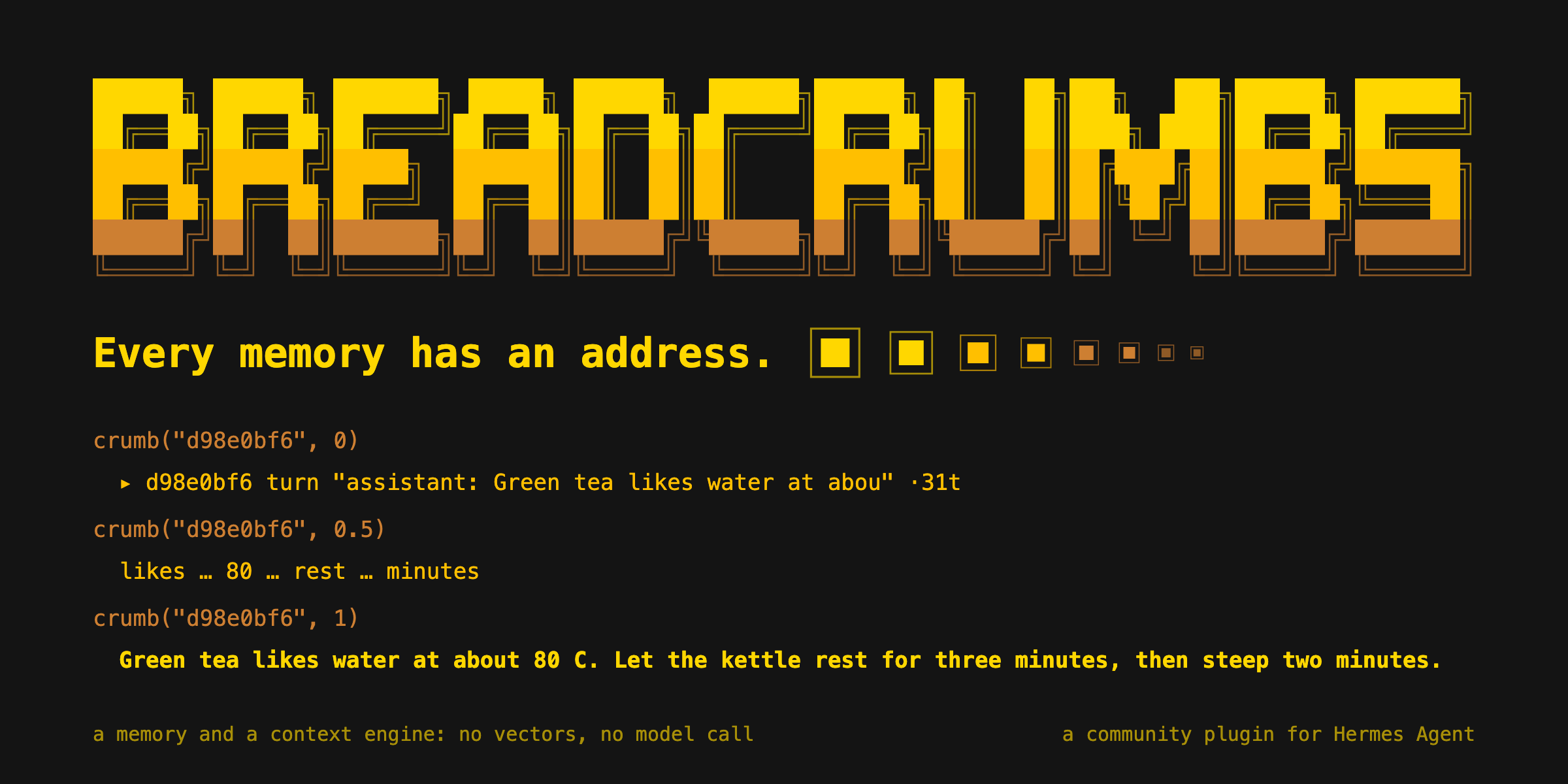
One call shows any memory at any size: from a one-line handle to its exact bytes. No vectors. No model writes any level.
crumb("d98e0bf6", 0)      ▸ d98e0bf6 turn "assistant: Green tea likes water at abou" ·31t
crumb("d98e0bf6", 0.5)    likes … 80 … rest … minutes
crumb("d98e0bf6", 1)      Green tea likes water at about 80 C. Let the kettle rest for three minutes, then steep two minutes.
breadcrumbs is a memory and a context engine for the Hermes agent. It keeps every fact with its exact source.
These lines are real output of the demo store (the header line of levels 0.5 and 1 is left out). Level 0 is a
handle. Level 1 is the exact bytes. In between, a text shows its most distinct words, and each gap expands to the
exact text. A higher level never removes a word.
THE MODEL OPENS ITS OWN MEMORY!
[EVENT] crumb_find → crumb("ffbd6e15", 1) → THE ANSWER NAMES ITS SOURCE
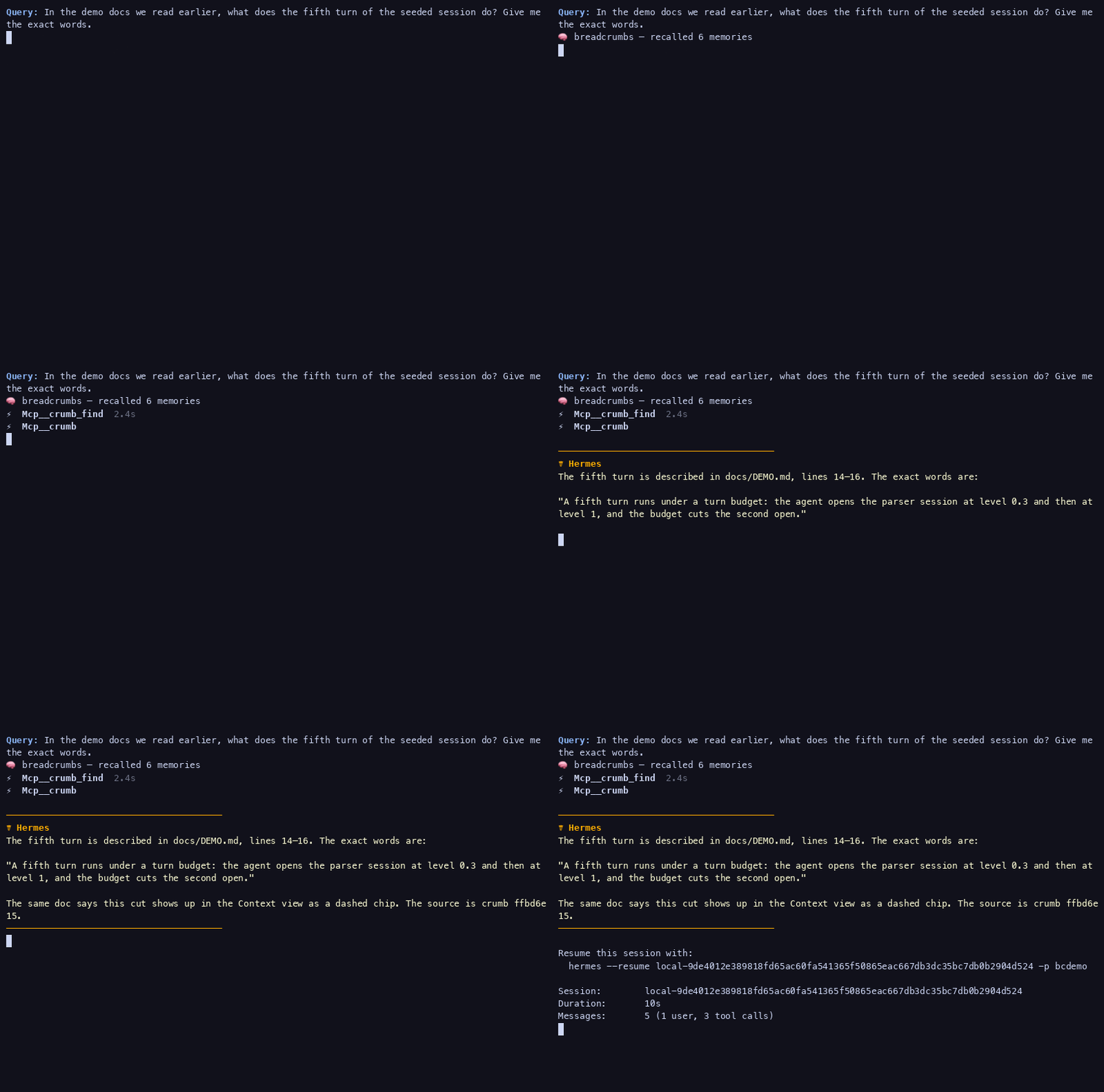
A real Hermes chat on the demo memory. The model recalls 6 memories, calls crumb_find, calls crumb at level 1,
and gives the exact words with their source: crumb ffbd6e15. Nobody wrote its words.
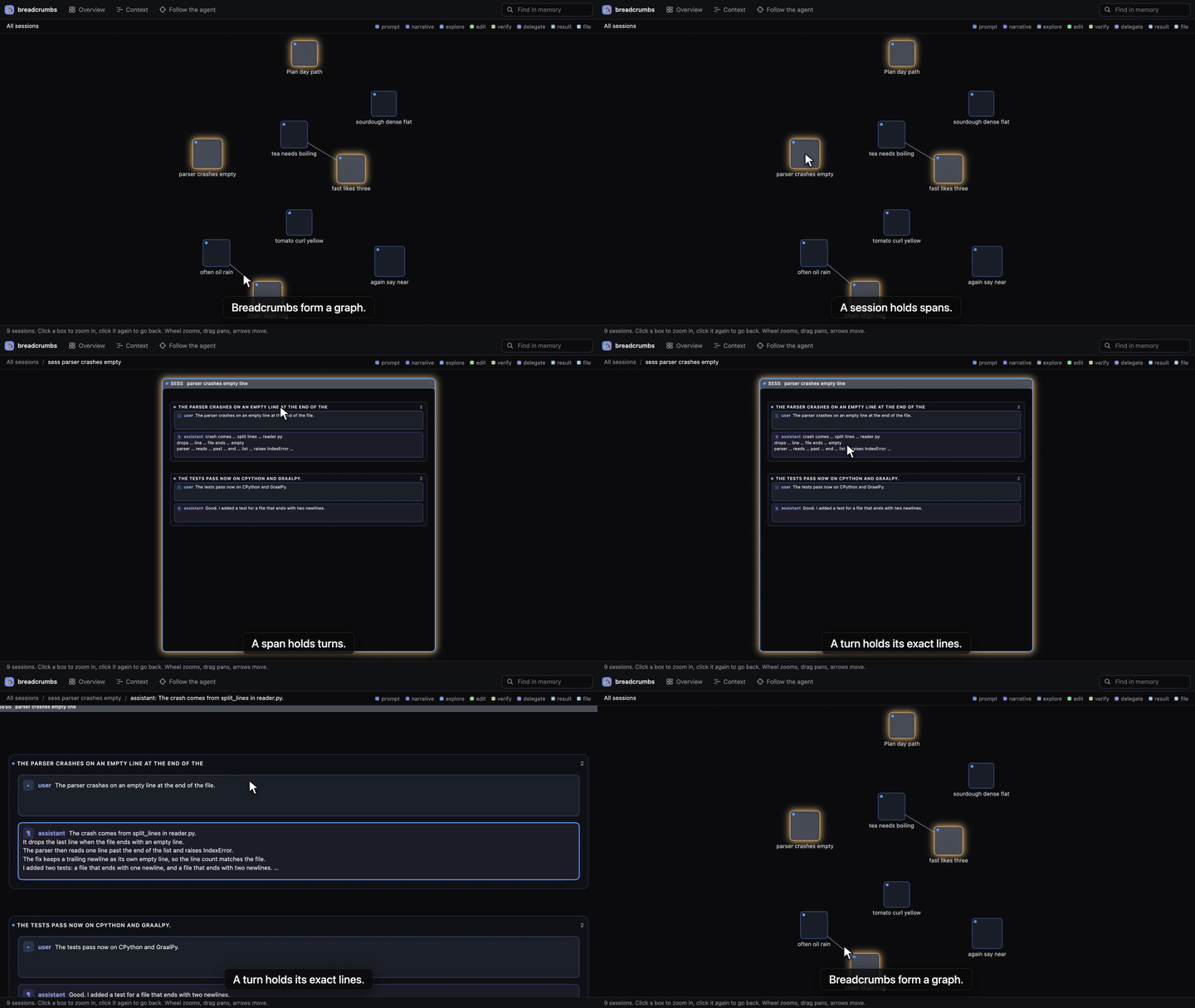
ALL SESSIONS TO ONE LINE, IN ONE DIVE!
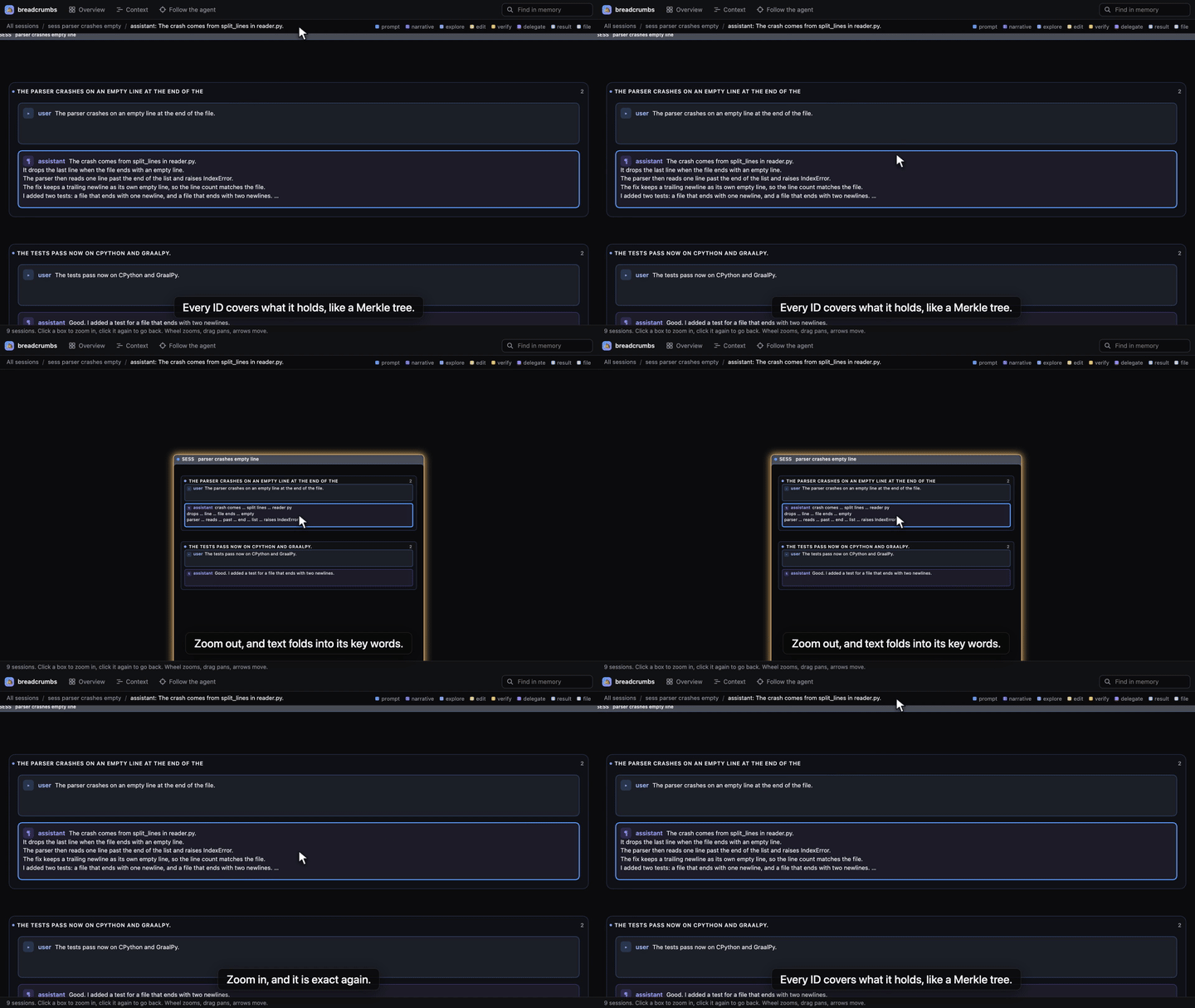
[ZOOM] MAP → SESSION → CARD → LEVEL 0.5: EACH WORD THAT STAYS KEEPS ITS PLACE
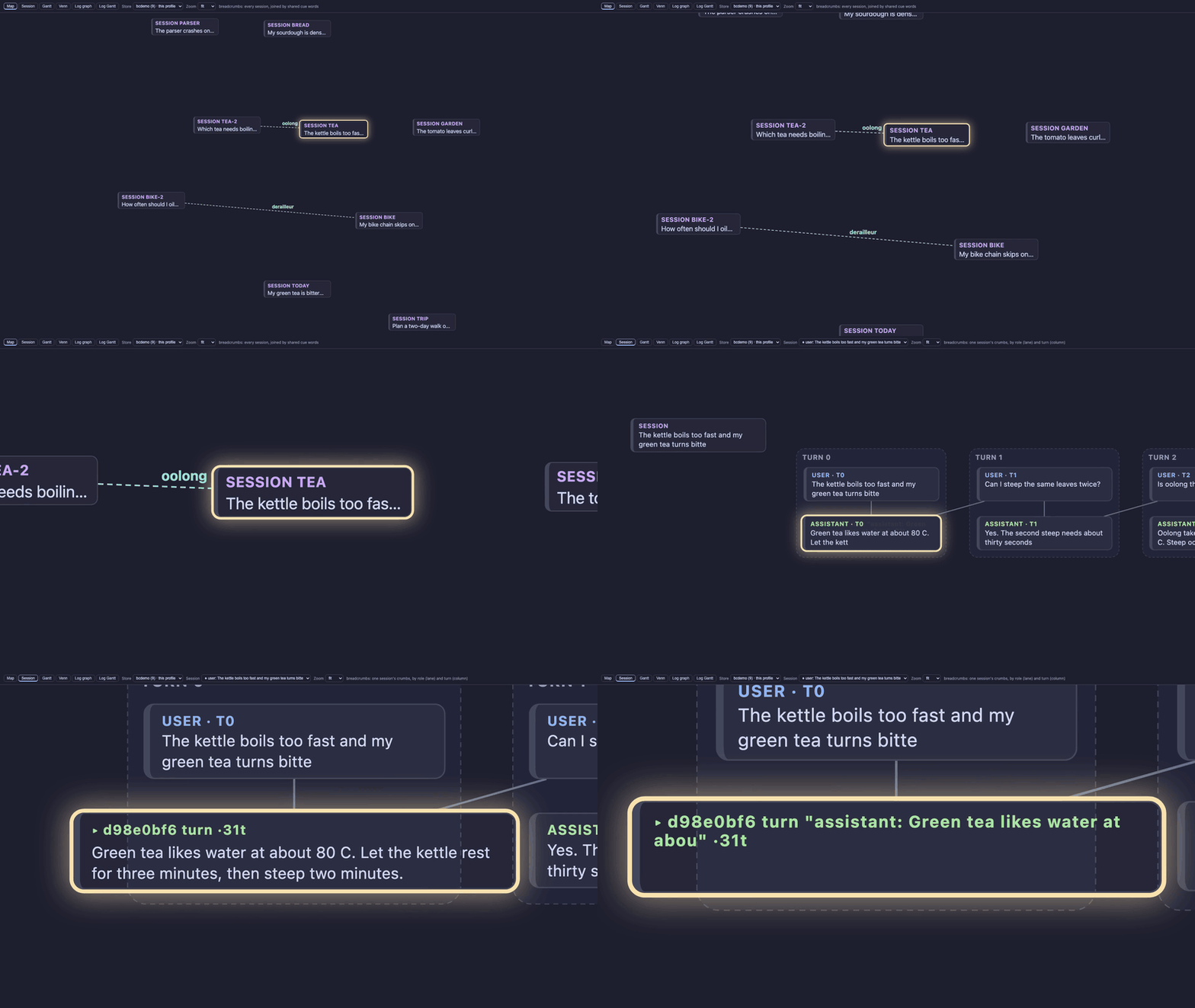
The plugin's own page for Hermes Desktop, on the demo store: the map of all sessions, then one session, then one
card. The card goes from level 1 to level 0.5, and each word that stays keeps its place.
270K TOKENS OF CHAT, 78K SENT, NO MODEL CALL!
[ACE] TARGET 80K HELD · THE LAYER DOES NOT CHANGE BETWEEN FOLDS · THE PROMPT CACHE HOLDS
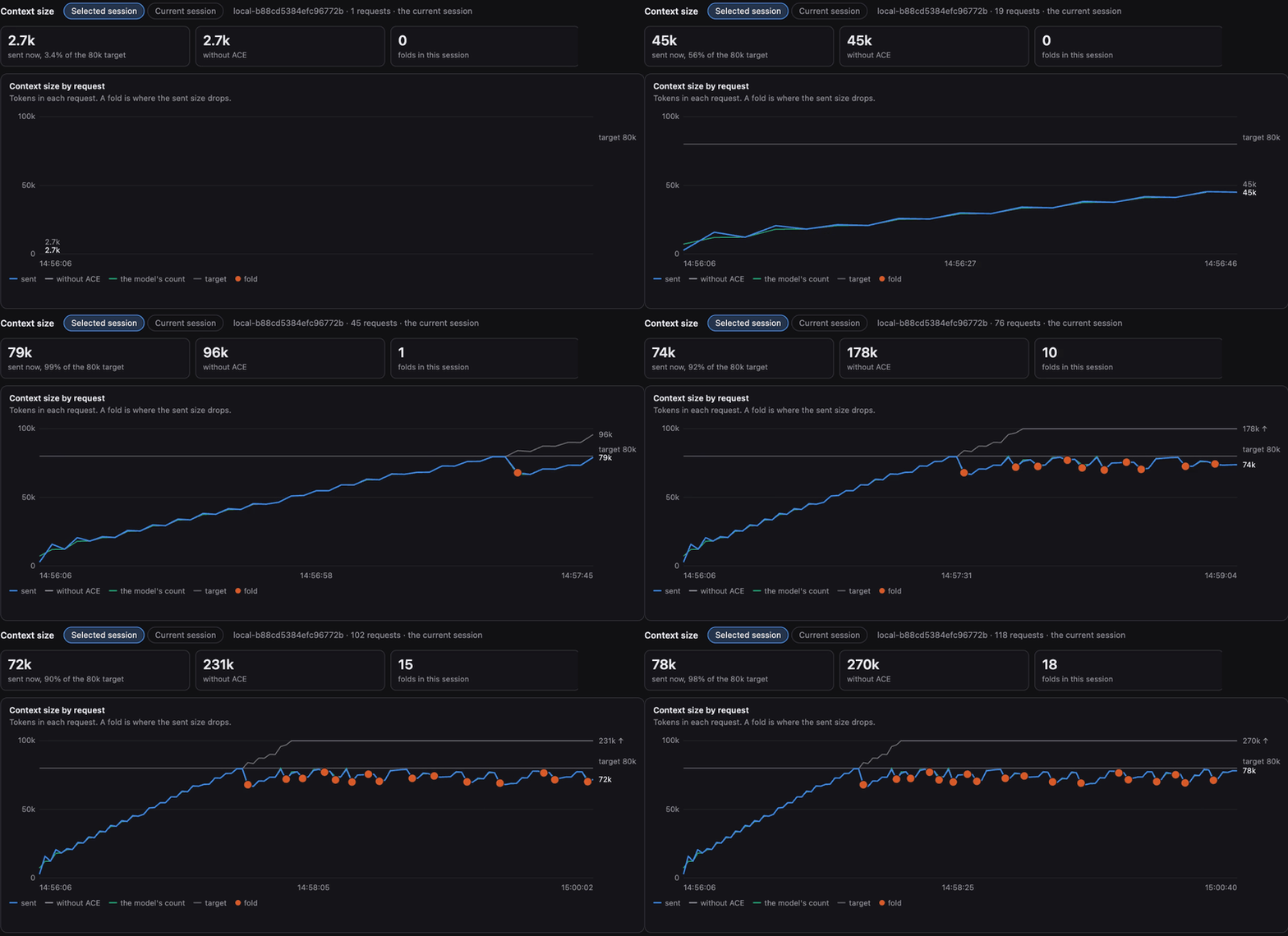
The Size panel of a real chat of 118 requests. The chat holds 270k tokens. The request that goes out is 78k, under
its target of 80k. Each red dot is a fold, and no model writes a fold. Between folds the layer does not change, so
the prompt cache holds.
38 AGENTS, 110 MINUTES, ONE HARD TASK!
[HIVE] 16 AT ONE TIME · ABOUT 1,900 REQUESTS · ABOUT 100 FOLDS · 91.5% OF THE INPUT FROM THE CACHE
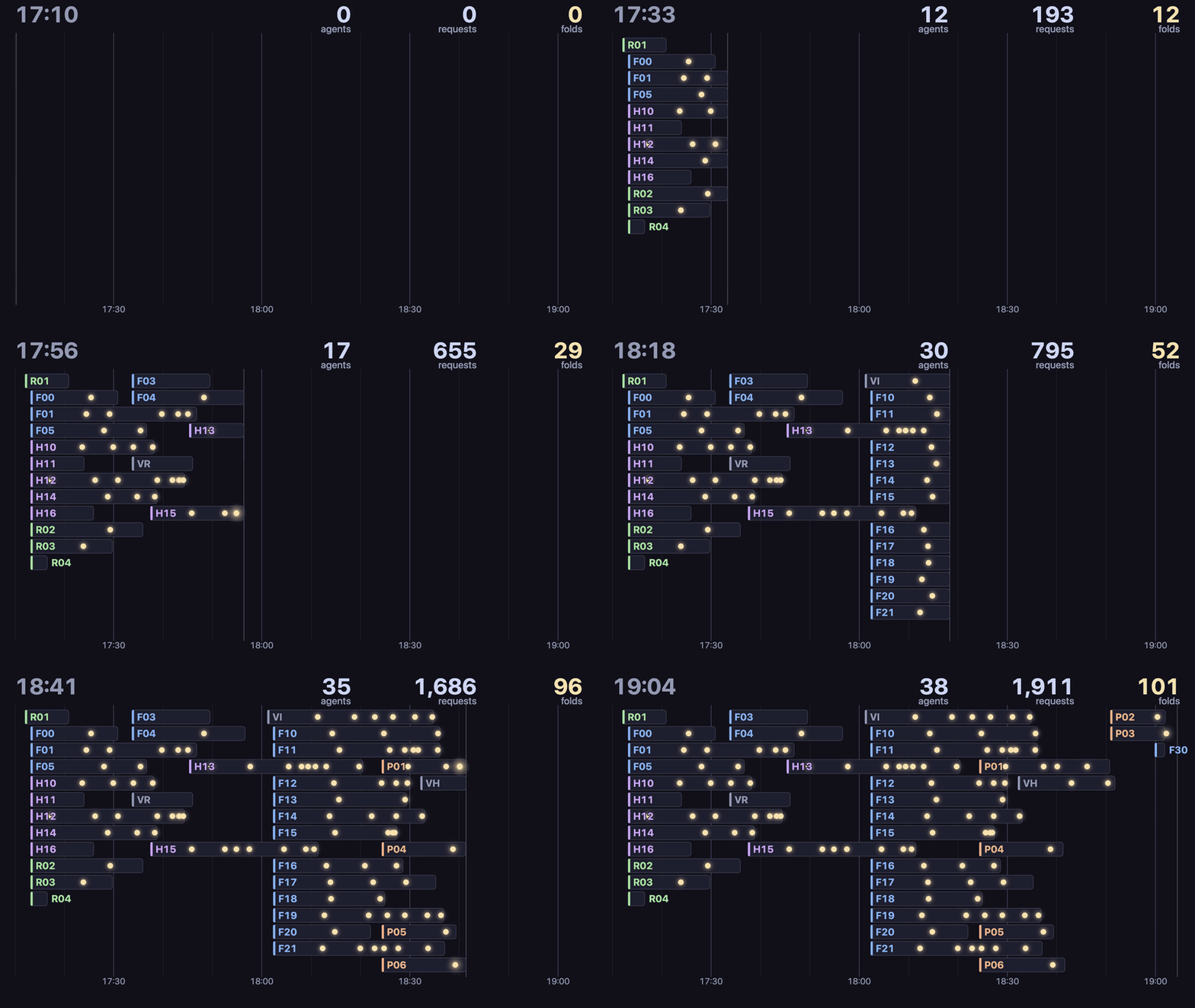
This entry was built this way. Each bar is one Hermes session (Sonnet 5.5) on its real clock, 16 at one time. Each
dot is a fold of that session's context. In all: about 1,900 model requests, about 100 folds, and 91.5% of the
input tokens from the cache. The numbers come from the session table and the ACE log; no text of a chat is shown.
FIVE CHILD AGENTS, ONE PARENT, ZERO BAD BLOCKS!
[IPFS] CHILD → CAR → CID → IMPORT · THE SAME ROOT ID IN BOTH STORES · VERIFY: 0 BAD
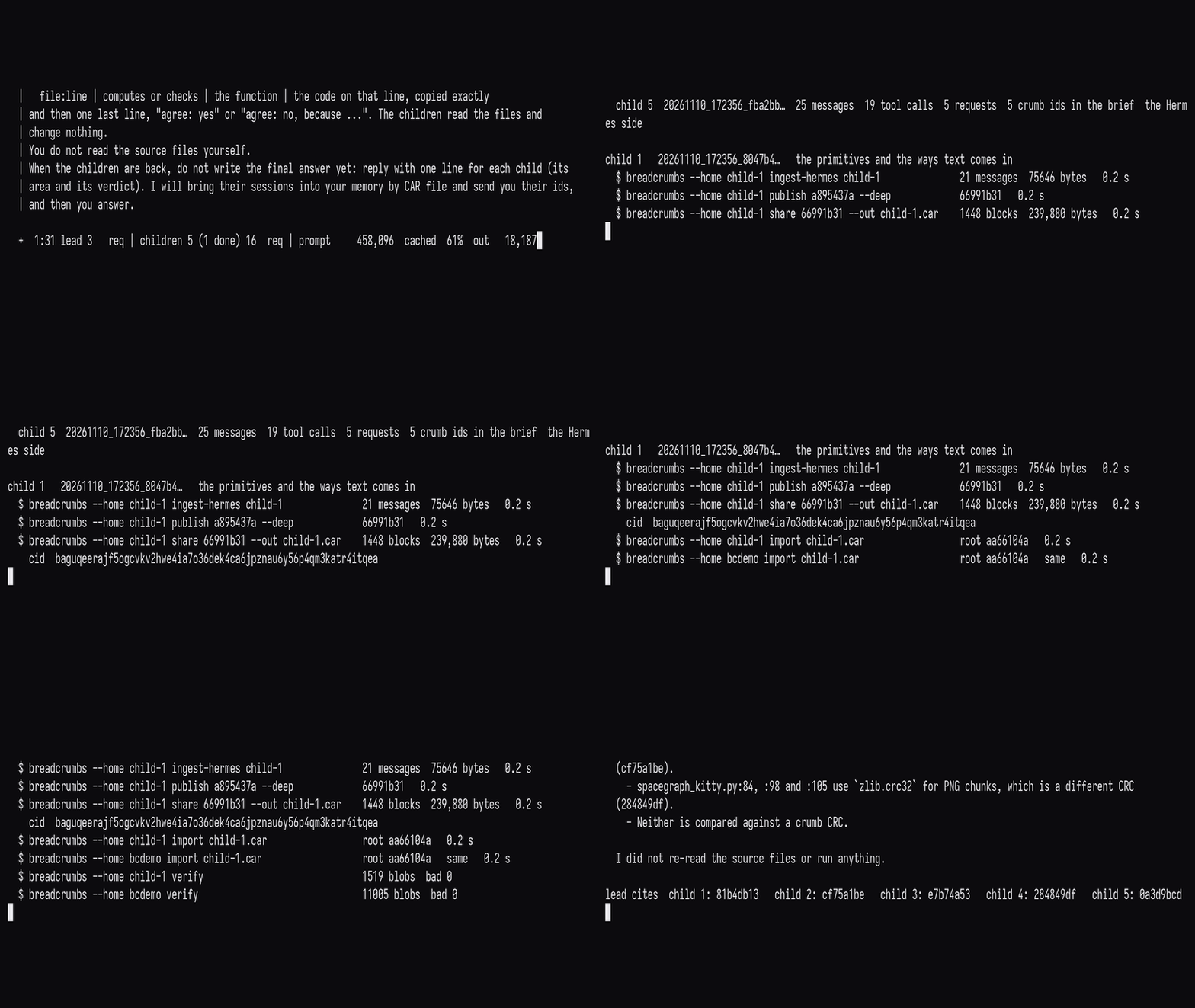
A lead agent and five child agents on the demo profile. The session of each child leaves as one CAR file with a
CID. The parent imports it and holds the same root id, and verify finds 0 bad blocks. The lead's answer cites an
id from each of the five.
THREE PROGRAMS, ONE LINE ID, NO LOCK WAIT!
[SYNC] CLAUDE CODE · OPENCODE · HERMES → LINE 12 = 1721f9ac IN EVERY STORE · 0.110 ms OF LOCKS IN ALL
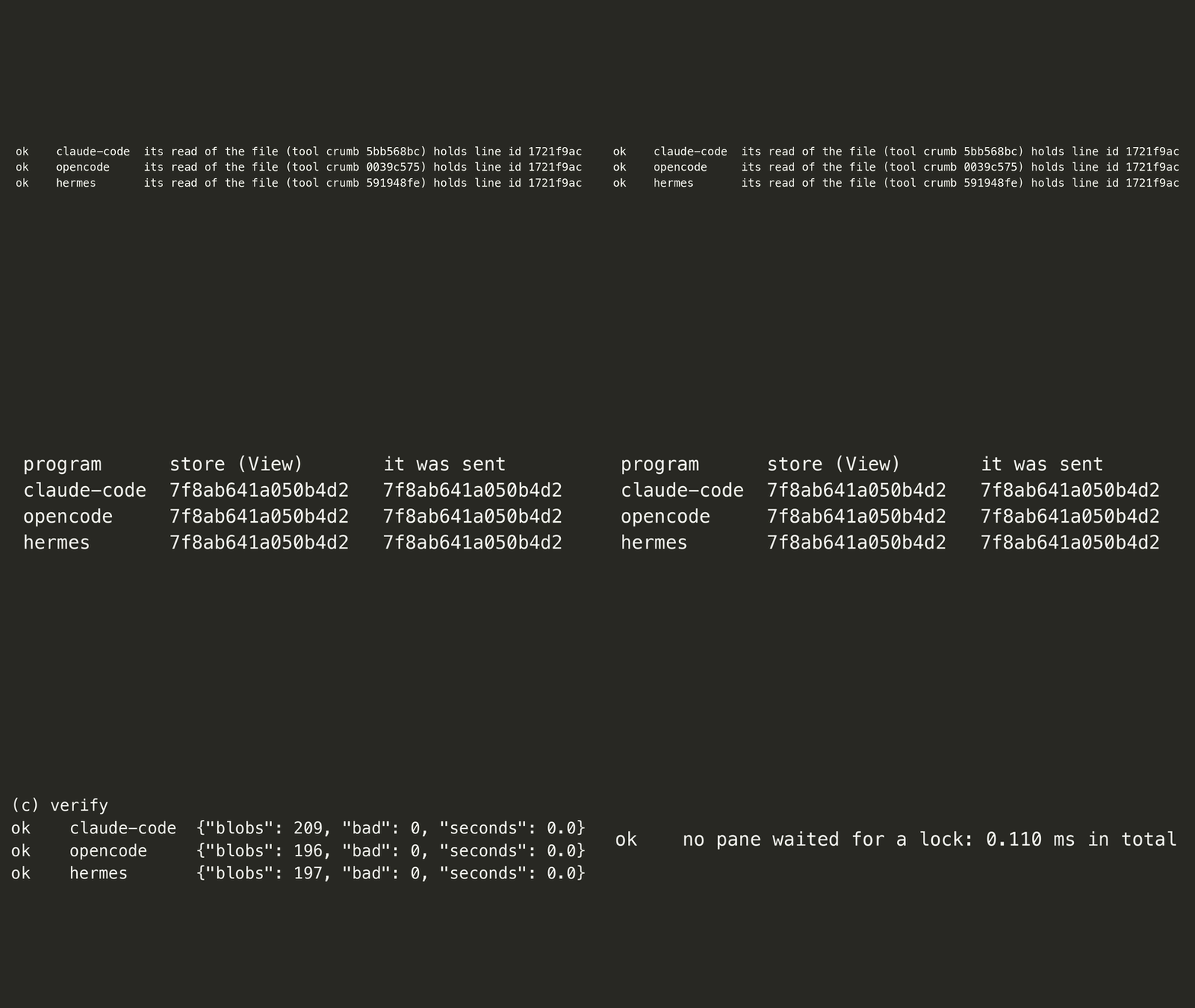
Claude Code, OpenCode and Hermes read one file, each with its own tool, each into its own store. Line 12 has the id
1721f9ac in all three stores, and no pane waited for a lock: 0.110 ms in total. The adapters for the two other
programs are not in this release.
ONE MEMORY FOR EACH GIT REPOSITORY OR FOLDER, NO PROFILES!
[PROJECT] THE FOLDER OF THE CHAT → ITS GIT REPOSITORY, OR THE FOLDER ITSELF → ITS OWN MEMORY · /scope SHOWS IT · /viz OPENS THE WHOLE PROFILE
A chat's memory is chosen by where the chat works, not by which Hermes profile runs it. breadcrumbs reads the folder
of the chat, takes its git repository (a linked worktree or a submodule counts as its main repository), a folder
that holds a .breadcrumbs file or folder, or else a source tree, or else the folder itself, and opens the store of
that project. Where nothing says otherwise, the project is the git repository or the current directory. A chat in
another repository has another memory, so recall in one codebase never brings back a crumb of another. Scopes nest
(a monorepo that holds repositories): automatic recall stays in the nearest scope, and crumb_find takes scope
"up" (the scopes above, then the default memory) or "all" to read further. A chat in the home folder uses the
default memory of the profile, as does a place with a .breadcrumbs file that says off. Nothing creates, clones or
switches a Hermes profile.
ALL OF LOCOMO IN 0.17 SECONDS!
[TO SCALE] 1,981 QUESTIONS · THE SAME DATA FOR EACH SYSTEM · NO LLM · NO JUDGE · THE OTHERS TOOK 4.4 TO 265 SECONDS
| gold in 256 tokens | gold in 4,096 | ingest | query p50 | disk | |
|---|---|---|---|---|---|
| breadcrumbs | 0.583 | 0.876 | 0.17 s | 1.6 ms | 2.8 MB |
| mem0 2.2.1 | 0.551 | 0.867 | 47 s | 22 ms | 31.1 MB |
| txtai 9.14 hybrid | 0.516 | 0.863 | 4.4 s | 10 ms | 16.3 MB |
| MemPalace 3.11.0 | 0.515 | 0.854 | 265 s | 64 ms | 44.7 MB |
| chromadb 1.5.9 | 0.335 | 0.768 | 134 s | 82 ms | 24.6 MB |
| the floor: SQLite FTS5 | 0.499 | 0.744 | 0.04 s | 0.4 ms | 2.2 MB |
Bold is the best of the five systems. The floor is plain SQLite FTS5 with no stemmer: it is faster and smaller,
and it finds less. The full rows, with the install column, are in "What is measured" below.
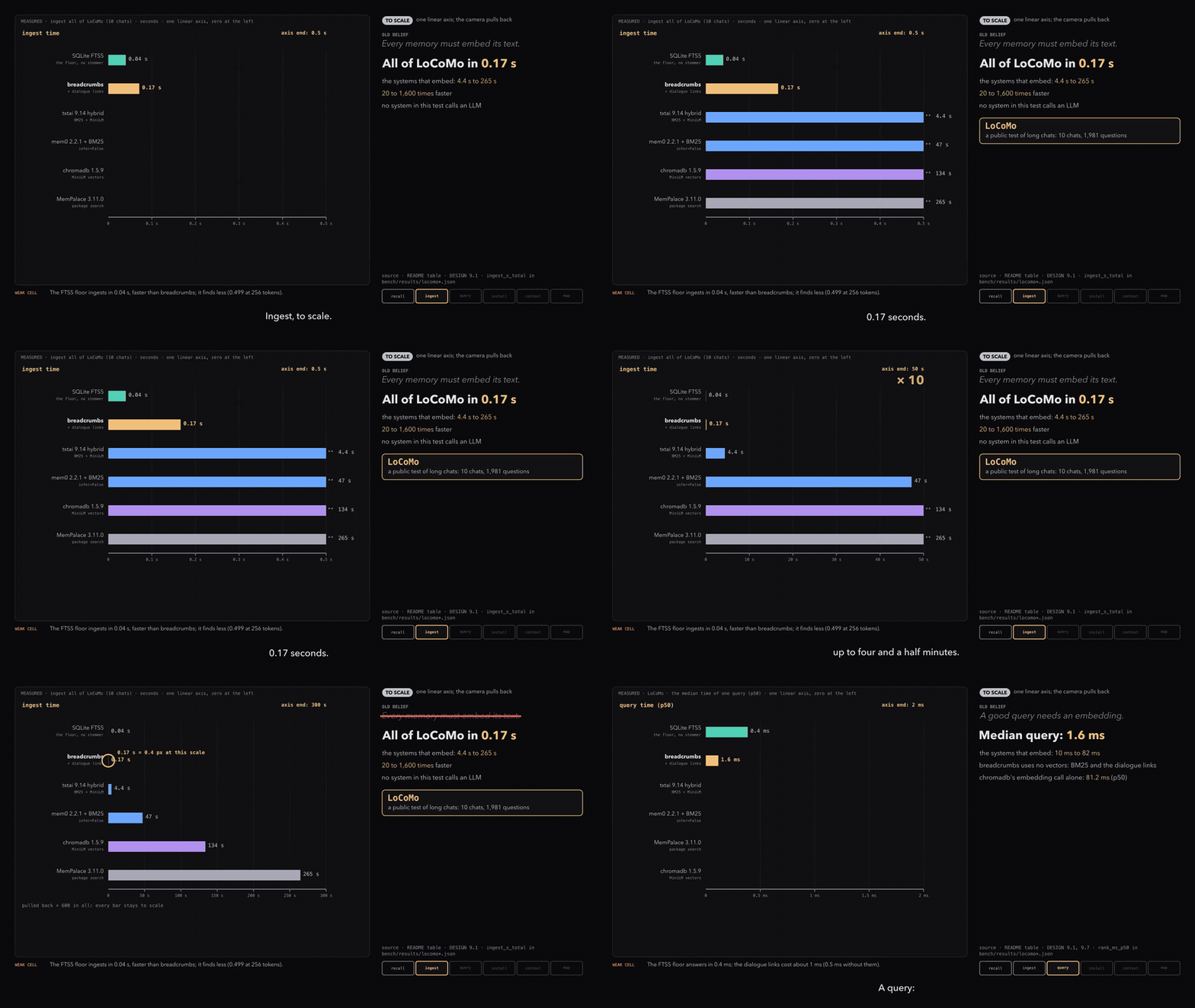
To Scale (65 seconds). The picture plays 12 seconds of it: click it for the full film with sound. Each bar is on
one linear axis with zero at the left, at its true ratio. Benchmark scores are a demonstration. They are
preliminary, and they vary during the hackathon.
MORE FILMS!
One Tool, Two Parts: crumb_find and crumb, live on a demo memory.
The First Explorer is the earliest film of the explorer.
LOOK CLOSER!
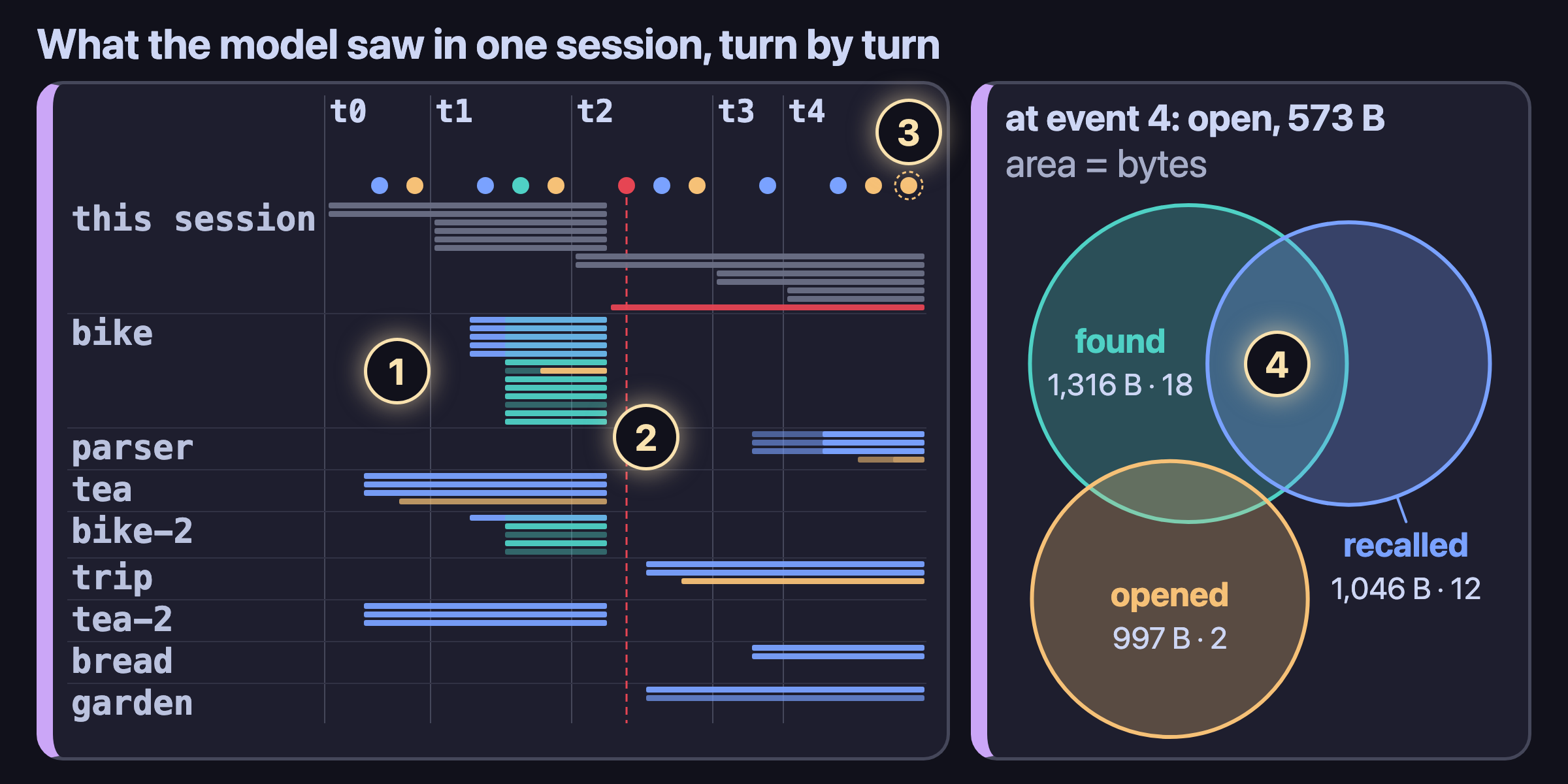
- Each bar is one copy of a crumb in the model's context, from the event that added it to the next compress. Blue is recall, teal is find, amber is open, grey is the session's own turns. A paler bar is a lower level.
- The red dashed line is a compress event (event 5, the sixth dot). The context was compacted, so each copy that was open ends there.
- The dashed ring is a cut. In turn 4, event 11 (the last dot) wanted 741 B of text. The turn budget (1,124 B) cut it to 243 B.
- The Venn shows the context at event 4 (the fifth dot). The area of a set is its bytes: found 1,316 B, recalled 1,046 B, opened 997 B. Found and recalled share 6 crumbs.
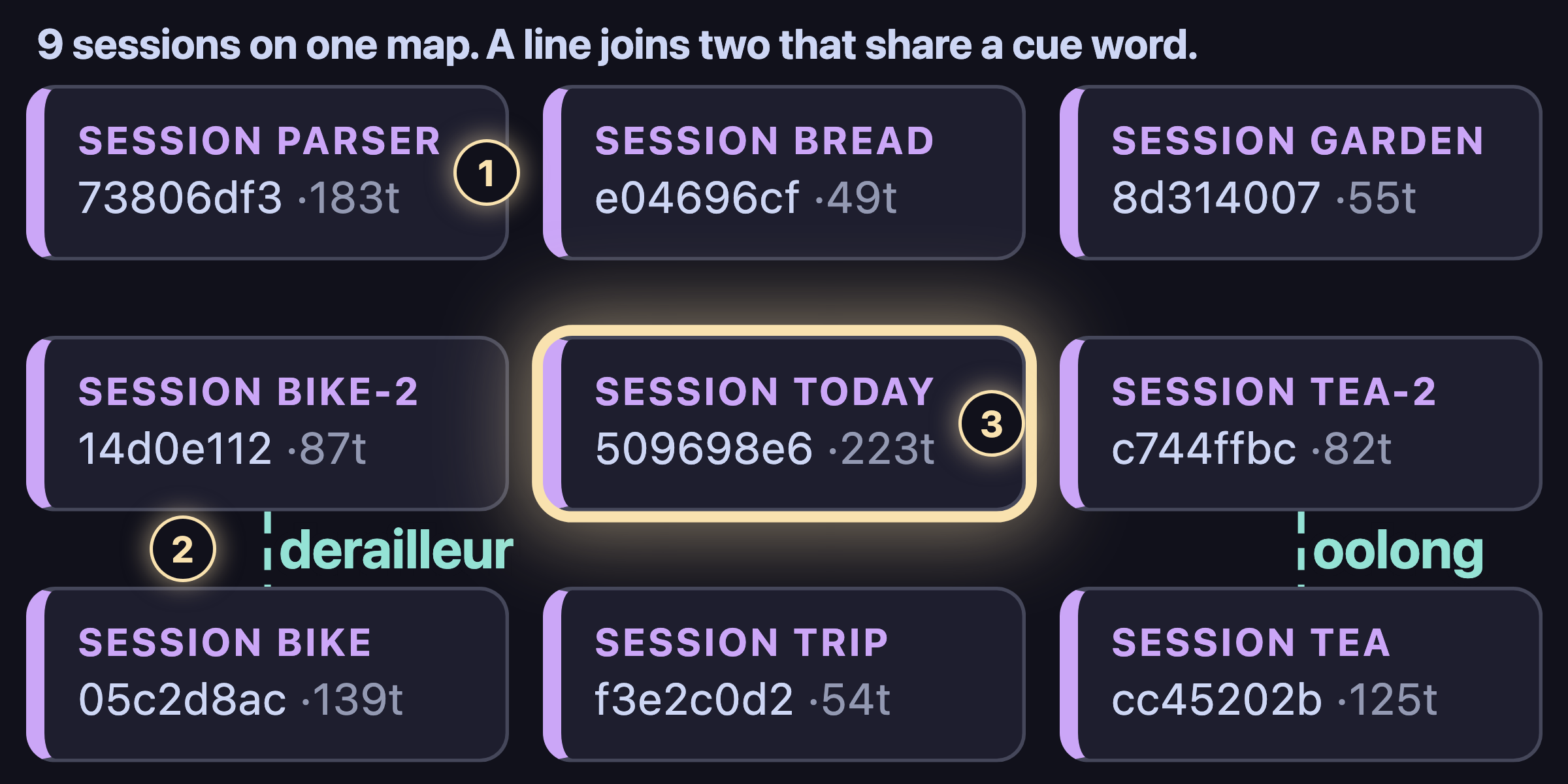
- Each card is one session: its name, its address (a crumb id) and its size in tokens.
- A dashed teal line joins two sessions that share a cue word. The word is the label: derailleur, oolong.
- The yellow halo marks the session in focus. Here it is today, the one live session; the other eight are past sessions.
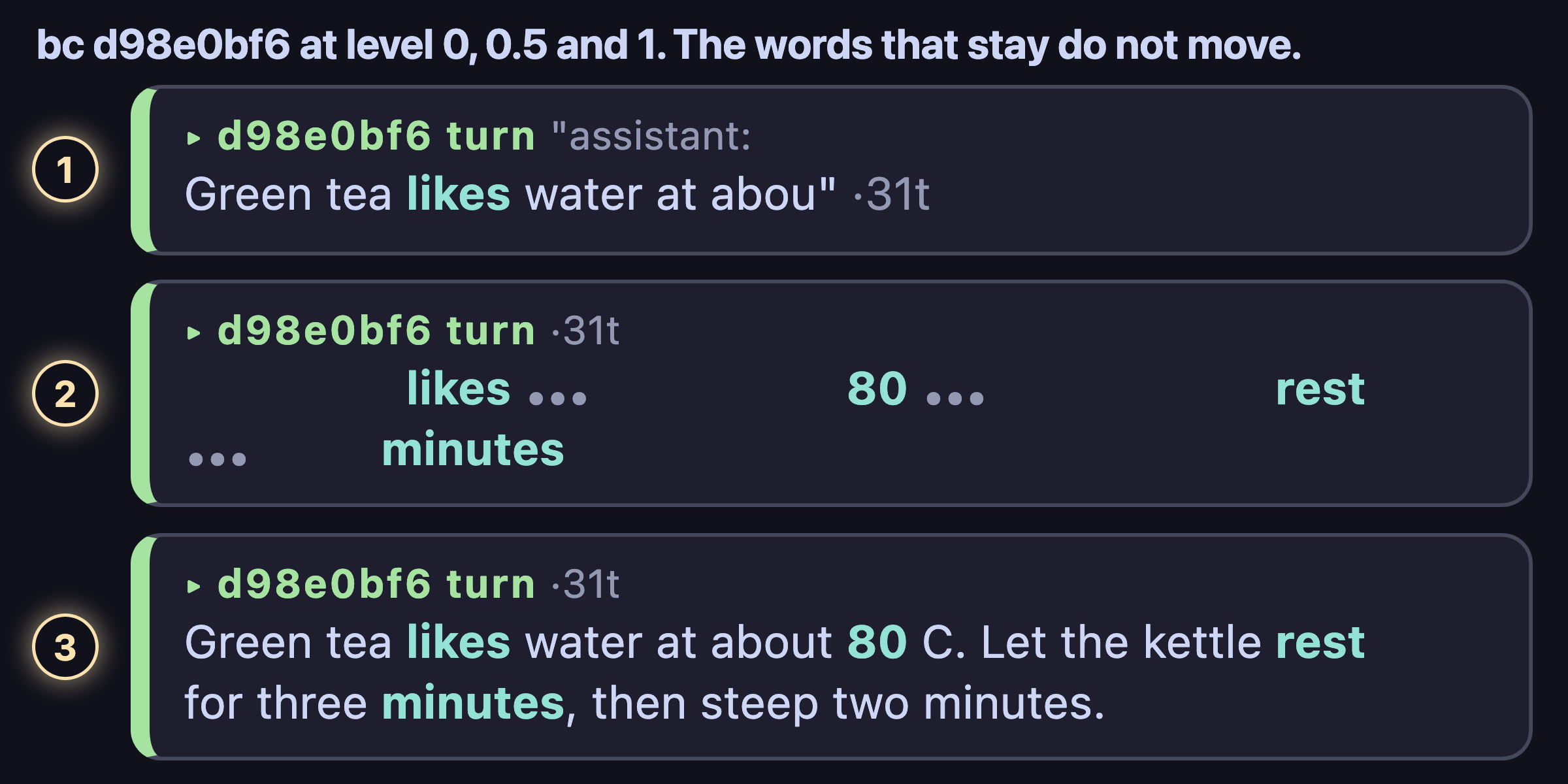
- Level 0 is a handle: one line with the id, the kind, the first words of the text and its size, 31 tokens.
- Level 0.5 shows the most distinct words. Each … is a gap, and each word keeps the place that it has at level 1.
- Level 1 is the exact bytes of the text. Each word of level 0.5 is here, in the same place.
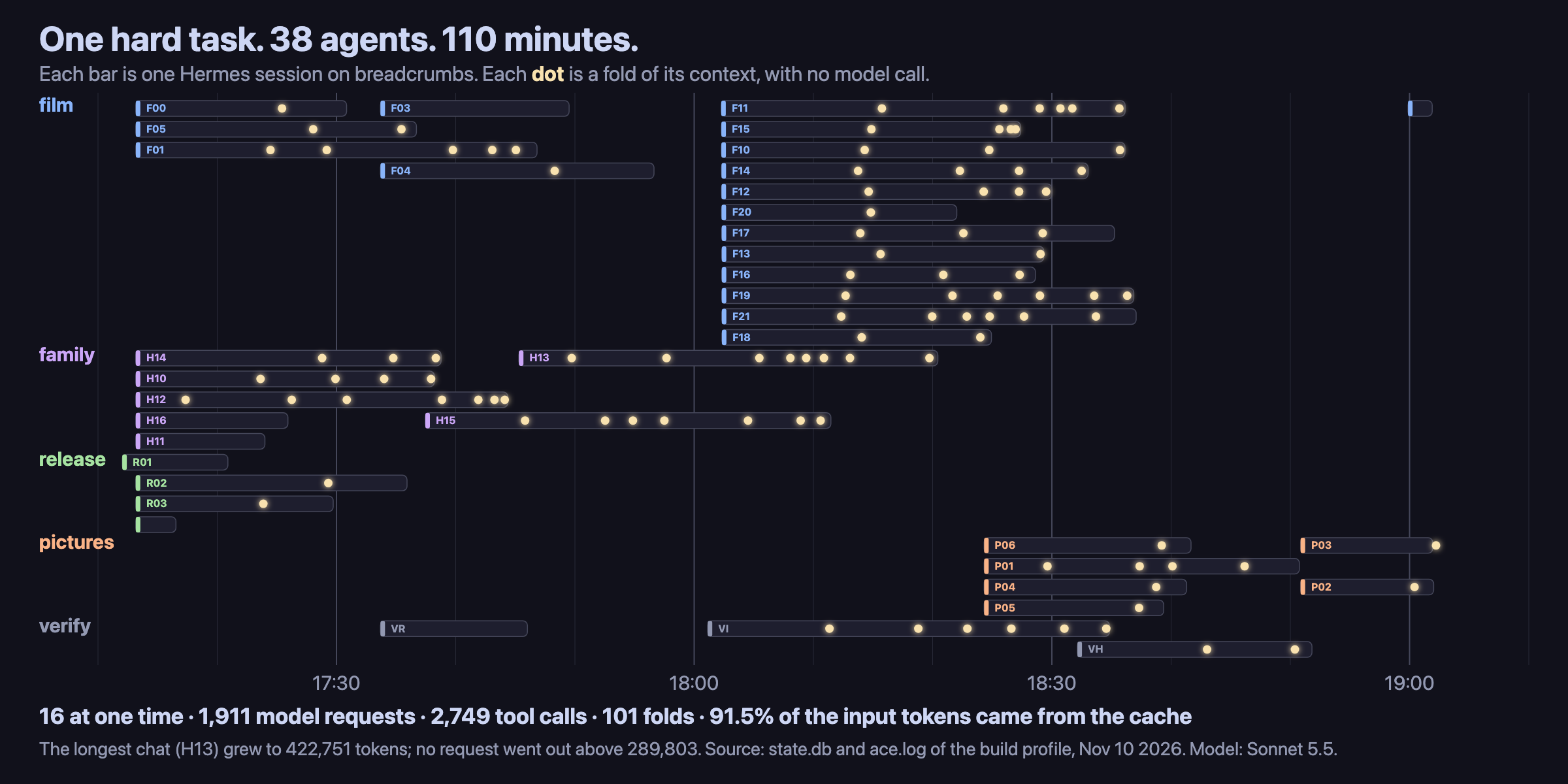
- Each bar is one Hermes session (Sonnet 5.5) that worked on this entry on the evening of Nov 10 2026, on its real clock.
- Each dot is one fold of that session's context by the breadcrumbs context engine. No model call makes a fold.
- The numbers come from the session table and the ACE log of the build profile: numbers only, no text of a chat.
Five facts, and what follows from each
| A fact about a model and its context | What breadcrumbs does about it |
|---|---|
| A model knows only the bytes in its window. | Handles. A handle is one line: an id and 8 cue words, the words that a session uses more than the rest of the memory. It is a name, inside the window, for a memory that is outside it. crumb_find(q) returns handles. It searches with BM25 and dialogue neighbors: no vectors, no model. |
| A copy with no address cannot be checked. | The address is the provenance. An id names exact bytes, in a content-addressed, append-only, compressed store: CRC32C addresses, line spines, Merkle crumbs and commits. A summary is one more crumb with a label; it never takes the place of its source. Context receipts: each recall, find, open and compaction writes an rcpt crumb that lists what the model saw, at which level and in how many bytes. |
| Nobody knows at write time how many bytes a question needs. | The zoom. The model picks the level when it reads, not when the memory is written. Below 1, a text shows key words: its first line, then its most distinct words, then its meaningful words. Grammar words show only at 1. |
| Each request pays again for every byte, unless the start of the prompt holds. | ACE, a context engine. A long chat folds into a layer of crumbs only when a request passes the target. The newest turns stay word for word, and the model opens any folded turn with crumb(id, level). Between folds the layer does not change, so the prompt cache holds. No model call is needed. |
| The same bytes must have the same name on every machine. | Sharing. Public crumbs export to an IPFS CAR file. Private crumbs never leave the machine. push prints a CID, pull CID fetches it, and every store that accepts one CID holds the same crumb ids. In a hive, hosts search each other's public crumbs in a budget of milliseconds, or pass. |
Try it in sixty seconds, with no model and no network
Run these from a clone of this repository, or from the installed plugin folder ($HERMES_HOME/plugins/breadcrumbs).
python3 demo/seed.py /tmp/bc-demo                                               # a memory with neutral text; the same ids on each run
python3 -m breadcrumbs --home /tmp/bc-demo/breadcrumbs find "green tea kettle"  # search: handles, each under its session
python3 -m breadcrumbs --home /tmp/bc-demo/breadcrumbs bc d98e0bf6 0.5          # one memory at level 0.5; try 0 and 1
python3 -m breadcrumbs --home /tmp/bc-demo/breadcrumbs verify                   # check every CRC32C
python3 -m breadcrumbs --home /tmp/bc-demo/breadcrumbs serve --open             # the explorer, read-only
doc/DEMO.md tells what the explorer shows. To see your own Hermes sessions, install the plugin
(the next section) and backfill a profile. The backfill reads state.db read-only.
python3 -m breadcrumbs --home ~/.hermes/breadcrumbs ingest-hermes default # then: ... --home ~/.hermes/breadcrumbs serve --open
Install
# breadcrumbs-hermes-release is the plugin: this part with breadcrumbs-common and breadcrumbs-spacegraph under lib/
hermes plugins install breadcrumbs-agency/breadcrumbs-hermes-release --yes-deps --enable \
  --ref "$(git ls-remote https://github.com/breadcrumbs-agency/breadcrumbs-hermes-release refs/heads/master | cut -f1)"
hermes config set memory.provider breadcrumbs       # undo: hermes memory off
hermes config set context.engine breadcrumbs        # ACE, the folding; without it only the memory runs. Undo: ... context.engine compressor
This repository is the source of this part and does not run alone (it needs its two layers). The plugin is the
repository breadcrumbs-hermes-release, built from the three parts by breadcrumbs/tools/bundle.py (BUNDLE.json
names the commits); it shares no history with this one and is never merged. Hermes installs one exact commit, so
--ref takes the 40-character commit of its master.
The plugin declares one dependency, google-crc32c, so the install asks one dependency question, and
Hermes installs the package into its environment. The CRC32C then uses the CPU instruction. In a Python
without the package (and on GraalPy), a pure-Python CRC32C runs and gives the same ids.
What it adds to Hermes
A prompt or a skill cannot do these. Each one is a plugin surface of Hermes.
- A memory provider. Recall before each turn, inside a steady-state budget: it holds context overflows at 2%
to 5% of turns. The toolscrumbandcrumb_find. A receipt for each read. Tool calls and their results
become linkedstepandtoolcrumbs. - A context engine (ACE):
hermes config set context.engine breadcrumbs. /scope: a memory for each git repository or folder, chosen by the folder of the chat. It is a slash command and no
hook. The dialfamilyadds one hook,transform_tool_result(see the handbook below)./viz: a slash command that opens the explorer of the whole profile, with no command line: it first imports the profile'sstate.db(read-only, idempotent) so every Hermes chat shows, not only the chats that this plugin has seen, then opens the base store with all of its scopes. Hermes is not a secure portal and its names are not stable, so the explorer sees what the profile holds; the viewers' disclosure level andnovisdecide what it shows."viz": "scope"inconfig.jsonnarrows it to the memory of the chat's scope.
Hermes's entry in the harness table carries the Hermes Agent app icon (icon.png). The explorer draws that icon beside
the breadcrumbs mark and uses it as the page favicon and title;BREADCRUMBS_HARNESS=<name>names the program for a
view that was not opened by one. As with Codex, the Hermes box carries the repository and Pages links; a click on the
box opens the evidence view (where this view reads, as QR codes with the JSON beneath), and a click on the breadcrumbs
mark opens the settings widget, whose Hermes section has two switches: breadcrumbs asmemory.providerand as
context.engineof the profile (hermes config; Revert restores the earlier value).
The widget's "Config file" picker lists theconfig.jsonof every profile of the Hermes root and of each scope of
each profile (a profile that opted out withno-visis left out), and says which chats read each one. Hermes runs a
chat under the profile of its process, so the CLI, the TUI, the desktop app, the gateway's bots, cron jobs and
delegate_task children of a profile all read its file; a chat whose folder is a scope also reads that scope's file,
whose values win. The provider, ACE and the model request options all read this same chain
(workdir.config_folders), and the Hermes section switches the profile of the chosen file.- One core for every harness (
breadcrumbs/core.py): six read-only verbs (find,open,zoom,trail,stores,health) over all stores at once (~/.hermes, each profile, and--homeaslocal), held open in one process. Three thin servers carry the same table:python -m breadcrumbs core mcp(MCP over stdio),core sock(a Unix socket, mode 0600;--tcp PORTadds loopback TCP that wantscore.token) andcore a2a(A2A 0.3 on 127.0.0.1 with a bearer token). A client names itself (MCPclientInfo, the A2AUser-AgentorX-Harness, theharnessfield of a socket request); the core tells Hermes, Claude Code, Codex and OpenCode apart, counts their calls inhealth, andcore setup [HARNESS]prints the command that adds the MCP server to each one. - The explorer. It opens a session as a document: turn frames, phase bands, tool and file cards. It draws
the receipts as a Gantt chart (crumbs by turns; each bar holds the text that the model saw) and a Venn of
recalled, found and opened crumbs (one frame of crumb texts for each region). It runs in a browser (serve),
in Kitty or Ghostty (term), and as a page of Hermes Desktop. - Worker flows. The skill
breadcrumbs:dispatchtells a lead agent how to give work to a helper: the
user's own words and the exact crumbs, not a summary of them. A helper opens a piece withbc ID 1, and
its report cites the ids. The explorer draws a delegation as its own band in the turn. - The slot and the seats: keep the memory provider that you have, and run it THRU breadcrumbs.
- A CLI:
migrate(exports of ChatGPT, claude.ai and other memory systems become crumbs that keep their
source ids); an Obsidian vault, both ways (vault export DIR,vault import DIR); and sharing over IPFS
(push,pull, the hive). - Heuristics first. A small local model (Qwen3.5-0.8B through llama.cpp, no server) writes
sumcrumbs only.
Each summary records its source, the model file hash and the exact model input. - The Python standard library and one package,
google-crc32c(the CRC32C as a CPU instruction). It
runs on CPython 3.11+ and on GraalPy 25; without the package, a pure-Python CRC32C gives the same ids.
What is measured
Benchmark scores are a demonstration. They are preliminary, and they vary during the hackathon.
Against other memory systems, on the same data and with no LLM and no judge. LoCoMo:
1,981 questions; the score is the share of gold turns inside a context of 256 or 4,096 tokens.
On LoCoMo it beats MemPalace, txtai, mem0 and chromadb at every budget.
| system | 256 | 4,096 | ingest | query p50 | disk | install |
|---|---|---|---|---|---|---|
| breadcrumbs (BM25 + neighbors) | 0.583 | 0.876 | 0.17 s | 1.6 ms | 2.8 MB | 0 |
| mem0 2.2.1 (infer=False + BM25) | 0.551 | 0.867 | 47 s | 22 ms | 31.1 MB | 1,016 MiB |
| txtai 9.14 hybrid (BM25 + MiniLM) | 0.516 | 0.863 | 4.4 s | 10 ms | 16.3 MB | 751 MiB |
| MemPalace 3.11.0 (package search) | 0.515 | 0.854 | 265 s | 64 ms | 44.7 MB | 341 MiB |
| chromadb 1.5.9 (MiniLM) | 0.335 | 0.768 | 134 s | 82 ms | 24.6 MB | 334 MiB |
| SQLite FTS5, no stemmer (the floor) | 0.499 | 0.744 | 0.04 s | 0.4 ms | 2.2 MB | 0 |
- The install column is the size of the packages that a system needs. breadcrumbs needs one small package,
google-crc32c. - The neighbor weight was chosen on LoCoMo. On LongMemEval-S, which was not used to tune, breadcrumbs
also beats the FTS5 floor. - Session handles end with 8 cue words. BM25 over one handle per session ranks the session that holds the
answer first for 38% of LoCoMo and 55% of LongMemEval-S questions (5% and 18% without the cue words). - The context engine. A replay of this project's own chat (4,697 messages) has its largest request at
2,332,831 tokens without ACE and at 164,350 with it (tokens here are request bytes / 4), and 3,961 of the
3,968 crumbs of its last layer open to their exact message. - Two limits. At a target of 8k or 16k tokens a plain window holds more exact text than ACE, and a summary by
the small model can be wrong. So a summary has a label, and its sources stay exact.
Reference
Summaries are optional. They need llama.cpp's llama-completion on the PATH and a GGUF model.
The default is Qwen3.5-0.8B (Apache-2.0, 580 MB), the best of ten local models up to 1.5B on the
summary bench:
curl -L -o ~/models/Qwen_Qwen3.5-0.8B-Q4_K_M.gguf \
  https://huggingface.co/bartowski/Qwen_Qwen3.5-0.8B-GGUF/resolve/main/Qwen_Qwen3.5-0.8B-Q4_K_M.gguf
shasum -a 256 ~/models/Qwen_Qwen3.5-0.8B-Q4_K_M.gguf   # fb044e93939a70469c905781334f5de1e6c8b608ced6cbc8c9249bd4127d9526
BREADCRUMBS_SUM_MODEL picks another file and BREADCRUMBS_SUM_TEMPLATE its chat family (qwen,
chatml, nemotron, granite, gemma3, gemma4). Without a model, everything else works and no summaries
are written.
hermes memory setup offers one field, turn_factor (default 0, off). Above 0, recall, find and open
share one memory budget for each user turn: that many times the recall budget. A full turn cuts find
to handles and open to a lower level, and the result says so. The value is kept in
$HERMES_HOME/breadcrumbs/config.json; BREADCRUMBS_TURN_FACTOR overrides it. In a live A/B, the
answers with the budget were less complete, so the default stays off.
Hermes runs one external memory provider. The slot lets you keep the one you have (mem0, Honcho,
Supermemory, Hindsight, ...) and add breadcrumbs:
python -m breadcrumbs slot <profile>           # the profile's provider moves into the slot; breadcrumbs takes its place
python -m breadcrumbs slot <profile> honcho    # or name the provider
python -m breadcrumbs slot <profile> --off     # undo: the slotted provider is the memory provider again
Each call goes THRU breadcrumbs to the slotted provider: Hermes gets its recall, tools, prompt block
and recall line as before, byte for byte. breadcrumbs stacks under it. It adds nothing to the context
(with ACE on, it adds crumb and crumb_find: the ACE layer needs them). It keeps each turn and each
text that the slot recalls as a slot crumb with its source and a receipt, and these stay after
--off. A slot that fails is logged in provider.log and skipped. The name is kept in config.json (hermes memory setup offers it too). Restart the gateway after a change.
Each memory system is a different case. breadcrumbs reuses a provider that Hermes has (in the slot),
clones one that Hermes took out of its core (from Hermes's own git history, with the commit and the
SHA-256 of each file), or borrows the files of one that it does not run. For each system it adds
permanence (seat snap, seat harvest) and mobility (seat restore, seat replay, and a CAR file):
python -m breadcrumbs seats <profile>                       # each system: its way, where it is, its files
python -m breadcrumbs seat clone holographic <profile>      # back from Hermes's history into plugins/
python -m breadcrumbs seat snap holographic <profile>       # the exact bytes of its state
python -m breadcrumbs seat harvest builtin <profile>        # each entry of MEMORY.md and USER.md as a crumb
python -m breadcrumbs seat restore holographic <profile-2>  # the state in another profile
python -m breadcrumbs seat replay holographic <profile> --from seat-builtin   # kept texts into a system
The size of a request counts its text, its tool calls and the thinking that goes back with each message,
and the model's own counts turn bytes into tokens. One turn can fold its own first steps. On a live run
with a 50k target, one turn of 16 calls stayed at 21,437 to 51,288 tokens (67,588 for one step that read
three files at once), with 9 folds, 0 API errors and an exact answer. Each request writes one line to
$HERMES_HOME/breadcrumbs/ace.log.
hermes -p <profile> config set context.engine breadcrumbs # back: ... context.engine compressor
Hermes then sends each request through the breadcrumbs context engine. When a request passes 200k
tokens, the older turns fold into a layer of crumbs, each at a level from 0 to 1, and the newest turns
stay word for word. The model opens a crumb with crumb(ref, level), and the next layer gives that
crumb more room. No model call is needed.
A delegate_task child has no memory provider, so it has no crumb tool. ACE leaves its requests as they are
(act=pass in ace.log): a layer that the model cannot open would only hide its text. Only Hermes's own
threshold (a nearly full window) still folds such a child.
Between folds the layer does not change, so the prompt cache holds: a request pays again for the new turns
only. This README states no multiplier for that gain. A plain window of the newest messages holds more exact
text than the layer at a target of 8k or 16k tokens. At a target of 16k tokens or less, the layer is smaller
(15% of a fold, not 40%), because there exact text recalls more.
The fold numbers (the 200k target, the 10% cut, the ratchet and the layer share) are preliminary
engineering parameters. They may change during the hackathon.
Every knob is one row below. python -m breadcrumbs --home <HERMES_HOME>/breadcrumbs dials [--model NAME]
shows each dial with its value and where the value came from (the default, config.json, a model entry, a built-in
model entry or the environment), names a value that is not valid, and names a key that is no dial (a typing mistake). A dial is set in
$HERMES_HOME/breadcrumbs/config.json. Each profile has its own file, so profiles differ in one gateway.
"models" maps a glob of the model name to dials: no one set is best for each model, because a model
at maximum reasoning writes more thinking, and the thinking that goes back with each message counts in each
request. The last value that sets a dial wins; the environment variable of a dial wins over the file. A
"models" entry may also hold request options (temperature, top_p, ...). Hermes's public llm_request
middleware puts them into each OpenAI chat-completions request of a chat (not into its helper calls), for a
provider that you call with an API key; the Anthropic wire and a provider that logs in with OAuth keep the request
that Hermes builds.
{"ace_tokens": 200000, "models": {"*nemotron*": {"ace_tokens": 290000, "ace_fold_to": 0.9}}}
The size of the context. ACE keeps a chat near ace_tokens. A model that reads a lot of data needs more room,
and nothing stops it but Hermes's own threshold and ace_ceiling: when an interval of reading passes the target, the target grows by
ace_ratchet, so the data stays in one place (fewer folds, fewer layers). When the tools work without growing the
context (a write, or ace_diverse different tools in an interval), each interval takes the fold share, 10% at
ace_fold_to 0.9, off the room above ace_tokens, until the target is back at the band. A fold then cuts 10% off
the target, as always. Before the taper, one chat went from 200k to 609,725 and was not folded for 450,000 tokens.
ace_ceiling holds a chat under a price step: Claude Haiku 5.5 costs 5 times as much per token when a prompt holds
more than 100,000 tokens (cache reads and writes count), so its built-in entry keeps each request at 94,000 or less
by ACE's estimate. The estimate read at most 5.9% under the model's count on a live run, so the bill stays under the step.
| Dial | Default | Range | Env var | What it does |
|---|---|---|---|---|
ace_tokens | 200,000 | 1 or more | BREADCRUMBS_ACE_TOKENS | The normal size in tokens at which ACE folds a chat. Reading may grow the target above it; work tapers it back to it. |
ace_fold_to | 0.9 | 0.1 to 1 | A fold leaves the request at this share of the target: 0.9 cuts 10%, 20k at a target of 200k. The same 10% tapers a raised target back to ace_tokens, one step in each interval of work. | |
ace_fold_cap | 1.35 | 0.1 to 2 | A fold aims at most at this share of the target, by the estimate (the estimate reads high). | |
ace_ratchet | 1.45 | 1 to 4 | A fold interval in which the tools only read raises the target by this factor, so that a model that reads a lot of data keeps it in one place (fewer folds, fewer layers). There is no ceiling but Hermes's threshold and ace_ceiling. 1.0: never. | |
ace_ceiling | 0 | 0 or more | The most tokens that ACE lets a request reach: the target, the raised target and the room of lockup stay at or under it. For a model whose price per token steps up with the size of the prompt: Claude Haiku 5.5 costs 5 times as much over 100,000 prompt tokens, so its built-in entry is 94,000, which keeps the bill under the step when the estimate reads 5.9% low. 0: no ceiling. | |
ace_lockup | false | true or false | Two gears. Lockup (research and reasoning): from the first request the target is ace_room, and nothing folds below it. Thinking and calls that only read keep the lockup; the crumb tools never count as work. Low gear (work): the first call that writes shifts down. Each user turn of work takes ace_downshift of the room above ace_tokens, and a user turn with no work puts the chat in lockup again. Off: the target is ace_tokens, and ace_ratchet raises it. | |
ace_room | 0 | 0 or more | The research room in lockup, in tokens: the size that a chat may reach before its first gentle fold, which leaves ace_fold_to of it. A grant, not a cap: it is cut to Hermes's threshold and to ace_ceiling, and a room under ace_tokens is ace_tokens. 0: Hermes's threshold. Needs ace_lockup. | |
ace_downshift | 0 | 0 to 1 | The share of the room above ace_tokens that each user turn of work takes off in low gear (with no ace_lockup: each interval of work). 0: 1 minus ace_fold_to, 10% at the default, as before. | |
ace_turn_fold | false | true or false | In low gear the first request of each user turn folds again when the chat has a layer, so the layer follows the task. The layer then holds inside the turn, and the prompt cache holds. Needs ace_lockup. | |
ace_persist | 0 | 0 or more | The words of the tool calls in the kept turns count as focus words at half weight in the layer, and an old crumb whose rare words come back in later groups of turns gets its weight times 1 plus this number for each of those groups (at most 4). 0: off. | |
ace_diverse | 4 | 0 or more | An interval in which the tool calls write, or use this many different tools, is work and not reading: the raised target tapers back. 0: only a write counts. | |
prefetch_tokens | 300 | 1 or more | BREADCRUMBS_PREFETCH_TOKENS | The first budget of the recall text in each turn, in tokens. The controller then adapts it, between budget_min and budget_max (it is saved in horizon.json). |
recall_share | 0.15 | 0 to 1 | BREADCRUMBS_RECALL_SHARE | A turn overflows when the recall text is more than this share of the context. |
neighbor | 0.3 | 0 to 1 | BREADCRUMBS_NEIGHBOR | The weight of dialogue-neighbor smoothing in search: a turn next to a strong hit gets this share of the hit's score. 0: off. |
turn_factor | 0 | 0 to 64 | BREADCRUMBS_TURN_FACTOR | One memory budget for each user turn: recall, find and open share this many recall budgets. 0: no turn budget. |
age_half_days | 30 | 0.1 or more | BREADCRUMBS_AGE_HALF_DAYS | The priority of a crumb in recall halves in this many days of age. |
idle_half_days | 7 | 0.1 or more | BREADCRUMBS_IDLE_HALF_DAYS | And it halves in this many days since the model last opened it. |
budget_min | 40 | 1 or more | The smallest recall budget that the controller sets, in tokens. | |
budget_max | 2,000 | 1 or more | The largest recall budget that the controller sets, in tokens. | |
overflow_low | 0.02 | 0 to 1 | The controller raises the budget when fewer turns than this share overflow. | |
overflow_high | 0.05 | 0 to 1 | The controller lowers the budget when more turns than this share overflow. | |
family | false | true or false | After a delegation, the provider reads the child's session rows from state.db (read-only), writes them to the child's own store (the folder children/ID of the breadcrumbs folder), and exports them there as a CAR file. It then imports the CAR into the profile's own store as private crumbs. When the result of delegate_task holds the entry of the child, it adds the handle of the child's session to that entry. Off: nothing is read, nothing is written and no result changes. | |
update_ms | 2,000 | 200 to 60000 | BREADCRUMBS_UPDATE_MS | The interval in milliseconds at which the live viewers (the explorer page of /viz) poll the store: the map, the context and the trail; the measures poll at three times it. Read from the top level of config.json and from the environment. A value of a 'models' entry is not used here. |
live | true | true or false | BREADCRUMBS_LIVE | Whether the live viewers (the explorer page of /viz) ask the store every update_ms which of its data changed (its index, its logs, this chat's config) and reload only that part. Off: the page loads once and reloads by hand. Read from the top level of config.json and from the environment, as update_ms is. |
| Environment knob | Default | What it does |
|---|---|---|
BREADCRUMBS_HOME | <HERMES_HOME>/breadcrumbs | The directory of the store, for the command line. |
BREADCRUMBS_TOOL_PREFIX | mcp__ | The prefix of the tool names (mcp__crumb). Hermes on the Anthropic OAuth wire needs it. |
BREADCRUMBS_SLOT | (none) | The name of another memory provider to run through breadcrumbs. Wins over config.json "slot". |
BREADCRUMBS_SUMMARIZE | auto | 0: never run the small summary model. auto: run it when the model and the binary exist. |
BREADCRUMBS_SUM_MODEL | ~/models/Qwen_Qwen3.5-0.8B-Q4_K_M.gguf | The GGUF file of the summary model. |
BREADCRUMBS_LLAMA | llama-completion on the PATH | The llama.cpp binary that runs the summary model. |
BREADCRUMBS_SUM_TEMPLATE | qwen | The prompt template of the summary model. |
BREADCRUMBS_CRC32C | (auto) | pure: use the pure-Python CRC32C even when google-crc32c is installed. |
BREADCRUMBS_GRAALPY | (auto) | The GraalPy binary for the GraalPy runs. |
BREADCRUMBS_GRAAL_HEAP | 4g | The heap of a GraalPy run. |
BREADCRUMBS_IPFS | ipfs on the PATH | The kubo binary, for push, pull and the hive. |
BREADCRUMBS_HERMES_REPO | ~/.hermes/hermes-agent | The Hermes checkout that seat commands read. |
| Environment knob | Default | What it does |
|---|---|---|
BREADCRUMBS_HOME | <HERMES_HOME>/breadcrumbs | The directory of the store, for the command line. |
BREADCRUMBS_TOOL_PREFIX | mcp__ | The prefix of the tool names (mcp__crumb). Hermes on the Anthropic OAuth wire needs it. |
BREADCRUMBS_SLOT | (none) | The name of another memory provider to run through breadcrumbs. Wins over config.json "slot". |
BREADCRUMBS_SUMMARIZE | auto | 0: never run the small summary model. auto: run it when the model and the binary exist. |
BREADCRUMBS_SUM_MODEL | ~/models/Qwen_Qwen3.5-0.8B-Q4_K_M.gguf | The GGUF file of the summary model. |
BREADCRUMBS_LLAMA | llama-completion on the PATH | The llama.cpp binary that runs the summary model. |
BREADCRUMBS_SUM_TEMPLATE | qwen | The prompt template of the summary model. |
BREADCRUMBS_CRC32C | (auto) | pure: use the pure-Python CRC32C even when google-crc32c is installed. |
BREADCRUMBS_GRAALPY | (auto) | The GraalPy binary for the GraalPy runs. |
BREADCRUMBS_GRAAL_HEAP | 4g | The heap of a GraalPy run. |
BREADCRUMBS_IPFS | ipfs on the PATH | The kubo binary, for push, pull and the hive. |
BREADCRUMBS_HERMES_REPO | ~/.hermes/hermes-agent | The Hermes checkout that seat commands read. |
python -m breadcrumbs migrate SYSTEM FILE reads another system's export into the store. Each crumb keeps
the record's id in that system (meta.src, meta.src_id), so a recalled fact names its source. A
conversation becomes a session; a memory list becomes one session of mem crumbs per system. A second
run adds nothing.
| SYSTEM | FILE |
|---|---|
chatgpt | conversations.json of an OpenAI data export (the visible branch of each conversation) |
claude | conversations.json of a claude.ai data export |
hermes | a profile's MEMORY.md or USER.md |
mem0, openmemory, supermemory, hindsight, honcho, retaindb | the JSON list that the system's list API returns |
The plugin ships a five-line skill with its tools: breadcrumbs:dispatch (breadcrumbs/skills/dispatch/SKILL.md).
Hermes lists it with the other skills, and the prompt block names it. It tells an agent how to give work
to a delegate_task child, a message_agent teammate or a cron job: send the user's own words and the
exact crumbs (level 1, or an id:a-b range), not a summary in the agent's own words. A child has no
memory tools, so the handbook gives it bc, which only reads the store.
When a child ends, Hermes tells the lead's provider (on_delegation), and breadcrumbs writes one worker
receipt in the lead's chain: the brief, the report, the refs that each one names (those that open in the
store), and both session ids. crumb(RECEIPT, 1) gives the brief and the report word for word. A worker
receipt is a name, not a copy: it adds no bar to the Gantt chart and spends none of the turn budget.
With the dial family on (it is off by default), the work of the child also comes into the lead's store. The
provider reads the rows of the child from state.db, exports them as a CAR file, and imports that file as
private crumbs: crumb(ROOT, level) opens the child's turns word for word, crumb_find finds them, and no
export and no hive peer sees them. The worker receipt then holds the CID of the CAR and the id of ROOT. The hook
transform_tool_result puts one handle line for each child in the result of delegate_task, in the entry of that
child under the key breadcrumbs; the result stays valid JSON, and only the entries of children change.
A result has entries when Hermes runs the call to its end: a call from a subagent, a gateway session with
delegation.gateway_mode: inline, and a session that cannot receive a detached result (a one-shot
hermes chat -q, an API request, a full pool). A call in a session that can receive one detaches its children
and returns a dispatch handle with no entries; the summaries come back later as a message that no tool-result
hook sees. There the hook adds no line. The import and the worker receipt do not depend on it, and
crumb_find still finds the work of the child.
Two codebases in one memory dilute it: recall can bring back a crumb of the wrong codebase. Hermes profiles can keep
them apart, but a profile is a whole agent (keys, skills, sessions, a gateway), and one profile for each repository is
more machinery than the problem needs. breadcrumbs keys the memory to the place instead.
- The project of a folder is the nearest of: a folder with a
.breadcrumbsentry (any depth; a file whose text isoff
says this place has no project and uses the default memory), a git repository (a worktree or submodule is its main
repository), a source tree (a folder withpyproject.toml,package.json, ...), and else the folder itself. The home
folder is the one exception: its project is the profile's default memory, which keeps what it already holds. - The folder of the chat is what Hermes gives as the session cwd (
agent.runtime_cwd), elseTERMINAL_CWD, else the folder
of the process. Hermes passes a memory provider no folder, so breadcrumbs reads it itself. - The store of a scope is
<profile home>/breadcrumbs/scopes/<name>-<8 hex>(the hex is from the real path). It is not in
the repository, so no memory reaches git. Aconfig.jsonthere overrides the defaultconfig.jsonof the profile. - Reading further. Automatic recall and every write use the nearest scope.
crumb_findwithscope: "up"also reads the
scopes above and the default memory;"all"reads every scope of the profile. A hit of another scope sits under a
◇ scope NAMEline, andcrumb(id)opens an id that another scope holds (a crumb id is a content hash). - Off.
BREADCRUMBS_SCOPE=offor"scope": "off"inconfig.json: every chat uses the default memory.
python3 -m breadcrumbs scopes [PROFILE]            # the scopes that have a memory
python3 -m breadcrumbs scopes --here PATH          # the scope of a folder, and the scopes above it
The ACE context engine and its logs (ace.log, usage.log) stay in the profile's default store.
A race car driver wears a helmet and gear, because performance comes with danger. breadcrumbs is the
turbo on token effectiveness, and it brings its own helmet and gear. Each part of the turbo has a
danger. breadcrumbs gives each danger a guard and a signal.
| Turbo | Danger | Guard in breadcrumbs | Signal |
|---|---|---|---|
| ACE folds older turns into crumbs. Between folds the layer does not change, so the prompt cache holds. | Below level 1, the model sees key words, not the exact text. At 8k and 16k, a plain window holds more exact text. | Each crumb keeps its exact text, and crumb(id, 1) gives it back. At 16k or less, the layer takes 15% of a fold. | ace.log: one line per request |
Recall and the crumb tools bring past text back as crumbs. | The model can open the wrong crumb, or no crumb. | Each event is a receipt: the refs, levels and bytes that the model saw, in a hash chain. | rcpt crumbs |
| A small model writes summaries. | A summary can be wrong. | A sum crumb keeps the model's SHA-256 and the exact prompt. Its sources stay exact. | sum crumbs |
| The hive searches other hosts. | Text from another host comes into the context. | Each part must pass its CRC32C check. A late peer passes. The id names the peer. | receipts with id@peer/store |
| One memory for each codebase. | Two codebases in one memory dilute the context and mix their recall. | The store follows the git repository or folder of the chat; crumb_find reads further only on request (scope). | scope.json |
| ACE raises its target when the tool calls only read. | A larger target costs more tokens in each request. | Only a fold interval with no work raises the target (by 1.45), up to Hermes's threshold or ace_ceiling. An interval with work folds as before. | act=ratchet in ace.log |
Each signal is a file (ace.log, scope.json) or a crumb (rcpt, sum) that you can read.
/scope and /viz are commands of breadcrumbs.
What it does on your machine
- It keeps its data in
$HERMES_HOME/breadcrumbs/, the store of the active profile. - It keeps each user, assistant and tool turn word for word, append-only. Hermes hands a turn to the provider
after Hermes has masked secrets in it (Hermes's own scrubber,_redact_for_provider). breadcrumbs masks
nothing itself, so a secret that the scrubber misses is kept. The context engine keeps the text of the
messages that it folds (a tool result and the arguments of a call as plain text).ingest-hermescopies the
user, assistant and tool rows ofstate.dbas Hermes stored them. - It keeps the brief and the report of each
delegate_taskchild word for word, in oneworkerreceipt, as
Hermes masked them before it handed them over (on_delegation). A secret that the scrubber misses is kept. - By default, breadcrumbs makes no network calls. It reads no credential files. It sends no telemetry. A
slotted provider (see the slot) works as it did before, with its own network calls. - It replaces no class and no function of Hermes.
- The hive is off by default. When
config.jsonlistshivepeers,crumb_findalso sends its
query to each listed peer address (TCP) and waits at most a budget (150 ms by default).crumbon
a hitid@peer/storegets that crumb from its peer. A peer answers from public crumbs only, unless
its owner serves a store whole (hive serve --all NAME, CLI only). - One background thread writes summaries after a span or a session closes, never during a model
turn. It runs the localllama-completionbinary as a subprocess and reads the model file once
to record its SHA-256. The subprocess gets a minimal environment:PATH,HOME,LANG,TMPDIR,
and theLC_*,LLAMA_*,GGML_*and GPU variables, never a name with KEY, TOKEN, SECRET or
PASSWORD (summarize.child_env).BREADCRUMBS_SUMMARIZE=0turns this off. - It makes a store folder under
<profile home>/breadcrumbs/scopes/for each scope that a chat works in, with ascope.json
(its real path and kind). It reads the folder of the chat and looks for.gitand.breadcrumbsentries in that folder and
its parents. It starts no process, makes no profile, and changes no config of Hermes. /scopeshows the scope of the chat and the scopes that have a memory (read-only).python3 -m breadcrumbs scopesdoes the same
from a shell.- The dashboard API (the Desktop page) is read-only, and the dashboard's session secret guards it. It reads the
store of the active profile. A request withstore=NAMEreads the store, or thestate.dbfor the log
views, of another profile of the same Hermes root, and/storeslists those stores with their paths and
session counts. The API starts one warm-up thread when it loads: the thread opens the store of the active
profile once. - With a slot, breadcrumbs reads the settings files of the slotted provider (
$HERMES_HOME/<name>.jsonand
$HERMES_HOME/<name>/config.json) and thememorysection ofconfig.yaml, to show the setup fields of
that provider. When you save that setup and the provider has nosave_configof its own, breadcrumbs writes
memory.<name>inconfig.yaml.python -m breadcrumbs slot PROFILEsetsmemory.providerthrough
hermes config set. - The CLI command
ingest-hermes PROFILEreads that profile'sstate.db(read-only). The memory provider
does not read it, except when the dialfamilyis on (it is off by default). With the dial on,
after a delegation, the provider reads the child's session rows fromstate.db, read-only. It reads only
the rows of that child. It writes them, as Hermes stored them, to the child's own store
($HERMES_HOME/breadcrumbs/children/<child session id>/) and exports them there as a CAR file. Then it
imports that CAR file into the store of this profile as private crumbs. The CAR file stays on the machine. - The hook
transform_tool_resultreturns at once for every tool butdelegate_task, and fordelegate_task
while the dialfamilyis off. With the dial on, it reads the result of eachdelegate_taskcall and adds one
line to the entry of each child that it kept: the handle of that child's session. It changes nothing else, and
it sends nothing out. - The hooks
post_api_request(after each model request of a chat) andpost_auxiliary_call(after each helper
call: titles, compression, approval, vision) each append one line to$HERMES_HOME/breadcrumbs/usage.log: the
ids of the session, turn and request, the model and provider names, the token counts (input, cache read, cache
write, output, reasoning), the message count, the duration and the finish reason. They never read the request,
the response, an error text or the base URL into a line, and they change nothing. The file turns over to
usage.log.1at 1 MB.BREADCRUMBS_USAGE_LOG=0writes nothing. - The
llm_requestmiddleware reads$HERMES_HOME/breadcrumbs/config.jsonat each model request of a chat.
When a"models"entry of the model holds request options (temperature,top_p,top_k, ...), it puts
them into that request: a key of the OpenAI spec at the top level, any other inextra_body, and a null removes
the key. Only the OpenAI chat-completions wire changes, and only for a provider that you call with an API key;
the Anthropic wire, a provider that logs in with OAuth and the helper calls keep the request that Hermes builds.
With no options for the model, it changes nothing. shareandimportwrite and read CAR files only at the paths you give. No IPFS daemon runs.pushandpull(CLI only) run your localipfsbinary (kubo) with yourIPFS_PATH; what it
connects to is your kubo configuration.pushadds only the public crumbs of one project.serve(CLI only) starts a read-only page on 127.0.0.1 with a token in the URL. The provider
opens no port.term(CLI only) draws the same explorer page in Kitty or Ghostty through the Kitty graphics
protocol. Each frame, headless Chrome (a scratch profile, never yours;BREADCRUMBS_CHROMEpicks the
binary) takes a PNG of the page, and the terminal shows it in place of the last one. With no--url,
it serves--homeon a free 127.0.0.1 port first. Options:--every S(default 10),--width,
--height,--wait-ms(page time for its API calls),--frames N. Ctrl-C clears the image.- The
seatcommands (CLI only) write outside the store only when you run them:clonewrites
plugins/<name>from your local Hermes git checkout,restorewrites the files of a snap, and
replayruns the other provider, with its own network calls.
Use
python3 -m breadcrumbs --home DIR find "zoom level"        # search
python3 -m breadcrumbs --home DIR bc 4fe224dc 0.3          # show a crumb at level 0.3 (read-only: safe while a gateway runs)
python3 -m breadcrumbs --home DIR bc 4fe224dc:1-7 1        # the exact lines 1..6 of a text
python3 -m breadcrumbs --home DIR log                      # the commit chain
python3 -m breadcrumbs --home DIR stats                    # sizes and ratios
python3 -m breadcrumbs --home DIR verify                   # check every CRC32C
python3 -m breadcrumbs --home DIR summarize --all         # small-model summaries of sessions and closed spans
python3 -m breadcrumbs --home DIR publish 4fe224dc         # a public copy (the original stays private)
python3 -m breadcrumbs --home DIR share ID --out x.car     # export public crumbs (IPFS CAR)
python3 -m breadcrumbs --home DIR import x.car             # import shared crumbs
python3 -m breadcrumbs --home DIR project NAME REF          # add a public copy of a crumb to a shared project
python3 -m breadcrumbs --home DIR push NAME                 # add the project head to IPFS (kubo); prints the CID
python3 -m breadcrumbs --home DIR pull NAME CID             # fetch a project head by CID and join it
python3 -m breadcrumbs install-hermes PROFILE              # add the provider to a Hermes profile
python3 -m breadcrumbs --home DIR ingest-hermes PROFILE    # backfill a profile's sessions (read-only)
python3 -m breadcrumbs --home DIR prune-index              # drop index rows of crumb/crumb_find calls made by older versions
python3 -m breadcrumbs --home DIR serve --open             # the explorer on 127.0.0.1 (read-only, token in the URL)
python3 -m breadcrumbs --home DIR term                     # the explorer in Kitty or Ghostty (Kitty graphics)
Test
python3 -m unittest discover -s tests                      # CPython
graalpy -m unittest discover -s tests                      # GraalPy
<hermes venv python> tests/hermes_integration.py           # through Hermes's own MemoryManager
License
MIT, the same license as Hermes Agent. See LICENSE.
README from the reviewed commit 4824735; it updates when the author re-pins.



