ladyFaye1998
Clean Exit
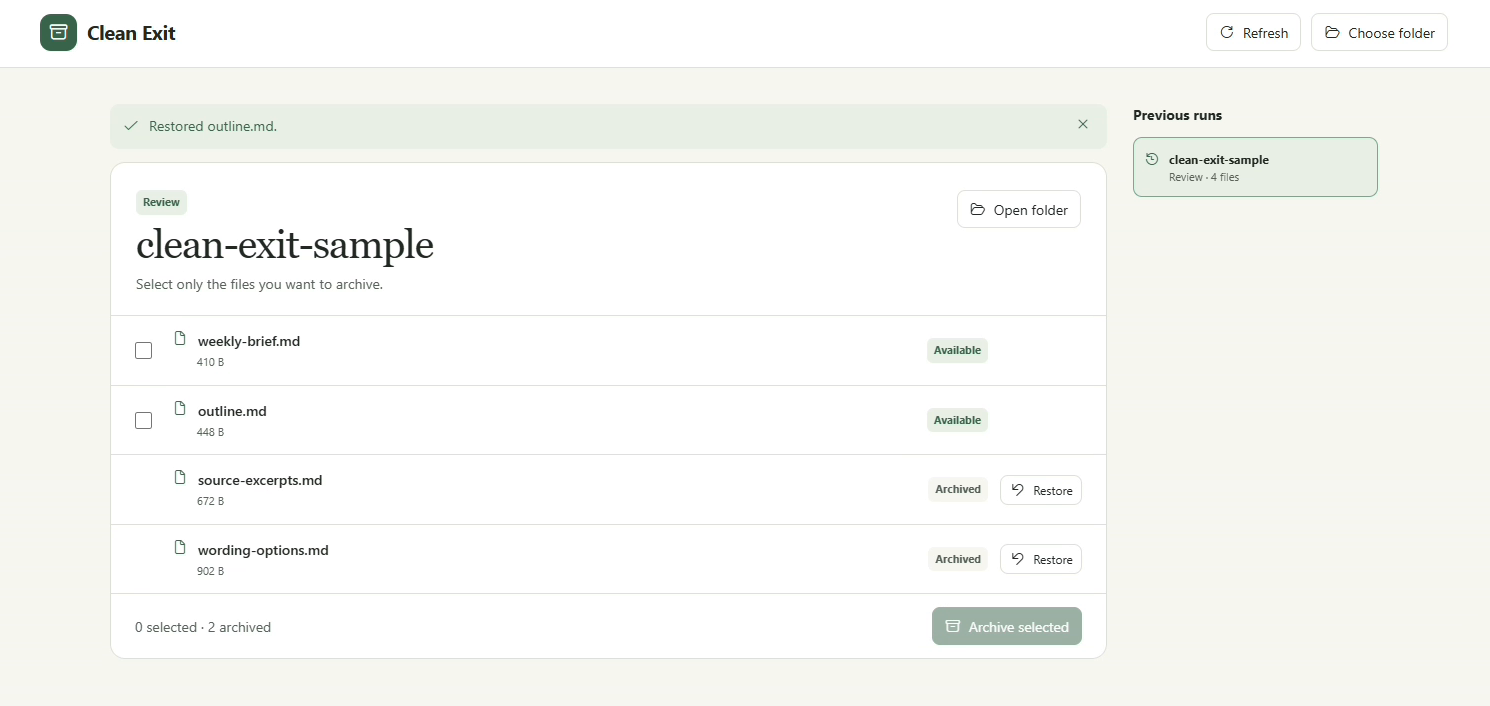
Review the files Hermes created during a run. Keep the deliverable, move the scratch files to an archive, and undo any move individually.
Clean Exit adds a workspace to Hermes Desktop. Start tracking one local folder before asking Hermes to work. When it finishes, you can see which new files came from that run and choose which ones to move.
0.1.0 · Windows with a local Hermes backend · Hermes 0.23.1+ · MIT
Install
Install into the Hermes profile you use in Desktop.
hermes plugins install https://github.com/ladyFaye1998/hermes-clean-exit --enable
In Hermes Desktop, open Capabilities → Plugins, enable the Clean Exit Desktop contribution for the profile, then open Clean Exit in the sidebar.
Use
- Click Choose folder, select a local project folder, and click Start tracking. Select a specific Hermes session if you want to bind the run in advance.
- Ask Hermes to create files in that folder with the native
write_filetool. Give it absolute paths. - Click Finish tracking and review the recorded creations. Select the files you want to archive, leaving the deliverable unselected.
- Click Archive selected, review the list, and confirm with Archive files. The files move into the project's
.clean-exitarchive folder. - Click Restore on an archived file to return it to its original path. A file that occupies that path stays in place. Use Previous runs to open older archives.
Reproduce the demo
From a checkout outside the Hermes profile directory, create a fresh demo folder. The script writes only the fictional client-notes.md and prints a prompt with absolute paths.
python examples/make_demo.py "$env:USERPROFILE\Documents\clean-exit-demo"
Choose the generated folder and start tracking before sending the printed prompt. Hermes creates one finished client brief and three scratch files. Finish tracking, archive the three scratch files, then click Restore for outline.md. The final folder should contain client-notes.md, weekly-brief.md, and outline.md, alongside the archive.
Tracking and file safety
- Clean Exit allows one active run at a time. Each run tracks one folder and one Hermes session. Without an explicit session, the first qualifying successful write binds the run.
- Clean Exit observes new, successful native
write_filecalls with an absolute path in that folder. It compares the observed file with the write. If the same run rewrites a file it created, Clean Exit updates the recorded fingerprint after verifying the new write. Edits to files that predate tracking, shell-created files, and other tool outputs are outside this scope. - Finish tracking before moving files. File selection and every archive or restore action require an explicit choice. The plugin checks the file identity before moving it and refuses changed, missing, linked, or conflicting paths. Archive and restore move each selected file individually.
- The Windows archive stays in the selected folder and preserves the file bytes. Moves require a free destination. If needed, you can retrieve the files directly from
.clean-exit. - The folder picker is for a local Windows folder. System folders, Hermes data directories, common credential names, and paths through links or reparse points are excluded. File checks and renames are separate operations. Finish the run before archiving and keep other tools from changing the selected files during the move.
Data and capabilities
The Python plugin registers pre- and post-tool hooks for tracking and RPC methods for the local Desktop workspace. It adds no agent tools or middleware. The hooks inspect write arguments and the resulting file to verify identity. The profile's plugin ledger stores run information, paths, sizes, filesystem identities, and file hashes. Archived files themselves stay under the selected project's .clean-exit directory.
Clean Exit makes no model or network calls, scans no directory tree for cleanup candidates, and runs no shell commands. Your normal Hermes conversation uses its configured model. Keep the archive folder and profile ledger to restore earlier moves from the workspace.
Development
python -m pytest -q
hermes plugins validate . --install-deps
README from the reviewed commit 1df8501; it updates when the author re-pins.