Fish Audio for Hermes
The official Fish Audio plugin for Hermes Agent, maintained by Electric Sheep.
Give your agent a voice: expressive speech in 80+ languages, Fish Audio's library of community voices, your own cloned or designed voices, and accurate speech-to-text. It works in the Hermes CLI, every messaging app Hermes supports and the Desktop app.
hermes plugins install https://github.com/100yenadmin/fish-audio-hermes --enable
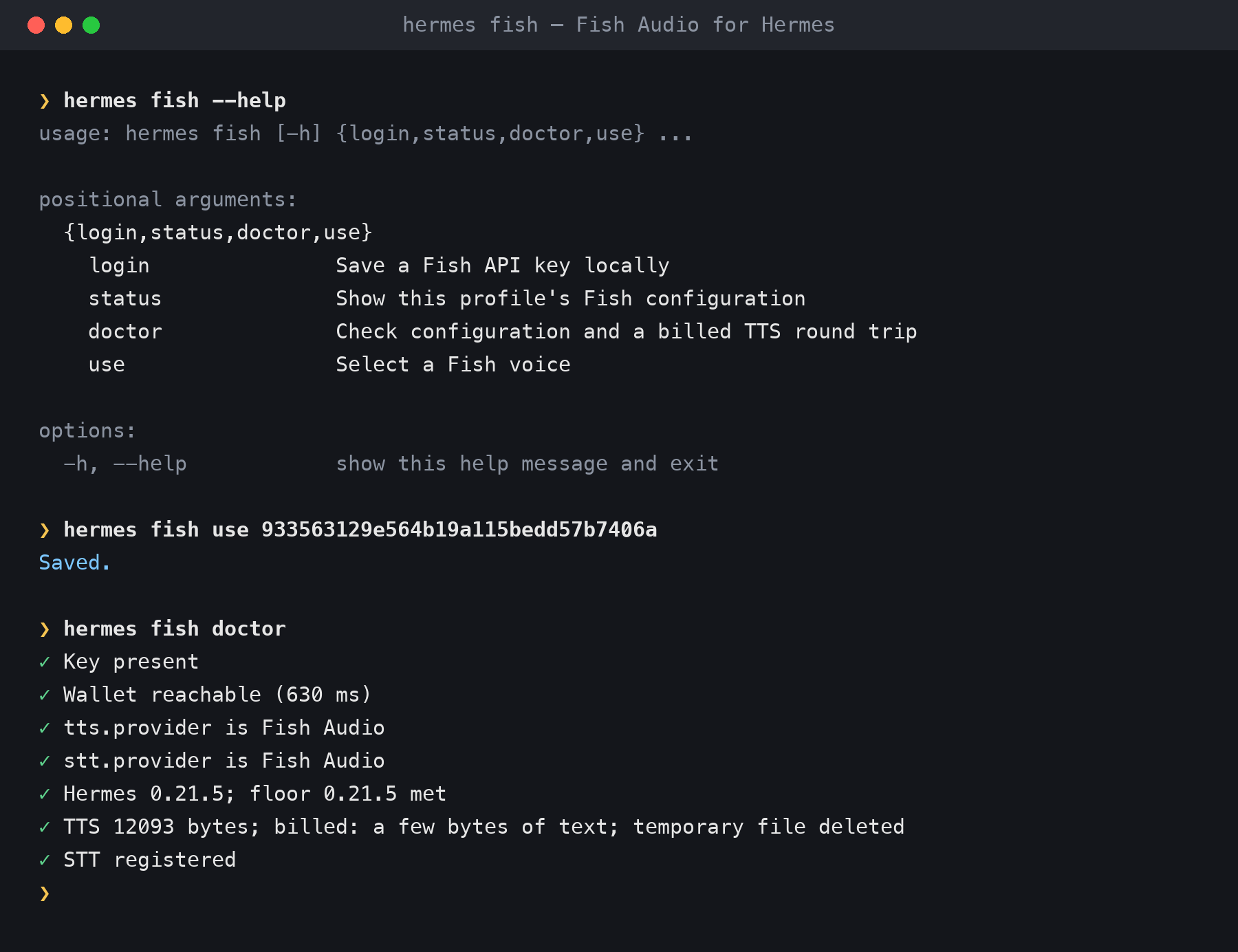
hermes fish login        # paste your key from https://fish.audio/app/api-keys
Hermes 0.21.5 installs the plugin's Python dependencies automatically. Newer Hermes builds ask first;
add --yes-deps there to answer yes. hermes fish login checks the key against your Fish account, saves it to the
active profile. It makes Fish Audio the speech and transcription provider where none is set, and replaces another
provider only if you confirm at the prompt or pass --yes. Once Fish Audio is the provider, voice replies,
read-aloud and voice notes go through it.
What you get
| Expressive speech | Fish Audio S2 models follow emotion and delivery cues such as [excited], [whispering] and [laughing]. Multi-speaker dialogue and custom pronunciations are supported too. |
| Streaming voice | CLI voice mode and Desktop voice replies stream each sentence as it is ready. In our tests the first audio bytes arrived 0.24–0.38 s after a sentence was sent (see Streaming voice for how this was measured). |
| Voice library | Search Fish Audio's community voices from chat (/fish voices narrator) and switch with /fish use <id>. |
| Your own voices | Clone a voice from a short sample, or describe one in words and pick from the candidates. Cloning and deleting from chat go through Hermes's approval gate, so by default Hermes asks you first. |
| Speech-to-text | Voice notes and Desktop dictation are transcribed by transcribe-1-pro. fish_transcribe adds speaker turns, timestamps and SRT subtitles. |
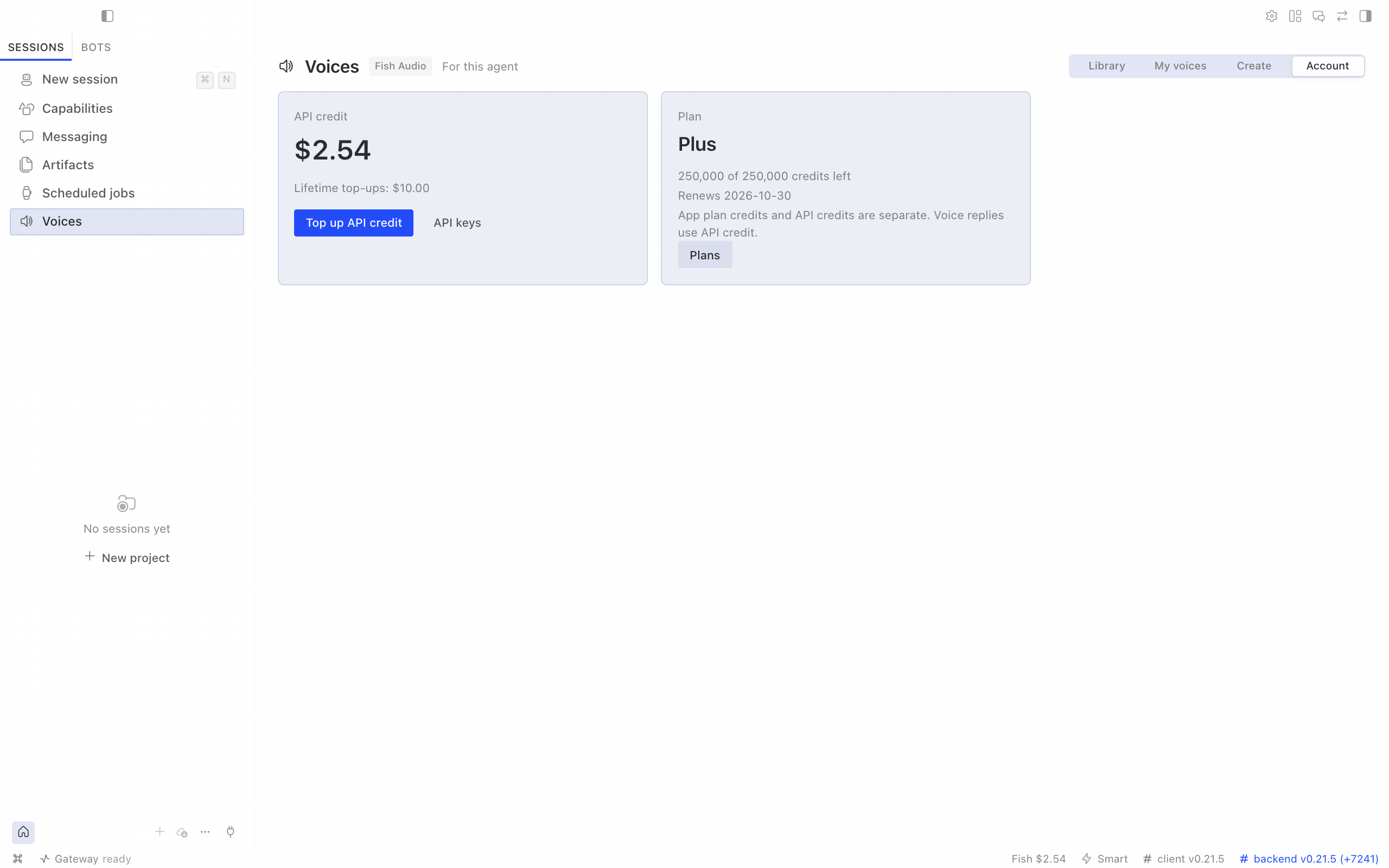
| Desktop Voices page | In Hermes Desktop: browse and preview voices, pick one for the agent, clone or design your own, and check your credit. |
| Account at a glance | /fish balance shows your API credit and plan. When credits run out, tools and /fish commands reply with a top-up link; for voice replies, /fish status shows the last error. |
Setup
- Get a key at https://fish.audio/app/api-keys. New accounts can start on the free
s2.1-pro-freemodel. - Add it with
hermes fish loginon the machine running Hermes, or in Desktop ▸ Settings ▸ Plugins ▸ Fish Audio (Capabilities ▸ Plugins on older Desktop), or inhermes tools▸ Text-to-Speech ▸ Fish Audio.loginchecks the key against your Fish wallet and saves it to the active profile. It makes Fish Audio the speech and transcription provider where none is set; it replaces another provider only if you confirm at the prompt or pass--yes.--key-stdinreads the key from standard input. - Check it with
hermes fish doctor, which makes one short billed synthesis (--no-synthskips it). Restart a running gateway or the Desktop app to pick up a new key.
Never paste API keys into a chat. /fish refuses them and tells you to rotate the key.
Use
In conversation: just ask.
- "Read that back to me in an excited voice."
- "Find me a deep British narrator voice and use it."
- "Design a voice for our support agent and let me pick."
- "Transcribe meeting.m4a with speakers and give me subtitles."
Commands
| Command | What it does |
|---|---|
/fish status |
Key, providers, voice, model and why it was chosen, credit, last error |
/fish voices [query] |
Search the voice library |
/fish use <voice-id> |
Use a voice for this profile |
/fish model <id> |
Pick a model (s2.1-pro, s2.1-pro-free, s2-pro, s1, drama-3-preview) |
/fish preview <voice-id> [text] |
Hear a voice (a billed synthesis) |
/fish balance |
API credit and plan |
hermes fish login [--key-stdin] [--yes] |
Save and check a key, offer to switch providers |
hermes fish status · hermes fish use <voice-id> |
Status and voice choice from your terminal |
hermes fish doctor [--no-synth] |
Check the setup with one billed synthesis, or without it |
Model tools (toolset fish_audio; calls are billed to your Fish Audio account)
| Tool | What it does |
|---|---|
fish_speak |
Expressive or multi-speaker speech; with timestamps: true, word timings plus SRT and WebVTT subtitles |
fish_voices |
Search, list and inspect voices; clone, design, save, update and delete them |
fish_transcribe |
Rich transcription with speakers, timestamps and SRT |
Plain read-aloud uses Hermes's own text_to_speech tool, with Fish Audio as the provider. Include the
media_tag that fish_speak returns in the reply to deliver its audio; the plugin also appends missing audio tags
through its output hook. Plugin skills: fish-audio:fish-audio-setup, fish-audio:fish-audio-expressive-speech
and fish-audio:fish-audio-voice-studio.
Hermes Desktop
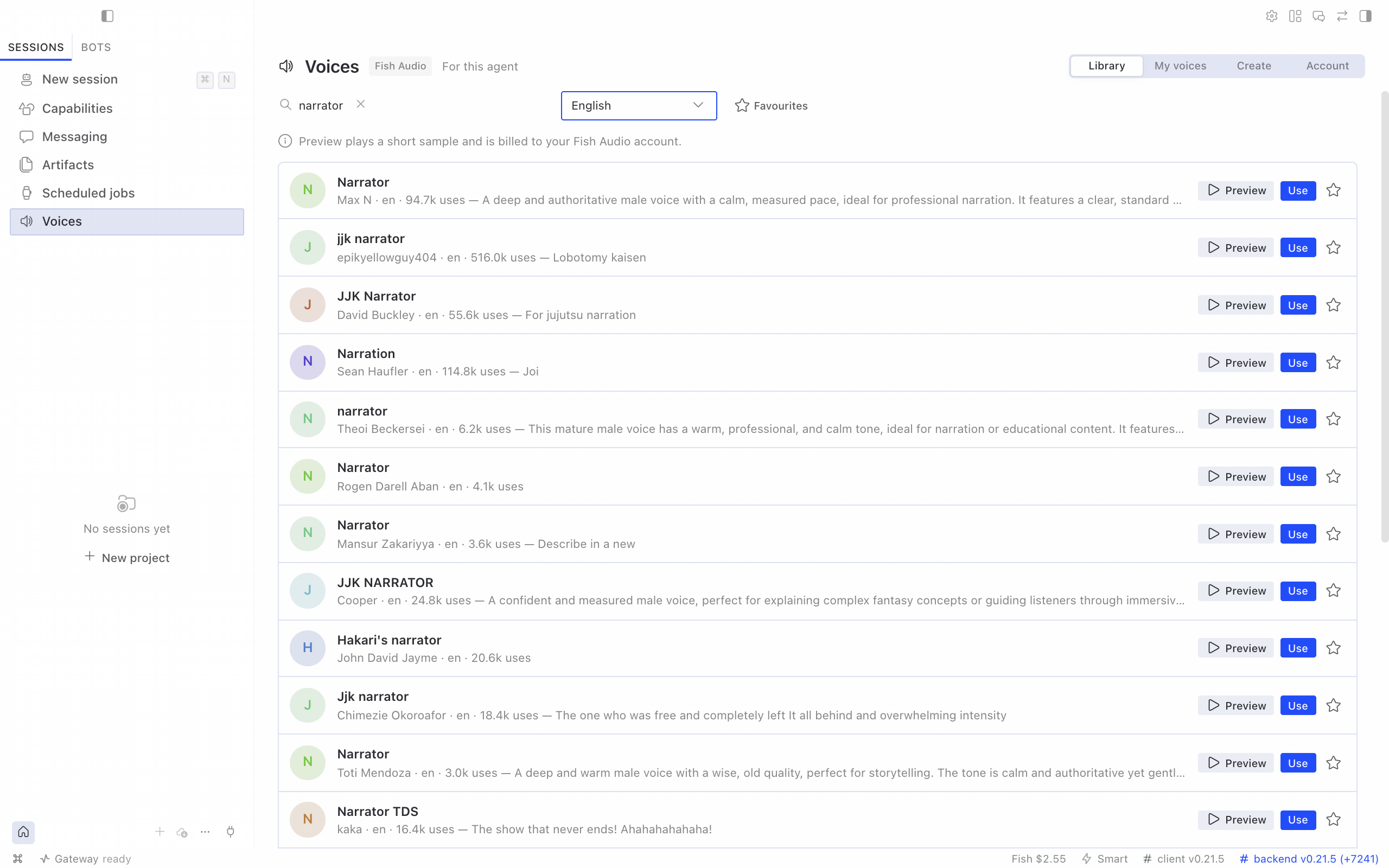
The Voices page follows Hermes Desktop's display language: English, Simplified Chinese (zh), Traditional Chinese
(zh-hant), Japanese (ja), Arabic (ar), Russian (ru), French (fr), German (de) and Spanish (es).
Changing the display language updates the page, sidebar, status bar and command palette without a reload.
The translations are machine-authored and checked against Hermes Desktop's own wording; native-speaker corrections
are welcome as pull requests to src/desktop/locales/.
The plugin adds a Voices page to Hermes Desktop for the selected agent:
- Library: search Fish Audio's voices by name and language, preview them (a short billed sample), star favourites, and choose Use to make a voice the agent's voice.
- My voices: the voices you cloned or designed; delete one by typing its name.
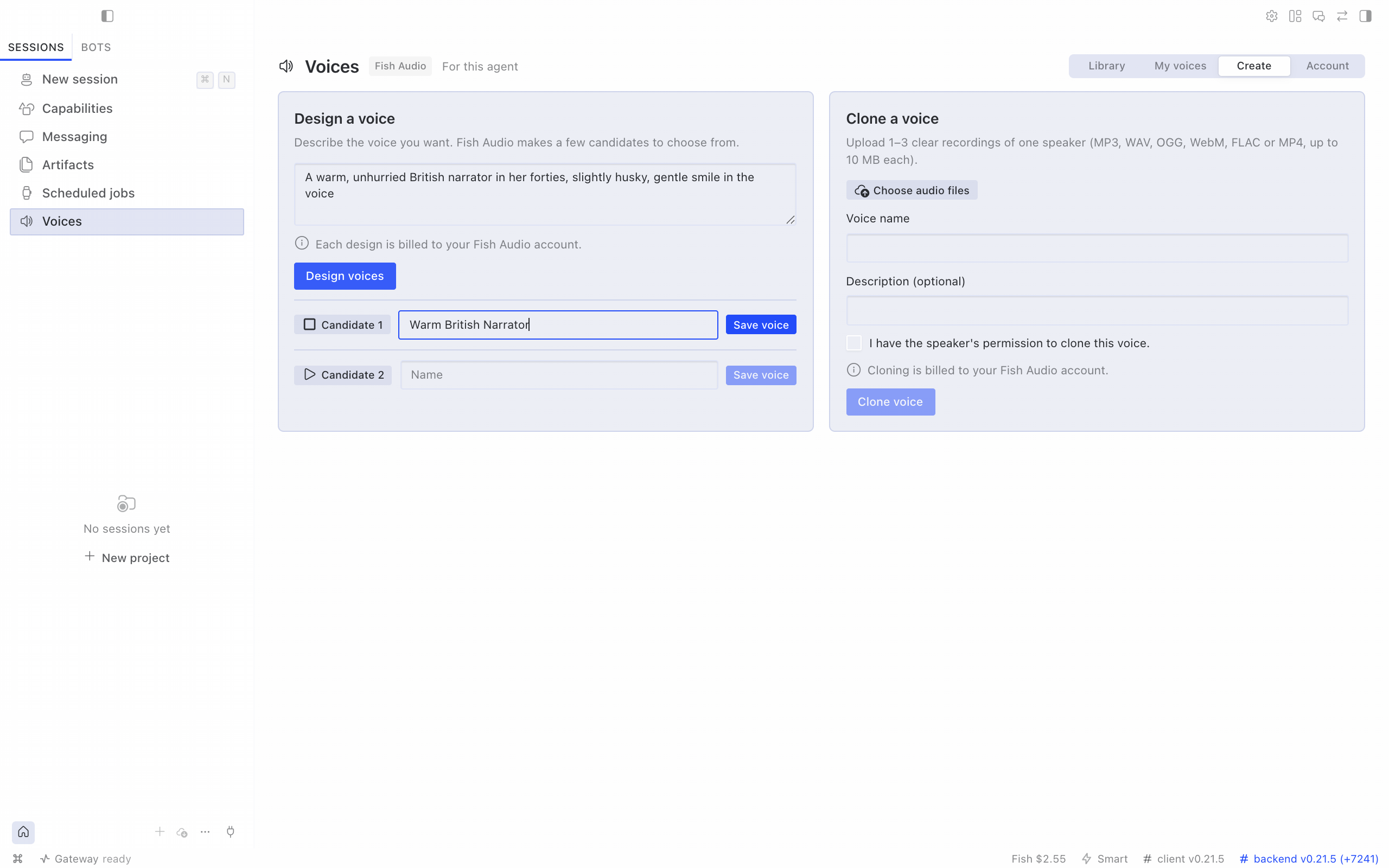
- Create: clone a voice from 1–3 recordings (up to 10 MB each, with the speaker's permission), or describe a voice and save the candidate you like.
- Account: API credit, plan credits and top-up links. The status bar shows your API credit, in orange when it runs low.
| Create | Account |
|---|---|
 |
 |
The page has two halves in one package: routes that run on the agent's gateway and screens that run in Hermes Desktop. To install from Desktop:
- Open Capabilities → Plugins → Install from Git, enter
https://github.com/100yenadmin/fish-audio-hermes, choose Review repository, then Install. Desktop installs the agent half into the connected agent and the desktop half on this computer. - In Capabilities → Plugins, open Fish Audio and switch on Desktop. Desktop plugins stay off until you turn them on.
- Restart the agent's gateway once. Hermes mounts plugin routes only at startup.
If you installed the plugin with hermes plugins install on the gateway machine, do steps 1 and 2 on each
computer that runs Desktop, and restart the gateway once after upgrading to 0.3.0. The Voices row appears only
for agents whose gateway has the plugin; an agent without a Fish Audio key shows a card that links to the key page
and the plugin's settings.
Configuration
All settings are per profile.
tts:
  provider: fish-audio
  fish-audio:
    voice: 933563129e564b19a115bedd57b7406a   # any Fish voice id (this one: "Sarah", a conversational narrator)
    model: s2.1-pro                           # optional; see "Which model?"
    latency: balanced                         # normal | balanced | low
    temperature: 0.7
stt:
  provider: fish-audio
  fish-audio:
    model: transcribe-1-pro
plugins:
  entries:
    fish-audio:
      settings:
        streaming: auto        # auto | "off"
        allow_free_model: true # false = never use s2.1-pro-free
The plugins.entries.fish-audio.settings keys (base_url, streaming, transport, allow_free_model,
operator_account) and the API key also appear in Desktop ▸ Settings ▸ Plugins ▸ Fish Audio (Capabilities ▸
Plugins on older Desktop). Set the voice and model from the Voices page, /fish use or /fish model.
Which model? A valid tts.fish-audio.model is used as set (for fish_speak, a model named in the call comes
first); invalid ids are ignored. Otherwise the plugin uses s2.1-pro, and picks s2.1-pro-free only when Fish
reports a wallet with no API credit and no past top-ups that doesn't carry Fish's free-credit flag. If the wallet can't be read, it uses
s2.1-pro. When it picks the free model it tells you once that the model is free until 30 November 2026 and that
Fish Audio may use free-tier requests to improve its models. allow_free_model: false replaces s2.1-pro-free
with s2.1-pro everywhere, even when you name the free model yourself.
Streaming voice. With tts.provider: fish-audio, on a Hermes build that has the plugin streaming hook
(Hermes main since 2026-10-06; the next release), the plugin streams 24 kHz PCM from POST /v1/tts to CLI and TUI
voice playback, Desktop read-aloud and gateway streaming. Older Hermes builds, including 0.21.5, use whole-file
synthesis instead: sentence by sentence in CLI voice mode, the whole reply in Desktop read-aloud and gateway voice.
Each streamed sentence is one billed request and is not retried. Measured first audio bytes: Fish HTTP API p50 243 ms (3 samples, 238–356
ms), CLI voice mode 373–381 ms, Desktop speak-stream handler 310 ms (in-process, not through the Electron UI);
these exclude the model's own reply time. Set streaming: "off" for whole-file speech; transport: ws switches to Fish's live
WebSocket for diagnosis.
Under host plugin isolation (plugins.isolation: host, newer Hermes builds), the hermes fish terminal command is
unavailable and voice replies use whole-file speech instead of streaming; /fish, the tools, the hooks and
both providers still work. Config changes apply to the active profile; managed installs may refuse writes.
Operator-managed keys
Set plugins.entries.fish-audio.settings.operator_account: true (Desktop: Operator-managed account) when the
Fish account belongs to the agent operator. This hides balance, plan, billing and API-key links in chat and Desktop, and directs
setup or credit problems to the operator. Because one operator account can serve many agents, the account's own
voices aren't listed, edited or deleted from an agent (no My voices tab; fish_voices refuses mine, update and
delete); cloning and designing still work, and a voice created on the Voices page goes into that agent's Favourites. It defaults to false. Tool descriptions update after a gateway restart.
Operators should also pin tts.fish-audio.model or set allow_free_model: false, so the model never depends on
the wallet that users can't see.
Privacy and security
- No telemetry. The plugin talks only to Fish Audio's API (
api.fish.audio, or thebase_urlyou configure), and only for the work you ask for. See SECURITY.md for exactly what each request carries. Links to Fish Audio are plain links, with no tracking parameters. - Keys come from the active profile's secret scope. When one Hermes process serves several profiles, each
profile uses its own key; a single-profile install may also read
FISH_API_KEYfrom the environment. Keys are never logged or put in error messages. - Voice fields: search accepts
author_id,title_languageandlicensed, and returns booleanhas_more. Design acceptsnum_step(1–128),guidance_scaleandinstruct_guidance_scale(finite, ≥ 0). Clone/update accept private/unlistvisibilityandcover_image_path(PNG/JPEG/WebP, ≤ 5 MiB); clone also accepts booleangenerate_sample. Transcription returnslanguagewhen Fish supplies a string. - Files the model tools upload (
fish_voicesclone samples,fish_transcriberecordings) must be regular audio files (covers must be images). They refuse symlinks, Hermes config and secret files, and SSH or cloud credential paths. - Approvals: cloning and deleting voices from chat or the model tools go through Hermes's approval gate and follow your Hermes approval settings. By default Hermes asks you, and refuses when no one is there to answer. The Desktop Voices page confirms them on the page instead (see Disclosure).
- Report vulnerabilities privately; see SECURITY.md.
Disclosure
- Synthesis, transcription, cloning and voice design are paid Fish Audio requests billed to your Fish account (the
free
s2.1-pro-freemodel excepted). - Fish Audio may use free-model requests to improve its models.
- The Desktop Voices page adds gateway routes under /api/plugins/fish-audio/, behind the Hermes dashboard's existing authentication. On that page, previews, clones and voice designs are billed; cloning a voice or saving a designed one creates a voice in your Fish account; cloning and deleting are confirmed on the page (a speaker-consent box, a typed voice name) instead of through Hermes's approval gate; and Use sets the profile's Fish voice, and its speech provider when none is set. Preview and design audio files are deleted from the gateway once returned; a design's audio is held in gateway memory so you can save it, until it is saved, a later design or save finds it over an hour old, or the gateway stops; clone uploads are deleted after the clone, or by the next upload once idle for 15 minutes. With a key set, Desktop reads your Fish wallet when an agent is selected and about every five minutes, for the status-bar credit; favourites stay in Desktop's plugin storage on that computer, and fetched previews stay in the window's memory until it closes.
Compatibility
Hermes Agent 0.21.5 or newer, Python 3.11+, macOS and Linux. CI tests it against the latest Hermes release, Hermes
main and the Electric Sheep fork. Windows is untested.
Troubleshooting
| Message | Fix |
|---|---|
| "Fish Audio isn't set up for this profile" | hermes fish login |
| "Top up Fish Audio API credits" | Top up at https://fish.audio/app/developers/billing. Plan credits and API credits are separate. |
| "Fish Audio concurrency limit reached" | Fish allows 5 concurrent requests below $100 of lifetime top-ups, 15 from $100, and 50 from $1,000. |
| "The voice id was not found" | The id is wrong or the voice is private to another account. Try /fish voices. |
| Voice replies stay silent | Run /fish status; it shows the last Fish error, with its Fish trace id when Fish sent one. |
| Anything else | Run hermes fish doctor, and quote the Fish trace id from the error when you contact Fish Audio support. |
Known limitations
The auto-append fallback is per session. Mid-turn context compression can drop that fallback;
the model normally includes the returned media_tag itself.
Core gives plugins a .mp3 path for plain text_to_speech and re-encodes it to Opus for voice bubbles
(upstream #133133). Core's text normaliser
also alters <|speaker:N|> markup on that path: use fish_speak for multi-speaker speech
(upstream #133131).
License
Apache-2.0. Maintained by Electric Sheep with the Fish Audio team. Fish Audio is a trademark of Hanabi AI Inc.