
 driptothebone
Fleet Control
Phone-first bulk model settings for Hermes Agent, by driptothebone.
Fleet Control grew out of Model Board, my Hermes plugin hackathon entry.
This repository holds both. The entry as submitted is tagged
hackathon-submission
(commit 17de6b8).
See every profile's models at a glance, tick several profiles and change their
main model, subagents, auxiliary tasks, reasoning effort, Fast mode, fallback
chain or subagent limit together. Nothing is saved until you review the exact
changes and explicitly confirm.
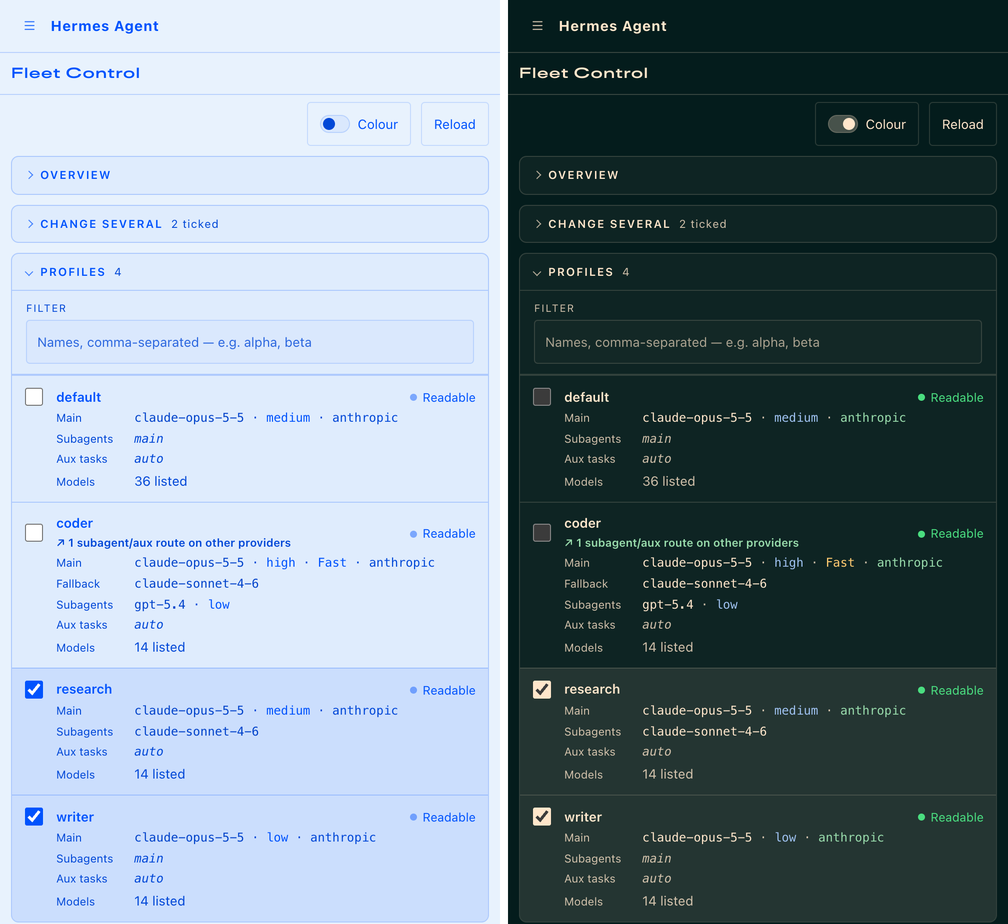
Phone view with synthetic demo profiles. The left side shows the Nous Blue light theme with Colour off, which is the default. The right side shows Hermes Teal with Colour on.
Install
Requires Hermes 0.23.0 or later with its browser dashboard, the local-file
config backend and in-process plugin loading. Separate plugin-host
isolation and remote config are not supported. Profile-scoped tickets are
refused. Do not weaken an existing isolation policy to enable this plugin.
hermes plugins install https://github.com/driptothebone/fleet-control
hermes plugins enable fleet-control
Restart the Hermes dashboard so it discovers the plugin, then open Fleet Control.
If you have the hackathon hermes-model-board installed, you can disable it.
The two use different plugin ids and do not conflict.
The plugin adds its own state, preview and apply API routes inside the existing
authenticated Hermes dashboard. It does not start a separate server or open a
port. On a phone, reach it through the dashboard's existing authenticated
HTTPS or Tailscale access.
What it does
- Overview shows profiles, readable configs, profiles that route some tasks
to other providers and a main-model breakdown. - Change several works on All shown or Ticked profiles. A scope line always
names exactly which profiles the next preview will change, including ticked
profiles hidden by the filter. - Settings cover the main model, main plus subagents together, subagents
(a specific model or the same as main), all auxiliary tasks (specific, same
as main or automatic), main reasoning effort, Fast or Normal, max subagents at
once (1 to 16) and an ordered fallback chain of up to ten entries that you can
add to, reorder, remove from or clear. - Per profile editing opens any profile to change its settings or
individual auxiliary tasks. - Review uses plain labels such as "Main model model-a to model-b" with the
exact config fields and values one click away, then one explicit confirmation
and a single Apply. Results show what was saved, read back field by field. - Looks native by following the active dashboard theme, dark or light, live.
A Colour switch (off by default) colour-codes models, providers, values
and status. Your browser remembers the choice.
Safety and disclosures
- No
.env,auth.json, CLI login or other credential-store reads. Model
choices come through Hermes's own model-options route. Hermes owns credential
handling and may refresh or probe provider catalogues. A listed model is not
proof of login, entitlement or that it will answer. - Reads and saves every profile only through Hermes's public dashboard routes,
the same ones its own Config and Models pages use. Main model changes go
through Hermes's own model switch, which validates the choice and may ask
for a cost confirmation first. The board never imports Hermes internals and
never returns whole configurations or credential or endpoint fields. - Exact preview, explicit confirmation, expiring single-use preview tokens,
stale-state rejection and saved-field readback. If a profile changed after the
preview, Apply is refused and nothing is written. Recovery reloads and makes a
fresh, unconfirmed preview. Apply is never retried or replayed automatically. - Saves profiles one at a time and rechecks each one right before saving it.
Hermes has no conditional save yet
(hermes-agent#156100),
so a change that lands in that same instant is not caught. Not a fleet
transaction, rollback system or cross-process lock. Partial or uncertain
outcomes are reported per profile. - Hermes's file backend rewrites a profile's config when saving, which drops
YAML comments. Keep comments elsewhere if they matter to you. - Does not start or restart gateways, switch running chat sessions, launch
models, execute shell commands, install dependencies, add telemetry or
self-update. Saved settings apply to future sessions. - Changing a model within the same provider keeps that route's endpoint and auth
settings untouched. On subagent and auxiliary routes, changing provider clears
only the previous provider's own standard API address. The review masks the
endpoint value. Custom endpoints, auth overrides,
malformed or legacy fallback entries, profiles with external secret sources
and unsupported task-effort combinations are refused or shown read-only with a
reason. They are never silently changed or carried across providers. - Fast is offered only where Hermes's model catalog says the model and provider
support it. On a custom endpoint it shows why it can't be verified instead.
Whether your account is entitled to Fast is not something the plugin can know. - Not included are jobs, federation, login or refresh tooling and multi-machine
control.
Compatibility and verification
Version 2.1.0 was exercised on an unmodified Hermes v0.23.0 checkout (commit
2bd378e) with synthetic profiles and an offline host. Hermes discovered and
mounted the plugin itself from a profile's plugins folder. The run covered
dashboard authentication, combined subagent, effort, max subagents and Fast
saves across two profiles, inherit routes, auxiliary routes and efforts,
fallback chains, a main model switch through Hermes's model route and no-op
saves. Stale previews, replayed tokens, unconfirmed saves, Fast on a custom
endpoint and profiles with external secret sources were refused. Unticked
profiles were left unchanged and no endpoint value reached the browser.
The browser interface is unchanged from 2.0.0. Its earlier checks covered theme
integration in Midnight, Hermes Teal, Mono, Ember and Nous Blue (light) at
390 px phone and desktop widths. Screenshots here use synthetic profiles.
Hermes's admission validator passes. The plugin imports only hermes_constants
and hermes_yaml.safe_load from Hermes, both on the published plugin API list.
The 0.23.0 validator's older list still flags hermes_yaml.safe_load, while
current Hermes lists it.
License
MIT. Copyright (c) 2026 driptothebone.
README from the reviewed commit 3c2b4bb; it updates when the author re-pins.


