
 k-reeeee
Flower Shop
Flower Shop is an AI business operating workspace inside Hermes. A small
flower-shop owner talks to a coordinated AI team, follows the work on a native
Desktop workspace, and approves every consequential action — against one shared
record of orders, stock, production, deliveries, and money.
Requires Hermes >= 0.22.0.
What it does
- An AI team, not a chatbot. A business manager plus five department agents
(Sales, Inventory, Production, Finance, Logistics) work through controlled
tools and one set of business records. - A native Desktop workspace. Overview, Orders, Inventory + recipes,
Production board, 3D Shop Floor, Delivery, Finance, AI Team, and an Approvals
inbox are pages inside Hermes Desktop, not a separate dashboard. - One source of truth. Agents and the UI call the same service layer and
the same SQLite database. No department keeps its own copy of the truth. - The owner stays in control. Consequential actions create a PENDING
approval. The owner approves from an inline chat card or the Approvals inbox
(an opt-in chat relay exists, off by default, and Hermes still asks the owner
to confirm). Agents propose; the owner approves. - Guided, optional setup. A short onboarding walks through the business,
needs and team. The AI team is a suggestion — run everything with one
assistant, or create the suggested profiles yourself with one click.
Screenshots
Theme — Anthousa (optional)
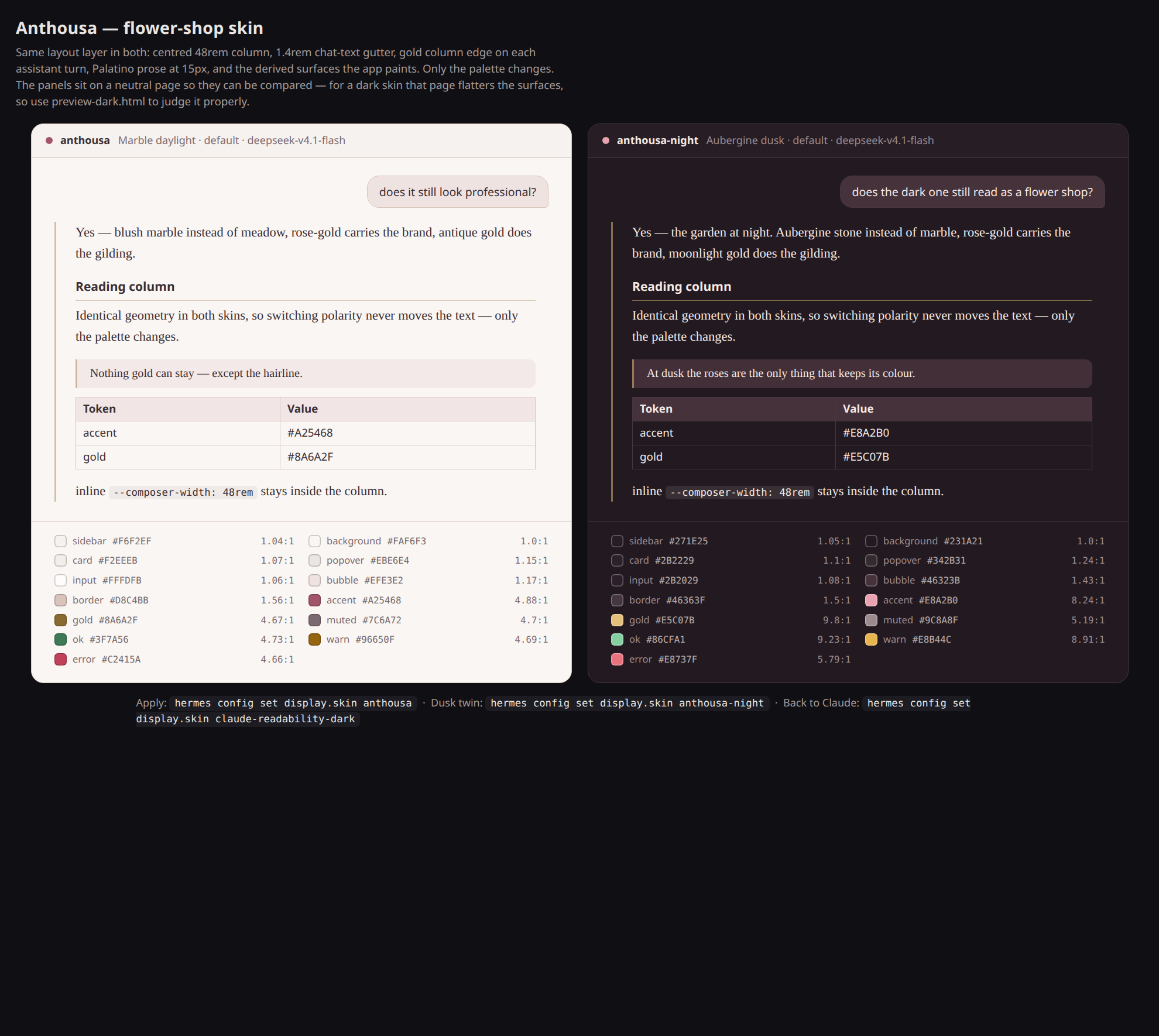
The repo ships a matching Hermes skin in theme/: Anthousa, a
light "marble daylight" garden palette with a dark twin, Anthousa Night.
One YAML file per polarity, and it re-skins the Desktop GUI, the TUI and the
CLI from the same palette — so the workspace and the shell around it look like
the same product.
Nothing applies itself: installing the plugin never changes your theme. The
optional Theme beat in onboarding shows both variants and applies one only
when you click it, with an Undo that switches straight back. From a
terminal, the same two steps:
./theme/install-theme.sh                  # copy both skins; switches nothing
./theme/install-theme.sh --activate       # copy both, then switch to the marble twin
./theme/install-theme.sh --activate anthousa-night   # ...or the dusk twin
./theme/restore-theme.sh                  # back to whatever this machine had before
Every colour that lands as text clears WCAG AA on the surface it sits on; see
theme/README.md for the palette table, the contrast audit
and the design rationale. The plugin does not depend on the theme — it is a
companion, not a requirement.
Features
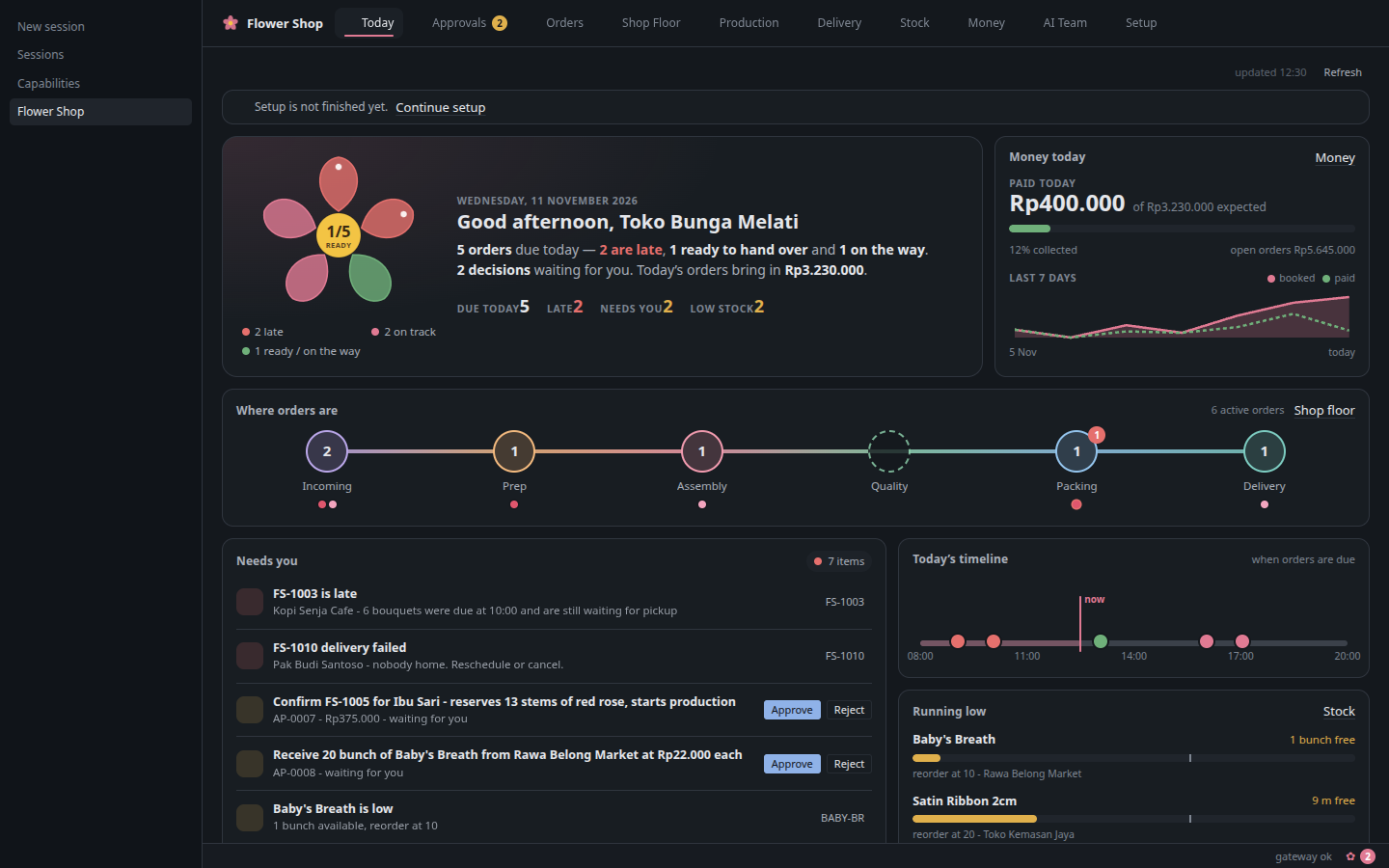
- Overview — what needs attention today: late orders, pending approvals,
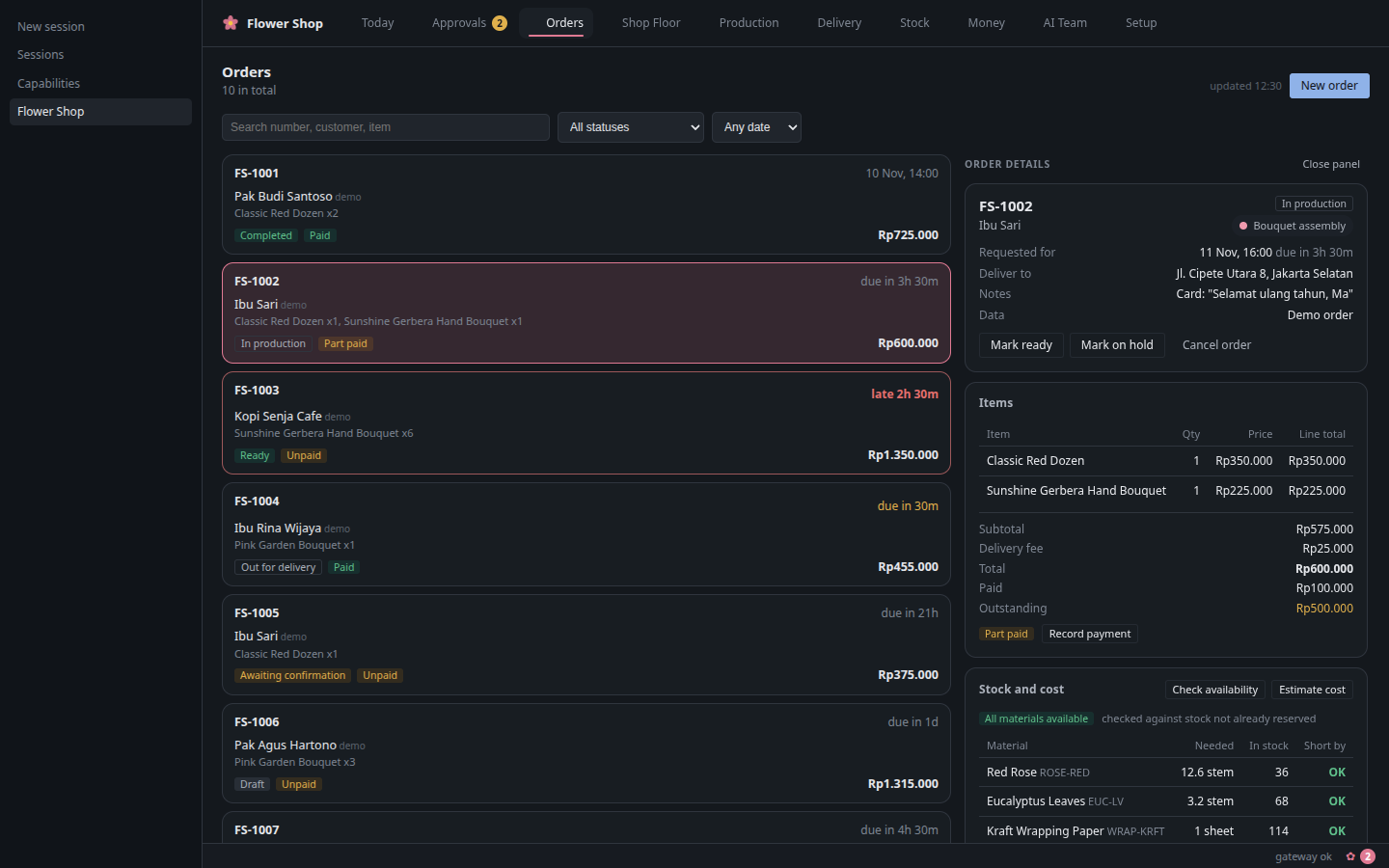
ready-but-unpaid orders, delivery risks, expected revenue, and data gaps. - Orders — list and detail: customer, items, price, payment state, status
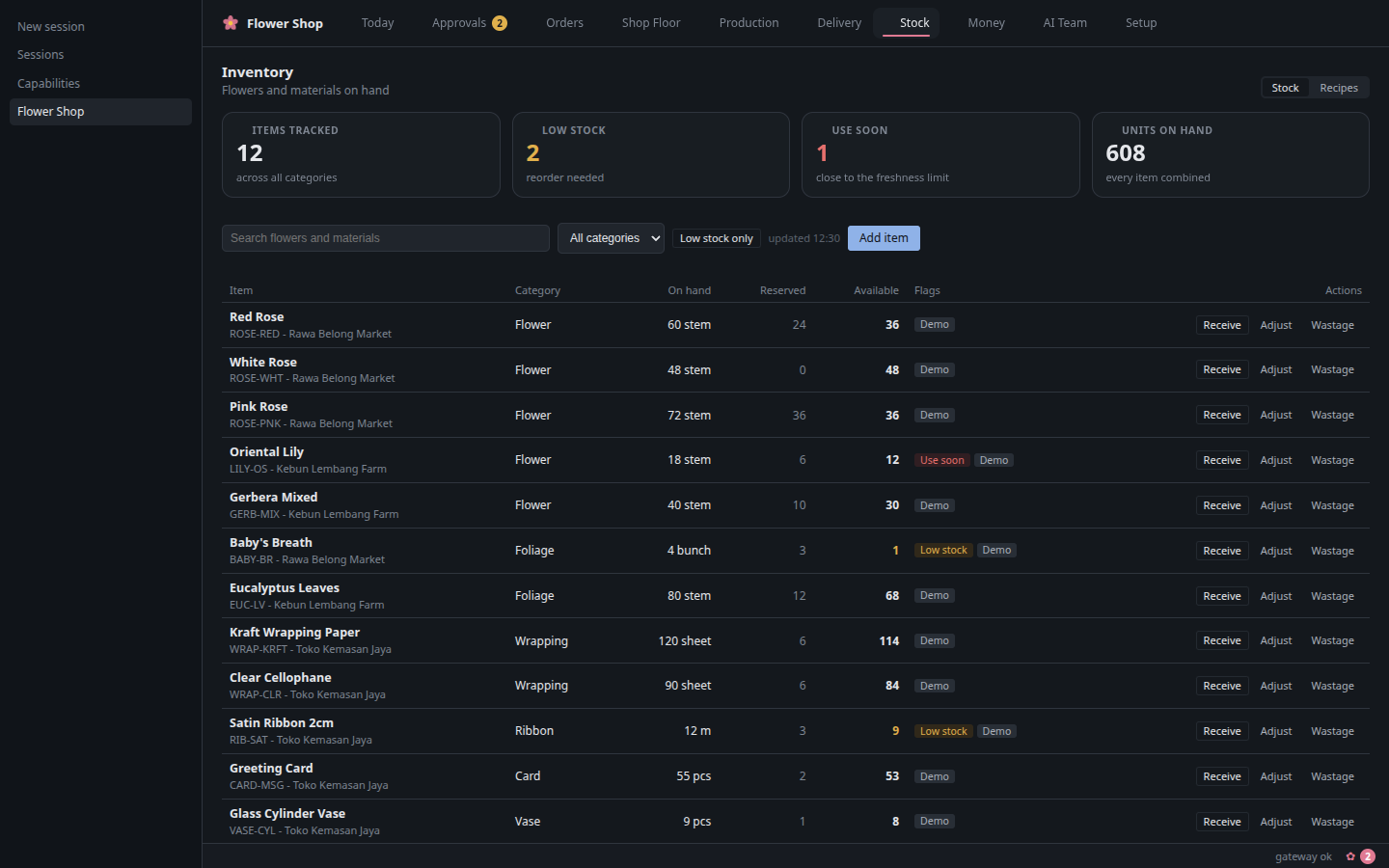
history, allowed next steps. - Inventory + recipes — stock on hand, reserved, and available; low-stock
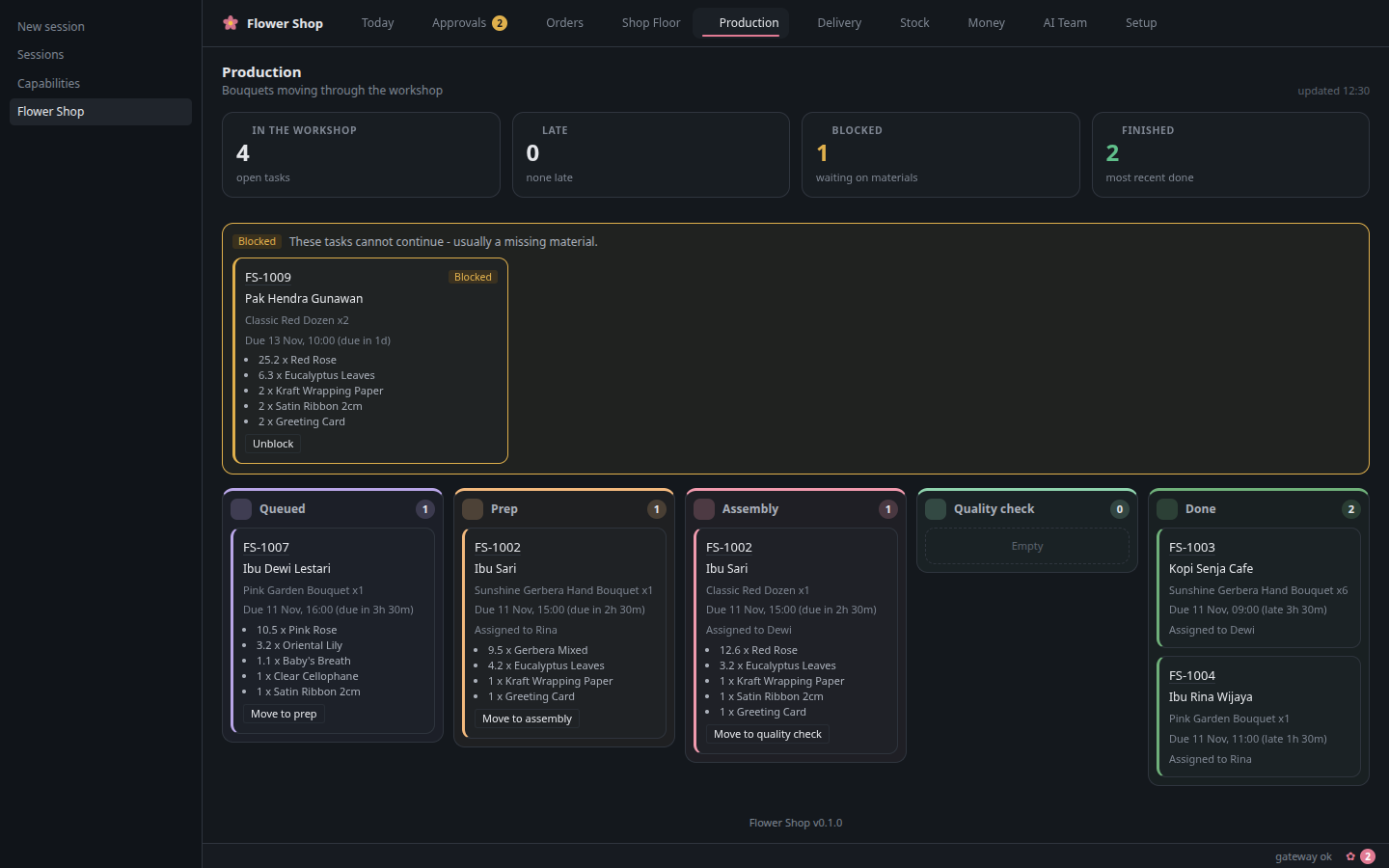
and freshness risks; bouquet recipes with components and wastage factors. - Production board — tasks from queued to done across prep, assembly,
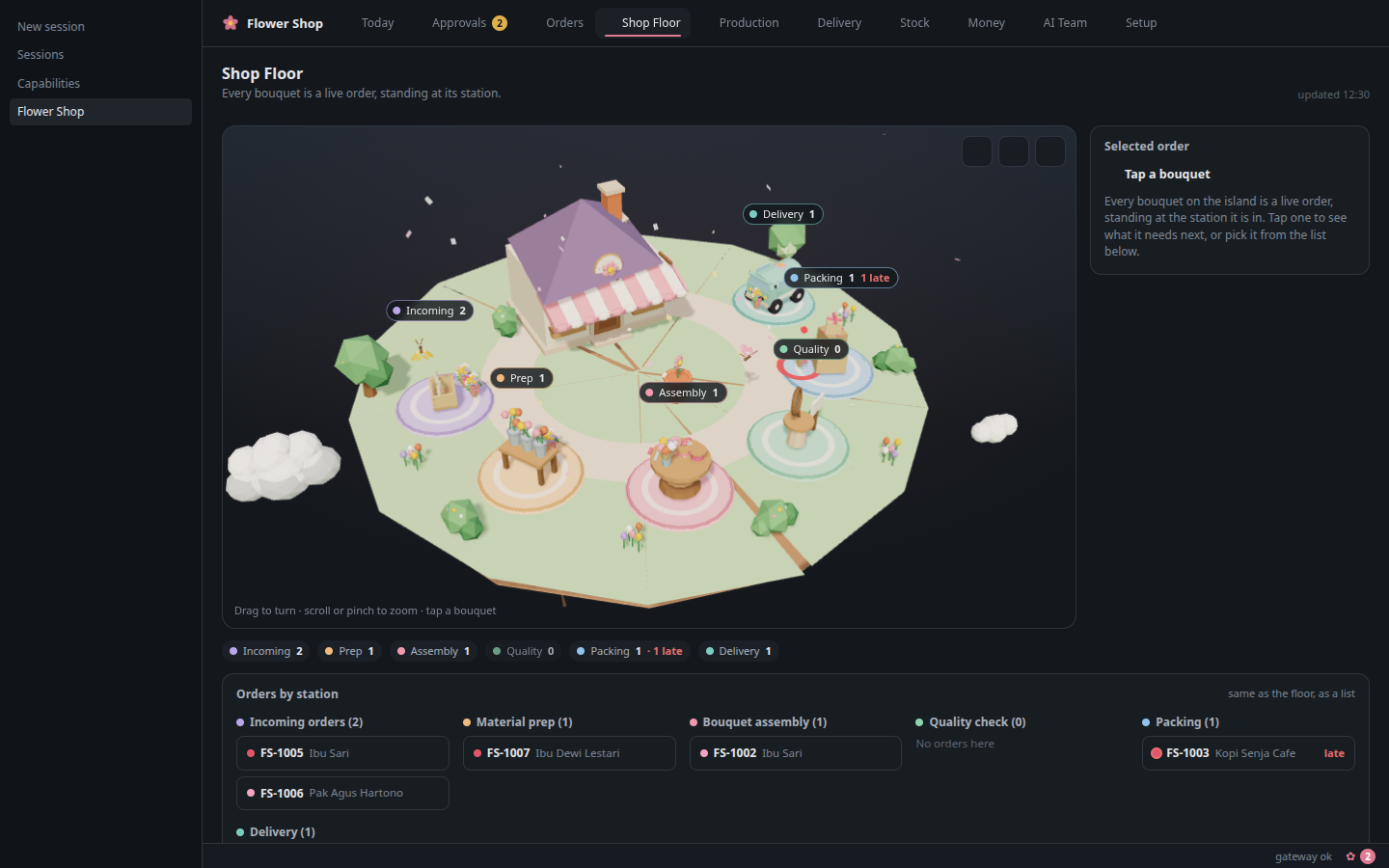
quality check, with materials required, reserved, and consumed. - 3D Shop Floor — a low-poly, read-only view of the floor fed live by the
production state. Orders appear as tokens at the station they are in. - Delivery — schedule, assign, and track deliveries; status changes move the
order. - Finance estimates — recorded payments and expenses next to cost and margin
estimates, always labelled as estimates. - AI Team — the department roster, responsibilities, tools, and recent
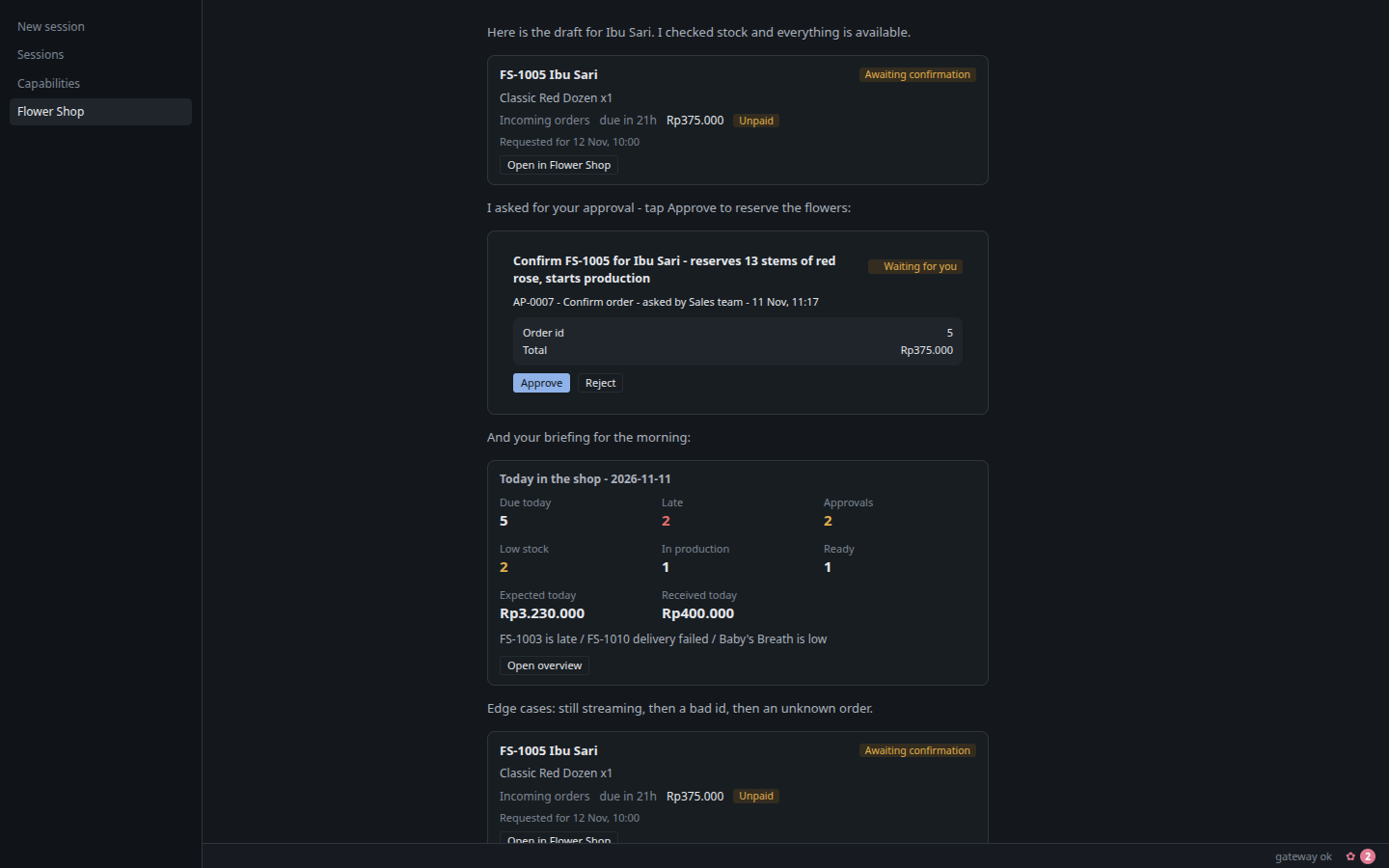
activity, in plain business language. - Approvals inbox + inline chat approval cards — every gated action lands in
one queue and also renders as a live card in chat with Approve / Reject. - Setup / onboarding + removable demo data — a guided setup, and a demo shop
that can be loaded and cleared without touching real records.
It isn't only for flowers
The flower shop is a demo, not a limit. Nothing in the engine knows what a
rose is. What the plugin actually provides is a general shape for any small
physical business:
one shared record of what was ordered, what is in stock, what is
being made, what is going out, and what was paid — plus a team of
agents that can only propose changes, and a queue where the owner approves
them.
Anything that sells, makes and delivers a physical thing fits that shape: a
bakery, a coffee roaster, a print shop, a dry cleaner, a bike repair shop, a
caterer, a ceramics studio, a flower shop. Swap the vocabulary and the same
workspace holds up — recipes become formulas or job tickets, stations
become workbenches or machines, delivery becomes pickup or shipping.
Ways to make it yours, cheapest first:
| What | How |
|---|---|
| Your market | POST /demo/seed {"locale": "id"} loads the Indonesian demo instead of the default international (USD) one — see docs/API.md |
| Your business | Set name, currency, timezone, location and opening hours in Setup, or through flowershop_update_business_profile |
| Your catalogue | Add your own SKUs, bouquet recipes and their components — the stock, cost and margin maths follows automatically |
| Your team | The five department skills in skills/ are plain markdown: rewrite Sales / Inventory / Production / Finance / Logistics for your trade, or drop the ones you don't need |
| Your flow | Production stations, approval types and the order lifecycle live in flowershop_core/services/ and the numbered SQL migrations — the same layer every agent and every screen already goes through |
The bundled Anthousa skin (below) is optional and swappable for the same
reason: it is a companion, not a requirement.
How it works
+------------------------------------------------------------------+
| Hermes Desktop (Flower Shop workspace)                           |
|  Overview . Orders . Inventory . Production . Shop Floor 3D      |
|  Delivery . Finance . AI Team . Approvals                        |
+----------------------^-----------------------+-------------------+
                       | REST /api/plugins/   | plugin.flower-shop.changed
                       | flower-shop (ctx.rest)| (live invalidation)
+----------------------+-----------------------v-------------------+
| Flower Shop plugin                                              |
|  dashboard/plugin_api.py  ->  flowershop_core.services           |
|  agent tools (flowershop_*)  ->  flowershop_core.services       |
|  skills/ (manager + 5 department SKILL.md)                      |
+----------------------^------------------------------------------+
                       | stdlib sqlite3, migrations, BEGIN IMMEDIATE
                       v
   <HERMES_HOME>/plugin-data/flower-shop/flowershop.db
Neither the Desktop UI nor the agent tools touch SQL. Only
flowershop_core.services does, so every write is validated, transactional,
and audited with the acting department.
Install
Requires Hermes >= 0.22.0.
hermes plugins install k-reeeee/hermes-flower-shop
Then enable it:
- Add
flower-shoptoplugins.enabledin your Hermesconfig.yaml:plugins: enabled: - flower-shop - Restart Hermes.
- In Desktop, open Capabilities -> Plugins and enable Flower Shop.
- Open the Flower Shop workspace and choose Load demo shop to start from a
realistic dataset.
To remove the demo data later, use Clear demo data in the same place; it
deletes only rows marked as demo.
Example prompts
Type these into the Hermes chat:
- "What needs attention today?"
- "Ibu Sari wants a dozen red roses delivered tomorrow at 10am to Jl. Kemang
Raya 12, budget 400 thousand." - "How many red roses do we have?"
- "What's the margin on FS-1012?"
- "We received 50 stems of red roses at Rp9,000 each from Rawa Belong."
- "Schedule FS-1012 for tomorrow at 10:00, Budi drives."
Tools
Every tool takes an optional department argument and returns a JSON string.
Read-only tools run freely; gated tools only create a pending approval.
| Tool | Kind | Purpose |
|---|---|---|
flowershop_team_playbook | read | Roster, department rules, approval policy |
flowershop_get_briefing | read | Daily operational overview |
flowershop_get_business_profile | read | Profile and onboarding state |
flowershop_get_onboarding | read | Full setup state: beats, needs, fit, suggested team |
flowershop_answer_onboarding | write | Record the owner's answer to one setup step |
flowershop_assess_fit | read | How well the plugin covers this business, and any gaps |
flowershop_recommend_team | read | Recommended departments for the owner's needs |
flowershop_create_bot | write | Record a suggested assistant team — never creates Hermes profiles |
flowershop_reset_onboarding | write | Replay setup from the start (business data untouched) |
flowershop_get_theme | read | Bundled skins, which is installed / active |
flowershop_choose_theme | write | On the owner's choice, copy the bundled skin files into the skins folder — never activates a skin |
flowershop_update_business_profile | write | Change profile fields |
flowershop_list_orders | read | Order list |
flowershop_get_order | read | Order detail |
flowershop_create_order_draft | write | New draft order |
flowershop_update_order_draft | write | Edit a draft |
flowershop_check_availability | read | Required vs available stock |
flowershop_estimate_order | read | Cost and margin estimate |
flowershop_request_order_confirmation | approval | Confirm order, reserve stock |
flowershop_request_order_cancellation | approval | Cancel an order |
flowershop_list_inventory | read | Stock list |
flowershop_get_inventory_item | read | One item + movements |
flowershop_create_inventory_item | write + approval | New SKU at 0; any opening stock becomes a stock-receipt approval |
flowershop_propose_stock_receipt | approval | Receive stock |
flowershop_propose_stock_adjustment | approval | Correct a count (reason required) |
flowershop_propose_wastage | approval | Record wastage (reason required) |
flowershop_list_recipes | read | Bouquet recipes |
flowershop_create_recipe | write | New recipe |
flowershop_list_production_tasks | read | Production board |
flowershop_update_production_status | write | Advance or block a task |
flowershop_schedule_delivery | write | Book a delivery |
flowershop_update_delivery_status | write | Move a delivery's status |
flowershop_list_deliveries | read | Delivery list |
flowershop_get_financial_summary | read | Recorded money + estimates |
flowershop_propose_payment | approval | Record a payment |
flowershop_propose_expense | approval | Record an expense |
flowershop_list_approvals | read | Approval queue |
flowershop_decide_approval | opt-in relay | Approve/reject from chat — refused unless chat_approvals is on (off by default); Hermes asks the owner to confirm every call |
flowershop_attach_design_reference | write | Attach a bouquet image from the uploads folder to an order |
Approvals
Agents propose; the owner approves. These actions never execute from the agent
alone:
- Confirming or cancelling a customer order
- Receiving, adjusting, or writing off stock
- Recording a payment or an expense
A gated tool call does not perform the action. It creates a PENDING approval and
returns a directive. The agent shows the directive on its own line in chat, so
Desktop renders a live card with Approve and Reject buttons. The owner
can also decide from the Approvals inbox, or say yes in chat — that relay is
allowed only when the chat_approvals setting is enabled (it is off by
default) and the tool call quotes the owner's exact words; every relayed
decision still lands in Hermes' own approval gate for an explicit confirm (see
Safety model). Every decision is recorded as the owner, with a
note.
Read-only lookups and calculations run without approval. Every write identifies
the acting department and creates an audit event.
Safety model
Agents propose, the owner approves — everywhere, including chat.
- Every gated action (order confirm/cancel, stock receipt/adjustment/wastage,
payment, expense) creates a PENDING approval; nothing executes from the
agent alone. The owner approves with a click on the chat card or the
Approvals inbox. - Chat relay is off by default.
chat_approvalsdefaults tofalse, so
flowershop_decide_approvalis refused and decisions only happen through the
Desktop Approve / Reject buttons. Enabling it lets the owner say "yes" in
chat — but even then the decision itself is escalated to Hermes' own
human-approval gate: the plugin registers apre_tool_callhook that
escalatesflowershop_decide_approvalto a host-level confirm naming the
decision, approval ref, action and amount. The hook fails closed (an
unreadable approval still ends up in the approval gate, never silently
passed) and never raises. - Global auto-approve modes bypass this gate. Hermes' own blanket
auto-approve settings (e.g.yolo/ always-approve-all) approve every
prompt, including this one, without asking — that is the owner's explicit
choice and overrides the plugin's per-call gate. - Read-only lookups and calculations run freely. Every write is audited with
the acting department. - Production consumes stock only for owner-approved orders. Production
tasks are created when an order is CONFIRMED — by the owner approving a
confirm_orderrequest or acting directly — and never for drafts.
Advancing a confirmed order's task to a stage consumes its recipe stock;
that order was already approved by the owner.
Design assets
Bouquet images and design references are files in the plugin's uploads
folder — the plugin only ever records and serves files from there.
| Topic | Rule |
|---|---|
| Where the folder is | <HERMES_HOME>/plugin-data/flower-shop/uploads — i.e. ~/.hermes/plugin-data/flower-shop/uploads on Linux/macOS, %USERPROFILE%\.hermes\plugin-data\flower-shop\uploads on Windows. Open it with your file manager. |
| Naming | <order#>-<short-desc>.<ext> — e.g. FS-1042-peony-ref.jpg. |
| Allowed types / size | .png .jpg .jpeg .webp .gif; keep each file at or under 10 MB. |
| One folder per shop | Single-shop plugin: everything lives in that one uploads/ folder, not one folder per order. |
| Backup | Copy uploads/ together with flowershop.db — the database holds the references, the folder holds the bytes. |
| Never point at personal folders | Do not reference Desktop/, Downloads/ or any folder outside uploads/; the plugin rejects those paths and tells you where to put the file instead. |
| Deleting a file | Breaks the reference: the order page then shows the image as missing. |
The agent never writes into uploads/ itself: it has no copy-in path, and its
tool schema tells it to ask the owner to add the image to the uploads
folder when a referenced file is not there.
The AI team is optional
Setup ends with an optional team step. You can run the whole shop with one
assistant and add team members later anytime. The agent only suggests
assistant names — free-form, e.g. sales, florist, delivery (the bundled
flower-shop-<department> profiles are just an example) — and records them as
suggested. It never creates Hermes profiles itself. Real profiles are made
by you on the Desktop Setup → Assistant profiles step (the Create
button) or from a terminal:
hermes profile create sales
hermes profile create florist
Example prompts for the chat:
- "Suggest a team for my shop"
- "Create profiles: sales, florist, delivery as a team to handle weekend orders"
Data and privacy
- All business data lives in one SQLite database at
<HERMES_HOME>/plugin-data/flower-shop/flowershop.db. - The plugin makes no network calls, sends no telemetry, and stores no
credentials. - It runs no shell commands at runtime. It reads and writes only its own
data directory — the one exception is the optional theme: when you choose it,
the skin files are copied into<hermes home>/skins(see
Disclosures). - Demo data is marked as demo and can be cleared from the workspace.
Disclosures
- No network calls. The plugin talks to nothing outside the machine. Its
business data stays in its own data directory (SQLite at
plugin-data/flower-shop/flowershop.db, plusuploads/for design
references). - Two read-only peeks at Hermes, for the theme step only. It lists
<hermes home>/skinsand reads the activedisplay.skinvalue (read-only
config load). It never editsconfig.yaml. - No telemetry. Nothing is sent anywhere.
- Optional theme is opt-in and never self-activates. When the owner
chooses the bundled Anthousa skins during onboarding, the plugin copies the
skin YAMLs (theme/anthousa.yaml,theme/anthousa-night.yaml) into
<hermes home>/skins— nothing more (services/theme.pyinstall()is
idempotent and writes only that directory). Switching the active skin is a
separate, explicit one-click owner action handled by Hermes' own skin
mechanism, with an Undo back to the previous skin; the plugin never changes
the active skin by itself. - The preview generator is dev-only.
theme/make-preview.pyrenders the
theme'spreview*.pngimages by launching headless Chrome — it is never run
by the plugin at runtime (the PNGs are checked into the repo).
Limitations
- Not an accounting ledger. Finance numbers are operational estimates plus
what you recorded. It is not tax-ready or bookkeeping software. - WhatsApp intake works only through the Hermes gateway you already have
configured; there is no special WhatsApp parsing in this plugin. - Image generation uses Hermes' built-in image tool; the plugin stores the
reference, it does not generate images itself. - The bouquet canvas is not built. Design references are images attached to
orders. - Single shop, single user. One database, one business profile; no
multi-branch or multi-staff access control. - The 3D Shop Floor is read-only; all state changes happen through tools or
the board.
Development
Layout:
flower-shop/
  plugin.yaml            manifest
  flowershop_core/       services, tools, migrations, seed (the only SQL)
  dashboard/             REST bridge
  desktop/               ESM sources + built plugin.js
  skills/                manager + 5 department SKILL.md
  scripts/               build-desktop.mjs
  tests/                 unit, integration, desktop
node scripts/build-desktop.mjs   # rebuild desktop/plugin.js
python3 -m pytest tests          # backend tests
hermes plugins validate .        # catalog admission gate
License
MIT. See LICENSE. Bundled runtime dependencies are listed with
their licences in THIRD_PARTY_NOTICES.md.
README from the reviewed commit 2ca5f77; it updates when the author re-pins.


