 shrinedogg
harness2
harness2 is a Hermes plugin that makes the agent better at a class of work.
It follows the loop from the
Harness^2 paper
(google-research/harness2).
The loop runs a task. It proposes edits to the agent's own harness. It
re-runs the task in fresh sessions under the edited harness. It keeps only
the edits the evidence supports. It saves the lessons in a library that the
next run reads first.
A harness is the set of files that shape how an agent works: a system
prompt, a configuration overlay, and on-demand skills. A probe is one
test run of the task in a fresh session. The library holds the adopted
harnesses and the saved lessons.
The plugin has two parts:
- Tools that run the loop. Nine
harness2_*tools do the mechanical
work. They start a run, clone a profile, and run budgeted test sessions.
They capture each session's full trajectory, and they block broken edits
with a structural gate. The code is deterministic Python. - Skills that steer the judgment. Five bundled skills (
harness2:run,
harness2:propose,harness2:compose,harness2:select,
harness2:reflect) tell the agent how to do the thinking stages. They
point at the stage prompts from the paper's appendix, which ship verbatim
inassets/prompts/.
You need a working Hermes install (version 0.22 or newer) with at least one
profile. You need no API keys and no Python dependencies. PyYAML ships
with Hermes.
What you get
- One sentence starts a full improvement round for a task.
- Every test run is isolated: its own profile, its own workspace, a
wall-clock budget, and a captured trajectory you can read. - A structural gate blocks broken harness edits before they run.
- An improvement library per profile. Every later run reads it first.
- No changes to your files: all run state lives in the plugin data
directory, which survives plugin updates.
Quickstart
Step 1: Install the plugin
hermes plugins install harness2      # from the catalog
hermes plugins enable harness2
To install from a clone instead, copy the repo to
~/.hermes/plugins/harness2.
Step 2: Start the loop
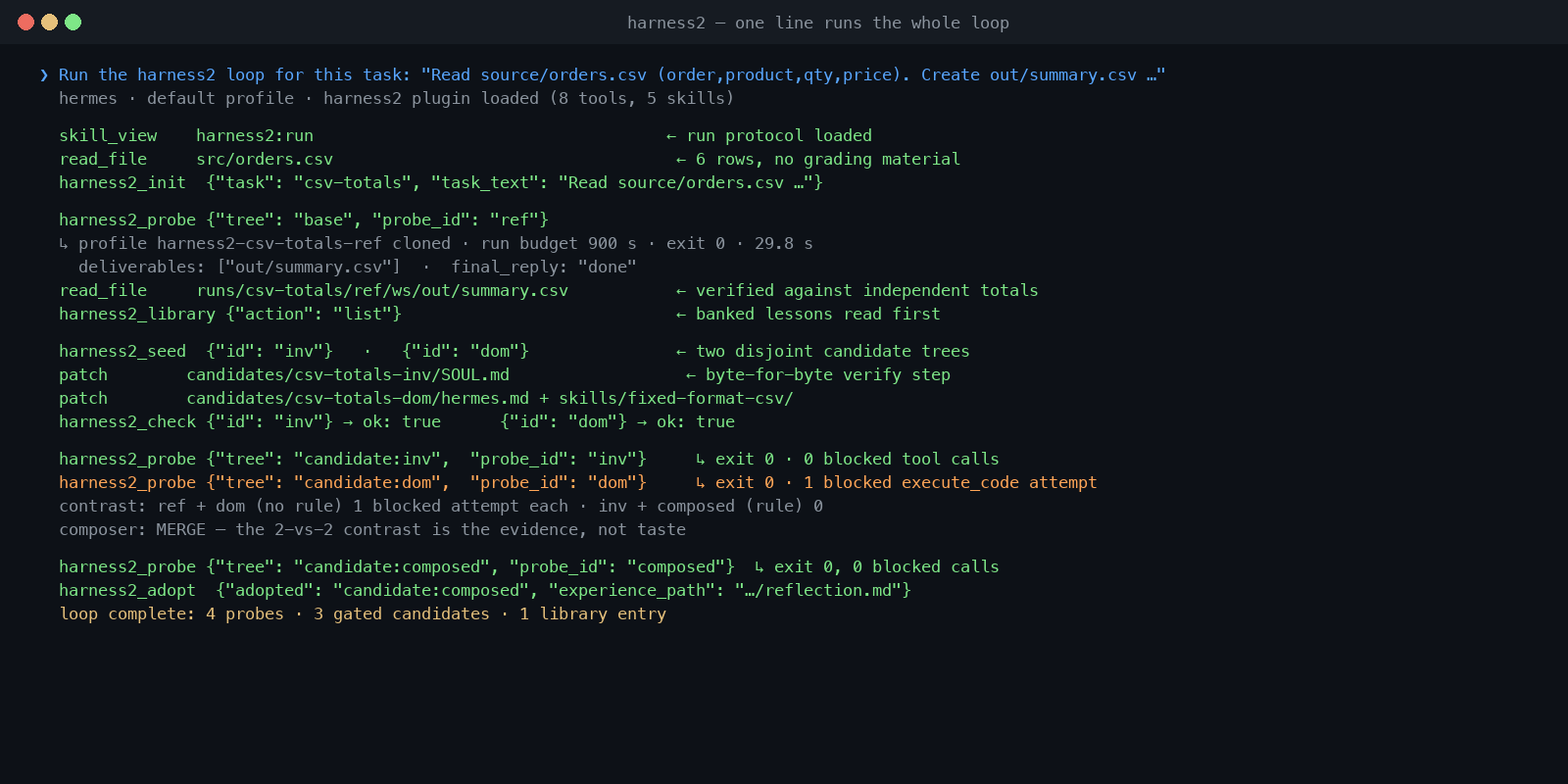
In any chat session, send:
Run the harness2 loop for this task:
<the task, word for word, with a path to source material if any>
The agent loads the harness2:run skill and drives the round. If you stop
the session, the loop resumes from the first missing stage.
Step 3: Check progress and results
harness2_status {"task": "<slug>"}
harness2_library {"action": "list"}
The first command reports round progress. The second lists the saved
lessons.
The loop
| Stage | Who does it | What happens |
|---|---|---|
| Init | harness2_init | The task text and source files land in the run directory |
| Reference | harness2_probe | The task runs under the unedited harness |
| Propose | agent + harness2_seed, harness2_check | Two edited harnesses: one for how the agent works, one for what an expert in the field knows |
| Probe | harness2_probe | Each edited harness runs the task in its own session |
| Compose | agent + harness2_check | The agent merges the edits the trajectories support, or keeps the base |
| Successor | harness2_probe | The merged harness runs the task |
| Select (k>1) | agent + harness2:select | A choice between the anonymized deliverables |
| Reflect | agent + harness2:reflect | One saved lesson per changed component, or none |
| Adopt | harness2_adopt | The harness and the lesson enter the library |
| Promote | harness2_promote | A carry-over report: what the banked harness changed, with the evidence, ready for you to apply |
Carrying the changes to the live profile
The loop works on a copy of the harness (the base tree), not on your
live profile. After Adopt, harness2_promote writes
runs/<task>/promote.md. The report shows every file the banked harness
changed against the unedited base, the reflector's evidence for each change,
and a recommendation per file:
- Skills are installable: copy the skill directory into your profile's
skills/. The report includes the exact copy command. - SOUL.md and hermes.md changes are review: the base text is probe
scaffolding, so only the lesson text transfers, and only if you judge it
worth it. - config.yaml is never promoted: it is the probe overlay (run budget,
approvals mode, secret redaction) and must stay probe-only.
The plugin never writes your live profile. You read the report, apply what
you approve, and keep the rest.
A basic round (k=1) runs 4 probe sessions: 1 reference + 2 candidates + 1
successor. That is 4 full agent sessions plus the agent's own stage work.
Each probe has a wall-clock cap (default 900 s). You set the cap with
probe_budget_seconds, in Desktop Settings → Plugins or under
plugins.entries.harness2.settings in config.yaml. A full round takes
minutes to hours, depending on the task and k. When k is greater than 1,
the Reference stage runs k rollouts, and the Select stage chooses between
the anonymized deliverables.
Safety
- A probe is a one-shot session in a profile named
harness2-<task>-<probe>. The profile clones your active profile once,
so the probe runs under your model and your keys. The clone carries your
config and.enva single time, under Hermes' own clone policy; the
probe-specific overlay keys are then applied one at a time with
hermes -p config set. The plugin never rewrites the profile's
config.yamlor touches its.env. - The probe overlay pins
approvals.mode: smart,
approvals.single_query_mode: denyandapprovals.cron_mode: deny
(probes are one-shot sessions, so nothing auto-approves) plus
security.redact_secrets: true. The plugin never relaxes approvals. - For a task you want to run offline, remove the
webandbrowser
toolsets from theconfig.yamlin the candidate tree before you probe
it. - Keep grading material (rubrics, answer keys, scores) out of the task text
and the source files. The loop's prompts forbid it. - The plugin writes only to its data directory and to the probe profiles.
It never writes to its own files or to your live profile: the promote
report is your input, and applying it is your step.harness2_gcremoves
only the probe profiles the plugin recorded creating for the task you
name, plus that task's run directory. It never touches the library. - The plugin makes no network calls and sends no telemetry. A probe does
whatever its tools do.
Where things live
harness2-hermes/
├── plugin.yaml                 # manifest: tools, settings, version floor
├── __init__.py                 # register(ctx): tools + bundled skills
├── core.py                     # trees, profiles, probes, gate, library
├── schemas.py                  # tool descriptions the model reads
├── tools.py                    # tool handlers
├── assets/
│   ├── base/                   # the unedited harness (SOUL.md, config, skills)
│   └── prompts/                # the paper's stage prompts, verbatim
├── skills/                     # run, propose, compose, select, reflect
└── docs/shots/                 # screenshots from a real run
Run state is outside the repo, in the plugin data directory under the
active profile. It survives plugin updates:
<plugin-data>/harness2/
├── runs/<task>/                # task.md, source/, per-probe trajectories + deliverables,
│                               # reflection.md, promote.md
├── candidates/<task>-<id>/     # edited harness trees + .meta.json provenance
└── library/                    # entries/<task>/harness + EXPERIENCE.md, INDEX.md
The probe profiles live in ~/.hermes/profiles/harness2-*/.
harness2_status prints the exact paths.
Validation
hermes plugins doctor /path/to/harness2-hermes --ci
hermes plugins validate /path/to/harness2-hermes --install-deps
These run the same checks the catalog CI runs: the manifest, the load, the
capability match, the security scan, and the desktop rules. CI runs them at
the pinned commit.
License
Apache-2.0. See LICENSE. Not affiliated with Google Research.
README from the reviewed commit ab03ab8; it updates when the author re-pins.