 sandman-sh
Hermes CoBrowse
Multi-Window Spatial Co-Browsing Canvas & Dual-Control Automation Studio for Hermes Agent




Overview
Autonomous browser agents are fast until they hit workflows requiring human authentication, MFA/2FA verification, checkout approvals, or visual debugging across multiple parallel tabs. Standard headless scripts run invisibly in the background and fail silently when human intervention is needed.
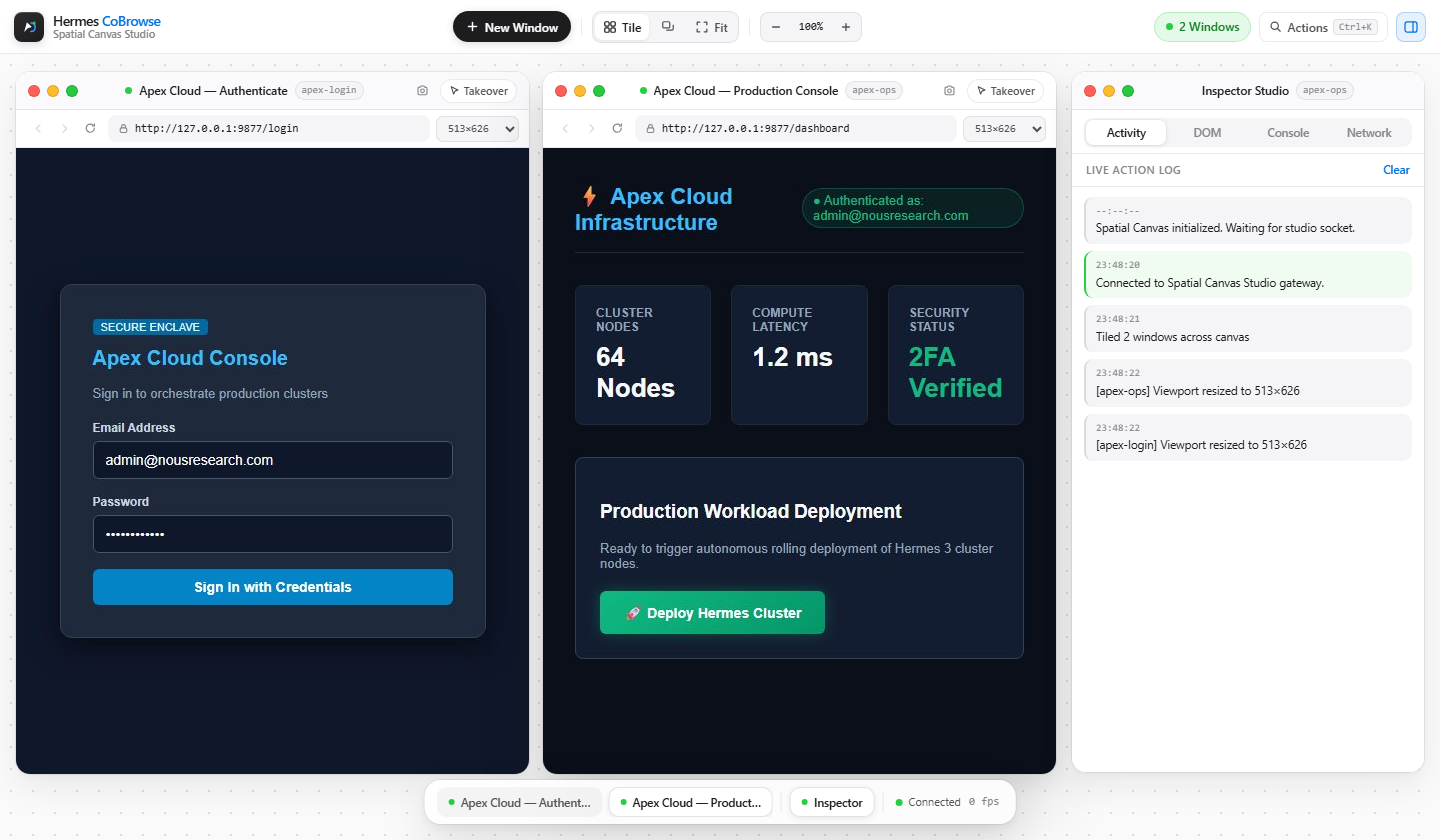
Hermes CoBrowse bridges autonomous AI browsing and human control inside a live minimalist white Spatial Canvas Studio running on a separate localhost web view. Every headless Chromium browser session invoked by Hermes Agent (or launched directly from the studio toolbar) streams live via Chrome DevTools Protocol (CDP) as a fully draggable, dynamically resizable floating window alongside a real-time Inspector Studio and floating Glass Dock.
Everything shown in the canvas runs end-to-end against real Playwright Chromium instances, real CDP screencasts, real WebSocket frames, and real Chromium console and network events—with zero mocked data or simulated UI state.
Features
1. Multi-Window Spatial Canvas
- Concurrent Multi-Session Execution: Run multiple isolated Chromium browser contexts side-by-side in one canvas—whether launched autonomously by Hermes Agent via
session_idor spawned from the toolbar's + New Window popover. - Full OS-Style Window Management: Every browser window and the floating Inspector Studio support:
- Smooth Dragging: Grab any window titlebar to position freely across the dot-grid spatial stage.
- 8-Direction Dynamic Resizing: Drag any edge (
N/S/E/W) or corner (NE/NW/SE/SW) to dynamically resize windows; releasing automatically resizes headless Chromium's live viewport (page.set_viewport_size+ CDP screencast retuning) so responsive pages reflow genuinely. - Traffic-Light Window Actions: Close individual browser sessions cleanly without disrupting sibling windows, Minimize to the frosted glass bottom Dock, or Maximize (Full) within the canvas stage and restore exact coordinates.
- Instant Arrangement & Navigation: One-click Tile Grid, Cascade, Fit All, and interactive background panning + zoom (
45%–150%) plusCtrl+K/Cmd+KQuick Actions Palette.
2. Dual-Control & Human Intervention Handoff
- Autonomous Mode: Watch Hermes Agent navigate, inspect interactive DOM nodes, type into inputs, and click targets with a live floating vector cursor (
Hermes) and activity log. - Instant Manual Takeover: Toggle Takeover on any individual window titlebar to stream pixel-accurate mouse clicks, cursor movement, scrolling, keyboard shortcuts, and clipboard paste directly into Chromium over WebSockets.
- Structured 2FA / Approval Handoffs (
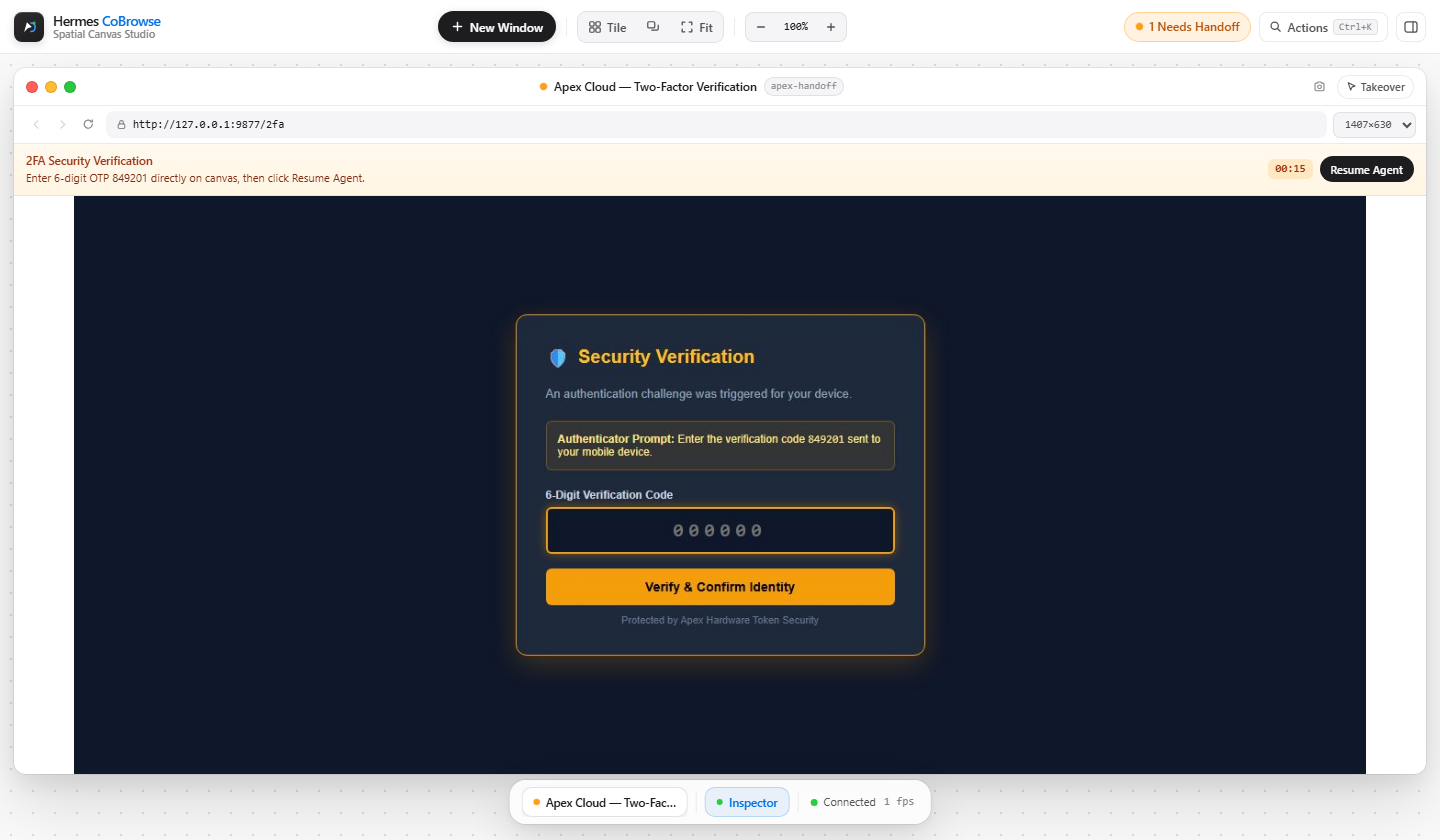
cobrowse_request_handoff): Hermes pauses execution on a specific session cleanly, displays a per-window amber intervention banner with guidance and live countdown timer, lets the user resolve 2FA or verification directly inside the streamed canvas, and immediately resumes agent execution when Resume Agent is clicked.
3. Real-Time Browser Chrome & Inspector Studio
- Authentic Navigation Controls: Per-window Back, Forward, and Reload history controls, live address bar (
Enterto navigate), Viewport Presets (1280×800Desktop,1440×900Wide Desktop,820×1024Tablet,390×844Mobile), and PNG Snapshot download. - Inspector Studio (Floating Window): Drag, resize, minimize, maximize, or toggle between four live telemetry tabs scoped to the focused window:
- Activity: Live timestamped log of agent actions, page updates, viewport resizes, and handoffs.
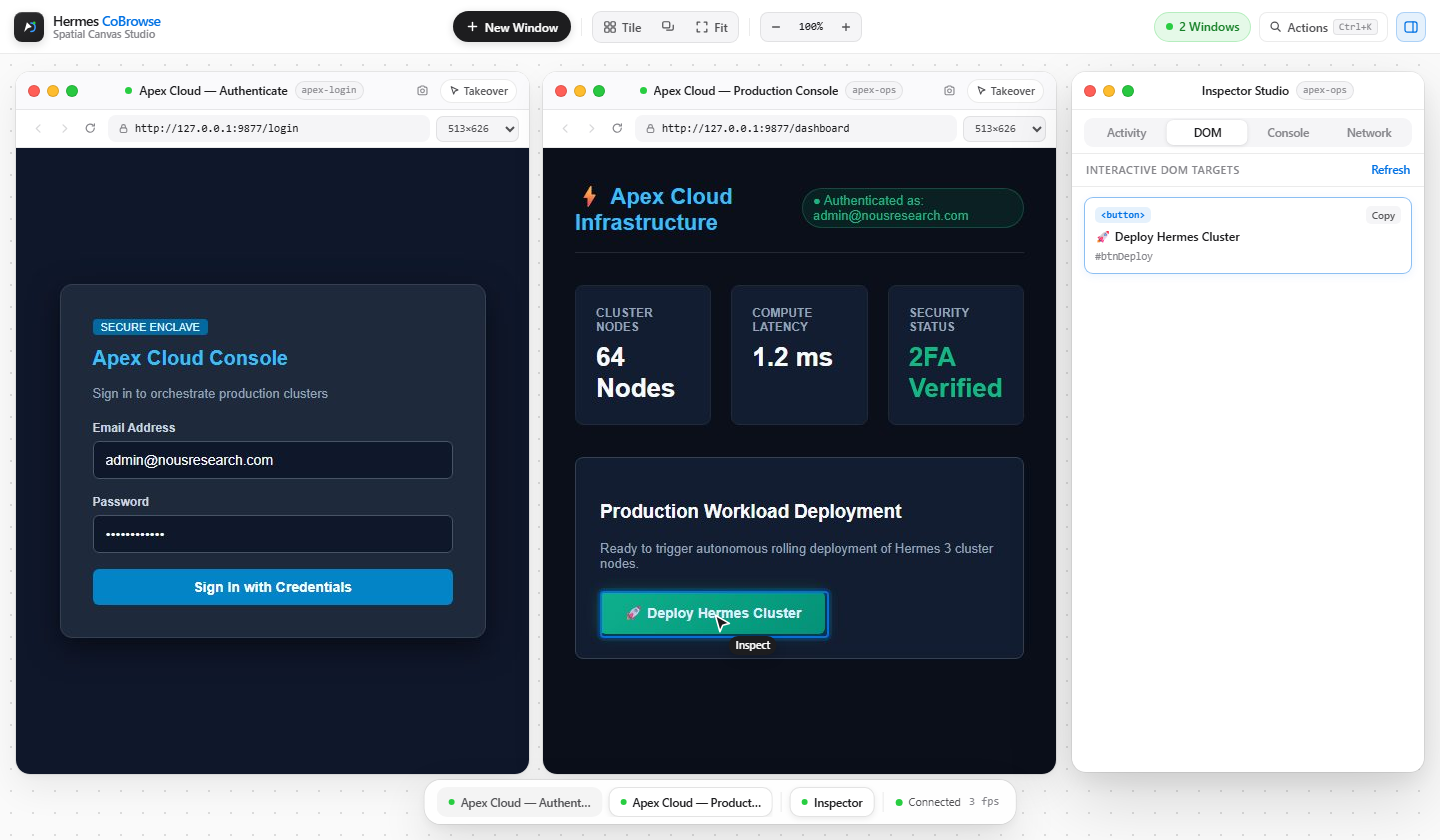
- DOM: Inspect visible interactive targets (
<button>,<input>,<a>, etc.), copy generated CSS selectors (CSS.escapesafe), or click any target card to scroll it into view and flash an active highlight ring directly inside the Chromium page. - Console: Real
console.log,warn, and uncaughtpageerrorstreams captured from Playwright. - Network: Real HTTP method, status code, resource type, latency (
ms), and URL telemetry from Chromium responses and failed requests.
Architecture
flowchart LR
    Agent["Hermes Agent<br/>(9 cobrowse_* Tools)"] -->|Tool Calls / Hooks| Manager["CoBrowseManager<br/>(Concurrent Session Registry)"]
    Manager -->|Manages N Sessions| Engine["BrowserEngine<br/>(Playwright Chromium + CDP)"]
    Engine -->|CDP JPEG Frames & Telemetry| Server["CoBrowseServer<br/>(FastAPI + /ws/studio & /ws/stream)"]
    Server <-->|Multiplexed WebSocket + REST| Canvas["Spatial Canvas Studio UI<br/>(Multi-Window Drag/Resize + Dock + Inspector)"]
    Canvas -->|Human Mouse / Key / Takeover / Resume| Server
    Server -->|Bidirectional Input Dispatch| Engine
Requirements
- Python:
3.10+(3.9+compatible package declaration) - Hermes CLI:
>=0.22.0(when installed as a Hermes plugin) - Playwright Chromium: Installed headless Chromium binary
Quick Start
Option A: Install as a Hermes Plugin (Recommended)
- Install directly from GitHub using Hermes CLI, or clone into your local Hermes plugins directory:
# Via Hermes CLI (GitHub URL or owner/repo shorthand) hermes plugins install https://github.com/sandman-sh/Hermes-CoBrowse.git # or: hermes plugins install sandman-sh/Hermes-CoBrowse # Or manual drop-in clone (Windows: %LOCALAPPDATA%\hermes\plugins\hermes-cobrowse) git clone https://github.com/sandman-sh/Hermes-CoBrowse.git ~/.hermes/plugins/hermes-cobrowse - Enable the plugin and install Playwright's headless Chromium runtime if not already present:
hermes plugins enable hermes-cobrowse playwright install chromium - Validate manifest integrity, tool declarations, and runtime health:
hermes plugins validate "path/to/Hermes-CoBrowse"
hermes plugins doctor hermes-cobrowse
Once installed, all 9 cobrowse_* tools and the post_tool_call telemetry hook register automatically inside Hermes.
Option B: Run Locally & Explore the End-to-End 2FA Demo
- Clone and install dependencies:
git clone https://github.com/sandman-sh/Hermes-CoBrowse.git cd Hermes-CoBrowse pip install -e . pip install pyyaml websocket-client httpx playwright install chromium - Launch the Standalone Spatial Canvas Studio:
Or launch the Interactive Dual-Control 2FA Demo (python -m hermes_cobrowse https://example.comrun_demo.py) which boots the local Apex Cloud portal (/login,/2fa,/dashboard), signs in autonomously, triggers a live human intervention handoff at the OTP checkpoint (849201), resumes upon completion, and executes deployment:python run_demo.py - Open your browser to
http://127.0.0.1:9876(or the printedpreview_url). Use + New Window to spawn additional live Chromium windows on the same spatial canvas.
Hermes Agent Tool Reference
All 9 tools support multi-window orchestration via the optional session_id parameter:
| Tool | Description | Key Parameters |
|---|---|---|
cobrowse_open | Launches CoBrowse server and opens a browser window (or opens a parallel window). | url, viewport_width, viewport_height, session_id, new_window, title |
cobrowse_navigate | Navigates a session to a URL and streams updated title, history state, and frames. | url, session_id |
cobrowse_get_state | Extracts page URL, title, viewport dimensions, history availability, and interactive DOM elements with escaped CSS selectors. | include_dom_tree, session_id |
cobrowse_click | Clicks via CSS selector, text locator, or (x, y) coordinates with animated cursor ripple telemetry. | selector, x, y, button, session_id |
cobrowse_type | Focuses an input, clears if configured, types text cleanly, and optionally submits with Enter. | text, selector, clear_first, press_enter, session_id |
cobrowse_request_handoff | Pauses autonomous execution cleanly for sensitive checkpoints (2FA, CAPTCHA, payments) until user completes action and clicks Resume Agent. | reason, guidance, timeout_seconds, session_id |
cobrowse_scroll | Scrolls page (up, down, top, bottom). | direction, amount, session_id |
cobrowse_eval_js | Evaluates custom JavaScript in the active session's browser page context. | script, session_id |
cobrowse_close | Closes a specific window (session_id) leaving siblings running, or shuts down all windows and server when omitted. | session_id |
Multi-Window Example Workflow
// Open two parallel tasks on the same Spatial Canvas
cobrowse_open({ "url": "https://portal.example.com", "session_id": "portal", "title": "Admin Portal" })
cobrowse_open({ "url": "https://docs.example.com", "session_id": "docs", "title": "API Docs", "viewport_width": 820, "viewport_height": 1024 })

// Act independently on each session
cobrowse_type({ "session_id": "portal", "selector": "#email", "text": "operator@example.com" })
cobrowse_scroll({ "session_id": "docs", "direction": "down", "amount": 600 })

// Close only the docs window when finished
cobrowse_close({ "session_id": "docs" })
Spatial Canvas Gateway Endpoints
WebSockets
/ws/studio— Multiplexed Spatial Canvas hub receivingstudio_init, multi-sessionframepackets tagged withsession_id, lifecycle updates (session_created,session_closed,session_focused),viewport_updated,page_updated,agent_action,intervention_required,intervention_resolved,console_log, andnetwork_log, while dispatching mouse, wheel, keyboard, focus, takeover, and resume actions bysession_id./ws/stream— Session-scoped stream WebSocket (?session_id=...optional) for single-viewport integrations.
Studio REST API
GET /health— Server health, active session ID, and session count.GET /api/sessions|POST /api/sessions|DELETE /api/sessions/{session_id}— List, spawn, or close live browser sessions.POST /api/sessions/{session_id}/focus— Focus session for Inspector Studio telemetry.POST /api/sessions/{session_id}/navigate|back|forward|reload— Control real Chromium navigation history.POST /api/sessions/{session_id}/resize— Resize Chromium viewport ({ "width", "height" }) and retune CDP screencast.POST /api/sessions/{session_id}/resume— Resolve an active human handoff pause.POST /api/sessions/{session_id}/highlight— Scroll CSS selector into view and flash visual bounding outline inside Chromium.GET /api/sessions/{session_id}/state|telemetry|screenshot— Retrieve interactive DOM tree, live Console & Network logs, or download PNG screenshot.
Verification & Testing
Every layer of Hermes CoBrowse has real, unmocked automated tests covering Chromium CDP integration, tool handling, WebSocket dual-control, and multi-window Studio endpoints:
# Multi-window Studio E2E (concurrent sessions, Back/Forward, resize, console/network telemetry, highlight, PNG)
python tests/test_studio_multiwindow.py

# Headless Chromium BrowserEngine & CDP screencast unit/integration tests
python tests/test_engine.py

# Plugin manifest, 9 tool registrations, hooks, and Demo Portal tests
python tests/test_tools.py

# Full 2FA human intervention handoff & recovery E2E over live WebSockets
python tests/test_e2e.py
Screenshots
Security & Runtime Disclosures
In accordance with Hermes Plugin Catalog guidelines:
- Authenticated Loopback Gateway (
127.0.0.1): Callingcobrowse_openstarts a background FastAPI/Uvicorn WebSocket server bound strictly to loopback127.0.0.1(default port9876, auto-incremented if busy) protected by a per-run random auth token (secrets.token_urlsafe), strictHostallowlisting (127.0.0.1,localhost,[::1]), and exact WebSocketOriginverification so only the tokened viewer returned inpreview_urlcan observe streams, call/api/*endpoints, dispatch inputs, or resume handoffs. - Minimal Browser Process Isolation: Headless Chromium launches via Playwright with an explicit minimal
env=(PATH,HOME,LANG, display vars only on POSIX; minimal OS/temp dirs on Windows) and never inherits host API keys or Hermes provider secrets. - SSRF & Scheme Guard (Off for Private Networks by Default): Navigation and all redirect/sub-navigation hops enforce
http:///https://scheme validation (file://,chrome://,view-source:,data:, andjavascript:model inputs are refused) and block private, loopback, link-local (169.254.169.254), CGNAT (100.64.0.0/10), and IPv6 ULA/link-local addresses. Local dev targets require explicitly settingallow_private_networks: truein plugin settings (disabled by default). - DOM Password & OTP Redaction:
cobrowse_get_stateredacts input values as"[redacted]"fortype="password"and forautocompletetokensone-time-code,current-password, andnew-password. - Network Telemetry & Unattended Runs: No external analytics, CDN assets, update checks,
.envreads, or third-party scripts exist.cobrowse_request_handoffbounds waits (1–900seconds) and aborts immediately (unattended_abort) during Hermes cron (current_cron_execution()) or messaging gateway (HERMES_SESSION_PLATFORM) turns even if a viewer is connected.
Project Layout
Hermes-CoBrowse/
├── __init__.py                   # Root plugin entrypoint for Hermes discovery
├── plugin.yaml                   # Hermes plugin manifest & tool declarations
├── pyproject.toml                # Package build metadata
├── run_demo.py                   # Interactive dual-control + 2FA demo runner
├── assets/
│   └── banner.jpg                # Spatial Canvas Studio hero banner
├── docs/
│   └── screenshots/              # Verified live UI screenshots for docs & catalog
├── demo_portal/
│   └── app.py                    # Local Apex Cloud 2FA demo FastAPI application
├── plugin-catalog/
│   └── hermes-cobrowse.yaml      # Catalog submission metadata
├── hermes_cobrowse/
│   ├── __init__.py               # Tool registry & post_tool_call telemetry hook
│   ├── engine.py                 # Playwright + CDP lifecycle, input & telemetry capture
│   ├── schemas.py                # Tool JSON schemas (cobrowse_*)
│   ├── server.py                 # FastAPI Studio REST API + /ws/studio & /ws/stream
│   ├── tools.py                  # Thread-safe multi-session CoBrowseManager & handlers
│   └── web/
│       ├── index.html            # Spatial Canvas Studio UI markup
│       ├── style.css             # Minimalist white frosted glass theme
│       ├── app.js                # Multi-window drag, 8-way resize, Dock, Inspector & WS client
│       └── favicon.svg           # Minimal geometric SVG icon
└── tests/
    ├── test_studio_multiwindow.py
    ├── test_engine.py
    ├── test_tools.py
    └── test_e2e.py
License
Released under the MIT License.
README from the reviewed commit 77e3c1c; it updates when the author re-pins.


