 ieatcode4breakfast
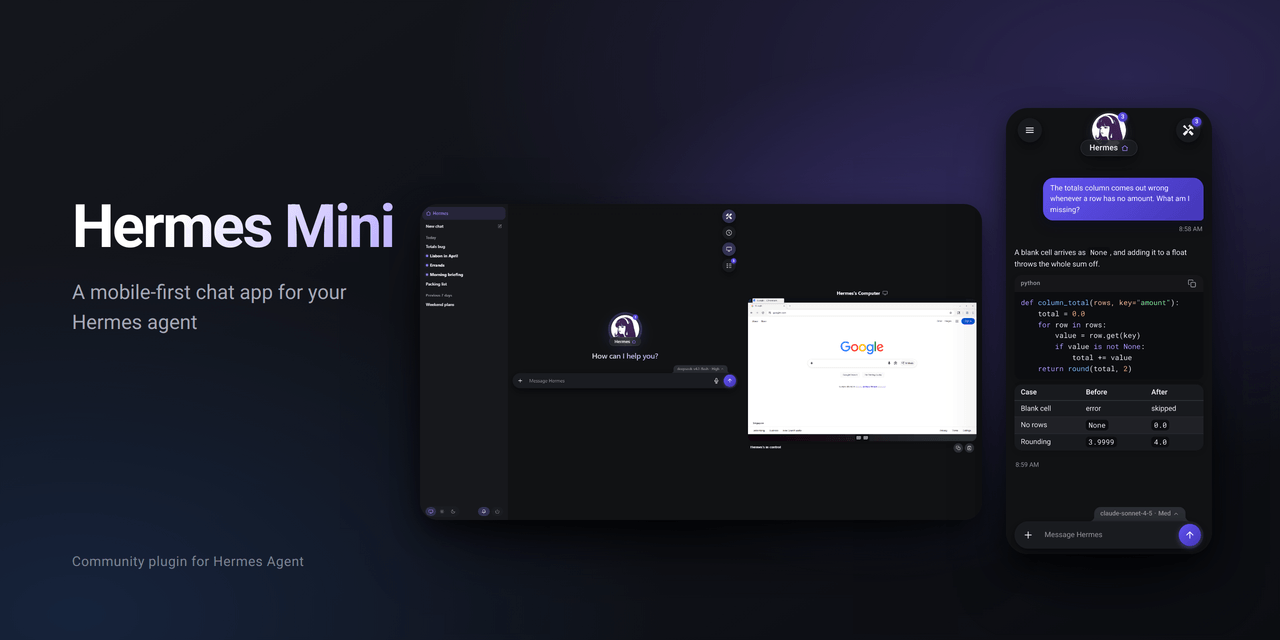
Hermes Mini
A mobile-first chat app for your own Hermes agent.
Hermes Mini is a single Hermes plugin that serves a fast, installable web app for talking to your
agent from a phone, tablet or desktop: multiple chats, an inbox, to-dos, live progress lines,
steering, optional push notifications, dictation, and an optional bundled view of your agent's
desktop.
- Product name: Hermes Mini (the install name and the app's own label; the browser tab shows the
agent's name). - Agent name: the name your Hermes bot already has — the default profile's bot title first, then
the serving profile's — with Hermes as the fallback when none is set. - One plugin: settings and state live outside the plugin, so updating the code never touches them.
Screenshots
Screenshots use sample data.
Automatic messages
Mini suppresses routine gateway lifecycle notices and first-time command tips delivered through
its bridge. App-only turn instructions discourage unsolicited introductions and profile offers
in existing and new chats. The known legacy introduction is hidden in live replies, history,
inbox and push previews. This is a narrow compatibility filter, not a general classifier of
model-written introductions. Failure templates retain a short explanation without unsupported
slash commands. Original assistant transcripts remain unchanged; filtered bridge deliveries are
not stored. Quoted examples and code are preserved. Other Hermes interfaces are unaffected.
Requirements
| Hermes Agent | v0.23.0 tested (commit 2bd378ed1b8d). The plugin uses documented plugin, dashboard and state APIs. |
| Python | Whatever Hermes runs (Hermes v0.23.0 ships Python 3.14 here; 3.11+ is expected to work). |
| Browser | A current Chrome, Safari, Firefox or Edge. The app is a plain ES-module page with no build step. Thoroughly tested on Android (Chrome, installed to the home screen); not yet tested on iPhone or iPad (see Verified, and not). |
| Optional | cryptography + httpx for push; Pillow for image dimension checks; a Hermes-configured speech-to-text provider for dictation; Hermes' Bot Desktop for the computer view. |
Nothing in this list is installed by the plugin. Optional pieces degrade to a hidden control, never
a broken app.
Install
The simplest way to install Hermes Mini is to copy this prompt and send it to your Hermes agent:
Install the Hermes Mini plugin for me:
1. Run: hermes plugins install ieatcode4breakfast/hermes-mini --enable
2. Check that `hermes plugins list` shows hermes-mini as enabled.
3. Tell me the address to open: my dashboard's address followed by
   /dashboard-plugins/hermes-mini/index.html
4. Last, restart the Hermes dashboard and gateway the way they normally
   run on this machine, so the plugin loads. If you're not sure how they
   run, tell me the commands instead of guessing.
Hermes asks you to approve the commands. It tells you the address before it restarts anything,
because restarting the gateway ends its reply. Then open the address, sign in with your usual
Hermes login, and use your browser's "Install app" / "Add to Home Screen".
This needs an agent that can run hermes commands on the machine Hermes runs on, and that machine
must be able to reach GitHub. If the agent's terminal is sandboxed (a Docker or remote terminal
backend), or your Hermes install is managed or read-only, use the manual install below.
Manual install
Hermes Mini is a directory plugin: plugin.yaml plus register(ctx) (hooks) plus a
dashboard/ folder (the app page and its backend routes). Put the folder where Hermes looks for
user plugins and enable it:
cp -r hermes-mini "$HERMES_HOME/plugins/hermes-mini"
hermes plugins list                  # shows: hermes-mini  not enabled
hermes plugins enable hermes-mini    # shows: enabled
$HERMES_HOME is your Hermes home (usually ~/.hermes; a profile home is
~/.hermes/profiles/<name>). This install path was verified end to end: a plain directory drop-in
is discovered by Hermes, reported as not enabled, then becomes enabled and is listed as a user
plugin.
Check that Hermes accepts it before enabling:
hermes plugins doctor "$HERMES_HOME/plugins/hermes-mini" --ci
hermes plugins validate "$HERMES_HOME/plugins/hermes-mini"
If your Hermes build supports installing from a local Git checkout, that also works and additionally
records install provenance:
git clone /path/to/hermes-mini /path/to/hermes-mini.git   # or use your own checkout
hermes plugins install file:///path/to/hermes-mini.git --no-enable
hermes plugins enable hermes-mini
This route needs a Git repository, so it does not apply to a plain copied folder (a project
downloaded without a .git directory).
Remove it with hermes plugins remove hermes-mini, or by deleting the directory. That removes the
code; your settings, picture and app data are left in place (see
Settings, state and profiles).
Open the app
Hermes serves dashboard plugins from the dashboard process. Start it (this is the ordinary Hermes
dashboard, not something Hermes Mini adds):
hermes dashboard
Then open:
http://127.0.0.1:9119/dashboard-plugins/hermes-mini/index.html
Use --host/--port if you started the dashboard differently; the path after the origin is fixed
by the plugin's folder name. Hermes' dashboard authentication (its normal session cookie, or an
OAuth/reverse-proxy gate you have configured) protects the page and every /api/plugins/hermes-mini/
route. Bookmark it, or use your browser's "Install app" / "Add to Home Screen".
You do not need to open the default dashboard page first. If the dashboard was already running when you enabled the plugin,
restart it (and the gateway, which loads the plugin's hooks) so it picks the plugin up. When the page asks
you to sign in, Hermes' login page brings you back to the app afterwards.
First run
There is none. Open the app and it is ready to use: the header and composer take the name Hermes
already has for the bot — the default profile's bot title, then the serving profile's, then its
display name or a named profile id, and finally Hermes. The app never renames the agent, and
nothing on the page asks for a name or picture of its own.
If Hermes has no model configured yet, there is no reply to show until one is connected from the
model tab or in Hermes; history, to-dos and the inbox still work.
Reading the page and every capability probe are pure reads. Opening the app may create its own
state files under $HERMES_HOME/data/hermes-mini/, and it records the default delivery target once
(see Settings, state and profiles).
Configure a model
Use the model tab on the input box: it lists Hermes's connected providers and their models, lets a
pick switch the chat (and become the default for new chats), and sets the reasoning level and, where
the model supports it, fast mode. Providers + lists every provider Hermes supports and saves or
updates an API key through Hermes. A provider that signs in with an account, and a custom endpoint, cannot
be connected from the app: its card says to run hermes model on the computer (tap the command to copy
it). Everything goes
through Hermes's own gateway methods, and the app keeps no model state.
You can also use Hermes itself, for example hermes model or the dashboard's Config page. See the
Hermes documentation. Until a model is configured,
there is no reply to show.
What's in it
- Chats: multiple conversations, a main chat, new chat, rename, pin (with a shared manual
order), delete, reset of the main chat, and a read-only view of a chat that belongs to another
source. - Inbox: every agent message across the app's chats, newest first, with unread tracking. A swipe
on a phone or an envelope button on hover marks a message read or unread without opening it; a
reply's action row in the chat (and its long-press menu) offers Mark unread, which becomes Mark
read while the reply is held unread. The main chat's messages carry the same home icon as the chat
list. - To-dos: one shared list, nesting one level, drag to sort, clear finished.
- Schedules: the agent's scheduled jobs (Hermes cron), each with what it is, when it runs in plain
words and when it runs next; a job running now says so. Each row's ⋮ menu pauses, resumes or deletes
the job through Hermes' own routes, or adds it to the message being written as an inline pill, which
reaches the agent as[Schedule: <name> · job <id>]. - Tools tray: the hammer-and-screwdriver button folds the Schedules, Computer and To-do buttons
away under it and brings them back; folded is the default, remembered per device. On a computer, while
the computer view is open, its button stays out under Tools even when the tray is folded. - Model and provider picker: a tab on the input box's top edge shows the chat's model and reasoning
level. The sheet lists Hermes's connected providers and their models (search, prices where Hermes
has them), with a five-bar reasoning level meter and fast mode where the model supports it; a pick
switches the chat and becomes the default for new chats. Providers + can add or update a
provider's API key through Hermes. - Live streaming: replies appear as they arrive, with a short quiet narration line (a soft
shimmer slides across it while the agent works) and tool-step progress. Narration uses Hermes' auxiliary model slots and stays silent if that is not
configured. - Steering: send while a reply is running to steer the current turn.
- Approvals and questions: answer them in the app; an approval can also be approved or denied
from its notification. - Attachments: photos, files and pasted text, with a collapsed view for long pastes. Pictures the
agent sends withMEDIA:show inline; audio plays inline in a voice-note player (play/pause, a
waveform to tap or drag, download; the waveform needs ffmpeg, on PATH or in Hermes' tools
directory); other files arrive as cards that download only when tapped. A picture that cannot be
loaded (a missing file, a dead web link) shows its alt text instead. - Picture viewer: full screen, with a back button and a download button; swipe, the arrows or
the arrow keys slide between a message's pictures; pinch or double-tap to zoom. - Markdown: GitHub-flavoured markdown with sanitised HTML and syntax highlighting.
- Edit and branch: edit and resend your message, or branch a conversation.
- Dictation: record and insert at the caret, through whatever speech-to-text provider Hermes is
configured to use. - Notifications (optional): Web Push for approvals, questions and finished replies, with
per-chat mute. A notification stays until it is tapped or swiped away. - Scheduled job results: Hermes cron output can be posted into the main chat or a chosen side
chat, with a push. - Computer (optional): a phone-friendly live view of your agent's desktop, with take-over,
hand-back, a trackpad and clipboard, gated by Hermes' own display tickets and control lease.
Optional features and how they degrade
| Feature | Needs | Without it |
|---|---|---|
| Dictation | An STT provider configured in Hermes; a browser that can record. | The microphone is hidden. The /dictate route also answers with a clear message. |
| Notifications | cryptography and httpx importable by Hermes, a browser with Push, and your click on the bell. | The bell is hidden. Chat is unaffected. |
| Computer | Hermes' Bot Desktop supported and installed on this host (tools.bot_desktop). | The computer button is hidden. Chat and to-dos still work. |
| Live narration | A Hermes auxiliary model (Hermes' title_generation inheritance). | The narration line is simply absent. |
A failed capability probe makes the app keep the control visible rather than hide something that
might work. The server always enforces the real rule: a disabled feature returns an error, it does
not quietly succeed.
What it touches
Hermes Mini is a community plugin, not a Nous Research product. Everything it does goes through Hermes'
plugin surfaces; this is the full list of what it reads, writes, runs and sends.
Serves
- A web app from your Hermes dashboard: static files under
/dashboard-plugins/hermes-mini/and routes
under/api/plugins/hermes-mini/, behind the dashboard's own login. It opens no port of its own. - A chat platform named
hermes-miniinside the gateway (in-process), so scheduled jobs can deliver
their results to the app.
Hooks (app chats only; other chats, Discord, the CLI, cron runs and subagents are left alone)
pre_llm_call: adds a short turn rule to app chats (acknowledge the newest message before the first
tool call) and the default delivery target for scheduled jobs created there.transform_tool_result: during a long turn, appends a one-line instruction to a tool result asking the
agent for a 1–2 sentence progress update (about every few minutes or every few tools).post_llm_call,pre_approval_request,on_human_input_request: queue a push notification for a
finished reply, an approval waiting for you, or a question the agent asks — only when you have turned
notifications on.pre_tool_call: blocks an app chat from editing the plugin's own files (a self-edit guard).
Reads
- Hermes' chat history and session list (
state.db, throughSessionDB; the Inbox query opens it read-only),
the scheduled-job list
(Hermes' cron routes), the model/provider list, and its own data folder.
Writes
- Its own settings in
$HERMES_HOME/hermes-mini/and state in$HERMES_HOME/data/hermes-mini/. $HERMES_HOME/config.yaml, once, through Hermes' config API: it records
platforms.hermes-mini.home_channelwhen none is set (and marks the platform enabled if it has no
enabledkey). Nothing else there.
Runs
ffmpeg(from PATH or Hermes' tools folder) to read the length and waveform of an audio attachment.- The Restart button runs
hermes gateway restart -y --detachand then restarts the dashboard, as the same user,
only when you press it (at most once a minute). - With the optional computer view: a short Python helper (Tk) to copy text out of the desktop, and
xclip
to paste a picture into it.
Model calls
- The live narration line is written by Hermes' auxiliary model (the same slot Hermes uses for chat
titles), with a short prompt built from the tool steps of the current turn — a few small calls per turn,
at most 80 tokens each, on your provider and your bill. Without an auxiliary model the line is absent.
Sends over the network
- Web Push messages to your browser's push service (Google FCM, Mozilla or Apple), only after you turn
notifications on, and only to those hosts. The push key is created at that moment. - Dictation audio to the speech-to-text provider you configured in Hermes (through Hermes).
- Nothing else: no telemetry, no analytics, no update checks.
Settings, state and profiles
The plugin directory is replaceable code. Everything you change lives outside it, under the Hermes
home of the profile serving the request, resolved with Hermes' own helper at request time:
| Path | Contents |
|---|---|
$HERMES_HOME/hermes-mini/config.yaml | Your agent name, home label, uploaded picture's filename, first-run completion, optional public URL and push contact. |
$HERMES_HOME/hermes-mini/assets/ | Your uploaded picture. |
$HERMES_HOME/data/hermes-mini/ | App state: to-dos, pin order, seen markers, inbox read state, the app-chat registry and recorded main-chat id, push key, subscriptions and muted chats. |
config.yaml is written atomically with mode 0600, and unknown keys are dropped. Everything is
per profile: a second Hermes profile gets its own name, picture and data, and one profile's app never
reads another's.
The plugin also records the platform's delivery default in Hermes' own $HERMES_HOME/config.yaml:
platforms.hermes-mini.home_channel, and in that same first write it marks the platform enabled if
it has no enabled key. The app records its main chat there the first time it loads, so a bare
hermes-mini job address has a destination. The home channel is written only when no value is
present; an existing value is never replaced.
The app's own registry, $HERMES_HOME/data/hermes-mini/app-chats.json, also records the main chat's
id. That id, not the chat's name, is how the app and scheduled-job delivery find the home.
Every app chat carries a built-in turn rule: acknowledge the newest message and say in one line
what happens next before starting work. It rides along with every user message in an app chat
only (and its subagents), never in Discord, cron, or another channel.
The plugin also contributes two system-prompt sections to app chats only: hermes-mini.app
describes the app, its chats, scheduled-job delivery and image handling; hermes-mini.style keeps
replies plain — the point first, no code or file paths, no jargon unless explicitly asked. Other
surfaces — Discord, cron, the terminal — never receive them.
An optional file at $HERMES_HOME/data/hermes-mini/app-instructions.md is appended to that rule.
Use it for extra operator instructions; the built-in acknowledgement stays.
During a long turn, the plugin also asks the agent for a short progress update every four minutes,
or every ten tool calls, so a phone user is not left watching a silent screen. It applies to app
chats only and skips delegated subagents.
Push notifications
Turning notifications on is the only thing that creates the VAPID key pair, and it happens the first
time you press the bell and confirm. The key and your subscription stay in
$HERMES_HOME/data/hermes-mini/push/. Only known push services (FCM, Mozilla, Apple, Windows) are
accepted as subscription endpoints, and the request must be HTTPS.
The VAPID sub claim uses, in order: your configured push contact, your configured public URL,
Hermes' configured dashboard/gateway public URL, then a reserved .invalid fallback. No personal
domain is baked into the source.
A notification stays until it is tapped or swiped away. Reading its chat in the app does not close
it: on many Android launchers an app closing its own notification leaves the icon's count behind,
and a web app cannot correct that count.
Scheduled job results
A Hermes scheduled job can post its result into the app. Address it as:
hermes-mini:main— the main chat.hermes-mini:<chat id>— a specific chat, stable across renames.hermes-mini:<chat name>— a named chat, when the name is unique. The spelling's case does not
matter.hermes-mini— the same ashermes-mini:main.
main and home are reserved words for the main chat, so a side chat with either name is reached
by its id, not its name.
The result is stored as a normal message in that chat and pushes a notification. The plugin gives
the app a default delivery chat the first time it loads, so no setup is needed. The home itself is
recorded by id in the app registry: renaming another chat to Hermes Mini cannot take it, and
resetting the main chat records the replacement id.
A name is a label, not an identity. If the named chat is missing, renamed, archived, or matches
more than one chat, the result goes to the main chat. The app does not announce the move; the
plugin's log records it. For a recurring job, or one that must keep working if a chat is renamed,
use the chat's id.
Computer view
The viewer is built into this plugin (dashboard/computer/), including its noVNC runtime under
dashboard/computer/vendor/novnc/. It loads only when you first tap the computer button; the app
shell and its service worker install without it. The viewer uses Hermes' own /api/display/ws
(display tickets and control leases) and the plugin's /api/plugins/hermes-mini/computer/clipboard
routes, which are limited to the person currently holding control.
Hermes Mini does not install desktop packages or run a desktop in the background. If Bot Desktop is
not set up, the button is hidden; when it is, Start Screen asks Hermes to start one.
Troubleshooting
- The page 404s. The dashboard must be the process serving it, and the folder must be named
hermes-mini. Checkhermes plugins listand thatdashboard/manifest.jsonis present. - Everything 401s or redirects to a login. That is Hermes' dashboard auth; sign in through the
dashboard first. - "Not connected yet". The WebSocket to the Hermes gateway is down. Check the gateway is running;
the app retries on its own. - No microphone. No STT provider is configured, or the browser cannot record. Configure STT in
Hermes (see the Hermes docs), then reload. - No bell.
cryptography/httpxare missing from Hermes' environment, or the browser does not
support Push. - No computer button. Bot Desktop is unsupported or not installed on this host.
- The name is
Hermes. No bot title, display name or named profile exists yet. Set a bot name
in Hermes and the app picks it up on the next load.
Verified, and not
Tested here against the real Hermes runtime: the plugin loads through Hermes' discovery and
register(ctx); the manifest passes hermes plugins doctor and hermes plugins validate; the app
routes the suite exercises; settings/identity/avatar validation; push key opt-in and endpoint gating;
dictation delegation to Hermes' provider with a mocked provider; the app-chat scoping and the
self-edit guard; scheduled-job target resolution across ids, names, archived chats and missing
chats; the browser module graph and service-worker asset list.
Phones: the app has been used and tested thoroughly on Android, installed to the home screen. It has
not been tested on an iPhone or iPad. It is built on standard web features Safari supports, but
expect rough edges there. Known differences: notifications need iOS 16.4 or later and the app added to
the Home Screen; approval notifications have no Approve/Deny buttons (iOS does not show them; answer
in the app); there is no vibration on swipes; dictation records in a different audio format (mp4)
whose transcription is untested; and Ogg/Opus audio falls back to the download card if Safari cannot
play it. Reports from iPhone users are welcome.
Not verified here, and worth trying yourself: a real desktop session through Bot Desktop, a real push
delivery to a device, a real speech-to-text transcription, a live scheduled-job delivery, and the
app's appearance in a specific browser. Those require services and credentials this project does not
ship. See
CHANGELOG.md for the honest status list.
Documentation
- AGENTS.md — contributor constraints (plugin only, no core edits, external state).
- CONTRIBUTING.md — how to run the tests and what a change should include.
- SECURITY.md — how to report a vulnerability.
- THIRD_PARTY_NOTICES.md — bundled libraries and their licenses.
- CHANGELOG.md — status and history.
License
MIT for the original project code; see LICENSE. Bundled third-party code keeps its own
license — see THIRD_PARTY_NOTICES.md.
README from the reviewed commit a8e79bf; it updates when the author re-pins.


